Solved Reducing system check time at boot up

denwilliam

New member
Member
VIP
Local time
1:28 AM
Messages
201
On a laptop with a SSD is it possible to reduce the system check time at boot up?.
 

My Computer My Computer

At a glance

Windows 7 Professional 64 Bit
Computer type
Laptop
Computer Manufacturer/Model Number
Toshiba Satellite Pro C870-1E2
OS
Windows 7 Professional 64 Bit
Two things you can experiment with.

- Open msconfig > start tab. You can uncheck everything except your antivirus suite. (See tutorial, Method Three.)

http://www.sevenforums.com/tutorials/1401-startup-programs-change.html

- Also in msconfig > boot tab you can disable the startup splash screen. (Doing so will also disable any POST problem notifications.) Check mark the box called No GUI Boot under the Boot options section.

Are you having any specific issues with startup times?
 

My Computer My Computer

At a glance

Win 7 Pro 64-bitIntel i5 2.4 Ghz8GB DDR3Intel HD 3000
Computer type
Laptop
Computer Manufacturer/Model Number
Sony Vaio VPCEB47GM Laptop
OS
Win 7 Pro 64-bit
CPU
Intel i5 2.4 Ghz
Memory
8GB DDR3
Graphics Card(s)
Intel HD 3000
Sound Card
IDT High Definition
Monitor(s) Displays
15.6 WGXA Anti-Glare LED
Screen Resolution
1280x800
Hard Drives
640Gb 7200rpm
Antivirus
MSE
Browser
Opera (primary) with IE9 backup

My Computer My Computer

At a glance

Windows 7 64 Bit Home Premium SP1i7-3820GSkill F3-14900CL9Q - 16GBEVGA GeForce GTX660 - Driver 352.86
Computer type
PC/Desktop
Computer Manufacturer/Model Number
Home Built - Jan 2013
OS
Windows 7 64 Bit Home Premium SP1
CPU
i7-3820
Motherboard
Asus P9X79-PRO - Bios 4608
Memory
GSkill F3-14900CL9Q - 16GB
Graphics Card(s)
EVGA GeForce GTX660 - Driver 352.86
Sound Card
On board Realtek ALC898
Monitor(s) Displays
Acer S271HL
Screen Resolution
1920 x 1080
Hard Drives
#1- Samsung 840 Pro Series
#2- Western Digital WD1002FAEX Sata3 Black
#3- Western Digital WD1002FAEX Sata3 Black
PSU
Corsair CMPSU-850TX-V2 - 850 watt (by Seasonic)
Case
Corsair Obsidian 550D
Cooling
Standard 3 120mm case fans, Cooler Master Hyper 212 EVO
Keyboard
MS KC-0405
Mouse
Intellimouse 5-button
Internet Speed
56 Mbits/Sec (on a good day)
Antivirus
Avast & Malwarebytes
Browser
Firefox
Other Info
Asus DVD - DRW-24B1ST 24X
The system check I am referring to is the one that starts when you power up the laptop and bootup starts,in other words the one built in for startup.
 

My Computer My Computer

At a glance

Windows 7 Professional 64 Bit
Computer type
Laptop
Computer Manufacturer/Model Number
Toshiba Satellite Pro C870-1E2
OS
Windows 7 Professional 64 Bit
Ah yes. Sorry. There is a lot of confusion in terminology regarding a computer starting up. I like to keep the 2 distinct processes separate by naming the initial process the "BIOS Boot" (from the original term "bootstrap" used in mainframes), and the operating system start process the "Startup".

To speed up the BIOS Boot,

  • Check your BIOS settings for any settings like "Quickboot" and enabling that.
  • Also see if you can turn off any setting regarding "Full Screen Logo" (that shows the OEM logo when you boot) and disable that.
  • Change your boot order to boot from Hard Drive First. This will stop the BIOS from checking the CD Drive to see if there is anything to boot on it. If you need to boot from a CD, change it temporarily.
  • Disable any secondary SATA controller, if you are not using it. This will stop the BIOS from checking to see if there are drives to boot on the secondary controller.
An unusual delay in the BIOS Boot process can be caused by defective or failing hardware, power issues, or a bad checksum. Keep in mind that drivers have nothing to do with the BIOS boot. They only affect the OS Startup.
 

My Computer My Computer

At a glance

Windows 7 64 Bit Home Premium SP1i7-3820GSkill F3-14900CL9Q - 16GBEVGA GeForce GTX660 - Driver 352.86
Computer type
PC/Desktop
Computer Manufacturer/Model Number
Home Built - Jan 2013
OS
Windows 7 64 Bit Home Premium SP1
CPU
i7-3820
Motherboard
Asus P9X79-PRO - Bios 4608
Memory
GSkill F3-14900CL9Q - 16GB
Graphics Card(s)
EVGA GeForce GTX660 - Driver 352.86
Sound Card
On board Realtek ALC898
Monitor(s) Displays
Acer S271HL
Screen Resolution
1920 x 1080
Hard Drives
#1- Samsung 840 Pro Series
#2- Western Digital WD1002FAEX Sata3 Black
#3- Western Digital WD1002FAEX Sata3 Black
PSU
Corsair CMPSU-850TX-V2 - 850 watt (by Seasonic)
Case
Corsair Obsidian 550D
Cooling
Standard 3 120mm case fans, Cooler Master Hyper 212 EVO
Keyboard
MS KC-0405
Mouse
Intellimouse 5-button
Internet Speed
56 Mbits/Sec (on a good day)
Antivirus
Avast & Malwarebytes
Browser
Firefox
Other Info
Asus DVD - DRW-24B1ST 24X
In reply to the points you raised please note the following:-
1 No quick boot option available
2 No choice there either
3 Always have had hard drive first in order
4 Can see no sign of a secondary SATA controller
In case I omitted to say earlier my computer is a Toshiba Satellite Pro L300-1FK laptop,bought new in August 2010 and when I contacted Toshiba recently was informed by them that my model is now obsolete,so there is no chance of a Bios update which could be faster.
 

My Computer My Computer

At a glance

Windows 7 Professional 64 Bit
Computer type
Laptop
Computer Manufacturer/Model Number
Toshiba Satellite Pro C870-1E2
OS
Windows 7 Professional 64 Bit
How much time does it take? From the time you push the button until you get that first "Starting Windows" screen?
 

My Computer My Computer

At a glance

Windows 7 64 Bit Home Premium SP1i7-3820GSkill F3-14900CL9Q - 16GBEVGA GeForce GTX660 - Driver 352.86
Computer type
PC/Desktop
Computer Manufacturer/Model Number
Home Built - Jan 2013
OS
Windows 7 64 Bit Home Premium SP1
CPU
i7-3820
Motherboard
Asus P9X79-PRO - Bios 4608
Memory
GSkill F3-14900CL9Q - 16GB
Graphics Card(s)
EVGA GeForce GTX660 - Driver 352.86
Sound Card
On board Realtek ALC898
Monitor(s) Displays
Acer S271HL
Screen Resolution
1920 x 1080
Hard Drives
#1- Samsung 840 Pro Series
#2- Western Digital WD1002FAEX Sata3 Black
#3- Western Digital WD1002FAEX Sata3 Black
PSU
Corsair CMPSU-850TX-V2 - 850 watt (by Seasonic)
Case
Corsair Obsidian 550D
Cooling
Standard 3 120mm case fans, Cooler Master Hyper 212 EVO
Keyboard
MS KC-0405
Mouse
Intellimouse 5-button
Internet Speed
56 Mbits/Sec (on a good day)
Antivirus
Avast & Malwarebytes
Browser
Firefox
Other Info
Asus DVD - DRW-24B1ST 24X
Obsolete means Toshiba isn't making or selling it anymore. It doesn't mean there won't be any new BIOS versions. If you explain what the problem is, we might be able to help. An SSD isn't going to help the speed in which your computer goes through it's POST routines.
 

My Computer My Computer

At a glance

Windows 7 Ultimate x64 SP1Intel Core i7-260012 GB Patriot Extreme DDR3-1333Nvidia GTX 470
OS
Windows 7 Ultimate x64 SP1
CPU
Intel Core i7-2600
Motherboard
Gigabyte GA-P67A-UD3P-B3
Memory
12 GB Patriot Extreme DDR3-1333
Graphics Card(s)
Nvidia GTX 470
Monitor(s) Displays
Dell UltraSharp 2209WA
Hard Drives
OCZ Agility3 240 GB, WD5001AALS, WD7501AALS
PSU
OCZ ModStream 700W
Case
CoolerMaster HAF 912 Advanced
Cooling
CoolerMaster Hyper 212 Plus
When I contacted Toshiba by phone and explained what I was trying to do they assured me quite emphatically that there would be no more Bios updates for my model.Before fitting the ssd it took 58 seconds from pressing the start button to the computer beiing ready to work.Since the ssd was fitted that time has been reduced to 34 seconds and the computer works far faster when performing.The system check time I am looking to reduce is the one the computer performs when you press the start button,not the disk check you can schedule.
 

My Computer My Computer

At a glance

Windows 7 Professional 64 Bit
Computer type
Laptop
Computer Manufacturer/Model Number
Toshiba Satellite Pro C870-1E2
OS
Windows 7 Professional 64 Bit
How much time does it take? From the time you push the button until you get that first "Starting Windows" screen?
 

My Computer My Computer

At a glance

Windows 7 64 Bit Home Premium SP1i7-3820GSkill F3-14900CL9Q - 16GBEVGA GeForce GTX660 - Driver 352.86
Computer type
PC/Desktop
Computer Manufacturer/Model Number
Home Built - Jan 2013
OS
Windows 7 64 Bit Home Premium SP1
CPU
i7-3820
Motherboard
Asus P9X79-PRO - Bios 4608
Memory
GSkill F3-14900CL9Q - 16GB
Graphics Card(s)
EVGA GeForce GTX660 - Driver 352.86
Sound Card
On board Realtek ALC898
Monitor(s) Displays
Acer S271HL
Screen Resolution
1920 x 1080
Hard Drives
#1- Samsung 840 Pro Series
#2- Western Digital WD1002FAEX Sata3 Black
#3- Western Digital WD1002FAEX Sata3 Black
PSU
Corsair CMPSU-850TX-V2 - 850 watt (by Seasonic)
Case
Corsair Obsidian 550D
Cooling
Standard 3 120mm case fans, Cooler Master Hyper 212 EVO
Keyboard
MS KC-0405
Mouse
Intellimouse 5-button
Internet Speed
56 Mbits/Sec (on a good day)
Antivirus
Avast & Malwarebytes
Browser
Firefox
Other Info
Asus DVD - DRW-24B1ST 24X
I'm not sure why you are wasting time with this. You cut 20 seconds off your total boot time already. Of all the things for people to be concerned about, boot times are way WAY down on that list, unless there was a problem. If it took 2-3 minutes...there's an issue.

Go on enjoying your system and your new SSD, and don't waste time or effort on a non-issue.
 

My Computer My Computer

At a glance

Windows 7 Ultimate x64 SP1Intel Core i7-260012 GB Patriot Extreme DDR3-1333Nvidia GTX 470
OS
Windows 7 Ultimate x64 SP1
CPU
Intel Core i7-2600
Motherboard
Gigabyte GA-P67A-UD3P-B3
Memory
12 GB Patriot Extreme DDR3-1333
Graphics Card(s)
Nvidia GTX 470
Monitor(s) Displays
Dell UltraSharp 2209WA
Hard Drives
OCZ Agility3 240 GB, WD5001AALS, WD7501AALS
PSU
OCZ ModStream 700W
Case
CoolerMaster HAF 912 Advanced
Cooling
CoolerMaster Hyper 212 Plus
From pressing the start button to "Srarting Windows" appearing is 10 seconds, then another 24 seconds before being ready to use.
 

My Computer My Computer

At a glance

Windows 7 Professional 64 Bit
Computer type
Laptop
Computer Manufacturer/Model Number
Toshiba Satellite Pro C870-1E2
OS
Windows 7 Professional 64 Bit
Again, I'm left to ask...why do you think 10 seconds is an issue?
 

My Computer My Computer

At a glance

Windows 7 Ultimate x64 SP1Intel Core i7-260012 GB Patriot Extreme DDR3-1333Nvidia GTX 470
OS
Windows 7 Ultimate x64 SP1
CPU
Intel Core i7-2600
Motherboard
Gigabyte GA-P67A-UD3P-B3
Memory
12 GB Patriot Extreme DDR3-1333
Graphics Card(s)
Nvidia GTX 470
Monitor(s) Displays
Dell UltraSharp 2209WA
Hard Drives
OCZ Agility3 240 GB, WD5001AALS, WD7501AALS
PSU
OCZ ModStream 700W
Case
CoolerMaster HAF 912 Advanced
Cooling
CoolerMaster Hyper 212 Plus
Now you are getting me worried,thought I had explained that after pressing the start button it took 10 seconds before "Starting Windows"appears,then another 24 seconds before work can commence,making a total of 34 seconds from pressing the start button to the computer being ready to use.If it was booting up in 10 seconds I would be highly satisfied
 

My Computer My Computer

At a glance

Windows 7 Professional 64 Bit
Computer type
Laptop
Computer Manufacturer/Model Number
Toshiba Satellite Pro C870-1E2
OS
Windows 7 Professional 64 Bit
Relax...take a deep breath. 34 seconds isn't bad for a system to boot from a cold power of state to a usable, settled desktop. I have never seen a laptop boot from that state to a usable desktop in 10 seconds, so I have to ask where you are getting this idea.

You still aren't answering the question...but you are getting worried for some reason. What part of the 10 seconds from power on to Windows splash screen do you think is the problem? 10 seconds is pretty normal, even very good. The larger delay is in your Windows boot time, but you don't seem concerned about that (which is fine, because 24 secons for that isn't too bad, either...not at all).

So once again, what is making you think this is a problem? If you want a total of a 10 second boot time, you need to get a tablet, not a Windows PC. Who's telling you that you should be seeing 10 second times?

EDIT: I'm not saying this to sound beligerent. I'm just not sure why you think there's an issue, considering your system has very normal boot times. We'd all be highly satisified with an overall 10 second boot time...but it just isn't a reality. So, maybe I'm missing something, but I'm not seeing anything that should make you think there's an issue.

 

My Computer My Computer

At a glance

Windows 7 Ultimate x64 SP1Intel Core i7-260012 GB Patriot Extreme DDR3-1333Nvidia GTX 470
OS
Windows 7 Ultimate x64 SP1
CPU
Intel Core i7-2600
Motherboard
Gigabyte GA-P67A-UD3P-B3
Memory
12 GB Patriot Extreme DDR3-1333
Graphics Card(s)
Nvidia GTX 470
Monitor(s) Displays
Dell UltraSharp 2209WA
Hard Drives
OCZ Agility3 240 GB, WD5001AALS, WD7501AALS
PSU
OCZ ModStream 700W
Case
CoolerMaster HAF 912 Advanced
Cooling
CoolerMaster Hyper 212 Plus
We do seem to be getting to cross purpose here and I fail to understand what is going on,maybe I am failing to explain correctly but will try once more.After the "Starting Windows" appears the computer is unable to be used until another 24 seconds has elapsed due to completing the boot up process,thus making a total time of 34 seconds to boot up.Pleased to hear that you think that is the norm.In closing this subject would also advise that the information I have received from another forum is that there is no possible way of reducing the system check which is activated during boot up.Thank you all for your attempts,though unsuccessful,to assist me.
 

My Computer My Computer

At a glance

Windows 7 Professional 64 Bit
Computer type
Laptop
Computer Manufacturer/Model Number
Toshiba Satellite Pro C870-1E2
OS
Windows 7 Professional 64 Bit
You seem to be bouncing back and forth between the parts. The first part is called the POST, where the hardware is checked. Once you see the Starting Windows screen, the POST is complete and the software/operating system takes over. There's no way to reduce the 10 second POST time. There are things you may be able to do to reduce the 24 seconds it takes Windows to boot, but there probably isn't much to do, since it is already down to 24 seconds.

We haven't been unsuccessful, because there's nothing wrong and no problem to fix. I've asked several times why you think there is a problem or what you think needs to be fixed, without any response. We can't fix a problem that doesn't exist.

I can give it one more shot, though. Please be detailed and explain what you think the issue is, or what is making you think your computer isn't acting normally.
 

My Computer My Computer

At a glance

Windows 7 Ultimate x64 SP1Intel Core i7-260012 GB Patriot Extreme DDR3-1333Nvidia GTX 470
OS
Windows 7 Ultimate x64 SP1
CPU
Intel Core i7-2600
Motherboard
Gigabyte GA-P67A-UD3P-B3
Memory
12 GB Patriot Extreme DDR3-1333
Graphics Card(s)
Nvidia GTX 470
Monitor(s) Displays
Dell UltraSharp 2209WA
Hard Drives
OCZ Agility3 240 GB, WD5001AALS, WD7501AALS
PSU
OCZ ModStream 700W
Case
CoolerMaster HAF 912 Advanced
Cooling
CoolerMaster Hyper 212 Plus
A total startup time on a system with spinning hard drives is normally in the 50 second to 70 second range.
(This is to the desktop. Different people have different configurations and programs. Some of these will continue loading long after the desktop appears)

30 to 40 seconds with an SSD is pretty good time. I don't have any SSDs here yet. So I am still "struggling" with 45 to 60 second start times.

I have laptops here that complete the BIOS Boot process in 5 to 10 seconds. This is with all offending features that could slow it down (posted earlier) off. I find the time is manufacturer dependent. We have a newer (EFI Hybrid BIOS) Asus that completes its boot lightning fast (5 seconds) and an 'older' Gateway with a standard BIOS that takes 7 to 10 seconds.

You BIOS Boot time is within a normal range. You OS Startup time is enviable.
 

My Computer My Computer

At a glance

Windows 7 64 Bit Home Premium SP1i7-3820GSkill F3-14900CL9Q - 16GBEVGA GeForce GTX660 - Driver 352.86
Computer type
PC/Desktop
Computer Manufacturer/Model Number
Home Built - Jan 2013
OS
Windows 7 64 Bit Home Premium SP1
CPU
i7-3820
Motherboard
Asus P9X79-PRO - Bios 4608
Memory
GSkill F3-14900CL9Q - 16GB
Graphics Card(s)
EVGA GeForce GTX660 - Driver 352.86
Sound Card
On board Realtek ALC898
Monitor(s) Displays
Acer S271HL
Screen Resolution
1920 x 1080
Hard Drives
#1- Samsung 840 Pro Series
#2- Western Digital WD1002FAEX Sata3 Black
#3- Western Digital WD1002FAEX Sata3 Black
PSU
Corsair CMPSU-850TX-V2 - 850 watt (by Seasonic)
Case
Corsair Obsidian 550D
Cooling
Standard 3 120mm case fans, Cooler Master Hyper 212 EVO
Keyboard
MS KC-0405
Mouse
Intellimouse 5-button
Internet Speed
56 Mbits/Sec (on a good day)
Antivirus
Avast & Malwarebytes
Browser
Firefox
Other Info
Asus DVD - DRW-24B1ST 24X
Thank you Deacon Frost and TVeblen for your further offers of help but as you say my boot up times are within good parameters I think we should put this to bed and call it a day.Once again,thank you both for your assistance.
 

My Computer My Computer

At a glance

Windows 7 Professional 64 Bit
Computer type
Laptop
Computer Manufacturer/Model Number
Toshiba Satellite Pro C870-1E2
OS
Windows 7 Professional 64 Bit
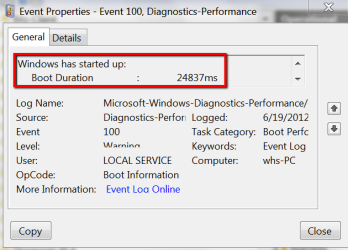
The 24 seconds you are seeing for loading the OS is not really out of the norm. It also depends on the SSD. Not all SSDs are the same. I run 7 systems with Gen1, Gen2 and Gen3 SSDs and boot times vary between 15 and 35 seconds depending on the SSD model and the number of startup programs. And I think the system specs also make a difference. My desktop with an i7 and 8GB of RAM is a lot faster than my oldest laptop with a 1.8GHz duo core and 2GB of RAM.

This is the number for this system which has a Q6600 (2.4GHz quad) and 4GB of RAM booting from a OCZ Vertex2.
 

Attachments

  • 2012-06-18_2325.png
    2012-06-18_2325.png
    19 KB · Views: 3

My Computer My Computer

At a glance

Vista, Windows7, Mint Mate, Zorin, Windows 8from 1.6GHz Duo to i7
Computer Manufacturer/Model Number
HP, Dell, Gateway, Toshiba - 4 laptops and 2 desktops
OS
Vista, Windows7, Mint Mate, Zorin, Windows 8
CPU
from 1.6GHz Duo to i7
Monitor(s) Displays
2x HP w2207
Hard Drives
5x HDD, 7x SSD, 12x Externals
Keyboard
with trackball - no mices
Mouse
Trackball mice
Internet Speed
DSL 6000
Back
Top