Regsvr32 error

Franky

New member
Member
VIP
Local time
3:08 AM
Messages
472
Location
Kurdistan
I have a aprogram file (Claculator.exe) which when I want to run it, it says the message no 1.

I downloaded the msvcp110d.dll (32bit) and tried to register it using this command:
C:\Windows\system32>regsvr32 msvcp110d.dll
on my elevated cmd on my Windows 7 x64.
But caught the message no 2.

How to solve the issue please?
I also have copied the .dll file onto the system32 folder!
 

Attachments

  • 1.PNG
    1.PNG
    4.6 KB · Views: 14
  • 2.PNG
    2.PNG
    84.4 KB · Views: 1

My Computer My Computer

At a glance

windows 7 32-bitIntel(R) Core(TM) i3-2120 CPU @ 3.30GHz4.00 GBNVIDIA GeForce GTS 450
Computer type
PC/Desktop
OS
windows 7 32-bit
CPU
Intel(R) Core(TM) i3-2120 CPU @ 3.30GHz
Motherboard
Gigabyte Technology Co., Ltd. P61A-D3
Memory
4.00 GB
Graphics Card(s)
NVIDIA GeForce GTS 450
Sound Card
(1) NVIDIA High Definition Audio (2) NVIDIA Virtual Audio
Monitor(s) Displays
Samsung
Hard Drives
ST500DM002-1BC142 ATA Device
Internet Speed
1 Mbps
Antivirus
KIS 2013
Browser
chrome

My Computer My Computer

At a glance

Windows 8.1 Pro x64Intel Core i5-4570 CPU @ 3.20GHz8GB DDR3-1596 - Dual ChannelNVIDIA GeForce GTX 750 Ti SC
Computer type
PC/Desktop
Computer Manufacturer/Model Number
Custom
OS
Windows 8.1 Pro x64
CPU
Intel Core i5-4570 CPU @ 3.20GHz
Motherboard
Gigabyte Z87-D3HP-CF
Memory
8GB DDR3-1596 - Dual Channel
Graphics Card(s)
NVIDIA GeForce GTX 750 Ti SC
Sound Card
Onboard
Monitor(s) Displays
Samsung
Screen Resolution
1920x1080
Hard Drives
SSD - 120GB
Second - 1TB
Antivirus
MSE
Browser
Chrome
I downloaded and installed that vcredist_x86 but the error still exists! :(
 

My Computer My Computer

At a glance

windows 7 32-bitIntel(R) Core(TM) i3-2120 CPU @ 3.30GHz4.00 GBNVIDIA GeForce GTS 450
Computer type
PC/Desktop
OS
windows 7 32-bit
CPU
Intel(R) Core(TM) i3-2120 CPU @ 3.30GHz
Motherboard
Gigabyte Technology Co., Ltd. P61A-D3
Memory
4.00 GB
Graphics Card(s)
NVIDIA GeForce GTS 450
Sound Card
(1) NVIDIA High Definition Audio (2) NVIDIA Virtual Audio
Monitor(s) Displays
Samsung
Hard Drives
ST500DM002-1BC142 ATA Device
Internet Speed
1 Mbps
Antivirus
KIS 2013
Browser
chrome
Completely uninstall the Redistributable Package, then use the installer again to have it downloaded and installed to your machine.
 

My Computer My Computer

At a glance

Windows 8.1 Pro x64Intel Core i5-4570 CPU @ 3.20GHz8GB DDR3-1596 - Dual ChannelNVIDIA GeForce GTX 750 Ti SC
Computer type
PC/Desktop
Computer Manufacturer/Model Number
Custom
OS
Windows 8.1 Pro x64
CPU
Intel Core i5-4570 CPU @ 3.20GHz
Motherboard
Gigabyte Z87-D3HP-CF
Memory
8GB DDR3-1596 - Dual Channel
Graphics Card(s)
NVIDIA GeForce GTX 750 Ti SC
Sound Card
Onboard
Monitor(s) Displays
Samsung
Screen Resolution
1920x1080
Hard Drives
SSD - 120GB
Second - 1TB
Antivirus
MSE
Browser
Chrome
I, too, did it but no changes. I think I should somehow register that file.
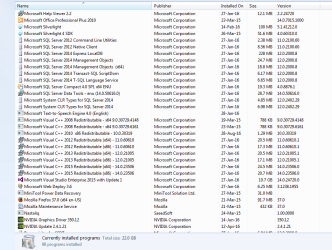
This a a screenshot from some of the apps instaaled on my Windows 7 64 bit:
 

Attachments

  • 3.PNG
    3.PNG
    32.8 KB · Views: 0

My Computer My Computer

At a glance

windows 7 32-bitIntel(R) Core(TM) i3-2120 CPU @ 3.30GHz4.00 GBNVIDIA GeForce GTS 450
Computer type
PC/Desktop
OS
windows 7 32-bit
CPU
Intel(R) Core(TM) i3-2120 CPU @ 3.30GHz
Motherboard
Gigabyte Technology Co., Ltd. P61A-D3
Memory
4.00 GB
Graphics Card(s)
NVIDIA GeForce GTS 450
Sound Card
(1) NVIDIA High Definition Audio (2) NVIDIA Virtual Audio
Monitor(s) Displays
Samsung
Hard Drives
ST500DM002-1BC142 ATA Device
Internet Speed
1 Mbps
Antivirus
KIS 2013
Browser
chrome
The original error message is simply that the dll don't exists, therefore you can't "register" it.

Moreover, as HonorGamer pointed out, that is part of VC++ 2012 runtime libraries, and that is the way to install it. Even more, those runtime libraries aren't ActiveX and as such don't need any kind of "register".
 

My Computer My Computer

At a glance

Windows 7 Ultimate x64Intel Core i7-740QM8 GB DDR3NVIDIA GeForce 330GT
Computer type
Laptop
Computer Manufacturer/Model Number
Toshiba Sattelite A665-S6092
OS
Windows 7 Ultimate x64
CPU
Intel Core i7-740QM
Memory
8 GB DDR3
Graphics Card(s)
NVIDIA GeForce 330GT
Screen Resolution
1366x768
Hard Drives
Samsung 840 SSD 500GB
1TB USB3 external HD
Cooling
Coolermaster Notepal U3 notebook cooling pad
Internet Speed
3mbps ASDL
Antivirus
ClamWin 0.98.7
Browser
Opera 12.17 x86 (main), Firefox 38 (sec), IE11 (last resort)
The question is how to solve the issue!?
 

My Computer My Computer

At a glance

windows 7 32-bitIntel(R) Core(TM) i3-2120 CPU @ 3.30GHz4.00 GBNVIDIA GeForce GTS 450
Computer type
PC/Desktop
OS
windows 7 32-bit
CPU
Intel(R) Core(TM) i3-2120 CPU @ 3.30GHz
Motherboard
Gigabyte Technology Co., Ltd. P61A-D3
Memory
4.00 GB
Graphics Card(s)
NVIDIA GeForce GTS 450
Sound Card
(1) NVIDIA High Definition Audio (2) NVIDIA Virtual Audio
Monitor(s) Displays
Samsung
Hard Drives
ST500DM002-1BC142 ATA Device
Internet Speed
1 Mbps
Antivirus
KIS 2013
Browser
chrome

My Computer My Computer

At a glance

Windows 8.1 Pro x64Intel Core i5-4570 CPU @ 3.20GHz8GB DDR3-1596 - Dual ChannelNVIDIA GeForce GTX 750 Ti SC
Computer type
PC/Desktop
Computer Manufacturer/Model Number
Custom
OS
Windows 8.1 Pro x64
CPU
Intel Core i5-4570 CPU @ 3.20GHz
Motherboard
Gigabyte Z87-D3HP-CF
Memory
8GB DDR3-1596 - Dual Channel
Graphics Card(s)
NVIDIA GeForce GTX 750 Ti SC
Sound Card
Onboard
Monitor(s) Displays
Samsung
Screen Resolution
1920x1080
Hard Drives
SSD - 120GB
Second - 1TB
Antivirus
MSE
Browser
Chrome

My Computer My Computer

At a glance

windows 7 32-bitIntel(R) Core(TM) i3-2120 CPU @ 3.30GHz4.00 GBNVIDIA GeForce GTS 450
Computer type
PC/Desktop
OS
windows 7 32-bit
CPU
Intel(R) Core(TM) i3-2120 CPU @ 3.30GHz
Motherboard
Gigabyte Technology Co., Ltd. P61A-D3
Memory
4.00 GB
Graphics Card(s)
NVIDIA GeForce GTS 450
Sound Card
(1) NVIDIA High Definition Audio (2) NVIDIA Virtual Audio
Monitor(s) Displays
Samsung
Hard Drives
ST500DM002-1BC142 ATA Device
Internet Speed
1 Mbps
Antivirus
KIS 2013
Browser
chrome
Did you completely uninstall it, and reinstall it? Also make sure you remove the file you added to your system as it may interfere with the installation process.
 

My Computer My Computer

At a glance

Windows 8.1 Pro x64Intel Core i5-4570 CPU @ 3.20GHz8GB DDR3-1596 - Dual ChannelNVIDIA GeForce GTX 750 Ti SC
Computer type
PC/Desktop
Computer Manufacturer/Model Number
Custom
OS
Windows 8.1 Pro x64
CPU
Intel Core i5-4570 CPU @ 3.20GHz
Motherboard
Gigabyte Z87-D3HP-CF
Memory
8GB DDR3-1596 - Dual Channel
Graphics Card(s)
NVIDIA GeForce GTX 750 Ti SC
Sound Card
Onboard
Monitor(s) Displays
Samsung
Screen Resolution
1920x1080
Hard Drives
SSD - 120GB
Second - 1TB
Antivirus
MSE
Browser
Chrome
I first deleted the msvcp110d.dll file on both system32 and SysWOW64 on my Windows 7 x64.
Then uninstalled Miscrosoft Visual C++ 2010 Redestributable. After these, I restarted the machine and re-installed the file vcredist_x86 downloaded using the link you gave me. And finally ran the app. No changes!

(And I don't know what you mean by "completely uninstall"!)
 

My Computer My Computer

At a glance

windows 7 32-bitIntel(R) Core(TM) i3-2120 CPU @ 3.30GHz4.00 GBNVIDIA GeForce GTS 450
Computer type
PC/Desktop
OS
windows 7 32-bit
CPU
Intel(R) Core(TM) i3-2120 CPU @ 3.30GHz
Motherboard
Gigabyte Technology Co., Ltd. P61A-D3
Memory
4.00 GB
Graphics Card(s)
NVIDIA GeForce GTS 450
Sound Card
(1) NVIDIA High Definition Audio (2) NVIDIA Virtual Audio
Monitor(s) Displays
Samsung
Hard Drives
ST500DM002-1BC142 ATA Device
Internet Speed
1 Mbps
Antivirus
KIS 2013
Browser
chrome
Then uninstalled Miscrosoft Visual C++ 2010 Redestributable

The files you name are from the 2012 version, reinstall those and leave the rest alone.
Also, don't or copy files from system32 or syswow64 by hand, that's what the installers do.
 

My Computer My Computer

At a glance

Windows 7 Ultimate x64Intel Core i7-740QM8 GB DDR3NVIDIA GeForce 330GT
Computer type
Laptop
Computer Manufacturer/Model Number
Toshiba Sattelite A665-S6092
OS
Windows 7 Ultimate x64
CPU
Intel Core i7-740QM
Memory
8 GB DDR3
Graphics Card(s)
NVIDIA GeForce 330GT
Screen Resolution
1366x768
Hard Drives
Samsung 840 SSD 500GB
1TB USB3 external HD
Cooling
Coolermaster Notepal U3 notebook cooling pad
Internet Speed
3mbps ASDL
Antivirus
ClamWin 0.98.7
Browser
Opera 12.17 x86 (main), Firefox 38 (sec), IE11 (last resort)
OK.
1- Uninstalled both (x86 and x64) versions of Miscrosoft Visual C++ 2012 Redestributable.
2- Restarted the PC, downloaded and installed both versions (as above) and ran the app again.
The issue still exists.

PS: My Visual Studio version is 2015.
 

My Computer My Computer

At a glance

windows 7 32-bitIntel(R) Core(TM) i3-2120 CPU @ 3.30GHz4.00 GBNVIDIA GeForce GTS 450
Computer type
PC/Desktop
OS
windows 7 32-bit
CPU
Intel(R) Core(TM) i3-2120 CPU @ 3.30GHz
Motherboard
Gigabyte Technology Co., Ltd. P61A-D3
Memory
4.00 GB
Graphics Card(s)
NVIDIA GeForce GTS 450
Sound Card
(1) NVIDIA High Definition Audio (2) NVIDIA Virtual Audio
Monitor(s) Displays
Samsung
Hard Drives
ST500DM002-1BC142 ATA Device
Internet Speed
1 Mbps
Antivirus
KIS 2013
Browser
chrome
I also did the work for vcredist 2013 and 2015 both versions. No changes again.

I think the problem does not solve that way. There should be some way to install/register that .dll file (that I have download from the web) — msvcp110d.dll.
 

My Computer My Computer

At a glance

windows 7 32-bitIntel(R) Core(TM) i3-2120 CPU @ 3.30GHz4.00 GBNVIDIA GeForce GTS 450
Computer type
PC/Desktop
OS
windows 7 32-bit
CPU
Intel(R) Core(TM) i3-2120 CPU @ 3.30GHz
Motherboard
Gigabyte Technology Co., Ltd. P61A-D3
Memory
4.00 GB
Graphics Card(s)
NVIDIA GeForce GTS 450
Sound Card
(1) NVIDIA High Definition Audio (2) NVIDIA Virtual Audio
Monitor(s) Displays
Samsung
Hard Drives
ST500DM002-1BC142 ATA Device
Internet Speed
1 Mbps
Antivirus
KIS 2013
Browser
chrome
Back
Top