Solved Relocate Output Folders

Elljay

New member
Power User
VIP
Local time
8:44 AM
Messages
417
Location
In the woods by the creek.
Hello there again.
I recently bought a few programs...(and some have been there quite a while) but it bothers me.
The programs output folders automatically locate themselves in my documents by default.
I don't consider these documents and I would prefer that they went to my desktop.
I relocated the folders there by dragging them to my desktop and the programs just made
new folders in my documents. So then I had 2. The files still go to the folder in Documents.
Could someone please tell me the proper way to do this.
 
Last edited:

My Computer My Computer

At a glance

Windows 7 Home Premium (x64) Service Pack 1 (...Intel Pentium P6200 2.13 GHz4.00 GBIntel HD Graphics
Computer type
Laptop
Computer Manufacturer/Model Number
HP 2000-150CA Notebook
OS
Windows 7 Home Premium (x64) Service Pack 1 (build 7601)
CPU
Intel Pentium P6200 2.13 GHz
Motherboard
HP 3674 28.49 1066 MH / BIOS: HP F.34
Memory
4.00 GB
Graphics Card(s)
Intel HD Graphics
Sound Card
Multimedia HD
Monitor(s) Displays
15.3
Screen Resolution
1366X768
Hard Drives
Hitachi HTS545050B9A300 ATA
(500.11 GB)
Keyboard
Standard PS2
Mouse
Synaptics PS2 Port Touch Pad / Microsoft HID-compliant mouse
Internet Speed
100 Mbps
Antivirus
MSE
Browser
PaleMoon / Fire Fox
Other Info
Purchased 2011
Redirect a folder to a new location - Windows Help

Although since this has the effect of storing anything put in Documents in the new target folder you may want to look for a program option to store the output in another folder. It may be worth checking for a forum for the software if there is nothing apropos in the help. If the program uses an .ini file for options sometimes the option is not specified but may be added by the user. It depends on the application. On the forum if you post the author may reply with the option if there is one.
 

My Computer My Computer

At a glance

Windows 7 32 bitAMD 5200+ dual core2 GBNVidia GeForce 6150SE 128 MB
Computer Manufacturer/Model Number
HP Media Center
OS
Windows 7 32 bit
CPU
AMD 5200+ dual core
Memory
2 GB
Graphics Card(s)
NVidia GeForce 6150SE 128 MB
Monitor(s) Displays
CRT
Screen Resolution
1280x1024
Hard Drives
500 GB Sata internal :

SIIG USB 3.0 docking stations w/WD Caviar Black 6 Gb/s drives
Keyboard
PS/2
Mouse
PS/2 Wheel Mouse
Other Info
SIIG USB 3.0 PCIexpress card.
OK. Thanks MilesAhead.
 
Last edited:

My Computer My Computer

At a glance

Windows 7 Home Premium (x64) Service Pack 1 (...Intel Pentium P6200 2.13 GHz4.00 GBIntel HD Graphics
Computer type
Laptop
Computer Manufacturer/Model Number
HP 2000-150CA Notebook
OS
Windows 7 Home Premium (x64) Service Pack 1 (build 7601)
CPU
Intel Pentium P6200 2.13 GHz
Motherboard
HP 3674 28.49 1066 MH / BIOS: HP F.34
Memory
4.00 GB
Graphics Card(s)
Intel HD Graphics
Sound Card
Multimedia HD
Monitor(s) Displays
15.3
Screen Resolution
1366X768
Hard Drives
Hitachi HTS545050B9A300 ATA
(500.11 GB)
Keyboard
Standard PS2
Mouse
Synaptics PS2 Port Touch Pad / Microsoft HID-compliant mouse
Internet Speed
100 Mbps
Antivirus
MSE
Browser
PaleMoon / Fire Fox
Other Info
Purchased 2011
You are welcome. If you consider the thread Solved please stick the green checc mark on. :)
 

My Computer My Computer

At a glance

Windows 7 32 bitAMD 5200+ dual core2 GBNVidia GeForce 6150SE 128 MB
Computer Manufacturer/Model Number
HP Media Center
OS
Windows 7 32 bit
CPU
AMD 5200+ dual core
Memory
2 GB
Graphics Card(s)
NVidia GeForce 6150SE 128 MB
Monitor(s) Displays
CRT
Screen Resolution
1280x1024
Hard Drives
500 GB Sata internal :

SIIG USB 3.0 docking stations w/WD Caviar Black 6 Gb/s drives
Keyboard
PS/2
Mouse
PS/2 Wheel Mouse
Other Info
SIIG USB 3.0 PCIexpress card.
You are welcome. If you consider the thread Solved please stick the green checc mark on. :)
Thank you MilesAhead. It isn't solved, I'm stuck.
I have gone back and expanded a bit more on my original post.
I am not understanding why I can't direct them to go to the desktop.
It would be nice if these Co. would let us choose where to put the output folder???
A video, picture or what have you, is not a Resume, Bank Statement or
Last Will and Testimony??? Good Grief.

http://www.sevenforums.com//www.pinterest.com/pin/create/extension/
 
Last edited:

My Computer My Computer

At a glance

Windows 7 Home Premium (x64) Service Pack 1 (...Intel Pentium P6200 2.13 GHz4.00 GBIntel HD Graphics
Computer type
Laptop
Computer Manufacturer/Model Number
HP 2000-150CA Notebook
OS
Windows 7 Home Premium (x64) Service Pack 1 (build 7601)
CPU
Intel Pentium P6200 2.13 GHz
Motherboard
HP 3674 28.49 1066 MH / BIOS: HP F.34
Memory
4.00 GB
Graphics Card(s)
Intel HD Graphics
Sound Card
Multimedia HD
Monitor(s) Displays
15.3
Screen Resolution
1366X768
Hard Drives
Hitachi HTS545050B9A300 ATA
(500.11 GB)
Keyboard
Standard PS2
Mouse
Synaptics PS2 Port Touch Pad / Microsoft HID-compliant mouse
Internet Speed
100 Mbps
Antivirus
MSE
Browser
PaleMoon / Fire Fox
Other Info
Purchased 2011
I have gone back and expanded a bit more on my original post.

I see no information on what applications you are talking about. It's rather vague when you ask how to divert output files from "some programs" to the desktop. Have you tried user forums for the particular applications? There you would tend to have the post read by users of that particular program. The odds go way up somebody would know the setting or work-around.
 

My Computer My Computer

At a glance

Windows 7 32 bitAMD 5200+ dual core2 GBNVidia GeForce 6150SE 128 MB
Computer Manufacturer/Model Number
HP Media Center
OS
Windows 7 32 bit
CPU
AMD 5200+ dual core
Memory
2 GB
Graphics Card(s)
NVidia GeForce 6150SE 128 MB
Monitor(s) Displays
CRT
Screen Resolution
1280x1024
Hard Drives
500 GB Sata internal :

SIIG USB 3.0 docking stations w/WD Caviar Black 6 Gb/s drives
Keyboard
PS/2
Mouse
PS/2 Wheel Mouse
Other Info
SIIG USB 3.0 PCIexpress card.
If you want to redirect these folders, you have to change the programs that create them. That is not a very practical proposition though. So you are stuck with them in Documents or the other libraries - I have a couple in Videos also.
 

My Computer My Computer

At a glance

Vista, Windows7, Mint Mate, Zorin, Windows 8from 1.6GHz Duo to i7
Computer Manufacturer/Model Number
HP, Dell, Gateway, Toshiba - 4 laptops and 2 desktops
OS
Vista, Windows7, Mint Mate, Zorin, Windows 8
CPU
from 1.6GHz Duo to i7
Monitor(s) Displays
2x HP w2207
Hard Drives
5x HDD, 7x SSD, 12x Externals
Keyboard
with trackball - no mices
Mouse
Trackball mice
Internet Speed
DSL 6000
One thing that may work is to use a program such as ToolWiz Time Freeze

Once you have the system running under Freeze change the Documents Folder to point to the desktop and run your programs. When done reboot. The settings will go back to the default. Just make sure you exclude the Desktop from being cached by TimeFreeze.

It is a free program. Pretty good to have in your toolbox in any case.
 

My Computer My Computer

At a glance

Windows 7 32 bitAMD 5200+ dual core2 GBNVidia GeForce 6150SE 128 MB
Computer Manufacturer/Model Number
HP Media Center
OS
Windows 7 32 bit
CPU
AMD 5200+ dual core
Memory
2 GB
Graphics Card(s)
NVidia GeForce 6150SE 128 MB
Monitor(s) Displays
CRT
Screen Resolution
1280x1024
Hard Drives
500 GB Sata internal :

SIIG USB 3.0 docking stations w/WD Caviar Black 6 Gb/s drives
Keyboard
PS/2
Mouse
PS/2 Wheel Mouse
Other Info
SIIG USB 3.0 PCIexpress card.
I have gone back and expanded a bit more on my original post.
I see no information on what applications you are talking about. It's rather vague when you ask how to divert output files from "some programs" to the desktop. Have you tried user forums for the particular applications? There you would tend to have the post read by users of that particular program. The odds go way up somebody would know the setting or work-around.

Sorry for the delayed response MilesAhead. I haven't had time to. I will though.
There are only so many hours in a day. I have been trying to help my Sister with her PC.
She has been badly infected. Malware Adware 131 and counting and 3 Trojans. Her PC froze up.
Something hijacked her Browser. Etc...
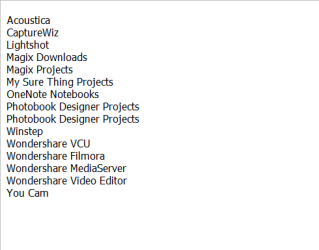
OK. Here is a snap shot of these programs. I took all my Documents out and put them in my Pictures because it was too confusing having all these mixed up together.
 

Attachments

  • PROGRAMS.png
    PROGRAMS.png
    4.6 KB · Views: 4
Last edited:

My Computer My Computer

At a glance

Windows 7 Home Premium (x64) Service Pack 1 (...Intel Pentium P6200 2.13 GHz4.00 GBIntel HD Graphics
Computer type
Laptop
Computer Manufacturer/Model Number
HP 2000-150CA Notebook
OS
Windows 7 Home Premium (x64) Service Pack 1 (build 7601)
CPU
Intel Pentium P6200 2.13 GHz
Motherboard
HP 3674 28.49 1066 MH / BIOS: HP F.34
Memory
4.00 GB
Graphics Card(s)
Intel HD Graphics
Sound Card
Multimedia HD
Monitor(s) Displays
15.3
Screen Resolution
1366X768
Hard Drives
Hitachi HTS545050B9A300 ATA
(500.11 GB)
Keyboard
Standard PS2
Mouse
Synaptics PS2 Port Touch Pad / Microsoft HID-compliant mouse
Internet Speed
100 Mbps
Antivirus
MSE
Browser
PaleMoon / Fire Fox
Other Info
Purchased 2011
One thing that may work is to use a program such as ToolWiz Time Freeze

Once you have the system running under Freeze change the Documents Folder to point to the desktop and run your programs. When done reboot. The settings will go back to the default. Just make sure you exclude the Desktop from being cached by TimeFreeze.

It is a free program. Pretty good to have in your toolbox in any case.

Thank you for the Link MilesAhead, I'll check it out. :)
 

My Computer My Computer

At a glance

Windows 7 Home Premium (x64) Service Pack 1 (...Intel Pentium P6200 2.13 GHz4.00 GBIntel HD Graphics
Computer type
Laptop
Computer Manufacturer/Model Number
HP 2000-150CA Notebook
OS
Windows 7 Home Premium (x64) Service Pack 1 (build 7601)
CPU
Intel Pentium P6200 2.13 GHz
Motherboard
HP 3674 28.49 1066 MH / BIOS: HP F.34
Memory
4.00 GB
Graphics Card(s)
Intel HD Graphics
Sound Card
Multimedia HD
Monitor(s) Displays
15.3
Screen Resolution
1366X768
Hard Drives
Hitachi HTS545050B9A300 ATA
(500.11 GB)
Keyboard
Standard PS2
Mouse
Synaptics PS2 Port Touch Pad / Microsoft HID-compliant mouse
Internet Speed
100 Mbps
Antivirus
MSE
Browser
PaleMoon / Fire Fox
Other Info
Purchased 2011
If you want to redirect these folders, you have to change the programs that create them. That is not a very practical proposition though. So you are stuck with them in Documents or the other libraries - I have a couple in Videos also.

Hi whs. No that would not be a very practical proposition.
What kind of Videos whs? Do you have a link?
 

My Computer My Computer

At a glance

Windows 7 Home Premium (x64) Service Pack 1 (...Intel Pentium P6200 2.13 GHz4.00 GBIntel HD Graphics
Computer type
Laptop
Computer Manufacturer/Model Number
HP 2000-150CA Notebook
OS
Windows 7 Home Premium (x64) Service Pack 1 (build 7601)
CPU
Intel Pentium P6200 2.13 GHz
Motherboard
HP 3674 28.49 1066 MH / BIOS: HP F.34
Memory
4.00 GB
Graphics Card(s)
Intel HD Graphics
Sound Card
Multimedia HD
Monitor(s) Displays
15.3
Screen Resolution
1366X768
Hard Drives
Hitachi HTS545050B9A300 ATA
(500.11 GB)
Keyboard
Standard PS2
Mouse
Synaptics PS2 Port Touch Pad / Microsoft HID-compliant mouse
Internet Speed
100 Mbps
Antivirus
MSE
Browser
PaleMoon / Fire Fox
Other Info
Purchased 2011
If you want to redirect these folders, you have to change the programs that create them. That is not a very practical proposition though. So you are stuck with them in Documents or the other libraries - I have a couple in Videos also.

Hi whs. No that would not be a very practical proposition.
What kind of Videos whs? Do you have a link?

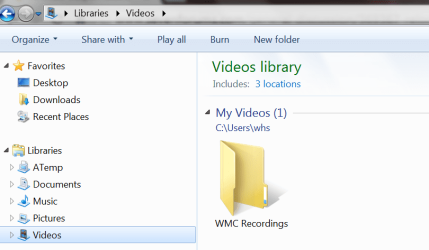
I think you misunderstood. Those are no videos but video programs that place their repositories into the My Videos library. The example in the picture is a screen recording program. Note that all my own files are on a different disk in a different library.
 

Attachments

  • 2015-05-14_1823.png
    2015-05-14_1823.png
    29 KB · Views: 0

My Computer My Computer

At a glance

Vista, Windows7, Mint Mate, Zorin, Windows 8from 1.6GHz Duo to i7
Computer Manufacturer/Model Number
HP, Dell, Gateway, Toshiba - 4 laptops and 2 desktops
OS
Vista, Windows7, Mint Mate, Zorin, Windows 8
CPU
from 1.6GHz Duo to i7
Monitor(s) Displays
2x HP w2207
Hard Drives
5x HDD, 7x SSD, 12x Externals
Keyboard
with trackball - no mices
Mouse
Trackball mice
Internet Speed
DSL 6000
Hey, I hope you can accomplish what you are trying to do. As our friends have already told, the best approach would be to use the programs' settings to change documents folder (might not be applicable to all programs).

Several ideas:
- Consider to not clutter the desktop with many files, not a very good practice! :)
- If you have a few files that you want on desktop, just make a shortcut to them. (Right-click the file->Send to->Desktop)
- If you need more files or the files change often/new files created, then you can simply create a folder shortcut (Same as a file shortcut). So you can access your files with 1 click. Plus your desktop will be clean and tidy.
 

My Computer My Computer

At a glance

Windows 7 Ultimate x64 SP1AMD Phenom 2 1090T2x8GB Kingston HyperX Fury Black 1600Mhz Unga...MSI GTX 970 Gaming 4G
Computer type
PC/Desktop
Computer Manufacturer/Model Number
Custom Build
OS
Windows 7 Ultimate x64 SP1
CPU
AMD Phenom 2 1090T
Motherboard
Gigabyte GA-890FXA-UD5
Memory
2x8GB Kingston HyperX Fury Black 1600Mhz Unganged
Graphics Card(s)
MSI GTX 970 Gaming 4G
Sound Card
Realtek On-Board HD 7.1 Audio / Logitech G35
Monitor(s) Displays
3xAcer GD245HQ
Screen Resolution
1920x1080
Hard Drives
Samsung 850 Pro 512GB SSD - OS /
WD Caviar Black SATA 3 - 1 TBx2 - Dynamic RAID 0 /
WD Caviar Green SATA 2 - 640GBx2 - Dynamic RAID 0 /
WD Caviar Green SATA 2 - 640GB - Internal Backup /
Seagate Barracude SATA 3 - 3TB - External Backup/ Sync
PSU
HighPower 1000W
Case
Cooler Master HAF 932
Cooling
Noctua NH-D14
Keyboard
Logitech G19
Mouse
Logitech G500
Internet Speed
100/4 Mbit Cable (100GB quota)
Antivirus
ZoneAlarm Extreme Security / MBAM Pro / MBAE Free / SAS Free
Browser
IE 11 - Firefox - Chrome
Other Info
Logitech F710/ G27/ G940/ Z5500 // TrackIR 5 // Nvidia 3D Surround Vision
If you want to redirect these folders, you have to change the programs that create them. That is not a very practical proposition though. So you are stuck with them in Documents or the other libraries - I have a couple in Videos also.

Hi whs. No that would not be a very practical proposition.
What kind of Videos whs? Do you have a link?

I think you misunderstood. Those are no videos but video programs that place their repositories into the My Videos library. The example in the picture is a screen recording program. Note that all my own files are on a different disk in a different library.

Lol...thank you. Tired and I didn't read that properly. I was having a blonde moment.
Rereading, I understand.
 
Last edited:

My Computer My Computer

At a glance

Windows 7 Home Premium (x64) Service Pack 1 (...Intel Pentium P6200 2.13 GHz4.00 GBIntel HD Graphics
Computer type
Laptop
Computer Manufacturer/Model Number
HP 2000-150CA Notebook
OS
Windows 7 Home Premium (x64) Service Pack 1 (build 7601)
CPU
Intel Pentium P6200 2.13 GHz
Motherboard
HP 3674 28.49 1066 MH / BIOS: HP F.34
Memory
4.00 GB
Graphics Card(s)
Intel HD Graphics
Sound Card
Multimedia HD
Monitor(s) Displays
15.3
Screen Resolution
1366X768
Hard Drives
Hitachi HTS545050B9A300 ATA
(500.11 GB)
Keyboard
Standard PS2
Mouse
Synaptics PS2 Port Touch Pad / Microsoft HID-compliant mouse
Internet Speed
100 Mbps
Antivirus
MSE
Browser
PaleMoon / Fire Fox
Other Info
Purchased 2011
Hey, I hope you can accomplish what you are trying to do. As our friends have already told, the best approach would be to use the programs' settings to change documents folder (might not be applicable to all programs).
Several ideas:
- Consider to not clutter the desktop with many files, not a very good practice! :)
- If you have a few files that you want on desktop, just make a shortcut to them. (Right-click the file->Send to->Desktop)
- If you need more files or the files change often/new files created, then you can simply create a folder shortcut (Same as a file shortcut). So you can access your files with 1 click. Plus your desktop will be clean and tidy.

Thank you GokAy.
Yes, I know this little tip.
I don't think I have a cluttered desktop. I don't like clutter.
Gets a little messy when I'm fooling around on projects but I clean it up, so it's always pretty tidy.
I have had Fences for a long time, 5 years or so.
Fences is awesome and I can do all sorts of kewl things like make Portals and other desktops.
Each Fence has a scroll bar etc. I can make it all disappear too.
I was hoping to move those Folders to my desktop and put them in a Fence.
Everyone should have Fences. :D


http://www.sevenforums.com//www.pinterest.com/pin/create/extension/
 

Attachments

  • stardock-fences-logo-organise-you-desktop.jpg
    stardock-fences-logo-organise-you-desktop.jpg
    5.5 KB · Views: 3
Last edited:

My Computer My Computer

At a glance

Windows 7 Home Premium (x64) Service Pack 1 (...Intel Pentium P6200 2.13 GHz4.00 GBIntel HD Graphics
Computer type
Laptop
Computer Manufacturer/Model Number
HP 2000-150CA Notebook
OS
Windows 7 Home Premium (x64) Service Pack 1 (build 7601)
CPU
Intel Pentium P6200 2.13 GHz
Motherboard
HP 3674 28.49 1066 MH / BIOS: HP F.34
Memory
4.00 GB
Graphics Card(s)
Intel HD Graphics
Sound Card
Multimedia HD
Monitor(s) Displays
15.3
Screen Resolution
1366X768
Hard Drives
Hitachi HTS545050B9A300 ATA
(500.11 GB)
Keyboard
Standard PS2
Mouse
Synaptics PS2 Port Touch Pad / Microsoft HID-compliant mouse
Internet Speed
100 Mbps
Antivirus
MSE
Browser
PaleMoon / Fire Fox
Other Info
Purchased 2011
Thank you everyone for your input.
I need to put my petty problem aside for now and help my sister.
I'll figure it all out.
She's got bugs again!! :rolleyes:
 

My Computer My Computer

At a glance

Windows 7 Home Premium (x64) Service Pack 1 (...Intel Pentium P6200 2.13 GHz4.00 GBIntel HD Graphics
Computer type
Laptop
Computer Manufacturer/Model Number
HP 2000-150CA Notebook
OS
Windows 7 Home Premium (x64) Service Pack 1 (build 7601)
CPU
Intel Pentium P6200 2.13 GHz
Motherboard
HP 3674 28.49 1066 MH / BIOS: HP F.34
Memory
4.00 GB
Graphics Card(s)
Intel HD Graphics
Sound Card
Multimedia HD
Monitor(s) Displays
15.3
Screen Resolution
1366X768
Hard Drives
Hitachi HTS545050B9A300 ATA
(500.11 GB)
Keyboard
Standard PS2
Mouse
Synaptics PS2 Port Touch Pad / Microsoft HID-compliant mouse
Internet Speed
100 Mbps
Antivirus
MSE
Browser
PaleMoon / Fire Fox
Other Info
Purchased 2011
Hey :)

I do use Fences as well. I bought it when Fences was v1 using v2 atm (installed v1 on my laptop). Back then I was looking for a solution to keep icon layout when switching to triple monitor resolutions etc. Very nice program indeed.

Hmm, why don't you make a couple of folder portals for the folders you wish on desktop? I know it is not the same as having several folder contents in one fence window but still would be neat.

What do you think?
 

My Computer My Computer

At a glance

Windows 7 Ultimate x64 SP1AMD Phenom 2 1090T2x8GB Kingston HyperX Fury Black 1600Mhz Unga...MSI GTX 970 Gaming 4G
Computer type
PC/Desktop
Computer Manufacturer/Model Number
Custom Build
OS
Windows 7 Ultimate x64 SP1
CPU
AMD Phenom 2 1090T
Motherboard
Gigabyte GA-890FXA-UD5
Memory
2x8GB Kingston HyperX Fury Black 1600Mhz Unganged
Graphics Card(s)
MSI GTX 970 Gaming 4G
Sound Card
Realtek On-Board HD 7.1 Audio / Logitech G35
Monitor(s) Displays
3xAcer GD245HQ
Screen Resolution
1920x1080
Hard Drives
Samsung 850 Pro 512GB SSD - OS /
WD Caviar Black SATA 3 - 1 TBx2 - Dynamic RAID 0 /
WD Caviar Green SATA 2 - 640GBx2 - Dynamic RAID 0 /
WD Caviar Green SATA 2 - 640GB - Internal Backup /
Seagate Barracude SATA 3 - 3TB - External Backup/ Sync
PSU
HighPower 1000W
Case
Cooler Master HAF 932
Cooling
Noctua NH-D14
Keyboard
Logitech G19
Mouse
Logitech G500
Internet Speed
100/4 Mbit Cable (100GB quota)
Antivirus
ZoneAlarm Extreme Security / MBAM Pro / MBAE Free / SAS Free
Browser
IE 11 - Firefox - Chrome
Other Info
Logitech F710/ G27/ G940/ Z5500 // TrackIR 5 // Nvidia 3D Surround Vision
Hey :)

I do use Fences as well. I bought it when Fences was v1 using v2 atm (installed v1 on my laptop). Back then I was looking for a solution to keep icon layout when switching to triple monitor resolutions etc. Very nice program indeed.

Hmm, why don't you make a couple of folder portals for the folders you wish on desktop? I know it is not the same as having several folder contents in one fence window but still would be neat.

What do you think?

My problem is, is that I like to be organized and I have many 'real' documents. I don't like having to trudge through all the stuff that doesn't belong there. To me, they simply are not documents and I want them separated.
OCD, Lol. Naw, not really... I think. :eek:

http://www.sevenforums.com//www.pinterest.com/pin/create/extension/
 

My Computer My Computer

At a glance

Windows 7 Home Premium (x64) Service Pack 1 (...Intel Pentium P6200 2.13 GHz4.00 GBIntel HD Graphics
Computer type
Laptop
Computer Manufacturer/Model Number
HP 2000-150CA Notebook
OS
Windows 7 Home Premium (x64) Service Pack 1 (build 7601)
CPU
Intel Pentium P6200 2.13 GHz
Motherboard
HP 3674 28.49 1066 MH / BIOS: HP F.34
Memory
4.00 GB
Graphics Card(s)
Intel HD Graphics
Sound Card
Multimedia HD
Monitor(s) Displays
15.3
Screen Resolution
1366X768
Hard Drives
Hitachi HTS545050B9A300 ATA
(500.11 GB)
Keyboard
Standard PS2
Mouse
Synaptics PS2 Port Touch Pad / Microsoft HID-compliant mouse
Internet Speed
100 Mbps
Antivirus
MSE
Browser
PaleMoon / Fire Fox
Other Info
Purchased 2011
There is one other thing maybe you can use. Symbolic linking, and perhaps a combination of linking and folder portal.

http://www.sevenforums.com/tutorials/278262-mklink-create-use-links-windows.html

(People used to use symbolic links with their Steam installs when they ran out of space and wanted selective game folders on other partitions/drives.)

So, you can use either:
- linking directly to desktop (you have to try if this can be done, as I have no experience with linking)
- linking to some other dummy folder and make a folder portal to the dummy folder so it only holds the Documents folders of the programs you want.
 

My Computer My Computer

At a glance

Windows 7 Ultimate x64 SP1AMD Phenom 2 1090T2x8GB Kingston HyperX Fury Black 1600Mhz Unga...MSI GTX 970 Gaming 4G
Computer type
PC/Desktop
Computer Manufacturer/Model Number
Custom Build
OS
Windows 7 Ultimate x64 SP1
CPU
AMD Phenom 2 1090T
Motherboard
Gigabyte GA-890FXA-UD5
Memory
2x8GB Kingston HyperX Fury Black 1600Mhz Unganged
Graphics Card(s)
MSI GTX 970 Gaming 4G
Sound Card
Realtek On-Board HD 7.1 Audio / Logitech G35
Monitor(s) Displays
3xAcer GD245HQ
Screen Resolution
1920x1080
Hard Drives
Samsung 850 Pro 512GB SSD - OS /
WD Caviar Black SATA 3 - 1 TBx2 - Dynamic RAID 0 /
WD Caviar Green SATA 2 - 640GBx2 - Dynamic RAID 0 /
WD Caviar Green SATA 2 - 640GB - Internal Backup /
Seagate Barracude SATA 3 - 3TB - External Backup/ Sync
PSU
HighPower 1000W
Case
Cooler Master HAF 932
Cooling
Noctua NH-D14
Keyboard
Logitech G19
Mouse
Logitech G500
Internet Speed
100/4 Mbit Cable (100GB quota)
Antivirus
ZoneAlarm Extreme Security / MBAM Pro / MBAE Free / SAS Free
Browser
IE 11 - Firefox - Chrome
Other Info
Logitech F710/ G27/ G940/ Z5500 // TrackIR 5 // Nvidia 3D Surround Vision
There is one other thing maybe you can use. Symbolic linking, and perhaps a combination of linking and folder portal.

http://www.sevenforums.com/tutorials/278262-mklink-create-use-links-windows.html

(People used to use symbolic links with their Steam installs when they ran out of space and wanted selective game folders on other partitions/drives.)

So, you can use either:
- linking directly to desktop (you have to try if this can be done, as I have no experience with linking)
- linking to some other dummy folder and make a folder portal to the dummy folder so it only holds the Documents folders of the programs you want.

Wouldn't it be nice to just be able to simply drag it else where.
 

My Computer My Computer

At a glance

Windows 7 Home Premium (x64) Service Pack 1 (...Intel Pentium P6200 2.13 GHz4.00 GBIntel HD Graphics
Computer type
Laptop
Computer Manufacturer/Model Number
HP 2000-150CA Notebook
OS
Windows 7 Home Premium (x64) Service Pack 1 (build 7601)
CPU
Intel Pentium P6200 2.13 GHz
Motherboard
HP 3674 28.49 1066 MH / BIOS: HP F.34
Memory
4.00 GB
Graphics Card(s)
Intel HD Graphics
Sound Card
Multimedia HD
Monitor(s) Displays
15.3
Screen Resolution
1366X768
Hard Drives
Hitachi HTS545050B9A300 ATA
(500.11 GB)
Keyboard
Standard PS2
Mouse
Synaptics PS2 Port Touch Pad / Microsoft HID-compliant mouse
Internet Speed
100 Mbps
Antivirus
MSE
Browser
PaleMoon / Fire Fox
Other Info
Purchased 2011
Back
Top