Solved Remove "Get Windows 10" from taskbar

joey_tbf

New member
Local time
3:34 PM
Messages
7

Attachments

  • 1.PNG
    1.PNG
    2.5 KB · Views: 263
  • 2.PNG
    2.PNG
    79.3 KB · Views: 9
Last edited by a moderator:

My Computer

OS
Windows 7 Ultimate x64
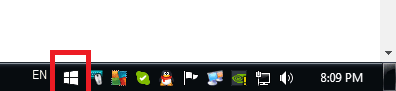
First time I am seeing the nag screen. Is it here already?

Did you check Task Manager? Maybe you can end it there.
 

My Computer

Computer type
PC/Desktop
Computer Manufacturer/Model Number
Custom Build
OS
Windows 7 Ultimate x64 SP1
CPU
AMD Phenom 2 1090T
Motherboard
Gigabyte GA-890FXA-UD5
Memory
2x8GB Kingston HyperX Fury Black 1600Mhz Unganged
Graphics Card(s)
MSI GTX 970 Gaming 4G
Sound Card
Realtek On-Board HD 7.1 Audio / Logitech G35
Monitor(s) Displays
3xAcer GD245HQ
Screen Resolution
1920x1080
Hard Drives
Samsung 850 Pro 512GB SSD - OS /
WD Caviar Black SATA 3 - 1 TBx2 - Dynamic RAID 0 /
WD Caviar Green SATA 2 - 640GBx2 - Dynamic RAID 0 /
WD Caviar Green SATA 2 - 640GB - Internal Backup /
Seagate Barracude SATA 3 - 3TB - External Backup/ Sync
PSU
HighPower 1000W
Case
Cooler Master HAF 932
Cooling
Noctua NH-D14
Keyboard
Logitech G19
Mouse
Logitech G500
Internet Speed
100/4 Mbit Cable (100GB quota)
Antivirus
ZoneAlarm Extreme Security / MBAM Pro / MBAE Free / SAS Free
Browser
IE 11 - Firefox - Chrome
Other Info
Logitech F710/ G27/ G940/ Z5500 // TrackIR 5 // Nvidia 3D Surround Vision
It seems a wee bit premature. I wonder if it is malware.
 

My Computer

Computer type
PC/Desktop
Computer Manufacturer/Model Number
Custom Build
OS
Win 7 Ultimate 64 bit
CPU
Intel i7-3930K
Motherboard
ASUS P9X79 WS
Memory
Kingston HyperX Genesis 32GB Kit (8x4GB Modules) 1600MHz DDR
Graphics Card(s)
MSI R7850 Twin Frozr 2GD5/OC Radeon HD 7850 2GB 256-bit GDDR
Sound Card
Asus Xonar Essence STX
Monitor(s) Displays
3x Asus VG248QE 24", Vizio 32" TV
Screen Resolution
1920 x 1080, ?
Hard Drives
Samsung 128GB 840 Pro SSD (1),
Samsung 4TB 850 EVO SSDs (4)
Samsung 4TB 850 EVO SSDs (16) external backup drives used in 2.5" hot swap bays in the computer.
PSU
Corsair HX750w
Case
Antec Two Hundred v2 (modified)
Cooling
Cooler Master GeminII S524 120mm (fan replaced with a 140mm)
Keyboard
Logitech G510s
Mouse
Logitech M525 (two in use)
Internet Speed
=< 32Mbps down, 8Mbps up
Antivirus
AVAST!, MBAM, SAS, Spybot S&D (all but MBAM free) Glary Util
Browser
IE11
Other Info
LSI 9211-8i HBA card (8 SATA III ports), 2.5" & 3.5" Hot Swap Bays, HooToo HT-CR001 PCI-E to USB 3.0 Internal Hub + 6 Slot Card Reader, and LG Model CH12LS28 BD-ROM Optical Drive. Also, ScanSnap S1500 ADF duplexing scanner, Canon 9000F flat bed scanner, Corsair SP2500 2.1 speakers, Samsung CLP 415nw laser color printer, Cyberpower PP2200SW UPS
This just happened to me as well. Any ideas would be greatly appreciated.
 

My Computer

Computer type
PC/Desktop
OS
Windows 7 Home Premium 64bit
Probably will see allot of this in the coming months
 

My Computer

Computer type
PC/Desktop
Computer Manufacturer/Model Number
Custom Build
OS
Win 10 Pro 64
CPU
Intel Core i7 960 @3.20 GHz
Motherboard
MSI MS7522
Memory
24.0 GB DDR3
Graphics Card(s)
EVGA GTX 750Ti
Monitor(s) Displays
LG E2341 23 Inch
Screen Resolution
1920x1080
Hard Drives
1TB Western Dgital 1002FAEX-00Y9A0
1TB Hitachi HDS721010CLA322
PSU
700 Watt
Case
Haf 912
Cooling
Fans
Keyboard
Logitech MK710
Mouse
Logitech M705
Internet Speed
Cable
Antivirus
AIS 2015 .10.0.2225
Browser
Firefox 49
Other Info
MalwareBytes Anti-Rootkit utility
Whoa. Surely, they are not doing this already? And if this is legit, Microsoft is really doing this in a bizarrely, borderline-spyware way.
 

My Computer

Computer type
PC/Desktop
Computer Manufacturer/Model Number
Dell OptiPlex 760
OS
Windows 10 Pro 64-bit
Memory
4 GB
Antivirus
Kaspersky Endpoint Security 10
It seems that maybe it was part of a recommended update, which created the folder Windows/System32/GWX.
 

My Computer

Computer type
PC/Desktop
OS
Windows 7 Home Premium 64bit
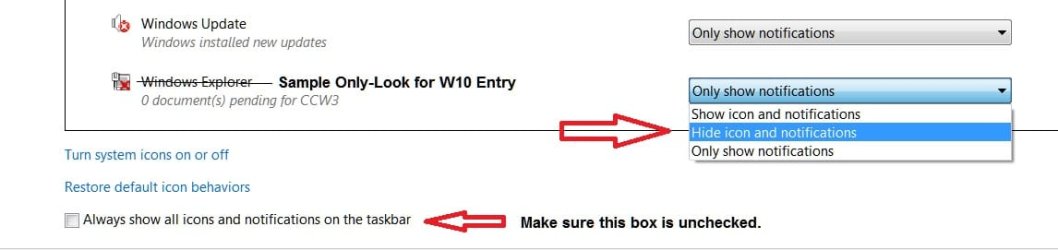
I didn't install those updates but you might try removing it from the Notifications.

Right click the Task Bar, select Properties.
On the Taskbar tab, look for Notification area and click on Customize.
Scroll through the notification and see if W10 shows up. If it does, give it a no-show.
 

Attachments

  • TaskBar-Notifications-W10.jpg
    TaskBar-Notifications-W10.jpg
    30.8 KB · Views: 5

My Computer

Computer type
PC/Desktop
Computer Manufacturer/Model Number
Built 2/11/2011
OS
Windows 7 Pro-x64
CPU
i7-2600 3.4GHz - 3.8GHz Turbo
Motherboard
Intel DH67BL-B3
Memory
8Gb - 2x4GB, Muskin 991770 PC3-1333
Graphics Card(s)
Integrated Intel HD 2000
Sound Card
Integrated Intel 10.1 HD, RealTek ALC892
Monitor(s) Displays
Asus LCD VH222H, Haier HL24XSL2a
Screen Resolution
1920x1080, 1920x1080
Hard Drives
Crucial SSD C300-128Gb,
Western Digital WD5002AALX - 500Gb,
Western Digital WD7501AALS - 750Gb
PSU
Seasonic 650W 80+ Gold Modular
Case
Rosewill Defender
Cooling
Stock CPU, Four 120mm case fans, PCH fan added
Keyboard
Logitech EX100 Y-RBH94 Wireless
Mouse
Logitech EX100 M-RCE95 Wireless
Internet Speed
3.0/1.5 Mbs
Antivirus
Microsoft Security Essentials
Browser
Microsoft Internet Explorer 11
Other Info
Antec Veris Premier-Multimedia IR Station,
Cyber Accoustics-3602 Speakers,
AFT XM-5U Card Reader,
Hauppauge TV-HVR-2250,
Sony LX300 USB Turntable
Can you see what program/process is making the window appear using Task Manager?
 

My Computer

Computer type
PC/Desktop
Computer Manufacturer/Model Number
Dell OptiPlex 760
OS
Windows 10 Pro 64-bit
Memory
4 GB
Antivirus
Kaspersky Endpoint Security 10

My Computers

System One System Two

  • Computer type
    Laptop
    Computer Manufacturer/Model Number
    Toshiba Satellite P750 series
    OS
    Windows 7 Home Premium 64 bit
  • Computer type
    Laptop
    System Manufacturer/Model Number
    Hewlett Packard 15-BW0XX
    OS
    Windows 10 Home
Well, if it's not legit, they definitely did their homework, huh?
 

My Computer

Computer type
PC/Desktop
Computer Manufacturer/Model Number
Dell OptiPlex 760
OS
Windows 10 Pro 64-bit
Memory
4 GB
Antivirus
Kaspersky Endpoint Security 10
It seems it might have been update KB3035583.
 

My Computer

Computer type
PC/Desktop
OS
Windows 7 Home Premium 64bit
It seems it might have been update KB3035583.

that's a particular one that had to go, refer to the list in the link to the thread I posted
 

My Computers

System One System Two

  • Computer type
    Laptop
    Computer Manufacturer/Model Number
    Toshiba Satellite P750 series
    OS
    Windows 7 Home Premium 64 bit
  • Computer type
    Laptop
    System Manufacturer/Model Number
    Hewlett Packard 15-BW0XX
    OS
    Windows 10 Home
Yup. Uninstalling KB3035583 did the trick.

Thanks for the assistance.
 

My Computer

Computer type
PC/Desktop
OS
Windows 7 Home Premium 64bit
I just got one of those.
 

My Computer

Computer type
PC/Desktop
Computer Manufacturer/Model Number
Custom Build
OS
Win 10 Pro 64
CPU
Intel Core i7 960 @3.20 GHz
Motherboard
MSI MS7522
Memory
24.0 GB DDR3
Graphics Card(s)
EVGA GTX 750Ti
Monitor(s) Displays
LG E2341 23 Inch
Screen Resolution
1920x1080
Hard Drives
1TB Western Dgital 1002FAEX-00Y9A0
1TB Hitachi HDS721010CLA322
PSU
700 Watt
Case
Haf 912
Cooling
Fans
Keyboard
Logitech MK710
Mouse
Logitech M705
Internet Speed
Cable
Antivirus
AIS 2015 .10.0.2225
Browser
Firefox 49
Other Info
MalwareBytes Anti-Rootkit utility
So it is definitely legit then? So Microsoft is indeed already pushing out the notification to Windows 7 users?
 

My Computer

Computer type
PC/Desktop
Computer Manufacturer/Model Number
Dell OptiPlex 760
OS
Windows 10 Pro 64-bit
Memory
4 GB
Antivirus
Kaspersky Endpoint Security 10
So it is definitely legit then? So Microsoft is indeed already pushing out the notification to Windows 7 users?

It would appear so. As soon as I rebooted it tried to get me to download it again before I hid the notification.
 

My Computer

Computer type
PC/Desktop
OS
Windows 7 Home Premium 64bit
That's nuts. I guess I'm a little surprised that (a) it really happened because in the back of my mind I never really thought Microsoft would do nagware and (b) even if they were going to do it, I figured we wouldn't see it until later in the year.
 

My Computer

Computer type
PC/Desktop
Computer Manufacturer/Model Number
Dell OptiPlex 760
OS
Windows 10 Pro 64-bit
Memory
4 GB
Antivirus
Kaspersky Endpoint Security 10
It's just a Reservation. I think MS wants to get a head-count of who's interested. It will help with "traffic control" when the actual time comes. I suspect there's a download manager to handle interruptions built in with the updates too. I know the TP downloads would range from two to 12 hours for me depending on when I started. (Time of day)

Surely you guys knew this was coming from the description of the updates. :p
 

My Computer

Computer type
PC/Desktop
Computer Manufacturer/Model Number
Built 2/11/2011
OS
Windows 7 Pro-x64
CPU
i7-2600 3.4GHz - 3.8GHz Turbo
Motherboard
Intel DH67BL-B3
Memory
8Gb - 2x4GB, Muskin 991770 PC3-1333
Graphics Card(s)
Integrated Intel HD 2000
Sound Card
Integrated Intel 10.1 HD, RealTek ALC892
Monitor(s) Displays
Asus LCD VH222H, Haier HL24XSL2a
Screen Resolution
1920x1080, 1920x1080
Hard Drives
Crucial SSD C300-128Gb,
Western Digital WD5002AALX - 500Gb,
Western Digital WD7501AALS - 750Gb
PSU
Seasonic 650W 80+ Gold Modular
Case
Rosewill Defender
Cooling
Stock CPU, Four 120mm case fans, PCH fan added
Keyboard
Logitech EX100 Y-RBH94 Wireless
Mouse
Logitech EX100 M-RCE95 Wireless
Internet Speed
3.0/1.5 Mbs
Antivirus
Microsoft Security Essentials
Browser
Microsoft Internet Explorer 11
Other Info
Antec Veris Premier-Multimedia IR Station,
Cyber Accoustics-3602 Speakers,
AFT XM-5U Card Reader,
Hauppauge TV-HVR-2250,
Sony LX300 USB Turntable
Back
Top