Remove shadow Icon Boxes

I have one more shadow its on the bottom of the screenshot a white one.
 

Attachments

  • white shadow.png
    white shadow.png
    503 bytes · Views: 111

My Computer My Computer

At a glance

windows Ultimate
Computer type
Laptop
Computer Manufacturer/Model Number
compaq
OS
windows Ultimate
Where are these 2 at maybe a bigger screenshot
blue shadow 1.pngblue shadow.png

I know where the other 2 are.
Jerry
 

My Computer My Computer

At a glance

Win 7 Pro x64 / Win 10 ProIntel(R) Core(TM) i7-3630QM CPU @ 2.40GHz12 GB(1) Intel(R) HD Graphics 4000 (2) NVIDIA GeFo...
Computer type
Laptop
Computer Manufacturer/Model Number
Sager NP9170
OS
Win 7 Pro x64 / Win 10 Pro
CPU
Intel(R) Core(TM) i7-3630QM CPU @ 2.40GHz
Motherboard
CLEVO P170EM
Memory
12 GB
Graphics Card(s)
(1) Intel(R) HD Graphics 4000 (2) NVIDIA GeForce GTX 675M
Sound Card
(1) Realtek High Definition Audio (2) Intel(R) Display Aud
Monitor(s) Displays
17.3
Screen Resolution
1920x1080
Hard Drives
(1) Samsung 860 EVO 500GB(OS) (1) Samsung 860 EVO 500GB(Data)
Keyboard
Backlite
Antivirus
MSE, Malwarebytes Pro
Browser
Firefox
Other Info
DESKTOP: Custom-built.
OS: Win 10 Pro x64.
CASE: Rosewill R5.
CPU: Intel I5 4670K CPU @ 3.40GHz.
CPU COOLER: Cool Master Hyper 212 EVO.
MOTHERBOARD: Asus Z87-A.
MEMORY: Kingston HyperX 2x4 GB.
GPU: Nvidia Geforce 650 TI.
PSU: Corsair TX750.
DRIVES: (1) Samsung 840 120 GB SSD (2) Western Digital blue 500 GB 7200 RPM.
The first one is on appearance the bottom blue. The other is just where ever when put mouseover and press it just like scrollbar.
 

My Computer My Computer

At a glance

windows Ultimate
Computer type
Laptop
Computer Manufacturer/Model Number
compaq
OS
windows Ultimate
Here is another white shadow if it can be removed also.
 

Attachments

  • top white shadow.png
    top white shadow.png
    5.4 KB · Views: 4

My Computer My Computer

At a glance

windows Ultimate
Computer type
Laptop
Computer Manufacturer/Model Number
compaq
OS
windows Ultimate
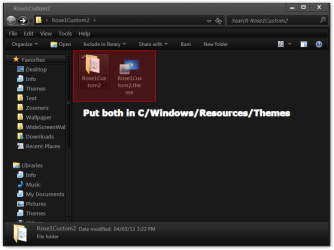
Here you go download and open the zip folder and open the folder inside of it and put the two in C/Windows/Resources/Themes
It will show up in the Personalization as Rose1Custom2
Rose1Custom2.png
Look at the screenshot it tells you what & where to put them. There is 1 Rose1Custom2 theme folder & 1 Rose1Custom2.theme file put both in C/Windows/Resources/Themes
Then Go to Personalization & click on Rose1Custom2


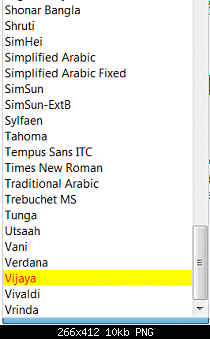
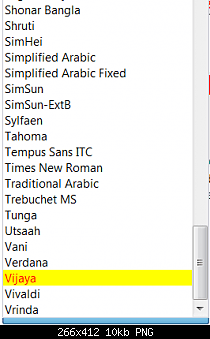
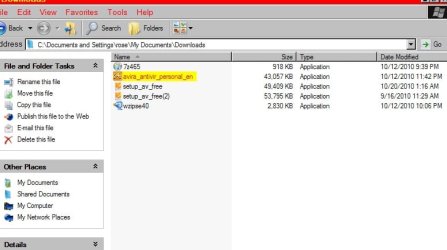
I cannot reproduce this so I cannot change it, how did you get the yellow highlight and the red text?
blue shadow 1.png
Jerry
 
Last edited:

My Computer My Computer

At a glance

Win 7 Pro x64 / Win 10 ProIntel(R) Core(TM) i7-3630QM CPU @ 2.40GHz12 GB(1) Intel(R) HD Graphics 4000 (2) NVIDIA GeFo...
Computer type
Laptop
Computer Manufacturer/Model Number
Sager NP9170
OS
Win 7 Pro x64 / Win 10 Pro
CPU
Intel(R) Core(TM) i7-3630QM CPU @ 2.40GHz
Motherboard
CLEVO P170EM
Memory
12 GB
Graphics Card(s)
(1) Intel(R) HD Graphics 4000 (2) NVIDIA GeForce GTX 675M
Sound Card
(1) Realtek High Definition Audio (2) Intel(R) Display Aud
Monitor(s) Displays
17.3
Screen Resolution
1920x1080
Hard Drives
(1) Samsung 860 EVO 500GB(OS) (1) Samsung 860 EVO 500GB(Data)
Keyboard
Backlite
Antivirus
MSE, Malwarebytes Pro
Browser
Firefox
Other Info
DESKTOP: Custom-built.
OS: Win 10 Pro x64.
CASE: Rosewill R5.
CPU: Intel I5 4670K CPU @ 3.40GHz.
CPU COOLER: Cool Master Hyper 212 EVO.
MOTHERBOARD: Asus Z87-A.
MEMORY: Kingston HyperX 2x4 GB.
GPU: Nvidia Geforce 650 TI.
PSU: Corsair TX750.
DRIVES: (1) Samsung 840 120 GB SSD (2) Western Digital blue 500 GB 7200 RPM.
The yellow highlight I got it on appearance selected. The zip worked. Also, one more thing. The restore and minimize when putting the mouseover it shows white shadows.
 
Last edited:

My Computer My Computer

At a glance

windows Ultimate
Computer type
Laptop
Computer Manufacturer/Model Number
compaq
OS
windows Ultimate

My Computer My Computer

At a glance

Win 7 Pro x64 / Win 10 ProIntel(R) Core(TM) i7-3630QM CPU @ 2.40GHz12 GB(1) Intel(R) HD Graphics 4000 (2) NVIDIA GeFo...
Computer type
Laptop
Computer Manufacturer/Model Number
Sager NP9170
OS
Win 7 Pro x64 / Win 10 Pro
CPU
Intel(R) Core(TM) i7-3630QM CPU @ 2.40GHz
Motherboard
CLEVO P170EM
Memory
12 GB
Graphics Card(s)
(1) Intel(R) HD Graphics 4000 (2) NVIDIA GeForce GTX 675M
Sound Card
(1) Realtek High Definition Audio (2) Intel(R) Display Aud
Monitor(s) Displays
17.3
Screen Resolution
1920x1080
Hard Drives
(1) Samsung 860 EVO 500GB(OS) (1) Samsung 860 EVO 500GB(Data)
Keyboard
Backlite
Antivirus
MSE, Malwarebytes Pro
Browser
Firefox
Other Info
DESKTOP: Custom-built.
OS: Win 10 Pro x64.
CASE: Rosewill R5.
CPU: Intel I5 4670K CPU @ 3.40GHz.
CPU COOLER: Cool Master Hyper 212 EVO.
MOTHERBOARD: Asus Z87-A.
MEMORY: Kingston HyperX 2x4 GB.
GPU: Nvidia Geforce 650 TI.
PSU: Corsair TX750.
DRIVES: (1) Samsung 840 120 GB SSD (2) Western Digital blue 500 GB 7200 RPM.
I also have this and this will be last if you don't mind, and when opening the attachement the window appears. Click on browse and all is blue highlight too when putting the mouse over. The other zip is fine. I want if I can have plane highlights without the shadows?
 

Attachments

  • blue shadows.png
    blue shadows.png
    556 bytes · Views: 87
Last edited:

My Computer My Computer

At a glance

windows Ultimate
Computer type
Laptop
Computer Manufacturer/Model Number
compaq
OS
windows Ultimate
Previous post I mentioned a highlight on the right panel to delete something. I would like a highlight on the screenshot like this in order to delete a file.
 

Attachments

  • highlight.jpg
    highlight.jpg
    37.4 KB · Views: 4

My Computer My Computer

At a glance

windows Ultimate
Computer type
Laptop
Computer Manufacturer/Model Number
compaq
OS
windows Ultimate
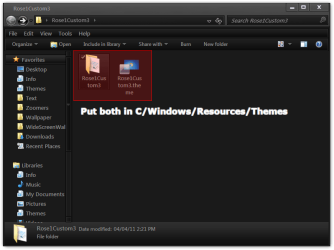
Here you go download and open the zip folder and open the folder inside of it and put the two in C/Windows/Resources/Themes
It will show up in the Personalization as Rose1Custom3
Rose1Custom3.png
Look at the screenshot it tells you what & where to put them. There is 1 Rose1Custom3 theme folder & 1 Rose1Custom3.theme file put both in C/Windows/Resources/Themes
Then Go to Personalization & click on Rose1Custom3
Jerry
 
Last edited:

My Computer My Computer

At a glance

Win 7 Pro x64 / Win 10 ProIntel(R) Core(TM) i7-3630QM CPU @ 2.40GHz12 GB(1) Intel(R) HD Graphics 4000 (2) NVIDIA GeFo...
Computer type
Laptop
Computer Manufacturer/Model Number
Sager NP9170
OS
Win 7 Pro x64 / Win 10 Pro
CPU
Intel(R) Core(TM) i7-3630QM CPU @ 2.40GHz
Motherboard
CLEVO P170EM
Memory
12 GB
Graphics Card(s)
(1) Intel(R) HD Graphics 4000 (2) NVIDIA GeForce GTX 675M
Sound Card
(1) Realtek High Definition Audio (2) Intel(R) Display Aud
Monitor(s) Displays
17.3
Screen Resolution
1920x1080
Hard Drives
(1) Samsung 860 EVO 500GB(OS) (1) Samsung 860 EVO 500GB(Data)
Keyboard
Backlite
Antivirus
MSE, Malwarebytes Pro
Browser
Firefox
Other Info
DESKTOP: Custom-built.
OS: Win 10 Pro x64.
CASE: Rosewill R5.
CPU: Intel I5 4670K CPU @ 3.40GHz.
CPU COOLER: Cool Master Hyper 212 EVO.
MOTHERBOARD: Asus Z87-A.
MEMORY: Kingston HyperX 2x4 GB.
GPU: Nvidia Geforce 650 TI.
PSU: Corsair TX750.
DRIVES: (1) Samsung 840 120 GB SSD (2) Western Digital blue 500 GB 7200 RPM.
Excellent. Thank you for your help and been patient with me. I appreciated. If I have other question I will be posting at this forum ☺
 

My Computer My Computer

At a glance

windows Ultimate
Computer type
Laptop
Computer Manufacturer/Model Number
compaq
OS
windows Ultimate
I wish windows 7 put options for all these situations. I had to other question, but it is not important and I don't want to bother you with it. I wish I can do what you did.
 

My Computer My Computer

At a glance

windows Ultimate
Computer type
Laptop
Computer Manufacturer/Model Number
compaq
OS
windows Ultimate
Excellent. Thank you for your help and been patient with me. I appreciated. If I have other question I will be posting at this forum ☺
Your Welcome Rose1
I wish windows 7 put options for all these situations. I had to other question, but it is not important and I don't want to bother you with it. I wish I can do what you did.
You can with WSB & Photoshop Or Gimp or Paint
 

My Computer My Computer

At a glance

Win 7 Pro x64 / Win 10 ProIntel(R) Core(TM) i7-3630QM CPU @ 2.40GHz12 GB(1) Intel(R) HD Graphics 4000 (2) NVIDIA GeFo...
Computer type
Laptop
Computer Manufacturer/Model Number
Sager NP9170
OS
Win 7 Pro x64 / Win 10 Pro
CPU
Intel(R) Core(TM) i7-3630QM CPU @ 2.40GHz
Motherboard
CLEVO P170EM
Memory
12 GB
Graphics Card(s)
(1) Intel(R) HD Graphics 4000 (2) NVIDIA GeForce GTX 675M
Sound Card
(1) Realtek High Definition Audio (2) Intel(R) Display Aud
Monitor(s) Displays
17.3
Screen Resolution
1920x1080
Hard Drives
(1) Samsung 860 EVO 500GB(OS) (1) Samsung 860 EVO 500GB(Data)
Keyboard
Backlite
Antivirus
MSE, Malwarebytes Pro
Browser
Firefox
Other Info
DESKTOP: Custom-built.
OS: Win 10 Pro x64.
CASE: Rosewill R5.
CPU: Intel I5 4670K CPU @ 3.40GHz.
CPU COOLER: Cool Master Hyper 212 EVO.
MOTHERBOARD: Asus Z87-A.
MEMORY: Kingston HyperX 2x4 GB.
GPU: Nvidia Geforce 650 TI.
PSU: Corsair TX750.
DRIVES: (1) Samsung 840 120 GB SSD (2) Western Digital blue 500 GB 7200 RPM.
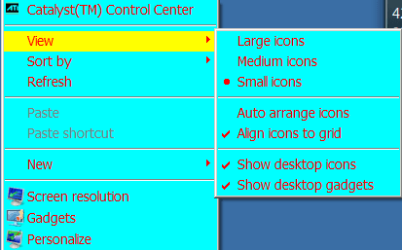
This will be my only last thing to ask hopefully. The only thing I want to change was when I go to the right click on empty space on desktop I want to change to this screenshot. Ignore the blue background.
 

Attachments

  • drop down menus.png
    drop down menus.png
    5.7 KB · Views: 5

My Computer My Computer

At a glance

windows Ultimate
Computer type
Laptop
Computer Manufacturer/Model Number
compaq
OS
windows Ultimate
This will be my only last thing to ask hopefully. The only thing I want to change was when I go to the right click on empty space on desktop I want to change to this screenshot. Ignore the blue background.
What is it you want changed the color or what??
This changes all right click menus and will change the drop down menus in Windows Explorer.
Jerry
 

My Computer My Computer

At a glance

Win 7 Pro x64 / Win 10 ProIntel(R) Core(TM) i7-3630QM CPU @ 2.40GHz12 GB(1) Intel(R) HD Graphics 4000 (2) NVIDIA GeFo...
Computer type
Laptop
Computer Manufacturer/Model Number
Sager NP9170
OS
Win 7 Pro x64 / Win 10 Pro
CPU
Intel(R) Core(TM) i7-3630QM CPU @ 2.40GHz
Motherboard
CLEVO P170EM
Memory
12 GB
Graphics Card(s)
(1) Intel(R) HD Graphics 4000 (2) NVIDIA GeForce GTX 675M
Sound Card
(1) Realtek High Definition Audio (2) Intel(R) Display Aud
Monitor(s) Displays
17.3
Screen Resolution
1920x1080
Hard Drives
(1) Samsung 860 EVO 500GB(OS) (1) Samsung 860 EVO 500GB(Data)
Keyboard
Backlite
Antivirus
MSE, Malwarebytes Pro
Browser
Firefox
Other Info
DESKTOP: Custom-built.
OS: Win 10 Pro x64.
CASE: Rosewill R5.
CPU: Intel I5 4670K CPU @ 3.40GHz.
CPU COOLER: Cool Master Hyper 212 EVO.
MOTHERBOARD: Asus Z87-A.
MEMORY: Kingston HyperX 2x4 GB.
GPU: Nvidia Geforce 650 TI.
PSU: Corsair TX750.
DRIVES: (1) Samsung 840 120 GB SSD (2) Western Digital blue 500 GB 7200 RPM.
The desktop when clicking on empty space right click.
 

My Computer My Computer

At a glance

windows Ultimate
Computer type
Laptop
Computer Manufacturer/Model Number
compaq
OS
windows Ultimate
The desktop when clicking on empty space right click.
Yes I can see that but what is it you want changed?
Can you circle the items or point to it, use paint.
 

My Computer My Computer

At a glance

Win 7 Pro x64 / Win 10 ProIntel(R) Core(TM) i7-3630QM CPU @ 2.40GHz12 GB(1) Intel(R) HD Graphics 4000 (2) NVIDIA GeFo...
Computer type
Laptop
Computer Manufacturer/Model Number
Sager NP9170
OS
Win 7 Pro x64 / Win 10 Pro
CPU
Intel(R) Core(TM) i7-3630QM CPU @ 2.40GHz
Motherboard
CLEVO P170EM
Memory
12 GB
Graphics Card(s)
(1) Intel(R) HD Graphics 4000 (2) NVIDIA GeForce GTX 675M
Sound Card
(1) Realtek High Definition Audio (2) Intel(R) Display Aud
Monitor(s) Displays
17.3
Screen Resolution
1920x1080
Hard Drives
(1) Samsung 860 EVO 500GB(OS) (1) Samsung 860 EVO 500GB(Data)
Keyboard
Backlite
Antivirus
MSE, Malwarebytes Pro
Browser
Firefox
Other Info
DESKTOP: Custom-built.
OS: Win 10 Pro x64.
CASE: Rosewill R5.
CPU: Intel I5 4670K CPU @ 3.40GHz.
CPU COOLER: Cool Master Hyper 212 EVO.
MOTHERBOARD: Asus Z87-A.
MEMORY: Kingston HyperX 2x4 GB.
GPU: Nvidia Geforce 650 TI.
PSU: Corsair TX750.
DRIVES: (1) Samsung 840 120 GB SSD (2) Western Digital blue 500 GB 7200 RPM.
Right now when I click on empty desktop on right click the highlight is to gray.
 

My Computer My Computer

At a glance

windows Ultimate
Computer type
Laptop
Computer Manufacturer/Model Number
compaq
OS
windows Ultimate
Right now when I click on empty desktop on right click the highlight is to gray.
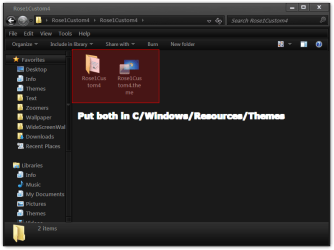
Here you go download and open the zip folder and open the folder inside of it and put the two in C/Windows/Resources/Themes
It will show up in the Personalization as Rose1Custom4
Rose1Custom4.png
Look at the screenshot it tells you what & where to put them. There is 1 Rose1Custom4 theme folder & 1 Rose1Custom4.theme file put both in C/Windows/Resources/Themes
Then Go to Personalization & click on Rose1Custom4
Jerry
 
Last edited:

My Computer My Computer

At a glance

Win 7 Pro x64 / Win 10 ProIntel(R) Core(TM) i7-3630QM CPU @ 2.40GHz12 GB(1) Intel(R) HD Graphics 4000 (2) NVIDIA GeFo...
Computer type
Laptop
Computer Manufacturer/Model Number
Sager NP9170
OS
Win 7 Pro x64 / Win 10 Pro
CPU
Intel(R) Core(TM) i7-3630QM CPU @ 2.40GHz
Motherboard
CLEVO P170EM
Memory
12 GB
Graphics Card(s)
(1) Intel(R) HD Graphics 4000 (2) NVIDIA GeForce GTX 675M
Sound Card
(1) Realtek High Definition Audio (2) Intel(R) Display Aud
Monitor(s) Displays
17.3
Screen Resolution
1920x1080
Hard Drives
(1) Samsung 860 EVO 500GB(OS) (1) Samsung 860 EVO 500GB(Data)
Keyboard
Backlite
Antivirus
MSE, Malwarebytes Pro
Browser
Firefox
Other Info
DESKTOP: Custom-built.
OS: Win 10 Pro x64.
CASE: Rosewill R5.
CPU: Intel I5 4670K CPU @ 3.40GHz.
CPU COOLER: Cool Master Hyper 212 EVO.
MOTHERBOARD: Asus Z87-A.
MEMORY: Kingston HyperX 2x4 GB.
GPU: Nvidia Geforce 650 TI.
PSU: Corsair TX750.
DRIVES: (1) Samsung 840 120 GB SSD (2) Western Digital blue 500 GB 7200 RPM.
Thanks. I like it. Still grayish, but it will do. Thank you.
 

My Computer My Computer

At a glance

windows Ultimate
Computer type
Laptop
Computer Manufacturer/Model Number
compaq
OS
windows Ultimate
Back
Top