Solved Remove System Reserved Partition+Partition Wizard

C-11

Mickey
Guru
VIP
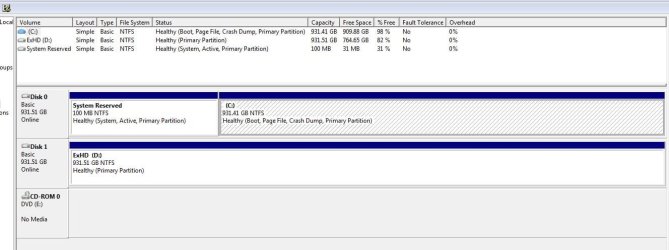
When I restore from an image there's only 31% free on the System Reserved Partition.
I have to wait about 30 minutes or longer and then there is 63% free, then I can create an image.

I want to continue to use the Win 7 backup utility because it's very reliable on my computer.

You must have a Windows 7 Installation or Repair disc to do this.
System Reserved Partition - Delete - Windows 7 Forums
I've got a systen repair disc and the Partition Wizard Bootable CD.

I want to make sure I get this right before I do anything.

What do I do first, second, third & etc.?

There is an easier-to-use graphical interface to do all of this using free Partition Wizard bootable CD. BareFootKid just wrote up a tutorial about using it to remove the 100mb Sys Reserved partition:
Partition Wizard : Use the Bootable CD

Using it might be easier for you to delete 100mb and also resize Windows 7 into the deleted 100mb HD space at the same time.
Windows 7 Forums - View Single Post - Backup Error code: 0x81000019
I found the information above from this older post> Backup Error code: 0x81000019 - Windows 7 Forums

The Disk 1 labled ExHD (D) below is an internal hard drive for my back ups.

The main question is how do I make the System Reserved Partition bigger? Delete & recreate, if so what steps do I take first, second & so on?
I don't want to mess up!
 

Attachments
  • DiskManage1.JPG
    DiskManage1.JPG
    118.6 KB · Views: 310
Last edited:

My Computer

Computer type
PC/Desktop
Computer Manufacturer/Model Number
Dell Inspiron 530
OS
Windows 7 Professional SP1 64-bit
CPU
Intel Core 2 Duo Processor E8300 @ 2.83GHz
Motherboard
Dell Inc. 0RY007 (Socket 775)
Memory
4.00 GB Dual-Channel DDR2 @ 332MHz (5-5-5-15)
Graphics Card(s)
Intel(R) G33/G31 Express Chipset Family
Sound Card
Integrated 7.1 Channel Audio
Monitor(s) Displays
Acer G245HQL 23.6" LED(1920x1080@60Hz)
Screen Resolution
1920 x 1080
Hard Drives
Disk 0 HITACHI 1TB OS Installed - Disk 1 HITACHI 1TB For Backups
Keyboard
Dell USB Keyboard
Mouse
Dell Optical USB Mouse
Internet Speed
DSL 10 meg
Antivirus
Symantec(SEP)
Browser
Pale Moon
System reserve is the wrong place to make your Backup for starters.
Damaging the Sys Reserve can cause problems.

Try putting Back ups on the external hard drive.

I don't think the OP is trying to put backups on the system reserved, the thread he

linked to is in regards to the error code which was originally failing backups because

of not enough free space in the system reserved partition, the solutions offered are

to make the system reserved larger or delete it and make the C partition active,

which would then require http://www.sevenforums.com/tutorials/105541-startup-repair-run-3-separate-times.html

Greg's post here http://www.sevenforums.com/backup-restore/101199-backup-error-code-0x81000019-3.html#post874304

explains the delete method.

Greg can expand on this, or the other method.
 

My Computer

Computer type
PC/Desktop
Computer Manufacturer/Model Number
Self Built
OS
Win 10 Pro x64
CPU
Intel I5-2500K @3.3GHz
Motherboard
Asrock P67 Extreme4
Memory
16GB G.Skill Ripjaws X (4x4GB)
Graphics Card(s)
EVGA GeForce 750 Ti SC 2GB
Sound Card
ASUS Xonar DG 5.1 Channels 24-bit 96KHz PCI Interface Sound
Monitor(s) Displays
auria eq2367
Screen Resolution
1920 x 1080
Hard Drives
250GB Samsung 850 EVO SSD
1TB WD Blue
1TB Hitachi
PSU
SeaSonic X 650W 80 Plus Gold
Case
Corsair Obsidian 750D
Cooling
Corsair H60, Three 140mm case fans
Keyboard
Logitech Wireless Keyboard K520
Mouse
Logitech Wireless Mouse M310
Internet Speed
Wave Broadband ~ 100 dn 5 up
Antivirus
Windows Defender, Malwarebytes Premium
Browser
Edge, IE11, Chrome
Other Info
Laptop specs: HP g7-1365dx /
CPU: AMD A6-3420M APU with Radeon(tm) HD Graphics /
RAM: Crucial 8Gb (2x4Gb) /
SSD: Crucial M4-CT128M4SSD2 ATA Device/ FW 000F /
GFX: AMD Radeon HD 6520G /
OS: Windows 10 Pro x64
System reserve is the wrong place to make your Backup for starters.
Damaging the Sys Reserve can cause problems.

Try putting Back ups on the external hard drive.

I don't think the OP is trying to put backups on the system reserved, the thread he

linked to is in regards to the error code which was originally failing backups because

of not enough free space in the system reserved partition, the solutions offered are

to make the system reserved larger or delete it and make the C partition active,

which would then require http://www.sevenforums.com/tutorials/105541-startup-repair-run-3-separate-times.html

Greg's post here http://www.sevenforums.com/backup-restore/101199-backup-error-code-0x81000019-3.html#post874304

explains the delete method.

Greg can expand on this, or the other method.
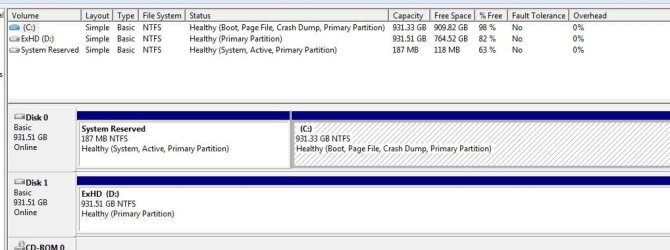
Exactly!

Then, when I restore from an image there's only 31% free on the System Reserved Partition.
If I try to create an image I get Backup Error code: 0x81000019.

I have to wait about 30 minutes or longer and then there is 63% free, then I can create an image.
 

Attachments

  • DiskManage2.JPG
    DiskManage2.JPG
    114.5 KB · Views: 72

My Computer

Computer type
PC/Desktop
Computer Manufacturer/Model Number
Dell Inspiron 530
OS
Windows 7 Professional SP1 64-bit
CPU
Intel Core 2 Duo Processor E8300 @ 2.83GHz
Motherboard
Dell Inc. 0RY007 (Socket 775)
Memory
4.00 GB Dual-Channel DDR2 @ 332MHz (5-5-5-15)
Graphics Card(s)
Intel(R) G33/G31 Express Chipset Family
Sound Card
Integrated 7.1 Channel Audio
Monitor(s) Displays
Acer G245HQL 23.6" LED(1920x1080@60Hz)
Screen Resolution
1920 x 1080
Hard Drives
Disk 0 HITACHI 1TB OS Installed - Disk 1 HITACHI 1TB For Backups
Keyboard
Dell USB Keyboard
Mouse
Dell Optical USB Mouse
Internet Speed
DSL 10 meg
Antivirus
Symantec(SEP)
Browser
Pale Moon
There is no need to restore the 100MB partition all the time. That partition never changes unless you add a double boot. I keep only 1 copy of the 100MB partition in case I have to move everything to another disk.

Problem you run into is that Windows7 imaging does not give you the option to restore C: alone. That is one reason I use other imaging programs (free Macrium and free Paragon).
 

My Computer

Computer Manufacturer/Model Number
HP, Dell, Gateway, Toshiba - 4 laptops and 2 desktops
OS
Vista, Windows7, Mint Mate, Zorin, Windows 8
CPU
from 1.6GHz Duo to i7
Monitor(s) Displays
2x HP w2207
Hard Drives
5x HDD, 7x SSD, 12x Externals
Keyboard
with trackball - no mices
Mouse
Trackball mice
Internet Speed
DSL 6000
Back up your files and a Win7 backup image: Backup Complete Computer - Create an Image Backup . Use free Macrium if necessary: Macrium - Image your system

Boot free Partition Wizard CD, rightclick on C to Resize, left click hold to slide the left border to the right by the amount you want to increase System Reserved (I'd add another 100mb), click OK.

Then rightclick on SysReserved to Resize, drag right border all the way over to the right into the space you made on the left side of C, OK. Make sure it looks right then click Apply.

Reboot and try making your image again. If Win7 won't start boot Win7 DVD Repair console or System Repair Disk to run up to 3 Startup Repairs with reboots as shown in Derek's link to repair or rewrite the System boot files to SysReserved which may itself solve your issue.
 
Back up your files and a Win7 backup image: Backup Complete Computer - Create an Image Backup . Use free Macrium if necessary: Macrium - Image your system

Boot free Partition Wizard CD, rightclick on C to Resize, left click hold to slide the left border to the right by the amount you want to increase System Reserved (I'd add another 100mb), click OK.

Then rightclick on SysReserved to Resize, drag right border all the way over to the right into the space you made on the left side of C, OK. Make sure it looks right then click Apply.

Reboot and try making your image again. If Win7 won't start boot Win7 DVD Repair console or System Repair Disk to run up to 3 Startup Repairs with reboots as shown in Derek's link to repair or rewrite the System boot files to SysReserved which may itself solve your issue.
I'll do this when I have a little more time and let you know it goes.

Thanks Greg!
 

My Computer

Computer type
PC/Desktop
Computer Manufacturer/Model Number
Dell Inspiron 530
OS
Windows 7 Professional SP1 64-bit
CPU
Intel Core 2 Duo Processor E8300 @ 2.83GHz
Motherboard
Dell Inc. 0RY007 (Socket 775)
Memory
4.00 GB Dual-Channel DDR2 @ 332MHz (5-5-5-15)
Graphics Card(s)
Intel(R) G33/G31 Express Chipset Family
Sound Card
Integrated 7.1 Channel Audio
Monitor(s) Displays
Acer G245HQL 23.6" LED(1920x1080@60Hz)
Screen Resolution
1920 x 1080
Hard Drives
Disk 0 HITACHI 1TB OS Installed - Disk 1 HITACHI 1TB For Backups
Keyboard
Dell USB Keyboard
Mouse
Dell Optical USB Mouse
Internet Speed
DSL 10 meg
Antivirus
Symantec(SEP)
Browser
Pale Moon
I think this is normal behaviour for Windows imaging. I use it and free Macrium Reflect. Between the 2 I feel reasonably safe.

If the system reserved doesn't free up the required 50MB (reqd for most cases) then you can have a look at:
1) USN journal files clogging things up. Try using the fsutil command like here.
Windows 7 backup error 0x81000019 - a knol by Yohann Sulaiman
2) Delete the system reserved by transferring it's boot functions to the OS partition. I tend to keep it though.
3) Make it bigger. I have used Partition Wizard boot CD to resize from 100MB to ~200MB. I needed to schedule a chkdsk which did a file system repair. It seemed to work ok. Note: I had nothing to lose since I was making a separate drive for my son to use. I still wouldn't do this on a one HDD system.
 

My Computer

Computer type
PC/Desktop
Computer Manufacturer/Model Number
Own build
OS
Windows 7x64 Home Premium SP1
CPU
Intel i7 2600k
Motherboard
ASUS P8Z68 Deluxe
Memory
G.Skill Ripjaws (DDR3-1600) 2x4GB
Graphics Card(s)
Nvidia GeForce GTS 450; Intel HD Graphics 3000(GT2+)
Monitor(s) Displays
Dell Ultrasharp IPS panel U2311H, Samsung SyncMaster P2350
Screen Resolution
1920x1080
Hard Drives
Samsung 850 Pro SSD 256GB, Samsung SSD 840 120GB, Seagates 1TB Barracuda ST31000528AS x2
PSU
Seasonic M12II 520W
Case
Lian Li Lancool PC-K60
Cooling
Case: 1x120mm, 3x140mm CPU: Hyper 212+
Keyboard
Logitech MK520 (wireless)
Mouse
Logitech MK520
Internet Speed
6-7 Mbps
Antivirus
Norton Security Premium, Malwarebytes on 2 (MSE on 3rd PC)
Browser
FireFox
Other Info
Audio: Logitech Z523 2.1
Back up your files and a Win7 backup image: Backup Complete Computer - Create an Image Backup . Use free Macrium if necessary: Macrium - Image your system

Boot free Partition Wizard CD, rightclick on C to Resize, left click hold to slide the left border to the right by the amount you want to increase System Reserved (I'd add another 100mb), click OK.

Then rightclick on SysReserved to Resize, drag right border all the way over to the right into the space you made on the left side of C, OK. Make sure it looks right then click Apply.
Ok, did this but in System Protection something was added so I restored from an image.

Local Disk C said no System Restore points available & C(Missing) was added.
 

Attachments

  • C-Missing.JPG
    C-Missing.JPG
    52.1 KB · Views: 42

My Computer

Computer type
PC/Desktop
Computer Manufacturer/Model Number
Dell Inspiron 530
OS
Windows 7 Professional SP1 64-bit
CPU
Intel Core 2 Duo Processor E8300 @ 2.83GHz
Motherboard
Dell Inc. 0RY007 (Socket 775)
Memory
4.00 GB Dual-Channel DDR2 @ 332MHz (5-5-5-15)
Graphics Card(s)
Intel(R) G33/G31 Express Chipset Family
Sound Card
Integrated 7.1 Channel Audio
Monitor(s) Displays
Acer G245HQL 23.6" LED(1920x1080@60Hz)
Screen Resolution
1920 x 1080
Hard Drives
Disk 0 HITACHI 1TB OS Installed - Disk 1 HITACHI 1TB For Backups
Keyboard
Dell USB Keyboard
Mouse
Dell Optical USB Mouse
Internet Speed
DSL 10 meg
Antivirus
Symantec(SEP)
Browser
Pale Moon
This is common after a repair. You simply click on C:Missing, turn System Protection Off, then enable it on C.

You should have asked as it would have saved you trouble. We deal with these issues regularly.

Do you still wish to expand Sys Reserved partition to see if it solves your issue, or jump ahead to the next step to delete it and recover System boot files into Win7 partition itself?
 
This is common after a repair. You simply click on C:Missing, turn System Protection Off, then enable it on C.

You should have asked as it would have saved you trouble. We deal with these issues regularly.

Do you still wish to expand Sys Reserved partition to see if it solves your issue, or jump ahead to the next step to delete it and recover System boot files into Win7 partition itself?
I'll go ahead and expand Sys Reserved partition again.
Be back in a little I hope.
 

My Computer

Computer type
PC/Desktop
Computer Manufacturer/Model Number
Dell Inspiron 530
OS
Windows 7 Professional SP1 64-bit
CPU
Intel Core 2 Duo Processor E8300 @ 2.83GHz
Motherboard
Dell Inc. 0RY007 (Socket 775)
Memory
4.00 GB Dual-Channel DDR2 @ 332MHz (5-5-5-15)
Graphics Card(s)
Intel(R) G33/G31 Express Chipset Family
Sound Card
Integrated 7.1 Channel Audio
Monitor(s) Displays
Acer G245HQL 23.6" LED(1920x1080@60Hz)
Screen Resolution
1920 x 1080
Hard Drives
Disk 0 HITACHI 1TB OS Installed - Disk 1 HITACHI 1TB For Backups
Keyboard
Dell USB Keyboard
Mouse
Dell Optical USB Mouse
Internet Speed
DSL 10 meg
Antivirus
Symantec(SEP)
Browser
Pale Moon
Internet went down or I would've been back sooner.

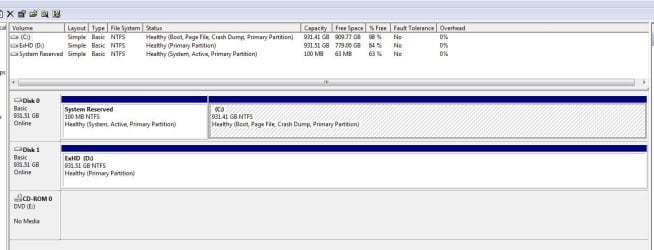
Alright, that fixed it!

Created an image & restored from the same image & had 63% free on Sys Reserved partition.

Thanks Greg!
 

Attachments

  • DiskManage3.JPG
    DiskManage3.JPG
    84.6 KB · Views: 48

My Computer

Computer type
PC/Desktop
Computer Manufacturer/Model Number
Dell Inspiron 530
OS
Windows 7 Professional SP1 64-bit
CPU
Intel Core 2 Duo Processor E8300 @ 2.83GHz
Motherboard
Dell Inc. 0RY007 (Socket 775)
Memory
4.00 GB Dual-Channel DDR2 @ 332MHz (5-5-5-15)
Graphics Card(s)
Intel(R) G33/G31 Express Chipset Family
Sound Card
Integrated 7.1 Channel Audio
Monitor(s) Displays
Acer G245HQL 23.6" LED(1920x1080@60Hz)
Screen Resolution
1920 x 1080
Hard Drives
Disk 0 HITACHI 1TB OS Installed - Disk 1 HITACHI 1TB For Backups
Keyboard
Dell USB Keyboard
Mouse
Dell Optical USB Mouse
Internet Speed
DSL 10 meg
Antivirus
Symantec(SEP)
Browser
Pale Moon
Anyone else doing this I would suggest you check the filesystem on C: after doing this sort of operation. It may or may not need an auto fix.
 

My Computer

Computer type
PC/Desktop
Computer Manufacturer/Model Number
Own build
OS
Windows 7x64 Home Premium SP1
CPU
Intel i7 2600k
Motherboard
ASUS P8Z68 Deluxe
Memory
G.Skill Ripjaws (DDR3-1600) 2x4GB
Graphics Card(s)
Nvidia GeForce GTS 450; Intel HD Graphics 3000(GT2+)
Monitor(s) Displays
Dell Ultrasharp IPS panel U2311H, Samsung SyncMaster P2350
Screen Resolution
1920x1080
Hard Drives
Samsung 850 Pro SSD 256GB, Samsung SSD 840 120GB, Seagates 1TB Barracuda ST31000528AS x2
PSU
Seasonic M12II 520W
Case
Lian Li Lancool PC-K60
Cooling
Case: 1x120mm, 3x140mm CPU: Hyper 212+
Keyboard
Logitech MK520 (wireless)
Mouse
Logitech MK520
Internet Speed
6-7 Mbps
Antivirus
Norton Security Premium, Malwarebytes on 2 (MSE on 3rd PC)
Browser
FireFox
Other Info
Audio: Logitech Z523 2.1
Partition Wizard checks the file system as it Resizes, but it's always a good idea to run it again once you're into Windows: Disk Check

In fact, Puran Defragger offers a boot-time defrag which includes System Files which can only be defragged at boot, along with a Full Disk Check. It's state of the art: Puran Defrag Free Edition - Free software downloads and software reviews - CNET Download.com

I run it monthly after CCleaner Disk and Registry cleanup: CCleaner - Free software downloads and software reviews - CNET Download.com
 
I did the precise exercise a couple of days ago using PW V7. When I checked C: Windows wanted to do a filesystem fix. So I let it.
 

My Computer

Computer type
PC/Desktop
Computer Manufacturer/Model Number
Own build
OS
Windows 7x64 Home Premium SP1
CPU
Intel i7 2600k
Motherboard
ASUS P8Z68 Deluxe
Memory
G.Skill Ripjaws (DDR3-1600) 2x4GB
Graphics Card(s)
Nvidia GeForce GTS 450; Intel HD Graphics 3000(GT2+)
Monitor(s) Displays
Dell Ultrasharp IPS panel U2311H, Samsung SyncMaster P2350
Screen Resolution
1920x1080
Hard Drives
Samsung 850 Pro SSD 256GB, Samsung SSD 840 120GB, Seagates 1TB Barracuda ST31000528AS x2
PSU
Seasonic M12II 520W
Case
Lian Li Lancool PC-K60
Cooling
Case: 1x120mm, 3x140mm CPU: Hyper 212+
Keyboard
Logitech MK520 (wireless)
Mouse
Logitech MK520
Internet Speed
6-7 Mbps
Antivirus
Norton Security Premium, Malwarebytes on 2 (MSE on 3rd PC)
Browser
FireFox
Other Info
Audio: Logitech Z523 2.1

My Computer

Computer type
PC/Desktop
Computer Manufacturer/Model Number
Own build
OS
Windows 7x64 Home Premium SP1
CPU
Intel i7 2600k
Motherboard
ASUS P8Z68 Deluxe
Memory
G.Skill Ripjaws (DDR3-1600) 2x4GB
Graphics Card(s)
Nvidia GeForce GTS 450; Intel HD Graphics 3000(GT2+)
Monitor(s) Displays
Dell Ultrasharp IPS panel U2311H, Samsung SyncMaster P2350
Screen Resolution
1920x1080
Hard Drives
Samsung 850 Pro SSD 256GB, Samsung SSD 840 120GB, Seagates 1TB Barracuda ST31000528AS x2
PSU
Seasonic M12II 520W
Case
Lian Li Lancool PC-K60
Cooling
Case: 1x120mm, 3x140mm CPU: Hyper 212+
Keyboard
Logitech MK520 (wireless)
Mouse
Logitech MK520
Internet Speed
6-7 Mbps
Antivirus
Norton Security Premium, Malwarebytes on 2 (MSE on 3rd PC)
Browser
FireFox
Other Info
Audio: Logitech Z523 2.1
Back
Top