remove win xp (in primary partion) in dual boot with windows 10

raghav sah

New member
Local time
10:00 PM
Messages
4
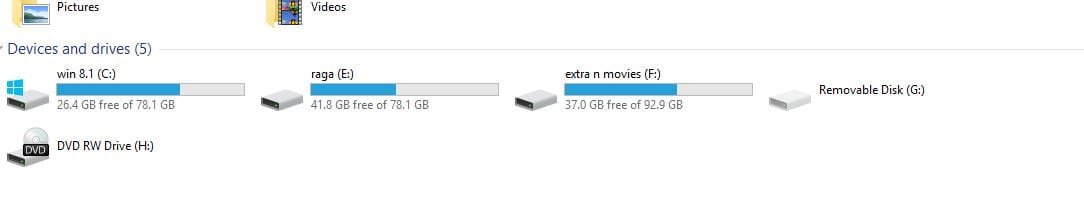
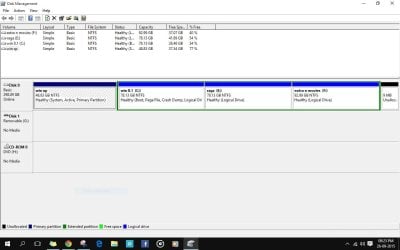
I have windows xp and windows 10 dual boot. I want to remove windows xp which is in the primary partition and that disk has booting files. So i cant format hat disk. Also that drive doesnt show up in my computer in windows 10, though it shows up in disk management. So i even want to get that disk back without windows xp. I have a small partition of 9 mb which was aleady present. How can i move those boot files to that small partition and gain back that disk in windows 10 without anything in it(neither win xp nor the boot files, bcz i may format it again). please suggest some easy way...
 

Attachments
  • 1.JPG
    1.JPG
    78.3 KB · Views: 5
  • 2.JPG
    2.JPG
    19.7 KB · Views: 3

My Computer My Computer

At a glance

window 10 x643 gb
Computer type
Laptop
Computer Manufacturer/Model Number
hcl
OS
window 10 x64
Memory
3 gb
Antivirus
no
I would just start over, get rid of all that garbage and do it right, just do a clean install of 10 on the partition you want to.

Where is windows 10, I don`t see it ? Is it on another drive ?

A 298 GB drive is not big enough for all that.
 

My Computer My Computer

At a glance

Windows 10 Pro x64Intel Core i7 6700KGSkill TridentZ RGB 16GB 3600 16-16-16-36EVGA GTX 980 Ti SC x2
Computer type
PC/Desktop
Computer Manufacturer/Model Number
Skylake Special #666
OS
Windows 10 Pro x64
CPU
Intel Core i7 6700K
Motherboard
Asus Sabertooth Z170 Mark 1
Memory
GSkill TridentZ RGB 16GB 3600 16-16-16-36
Graphics Card(s)
EVGA GTX 980 Ti SC x2
Sound Card
Realtek High Definition
Monitor(s) Displays
AOC G2460PG
Screen Resolution
1920 x 1080 144Hz
Hard Drives
Samsung 860 Pro 256GB, Seagate Barracuda 4TB x2
PSU
EVGA 1000 P2, EVGA White Custom Braided Cables
Case
Corsair Vengeance C70 Gunmetal Black
Cooling
Corsair H100i v2, Corsair ML120 x2, Thermal Grizzly Kryonaut
Keyboard
Logitech G910 Orion Spectrum
Mouse
Logitech G700s
Internet Speed
Verizon Fios Quantum Gateway 75/75
Antivirus
Windows Defender, Malwarebytes Free 3.8.3
Browser
Chrome
Other Info
Corsair SP120 x4, LG Blu-ray Drive, Durabrand HT-395 100 Watt Dolby Digital Amp, Corsair H2100 Wireless 7.1 Headset
Sorry.... But the drive win 8.1 has win10...i frgot to rename it
 

My Computer My Computer

At a glance

window 10 x643 gb
Computer type
Laptop
Computer Manufacturer/Model Number
hcl
OS
window 10 x64
Memory
3 gb
Antivirus
no
N i got the win 10 updste.... So i didnt install it
 

My Computer My Computer

At a glance

window 10 x643 gb
Computer type
Laptop
Computer Manufacturer/Model Number
hcl
OS
window 10 x64
Memory
3 gb
Antivirus
no
Just format the partition that has Win XP , and after that , boot from Win 10 disk , and select , Startup repair from the option ,I hope it will fix the MBR .

if not , do let me know .
 

My Computer My Computer

At a glance

Windows 7 Ultimate 32-bitPentium Dual Core 2.9 GhzA-Data DDR3 1600 Mhz
Computer type
PC/Desktop
Computer Manufacturer/Model Number
Custom build
OS
Windows 7 Ultimate 32-bit
CPU
Pentium Dual Core 2.9 Ghz
Motherboard
Asus H-61 m-k
Memory
A-Data DDR3 1600 Mhz
what abt the boot files n boot manager.... win 10 (c://(win 8.1)) is actually on a logicsal drive without nothing on it...
 

My Computer My Computer

At a glance

window 10 x643 gb
Computer type
Laptop
Computer Manufacturer/Model Number
hcl
OS
window 10 x64
Memory
3 gb
Antivirus
no
Back
Top