Solved Remove XP from dual boot with Windows 7

I stay away from 3rd party partitions, as OP most of the time mess up.
 

My Computer My Computer

OS
ME/XP/Vista/Win7
Wow! So many replies! Thank you, all!

Nevertheless I have to admit I'm lost a bit. Can someone summarize what you guys suggest me to do? Is there any concensus here?

Thanks again!
 

My Computer My Computer

OS
Windows 7 x32
Hello again.

There's no consequence to this and it's very safe and easy to do; click this link (post #16) to view the best way to do this and be sure to post back with any further questions you may have and to keep us informed.
 

My Computer My Computer

Computer Manufacturer/Model Number
* BFK Customs *
OS
W 7 64-bit Ultimate
CPU
Intel Q9550 Yorkfield
Motherboard
ASUS P5Q Pro
Memory
8GB Dominator 8500C5D
Graphics Card(s)
ATI : XFX 5870
Sound Card
Realtek HD Audio 7-1
Monitor(s) Displays
1x 47" LCD HDMI & 3x 26" LCD HDMI
Screen Resolution
1920x1080P & 1920x1200
Hard Drives
1x 80GB Intel X25-M G2 SSD : 1x 500GB & 1x 640GB WD Caviar Black(s)
PSU
Corsair 620HX
Case
Cooler Master RC-690
Cooling
Tuniq Tower 120, 2x 140mm and 3x 120mm case fans
Keyboard
Microsoft 500
Mouse
Razer Diamondback 3G
Internet Speed
14 Mb/s
Other Info
1x Koutech 3Gb/s SATA HDD Hot Swap Rack
Alright, let me just make sure I got this right: in post #16 you suggest:
"Option Four of this tutorial at the link below to safely convert C: to a Primary partition so the "System" boot files can be stored on the Windows 7 C: partition".
Assume it's done then I guess there are more steps to do before I can eliminate the dual boot and boot directly to Windows 7, right? If yes, can outline the further steps so I can see the total flow of steps that i need to do?
Cheers!
 

My Computer My Computer

OS
Windows 7 x32
OK, after the Windows 7 partition is a Primary partition and Windows 7 is booting good as a Primary partition; you will need to mark the Windows 7 Primary partition as the Active partition and do the 3 separate startup repairs so the "System" boot files can be (re)created to the Windows 7 partition so the XP partition can then be removed.

Have a thorough look at the information presented in this tutorial at the link below.


My Computer My Computer

Computer Manufacturer/Model Number
* BFK Customs *
OS
W 7 64-bit Ultimate
CPU
Intel Q9550 Yorkfield
Motherboard
ASUS P5Q Pro
Memory
8GB Dominator 8500C5D
Graphics Card(s)
ATI : XFX 5870
Sound Card
Realtek HD Audio 7-1
Monitor(s) Displays
1x 47" LCD HDMI & 3x 26" LCD HDMI
Screen Resolution
1920x1080P & 1920x1200
Hard Drives
1x 80GB Intel X25-M G2 SSD : 1x 500GB & 1x 640GB WD Caviar Black(s)
PSU
Corsair 620HX
Case
Cooler Master RC-690
Cooling
Tuniq Tower 120, 2x 140mm and 3x 120mm case fans
Keyboard
Microsoft 500
Mouse
Razer Diamondback 3G
Internet Speed
14 Mb/s
Other Info
1x Koutech 3Gb/s SATA HDD Hot Swap Rack
OK, so here is what I'll do:
0./1. Reboot with the freshly created Repair Disk to verify that it works :)
0./2. Shut down the PC :)
1. Unplug the two other hard disks.
2. Reboot using the Partition Wizard Bootable CD and convert C: to a Primary partition
3. Reboot to Windows 7 again to see if it works. (Crossing fingers in the meantime... :))
[3./a Post you a progress update to this forum :)]
4. Run diskmgmt.msc to mark C: as Active partition
5. Reboot again, this time with the Repair Disc and do the Startup Repair (at least 3 times)

Do I miss anything?
Once all this is done, can I delete the old Windows XP partition and add it to the C: ??
 

My Computer My Computer

OS
Windows 7 x32
Very good, after you disconnect the other HDDs (power down first) be sure to set the Windows 7 HDD as second boot device after the CD/DVD drive in the PC BIOS.


You could view this one for use after the Windows 7 is a Primary. ;)


My Computer My Computer

Computer Manufacturer/Model Number
* BFK Customs *
OS
W 7 64-bit Ultimate
CPU
Intel Q9550 Yorkfield
Motherboard
ASUS P5Q Pro
Memory
8GB Dominator 8500C5D
Graphics Card(s)
ATI : XFX 5870
Sound Card
Realtek HD Audio 7-1
Monitor(s) Displays
1x 47" LCD HDMI & 3x 26" LCD HDMI
Screen Resolution
1920x1080P & 1920x1200
Hard Drives
1x 80GB Intel X25-M G2 SSD : 1x 500GB & 1x 640GB WD Caviar Black(s)
PSU
Corsair 620HX
Case
Cooler Master RC-690
Cooling
Tuniq Tower 120, 2x 140mm and 3x 120mm case fans
Keyboard
Microsoft 500
Mouse
Razer Diamondback 3G
Internet Speed
14 Mb/s
Other Info
1x Koutech 3Gb/s SATA HDD Hot Swap Rack
Hi BFK

You can copy & paste boot files from the Win XP, & mark Windows 7 partition active.
No, need to do Startup Repair once.

Ray.
 

My Computer My Computer

OS
ME/XP/Vista/Win7
Yes Ray but as you are always telling me, let's keep it as simple as possible for the OPs. ;)


There's BCDBoot also but let's not go there either.
 

My Computer My Computer

Computer Manufacturer/Model Number
* BFK Customs *
OS
W 7 64-bit Ultimate
CPU
Intel Q9550 Yorkfield
Motherboard
ASUS P5Q Pro
Memory
8GB Dominator 8500C5D
Graphics Card(s)
ATI : XFX 5870
Sound Card
Realtek HD Audio 7-1
Monitor(s) Displays
1x 47" LCD HDMI & 3x 26" LCD HDMI
Screen Resolution
1920x1080P & 1920x1200
Hard Drives
1x 80GB Intel X25-M G2 SSD : 1x 500GB & 1x 640GB WD Caviar Black(s)
PSU
Corsair 620HX
Case
Cooler Master RC-690
Cooling
Tuniq Tower 120, 2x 140mm and 3x 120mm case fans
Keyboard
Microsoft 500
Mouse
Razer Diamondback 3G
Internet Speed
14 Mb/s
Other Info
1x Koutech 3Gb/s SATA HDD Hot Swap Rack
Yes Ray but as you are always telling me, let's keep it as simple as possible for the OPs. ;)


There's BCDBoot also but let's not go there either.

You done the easy simple one in the other thread when I was sleep.:sleep::sleep::sleep:

Ray.
 

My Computer My Computer

OS
ME/XP/Vista/Win7
OK, here I am again. :)

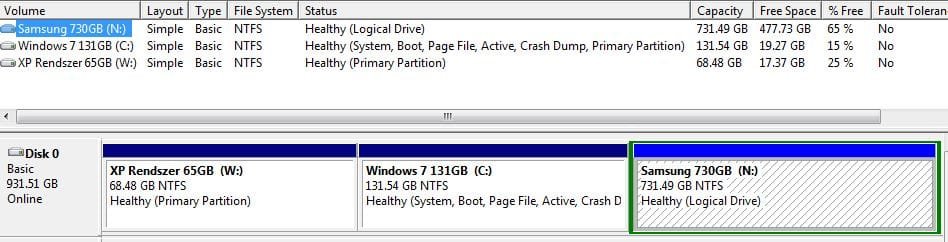
The Repair Disc restarted only twice (is that enough??) and this is how my Disk Mgmt looks like now.

I guess I can move to reclaiming the partition from XP and merge it to the W7, right?
 

Attachments

  • Partitions Capture 3.JPG
    Partitions Capture 3.JPG
    50.3 KB · Views: 8

My Computer My Computer

OS
Windows 7 x32
Very good, after you disconnect the other HDDs (power down first) be sure to set the Windows 7 HDD as second boot device after the CD/DVD drive in the PC BIOS.


You could view this one for use after the Windows 7 is a Primary. ;)
Have you seen this?


Very well done mate! :party:

Later, when you connect the other HDDs back use Option Two #2 of this one to mark them Inactive so that doesn't cause other issues.


My Computer My Computer

Computer Manufacturer/Model Number
* BFK Customs *
OS
W 7 64-bit Ultimate
CPU
Intel Q9550 Yorkfield
Motherboard
ASUS P5Q Pro
Memory
8GB Dominator 8500C5D
Graphics Card(s)
ATI : XFX 5870
Sound Card
Realtek HD Audio 7-1
Monitor(s) Displays
1x 47" LCD HDMI & 3x 26" LCD HDMI
Screen Resolution
1920x1080P & 1920x1200
Hard Drives
1x 80GB Intel X25-M G2 SSD : 1x 500GB & 1x 640GB WD Caviar Black(s)
PSU
Corsair 620HX
Case
Cooler Master RC-690
Cooling
Tuniq Tower 120, 2x 140mm and 3x 120mm case fans
Keyboard
Microsoft 500
Mouse
Razer Diamondback 3G
Internet Speed
14 Mb/s
Other Info
1x Koutech 3Gb/s SATA HDD Hot Swap Rack

My Computer My Computer

Computer Manufacturer/Model Number
* BFK Customs *
OS
W 7 64-bit Ultimate
CPU
Intel Q9550 Yorkfield
Motherboard
ASUS P5Q Pro
Memory
8GB Dominator 8500C5D
Graphics Card(s)
ATI : XFX 5870
Sound Card
Realtek HD Audio 7-1
Monitor(s) Displays
1x 47" LCD HDMI & 3x 26" LCD HDMI
Screen Resolution
1920x1080P & 1920x1200
Hard Drives
1x 80GB Intel X25-M G2 SSD : 1x 500GB & 1x 640GB WD Caviar Black(s)
PSU
Corsair 620HX
Case
Cooler Master RC-690
Cooling
Tuniq Tower 120, 2x 140mm and 3x 120mm case fans
Keyboard
Microsoft 500
Mouse
Razer Diamondback 3G
Internet Speed
14 Mb/s
Other Info
1x Koutech 3Gb/s SATA HDD Hot Swap Rack
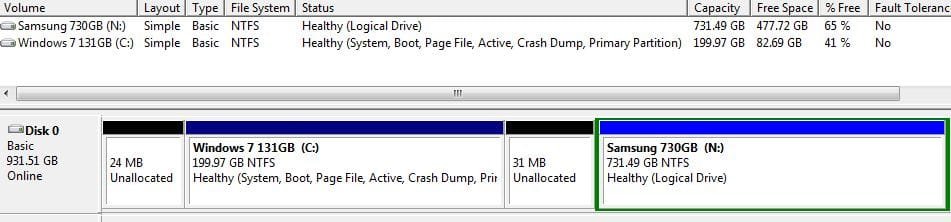
Hey! All steps are done as planned. I have the XP partition eliminated, unallocated space added to Windows 7 -well, mostly. Here is the screenshot of my current situation. Should I worry about those two small unallocated pieces? How can I add those to the Windows 7 partition?
 

Attachments

  • Partitions Capture 4.JPG
    Partitions Capture 4.JPG
    41 KB · Views: 10

My Computer My Computer

OS
Windows 7 x32
No, do Not worry about those two small bits.

Well done. :thumbsup:
 

My Computer My Computer

OS
ME/XP/Vista/Win7
If you're OCD like me ...


Use Windows disk management to extend C: to the right into that space.

Use Partition Wizard to Move/Resize C: to the left into that space.
 

My Computer My Computer

Computer Manufacturer/Model Number
* BFK Customs *
OS
W 7 64-bit Ultimate
CPU
Intel Q9550 Yorkfield
Motherboard
ASUS P5Q Pro
Memory
8GB Dominator 8500C5D
Graphics Card(s)
ATI : XFX 5870
Sound Card
Realtek HD Audio 7-1
Monitor(s) Displays
1x 47" LCD HDMI & 3x 26" LCD HDMI
Screen Resolution
1920x1080P & 1920x1200
Hard Drives
1x 80GB Intel X25-M G2 SSD : 1x 500GB & 1x 640GB WD Caviar Black(s)
PSU
Corsair 620HX
Case
Cooler Master RC-690
Cooling
Tuniq Tower 120, 2x 140mm and 3x 120mm case fans
Keyboard
Microsoft 500
Mouse
Razer Diamondback 3G
Internet Speed
14 Mb/s
Other Info
1x Koutech 3Gb/s SATA HDD Hot Swap Rack
Hi guys!
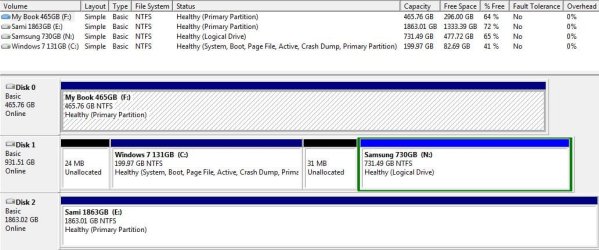
It all looks good. Here is the final picture after making all those additional data partitions inactive.

I'm also kind of a perfectionist (if that's a new info to you after these notes ;)) so I might look into what can I do. The thing is that I tried to use the bootable Partition Wizard to reclaim those small pieces without success.

In any case, I want to express my gratitude to you both and the whole community around here. Fantastic, very timely help. I hope Microsoft contributes in one way or another to your income, you surely deserve it! Respect!

THANK YOU!
 

Attachments

  • Partitions Capture 5.JPG
    Partitions Capture 5.JPG
    80 KB · Views: 11

My Computer My Computer

OS
Windows 7 x32
We do this for fun.

You can now. :party::party::party:
 

My Computer My Computer

OS
ME/XP/Vista/Win7
You have done an excellent job and it has been a pleasure to assist you. :) We are volunteers!


PW is kind 'a screwy when it comes to managing very small bits, the slider will 'see-saw' back and forth, do the one to the right with disk management first and then reboot a couple times and then boot the PW CD to see if you are able to recover the space to the left.
 

My Computer My Computer

Computer Manufacturer/Model Number
* BFK Customs *
OS
W 7 64-bit Ultimate
CPU
Intel Q9550 Yorkfield
Motherboard
ASUS P5Q Pro
Memory
8GB Dominator 8500C5D
Graphics Card(s)
ATI : XFX 5870
Sound Card
Realtek HD Audio 7-1
Monitor(s) Displays
1x 47" LCD HDMI & 3x 26" LCD HDMI
Screen Resolution
1920x1080P & 1920x1200
Hard Drives
1x 80GB Intel X25-M G2 SSD : 1x 500GB & 1x 640GB WD Caviar Black(s)
PSU
Corsair 620HX
Case
Cooler Master RC-690
Cooling
Tuniq Tower 120, 2x 140mm and 3x 120mm case fans
Keyboard
Microsoft 500
Mouse
Razer Diamondback 3G
Internet Speed
14 Mb/s
Other Info
1x Koutech 3Gb/s SATA HDD Hot Swap Rack
Back
Top