Solved Remove XP from dual boot with Windows 7

I stay away from 3rd party partitions, as OP most of the time mess up.
 

My Computer My Computer

At a glance

ME/XP/Vista/Win7
OS
ME/XP/Vista/Win7
Wow! So many replies! Thank you, all!

Nevertheless I have to admit I'm lost a bit. Can someone summarize what you guys suggest me to do? Is there any concensus here?

Thanks again!
 

My Computer My Computer

At a glance

Windows 7 x32
OS
Windows 7 x32
Hello again.

There's no consequence to this and it's very safe and easy to do; click this link (post #16) to view the best way to do this and be sure to post back with any further questions you may have and to keep us informed.
 

My Computer My Computer

At a glance

W 7 64-bit UltimateIntel Q9550 Yorkfield8GB Dominator 8500C5DATI : XFX 5870
Computer Manufacturer/Model Number
* BFK Customs *
OS
W 7 64-bit Ultimate
CPU
Intel Q9550 Yorkfield
Motherboard
ASUS P5Q Pro
Memory
8GB Dominator 8500C5D
Graphics Card(s)
ATI : XFX 5870
Sound Card
Realtek HD Audio 7-1
Monitor(s) Displays
1x 47" LCD HDMI & 3x 26" LCD HDMI
Screen Resolution
1920x1080P & 1920x1200
Hard Drives
1x 80GB Intel X25-M G2 SSD : 1x 500GB & 1x 640GB WD Caviar Black(s)
PSU
Corsair 620HX
Case
Cooler Master RC-690
Cooling
Tuniq Tower 120, 2x 140mm and 3x 120mm case fans
Keyboard
Microsoft 500
Mouse
Razer Diamondback 3G
Internet Speed
14 Mb/s
Other Info
1x Koutech 3Gb/s SATA HDD Hot Swap Rack
Alright, let me just make sure I got this right: in post #16 you suggest:
"Option Four of this tutorial at the link below to safely convert C: to a Primary partition so the "System" boot files can be stored on the Windows 7 C: partition".
Assume it's done then I guess there are more steps to do before I can eliminate the dual boot and boot directly to Windows 7, right? If yes, can outline the further steps so I can see the total flow of steps that i need to do?
Cheers!
 

My Computer My Computer

At a glance

Windows 7 x32
OS
Windows 7 x32
OK, after the Windows 7 partition is a Primary partition and Windows 7 is booting good as a Primary partition; you will need to mark the Windows 7 Primary partition as the Active partition and do the 3 separate startup repairs so the "System" boot files can be (re)created to the Windows 7 partition so the XP partition can then be removed.

Have a thorough look at the information presented in this tutorial at the link below.


My Computer My Computer

At a glance

W 7 64-bit UltimateIntel Q9550 Yorkfield8GB Dominator 8500C5DATI : XFX 5870
Computer Manufacturer/Model Number
* BFK Customs *
OS
W 7 64-bit Ultimate
CPU
Intel Q9550 Yorkfield
Motherboard
ASUS P5Q Pro
Memory
8GB Dominator 8500C5D
Graphics Card(s)
ATI : XFX 5870
Sound Card
Realtek HD Audio 7-1
Monitor(s) Displays
1x 47" LCD HDMI & 3x 26" LCD HDMI
Screen Resolution
1920x1080P & 1920x1200
Hard Drives
1x 80GB Intel X25-M G2 SSD : 1x 500GB & 1x 640GB WD Caviar Black(s)
PSU
Corsair 620HX
Case
Cooler Master RC-690
Cooling
Tuniq Tower 120, 2x 140mm and 3x 120mm case fans
Keyboard
Microsoft 500
Mouse
Razer Diamondback 3G
Internet Speed
14 Mb/s
Other Info
1x Koutech 3Gb/s SATA HDD Hot Swap Rack
OK, so here is what I'll do:
0./1. Reboot with the freshly created Repair Disk to verify that it works :)
0./2. Shut down the PC :)
1. Unplug the two other hard disks.
2. Reboot using the Partition Wizard Bootable CD and convert C: to a Primary partition
3. Reboot to Windows 7 again to see if it works. (Crossing fingers in the meantime... :))
[3./a Post you a progress update to this forum :)]
4. Run diskmgmt.msc to mark C: as Active partition
5. Reboot again, this time with the Repair Disc and do the Startup Repair (at least 3 times)

Do I miss anything?
Once all this is done, can I delete the old Windows XP partition and add it to the C: ??
 

My Computer My Computer

At a glance

Windows 7 x32
OS
Windows 7 x32
Very good, after you disconnect the other HDDs (power down first) be sure to set the Windows 7 HDD as second boot device after the CD/DVD drive in the PC BIOS.


You could view this one for use after the Windows 7 is a Primary. ;)


My Computer My Computer

At a glance

W 7 64-bit UltimateIntel Q9550 Yorkfield8GB Dominator 8500C5DATI : XFX 5870
Computer Manufacturer/Model Number
* BFK Customs *
OS
W 7 64-bit Ultimate
CPU
Intel Q9550 Yorkfield
Motherboard
ASUS P5Q Pro
Memory
8GB Dominator 8500C5D
Graphics Card(s)
ATI : XFX 5870
Sound Card
Realtek HD Audio 7-1
Monitor(s) Displays
1x 47" LCD HDMI & 3x 26" LCD HDMI
Screen Resolution
1920x1080P & 1920x1200
Hard Drives
1x 80GB Intel X25-M G2 SSD : 1x 500GB & 1x 640GB WD Caviar Black(s)
PSU
Corsair 620HX
Case
Cooler Master RC-690
Cooling
Tuniq Tower 120, 2x 140mm and 3x 120mm case fans
Keyboard
Microsoft 500
Mouse
Razer Diamondback 3G
Internet Speed
14 Mb/s
Other Info
1x Koutech 3Gb/s SATA HDD Hot Swap Rack
Hi BFK

You can copy & paste boot files from the Win XP, & mark Windows 7 partition active.
No, need to do Startup Repair once.

Ray.
 

My Computer My Computer

At a glance

ME/XP/Vista/Win7
OS
ME/XP/Vista/Win7
Yes Ray but as you are always telling me, let's keep it as simple as possible for the OPs. ;)


There's BCDBoot also but let's not go there either.
 

My Computer My Computer

At a glance

W 7 64-bit UltimateIntel Q9550 Yorkfield8GB Dominator 8500C5DATI : XFX 5870
Computer Manufacturer/Model Number
* BFK Customs *
OS
W 7 64-bit Ultimate
CPU
Intel Q9550 Yorkfield
Motherboard
ASUS P5Q Pro
Memory
8GB Dominator 8500C5D
Graphics Card(s)
ATI : XFX 5870
Sound Card
Realtek HD Audio 7-1
Monitor(s) Displays
1x 47" LCD HDMI & 3x 26" LCD HDMI
Screen Resolution
1920x1080P & 1920x1200
Hard Drives
1x 80GB Intel X25-M G2 SSD : 1x 500GB & 1x 640GB WD Caviar Black(s)
PSU
Corsair 620HX
Case
Cooler Master RC-690
Cooling
Tuniq Tower 120, 2x 140mm and 3x 120mm case fans
Keyboard
Microsoft 500
Mouse
Razer Diamondback 3G
Internet Speed
14 Mb/s
Other Info
1x Koutech 3Gb/s SATA HDD Hot Swap Rack
Yes Ray but as you are always telling me, let's keep it as simple as possible for the OPs. ;)


There's BCDBoot also but let's not go there either.

You done the easy simple one in the other thread when I was sleep.:sleep::sleep::sleep:

Ray.
 

My Computer My Computer

At a glance

ME/XP/Vista/Win7
OS
ME/XP/Vista/Win7
OK, here I am again. :)

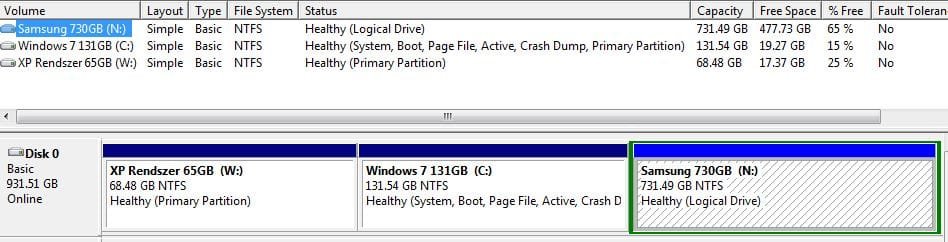
The Repair Disc restarted only twice (is that enough??) and this is how my Disk Mgmt looks like now.

I guess I can move to reclaiming the partition from XP and merge it to the W7, right?
 

Attachments

  • Partitions Capture 3.JPG
    Partitions Capture 3.JPG
    50.3 KB · Views: 8

My Computer My Computer

At a glance

Windows 7 x32
OS
Windows 7 x32
Very good, after you disconnect the other HDDs (power down first) be sure to set the Windows 7 HDD as second boot device after the CD/DVD drive in the PC BIOS.


You could view this one for use after the Windows 7 is a Primary. ;)
Have you seen this?


Very well done mate! :party:

Later, when you connect the other HDDs back use Option Two #2 of this one to mark them Inactive so that doesn't cause other issues.


My Computer My Computer

At a glance

W 7 64-bit UltimateIntel Q9550 Yorkfield8GB Dominator 8500C5DATI : XFX 5870
Computer Manufacturer/Model Number
* BFK Customs *
OS
W 7 64-bit Ultimate
CPU
Intel Q9550 Yorkfield
Motherboard
ASUS P5Q Pro
Memory
8GB Dominator 8500C5D
Graphics Card(s)
ATI : XFX 5870
Sound Card
Realtek HD Audio 7-1
Monitor(s) Displays
1x 47" LCD HDMI & 3x 26" LCD HDMI
Screen Resolution
1920x1080P & 1920x1200
Hard Drives
1x 80GB Intel X25-M G2 SSD : 1x 500GB & 1x 640GB WD Caviar Black(s)
PSU
Corsair 620HX
Case
Cooler Master RC-690
Cooling
Tuniq Tower 120, 2x 140mm and 3x 120mm case fans
Keyboard
Microsoft 500
Mouse
Razer Diamondback 3G
Internet Speed
14 Mb/s
Other Info
1x Koutech 3Gb/s SATA HDD Hot Swap Rack
Keep going, :thumbsup: half done.
 

My Computer My Computer

At a glance

ME/XP/Vista/Win7
OS
ME/XP/Vista/Win7

My Computer My Computer

At a glance

W 7 64-bit UltimateIntel Q9550 Yorkfield8GB Dominator 8500C5DATI : XFX 5870
Computer Manufacturer/Model Number
* BFK Customs *
OS
W 7 64-bit Ultimate
CPU
Intel Q9550 Yorkfield
Motherboard
ASUS P5Q Pro
Memory
8GB Dominator 8500C5D
Graphics Card(s)
ATI : XFX 5870
Sound Card
Realtek HD Audio 7-1
Monitor(s) Displays
1x 47" LCD HDMI & 3x 26" LCD HDMI
Screen Resolution
1920x1080P & 1920x1200
Hard Drives
1x 80GB Intel X25-M G2 SSD : 1x 500GB & 1x 640GB WD Caviar Black(s)
PSU
Corsair 620HX
Case
Cooler Master RC-690
Cooling
Tuniq Tower 120, 2x 140mm and 3x 120mm case fans
Keyboard
Microsoft 500
Mouse
Razer Diamondback 3G
Internet Speed
14 Mb/s
Other Info
1x Koutech 3Gb/s SATA HDD Hot Swap Rack
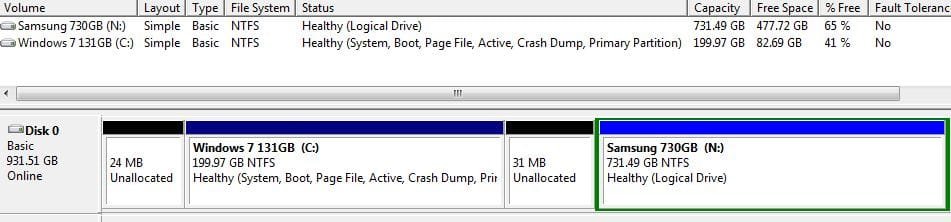
Hey! All steps are done as planned. I have the XP partition eliminated, unallocated space added to Windows 7 -well, mostly. Here is the screenshot of my current situation. Should I worry about those two small unallocated pieces? How can I add those to the Windows 7 partition?
 

Attachments

  • Partitions Capture 4.JPG
    Partitions Capture 4.JPG
    41 KB · Views: 10

My Computer My Computer

At a glance

Windows 7 x32
OS
Windows 7 x32
No, do Not worry about those two small bits.

Well done. :thumbsup:
 

My Computer My Computer

At a glance

ME/XP/Vista/Win7
OS
ME/XP/Vista/Win7
If you're OCD like me ...


Use Windows disk management to extend C: to the right into that space.

Use Partition Wizard to Move/Resize C: to the left into that space.
 

My Computer My Computer

At a glance

W 7 64-bit UltimateIntel Q9550 Yorkfield8GB Dominator 8500C5DATI : XFX 5870
Computer Manufacturer/Model Number
* BFK Customs *
OS
W 7 64-bit Ultimate
CPU
Intel Q9550 Yorkfield
Motherboard
ASUS P5Q Pro
Memory
8GB Dominator 8500C5D
Graphics Card(s)
ATI : XFX 5870
Sound Card
Realtek HD Audio 7-1
Monitor(s) Displays
1x 47" LCD HDMI & 3x 26" LCD HDMI
Screen Resolution
1920x1080P & 1920x1200
Hard Drives
1x 80GB Intel X25-M G2 SSD : 1x 500GB & 1x 640GB WD Caviar Black(s)
PSU
Corsair 620HX
Case
Cooler Master RC-690
Cooling
Tuniq Tower 120, 2x 140mm and 3x 120mm case fans
Keyboard
Microsoft 500
Mouse
Razer Diamondback 3G
Internet Speed
14 Mb/s
Other Info
1x Koutech 3Gb/s SATA HDD Hot Swap Rack
Hi guys!
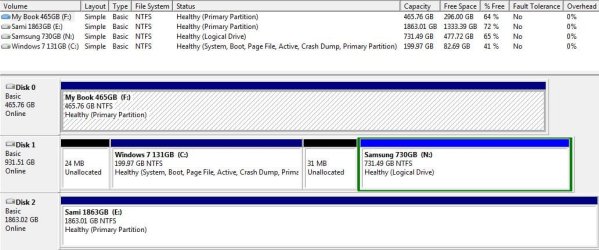
It all looks good. Here is the final picture after making all those additional data partitions inactive.

I'm also kind of a perfectionist (if that's a new info to you after these notes ;)) so I might look into what can I do. The thing is that I tried to use the bootable Partition Wizard to reclaim those small pieces without success.

In any case, I want to express my gratitude to you both and the whole community around here. Fantastic, very timely help. I hope Microsoft contributes in one way or another to your income, you surely deserve it! Respect!

THANK YOU!
 

Attachments

  • Partitions Capture 5.JPG
    Partitions Capture 5.JPG
    80 KB · Views: 11

My Computer My Computer

At a glance

Windows 7 x32
OS
Windows 7 x32
We do this for fun.

You can now. :party::party::party:
 

My Computer My Computer

At a glance

ME/XP/Vista/Win7
OS
ME/XP/Vista/Win7
You have done an excellent job and it has been a pleasure to assist you. :) We are volunteers!


PW is kind 'a screwy when it comes to managing very small bits, the slider will 'see-saw' back and forth, do the one to the right with disk management first and then reboot a couple times and then boot the PW CD to see if you are able to recover the space to the left.
 

My Computer My Computer

At a glance

W 7 64-bit UltimateIntel Q9550 Yorkfield8GB Dominator 8500C5DATI : XFX 5870
Computer Manufacturer/Model Number
* BFK Customs *
OS
W 7 64-bit Ultimate
CPU
Intel Q9550 Yorkfield
Motherboard
ASUS P5Q Pro
Memory
8GB Dominator 8500C5D
Graphics Card(s)
ATI : XFX 5870
Sound Card
Realtek HD Audio 7-1
Monitor(s) Displays
1x 47" LCD HDMI & 3x 26" LCD HDMI
Screen Resolution
1920x1080P & 1920x1200
Hard Drives
1x 80GB Intel X25-M G2 SSD : 1x 500GB & 1x 640GB WD Caviar Black(s)
PSU
Corsair 620HX
Case
Cooler Master RC-690
Cooling
Tuniq Tower 120, 2x 140mm and 3x 120mm case fans
Keyboard
Microsoft 500
Mouse
Razer Diamondback 3G
Internet Speed
14 Mb/s
Other Info
1x Koutech 3Gb/s SATA HDD Hot Swap Rack
Back
Top