
Remove XP from XP & 7 dual boot

GRR

New member
Local time
11:18 PM
Messages
5
Afternoon all. Please could you help to achieve the above.

I dare say that this topic has been covered may times and apologise up front if that's true.

The PC was XP Pro and a while back I made it into a dual boot and installed 7 Pro on a new SSD

Now I want to remove the original XP hard disk but I suspect it won't boot at all if I do that.

The reason I installed 7 on a new drive was that I thought the original was sounding a bit cranky.

How can I achieve this? Copy the files required for booting to later drive?

I have uplodaded a screenshot to illustrate.

Cheers
 

Attachments
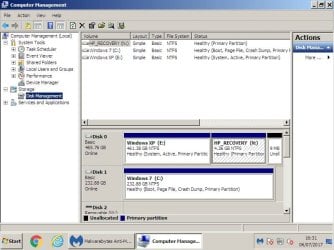
  • Disk setup 6-7-17.jpg
    Disk setup 6-7-17.jpg
    65.5 KB · Views: 1

My Computer My Computer

At a glance

Windows 7 Pro 32 bit
Computer type
PC/Desktop
OS
Windows 7 Pro 32 bit
Welcome to the forum. It's two drives with all the boot files on the XP drive so win7 drive on its own won't boot the partition would need setting as active a a new boot sector do you have a Windows 7 DVD to do a repair?
 

My Computer My Computer

At a glance

win 8 32 bit
Computer type
PC/Desktop
OS
win 8 32 bit
Samuria is right.
- Boot from Win 7
- Open disk manager and make disk 1 (Win 7) active.
- Shut down, remove disk 0 and place the SSD (win 7) on SATA 0
- Boot from Win 7 DVD, go to repair - do a Boot repair.
- Once you're able to boot from the SSD to win 7, attach the HDD (win XP) to SATA 1.
- Boot win 7, transfer your files from HDD to the SSD or to an external disk.
- Open disk manager, make the HDD inactive (important), delete all partitions and then format it as NTFS
 
Last edited:

My Computers My Computers

  • At a glance

    Windows 7 HP 64i5 6600K - 800MHz to 4200MHz4+4G GSkill DDR4 3000IG - Intel 530
    Computer type
    PC/Desktop
    Computer Manufacturer/Model Number
    custom build
    OS
    Windows 7 HP 64
    CPU
    i5 6600K - 800MHz to 4200MHz
    Motherboard
    GA-Z170-HD3P
    Memory
    4+4G GSkill DDR4 3000
    Graphics Card(s)
    IG - Intel 530
    Monitor(s) Displays
    Samsung 226BW
    Screen Resolution
    1680x1050
    Hard Drives
    (1) -1 SM951 – 128GB M.2 AHCI PCIe SSD drive for Windows 7 and Lubuntu
    (2) -1 WD SATA 3 - 1T for Data
    (3) -1 WD SATA 3 - 1T for backup
    PSU
    Thermaltake 450W TR2 gold
    Keyboard
    Old and good Chicony mechanical keyboard
    Mouse
    Logitech mX performance - 9 buttons (had to disable some)
    Internet Speed
    500Mb/s
    Browser
    Firefox 64
    Other Info
    TinyWall firewall
  • At a glance

    Windows 7 Proi7-4500U 800MHz to 3.0GHz(4+4)G DDR3 1600IG intel 4400 + NVIDIA GeForce GT 745M
    Computer type
    Laptop
    System Manufacturer/Model Number
    Asus Q550LF
    OS
    Windows 7 Pro
    CPU
    i7-4500U 800MHz to 3.0GHz
    Motherboard
    Asus Q550LF
    Memory
    (4+4)G DDR3 1600
    Graphics Card(s)
    IG intel 4400 + NVIDIA GeForce GT 745M
    Sound Card
    Realtek
    Monitor(s) Displays
    LG Display LP156WF4-SPH1
    Screen Resolution
    1920 x 1080
    Hard Drives
    BX500 120G SSD for Windows and programs +
    1T HDD for data
    Internet Speed
    500 Mb/s
    Browser
    Firefox
    Other Info
    TinyWall firewall
Thanks people.

Is the last two lines of Megehertz reply only if I wish to keep the data from the XP drive?

(Which I don't)

Once 7 will boot I don't need any of the XP data.

Cheers
 

My Computer My Computer

At a glance

Windows 7 Pro 32 bit
Computer type
PC/Desktop
OS
Windows 7 Pro 32 bit
Nope.

But you could format it and start using it to store data, but if it`s bad, chuck it in the can.

Also, make sure the new ssd is hooked up to the #1 sata port on the motherboard.
 

My Computer My Computer

At a glance

Windows 10 Pro x64Intel Core i7 6700KGSkill TridentZ RGB 16GB 3600 16-16-16-36EVGA GTX 980 Ti SC x2
Computer type
PC/Desktop
Computer Manufacturer/Model Number
Skylake Special #666
OS
Windows 10 Pro x64
CPU
Intel Core i7 6700K
Motherboard
Asus Sabertooth Z170 Mark 1
Memory
GSkill TridentZ RGB 16GB 3600 16-16-16-36
Graphics Card(s)
EVGA GTX 980 Ti SC x2
Sound Card
Realtek High Definition
Monitor(s) Displays
AOC G2460PG
Screen Resolution
1920 x 1080 144Hz
Hard Drives
Samsung 860 Pro 256GB, Seagate Barracuda 4TB x2
PSU
EVGA 1000 P2, EVGA White Custom Braided Cables
Case
Corsair Vengeance C70 Gunmetal Black
Cooling
Corsair H100i v2, Corsair ML120 x2, Thermal Grizzly Kryonaut
Keyboard
Logitech G910 Orion Spectrum
Mouse
Logitech G700s
Internet Speed
Verizon Fios Quantum Gateway 75/75
Antivirus
Windows Defender, Malwarebytes Free 3.8.3
Browser
Chrome
Other Info
Corsair SP120 x4, LG Blu-ray Drive, Durabrand HT-395 100 Watt Dolby Digital Amp, Corsair H2100 Wireless 7.1 Headset
I'm confused now. Can I just remove the original hard disk, place new SSD (the one with Win 7 loaded) on Sata 0 instead, boot from DVD, do a boot fix

Will that work?

Cheers
 

My Computer My Computer

At a glance

Windows 7 Pro 32 bit
Computer type
PC/Desktop
OS
Windows 7 Pro 32 bit
If you know how to use Diskpart yes it`s very easy, but it`s a lot simpler to mark the W7 partition Active before you remove the XP drive.

It has to be marked Active 1st in order to write the System files to it.

Partition - Mark as Active - Windows 7 Help Forums
 

My Computer My Computer

At a glance

Windows 10 Pro x64Intel Core i7 6700KGSkill TridentZ RGB 16GB 3600 16-16-16-36EVGA GTX 980 Ti SC x2
Computer type
PC/Desktop
Computer Manufacturer/Model Number
Skylake Special #666
OS
Windows 10 Pro x64
CPU
Intel Core i7 6700K
Motherboard
Asus Sabertooth Z170 Mark 1
Memory
GSkill TridentZ RGB 16GB 3600 16-16-16-36
Graphics Card(s)
EVGA GTX 980 Ti SC x2
Sound Card
Realtek High Definition
Monitor(s) Displays
AOC G2460PG
Screen Resolution
1920 x 1080 144Hz
Hard Drives
Samsung 860 Pro 256GB, Seagate Barracuda 4TB x2
PSU
EVGA 1000 P2, EVGA White Custom Braided Cables
Case
Corsair Vengeance C70 Gunmetal Black
Cooling
Corsair H100i v2, Corsair ML120 x2, Thermal Grizzly Kryonaut
Keyboard
Logitech G910 Orion Spectrum
Mouse
Logitech G700s
Internet Speed
Verizon Fios Quantum Gateway 75/75
Antivirus
Windows Defender, Malwarebytes Free 3.8.3
Browser
Chrome
Other Info
Corsair SP120 x4, LG Blu-ray Drive, Durabrand HT-395 100 Watt Dolby Digital Amp, Corsair H2100 Wireless 7.1 Headset
Ok so mark Disk 1 as active, shut down, remove Disk 0, boot using Win 7 DVD, do boot repair?

And where should disk 1 be, Sata 0 or Sata 1

Cheers
 

My Computer My Computer

At a glance

Windows 7 Pro 32 bit
Computer type
PC/Desktop
OS
Windows 7 Pro 32 bit
Whichever your board uses, 0 or 1.

Personally I`ve never seen a board with a sata port marked 0, only 1 through 2 3 4 5 6 7 8 etc.

The board will be clearly marked. Or at least it should be marked, the print is very small, a magnifying glass helps ;)

The Bios will also tell you which port a drive is hooked to.

It`s actually called startup repair, and it doesn`t always work.

Startup Repair - Windows 7 Help Forums
 

My Computer My Computer

At a glance

Windows 10 Pro x64Intel Core i7 6700KGSkill TridentZ RGB 16GB 3600 16-16-16-36EVGA GTX 980 Ti SC x2
Computer type
PC/Desktop
Computer Manufacturer/Model Number
Skylake Special #666
OS
Windows 10 Pro x64
CPU
Intel Core i7 6700K
Motherboard
Asus Sabertooth Z170 Mark 1
Memory
GSkill TridentZ RGB 16GB 3600 16-16-16-36
Graphics Card(s)
EVGA GTX 980 Ti SC x2
Sound Card
Realtek High Definition
Monitor(s) Displays
AOC G2460PG
Screen Resolution
1920 x 1080 144Hz
Hard Drives
Samsung 860 Pro 256GB, Seagate Barracuda 4TB x2
PSU
EVGA 1000 P2, EVGA White Custom Braided Cables
Case
Corsair Vengeance C70 Gunmetal Black
Cooling
Corsair H100i v2, Corsair ML120 x2, Thermal Grizzly Kryonaut
Keyboard
Logitech G910 Orion Spectrum
Mouse
Logitech G700s
Internet Speed
Verizon Fios Quantum Gateway 75/75
Antivirus
Windows Defender, Malwarebytes Free 3.8.3
Browser
Chrome
Other Info
Corsair SP120 x4, LG Blu-ray Drive, Durabrand HT-395 100 Watt Dolby Digital Amp, Corsair H2100 Wireless 7.1 Headset
AddRam, I've used Diskpart before but I'm not what you'd call competent.

So how woulkd you do it, start to finish please?

Let's assume the "First" available Sata is number 1

Disk 0 is XP

Disk 1 is 7

Cheers
 

My Computer My Computer

At a glance

Windows 7 Pro 32 bit
Computer type
PC/Desktop
OS
Windows 7 Pro 32 bit
Already told you :) Mark Disk 1 Active and run startup repair. Just get W7 booting on its own, you can worry about the sata port later.

I would have never installed W7 with the XP drive hooked up.
 

My Computer My Computer

At a glance

Windows 10 Pro x64Intel Core i7 6700KGSkill TridentZ RGB 16GB 3600 16-16-16-36EVGA GTX 980 Ti SC x2
Computer type
PC/Desktop
Computer Manufacturer/Model Number
Skylake Special #666
OS
Windows 10 Pro x64
CPU
Intel Core i7 6700K
Motherboard
Asus Sabertooth Z170 Mark 1
Memory
GSkill TridentZ RGB 16GB 3600 16-16-16-36
Graphics Card(s)
EVGA GTX 980 Ti SC x2
Sound Card
Realtek High Definition
Monitor(s) Displays
AOC G2460PG
Screen Resolution
1920 x 1080 144Hz
Hard Drives
Samsung 860 Pro 256GB, Seagate Barracuda 4TB x2
PSU
EVGA 1000 P2, EVGA White Custom Braided Cables
Case
Corsair Vengeance C70 Gunmetal Black
Cooling
Corsair H100i v2, Corsair ML120 x2, Thermal Grizzly Kryonaut
Keyboard
Logitech G910 Orion Spectrum
Mouse
Logitech G700s
Internet Speed
Verizon Fios Quantum Gateway 75/75
Antivirus
Windows Defender, Malwarebytes Free 3.8.3
Browser
Chrome
Other Info
Corsair SP120 x4, LG Blu-ray Drive, Durabrand HT-395 100 Watt Dolby Digital Amp, Corsair H2100 Wireless 7.1 Headset
Back
Top