Renaming the "Users" folder

Sergeant Steve

New member
Power User
Local time
11:46 PM
Messages
95
I don't want to rename a user PROFILE, I want to be able to rename the Users folder (i.e. E:\Users) to Users.old and change every single link in the registry that points to it.

The reason I want to do this is because when I first installed Win 7 Ultimate I forgot to unplug my old Win 7 Pro HDD & also forgot to delete the factory made partition on the SSD, so when I had finished installing Windows 7 Ultimate (including moving my User Profiles to a 2Tb WD Black HDD), I found I couldn't boot into it because I had no "System Reserved" partition and therefore no boot files (as the Ultimate install just added an entry into the Professional bootloader).

I have a new SSD that's the same size as my current one and I can delete the partition off of it so it's completely unused and Windows can create its own partitions, however I want to be able to use the same 2Tb WD Black Drive for my User Profiles, I know how to do move the User Profiles to another HDD at install but I don't want to overwrite the old folders hence why I want to rename the old ones & toggle all the links to suit.

I have Ubuntu installed on a 500Gb HDD which I could use to rename them but I may want to be able to boot between the two OS's to deactivate software and gather license keys etc, so is there a way I can do this?

Or am I better off just booting to Ubuntu, renaming the old "User" folder, plugging in the new SSD and installing windows, moving the User Profiles to the 2Tb HDD and copying the contents from Users.old to Users and hope for the best?
 

My Computer

Computer type
PC/Desktop
Computer Manufacturer/Model Number
Self Built
OS
Windows 7 Ultimate x64
CPU
Intil i7-860
Motherboard
Gigabyte GA-P55a-UD6
Memory
16Gb Corsair XMS3 1600MHz
Graphics Card(s)
MSI N470GTXTwin FrozR II
Monitor(s) Displays
Samsung S23A700D
Hard Drives
1x Samsung 840Pro SSD 256Gb for Windows
2x WD Green 2Tb (for Storage)
1x Western Digital Caviar Black 2 TB 7200 RPM (also for storage)
1x Samsung HD501LJ 500Gb for Ubuntu
PSU
Antec TruePower New Blue Modular 750W
Case
Antec 300
Cooling
Cosair H70
Internet Speed
60Mb/s DL, 3Mb/s UL
Antivirus
Norton Internet Security
Browser
IE, FF, Chrome

My Computer

Computer type
PC/Desktop
Computer Manufacturer/Model Number
Custom Build
OS
Windows 7 Home Premium 32-Bit - Build 7600 SP1
CPU
Intel Core i3-2120 3.30Ghz
Motherboard
Asus P8Z68-V LX Intel Z68 Socket H2 ATX
Memory
Kingston 4 GB DDR3 1333 mhz
Graphics Card(s)
AMD Radeon HD6670
Sound Card
Sound Blaster Audigy SE 24-Bit
Monitor(s) Displays
Asus VE228
Screen Resolution
1440 X 900
Hard Drives
OCZ Vertex 3 120 GB Sata 3 SSD ==
Kingston SH103/S3 120 G Hyper X 120 GB SSD ==
Western Digital 500 GB Caviar Green 7200 RPM ==
PSU
Corsair CX600M == 600 Watt
Case
NZXT Apollo - Silver with Clear Side Panel
Cooling
Three 120 mm Fans
Keyboard
Microsoft Natural 4000
Mouse
Microsoft Custom Optical 3000
Internet Speed
AT&T Fiber Optic Wireless Network
Antivirus
Microsoft Security Essentials
Browser
Chrome
Other Info
120 mm Blue LED Fan -- Three Blue LED Lazer Light Sticks
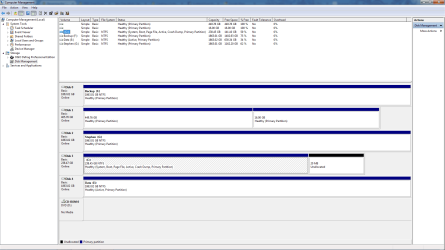
C:\ is obviously Windows, but as you can see there is no System Reserved Partition. I have a feeling this is why no OS shows when you run the "Repair My Computer" option from the Win 7 DVD, and why I can't run the System File Checker offline directing it to the correct locations.

E:\ is where I keep the User Profiles and my Steam games and other stuff.

F:\ is a backup drive which is solely used

G:\ is a drive I use just for myself (I have a lot of crap I need to remove, it's one of those around to it's)

I have also attached the output of the log for the errors I'm getting from the System File Checker.
 

Attachments

  • Screenshot 2014-07-11 21.39.40.png
    Screenshot 2014-07-11 21.39.40.png
    45.9 KB · Views: 8
  • sfcdetails.txt
    sfcdetails.txt
    86.7 KB · Views: 0

My Computer

Computer type
PC/Desktop
Computer Manufacturer/Model Number
Self Built
OS
Windows 7 Ultimate x64
CPU
Intil i7-860
Motherboard
Gigabyte GA-P55a-UD6
Memory
16Gb Corsair XMS3 1600MHz
Graphics Card(s)
MSI N470GTXTwin FrozR II
Monitor(s) Displays
Samsung S23A700D
Hard Drives
1x Samsung 840Pro SSD 256Gb for Windows
2x WD Green 2Tb (for Storage)
1x Western Digital Caviar Black 2 TB 7200 RPM (also for storage)
1x Samsung HD501LJ 500Gb for Ubuntu
PSU
Antec TruePower New Blue Modular 750W
Case
Antec 300
Cooling
Cosair H70
Internet Speed
60Mb/s DL, 3Mb/s UL
Antivirus
Norton Internet Security
Browser
IE, FF, Chrome

My Computer

Computer type
PC/Desktop
Computer Manufacturer/Model Number
Custom Built
OS
Windows 10 Pro x64, Windows 8.1 Pro x64, Windows 7 Ultimate x64 SP1,
CPU
INTEL i9-7920X LGA 2066
Motherboard
Gigabyte X299-WU8 F3
Memory
64 GB (4 X 16 GB) G-Skill V Series DDR4 3200 Quad Channel
Graphics Card(s)
EVGA GTX 1060 SC 3 GB
Sound Card
Realtek Onboard ALC1220
Monitor(s) Displays
2 x Samsung S27E310
Screen Resolution
1920x1080
Hard Drives
Samsung 2 x 970 EVO Plus 500 GB NVMe
1 x 6TB WD 6003FZBX SATA
1 x 6TB WD 60EFRX SATA
12 x 3TB WD 30EFRX SATA
PSU
Seasonic X-1050
Case
Thermaltake Armor+
Cooling
Corsair H80i V2 Liquid AOI Cooler
Keyboard
Logitech G510s
Mouse
Logitech MX Master 2S
Internet Speed
200 Mb/s
Antivirus
ESET NOD32 13.1
Browser
EDGE (Dev, Canary, Beta), Chrome
Other Info
ASUS RT-AC68U router
Malwarebytes 4.0.4
My experience of several years installing Windows is that generally it doesn't work to rename or move the Users Folder that is created during the installation of Windows. There's just some Folders that must be left alone to assure proper operation of the OS.
 

My Computer

Computer type
PC/Desktop
Computer Manufacturer/Model Number
Customs, Dell, Gateway, HP, Toshiba, Acer, ASUS
OS
Windows 7 Ultimate 64-bit, Windows 8.1 64-bit, Mac OS X 10.10, Linux Mint 17, Windows 10 Pro TP
Keyboard
Microsoft
Mouse
Microsoft
pbcopter - I don't want to change the name of a user profile folder, I was wanting to rename the actual Users folder e.g. C:\Users to C:\Users.old.

Berton - there is a way to safely move the Users and the ProgramData folders during the Windows Install using the Out of Box Experience tool, I found a tutorial on here about how to move them.

What I really want to know is this: would I be better off booting into Ubuntu to rename the Users folder until I install windows onto the new SSD and move the Users and Program Data folders from C:\ to the drive I want them to be on, and then creating relevant profiles on the new windows to generate the Profile folders and copying the old folders to the new folders, or deleting the new folders & renaming Users.old back to Users.

Or would I be better using a completely different drive yet again for the User Profiles & Program Data folder (bearing in mind that the drive the folders are currently on is a 2Tb WD Black & the other 2Tb drives are WD Green so not quite so speedy).
 

My Computer

Computer type
PC/Desktop
Computer Manufacturer/Model Number
Self Built
OS
Windows 7 Ultimate x64
CPU
Intil i7-860
Motherboard
Gigabyte GA-P55a-UD6
Memory
16Gb Corsair XMS3 1600MHz
Graphics Card(s)
MSI N470GTXTwin FrozR II
Monitor(s) Displays
Samsung S23A700D
Hard Drives
1x Samsung 840Pro SSD 256Gb for Windows
2x WD Green 2Tb (for Storage)
1x Western Digital Caviar Black 2 TB 7200 RPM (also for storage)
1x Samsung HD501LJ 500Gb for Ubuntu
PSU
Antec TruePower New Blue Modular 750W
Case
Antec 300
Cooling
Cosair H70
Internet Speed
60Mb/s DL, 3Mb/s UL
Antivirus
Norton Internet Security
Browser
IE, FF, Chrome
You don't always have a separate System Reserved Partition. Sometimes it is included on C:. If you will note on your C: drive that it says "System, Boot", that is what you need so it should boot OK, but you say you can not boot into C: drive, is that correct? == You need to try a http://www.sevenforums.com/tutorials/3413-repair-install.html This tells you how.
 

My Computer

Computer type
PC/Desktop
Computer Manufacturer/Model Number
Custom Build
OS
Windows 7 Home Premium 32-Bit - Build 7600 SP1
CPU
Intel Core i3-2120 3.30Ghz
Motherboard
Asus P8Z68-V LX Intel Z68 Socket H2 ATX
Memory
Kingston 4 GB DDR3 1333 mhz
Graphics Card(s)
AMD Radeon HD6670
Sound Card
Sound Blaster Audigy SE 24-Bit
Monitor(s) Displays
Asus VE228
Screen Resolution
1440 X 900
Hard Drives
OCZ Vertex 3 120 GB Sata 3 SSD ==
Kingston SH103/S3 120 G Hyper X 120 GB SSD ==
Western Digital 500 GB Caviar Green 7200 RPM ==
PSU
Corsair CX600M == 600 Watt
Case
NZXT Apollo - Silver with Clear Side Panel
Cooling
Three 120 mm Fans
Keyboard
Microsoft Natural 4000
Mouse
Microsoft Custom Optical 3000
Internet Speed
AT&T Fiber Optic Wireless Network
Antivirus
Microsoft Security Essentials
Browser
Chrome
Other Info
120 mm Blue LED Fan -- Three Blue LED Lazer Light Sticks
Usually you do have a Separate System Reserved Partition, I did when I had Windows 7 Professional.

Here is what I did when I built my PC:

Installed Windows 7 Pro x64 onto 1Tb Samsung SpinPoint with another 1Tb SpinPoint for Data.

Got a Speed I/O error in Avid ProTools saying it couldn't read Audio off the drive fast enough, so cloned C:\ to a 1Tb WD Black.

Bought a Samsung 840 Pro 256Gb SSD, installed Win 7 Ultimate x64 onto that without first disconnecting the 1Tb WD Black which had Win 7 Pro on, also didn't remove the partition from the SSD so the Windows 7 Ultimate installation didn't install ANY boot files to the SSD, instead adding an entry into the Win 7 Pro Bootloader.

Ran Startup Repair multiple times after unplugging the 1Tb WD Black in order to be able to boot into Win 7 Ultimate.


At present I have corrupted System Files as shown by the log file I uploaded. These cannot be repaired and the tutorial for running SFC from the Windows DVD shows you select your OS on the screen. My screen does not show my OS, presumably because I do not have a System Reserved Partition. And when I try and run SFC and tell it where the Windows directory is it starts and then stops and says it could not complete the requested action.


I have an idea on how to install Windows onto the new SSD and retain the User Profile Locations:


  1. Boot into Ubuntu and rename the "ProgramData" and the "Users" folder to have a .old on the end.
  2. Remove the Partition from the new SSD and insert the Windows 7 Ultimate DVD then Shut Down the computer.
  3. Disconnect the OLD SSD and reboot from the Windows Disk.
  4. Install windows, move Users and ProgramData folders from C:\ to E:\ and create all the relevant User Profiles.
  5. Use the Ubuntu DVD to repair Grub so I can boot into Ubuntu and delete the newest Users and ProgramData folders and rename the old folders back to Normal and reboot back into Windows.
Do you think this would work as well as I am hoping it will?
 

My Computer

Computer type
PC/Desktop
Computer Manufacturer/Model Number
Self Built
OS
Windows 7 Ultimate x64
CPU
Intil i7-860
Motherboard
Gigabyte GA-P55a-UD6
Memory
16Gb Corsair XMS3 1600MHz
Graphics Card(s)
MSI N470GTXTwin FrozR II
Monitor(s) Displays
Samsung S23A700D
Hard Drives
1x Samsung 840Pro SSD 256Gb for Windows
2x WD Green 2Tb (for Storage)
1x Western Digital Caviar Black 2 TB 7200 RPM (also for storage)
1x Samsung HD501LJ 500Gb for Ubuntu
PSU
Antec TruePower New Blue Modular 750W
Case
Antec 300
Cooling
Cosair H70
Internet Speed
60Mb/s DL, 3Mb/s UL
Antivirus
Norton Internet Security
Browser
IE, FF, Chrome
It looks correct but be aware that if you run Startup Repairs again or reinstall without unplugging the other hard drives, it may move the System boot files to the first Primary partition in order. For this reason it's best to have the OS drive in DISK0.

Your data drive should also not be Active, only an OS drive or its intended boot partition: Partition - Mark as Inactive - Windows 7 Forums

You can certainly move your User folders or change the name as given in the tutorial pbcopter posted for you.
 
Back
Top