Restart Time

How to See What Your Windows Restart Time is


   Information
This will show you how to see how long in seconds it takes your Windows 7, Windows 8, or Windows 10 PC to restart back to the desktop.

You can also view the startup logs in Event Viewer (C:\Windows\system32\eventvwr.msc) under Applications and Services Logs, Microsoft, Windows, Diagnostics-Performance, and Operational. The logs will be in the middle to show you what ran at startup, how long it took, and more.
   Note
Credit completely belongs to sidney1st for writing this VBS script.
   Tip
For fun, post your restart time at this link.


Here's How:1. Click on the download button below to download the Restart-Time.bat or Restart-Time.vbs file, and save it to your desktop.
Restart-Time.bat

Download


OR

Restart-Time.vbs

Download


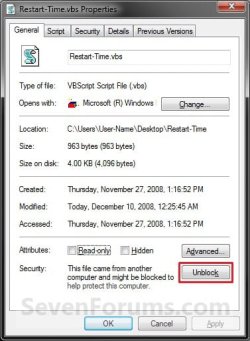
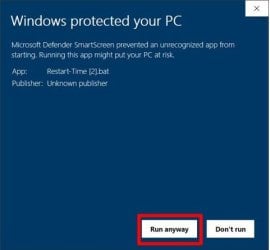
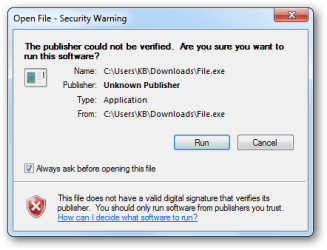
2. Right click on the downloaded Restart-Time.bat or Restart-Time.vbs file, click on Properties, click on the General tab, click on the Unblock button to unblock the Restart-Time.vbs file. (see screenshots below)

NOTE: If you do not have a Unblock button, then it is already unblocked. Continue to step 3.Unblock.jpg
Protect1.jpg Protect2.jpg

3. Run the Restart-Time.bat or Restart-Time.vbs file.

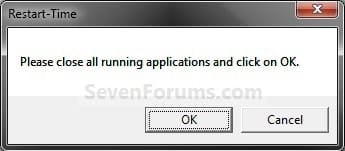
4. Click on OK to restart the computer. (see screenshot below)
WARNING: Close and save all windows first. This will immediately restart your computer.
1100d1227815274-restart-time-step1.jpg


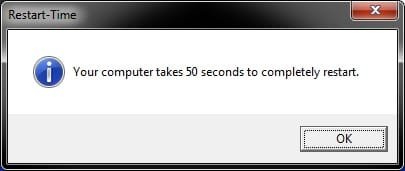
5. When the computer finishes restarting, you will see your Windows restart time. Click on OK when done. (see screenshot below)
169900d1313170395-restart-time-restart-time.jpg


6. You can now delete the downloaded Restart-Time.bat or Restart-Time.vbs file if you like, or save it somewhere to use again later.


That's it,
Shawn


Attachments

  • Step1.jpg
    Step1.jpg
    28 KB · Views: 148,033
  • Restart-Time.jpg
    Restart-Time.jpg
    17.1 KB · Views: 97,061
  • Restart-Time.vbs
    Restart-Time.vbs
    983 bytes · Views: 33,957
  • Restart-Time.bat
    Restart-Time.bat
    2.1 KB · Views: 56
Last edited:
Hey Brink,
I know this thread or topic is old, but I just discovered it. Do you think these two .vbs scripts would work on my Vista PC? I didn't want to try them without asking, for fear of messing something up on my computer. Thanks.
 

My Computer

Computer type
PC/Desktop
Computer Manufacturer/Model Number
Dell
OS
Win7 Pro x64
CPU
Intel i7-4790
Motherboard
Dell
Memory
24GB
Graphics Card(s)
AMD Radeon R9 270
Hard Drives
256GB mSATA SSD
2TB Hard Drive
Antivirus
Norton
Browser
Firefox, Internet Explorer
Hello Toby, :-)

It should work in Vista as well.

It won't hurt anything since the script is only measuring the times to report later though.
 

My Computer

Computer type
PC/Desktop
Computer Manufacturer/Model Number
Self built custom
OS
64-bit Windows 11 Pro for Workstations
CPU
Intel i7-8700K OC'd to 5 GHz
Motherboard
ASUS ROG Maximus XI Formula Z390
Memory
64 GB (4x16GB) G.SKILL TridentZ RGB DDR4 3600 MHz
Graphics Card(s)
ASUS ROG-STRIX-GTX1080TI-O11G-GAMING
Sound Card
Integrated
Monitor(s) Displays
2 x Samsung Odyssey G7 27"
Screen Resolution
2560x1440
Hard Drives
1TB Samsung 990 PRO M.2,
4TB Samsung 990 PRO PRO M.2,
TerraMaster F8 SSD Plus NAS
PSU
Seasonic Prime Titanium 850W
Case
Thermaltake Core P3
Cooling
Corsair Hydro H115i
Keyboard
Logitech wireless K800
Mouse
Logitech MX Master 4
Internet Speed
2 Gb/s Download and 100 Mb/s Upload
Antivirus
Malwarebyte Anti-Malware Premium
Browser
Google Chrome
Other Info
Logitech Z625 speaker system,
Logitech BRIO 4K Pro webcam,
HP Color LaserJet Pro MFP M477fdn,
APC SMART-UPS RT 1000 XL - SURT1000XLI,
Galaxy S23 Plus phone
Thank you.
 

My Computer

Computer type
PC/Desktop
Computer Manufacturer/Model Number
Dell
OS
Win7 Pro x64
CPU
Intel i7-4790
Motherboard
Dell
Memory
24GB
Graphics Card(s)
AMD Radeon R9 270
Hard Drives
256GB mSATA SSD
2TB Hard Drive
Antivirus
Norton
Browser
Firefox, Internet Explorer
You're most welcome. :-)
 

My Computer

Computer type
PC/Desktop
Computer Manufacturer/Model Number
Self built custom
OS
64-bit Windows 11 Pro for Workstations
CPU
Intel i7-8700K OC'd to 5 GHz
Motherboard
ASUS ROG Maximus XI Formula Z390
Memory
64 GB (4x16GB) G.SKILL TridentZ RGB DDR4 3600 MHz
Graphics Card(s)
ASUS ROG-STRIX-GTX1080TI-O11G-GAMING
Sound Card
Integrated
Monitor(s) Displays
2 x Samsung Odyssey G7 27"
Screen Resolution
2560x1440
Hard Drives
1TB Samsung 990 PRO M.2,
4TB Samsung 990 PRO PRO M.2,
TerraMaster F8 SSD Plus NAS
PSU
Seasonic Prime Titanium 850W
Case
Thermaltake Core P3
Cooling
Corsair Hydro H115i
Keyboard
Logitech wireless K800
Mouse
Logitech MX Master 4
Internet Speed
2 Gb/s Download and 100 Mb/s Upload
Antivirus
Malwarebyte Anti-Malware Premium
Browser
Google Chrome
Other Info
Logitech Z625 speaker system,
Logitech BRIO 4K Pro webcam,
HP Color LaserJet Pro MFP M477fdn,
APC SMART-UPS RT 1000 XL - SURT1000XLI,
Galaxy S23 Plus phone
Hi Brink,

Sorry to bother you again, but I'm having trouble with the Restart-Time.vbs file. I tried to download the file, but my Norton Security 2018 program keeps blocking/quarantining the file. Norton is treating it as a ISB.Downloader!gen52 threat.

I even tried copying the script documentation (on the first page of the thread) into a Notepad text file, so I could convert it to .VBS later, but Norton Security thinks the .TXT file is a threat, too, and keeps deleting it.

I can probably turn off Norton Security, download the file and run it, but I'm curious why Norton thinks the .vbs and .txt files are a threat? Any idea why?

Thanks.

Toby
 

My Computer

Computer type
PC/Desktop
Computer Manufacturer/Model Number
Dell
OS
Win7 Pro x64
CPU
Intel i7-4790
Motherboard
Dell
Memory
24GB
Graphics Card(s)
AMD Radeon R9 270
Hard Drives
256GB mSATA SSD
2TB Hard Drive
Antivirus
Norton
Browser
Firefox, Internet Explorer
Hello Toby, :-)

Yep, it's a false positive by Norton since it's an unsigned script file that restarts the computer and sends a message at startup.

If you like, you should be able to temporarily add it to Norton's safe list.
 

My Computer

Computer type
PC/Desktop
Computer Manufacturer/Model Number
Self built custom
OS
64-bit Windows 11 Pro for Workstations
CPU
Intel i7-8700K OC'd to 5 GHz
Motherboard
ASUS ROG Maximus XI Formula Z390
Memory
64 GB (4x16GB) G.SKILL TridentZ RGB DDR4 3600 MHz
Graphics Card(s)
ASUS ROG-STRIX-GTX1080TI-O11G-GAMING
Sound Card
Integrated
Monitor(s) Displays
2 x Samsung Odyssey G7 27"
Screen Resolution
2560x1440
Hard Drives
1TB Samsung 990 PRO M.2,
4TB Samsung 990 PRO PRO M.2,
TerraMaster F8 SSD Plus NAS
PSU
Seasonic Prime Titanium 850W
Case
Thermaltake Core P3
Cooling
Corsair Hydro H115i
Keyboard
Logitech wireless K800
Mouse
Logitech MX Master 4
Internet Speed
2 Gb/s Download and 100 Mb/s Upload
Antivirus
Malwarebyte Anti-Malware Premium
Browser
Google Chrome
Other Info
Logitech Z625 speaker system,
Logitech BRIO 4K Pro webcam,
HP Color LaserJet Pro MFP M477fdn,
APC SMART-UPS RT 1000 XL - SURT1000XLI,
Galaxy S23 Plus phone
Hello Brink,

I appreciate the quick reply. I forgot about Norton's Safe List capability. Thanks for the suggestion. I'll do that.

I knew that Norton will sometimes block .vbs files, but I was unaware that it was smart enough to block a .txt file too.

Thanks again for the info. Have a great weekend.

Toby
 

My Computer

Computer type
PC/Desktop
Computer Manufacturer/Model Number
Dell
OS
Win7 Pro x64
CPU
Intel i7-4790
Motherboard
Dell
Memory
24GB
Graphics Card(s)
AMD Radeon R9 270
Hard Drives
256GB mSATA SSD
2TB Hard Drive
Antivirus
Norton
Browser
Firefox, Internet Explorer
You're most welcome. I hope you have a great weekend as well.
 

My Computer

Computer type
PC/Desktop
Computer Manufacturer/Model Number
Self built custom
OS
64-bit Windows 11 Pro for Workstations
CPU
Intel i7-8700K OC'd to 5 GHz
Motherboard
ASUS ROG Maximus XI Formula Z390
Memory
64 GB (4x16GB) G.SKILL TridentZ RGB DDR4 3600 MHz
Graphics Card(s)
ASUS ROG-STRIX-GTX1080TI-O11G-GAMING
Sound Card
Integrated
Monitor(s) Displays
2 x Samsung Odyssey G7 27"
Screen Resolution
2560x1440
Hard Drives
1TB Samsung 990 PRO M.2,
4TB Samsung 990 PRO PRO M.2,
TerraMaster F8 SSD Plus NAS
PSU
Seasonic Prime Titanium 850W
Case
Thermaltake Core P3
Cooling
Corsair Hydro H115i
Keyboard
Logitech wireless K800
Mouse
Logitech MX Master 4
Internet Speed
2 Gb/s Download and 100 Mb/s Upload
Antivirus
Malwarebyte Anti-Malware Premium
Browser
Google Chrome
Other Info
Logitech Z625 speaker system,
Logitech BRIO 4K Pro webcam,
HP Color LaserJet Pro MFP M477fdn,
APC SMART-UPS RT 1000 XL - SURT1000XLI,
Galaxy S23 Plus phone
Hello, it looks like the Windows 10 SmartScreen.
0.png
 

My Computer

Computer type
PC/Desktop
Computer Manufacturer/Model Number
Dell
OS
Windows 10 Pro x64
CPU
Core i3 2100
Motherboard
OEM
Memory
4GB DDR3
Graphics Card(s)
Integrated
Hard Drives
Samsung HD250HJ
Antivirus
default
Browser
Chrome / Edge Beta
Back
Top