Restoring backed-up files

tallt65

New member
Local time
4:13 AM
Messages
2
While using Vista I backed up my HD using Windows Backup to a 250GB Seagate FreeAgent Go USB drive.

I then installed Windows 7 Professional using a clean install.

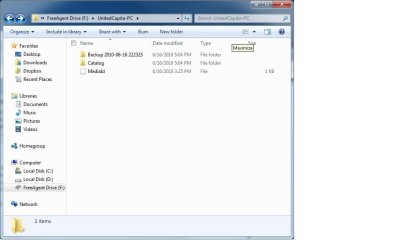
The backup files on the Seagate can be viewed as the F drive. However, when I use Windows Restore function no backup files are listed.

Any suggestions on how I get my files back?
 

My Computer

Computer Manufacturer/Model Number
Lenovo ThinkPad X200 Tablet, Model 74499FU
OS
Microsoft Windows 7 Professional
CPU
Intel Core 2 Duo
Memory
2 GB
Graphics Card(s)
Mobile Intel 4 Series Express Chipset
Sound Card
Conexant 20561 SmartAudio HD
Hard Drives
128 GB
Thanks for the quick reply. Still can't get restore to see files.

The attached docs are screenshots of what I'm seeing:
  • #1 the backup files on the Seagate HD
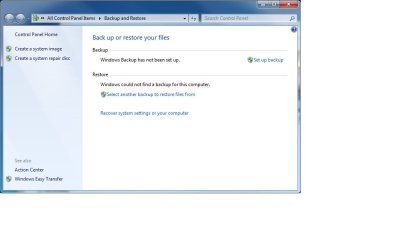
  • #2 My Backup/Restore options from which I select "Select another backup to restore files from"
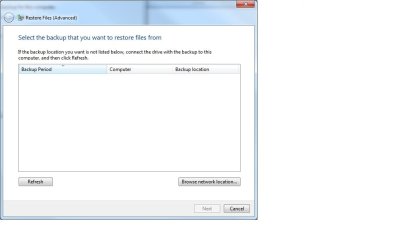
  • #3 The Select backup file window: Refresh does nothing, "Browse network" takes me to #4
  • #4 Selection options don't allow me to view the F: drive connected to my laptop
 

Attachments

  • Screen 1 - Seagate backup files.jpg
    Screen 1 - Seagate backup files.jpg
    39.9 KB · Views: 19
  • Screen 2 - Backup Options.jpg
    Screen 2 - Backup Options.jpg
    32.5 KB · Views: 15
  • Screen 3 - Select restore files.jpg
    Screen 3 - Select restore files.jpg
    26.9 KB · Views: 13
  • Screen 4 - Network browse folders.jpg
    Screen 4 - Network browse folders.jpg
    18.1 KB · Views: 10

My Computer

Computer Manufacturer/Model Number
Lenovo ThinkPad X200 Tablet, Model 74499FU
OS
Microsoft Windows 7 Professional
CPU
Intel Core 2 Duo
Memory
2 GB
Graphics Card(s)
Mobile Intel 4 Series Express Chipset
Sound Card
Conexant 20561 SmartAudio HD
Hard Drives
128 GB
Back
Top