Ribbon Explorer

If they are goig to add a ribbion people will hate
they should call it Vista2.
It will be just as popular.

Jimmy
 

My Computer

Computer Manufacturer/Model Number
Power Spec- Micro Electronics,Inc.
OS
Windows 7 64-bit
CPU
Intel i7
Motherboard
Intel
Memory
12 gigs
Graphics Card(s)
AMD Radeon HD 6900 series
Sound Card
AMD High Definition Audio Device
Monitor(s) Displays
Gateway FHX2300
Screen Resolution
1920x1080
Hard Drives
Samsung HD204UI 2 terabytes used for storage
SSD G2 Series 64 GB System drive
I think the ribbon is one of the best things they ever invented. Today you can go to Word, Excel, PowerPoint, WLMM, Wordpad, Paint, etc - and you are never alienated. Yes the buttons and icons are different depending on what the functions of the program are. But all the basic things are the same or similar. I love it.
 

My Computer

Computer Manufacturer/Model Number
HP, Dell, Gateway, Toshiba - 4 laptops and 2 desktops
OS
Vista, Windows7, Mint Mate, Zorin, Windows 8
CPU
from 1.6GHz Duo to i7
Monitor(s) Displays
2x HP w2207
Hard Drives
5x HDD, 7x SSD, 12x Externals
Keyboard
with trackball - no mices
Mouse
Trackball mice
Internet Speed
DSL 6000
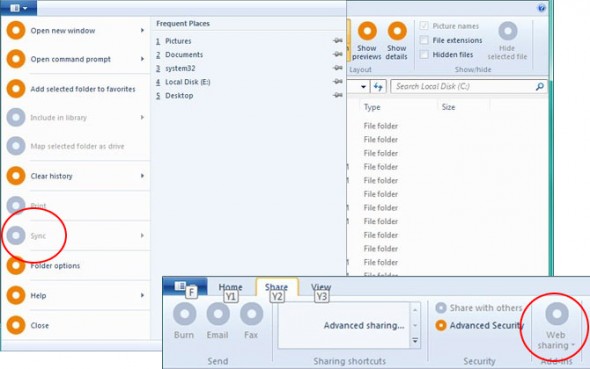
Also, the office ribbon would be desactivated in Win8...

Look :
win8_ribbon6.jpg


And some other images :
win8sharing-590x369.jpg

win8_m23_hiddenribbon.jpg


Personnaly, I love the ribbon they are gonna introduce with Windows 8. It feels likes they gonna complete the circle.
 
Last edited:

My Computer

Computer type
PC/Desktop
Computer Manufacturer/Model Number
Custom build
OS
Windows 10 Professional 64-bit
CPU
Ryzen 9 5900X
Motherboard
Gigabyte X570 Aorus Master
Memory
G.Skill 3600Mhz CL16 16GB × 4
Graphics Card(s)
EVGA GeForce RTX 3070 Ti FTW3 Ultra Gaming
Sound Card
On-board
Monitor(s) Displays
Dell Alienware AW3418DW
Screen Resolution
3440x1440
Hard Drives
1×Sabrent Rocket 4 Plus 2TB nvme SSD (System, internal)
2x4TB Western Digital Blue (Internal)
1x4TB HDST 7200RPM (Internal)
PSU
Seasonic Focus Plus 850W Platinum
Case
Corsair 680X
Cooling
Stock fans + 3× Corsair QL120, Corsair H100i Platinum
Keyboard
Logitech K350
Mouse
Logitech M510
Internet Speed
120Mbits dl - 20Mbits up
Antivirus
ESET NOD32 Antivirus
Browser
Firefox (latest version)
Other Info
Headphones : Audio-Technica ATH-M50x
Scanner : Canon Canoscan LiDE 220 + Plustek OptiBook 4800
Fore more Touchscreen Friendly over all than what is available right now.

Remember,, they are headed for the Cloud.

Just Think about it,,,,another step closer to having a full use touchscreen system you can incorporate into anything in your house,to do anything you need.

Future Home............

Too bad there are those in this country who demand our lifes savings be sucked dry by high bills and vampire's.
 

My Computer

Computer Manufacturer/Model Number
Self Built
OS
Win 7 Ultimate 32bit
CPU
C2D E6600 2.4Ghz
Motherboard
Intel D965WH
Memory
4G Kingston KHX5400D2
Graphics Card(s)
EVGA GTX 570 HD SC (012-P3-1573-KR)
Sound Card
On-Board
Monitor(s) Displays
Samsung 226BW
Screen Resolution
1680 x 1050
Hard Drives
2 x 250 Seagate Barracuda
2 x 500 Seagate Barracuda (Raid1)
PSU
Corsair TX750W
Case
In-Win C589
Cooling
Stock Intel Cooling
I don't want a "cloud" OS, whatever the hell that even means. I want an Operating System that's entirely offline based, because I don't want to depend on some faceless corporation's server for my OS to operate properly. If Windows 8 is going to have this horrible ribbon interface, I guess I'll be passing on Windows 8 then, or at least until a 3rd party tool is released that makes it go away.
 

My Computer

OS
7x64 SP1
CPU
Intel 2600K
Motherboard
Intel DZ77GA-70K
Memory
8GB Samsung
Graphics Card(s)
MSI 670
Sound Card
HT Omega Striker 7.1
Monitor(s) Displays
Dell U2412M
Screen Resolution
1920x1200
Hard Drives
2x 3TB WD Green
1x 4TB Hitachi
1x Intel 330 Series 180GB SSD
PSU
Corsair HX850
I don't want a "cloud" OS, whatever the hell that even means. I want an Operating System that's entirely offline based, because I don't want to depend on some faceless corporation's server for my OS to operate properly.

I totally agree with you Stormkitty. I have a lot of confidential information on my system that I want and need to have 100% control over. There is no way I would allow this information to be floating around in cyberspace and available to any tekkie with the capability to hack into it.
 

My Computer

Computer Manufacturer/Model Number
HP Pavillion dv5t (generation 1)
OS
Vista 64 bit and 32 bit (SP2)
CPU
Intel(R) Core(TM)2 Duo Processor T9400 (2.53 GHz
Memory
4GB DDR2 System Memory (2 Dimm)
Graphics Card(s)
512 MB NVIDIA GeForce 9600M GT
Monitor(s) Displays
15.4" diagonal WSXGA+ High-Definition HP BrightView Widescre
Screen Resolution
1680 x 1050
Hard Drives
320GB 5400RPM SATA Hard Drive with HP ProtectSmart Hard Drive Protection
Keyboard
Built-in HP
Mouse
Built in - Synaptics TouchPad V6.5 on PS/2 Port
Internet Speed
Max
Other Info
~ Intel Next-Gen Wireless-N Mini-card w/Bluetooth ~ Blu-Ray ROM DVD+/-R/RW ~ Integ. HDTV Hybrid Tuner ~ 12 Cell Battery ~ MS Office (Home Premium) 2007 ~
Stop ribbons :mad2:
 

My Computer

Computer type
PC/Desktop
Computer Manufacturer/Model Number
Self Assembled
OS
Microsoft Windows 10 Pro Insider Preview 64-bit
CPU
Intel(R) Core(TM) i3-4130 CPU @ 3.40GHz
Motherboard
Gigabyte Technology Co., Ltd. B85M-D3H
Memory
Corsair Vengence 4GB x2 (8.00GB Dual-Channel DDR3 @ 798MHz)
Graphics Card(s)
2047MB GeForce GTS 450 (ZOTAC International)
Sound Card
Onboard (Realtek High Definition Audio)
Monitor(s) Displays
LG Flatron E2040T
Screen Resolution
1600x900
Hard Drives
Western Digital 1 TB
Seagate 500 GB
PSU
Corsair VS550
Case
Cooler Master K380
Cooling
Cooler Master Seidon 120V Plus
Keyboard
Logitech MK260r
Mouse
Logitech MK260r
Internet Speed
PMPL Broadband
Antivirus
Windows Defender + MBAM
Browser
Firefox
Other Info
Dell Studio 15" Laptop
My users are very non-tech savy, and it took them a while to adjust from Office 2003 to 2007, but they've all realized how much more efficient a ribbon is. I say it all the time in the General section, and I'll say it here as well. Don't confuse the need for a learning period with a sign of a bad product. No one returns a car because they have an adjustment period to the new controls.
 

My Computer

OS
Windows 7 Ultimate x64 SP1
CPU
Intel Core i7-2600
Motherboard
Gigabyte GA-P67A-UD3P-B3
Memory
12 GB Patriot Extreme DDR3-1333
Graphics Card(s)
Nvidia GTX 470
Monitor(s) Displays
Dell UltraSharp 2209WA
Hard Drives
OCZ Agility3 240 GB, WD5001AALS, WD7501AALS
PSU
OCZ ModStream 700W
Case
CoolerMaster HAF 912 Advanced
Cooling
CoolerMaster Hyper 212 Plus
My users are very non-tech savy, and it took them a while to adjust from Office 2003 to 2007, but they've all realized how much more efficient a ribbon is. I say it all the time in the General section, and I'll say it here as well. Don't confuse the need for a learning period with a sign of a bad product. No one returns a car because they have an adjustment period to the new controls.

The point is, that many users do not like being forced to endure a learning phase before they can use software they have otherwise been using quite happily for years. I agree with them. Software should do what the user wants and how he wants to do it, not force him to do it some other way.

Many users simply do not have the time to learn things like this. It may just increase their productivity when they do learn it, ( although I rather doubt that), but it is initially confusing and contra-productive.

That is why there are so many alternatives.

I am always rather amused that people expect Microsoft to help them in some way. Microsoft exists for one single purpose, to make money, and they are very good at that.

Regards....Mike Connor
 

My Computer

OS
Several, including Windows 7 x64 Ultimate
Many users simply do not have the time to learn things like this
What time are we talking about. Learning the ribbon of a product takes 1 or 2 hours. And then you have a good base to deal with the ribbon of another product - e.g. going from Word to PowerPoint or WLMM. If it takes more that that, I would say they do not have the brains to learn it. But then they should stay away from computers.
 

My Computer

Computer Manufacturer/Model Number
HP, Dell, Gateway, Toshiba - 4 laptops and 2 desktops
OS
Vista, Windows7, Mint Mate, Zorin, Windows 8
CPU
from 1.6GHz Duo to i7
Monitor(s) Displays
2x HP w2207
Hard Drives
5x HDD, 7x SSD, 12x Externals
Keyboard
with trackball - no mices
Mouse
Trackball mice
Internet Speed
DSL 6000
You know, after my little spit and bile rant yesterday, I've been thinking about it.

This is just going to be like everytime Microsoft change the UI, You'll whinge and moan about it for the first couple of days, and switch it off. Then you'll force yourself to use it for a day, and suddenly you won't know how you did without it.
 

My Computer

Computer type
PC/Desktop
Computer Manufacturer/Model Number
Medion Erazer (note to self: insert model number) - with custom additions
OS
Windows 10 Pro x64
CPU
Intel Core i5 7400 @ 3.00GHz
Motherboard
OEM supllied with PC
Memory
8GB 2133Mhz DDR4 (OEM supplied)
Graphics Card(s)
Gygabyte Windforce GTX 1050Ti (Factory Overclocked)
Sound Card
Realtek
Monitor(s) Displays
Acer Al1980 + HKC
Screen Resolution
1360*768(HKC) / 1280*1024(Acer)
Hard Drives
1TB Toshiba
1TB WD Caviar Green
120GB Samsung Evo 840
PSU
OEM supplied (no power rating on case)
Case
OEM Supplied
Cooling
Stock
Keyboard
Logitech Wireless
Mouse
Logitect Wireless
Internet Speed
40Mb/s Down 10Mb/s Up
Antivirus
Defender
Browser
Firefox
I have to agree. Again, going back to my non-tech-savy users. When they quit complaining, and just started using the products, they realized how easy the ribbon was, and how all the options are visible on screen, rather than buried in menus and submenus. Once they decided to give it a try, they were off and running in no time. No productivity was lost.
 

My Computer

OS
Windows 7 Ultimate x64 SP1
CPU
Intel Core i7-2600
Motherboard
Gigabyte GA-P67A-UD3P-B3
Memory
12 GB Patriot Extreme DDR3-1333
Graphics Card(s)
Nvidia GTX 470
Monitor(s) Displays
Dell UltraSharp 2209WA
Hard Drives
OCZ Agility3 240 GB, WD5001AALS, WD7501AALS
PSU
OCZ ModStream 700W
Case
CoolerMaster HAF 912 Advanced
Cooling
CoolerMaster Hyper 212 Plus
I have to agree. Again, going back to my non-tech-savy users. When they quit complaining, and just started using the products, they realized how easy the ribbon was, and how all the options are visible on screen, rather than buried in menus and submenus. Once they decided to give it a try, they were off and running in no time. No productivity was lost.
That's why a developer should not listen to the "average user" but just implement what he thinks is right. If they went by the average user, we would still live in the stone age - because people hate change, even if it is for the better.
 

My Computer

Computer Manufacturer/Model Number
HP, Dell, Gateway, Toshiba - 4 laptops and 2 desktops
OS
Vista, Windows7, Mint Mate, Zorin, Windows 8
CPU
from 1.6GHz Duo to i7
Monitor(s) Displays
2x HP w2207
Hard Drives
5x HDD, 7x SSD, 12x Externals
Keyboard
with trackball - no mices
Mouse
Trackball mice
Internet Speed
DSL 6000
Many users simply do not have the time to learn things like this
What time are we talking about. Learning the ribbon of a product takes 1 or 2 hours. And then you have a good base to deal with the ribbon of another product - e.g. going from Word to PowerPoint or WLMM. If it takes more that that, I would say they do not have the brains to learn it. But then they should stay away from computers.

Well, if everybody knew how to setup and operate their machines and software, we would be superfluous.........

Regards....Mike Connor
 

My Computer

OS
Several, including Windows 7 x64 Ultimate
The ribbon was one of the best UI designs from MS when it comes to the new MS Paint, Wordpad, Office 2007 and 2010 and I love it BUT when it comes to Windows Explorer, managing files and folders, its a different thing and I don't want it to look like Office because I like the current design because that's what I got used to and many would agree.

I'd say they better stick with the current UI design of Windows Explorer or at least tweak it a little bit but not with the ribbon interface. They should not enforce the ribbon UI because we already know that a lot of people don't like it so just stick to a design which most of us like at this point. Yes, it can be learned but say that a lot of people would still be so frustrated with this and will do minimal effort to learn and they would have a negative feedback. Come on, remember Vista wasn't a bad OS when you learn how to tweak it but with a lot of new things enabled by default, a lot of people thought it was rubbish all along and it got a lot of negative feedback thus ruining its reputation.
 

My Computer

Computer Manufacturer/Model Number
Custom Built
OS
Windows 7 Ultimate 32 Bit, Windows Developer Preview, Linux Mint 9 Gnome 32 Bit
CPU
Intel Pentium Dual CPU E2180@2GHz
Motherboard
Elitegroup 671T-M3
Graphics Card(s)
NVIDIA GeForce 7200 GS
Monitor(s) Displays
AOC TFT1560 15" LCD Monitor
Screen Resolution
1024x768
Keyboard
Logitech USB Keyboard
I like the current design because that's what I got used to
That is the killer argument for any progress.
 

My Computer

Computer Manufacturer/Model Number
HP, Dell, Gateway, Toshiba - 4 laptops and 2 desktops
OS
Vista, Windows7, Mint Mate, Zorin, Windows 8
CPU
from 1.6GHz Duo to i7
Monitor(s) Displays
2x HP w2207
Hard Drives
5x HDD, 7x SSD, 12x Externals
Keyboard
with trackball - no mices
Mouse
Trackball mice
Internet Speed
DSL 6000
You know, after my little spit and bile rant yesterday, I've been thinking about it.

This is just going to be like everytime Microsoft change the UI, You'll whinge and moan about it for the first couple of days, and switch it off. Then you'll force yourself to use it for a day, and suddenly you won't know how you did without it.

That is how I've been looking at it. Instead of jumping to my own conclusions I took a step back to consider the change.

If this is indeed real and it comes to pass, it may be something that I won't be crazy about at first, but after using it will come to master and not be bothered.

My main concern is it takes up quite a bit of the window. I often have lots of files and folders in a window and that will be obtrusive when looking for files. Maybe they can cut it down a bit.
 

My Computer

Computer Manufacturer/Model Number
Dell Inspiron 1520 (Laptop)/ Home (Desktop)
OS
Windows 7 x64 / Same
CPU
Intel Core 2 Duo T7250 / Intel Core i7 930
Motherboard
Intel 945 / Asus P6X58D-E
Memory
4GB / 6GB
Graphics Card(s)
NVIDIA GeForce 8400M GS / ASUS 1GB
Sound Card
Whatever Dell gave me :-( / Onboard
Monitor(s) Displays
15.4" LCD / Crappy CRT
Hard Drives
Seagate 500GB SATA; 7200 RPM / Seagate 1TB SATA; 7200 RPM
PSU
N/A / OCZ Fatal1ty 550W Modular
Case
N/A / Antec 900
Cooling
Air
Mouse
Microsoft Presenter (Bluetooth)
As long as it's hidable when you don't want it (and it looks like it is) then it shouldn't be a negative issue for anyone and in fact a positive issue for a lot.

You /can/ see why they did it though. There is WAY too much stuff that is needed daily hidden under the context menu for the general populous. And some actions are downright hostle like "New Folder" only showing up if you right click on "Empty Space" which sometimes can be non existant, which is why it was added to the current command bar in the W7 explorer GUI, but there are far too many options for that bar in it's current form.

So it completely makes sense to use the ribbon UI. In fact if the ribbon can easily and quickly be turned on and off with a single mouse click it'll actually take up LESS space during "normal" use that the current explorer wastes now...

I would only have a problem with it if it was unhidable (like the current command bar in the W7 explorer... grrr.)
 

My Computer

Computer Manufacturer/Model Number
Scratch built
OS
Windows 7 x64 Ultimate
CPU
i7 960
Motherboard
Asus P6X58D
Memory
12 Gig Corsair Dominator
Graphics Card(s)
Nvidia 480
Sound Card
Maudio Delta 44 + breakout box
Monitor(s) Displays
Dell UltraSharp U2410 24in and Samsung 21 dual monitors
Screen Resolution
1920x1200 and 1280x1024
Hard Drives
Primary: Intel X-25M G2 160G SSD
Secondary: Segate baracuda 1.0 TB
HDs in AHCI mode.
PSU
Corasair TX850
Case
Cooler Master HAF
Cooling
Corsair H50
Keyboard
Logitech G15 + N52 game pad
Mouse
Logitech MX518
Internet Speed
15kbs down 4.5kbps up
Other Info
WEI 7.6
CPU & RAM 7.6
Graphics 7.9
Hard disk 7.7
My main concern is it takes up quite a bit of the window. I often have lots of files and folders in a window and that will be obtrusive when looking for files. Maybe they can cut it down a bit.

Indeed, that is my main reason for disliking various ribbons.

Regards....Mike Connor
 

My Computer

OS
Several, including Windows 7 x64 Ultimate
A
I would only have a problem with it if it was unhidable (like the current command bar in the W7 explorer... grrr.)

You can set that to autohide if you want;

How to Auto-Hide or Disable Command Bar (aka Folder Band) in Windows Vista and 7 Explorer? - Tweaking with Vishal

( Works on 7 x64 )

But in the meantime I have simply added the common functions to it, and removed them elsewhere. Takes a little getting used to, but does not waste so much screen space.
Regards....Mike Connor
 

My Computer

OS
Several, including Windows 7 x64 Ultimate
Back
Top