Hopefully I’m in the most appropriate location for this inquiry.
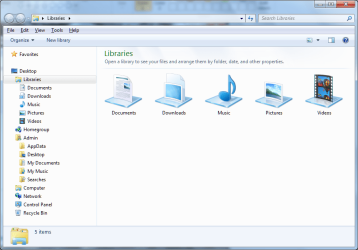
In my pc navigation pane for my main pc it goes Desktop, then the Libraries (Documents, Downloads, etc), Homegroup, Computer (with the listed drives), then last Network. In my secondary pc between Homegroup and Computer it has “Admin” with many of the same Library menus along with AppData. I would really like to get rid of this extra file location. It used to also have a download location that was a pain and I changed the paths for that but I would still like to get rid of it totally. I was also able to delete some other things that were empty. I think this must be something the previous owner set up as I don’t think I have ever seen one set up like this.
Not sure but for one thing it appears the AppData in that Admin listing is linked to the User AppData files. I certainly don’t want to delete it if I can’t and cause a mess, but I would really like to clean things up. There is enough confusion and potential problems as it is. Anyone know how to do this? I think this may be the default location for AppData so a path may have to be changed or maybe this is some kind of shared folders situation that needs to be undone. I can make a backup of the AppData files in case deleting it needs to be reversed. Or maybe if this is not really a secondary location using up hard drive space there is a way to hide this listing. Thanks.
In my pc navigation pane for my main pc it goes Desktop, then the Libraries (Documents, Downloads, etc), Homegroup, Computer (with the listed drives), then last Network. In my secondary pc between Homegroup and Computer it has “Admin” with many of the same Library menus along with AppData. I would really like to get rid of this extra file location. It used to also have a download location that was a pain and I changed the paths for that but I would still like to get rid of it totally. I was also able to delete some other things that were empty. I think this must be something the previous owner set up as I don’t think I have ever seen one set up like this.
Not sure but for one thing it appears the AppData in that Admin listing is linked to the User AppData files. I certainly don’t want to delete it if I can’t and cause a mess, but I would really like to clean things up. There is enough confusion and potential problems as it is. Anyone know how to do this? I think this may be the default location for AppData so a path may have to be changed or maybe this is some kind of shared folders situation that needs to be undone. I can make a backup of the AppData files in case deleting it needs to be reversed. Or maybe if this is not really a secondary location using up hard drive space there is a way to hide this listing. Thanks.
My Computer
- Computer type
- PC/Desktop
- Computer Manufacturer/Model Number
- Custom
- OS
- W7 Pro 64
- CPU
- Ryzen 1500X
- Motherboard
- Gigabyte AX370 - Gaming
- Memory
- G Skill 2400 - 8GB
- Graphics Card(s)
- HD 6450
- Sound Card
- Realtek onboard
- Monitor(s) Displays
- Dell 19 square, Dell 17 square, Dell 15 square, Element 24
- Hard Drives
- Samsung 970 nvme 120 GB, WD 1TB 7200
- Keyboard
- MS ERGO 4000 mostly
- Mouse
- Dell standard optical
- Internet Speed
- 15 Mbps
- Antivirus
- AVG, MS firewall
- Browser
- firefox mostly