
Solved Roswell rnx-n1 adopter issue

drmax

New member
Member
VIP
Local time
10:17 AM
Messages
314
Ok, so I'm trying to connect to my encrypted Linksys router, which is hooked to my mainframe pc. I find the network and hit connect at which time I enter the password. It connects, sig strength good and soforth. I try to go onto the net and no go. There is no connection to the net. Unsure what is happening, as it used to work, like as in a few weeks ago. I have not tried to disable my network connection to then see if it connects.
Unsure why this has to be so difficult. What happen to the days of plug-n-play? Thx for any help on this. I've never messed with the internal settings in Roswell, as there seems to be a million. Also, if I shut off the pc and restart, the password for wireless is lost and have to reenter. I'm about to pitch this in the ditch.
 

My Computer My Computer

At a glance

W7 premium 64amd a8-38508G g-skillasus gt-520 silent
OS
W7 premium 64
CPU
amd a8-3850
Motherboard
asus f1-a75v pro
Memory
8G g-skill
Graphics Card(s)
asus gt-520 silent
Monitor(s) Displays
LED viewsonic 24"
Hard Drives
seagate sata 120
wd 2T green
PSU
cool master 600W silent pro (80+bronze)
Hi drmax,

Can you access the router setting? Try changing the Wireless Mode (usually this is in a Mixed Mode), change it to G/N, G or B/G.

If this is still a No-Go, please follow the basic posting requirements here and provide us more info to better assist you.
 

My Computer My Computer

At a glance

Win7 & Win8 64bitIntel i5
Computer Manufacturer/Model Number
Lenovo Desktop/Samsung Laptop
OS
Win7 & Win8 64bit
CPU
Intel i5
Internet Speed
Charter-20 Mbps
Antivirus
Avast
Browser
FF, IE9 and Chrome
Hi drmax,

Can you access the router setting? Try changing the Wireless Mode (usually this is in a Mixed Mode), change it to G/N, G or B/G.

If this is still a No-Go, please follow the basic posting requirements here and provide us more info to better assist you.
Will get to this in a few days. It's my kids homework pc and we can work around it for now. Thx for this info. I'll post back soon. DM
 

My Computer My Computer

At a glance

W7 premium 64amd a8-38508G g-skillasus gt-520 silent
OS
W7 premium 64
CPU
amd a8-3850
Motherboard
asus f1-a75v pro
Memory
8G g-skill
Graphics Card(s)
asus gt-520 silent
Monitor(s) Displays
LED viewsonic 24"
Hard Drives
seagate sata 120
wd 2T green
PSU
cool master 600W silent pro (80+bronze)
I had a G or B. Selected G and now connected. I will restart and if it does not connect, I will follow your further instruction. Thx a ton and time slid by so sorry for the later reply. Just go back at this. DM
 

My Computer My Computer

At a glance

W7 premium 64amd a8-38508G g-skillasus gt-520 silent
OS
W7 premium 64
CPU
amd a8-3850
Motherboard
asus f1-a75v pro
Memory
8G g-skill
Graphics Card(s)
asus gt-520 silent
Monitor(s) Displays
LED viewsonic 24"
Hard Drives
seagate sata 120
wd 2T green
PSU
cool master 600W silent pro (80+bronze)
No worries.... glad to hear that we could helped and your issue has been resolved. :)
You're Welcome!

I had a G or B. Selected G and now connected. I will restart and if it does not connect, I will follow your further instruction. Thx a ton and time slid by so sorry for the later reply. Just go back at this. DM

Edit: Issue not yet resolved!
 
Last edited:

My Computer My Computer

At a glance

Win7 & Win8 64bitIntel i5
Computer Manufacturer/Model Number
Lenovo Desktop/Samsung Laptop
OS
Win7 & Win8 64bit
CPU
Intel i5
Internet Speed
Charter-20 Mbps
Antivirus
Avast
Browser
FF, IE9 and Chrome
Thank you on the help....and with a restart it appears it did not store my "lock" code. I ck'd and there is not a box to ck to "remember" the code...if there is even suppose to be one. This won't work, if I have to keep entering this huge code. (for my kids homework) I'll just go to the place you told me to and enter the info. thx, DM
 

My Computer My Computer

At a glance

W7 premium 64amd a8-38508G g-skillasus gt-520 silent
OS
W7 premium 64
CPU
amd a8-3850
Motherboard
asus f1-a75v pro
Memory
8G g-skill
Graphics Card(s)
asus gt-520 silent
Monitor(s) Displays
LED viewsonic 24"
Hard Drives
seagate sata 120
wd 2T green
PSU
cool master 600W silent pro (80+bronze)
Before you do the preposting requirements, can we try something else? See below....

Remove all network profiles stored from the problematic computer, then re-add your SSID (or wireless network) with the proper encryption, here's a Tutorial from Brink.

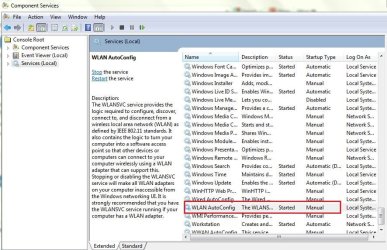
Also, if you are using a wireless manager or utility for your Wi-Fi device, this might be conflicting with your WLAN Auto Configuration that you might find under Services (click on the Start button type services.msc then press enter). In this image, the native WLAN Auto Configuration service is Started, but if you are using a wireless manager, make sure that this is disabled.
 

Attachments

  • WLAN Auto Config.jpg
    WLAN Auto Config.jpg
    102.4 KB · Views: 0

My Computer My Computer

At a glance

Win7 & Win8 64bitIntel i5
Computer Manufacturer/Model Number
Lenovo Desktop/Samsung Laptop
OS
Win7 & Win8 64bit
CPU
Intel i5
Internet Speed
Charter-20 Mbps
Antivirus
Avast
Browser
FF, IE9 and Chrome
I've realized just now that during start up I immediately have to hit the F1 key to continue. My time is not keeping track either. Hunch has it my cmos bat. is dead. I'm wondering if this could be causing an assortment of issues? I'll dig this bat out and replace and then continue with troubleshooting. Thx, DM
 

My Computer My Computer

At a glance

W7 premium 64amd a8-38508G g-skillasus gt-520 silent
OS
W7 premium 64
CPU
amd a8-3850
Motherboard
asus f1-a75v pro
Memory
8G g-skill
Graphics Card(s)
asus gt-520 silent
Monitor(s) Displays
LED viewsonic 24"
Hard Drives
seagate sata 120
wd 2T green
PSU
cool master 600W silent pro (80+bronze)
I am using XP on troubled pc and there are 4 different connections, 3 of which I have disable. I went into the xp wireless center and do not see a way to manage it, as of anything similar to what is listed by Brink.
 

My Computer My Computer

At a glance

W7 premium 64amd a8-38508G g-skillasus gt-520 silent
OS
W7 premium 64
CPU
amd a8-3850
Motherboard
asus f1-a75v pro
Memory
8G g-skill
Graphics Card(s)
asus gt-520 silent
Monitor(s) Displays
LED viewsonic 24"
Hard Drives
seagate sata 120
wd 2T green
PSU
cool master 600W silent pro (80+bronze)
update

I sent rosewell my issue and they replied to 1stly disable my security from my linksys. I went into that setting, disabled....restarted main pc (hooked to router) When I went to see if it would then hookup to my xp machine it still said my linksys was locked. I'm starting to think that I should reinstall the software for linksys and go from there. This all used to work and unsure WTH happened. It did start by me encrypting my linksys. After I did this, I noticed there was 2 of the same named networks....i.e. "mynetwork"....showing up. It somehow had created 2 networks. I had spent hours trying to figure out what caused this. I'm going for a fresh install of the software. Advise if you disagree. Thx for listening, DM
 

My Computer My Computer

At a glance

W7 premium 64amd a8-38508G g-skillasus gt-520 silent
OS
W7 premium 64
CPU
amd a8-3850
Motherboard
asus f1-a75v pro
Memory
8G g-skill
Graphics Card(s)
asus gt-520 silent
Monitor(s) Displays
LED viewsonic 24"
Hard Drives
seagate sata 120
wd 2T green
PSU
cool master 600W silent pro (80+bronze)
Sorry for the late reply.....

I'd suggest for you to remove the encryption from the router, see if you can connect, then put it back again. Make sure that you are using WPA2 with AES encryption. If it still an issue, update your Wi-Fi network adapter's driver to the latest.

Another update of your progress will be nice.
 

My Computer My Computer

At a glance

Win7 & Win8 64bitIntel i5
Computer Manufacturer/Model Number
Lenovo Desktop/Samsung Laptop
OS
Win7 & Win8 64bit
CPU
Intel i5
Internet Speed
Charter-20 Mbps
Antivirus
Avast
Browser
FF, IE9 and Chrome
When I disabled my linksys my troubled machine was still reporting the network was still locked? How could this be? My rosewell has the latest drivers
 

My Computer My Computer

At a glance

W7 premium 64amd a8-38508G g-skillasus gt-520 silent
OS
W7 premium 64
CPU
amd a8-3850
Motherboard
asus f1-a75v pro
Memory
8G g-skill
Graphics Card(s)
asus gt-520 silent
Monitor(s) Displays
LED viewsonic 24"
Hard Drives
seagate sata 120
wd 2T green
PSU
cool master 600W silent pro (80+bronze)
if I disable my wireless SSID broadcast in linksys, this should not allow my xp machine with the rosewell "see" my network, hence not be able to use it, correct? I am troubleshoot right now, is why I ask. Thx
 

My Computer My Computer

At a glance

W7 premium 64amd a8-38508G g-skillasus gt-520 silent
OS
W7 premium 64
CPU
amd a8-3850
Motherboard
asus f1-a75v pro
Memory
8G g-skill
Graphics Card(s)
asus gt-520 silent
Monitor(s) Displays
LED viewsonic 24"
Hard Drives
seagate sata 120
wd 2T green
PSU
cool master 600W silent pro (80+bronze)
Ok, well I had to turn the network mode to "mixed". (which I think is what ultimately fixed it) I enabled my Linksys firewall, and disabled my ssid. Somehow, my xp machine rosewell is still able to make the connection to Linksys...but it just does not populate Linksys as a available network. (invisible) Guess I don't quite understand how that part of it works...and really do not want to. I will monitor this for now and mark as "solved? Cheers
 

My Computer My Computer

At a glance

W7 premium 64amd a8-38508G g-skillasus gt-520 silent
OS
W7 premium 64
CPU
amd a8-3850
Motherboard
asus f1-a75v pro
Memory
8G g-skill
Graphics Card(s)
asus gt-520 silent
Monitor(s) Displays
LED viewsonic 24"
Hard Drives
seagate sata 120
wd 2T green
PSU
cool master 600W silent pro (80+bronze)
Back
Top