
Run as Different User

How to Run Program as a Different User in Windows 7 and Windows 8


   Information
This will show you how to run a program as if it was running from a different user account on your computer while you are still logged on to your user account in Windows 7 and Windows 8.

   Note
This will only affect this instance of the program running, so you can open multiple instances of this progam as a different user per instance. Closing the program will end that program's instance running for that user.
   Warning

  • The user account that you want to run the program as must be password protected.
  • The Secondary Logon service needs to be set to Manual and not be disabled. By default, it is set to Manual unless changed.


OPTION ONE

To "Run as different user" using Context Menu


1. Press and hold the Shift key and right click on the program's shortcut or BAT, CMD, EXE, MSC, or MSI file, then click/tap on Run as different user. (See screenshot below)
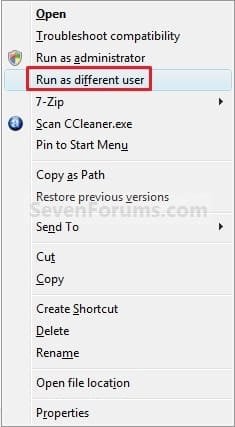
Context_Menu.jpg
2. Type in the user name and password of the user account that you want to run this program as. (see screenshot below)
NOTE: If the user account is on a domain, then you would use UserName@Domain or Domain\UserName for the user name instead.
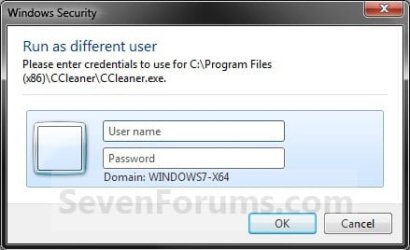
Log-On.jpg
3. If prompted by UAC, then click/tap on Yes.

4. The program will now be running as that user.

5. When done, simply close the program to stop it from running as that user.


OPTION TWO

To "Run as different user" from Start Application Bar


NOTE: This option is only for Windows 8.
1. For how, see: How to Add or Remove "Run as Different User" from Context Menu in Windows 7 and Windows 8
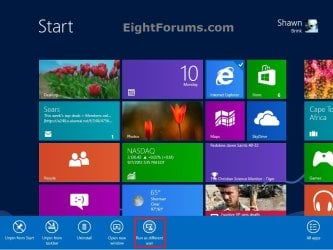
Start.jpg


OPTION THREE

To "Run as different user" using RUNAS Command in Command Prompt


RUNAS.jpg
1. Open a command prompt.

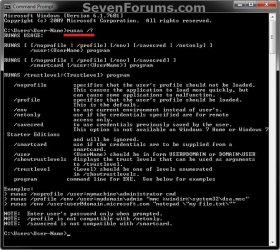
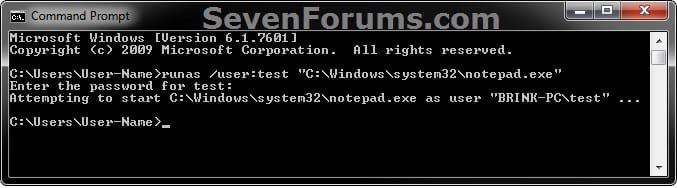
2. In the command prompt, type the command below, and press Enter. (see screenshot below)
NOTE: You would substitute USER-NAME in the command with the actual name of the user account that you want to run the program as. If the user account is on a domain, then you would use UserName@Domain or Domain\UserName for the user name instead.
runas /user:USER-NAME "C:\full\path\of\Program.exe"

For example, if I wanted to run Notepad as the test user, I would type this command below.

runas /user:test "C:\Windows\system32\notepad.exe"
example.jpg
3. Type in the password of the user account that you want to run this program as. (see screenshot above)

4. If prompted by UAC, then click/tap on Yes.

5. The program will now be running as that user.

6. When done, simply close the program to stop it from running as that user.
   Tip
To Create a RunAs Shortcut for the Program
OR

  • Open Notepad.
  • Type the command from step 2 above in Notepad.
  • Click on File (menu bar) and Save as in Notepad.
  • Navigate to your desktop.
  • Type in name-you-want.bat, and click on the Save button.
You will now be able to just run this shortcut or .bat file to have the program runas the user you want.

That's it,
Shawn


Last edited:
Thanks for the quick response, I created a different user name and log in as ID: illusion and password, doesn't help
 

My Computer

OS
W7 Ultimate 32bit
Stev,

What are you typing in the "User Name" field?

For example, if the user name is illusion, then you would type either below. Just substitute Domain with the actual name of the domain computer (ex: SEV-PC).

illusion@Domain

OR

Domain\illusion
 

My Computer

Computer type
PC/Desktop
Computer Manufacturer/Model Number
Self built custom
OS
64-bit Windows 11 Pro for Workstations
CPU
Intel i7-8700K OC'd to 5 GHz
Motherboard
ASUS ROG Maximus XI Formula Z390
Memory
64 GB (4x16GB) G.SKILL TridentZ RGB DDR4 3600 MHz
Graphics Card(s)
ASUS ROG-STRIX-GTX1080TI-O11G-GAMING
Sound Card
Integrated
Monitor(s) Displays
2 x Samsung Odyssey G7 27"
Screen Resolution
2560x1440
Hard Drives
1TB Samsung 990 PRO M.2,
4TB Samsung 990 PRO PRO M.2,
TerraMaster F8 SSD Plus NAS
PSU
Seasonic Prime Titanium 850W
Case
Thermaltake Core P3
Cooling
Corsair Hydro H115i
Keyboard
Logitech wireless K800
Mouse
Logitech MX Master 4
Internet Speed
2 Gb/s Download and 100 Mb/s Upload
Antivirus
Malwarebyte Anti-Malware Premium
Browser
Google Chrome
Other Info
Logitech Z625 speaker system,
Logitech BRIO 4K Pro webcam,
HP Color LaserJet Pro MFP M477fdn,
APC SMART-UPS RT 1000 XL - SURT1000XLI,
Galaxy S23 Plus phone
Hello,

I have a question : Suppose my computer is on Domain D1. There is also another domain D2 which i used to connect through VPN. Now after connecting VPN, i am following below steps :

1. I am trying to execute a Application by Run as User (Shift+Right Mouse button).
2. I am entering D2\Username & password.

I am getting error "Logon failure : Unknown User name or bad password".

However using same credentials (D2\username & password), i can successfully RDP the machine on domain D2. Moreover this account is member of Admin group on D2 domain.

Can you please suggest?
 

My Computer

OS
Windows 7 Enterprise x64 Sp1
Hello anujagrawal, and welcome to Seven Forums.

You might see if you may be able to log in using username@D2, then the password may work instead.

Hope this helps, :)
Shawn
 

My Computer

Computer type
PC/Desktop
Computer Manufacturer/Model Number
Self built custom
OS
64-bit Windows 11 Pro for Workstations
CPU
Intel i7-8700K OC'd to 5 GHz
Motherboard
ASUS ROG Maximus XI Formula Z390
Memory
64 GB (4x16GB) G.SKILL TridentZ RGB DDR4 3600 MHz
Graphics Card(s)
ASUS ROG-STRIX-GTX1080TI-O11G-GAMING
Sound Card
Integrated
Monitor(s) Displays
2 x Samsung Odyssey G7 27"
Screen Resolution
2560x1440
Hard Drives
1TB Samsung 990 PRO M.2,
4TB Samsung 990 PRO PRO M.2,
TerraMaster F8 SSD Plus NAS
PSU
Seasonic Prime Titanium 850W
Case
Thermaltake Core P3
Cooling
Corsair Hydro H115i
Keyboard
Logitech wireless K800
Mouse
Logitech MX Master 4
Internet Speed
2 Gb/s Download and 100 Mb/s Upload
Antivirus
Malwarebyte Anti-Malware Premium
Browser
Google Chrome
Other Info
Logitech Z625 speaker system,
Logitech BRIO 4K Pro webcam,
HP Color LaserJet Pro MFP M477fdn,
APC SMART-UPS RT 1000 XL - SURT1000XLI,
Galaxy S23 Plus phone
Ok can anyone help me how to run as different user this link
"C:\Program Files (x86)\Gameforge\NCLauncher\NCLauncher.exe" /LauncherID:"GameForge" /CompanyID:"11" /GameID:"AION-LIVE" /LUpdateAddr:"update.aion.gfsrv.net"
With all these quotation marks runas.exe cant accept the parameters.
 

My Computer

OS
Windows 7 Ultimate x64
Hello Sakina,

I have no idea if this will work, but you might try this instead with one more set of quotes wrapped around the whole thing.

Code:
""C:\Program Files (x86)\Gameforge\NCLauncher\NCLauncher.exe" /LauncherID:"GameForge" /CompanyID:"11" /GameID:"AION-LIVE" /LUpdateAddr:"update.aion.gfsrv.net""

Hope this helps, :)
Shawn
 

My Computer

Computer type
PC/Desktop
Computer Manufacturer/Model Number
Self built custom
OS
64-bit Windows 11 Pro for Workstations
CPU
Intel i7-8700K OC'd to 5 GHz
Motherboard
ASUS ROG Maximus XI Formula Z390
Memory
64 GB (4x16GB) G.SKILL TridentZ RGB DDR4 3600 MHz
Graphics Card(s)
ASUS ROG-STRIX-GTX1080TI-O11G-GAMING
Sound Card
Integrated
Monitor(s) Displays
2 x Samsung Odyssey G7 27"
Screen Resolution
2560x1440
Hard Drives
1TB Samsung 990 PRO M.2,
4TB Samsung 990 PRO PRO M.2,
TerraMaster F8 SSD Plus NAS
PSU
Seasonic Prime Titanium 850W
Case
Thermaltake Core P3
Cooling
Corsair Hydro H115i
Keyboard
Logitech wireless K800
Mouse
Logitech MX Master 4
Internet Speed
2 Gb/s Download and 100 Mb/s Upload
Antivirus
Malwarebyte Anti-Malware Premium
Browser
Google Chrome
Other Info
Logitech Z625 speaker system,
Logitech BRIO 4K Pro webcam,
HP Color LaserJet Pro MFP M477fdn,
APC SMART-UPS RT 1000 XL - SURT1000XLI,
Galaxy S23 Plus phone
Hello Sakina,

I have no idea if this will work, but you might try this instead with one more set of quotes wrapped around the whole thing.

Code:
""C:\Program Files (x86)\Gameforge\NCLauncher\NCLauncher.exe /LauncherID:"GameForge" /CompanyID:"11" /GameID:"AION-LIVE" /LUpdateAddr:"update.aion.gfsrv.net""
Hope this helps, :)
Shawn

It doesn't works. Normaly
Code:
runas /user:games "C:\Program Files (x86)\Gameforge\NCLauncher\NCLauncher.exe  /LauncherID:"GameForge" /CompanyID:"11" /GameID:"AION-LIVE"  /LUpdateAddr:"update.aion.gfsrv.net""
should work, if there was no stupid quotation marks in the parameters
 
Last edited:

My Computer

OS
Windows 7 Ultimate x64
Hello Guys! While I am Firing following Command
runas /user:user name "C:\Windows\system32\notepad.exe" then this prompt me a password while no any password set for system. i am sole user of my System mean i am admin of system. if i leave blank password and press enter then following message shown

RUNAS ERROR: Unable to run - C:\windows\System32\notepad.exe
1327: Logon failure: user account restriction. Possible reasons are blank passwords not allowed, logon hour restrictions, or a policy restriction has been enforced.
 

My Computer

OS
windows 7 ultimate 32 bit
Hello avinashrawat,

Unfortunately, the user account you want to "run as" must have a password to be able to use it. :(
 

My Computer

Computer type
PC/Desktop
Computer Manufacturer/Model Number
Self built custom
OS
64-bit Windows 11 Pro for Workstations
CPU
Intel i7-8700K OC'd to 5 GHz
Motherboard
ASUS ROG Maximus XI Formula Z390
Memory
64 GB (4x16GB) G.SKILL TridentZ RGB DDR4 3600 MHz
Graphics Card(s)
ASUS ROG-STRIX-GTX1080TI-O11G-GAMING
Sound Card
Integrated
Monitor(s) Displays
2 x Samsung Odyssey G7 27"
Screen Resolution
2560x1440
Hard Drives
1TB Samsung 990 PRO M.2,
4TB Samsung 990 PRO PRO M.2,
TerraMaster F8 SSD Plus NAS
PSU
Seasonic Prime Titanium 850W
Case
Thermaltake Core P3
Cooling
Corsair Hydro H115i
Keyboard
Logitech wireless K800
Mouse
Logitech MX Master 4
Internet Speed
2 Gb/s Download and 100 Mb/s Upload
Antivirus
Malwarebyte Anti-Malware Premium
Browser
Google Chrome
Other Info
Logitech Z625 speaker system,
Logitech BRIO 4K Pro webcam,
HP Color LaserJet Pro MFP M477fdn,
APC SMART-UPS RT 1000 XL - SURT1000XLI,
Galaxy S23 Plus phone
@Brink
which password apply by me for open user account. i never set password for any user account.
 

My Computer

OS
windows 7 ultimate 32 bit
"Run as" requires a password credential to work.
 

My Computer

Computer type
PC/Desktop
Computer Manufacturer/Model Number
Self built custom
OS
64-bit Windows 11 Pro for Workstations
CPU
Intel i7-8700K OC'd to 5 GHz
Motherboard
ASUS ROG Maximus XI Formula Z390
Memory
64 GB (4x16GB) G.SKILL TridentZ RGB DDR4 3600 MHz
Graphics Card(s)
ASUS ROG-STRIX-GTX1080TI-O11G-GAMING
Sound Card
Integrated
Monitor(s) Displays
2 x Samsung Odyssey G7 27"
Screen Resolution
2560x1440
Hard Drives
1TB Samsung 990 PRO M.2,
4TB Samsung 990 PRO PRO M.2,
TerraMaster F8 SSD Plus NAS
PSU
Seasonic Prime Titanium 850W
Case
Thermaltake Core P3
Cooling
Corsair Hydro H115i
Keyboard
Logitech wireless K800
Mouse
Logitech MX Master 4
Internet Speed
2 Gb/s Download and 100 Mb/s Upload
Antivirus
Malwarebyte Anti-Malware Premium
Browser
Google Chrome
Other Info
Logitech Z625 speaker system,
Logitech BRIO 4K Pro webcam,
HP Color LaserJet Pro MFP M477fdn,
APC SMART-UPS RT 1000 XL - SURT1000XLI,
Galaxy S23 Plus phone
I am trying to write a batch file. I want to run the batch file as Administrator. I know I can put "runas /user:(UserNameHere) CMD.exe" In the batch file but It ask me to put the Administrator password In. Is there anyway I can put the password In the batch file too? I am writing the batch file for someone else and don't want to give them the batch file.
 

My Computer

Computer type
PC/Desktop
OS
windows 7
Hello Bill,

If you like, users could just right click on the .bat file, and click on "Run as administrator" to do so.

Hope this helps some, :)
Shawn
 

My Computer

Computer type
PC/Desktop
Computer Manufacturer/Model Number
Self built custom
OS
64-bit Windows 11 Pro for Workstations
CPU
Intel i7-8700K OC'd to 5 GHz
Motherboard
ASUS ROG Maximus XI Formula Z390
Memory
64 GB (4x16GB) G.SKILL TridentZ RGB DDR4 3600 MHz
Graphics Card(s)
ASUS ROG-STRIX-GTX1080TI-O11G-GAMING
Sound Card
Integrated
Monitor(s) Displays
2 x Samsung Odyssey G7 27"
Screen Resolution
2560x1440
Hard Drives
1TB Samsung 990 PRO M.2,
4TB Samsung 990 PRO PRO M.2,
TerraMaster F8 SSD Plus NAS
PSU
Seasonic Prime Titanium 850W
Case
Thermaltake Core P3
Cooling
Corsair Hydro H115i
Keyboard
Logitech wireless K800
Mouse
Logitech MX Master 4
Internet Speed
2 Gb/s Download and 100 Mb/s Upload
Antivirus
Malwarebyte Anti-Malware Premium
Browser
Google Chrome
Other Info
Logitech Z625 speaker system,
Logitech BRIO 4K Pro webcam,
HP Color LaserJet Pro MFP M477fdn,
APC SMART-UPS RT 1000 XL - SURT1000XLI,
Galaxy S23 Plus phone
run as Administrator

I can't put this In a batch file? I would like to make It as easy as I can since I am making this for someone else. I know I can do "runas" but that ask for password and I don't know how to add the password to the batch file.
 

My Computer

Computer type
PC/Desktop
OS
windows 7
How is the batch file going to be used?

Would you be able to do what you are wanting to do in the .bat file with a .vbs script file instead? I have a method that will have the .vbs prompt with UAC to elevate using a script.

If you have a password included in the batch, then it will only work on the computer that has the account and password you used for the batch.
 

My Computer

Computer type
PC/Desktop
Computer Manufacturer/Model Number
Self built custom
OS
64-bit Windows 11 Pro for Workstations
CPU
Intel i7-8700K OC'd to 5 GHz
Motherboard
ASUS ROG Maximus XI Formula Z390
Memory
64 GB (4x16GB) G.SKILL TridentZ RGB DDR4 3600 MHz
Graphics Card(s)
ASUS ROG-STRIX-GTX1080TI-O11G-GAMING
Sound Card
Integrated
Monitor(s) Displays
2 x Samsung Odyssey G7 27"
Screen Resolution
2560x1440
Hard Drives
1TB Samsung 990 PRO M.2,
4TB Samsung 990 PRO PRO M.2,
TerraMaster F8 SSD Plus NAS
PSU
Seasonic Prime Titanium 850W
Case
Thermaltake Core P3
Cooling
Corsair Hydro H115i
Keyboard
Logitech wireless K800
Mouse
Logitech MX Master 4
Internet Speed
2 Gb/s Download and 100 Mb/s Upload
Antivirus
Malwarebyte Anti-Malware Premium
Browser
Google Chrome
Other Info
Logitech Z625 speaker system,
Logitech BRIO 4K Pro webcam,
HP Color LaserJet Pro MFP M477fdn,
APC SMART-UPS RT 1000 XL - SURT1000XLI,
Galaxy S23 Plus phone
How is the batch file going to be used?

Would you be able to do what you are wanting to do in the .bat file with a .vbs script file instead? I have a method that will have the .vbs prompt with UAC to elevate using a script.

If you have a password included in the batch, then it will only work on the computer that has the account and password you used for the batch.
'I am helping my Sister-In-Law with her computer. She can't change her password from her user account. I don't want to give her the Administrator password. I was thinking of writing a batch file for her to change her account With the runas Administrator and password than make It a executable so she can just click and run It. I have the batch file writing already. She does just learning computers. This Is her first computer. I am just learning batch file and vbscipt. It should just be run on her computer not on on any other computer.
 

My Computer

Computer type
PC/Desktop
OS
windows 7

My Computer

Computer type
PC/Desktop
Computer Manufacturer/Model Number
Self built custom
OS
64-bit Windows 11 Pro for Workstations
CPU
Intel i7-8700K OC'd to 5 GHz
Motherboard
ASUS ROG Maximus XI Formula Z390
Memory
64 GB (4x16GB) G.SKILL TridentZ RGB DDR4 3600 MHz
Graphics Card(s)
ASUS ROG-STRIX-GTX1080TI-O11G-GAMING
Sound Card
Integrated
Monitor(s) Displays
2 x Samsung Odyssey G7 27"
Screen Resolution
2560x1440
Hard Drives
1TB Samsung 990 PRO M.2,
4TB Samsung 990 PRO PRO M.2,
TerraMaster F8 SSD Plus NAS
PSU
Seasonic Prime Titanium 850W
Case
Thermaltake Core P3
Cooling
Corsair Hydro H115i
Keyboard
Logitech wireless K800
Mouse
Logitech MX Master 4
Internet Speed
2 Gb/s Download and 100 Mb/s Upload
Antivirus
Malwarebyte Anti-Malware Premium
Browser
Google Chrome
Other Info
Logitech Z625 speaker system,
Logitech BRIO 4K Pro webcam,
HP Color LaserJet Pro MFP M477fdn,
APC SMART-UPS RT 1000 XL - SURT1000XLI,
Galaxy S23 Plus phone
Hi Brink
is it possible to create a context menu option example "run with elevated permissions" where it would automatically insert my administrator user and pass.
We all switched to standard user in my company but we in IT have domain admin accounts that we use when prompted and it would make it easier if i could automate it with a script than make a batch file for every app i need.
 

My Computer

OS
Windows 7 7000 x32
CPU
AMD AM2 4400+ x64 x2 OC 3.0ghz per core
Motherboard
MSI K9N Neo V3
Memory
2Gb Kingston 800Mhz Value
Graphics Card(s)
Asus G-Force 8600GTS 256ram OC
Sound Card
Sound Blaster live 5.1 platinum
Monitor(s) Displays
Asus 22" VW222S
Screen Resolution
1650x1080
Hard Drives
WD Caviar 320GB AAKS
PSU
Thermal Take 450W
Case
Quantum digital
Keyboard
Pleomax usb hub keyboard
Mouse
Logitech mouseman dual optical
Internet Speed
1mbit :(
Hello Zloduh,

It's a good idea, but the only problem I see with using a context menu like that is it would be available for all users to use to "Run as administrator" with your account.
 

My Computer

Computer type
PC/Desktop
Computer Manufacturer/Model Number
Self built custom
OS
64-bit Windows 11 Pro for Workstations
CPU
Intel i7-8700K OC'd to 5 GHz
Motherboard
ASUS ROG Maximus XI Formula Z390
Memory
64 GB (4x16GB) G.SKILL TridentZ RGB DDR4 3600 MHz
Graphics Card(s)
ASUS ROG-STRIX-GTX1080TI-O11G-GAMING
Sound Card
Integrated
Monitor(s) Displays
2 x Samsung Odyssey G7 27"
Screen Resolution
2560x1440
Hard Drives
1TB Samsung 990 PRO M.2,
4TB Samsung 990 PRO PRO M.2,
TerraMaster F8 SSD Plus NAS
PSU
Seasonic Prime Titanium 850W
Case
Thermaltake Core P3
Cooling
Corsair Hydro H115i
Keyboard
Logitech wireless K800
Mouse
Logitech MX Master 4
Internet Speed
2 Gb/s Download and 100 Mb/s Upload
Antivirus
Malwarebyte Anti-Malware Premium
Browser
Google Chrome
Other Info
Logitech Z625 speaker system,
Logitech BRIO 4K Pro webcam,
HP Color LaserJet Pro MFP M477fdn,
APC SMART-UPS RT 1000 XL - SURT1000XLI,
Galaxy S23 Plus phone
Yes but in my case no one uses my pc but me.
I will have to look if it is even possible to script around this security measure.
Thx for reply Brink its ancient topic.
 

My Computer

OS
Windows 7 7000 x32
CPU
AMD AM2 4400+ x64 x2 OC 3.0ghz per core
Motherboard
MSI K9N Neo V3
Memory
2Gb Kingston 800Mhz Value
Graphics Card(s)
Asus G-Force 8600GTS 256ram OC
Sound Card
Sound Blaster live 5.1 platinum
Monitor(s) Displays
Asus 22" VW222S
Screen Resolution
1650x1080
Hard Drives
WD Caviar 320GB AAKS
PSU
Thermal Take 450W
Case
Quantum digital
Keyboard
Pleomax usb hub keyboard
Mouse
Logitech mouseman dual optical
Internet Speed
1mbit :(
Back
Top