Run as Different User

How to Run Program as a Different User in Windows 7 and Windows 8


   Information
This will show you how to run a program as if it was running from a different user account on your computer while you are still logged on to your user account in Windows 7 and Windows 8.

   Note
This will only affect this instance of the program running, so you can open multiple instances of this progam as a different user per instance. Closing the program will end that program's instance running for that user.
   Warning

  • The user account that you want to run the program as must be password protected.
  • The Secondary Logon service needs to be set to Manual and not be disabled. By default, it is set to Manual unless changed.


OPTION ONE

To "Run as different user" using Context Menu


1. Press and hold the Shift key and right click on the program's shortcut or BAT, CMD, EXE, MSC, or MSI file, then click/tap on Run as different user. (See screenshot below)
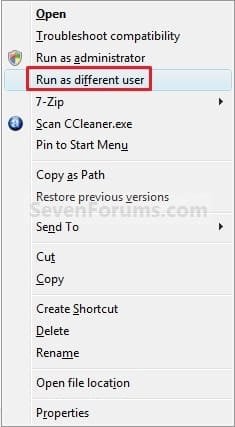
Context_Menu.jpg
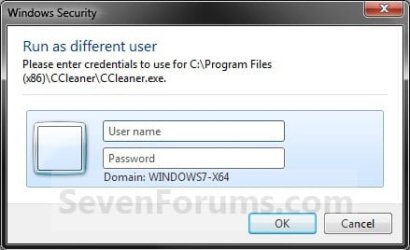
2. Type in the user name and password of the user account that you want to run this program as. (see screenshot below)
NOTE: If the user account is on a domain, then you would use UserName@Domain or Domain\UserName for the user name instead.
Log-On.jpg
3. If prompted by UAC, then click/tap on Yes.

4. The program will now be running as that user.

5. When done, simply close the program to stop it from running as that user.


OPTION TWO

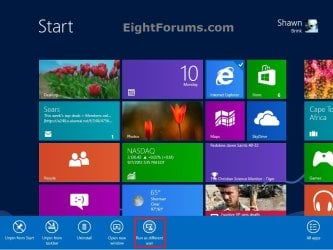
To "Run as different user" from Start Application Bar


NOTE: This option is only for Windows 8.
1. For how, see: How to Add or Remove "Run as Different User" from Context Menu in Windows 7 and Windows 8
Start.jpg


OPTION THREE

To "Run as different user" using RUNAS Command in Command Prompt


RUNAS.jpg
1. Open a command prompt.

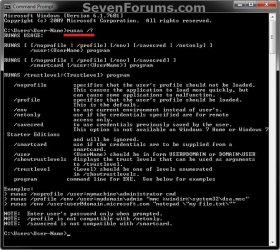
2. In the command prompt, type the command below, and press Enter. (see screenshot below)
NOTE: You would substitute USER-NAME in the command with the actual name of the user account that you want to run the program as. If the user account is on a domain, then you would use UserName@Domain or Domain\UserName for the user name instead.
runas /user:USER-NAME "C:\full\path\of\Program.exe"

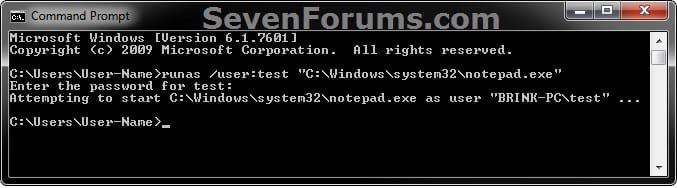
For example, if I wanted to run Notepad as the test user, I would type this command below.

runas /user:test "C:\Windows\system32\notepad.exe"
example.jpg
3. Type in the password of the user account that you want to run this program as. (see screenshot above)

4. If prompted by UAC, then click/tap on Yes.

5. The program will now be running as that user.

6. When done, simply close the program to stop it from running as that user.
   Tip
To Create a RunAs Shortcut for the Program
OR

  • Open Notepad.
  • Type the command from step 2 above in Notepad.
  • Click on File (menu bar) and Save as in Notepad.
  • Navigate to your desktop.
  • Type in name-you-want.bat, and click on the Save button.
You will now be able to just run this shortcut or .bat file to have the program runas the user you want.

That's it,
Shawn


Last edited:
Good morning,

In windows xp if you did this you would see that the window is running as an administrator. Is that display no longer available with Windows 7? How do you know that you are running lets say, explorer.exe from an admin account? I have tried the Shift Right Click and selected Run As a Different user and there is nothing showing I am running it as an administrator. Is there a feature I need to enable? Thanks for your help.
 

My Computer

OS
Windows 7 Professional
Hello Grundmj, and welcome to Seven Forums.

After your press and hold shift and right click and click on "Run as different user", do you not get a log on dialog box??

You will be able to tell what user the program is running as through Task Manager (Ctrl+Shift+Esc) under the Processes tab in the User-name column with the user account name that it is running as.
 

My Computer

Computer type
PC/Desktop
Computer Manufacturer/Model Number
Self built custom
OS
64-bit Windows 11 Pro for Workstations
CPU
Intel i7-8700K OC'd to 5 GHz
Motherboard
ASUS ROG Maximus XI Formula Z390
Memory
64 GB (4x16GB) G.SKILL TridentZ RGB DDR4 3600 MHz
Graphics Card(s)
ASUS ROG-STRIX-GTX1080TI-O11G-GAMING
Sound Card
Integrated
Monitor(s) Displays
2 x Samsung Odyssey G7 27"
Screen Resolution
2560x1440
Hard Drives
1TB Samsung 990 PRO M.2,
4TB Samsung 990 PRO PRO M.2,
TerraMaster F8 SSD Plus NAS
PSU
Seasonic Prime Titanium 850W
Case
Thermaltake Core P3
Cooling
Corsair Hydro H115i
Keyboard
Logitech wireless K800
Mouse
Logitech MX Master 4
Internet Speed
2 Gb/s Download and 100 Mb/s Upload
Antivirus
Malwarebyte Anti-Malware Premium
Browser
Google Chrome
Other Info
Logitech Z625 speaker system,
Logitech BRIO 4K Pro webcam,
HP Color LaserJet Pro MFP M477fdn,
APC SMART-UPS RT 1000 XL - SURT1000XLI,
Galaxy S23 Plus phone
Hello Brink,

We do get that dialog box, and when we login with Admin Credentials it opens a seperate Window. When the user trys to complete items in the Windows it says permissions denied and it worked in XP. Just trying to figure out what the cause would be. Thanks
 

My Computer

OS
Windows 7 Professional
Hello Grundmj,

Run as administrator would be different than "Run as Different User". You should be able to right click on the application, and click on "Run as administrator". If you are not in a administrator account, it would then ask you for that computer administrator's user name and password.
 

My Computer

Computer type
PC/Desktop
Computer Manufacturer/Model Number
Self built custom
OS
64-bit Windows 11 Pro for Workstations
CPU
Intel i7-8700K OC'd to 5 GHz
Motherboard
ASUS ROG Maximus XI Formula Z390
Memory
64 GB (4x16GB) G.SKILL TridentZ RGB DDR4 3600 MHz
Graphics Card(s)
ASUS ROG-STRIX-GTX1080TI-O11G-GAMING
Sound Card
Integrated
Monitor(s) Displays
2 x Samsung Odyssey G7 27"
Screen Resolution
2560x1440
Hard Drives
1TB Samsung 990 PRO M.2,
4TB Samsung 990 PRO PRO M.2,
TerraMaster F8 SSD Plus NAS
PSU
Seasonic Prime Titanium 850W
Case
Thermaltake Core P3
Cooling
Corsair Hydro H115i
Keyboard
Logitech wireless K800
Mouse
Logitech MX Master 4
Internet Speed
2 Gb/s Download and 100 Mb/s Upload
Antivirus
Malwarebyte Anti-Malware Premium
Browser
Google Chrome
Other Info
Logitech Z625 speaker system,
Logitech BRIO 4K Pro webcam,
HP Color LaserJet Pro MFP M477fdn,
APC SMART-UPS RT 1000 XL - SURT1000XLI,
Galaxy S23 Plus phone
The function 'Run as different user', when holding Shift, doesn't appear to me. Which Registry-key may be added to fix this option?
 

My Computer

OS
Windows 7 Ultimate (64 Bit) - Version 6.1
CPU
Amd Phenom Core 2 Quad 9750
Memory
2047 MB
Hello Opportunitor, and welcome to Seven Forums.

Are you in a administrator account? Is this with all or one program or program shortcut that it's not available for?
 

My Computer

Computer type
PC/Desktop
Computer Manufacturer/Model Number
Self built custom
OS
64-bit Windows 11 Pro for Workstations
CPU
Intel i7-8700K OC'd to 5 GHz
Motherboard
ASUS ROG Maximus XI Formula Z390
Memory
64 GB (4x16GB) G.SKILL TridentZ RGB DDR4 3600 MHz
Graphics Card(s)
ASUS ROG-STRIX-GTX1080TI-O11G-GAMING
Sound Card
Integrated
Monitor(s) Displays
2 x Samsung Odyssey G7 27"
Screen Resolution
2560x1440
Hard Drives
1TB Samsung 990 PRO M.2,
4TB Samsung 990 PRO PRO M.2,
TerraMaster F8 SSD Plus NAS
PSU
Seasonic Prime Titanium 850W
Case
Thermaltake Core P3
Cooling
Corsair Hydro H115i
Keyboard
Logitech wireless K800
Mouse
Logitech MX Master 4
Internet Speed
2 Gb/s Download and 100 Mb/s Upload
Antivirus
Malwarebyte Anti-Malware Premium
Browser
Google Chrome
Other Info
Logitech Z625 speaker system,
Logitech BRIO 4K Pro webcam,
HP Color LaserJet Pro MFP M477fdn,
APC SMART-UPS RT 1000 XL - SURT1000XLI,
Galaxy S23 Plus phone
I have a question that is a slight variation from the above.

How can you store the desire to run as a different user in the desktop shortcut as we were able to do in XP?
In XP you could right click on the shortcut icon, select properties, advanced option in the Shortcut tab of properties let you choose an option to run with different credentials. I may have missed it, but I see nothing similar in 7.
 

My Computer

Computer Manufacturer/Model Number
Custom
OS
Win7 Ultimate 64
CPU
AMD Phenom Quad
Motherboard
Gigabyte
Hello Ilps,

You might be able to create a script or batch file that may allow this, but I'm uncertain as to how to do this if it's possible. :(
 

My Computer

Computer type
PC/Desktop
Computer Manufacturer/Model Number
Self built custom
OS
64-bit Windows 11 Pro for Workstations
CPU
Intel i7-8700K OC'd to 5 GHz
Motherboard
ASUS ROG Maximus XI Formula Z390
Memory
64 GB (4x16GB) G.SKILL TridentZ RGB DDR4 3600 MHz
Graphics Card(s)
ASUS ROG-STRIX-GTX1080TI-O11G-GAMING
Sound Card
Integrated
Monitor(s) Displays
2 x Samsung Odyssey G7 27"
Screen Resolution
2560x1440
Hard Drives
1TB Samsung 990 PRO M.2,
4TB Samsung 990 PRO PRO M.2,
TerraMaster F8 SSD Plus NAS
PSU
Seasonic Prime Titanium 850W
Case
Thermaltake Core P3
Cooling
Corsair Hydro H115i
Keyboard
Logitech wireless K800
Mouse
Logitech MX Master 4
Internet Speed
2 Gb/s Download and 100 Mb/s Upload
Antivirus
Malwarebyte Anti-Malware Premium
Browser
Google Chrome
Other Info
Logitech Z625 speaker system,
Logitech BRIO 4K Pro webcam,
HP Color LaserJet Pro MFP M477fdn,
APC SMART-UPS RT 1000 XL - SURT1000XLI,
Galaxy S23 Plus phone
Thanks Brink!

Yes, that is how I solved it a couple weeks ago. For example, here is the target command to run Admin for AD Users & Computers (which is why I need the functionality):

C:\Windows\System32\runas.exe /noprofile /user:domain\username "mmc %SystemRoot%\system32\dsa.msc"

Just did not make sense that MS would revoke such a useful and seemingly benign capability. I had to be missing something. Go figure!
 

My Computer

Computer Manufacturer/Model Number
Custom
OS
Win7 Ultimate 64
CPU
AMD Phenom Quad
Motherboard
Gigabyte
LOL, I'm glad that you got it. Thank you for posting back with your results. :)
 

My Computer

Computer type
PC/Desktop
Computer Manufacturer/Model Number
Self built custom
OS
64-bit Windows 11 Pro for Workstations
CPU
Intel i7-8700K OC'd to 5 GHz
Motherboard
ASUS ROG Maximus XI Formula Z390
Memory
64 GB (4x16GB) G.SKILL TridentZ RGB DDR4 3600 MHz
Graphics Card(s)
ASUS ROG-STRIX-GTX1080TI-O11G-GAMING
Sound Card
Integrated
Monitor(s) Displays
2 x Samsung Odyssey G7 27"
Screen Resolution
2560x1440
Hard Drives
1TB Samsung 990 PRO M.2,
4TB Samsung 990 PRO PRO M.2,
TerraMaster F8 SSD Plus NAS
PSU
Seasonic Prime Titanium 850W
Case
Thermaltake Core P3
Cooling
Corsair Hydro H115i
Keyboard
Logitech wireless K800
Mouse
Logitech MX Master 4
Internet Speed
2 Gb/s Download and 100 Mb/s Upload
Antivirus
Malwarebyte Anti-Malware Premium
Browser
Google Chrome
Other Info
Logitech Z625 speaker system,
Logitech BRIO 4K Pro webcam,
HP Color LaserJet Pro MFP M477fdn,
APC SMART-UPS RT 1000 XL - SURT1000XLI,
Galaxy S23 Plus phone
Hi,

I have a similar problem wit this topic; wondering if you have an answer for me.


I play some web-based online games that are I believe built with adobe flash.


With Windows XP, I was able to right-click on IE short-cut, choose "run with different credentials" from advance tap; then I can play the same game with two accounts(users) at the same time.


However, it doesn't woth after I've installed Windows 7 64bit on my desktop! The "run as a different users" function didn't work the way it was with XP; seems to me that the resources, cookies or users information are shares before the primary account and the user account. (symtom: I logged in the game with my FIREFOX; then open firefox again with a different users (passworded), the game will log me out saying "you're logged in to this game on this computer")


In order to play the game, I need to use the laptop and the destop together!! If there a way around it, I could still use only my desktop and run the game in two users without conflicting each other?

Thank you very much!

Ben
 
Last edited by a moderator:

My Computer

OS
Windows 7
Hello Ben, and welcome to Seven Forums.

I'm not sure if you will be able to since it seems that the game's website is keeping track of you with a cookie. To them, you are the same person since your IP address is the same for both users on your one computer. This is why it works with both the laptop and desktop together since they're IP addresses are different. The site sees two computers (different IP per computer) with a cookie on each computer, so you can have two log ins this way. :(
 

My Computer

Computer type
PC/Desktop
Computer Manufacturer/Model Number
Self built custom
OS
64-bit Windows 11 Pro for Workstations
CPU
Intel i7-8700K OC'd to 5 GHz
Motherboard
ASUS ROG Maximus XI Formula Z390
Memory
64 GB (4x16GB) G.SKILL TridentZ RGB DDR4 3600 MHz
Graphics Card(s)
ASUS ROG-STRIX-GTX1080TI-O11G-GAMING
Sound Card
Integrated
Monitor(s) Displays
2 x Samsung Odyssey G7 27"
Screen Resolution
2560x1440
Hard Drives
1TB Samsung 990 PRO M.2,
4TB Samsung 990 PRO PRO M.2,
TerraMaster F8 SSD Plus NAS
PSU
Seasonic Prime Titanium 850W
Case
Thermaltake Core P3
Cooling
Corsair Hydro H115i
Keyboard
Logitech wireless K800
Mouse
Logitech MX Master 4
Internet Speed
2 Gb/s Download and 100 Mb/s Upload
Antivirus
Malwarebyte Anti-Malware Premium
Browser
Google Chrome
Other Info
Logitech Z625 speaker system,
Logitech BRIO 4K Pro webcam,
HP Color LaserJet Pro MFP M477fdn,
APC SMART-UPS RT 1000 XL - SURT1000XLI,
Galaxy S23 Plus phone
Hi "Brink",


Thank you for your fast response!


I was able to run the game with "run with different credentials" under Windows XP; and I am still able to do so with my girlfriend's XP system.


I could just simply create a short-cut for IE on my desktop, and for the new IE short-cut, I select "run with different credentials" un der advance tap, then enter the windows' user name and password I created; then two IE windows are running at the same time, with two the different login.


With the new Windows 7 I installed on my desktop; I've tried running it as a different user, run as admin.... tried with IE, Firefox, Opera & Safari.... non of them working for me. When the second games page loads up, the first one would know, and kick me out.


I don't believe MSFT would down-grade their products, I think there must be a way, I just don't know as of yet.


Thank you once again, I hope you're clear about what I meant by now.


Ben
 

My Computer

OS
Windows 7
Hi Brink,

Is there any solution to my question?

Thank you!

Ben
 

My Computer

OS
Windows 7
I'm sorry Ben, but I do not know of a way do so. You might also post this issue in either the "Browsers & Mail" or "Gaming" forum to see if someone may know of a way for you to. :(
 

My Computer

Computer type
PC/Desktop
Computer Manufacturer/Model Number
Self built custom
OS
64-bit Windows 11 Pro for Workstations
CPU
Intel i7-8700K OC'd to 5 GHz
Motherboard
ASUS ROG Maximus XI Formula Z390
Memory
64 GB (4x16GB) G.SKILL TridentZ RGB DDR4 3600 MHz
Graphics Card(s)
ASUS ROG-STRIX-GTX1080TI-O11G-GAMING
Sound Card
Integrated
Monitor(s) Displays
2 x Samsung Odyssey G7 27"
Screen Resolution
2560x1440
Hard Drives
1TB Samsung 990 PRO M.2,
4TB Samsung 990 PRO PRO M.2,
TerraMaster F8 SSD Plus NAS
PSU
Seasonic Prime Titanium 850W
Case
Thermaltake Core P3
Cooling
Corsair Hydro H115i
Keyboard
Logitech wireless K800
Mouse
Logitech MX Master 4
Internet Speed
2 Gb/s Download and 100 Mb/s Upload
Antivirus
Malwarebyte Anti-Malware Premium
Browser
Google Chrome
Other Info
Logitech Z625 speaker system,
Logitech BRIO 4K Pro webcam,
HP Color LaserJet Pro MFP M477fdn,
APC SMART-UPS RT 1000 XL - SURT1000XLI,
Galaxy S23 Plus phone
Hi Brink,


Thank you for your advise!

Ben
 

My Computer

OS
Windows 7
I hope you get a solution soon.
 

My Computer

Computer type
PC/Desktop
Computer Manufacturer/Model Number
Self built custom
OS
64-bit Windows 11 Pro for Workstations
CPU
Intel i7-8700K OC'd to 5 GHz
Motherboard
ASUS ROG Maximus XI Formula Z390
Memory
64 GB (4x16GB) G.SKILL TridentZ RGB DDR4 3600 MHz
Graphics Card(s)
ASUS ROG-STRIX-GTX1080TI-O11G-GAMING
Sound Card
Integrated
Monitor(s) Displays
2 x Samsung Odyssey G7 27"
Screen Resolution
2560x1440
Hard Drives
1TB Samsung 990 PRO M.2,
4TB Samsung 990 PRO PRO M.2,
TerraMaster F8 SSD Plus NAS
PSU
Seasonic Prime Titanium 850W
Case
Thermaltake Core P3
Cooling
Corsair Hydro H115i
Keyboard
Logitech wireless K800
Mouse
Logitech MX Master 4
Internet Speed
2 Gb/s Download and 100 Mb/s Upload
Antivirus
Malwarebyte Anti-Malware Premium
Browser
Google Chrome
Other Info
Logitech Z625 speaker system,
Logitech BRIO 4K Pro webcam,
HP Color LaserJet Pro MFP M477fdn,
APC SMART-UPS RT 1000 XL - SURT1000XLI,
Galaxy S23 Plus phone
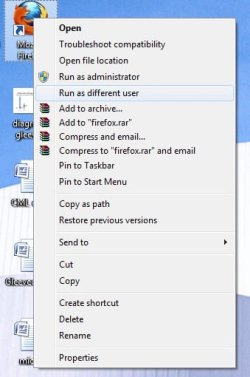
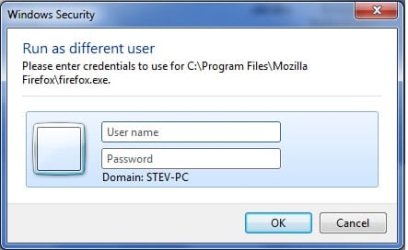
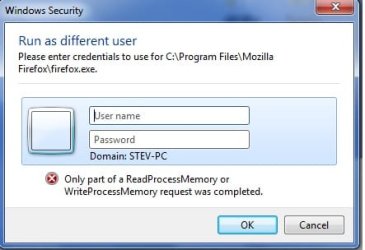
Please help, I got error after trying to run an exe as different user. It works perfectly on my windows XP but doesnt work after upgrade to windows 7!

Look at pictures attached, thanks
 

Attachments

  • 71.jpg
    71.jpg
    54.8 KB · Views: 3,167
  • 72.jpg
    72.jpg
    36.2 KB · Views: 3,058
  • 73.jpg
    73.jpg
    43.2 KB · Views: 3,156

My Computer

OS
W7 Ultimate 32bit
Hello Stev, and welcome to Seven Forums.

Since this is on a domain, are you entering ComputerName/UserAccountName (ex: STEV-PC\Stev) in the user name field?
 

My Computer

Computer type
PC/Desktop
Computer Manufacturer/Model Number
Self built custom
OS
64-bit Windows 11 Pro for Workstations
CPU
Intel i7-8700K OC'd to 5 GHz
Motherboard
ASUS ROG Maximus XI Formula Z390
Memory
64 GB (4x16GB) G.SKILL TridentZ RGB DDR4 3600 MHz
Graphics Card(s)
ASUS ROG-STRIX-GTX1080TI-O11G-GAMING
Sound Card
Integrated
Monitor(s) Displays
2 x Samsung Odyssey G7 27"
Screen Resolution
2560x1440
Hard Drives
1TB Samsung 990 PRO M.2,
4TB Samsung 990 PRO PRO M.2,
TerraMaster F8 SSD Plus NAS
PSU
Seasonic Prime Titanium 850W
Case
Thermaltake Core P3
Cooling
Corsair Hydro H115i
Keyboard
Logitech wireless K800
Mouse
Logitech MX Master 4
Internet Speed
2 Gb/s Download and 100 Mb/s Upload
Antivirus
Malwarebyte Anti-Malware Premium
Browser
Google Chrome
Other Info
Logitech Z625 speaker system,
Logitech BRIO 4K Pro webcam,
HP Color LaserJet Pro MFP M477fdn,
APC SMART-UPS RT 1000 XL - SURT1000XLI,
Galaxy S23 Plus phone
Back
Top