
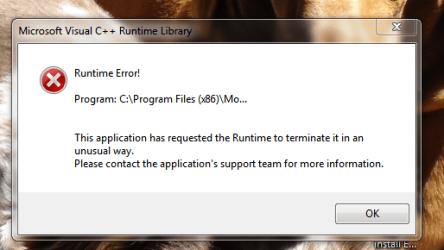
Runtime error on start up

bonkers72

New member
Member
VIP
Local time
1:37 PM
Messages
186
Been getting a runtime error on start up lately. Doesn't happen all the time. See image. Thanks.
 

Attachments

  • Capture.PNG
    Capture.PNG
    27.6 KB · Views: 28

My Computer

Computer type
PC/Desktop
Computer Manufacturer/Model Number
Custom build
OS
Win 7 Premium 64 Bit
CPU
2.67 gigahertz Intel Core2 Duo
Motherboard
Gigabyte EP45-UD3R
Memory
8192 Megabytes (8 gig) Crucial BallistiX
Graphics Card(s)
NVIDIA GeForce 6600
Sound Card
Intergrated Realtek High Definition Audio
Monitor(s) Displays
BenQ FP93GX
Screen Resolution
1280 x 1024
Hard Drives
WDC WD6401AALS-00L3B2 640 gig (Internal)
PSU
Corsair TX 750W
Case
Cooler Master
Cooling
Stock case fan / Intel Processor fan
Keyboard
Wireless Logitec
Mouse
Wireless Logitec 505
Internet Speed
U 9.01 / D 1.4
Antivirus
Avast!
Browser
Internet Explorer 10
Other Info
PLEXTOR DVDR PX-880SA ATA Device [Optical drive] x2
Accent Acoustics speakers w/sub.
BIOS: Award Software International, Inc. F9 04/16/2009
So what is the actual path. What do you see that starts with C:\Program Files(x86)\Mo

Once oyu know that, use msconfig, Startup tab to prevent it from starting at boot time.
 

My Computer

Computer type
PC/Desktop
Computer Manufacturer/Model Number
Lenovo IdeaCenter 450
OS
Windows 10 Pro X64
CPU
Intel Quad Core i7-4770 @ 3.4Ghz
Memory
16.0GB PC3-12800 DDR3 SDRAM 1600 MHz
Graphics Card(s)
Intel Integrated HD Graphics
Sound Card
Realtek HD Audio
Monitor(s) Displays
HP 22" LCD
Screen Resolution
1680 x 1050
Hard Drives
250GB Samsung EVO SATA-3 SSD
2TB Seagate ST2000DM001 SATA-2
1.5TB Seagate ST3150041AS SATA
Keyboard
Dell USB
Mouse
Lenovo USB
Internet Speed
Cable via Road Runner 3MB Upload, 30MB Download
Antivirus
Windows Defender, MBAM Pro, MBAE
Browser
Seamonkey
Other Info
UEFI/GPT
PLDS DVD-RW DH16AERSH
So what is the actual path. What do you see that starts with C:\Program Files(x86)\Mo

Once you know that, use msconfig, Startup tab to prevent it from starting at boot time.

I've got the exact problem and mine is caused by Asus Suite - I went to Services and stopped it - made no difference. (not listed in Msconfig).

Hope someone has the answer.
 

My Computer

Computer type
PC/Desktop
Computer Manufacturer/Model Number
Self-Built
OS
Windows 7 Professional X64
CPU
Core i7 (2nd gen) i7-2600K / 3.40GHz
Motherboard
ASUS P8Z77-V Intel 7 Series Motherboard
Memory
DDR3 2400MHz (OC) 16gb
Graphics Card(s)
Intel(R) HD Graphics 3000, -1988 Mb
Sound Card
8 ChannelsAudio Chipset Realtek ALC892
Monitor(s) Displays
LG 29UM65 Black 29"
Screen Resolution
2560 x 1080
Hard Drives
840 EVO 250 GB SSD ;2tb (2);Seagate;1tb Seagate; 750 gb Seagate; wd ext (2) 750 gb,WD 2tb X 2;WD 3TB Black
PSU
750 watt
Case
Thermaltake RX -1
Cooling
2120mm Fans Included 1Other Fan Ports 5x 200mm Fan Ports
Keyboard
Microsoft Digital Media Pro
Mouse
Microsoft Wireless 6000
Internet Speed
U-verse 18 mbps
Antivirus
MSE
Browser
Firefox, Chrome and my favorite: Pale Moon
Other Info
HdHomerun Dual Tuner.
SRS Audio Lab,
Pioneer BDR 208-DBK
PS3-What a difference in my Surround Sound Receiver!
HP 4540s - My new Toy.
Epson R280 Printer- To personalize my Dvds.
Canon MP 560 - For scanning.
His first screenshot shows it as MS Visual cc+.

I'd uninstall it via programmes, if you >>ever<< do need it you will get a pop-up saying C++ required.
Then just reinstall it
Roy
 

My Computer

Computer type
PC/Desktop
Computer Manufacturer/Model Number
medionl/Aspire 6930G/acer x55a
OS
W7 home premium 32bit/W7HP 64bit/w10 tp insider ring
CPU
E5300 dual core
Motherboard
medion MS7366
Memory
3gb
Graphics Card(s)
Nvidia Geforce 7100 Nforce 630i
Monitor(s) Displays
avixc
Internet Speed
n (isp resticted to 72)
Antivirus
mse/pands
Browser
palemoon
Other Info
Belkin Fd7050 n USB using Railink RT2870 drivers, more upto date
Back
Top