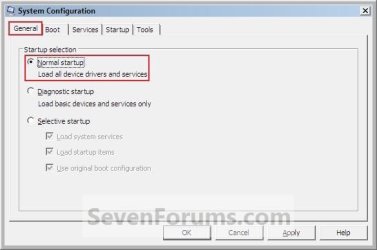
Safe Mode

How to Start Windows 7 in Safe Mode

   Information
Safe mode is a troubleshooting option for Windows that starts your computer with a minimal set of drivers and services. This will show you how to start Windows 7 in Safe Mode.

   Tip
To Log on to a Different User Account in Safe Mode:
If you would like to change the user account that Safe Mode is currently logged on to, then Log Off while in Safe Mode and select another user account to log on to back in Safe Mode. If you do not have another user account, then you can enable the built-in Administrator account while in Safe Mode to have available when you log off.

   Warning
If you do a System Restore when the computer is in safe mode, you cannot undo the restore operation. However, you can run System Restore again and choose a different restore point if one exists.


EXAMPLE: Safe Mode
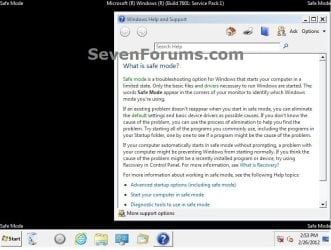
Safe_Mode.jpg


OPTION ONE

Through Advanced Boot Options


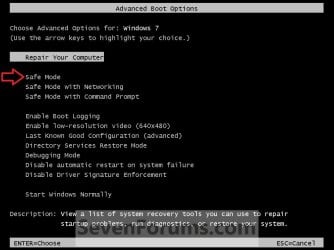
1. Boot into the Advanced Boot Options screen.

2. Use the arrow keys to select Safe Mode and press Enter. (see screenshot below)
Advanced_Boot_Options.jpg
3. When finished in Safe Mode, you can restart the computer from the Start Menu to go back to the normal boot mode.


OPTION TWO

Through System Configuration (msconfig)


1. To Start Windows 7 in Safe Mode
   Warning
This will set Windows 7 to start into Safe Mode until you set it back to the normal boot mode in step 2 below.

A) Open the Start Menu, then type msconfig in the search box and press Enter.

B) If prompted by UAC, click on Yes.

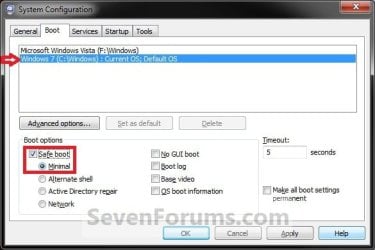
C) Click on the Boot tab. (See screenshot below)

D) Select Windows 7 at the top, check Safe boot, and dot Minimal.

E) Click on OK and restart the computer.

F) The computer will now restart and start Windows 7 into Safe Mode.
2. To Start Windows 7 Back in Normal Mode
A) Open the Start Menu, then type msconfig in the search box and press Enter.

B) If prompted by UAC, click on Yes.

C) Click on the Boot tab. (see screenshot below)

D) Select Windows 7 at the top, and uncheck Safe boot.

E) Check the Make all boot settings permanent box.
NOTE: You can still make changes to msconfig later if you want despite the warning. I will confirm it.

F) Click on OK, and restart the computer.
G) The computer will now restart and start Windows 7 in normal mode.
Step1.jpg


OPTION THREE

Using BCDEDIT Command in a Command Prompt


1. Open either an elevated command prompt or a command prompt at boot.

2. In the command prompt, type the command below and press Enter. (see screenshot below)
NOTE: Under the Windows Boot Loader sections, make note of the identifier value (ex: {current}) for the OS description (ex: Windows 7) that you want to use in steps 4, 5, or 6 below.
bcdedit /enum

CMD-1.jpg
3. Do either step 4, 5, or 6 below for what you would like to do.


4. To Start in Safe Mode
A) In the command prompt, type the command below and press enter.
NOTE: Substitute identifier in the command below with the actual value or long GUID number to the right of identifer in the command used from step 2.
bcdedit /set {identifier} safeboot minimal
For example: If I wanted to have Windows 7 boot into Safe Mode using the values in the screenshot under step 2, I would type this command below and press Enter.

bcdedit /set {current} safeboot minimal
B) Go to step 7.
5. To Start in Safe Mode with Networking
A) In the command prompt, type the command below and press enter.
NOTE: Substitute identifier in the command below with the actual value or long GUID number to the right of identifer in the command used from step 2.
bcdedit /set {identifier} safeboot network

For example: If I wanted to have Windows 7 boot into Safe Mode with networking using the values in the screenshot under step 2, I would type this command below and press Enter.

bcdedit /set {current} safeboot network
B) Go to step 7.
6. To Start Windows 7 back in Normal Mode
A) From step 2, look for the identifier (ex: {current}) for the OS description (ex: Windows 7) under a Windows Boot Loader section that has the safeboot value in it.

B) In the command prompt, type the command below and press enter.
NOTE: Substitute identifier in the command below with the actual value or long GUID number to the right of identifer in the command used from step 2.
bcdedit /deletevalue {identifier} safeboot

For example: If I wanted to have Windows 7 not boot into Safe Mode anymore, I would type this command below and press Enter.

bcdedit /deletevalue {current} safeboot
7. Restart the computer.

That's it,
Shawn


Attachments

  • MSConfig2.jpg
    MSConfig2.jpg
    21.1 KB · Views: 1,032
Last edited:
Ya I did and nothing? All I have is the keyboard and couldn't navigate properly to open stuff up? I really don't want to format as I will loose my emails.


I'd see if you may be able to borrow a friends mouse to see if it may work on yours long enough to back up anything that you do not want to lose to be safe, and to see if uninstalling/reinstalling the original mouse and keyboard drivers may help.

If the reinstalling the drivers do not help and your friends USB mouse/keyboard works, then you may need to replace yours.
 

My Computer

Computer type
PC/Desktop
Computer Manufacturer/Model Number
Self built custom
OS
64-bit Windows 11 Pro for Workstations
CPU
Intel i7-8700K OC'd to 5 GHz
Motherboard
ASUS ROG Maximus XI Formula Z390
Memory
64 GB (4x16GB) G.SKILL TridentZ RGB DDR4 3600 MHz
Graphics Card(s)
ASUS ROG-STRIX-GTX1080TI-O11G-GAMING
Sound Card
Integrated
Monitor(s) Displays
2 x Samsung Odyssey G7 27"
Screen Resolution
2560x1440
Hard Drives
1TB Samsung 990 PRO M.2,
4TB Samsung 990 PRO PRO M.2,
TerraMaster F8 SSD Plus NAS
PSU
Seasonic Prime Titanium 850W
Case
Thermaltake Core P3
Cooling
Corsair Hydro H115i
Keyboard
Logitech wireless K800
Mouse
Logitech MX Master 4
Internet Speed
2 Gb/s Download and 100 Mb/s Upload
Antivirus
Malwarebyte Anti-Malware Premium
Browser
Google Chrome
Other Info
Logitech Z625 speaker system,
Logitech BRIO 4K Pro webcam,
HP Color LaserJet Pro MFP M477fdn,
APC SMART-UPS RT 1000 XL - SURT1000XLI,
Galaxy S23 Plus phone
I did try a neibours ps2 mouse and nothing
 

My Computer

OS
Windows 7 Ultimate
CPU
AMD Athlon II X4 630 (95W) Quad Core Socket AM3
Motherboard
GIGABYTE MA785GMT-UD2H
Memory
Patriot Viper Series DDR3 PC3-10666 1333MHz 4GB CL 7-7-7-20
Graphics Card(s)
Geforce GTX550 TI
Sound Card
built in realtech hd
Any luck with another USB mouse cord and/or wireless?
 

My Computer

Computer type
PC/Desktop
Computer Manufacturer/Model Number
Self built custom
OS
64-bit Windows 11 Pro for Workstations
CPU
Intel i7-8700K OC'd to 5 GHz
Motherboard
ASUS ROG Maximus XI Formula Z390
Memory
64 GB (4x16GB) G.SKILL TridentZ RGB DDR4 3600 MHz
Graphics Card(s)
ASUS ROG-STRIX-GTX1080TI-O11G-GAMING
Sound Card
Integrated
Monitor(s) Displays
2 x Samsung Odyssey G7 27"
Screen Resolution
2560x1440
Hard Drives
1TB Samsung 990 PRO M.2,
4TB Samsung 990 PRO PRO M.2,
TerraMaster F8 SSD Plus NAS
PSU
Seasonic Prime Titanium 850W
Case
Thermaltake Core P3
Cooling
Corsair Hydro H115i
Keyboard
Logitech wireless K800
Mouse
Logitech MX Master 4
Internet Speed
2 Gb/s Download and 100 Mb/s Upload
Antivirus
Malwarebyte Anti-Malware Premium
Browser
Google Chrome
Other Info
Logitech Z625 speaker system,
Logitech BRIO 4K Pro webcam,
HP Color LaserJet Pro MFP M477fdn,
APC SMART-UPS RT 1000 XL - SURT1000XLI,
Galaxy S23 Plus phone
Nothing works win log in screen appears. Keyboard works while booting up but that's it? Def something corrupted.
 

My Computer

OS
Windows 7 Ultimate
CPU
AMD Athlon II X4 630 (95W) Quad Core Socket AM3
Motherboard
GIGABYTE MA785GMT-UD2H
Memory
Patriot Viper Series DDR3 PC3-10666 1333MHz 4GB CL 7-7-7-20
Graphics Card(s)
Geforce GTX550 TI
Sound Card
built in realtech hd

My Computer

Computer type
PC/Desktop
Computer Manufacturer/Model Number
Self built custom
OS
64-bit Windows 11 Pro for Workstations
CPU
Intel i7-8700K OC'd to 5 GHz
Motherboard
ASUS ROG Maximus XI Formula Z390
Memory
64 GB (4x16GB) G.SKILL TridentZ RGB DDR4 3600 MHz
Graphics Card(s)
ASUS ROG-STRIX-GTX1080TI-O11G-GAMING
Sound Card
Integrated
Monitor(s) Displays
2 x Samsung Odyssey G7 27"
Screen Resolution
2560x1440
Hard Drives
1TB Samsung 990 PRO M.2,
4TB Samsung 990 PRO PRO M.2,
TerraMaster F8 SSD Plus NAS
PSU
Seasonic Prime Titanium 850W
Case
Thermaltake Core P3
Cooling
Corsair Hydro H115i
Keyboard
Logitech wireless K800
Mouse
Logitech MX Master 4
Internet Speed
2 Gb/s Download and 100 Mb/s Upload
Antivirus
Malwarebyte Anti-Malware Premium
Browser
Google Chrome
Other Info
Logitech Z625 speaker system,
Logitech BRIO 4K Pro webcam,
HP Color LaserJet Pro MFP M477fdn,
APC SMART-UPS RT 1000 XL - SURT1000XLI,
Galaxy S23 Plus phone
reformated and everything is fine!! damn
 

My Computer

OS
Windows 7 Ultimate
CPU
AMD Athlon II X4 630 (95W) Quad Core Socket AM3
Motherboard
GIGABYTE MA785GMT-UD2H
Memory
Patriot Viper Series DDR3 PC3-10666 1333MHz 4GB CL 7-7-7-20
Graphics Card(s)
Geforce GTX550 TI
Sound Card
built in realtech hd
I'm happy to hear that everything is fine now. Most likely corrupted drivers.
 

My Computer

Computer type
PC/Desktop
Computer Manufacturer/Model Number
Self built custom
OS
64-bit Windows 11 Pro for Workstations
CPU
Intel i7-8700K OC'd to 5 GHz
Motherboard
ASUS ROG Maximus XI Formula Z390
Memory
64 GB (4x16GB) G.SKILL TridentZ RGB DDR4 3600 MHz
Graphics Card(s)
ASUS ROG-STRIX-GTX1080TI-O11G-GAMING
Sound Card
Integrated
Monitor(s) Displays
2 x Samsung Odyssey G7 27"
Screen Resolution
2560x1440
Hard Drives
1TB Samsung 990 PRO M.2,
4TB Samsung 990 PRO PRO M.2,
TerraMaster F8 SSD Plus NAS
PSU
Seasonic Prime Titanium 850W
Case
Thermaltake Core P3
Cooling
Corsair Hydro H115i
Keyboard
Logitech wireless K800
Mouse
Logitech MX Master 4
Internet Speed
2 Gb/s Download and 100 Mb/s Upload
Antivirus
Malwarebyte Anti-Malware Premium
Browser
Google Chrome
Other Info
Logitech Z625 speaker system,
Logitech BRIO 4K Pro webcam,
HP Color LaserJet Pro MFP M477fdn,
APC SMART-UPS RT 1000 XL - SURT1000XLI,
Galaxy S23 Plus phone
I love you, you sir is the best, after using that DDU Uninstaller, my computer got in a boot loop stuck, after doing the proccedure that you mentioned, it recovered my boot completely, thank you honey.

My scenario was with Windows 8.1 Pro X64
 

My Computer

Computer type
PC/Desktop
OS
Windows 8 Pro x64
safe mode 32-bit drivers

Sorry if this is dumb but I cannot see any references to this in safe mode help sheets.

When I go into safe mode on my 64-bit Windows Home Premium computer, only 32-bit drivers are listed.

Is this is what is meant by "basic" drivers or should there be some 64-bit as well ? I am going into safe mode
because System Restore fails in normal mode. But I am just looking for info here.

Thanks
 

My Computer

Computer type
PC/Desktop
Computer Manufacturer/Model Number
Mesh
OS
Windows 7 Home Premium Upgrade designed for Windows Vista
Browser
Internet Explorer
Hello Windy, :)

It'll vary per system which drivers will load, but usually it'll just be the bare essentials for Windows to run.

If you like, you could also do a system restore at boot using OPTION TWO below.

System Restore
 

My Computer

Computer type
PC/Desktop
Computer Manufacturer/Model Number
Self built custom
OS
64-bit Windows 11 Pro for Workstations
CPU
Intel i7-8700K OC'd to 5 GHz
Motherboard
ASUS ROG Maximus XI Formula Z390
Memory
64 GB (4x16GB) G.SKILL TridentZ RGB DDR4 3600 MHz
Graphics Card(s)
ASUS ROG-STRIX-GTX1080TI-O11G-GAMING
Sound Card
Integrated
Monitor(s) Displays
2 x Samsung Odyssey G7 27"
Screen Resolution
2560x1440
Hard Drives
1TB Samsung 990 PRO M.2,
4TB Samsung 990 PRO PRO M.2,
TerraMaster F8 SSD Plus NAS
PSU
Seasonic Prime Titanium 850W
Case
Thermaltake Core P3
Cooling
Corsair Hydro H115i
Keyboard
Logitech wireless K800
Mouse
Logitech MX Master 4
Internet Speed
2 Gb/s Download and 100 Mb/s Upload
Antivirus
Malwarebyte Anti-Malware Premium
Browser
Google Chrome
Other Info
Logitech Z625 speaker system,
Logitech BRIO 4K Pro webcam,
HP Color LaserJet Pro MFP M477fdn,
APC SMART-UPS RT 1000 XL - SURT1000XLI,
Galaxy S23 Plus phone
safe mode 32-bit drivers

Thanks for reply. I tried restrui.exe - the same result only 32-bit drivers showed up but I went ahead any way and successfully did a System Restore. Unfortunately it has not solved the Windows Features problem but I will mark this solved and carry on investigating that elsewhere !

Thanks again.

Cannot see where to mark this solved.
 

My Computer

Computer type
PC/Desktop
Computer Manufacturer/Model Number
Mesh
OS
Windows 7 Home Premium Upgrade designed for Windows Vista
Browser
Internet Explorer
Hi,
This is a tutorial it can not be marked as answered just your reply to thank the author is good enough :)
 

My Computer

Computer type
PC/Desktop
Computer Manufacturer/Model Number
Custom assembled by me :}
OS
Win-7-Pro64bit 7-H-Prem-64bit
CPU
i7-5930K 2nd i9-9940x both water blocked VRM's too
Motherboard
ASUS SABERTOOTH X99 2nd ASUS x299 Apex
Memory
Trident-z 3200C14 2nd Trident-z 3600C16
Graphics Card(s)
EVGA 1080ti ftw3 2nd Titan Xp both water blocked
Sound Card
Built-in Realtek
Monitor(s) Displays
1-AOC G2460PG 24"G-Sync 144Hz/ 2nd 1-ASUS VG248QE 24" 144Hz
Screen Resolution
1920 x 1080 144Hz
Hard Drives
2-Samsung M.2 Evo & Evo Plus
2-Samsung 850 EVO 500GB SSD's/ 3-2.5 W.D. Black 1tb-&3-1tb/3-3.5 WD Black 1tb hdd's
PSU
EVGA SuperNOVA 1000-P2 2nd 1200-P2
Case
2-Corsair Obsidian Series 450D Black ATX Mid Tower
Cooling
Custom water loops
Keyboard
Logitech G710+/ 2nd Logitech G910
Mouse
2-RedDragon M901 Perdition 16400 dpi Gaming mouse = wired
Internet Speed
Comcast Ping 19ms 89.31mbps download speed 6.12mbps upload
Antivirus
Malwarebytes Pro/ Superantispyware Pro
Browser
FireFox & Pale moon
Other Info
2nd ASUS X299 Apex/Intel i9-9940x with Custom water loop/7H-Prem-x64/Corsair 450D case/Ram Trident-z 3600C16 4x8gb / Samsung970Evo plus 500gb SSD/Dual ssd EZ swap evo/PSU EVGA SuperNova 1200w-P2 80+Platinum/GPU Titan Xp /8-ML-140 on push-pull on 2-280GTX rads
Windy,

I'm glad to hear that you have gotten partially sorted. Please go ahead and create a new thread for you Windows Features issue if you like, and we'll be happy to see what we can do to help. :)
 

My Computer

Computer type
PC/Desktop
Computer Manufacturer/Model Number
Self built custom
OS
64-bit Windows 11 Pro for Workstations
CPU
Intel i7-8700K OC'd to 5 GHz
Motherboard
ASUS ROG Maximus XI Formula Z390
Memory
64 GB (4x16GB) G.SKILL TridentZ RGB DDR4 3600 MHz
Graphics Card(s)
ASUS ROG-STRIX-GTX1080TI-O11G-GAMING
Sound Card
Integrated
Monitor(s) Displays
2 x Samsung Odyssey G7 27"
Screen Resolution
2560x1440
Hard Drives
1TB Samsung 990 PRO M.2,
4TB Samsung 990 PRO PRO M.2,
TerraMaster F8 SSD Plus NAS
PSU
Seasonic Prime Titanium 850W
Case
Thermaltake Core P3
Cooling
Corsair Hydro H115i
Keyboard
Logitech wireless K800
Mouse
Logitech MX Master 4
Internet Speed
2 Gb/s Download and 100 Mb/s Upload
Antivirus
Malwarebyte Anti-Malware Premium
Browser
Google Chrome
Other Info
Logitech Z625 speaker system,
Logitech BRIO 4K Pro webcam,
HP Color LaserJet Pro MFP M477fdn,
APC SMART-UPS RT 1000 XL - SURT1000XLI,
Galaxy S23 Plus phone
I'm abit confused about the Option 5 syntax.

When I use the bcdedit /enum, I get the following in the Boot Loader section:
identifier: {default}
...
safeboot: Network

There is no code for the identifier just the word default in the squiggly brackets. So when I type:
bcdedit /deletevalue {default} network

I get the following error:
The specified entry identifier is not valid
The parameter is not correct

I also have a second loader listed for Easus TodoBackup which does have an identifier, but it's not the one I need to use. Need to access the default one.

Help please!

UPDATE!

I actually got it working... I instead typed:
bcdedit /deletevalue {default} safeboot

Now Windows boots in Normal mode once again. On to the next challenge that got me into this mess in the first place... remove the NVidia drivers without getting a bluescreen!
 
Last edited:

My Computer

Computer type
PC/Desktop
OS
7 Pro 64
I'm glad to hear you got it sorted radact, and welcome to Seven Forums. :)
 

My Computer

Computer type
PC/Desktop
Computer Manufacturer/Model Number
Self built custom
OS
64-bit Windows 11 Pro for Workstations
CPU
Intel i7-8700K OC'd to 5 GHz
Motherboard
ASUS ROG Maximus XI Formula Z390
Memory
64 GB (4x16GB) G.SKILL TridentZ RGB DDR4 3600 MHz
Graphics Card(s)
ASUS ROG-STRIX-GTX1080TI-O11G-GAMING
Sound Card
Integrated
Monitor(s) Displays
2 x Samsung Odyssey G7 27"
Screen Resolution
2560x1440
Hard Drives
1TB Samsung 990 PRO M.2,
4TB Samsung 990 PRO PRO M.2,
TerraMaster F8 SSD Plus NAS
PSU
Seasonic Prime Titanium 850W
Case
Thermaltake Core P3
Cooling
Corsair Hydro H115i
Keyboard
Logitech wireless K800
Mouse
Logitech MX Master 4
Internet Speed
2 Gb/s Download and 100 Mb/s Upload
Antivirus
Malwarebyte Anti-Malware Premium
Browser
Google Chrome
Other Info
Logitech Z625 speaker system,
Logitech BRIO 4K Pro webcam,
HP Color LaserJet Pro MFP M477fdn,
APC SMART-UPS RT 1000 XL - SURT1000XLI,
Galaxy S23 Plus phone
Thank You so Much

I had my windows 10 stuck in a loop where it was trying to repair my startup after I tried to put it in safe mode through msconfig and hit the wrong button when it started back up. I tried so many options and was getting ready to dig out my last option factory reset usb drive but I stumbled upon this thread. I went through every step without luck until I got to the section of returning windows 7 back to normal mode and I am now back into my computer after a couple hours of troubleshooting. Again thank you.
 

My Computer

Computer type
PC/Desktop
OS
10
I'm glad it could help WanderingDragon, and welcome to Seven Forums. :-)

If you like, our sister site www.tenforums.com can be even more useful for Windows 10 issues.
 

My Computer

Computer type
PC/Desktop
Computer Manufacturer/Model Number
Self built custom
OS
64-bit Windows 11 Pro for Workstations
CPU
Intel i7-8700K OC'd to 5 GHz
Motherboard
ASUS ROG Maximus XI Formula Z390
Memory
64 GB (4x16GB) G.SKILL TridentZ RGB DDR4 3600 MHz
Graphics Card(s)
ASUS ROG-STRIX-GTX1080TI-O11G-GAMING
Sound Card
Integrated
Monitor(s) Displays
2 x Samsung Odyssey G7 27"
Screen Resolution
2560x1440
Hard Drives
1TB Samsung 990 PRO M.2,
4TB Samsung 990 PRO PRO M.2,
TerraMaster F8 SSD Plus NAS
PSU
Seasonic Prime Titanium 850W
Case
Thermaltake Core P3
Cooling
Corsair Hydro H115i
Keyboard
Logitech wireless K800
Mouse
Logitech MX Master 4
Internet Speed
2 Gb/s Download and 100 Mb/s Upload
Antivirus
Malwarebyte Anti-Malware Premium
Browser
Google Chrome
Other Info
Logitech Z625 speaker system,
Logitech BRIO 4K Pro webcam,
HP Color LaserJet Pro MFP M477fdn,
APC SMART-UPS RT 1000 XL - SURT1000XLI,
Galaxy S23 Plus phone
Back
Top