Safely Remove Hardware - Eject Device

How to Use Safely Remove Hardware to Eject a Device in Windows 7 and Windows 8

   Information
This tutorial will show you how to use Safely Remove Hardware in Windows 7, Windows 8/8.1, and Windows RT to safely shutdown and eject a storage device before just unplugging or disconnecting it to help prevent accidental data loss if data were still being copied or saved to or from the device. For example, if you have write caching enable on the device.

   Tip
To have access to an external drive (ex: USB key) again after you have already ejected it using Safely Remove Hardware, you will just need to unplug it and plug it back in, or restart the PC.


Available Hotfix:
   Warning
It is not recommended to eject an internal drive. If you do, then restarting the computer will allow you to have access to it again.


Here's How:
1. Make sure that anything that is being copied or saved to or from the storage device that you want to eject has finished.

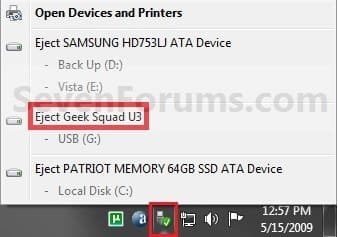
2. Click/tap on the Safely Remove Hardware notification area icon, and click/tap on the Eject drive option for the listed drive that you want to eject, and go to step 4 below. (see screenshot below)
Step1.jpg
OR

3. Open Devices and Printers.
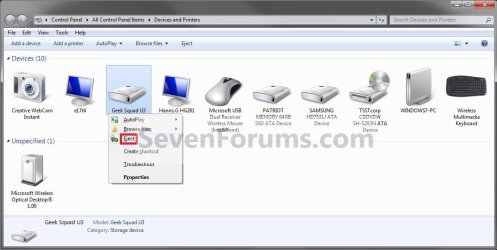
A) Right click or press and hold on the storage device that you want to eject, then click/tap on Eject. (see screenshot below)

OR

B) Right click or press and hold on your computer device (ex: WINDOWS7-PC), select Eject, then click/tap on a listed storage device that you want to eject. (see screenshot below)
Step1A.jpg
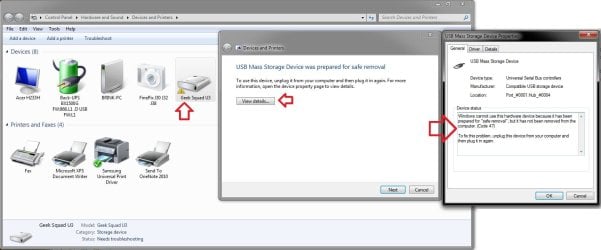
C) You will notice that your device will have a warning/alert overlay icon it now. This only indicates that you will not be able to use this device again unless you unplug it and then plug it in again. (see screenshot below)
Troubleshoot.jpg
4. When you see this notification message below, you can now safely remove the device from the computer. (see screenshot below)
NOTE: Some devices (ex: USB flash drives) may still have their light on even after you ejected it. As long as you got this Safe to remove hardware message below, it will be safe to disconnect your device even though the light is still on.
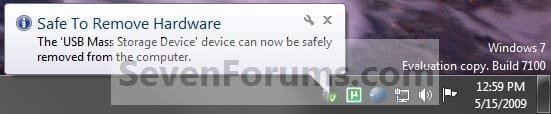
Step2.jpg
   Tip
If you do not get the Safe to remove hardware notification message above, then for next time uncheck Always show all icons and notifications on the taskbar (click on link) box and click on OK. Afterwards check the Always show all icons and notifications on the taskbar box and click on OK. This will toggle these settings off an on to have it work again.


That's it,
Shawn


Last edited:
Hi Shawn
i am surprised that in my windows 7 professional i am not able to safely remove my external hdd or pen drive. in the safely remove and eject media icon i am getting only open device and printers. not any other things which i alrady conected to my usb. what could be the issue??? can u suggest me something pl???
 

My Computer

Computer Manufacturer/Model Number
Dell/vostro
OS
windows 7 professional
CPU
2GHz
Motherboard
intel
Memory
3GB
Hello Manoj, and welcome to Seven Forums.

If you have previously ejected them, then it may take a restart of the computer for them to show back up in "Safely Remove Hardware". Is it connected to a USB hub or to a USB port on the back if the computer? If to the computer, then you might try a differen USB port to see if that may be the issue.

If you open "Devices and Printers", do you have it's drive icon listed there, and can you right click on it and click on Eject?

Hope this helps,
Shawn
 

My Computer

Computer type
PC/Desktop
Computer Manufacturer/Model Number
Self built custom
OS
64-bit Windows 11 Pro for Workstations
CPU
Intel i7-8700K OC'd to 5 GHz
Motherboard
ASUS ROG Maximus XI Formula Z390
Memory
64 GB (4x16GB) G.SKILL TridentZ RGB DDR4 3600 MHz
Graphics Card(s)
ASUS ROG-STRIX-GTX1080TI-O11G-GAMING
Sound Card
Integrated
Monitor(s) Displays
2 x Samsung Odyssey G7 27"
Screen Resolution
2560x1440
Hard Drives
1TB Samsung 990 PRO M.2,
4TB Samsung 990 PRO PRO M.2,
TerraMaster F8 SSD Plus NAS
PSU
Seasonic Prime Titanium 850W
Case
Thermaltake Core P3
Cooling
Corsair Hydro H115i
Keyboard
Logitech wireless K800
Mouse
Logitech MX Master 4
Internet Speed
2 Gb/s Download and 100 Mb/s Upload
Antivirus
Malwarebyte Anti-Malware Premium
Browser
Google Chrome
Other Info
Logitech Z625 speaker system,
Logitech BRIO 4K Pro webcam,
HP Color LaserJet Pro MFP M477fdn,
APC SMART-UPS RT 1000 XL - SURT1000XLI,
Galaxy S23 Plus phone
hi
i tried all the usb ports. it opens the contents, but it is not showing the icon in safely remove hardware. whether it is external hdd, pen drive, mobile or anything. i dont know what is the actual reason for this.
 

My Computer

Computer Manufacturer/Model Number
Dell/vostro
OS
windows 7 professional
CPU
2GHz
Motherboard
intel
Memory
3GB
Manoj,

How about in "Devices and Printers" as described above?

I'm not sure why they are not showing up in "Safely Remove Hardware". You might see if running a sfc /scannow command may help. If not, then perhaps a repair install may.
 

My Computer

Computer type
PC/Desktop
Computer Manufacturer/Model Number
Self built custom
OS
64-bit Windows 11 Pro for Workstations
CPU
Intel i7-8700K OC'd to 5 GHz
Motherboard
ASUS ROG Maximus XI Formula Z390
Memory
64 GB (4x16GB) G.SKILL TridentZ RGB DDR4 3600 MHz
Graphics Card(s)
ASUS ROG-STRIX-GTX1080TI-O11G-GAMING
Sound Card
Integrated
Monitor(s) Displays
2 x Samsung Odyssey G7 27"
Screen Resolution
2560x1440
Hard Drives
1TB Samsung 990 PRO M.2,
4TB Samsung 990 PRO PRO M.2,
TerraMaster F8 SSD Plus NAS
PSU
Seasonic Prime Titanium 850W
Case
Thermaltake Core P3
Cooling
Corsair Hydro H115i
Keyboard
Logitech wireless K800
Mouse
Logitech MX Master 4
Internet Speed
2 Gb/s Download and 100 Mb/s Upload
Antivirus
Malwarebyte Anti-Malware Premium
Browser
Google Chrome
Other Info
Logitech Z625 speaker system,
Logitech BRIO 4K Pro webcam,
HP Color LaserJet Pro MFP M477fdn,
APC SMART-UPS RT 1000 XL - SURT1000XLI,
Galaxy S23 Plus phone
sfc /scannow worked for me

Manoj, you probably fixed it by now. I had the exact same issue right now (only "Open Devices and Printers" showed up. What worked for me was the sfc /scannow, as Brink pointed to.

Below a printout of running that command:
C:\Windows\system32>sfc /scannow
Beginning system scan. This process will take some time.
Beginning verification phase of system scan.
Verification 100% complete.
Windows Resource Protection found corrupt files and successfully repaired
them. Details are included in the CBS.Log windir\Logs\CBS\CBS.log. For
example C:\Windows\Logs\CBS\CBS.log

I didn't bother looking at the details in CBS.log, but those might hold the answer.

thanks Brink! and thanks manoj for posting so detailed making it easy to search for this resolution. :D
 

My Computer

OS
Win7 Professional
Hard Drives
128GB SSD
You're welcome Simon, and welcome to Seven Forums. :)
 

My Computer

Computer type
PC/Desktop
Computer Manufacturer/Model Number
Self built custom
OS
64-bit Windows 11 Pro for Workstations
CPU
Intel i7-8700K OC'd to 5 GHz
Motherboard
ASUS ROG Maximus XI Formula Z390
Memory
64 GB (4x16GB) G.SKILL TridentZ RGB DDR4 3600 MHz
Graphics Card(s)
ASUS ROG-STRIX-GTX1080TI-O11G-GAMING
Sound Card
Integrated
Monitor(s) Displays
2 x Samsung Odyssey G7 27"
Screen Resolution
2560x1440
Hard Drives
1TB Samsung 990 PRO M.2,
4TB Samsung 990 PRO PRO M.2,
TerraMaster F8 SSD Plus NAS
PSU
Seasonic Prime Titanium 850W
Case
Thermaltake Core P3
Cooling
Corsair Hydro H115i
Keyboard
Logitech wireless K800
Mouse
Logitech MX Master 4
Internet Speed
2 Gb/s Download and 100 Mb/s Upload
Antivirus
Malwarebyte Anti-Malware Premium
Browser
Google Chrome
Other Info
Logitech Z625 speaker system,
Logitech BRIO 4K Pro webcam,
HP Color LaserJet Pro MFP M477fdn,
APC SMART-UPS RT 1000 XL - SURT1000XLI,
Galaxy S23 Plus phone
I have found something odd.

I did a CLEAN install of Windows 7 Pro (I have done many)

On one of them the icon is like the old XP icon to "safely remove hardware" I cannot figure out why it would not be the same as all the rest of the installs I have done. Let me know why this particular install would have a different icon?
 

My Computer

Computer Manufacturer/Model Number
Keeps changing - (Custom)
OS
Windows 7 Professional x64
CPU
Intel Core i7 860
Motherboard
Gigabyte GA-P55-UD4P
Memory
4GB DDR3 Mushkin 1600Mhz @ 7-8-7-20
Graphics Card(s)
MSI GTS250 1GB DDR3 Twin Frozr
Sound Card
Onboard realtek
Monitor(s) Displays
Samsung SyncMaster 24" P2450 + Samsung 20" 2033
Screen Resolution
1920 X 1080 and 1600 X 900 (#2 system 1440 X 900)
Hard Drives
Patriot Inferno 120GB SSD + 3 WD Blue 640GB drives
PSU
Corsair 750 HX Modular
Case
Lancool PC-K62
Cooling
Cooler Master TX3 CPU cooler and 4-140mm and 1-120mm case
Keyboard
Gigabyte USB keyboard
Mouse
Microsoft wireless laser mouse 5000
Internet Speed
7 Mb down 1.5 up
Other Info
System #2: AMD Phenom II X6 1055T (Freezer 7 Pro cooler) - Gigabyte 880GMA-UD2H - WD 500GB Black - 9500GT (1GB) 500W OCZ modular PSU - Antec 200 case. System #3 (LapTop) Core 2 Duo T6670 - 320GB 7200RPM HD - 4GB DDR3 RAM.
Hello Nate,

Could you post a screenshot of this?

Strange, are you using a Aero theme, or a classic theme?
 

My Computer

Computer type
PC/Desktop
Computer Manufacturer/Model Number
Self built custom
OS
64-bit Windows 11 Pro for Workstations
CPU
Intel i7-8700K OC'd to 5 GHz
Motherboard
ASUS ROG Maximus XI Formula Z390
Memory
64 GB (4x16GB) G.SKILL TridentZ RGB DDR4 3600 MHz
Graphics Card(s)
ASUS ROG-STRIX-GTX1080TI-O11G-GAMING
Sound Card
Integrated
Monitor(s) Displays
2 x Samsung Odyssey G7 27"
Screen Resolution
2560x1440
Hard Drives
1TB Samsung 990 PRO M.2,
4TB Samsung 990 PRO PRO M.2,
TerraMaster F8 SSD Plus NAS
PSU
Seasonic Prime Titanium 850W
Case
Thermaltake Core P3
Cooling
Corsair Hydro H115i
Keyboard
Logitech wireless K800
Mouse
Logitech MX Master 4
Internet Speed
2 Gb/s Download and 100 Mb/s Upload
Antivirus
Malwarebyte Anti-Malware Premium
Browser
Google Chrome
Other Info
Logitech Z625 speaker system,
Logitech BRIO 4K Pro webcam,
HP Color LaserJet Pro MFP M477fdn,
APC SMART-UPS RT 1000 XL - SURT1000XLI,
Galaxy S23 Plus phone
Aero, it's on my Mom's machine. I set it up the same as all the rest of my installs. I have never seen it before. I will get a screenshot of it, but it may take a couple of days. It's the same icon as XP as I remember. Very odd. Everything works fine, but it looks funny.
 

My Computer

Computer Manufacturer/Model Number
Keeps changing - (Custom)
OS
Windows 7 Professional x64
CPU
Intel Core i7 860
Motherboard
Gigabyte GA-P55-UD4P
Memory
4GB DDR3 Mushkin 1600Mhz @ 7-8-7-20
Graphics Card(s)
MSI GTS250 1GB DDR3 Twin Frozr
Sound Card
Onboard realtek
Monitor(s) Displays
Samsung SyncMaster 24" P2450 + Samsung 20" 2033
Screen Resolution
1920 X 1080 and 1600 X 900 (#2 system 1440 X 900)
Hard Drives
Patriot Inferno 120GB SSD + 3 WD Blue 640GB drives
PSU
Corsair 750 HX Modular
Case
Lancool PC-K62
Cooling
Cooler Master TX3 CPU cooler and 4-140mm and 1-120mm case
Keyboard
Gigabyte USB keyboard
Mouse
Microsoft wireless laser mouse 5000
Internet Speed
7 Mb down 1.5 up
Other Info
System #2: AMD Phenom II X6 1055T (Freezer 7 Pro cooler) - Gigabyte 880GMA-UD2H - WD 500GB Black - 9500GT (1GB) 500W OCZ modular PSU - Antec 200 case. System #3 (LapTop) Core 2 Duo T6670 - 320GB 7200RPM HD - 4GB DDR3 RAM.

My Computer

Computer type
PC/Desktop
Computer Manufacturer/Model Number
Self built custom
OS
64-bit Windows 11 Pro for Workstations
CPU
Intel i7-8700K OC'd to 5 GHz
Motherboard
ASUS ROG Maximus XI Formula Z390
Memory
64 GB (4x16GB) G.SKILL TridentZ RGB DDR4 3600 MHz
Graphics Card(s)
ASUS ROG-STRIX-GTX1080TI-O11G-GAMING
Sound Card
Integrated
Monitor(s) Displays
2 x Samsung Odyssey G7 27"
Screen Resolution
2560x1440
Hard Drives
1TB Samsung 990 PRO M.2,
4TB Samsung 990 PRO PRO M.2,
TerraMaster F8 SSD Plus NAS
PSU
Seasonic Prime Titanium 850W
Case
Thermaltake Core P3
Cooling
Corsair Hydro H115i
Keyboard
Logitech wireless K800
Mouse
Logitech MX Master 4
Internet Speed
2 Gb/s Download and 100 Mb/s Upload
Antivirus
Malwarebyte Anti-Malware Premium
Browser
Google Chrome
Other Info
Logitech Z625 speaker system,
Logitech BRIO 4K Pro webcam,
HP Color LaserJet Pro MFP M477fdn,
APC SMART-UPS RT 1000 XL - SURT1000XLI,
Galaxy S23 Plus phone
You might reset the notification icons and the icon cache to see if it may help in case it may just be a icon glitch.

I will try that Brink. What's funny is it's a NEW machine. XP was never on it and all components are new and it's always been that way. When I put my flash drive in when it was new to install drivers, it was the same way. I have never seen it on another 7 machine. I'll try to post back if that works.
 

My Computer

Computer Manufacturer/Model Number
Keeps changing - (Custom)
OS
Windows 7 Professional x64
CPU
Intel Core i7 860
Motherboard
Gigabyte GA-P55-UD4P
Memory
4GB DDR3 Mushkin 1600Mhz @ 7-8-7-20
Graphics Card(s)
MSI GTS250 1GB DDR3 Twin Frozr
Sound Card
Onboard realtek
Monitor(s) Displays
Samsung SyncMaster 24" P2450 + Samsung 20" 2033
Screen Resolution
1920 X 1080 and 1600 X 900 (#2 system 1440 X 900)
Hard Drives
Patriot Inferno 120GB SSD + 3 WD Blue 640GB drives
PSU
Corsair 750 HX Modular
Case
Lancool PC-K62
Cooling
Cooler Master TX3 CPU cooler and 4-140mm and 1-120mm case
Keyboard
Gigabyte USB keyboard
Mouse
Microsoft wireless laser mouse 5000
Internet Speed
7 Mb down 1.5 up
Other Info
System #2: AMD Phenom II X6 1055T (Freezer 7 Pro cooler) - Gigabyte 880GMA-UD2H - WD 500GB Black - 9500GT (1GB) 500W OCZ modular PSU - Antec 200 case. System #3 (LapTop) Core 2 Duo T6670 - 320GB 7200RPM HD - 4GB DDR3 RAM.
One thing I don't get though, is that on Windows 7 (at least for me) it is no longer turning my devices off after the "safely remove hardware" bubble pops up, when it used to on my old XP. As in - after using the eject function on XP my MP3's LCD message will change from "USB connected" to "USB disconnected" and the lights on my USB thumbdrives and SD card readers etc will turn off. Now nothing happens except the icons disappear from My Computer and I still need to unplug and replug to access them again. Is this normal?
 

My Computer

OS
XP
Hello Snuffed,

It appears to be normal. I get the same thing for my USB key drive as well.
 

My Computer

Computer type
PC/Desktop
Computer Manufacturer/Model Number
Self built custom
OS
64-bit Windows 11 Pro for Workstations
CPU
Intel i7-8700K OC'd to 5 GHz
Motherboard
ASUS ROG Maximus XI Formula Z390
Memory
64 GB (4x16GB) G.SKILL TridentZ RGB DDR4 3600 MHz
Graphics Card(s)
ASUS ROG-STRIX-GTX1080TI-O11G-GAMING
Sound Card
Integrated
Monitor(s) Displays
2 x Samsung Odyssey G7 27"
Screen Resolution
2560x1440
Hard Drives
1TB Samsung 990 PRO M.2,
4TB Samsung 990 PRO PRO M.2,
TerraMaster F8 SSD Plus NAS
PSU
Seasonic Prime Titanium 850W
Case
Thermaltake Core P3
Cooling
Corsair Hydro H115i
Keyboard
Logitech wireless K800
Mouse
Logitech MX Master 4
Internet Speed
2 Gb/s Download and 100 Mb/s Upload
Antivirus
Malwarebyte Anti-Malware Premium
Browser
Google Chrome
Other Info
Logitech Z625 speaker system,
Logitech BRIO 4K Pro webcam,
HP Color LaserJet Pro MFP M477fdn,
APC SMART-UPS RT 1000 XL - SURT1000XLI,
Galaxy S23 Plus phone
Hi All,

I am new to this forum. I landed here to search same question.

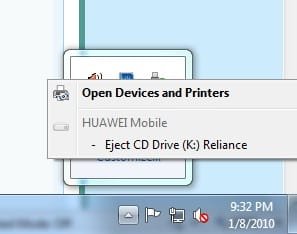
I am not able to Eject USB drive (Reliance Broadband++ USB Data Card). I see something different notification from you people have posted here. See attached image. In the notification HUAWEI Mobile is grey and Eject CD Drive (K:) Reliance Dark. I see vice versa notification what you have posted here.

Is there any problem in this type of notification? How can I remove USD this USB device safely as I have already lost (corrupted) one drive. Please help me.

Regards,

Sunil
 

Attachments

  • eject device.jpg
    eject device.jpg
    19.9 KB · Views: 6,143

My Computer

OS
Windows 7
Hello Sunil, and welcome to Seven Forums.

What does it eject when you click on the "Eject CD Drive (K: ) Reliance" option? Is this your data card?
 

My Computer

Computer type
PC/Desktop
Computer Manufacturer/Model Number
Self built custom
OS
64-bit Windows 11 Pro for Workstations
CPU
Intel i7-8700K OC'd to 5 GHz
Motherboard
ASUS ROG Maximus XI Formula Z390
Memory
64 GB (4x16GB) G.SKILL TridentZ RGB DDR4 3600 MHz
Graphics Card(s)
ASUS ROG-STRIX-GTX1080TI-O11G-GAMING
Sound Card
Integrated
Monitor(s) Displays
2 x Samsung Odyssey G7 27"
Screen Resolution
2560x1440
Hard Drives
1TB Samsung 990 PRO M.2,
4TB Samsung 990 PRO PRO M.2,
TerraMaster F8 SSD Plus NAS
PSU
Seasonic Prime Titanium 850W
Case
Thermaltake Core P3
Cooling
Corsair Hydro H115i
Keyboard
Logitech wireless K800
Mouse
Logitech MX Master 4
Internet Speed
2 Gb/s Download and 100 Mb/s Upload
Antivirus
Malwarebyte Anti-Malware Premium
Browser
Google Chrome
Other Info
Logitech Z625 speaker system,
Logitech BRIO 4K Pro webcam,
HP Color LaserJet Pro MFP M477fdn,
APC SMART-UPS RT 1000 XL - SURT1000XLI,
Galaxy S23 Plus phone
Hi Brink,

Thanks.

Yes, this is Data Card and nothing ejects. One thing is there, if I use USB pen drive, it ejects successfully. But this is not the case with Data Card.

Regards,

Sunil
 

My Computer

OS
Windows 7
Sunil,

I have not used one before, but I would imaging that the data card is tied to the HUAWEI mobile broadband card acting as one device. This may be why it will not eject it. If available, do you have the latest driver installed for it?
 

My Computer

Computer type
PC/Desktop
Computer Manufacturer/Model Number
Self built custom
OS
64-bit Windows 11 Pro for Workstations
CPU
Intel i7-8700K OC'd to 5 GHz
Motherboard
ASUS ROG Maximus XI Formula Z390
Memory
64 GB (4x16GB) G.SKILL TridentZ RGB DDR4 3600 MHz
Graphics Card(s)
ASUS ROG-STRIX-GTX1080TI-O11G-GAMING
Sound Card
Integrated
Monitor(s) Displays
2 x Samsung Odyssey G7 27"
Screen Resolution
2560x1440
Hard Drives
1TB Samsung 990 PRO M.2,
4TB Samsung 990 PRO PRO M.2,
TerraMaster F8 SSD Plus NAS
PSU
Seasonic Prime Titanium 850W
Case
Thermaltake Core P3
Cooling
Corsair Hydro H115i
Keyboard
Logitech wireless K800
Mouse
Logitech MX Master 4
Internet Speed
2 Gb/s Download and 100 Mb/s Upload
Antivirus
Malwarebyte Anti-Malware Premium
Browser
Google Chrome
Other Info
Logitech Z625 speaker system,
Logitech BRIO 4K Pro webcam,
HP Color LaserJet Pro MFP M477fdn,
APC SMART-UPS RT 1000 XL - SURT1000XLI,
Galaxy S23 Plus phone
Hi Brink,

Sorry for late reply as I was out of station.

No I don't have latest driver for that. I am using Windows 7 operating system and as per my knowledge HUAWEI have not released driver for the same. If you have any information about that, please let me know.

Thanks

Sunil
 

My Computer

OS
Windows 7
Hey Sunil!

Try seeing in Devices and Printers.

The problem is that the data cards contain a small amount of flash memory that hold the drivers and they are set to be emulated as CD drives.

Since they emulate CD drive, they autorun the driver installation without user input.

That is the reason why Sunil's screenie shows The CD Drive under his mobile.

Hope this helps.

P.S.: Post the screen of devices and printers and also take a screen shot with right click menu of your mobile.
 

My Computer

Computer type
PC/Desktop
Computer Manufacturer/Model Number
Custom built
OS
Windows 7 Ultimate (64 bit) dual boot with Fedora KDE
CPU
Intel Corei5-3470 @ 3.20Ghz (Turbo 3.60Ghz) [6MB L3 cache]
Motherboard
GIGABYTE GA-B75M-D3H [intel B75 Express Chipset]
Memory
8 GB [4 GB x 2] DDR3 1600 Mhz G.Skill
Graphics Card(s)
Zotac nVidia GeForce GTX 650 1024 MB GDDR5 (128 bit)
Sound Card
Realtek ALC 887 HD Audio codec onboard
Monitor(s) Displays
Samsung SyncMaster 2033SW+
Screen Resolution
1600 x 900 @ 60Hz
Hard Drives
1 x S-ATA II Seagate 1 TB [Win7 Ultimate x86-64 RTM]
1 x S-ATA Samsung 1 TB [Fedora]
PSU
Cooler Master Thunder 650W
Case
Cooler Master Elite 344 - USB 3
Cooling
All Fan [1 on front and 1 at back]
Keyboard
Microsoft PS/2 Multimedia keyboard
Mouse
Microsoft Optical Mouse USB
Internet Speed
1 Mbps Cable
Antivirus
Kaspersky Internet Security
Browser
Firefox
Back
Top