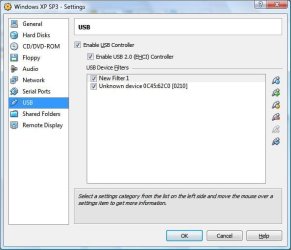
You have to activate the USB stick when nothing is running in the vBox. Maybe that is why it did not work.gigabyte, if you want to try Virtual Box (vBox), you could have a look at the tutorial a wrote up a long time ago. It is actually very easy to set up and if you want to delete it you just get rid of a folder.
Installing in a virtual partition .zip - Windows Live
Just download and unzip the folder. This was written at the time for win7 Beta. But it applies to all systems.
I had a look at your tutorial : thanks for the work.
I have a problem with the Virtual Box program which I use to run Linux systems to do some secure home banking. I desparately try to get access to an USB stick but don't know what I do wrong. I tried to activate the stick via this small USB button but no success.
Any step-by-step hint ?
My Computer
- Computer Manufacturer/Model Number
- HP, Dell, Gateway, Toshiba - 4 laptops and 2 desktops
- OS
- Vista, Windows7, Mint Mate, Zorin, Windows 8
- CPU
- from 1.6GHz Duo to i7
- Monitor(s) Displays
- 2x HP w2207
- Hard Drives
- 5x HDD, 7x SSD, 12x Externals
- Keyboard
- with trackball - no mices
- Mouse
- Trackball mice
- Internet Speed
- DSL 6000