sandboxie

gigabyte, if you want to try Virtual Box (vBox), you could have a look at the tutorial a wrote up a long time ago. It is actually very easy to set up and if you want to delete it you just get rid of a folder.
Installing in a virtual partition .zip - Windows Live

Just download and unzip the folder. This was written at the time for win7 Beta. But it applies to all systems.

I had a look at your tutorial : thanks for the work.

I have a problem with the Virtual Box program which I use to run Linux systems to do some secure home banking. I desparately try to get access to an USB stick but don't know what I do wrong. I tried to activate the stick via this small USB button but no success.

Any step-by-step hint ?
You have to activate the USB stick when nothing is running in the vBox. Maybe that is why it did not work.
 

My Computer

Computer Manufacturer/Model Number
HP, Dell, Gateway, Toshiba - 4 laptops and 2 desktops
OS
Vista, Windows7, Mint Mate, Zorin, Windows 8
CPU
from 1.6GHz Duo to i7
Monitor(s) Displays
2x HP w2207
Hard Drives
5x HDD, 7x SSD, 12x Externals
Keyboard
with trackball - no mices
Mouse
Trackball mice
Internet Speed
DSL 6000
lol woow guys thankyou for ur help now wat to do with these?

ngyedd.png
 

My Computer

Computer Manufacturer/Model Number
gigabyte
OS
windows 7 64bit
CPU
intel core 2 duo E8600 @3.33ghz
Motherboard
gigabyte ep45-ds5 (socket 775)
Memory
8.0gb dual-channel DDR2 @400mhz (6-6-6-18
Graphics Card(s)
2X ATI Radeon HD 4800 series (sapphire) crossfire
Sound Card
realtek high definition audio
Monitor(s) Displays
benq E2200w (digital)
Screen Resolution
1680 x 1050
Hard Drives
1 313GB Western digital WDC
You deal with those like in any "normal" system. deal with the virtual system the same as if it was a normal native system.
 

My Computer

Computer Manufacturer/Model Number
HP, Dell, Gateway, Toshiba - 4 laptops and 2 desktops
OS
Vista, Windows7, Mint Mate, Zorin, Windows 8
CPU
from 1.6GHz Duo to i7
Monitor(s) Displays
2x HP w2207
Hard Drives
5x HDD, 7x SSD, 12x Externals
Keyboard
with trackball - no mices
Mouse
Trackball mice
Internet Speed
DSL 6000
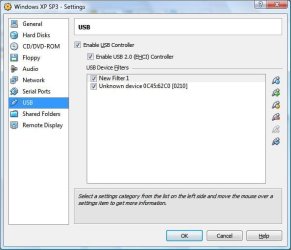
Remember you can set up USB in config or specify after running virtual OS. The ONLY problem I had was with my Logitech webcam. My only solution was to switch to vmwareplayer. Still, I used both virtualbox and vmwareplayer. Screen capture below is not mine.
 

Attachments

  • usb.jpg
    usb.jpg
    42.9 KB · Views: 3

My Computer

Computer Manufacturer/Model Number
Dell and Custom
OS
Systems 1 and 2: Windows 7 Enterprise x64, Win 8 Developer
CPU
System 1: i7 [email protected], System 2: AMD FX-4100 Zambezi 3.6G
Motherboard
System 1:Dell 06NWYK System 2: ASUS M5A97 AM3+
Memory
System 1: 8GB System 2: 8GB
Graphics Card(s)
System 1: ATI FirePro V4800 System 2: Radeon HD 6850
Sound Card
System 1: onboard System 2: onboard
Monitor(s) Displays
System1: Viewsonic HDMI 24"
Screen Resolution
System 1: 1920x1080 System 2: 1920x1080
Hard Drives
System 1: Mirrored .5B drives System 2: Seagate Barracuda ST1000DM003 1TB 7200 RPM 64MB Cache SATA 6.0Gb/s
Case
System 1: Dell System 2: Cooler Master
Internet Speed
10 MBPS
I'm so :confused:
 

My Computer

Computer Manufacturer/Model Number
Gateway/NV7923u & NV79C52u Laptops
OS
windows 7 professional & ultimate 64bit laptops
CPU
2.27 boost to 2.53 & 2.53 boost to 2.80
Motherboard
Mobile Intel® HM55 Express Chipset ???
Memory
4GB
Graphics Card(s)
Intel® Graphics Media Accelerator HD
Sound Card
realtek High-definition audio support
Monitor(s) Displays
17.3 " HD 1600 x 900
Hard Drives
hatachi Travelstar 5400 500GB & west digital 500GB
Internet Speed
35MB fios

My Computer

Computer Manufacturer/Model Number
HP, Dell, Gateway, Toshiba - 4 laptops and 2 desktops
OS
Vista, Windows7, Mint Mate, Zorin, Windows 8
CPU
from 1.6GHz Duo to i7
Monitor(s) Displays
2x HP w2207
Hard Drives
5x HDD, 7x SSD, 12x Externals
Keyboard
with trackball - no mices
Mouse
Trackball mice
Internet Speed
DSL 6000
No Virtual Machine, much less a sandbox are 100% reliable, many hackers can invade your VM and try to "jump" to your computer, of course if you're updated with all the risks are lower, but they exist, ever!
For those tests infections both programs or sites a VM is better than a sandbox.
 

My Computer

Computer Manufacturer/Model Number
Homemade
OS
Windows 7 Professional 32bit
CPU
Intel Core 2Quad Q8300 @2550 MHz
Motherboard
Phitronics PN73VS-M
Memory
4096 MB (2x 2048 DDR2-SDRAM)
Graphics Card(s)
NVIDIA GeForce 7300 SE/7200 GS
Sound Card
Nvidia MCP73 High Definition Audio
Monitor(s) Displays
LG Electronics W1953 - 19 inches
Screen Resolution
1280x720
Hard Drives
WDC (1000 GB)
Internet Speed
1 MB
The risks are greater when you create shares from the vm to the host.
 

My Computer

Computer Manufacturer/Model Number
Dell and Custom
OS
Systems 1 and 2: Windows 7 Enterprise x64, Win 8 Developer
CPU
System 1: i7 [email protected], System 2: AMD FX-4100 Zambezi 3.6G
Motherboard
System 1:Dell 06NWYK System 2: ASUS M5A97 AM3+
Memory
System 1: 8GB System 2: 8GB
Graphics Card(s)
System 1: ATI FirePro V4800 System 2: Radeon HD 6850
Sound Card
System 1: onboard System 2: onboard
Monitor(s) Displays
System1: Viewsonic HDMI 24"
Screen Resolution
System 1: 1920x1080 System 2: 1920x1080
Hard Drives
System 1: Mirrored .5B drives System 2: Seagate Barracuda ST1000DM003 1TB 7200 RPM 64MB Cache SATA 6.0Gb/s
Case
System 1: Dell System 2: Cooler Master
Internet Speed
10 MBPS
I have installed it on my vista 32bit laptop.
have not tried on my 64bit win7 laptop or my XP Pro sp3 tower yet


I'm lovin it. I still clean everything as usual.


well, it works on my win7----- had to install v3.44
 
Last edited:

My Computer

Computer Manufacturer/Model Number
Gateway/NV7923u & NV79C52u Laptops
OS
windows 7 professional & ultimate 64bit laptops
CPU
2.27 boost to 2.53 & 2.53 boost to 2.80
Motherboard
Mobile Intel® HM55 Express Chipset ???
Memory
4GB
Graphics Card(s)
Intel® Graphics Media Accelerator HD
Sound Card
realtek High-definition audio support
Monitor(s) Displays
17.3 " HD 1600 x 900
Hard Drives
hatachi Travelstar 5400 500GB & west digital 500GB
Internet Speed
35MB fios
I just upgraded both my Vista x86 laptop and Win 7 x64 to Sandboxie 3.48 and each computer has been squeeky clean since I started using my browsers forced to run in the virtual space of Sandboxie.

~Maxx~
.
da59fa57.png
 

My Computer

Computer Manufacturer/Model Number
HP HPE 270f
OS
Windows 7 x64 Home Premium
CPU
Intel Core i7 930 @ 2.8 Ghz Socket 1366 LGA
Motherboard
Pegatron Truckee v1.04E41
Memory
8 GB 1366 Mhz DDR3 (PC3-10700) RAM
Graphics Card(s)
ATI Radeon 5770 1 GB DDR5 RAM
Sound Card
Realtech High Definition
Monitor(s) Displays
32" Sony Bravia
Screen Resolution
1366 X 768
Hard Drives
Intel 25nm 120 GB Series 320 SSD HD Tune- 265 MBps Read/ 130 MBps Write

LaCie 1TB + 1TB RAID 0 eSATA Drive HD Tune- 160 MBps Read/ 90 MBps Write
Keyboard
Logitech Illuminated
Mouse
Logitech MX Revolution
Internet Speed
36.4 Mbps Maximum on a 37 Mbps Motorola SB501 Modem
I would like EVERYTHING to run sandboxed from the second my desktop becomes available
 

My Computer

Computer Manufacturer/Model Number
Gateway/NV7923u & NV79C52u Laptops
OS
windows 7 professional & ultimate 64bit laptops
CPU
2.27 boost to 2.53 & 2.53 boost to 2.80
Motherboard
Mobile Intel® HM55 Express Chipset ???
Memory
4GB
Graphics Card(s)
Intel® Graphics Media Accelerator HD
Sound Card
realtek High-definition audio support
Monitor(s) Displays
17.3 " HD 1600 x 900
Hard Drives
hatachi Travelstar 5400 500GB & west digital 500GB
Internet Speed
35MB fios
I just upgraded both my Vista x86 laptop and Win 7 x64 to Sandboxie 3.48 and each computer has been squeeky clean since I started using my browsers forced to run in the virtual space of Sandboxie.

~Maxx~
.
da59fa57.png

I've used Sandboxie for several years. Only thing I don't like with versions after 3.46 is the author can kill your registration. I'm staying with 3.46 unless the licensing scheme reverts to something permanently enabled.
 

My Computer

Computer Manufacturer/Model Number
HP Media Center
OS
Windows 7 32 bit
CPU
AMD 5200+ dual core
Memory
2 GB
Graphics Card(s)
NVidia GeForce 6150SE 128 MB
Monitor(s) Displays
CRT
Screen Resolution
1280x1024
Hard Drives
500 GB Sata internal :

SIIG USB 3.0 docking stations w/WD Caviar Black 6 Gb/s drives
Keyboard
PS/2
Mouse
PS/2 Wheel Mouse
Other Info
SIIG USB 3.0 PCIexpress card.
I've used Sandboxie for several years. Only thing I don't like with versions after 3.46 is the author can kill your registration. I'm staying with 3.46 unless the licensing scheme reverts to something permanently enabled.

I have also used Sandboxie with great success and not a single Malware detection for almost 2 years. The licensing situation that Tzuk started with v3.48 because some people had 100's of computers running off a single paid licenses means that now I have to go into the GUI for a minute every 3 months and get a new product key, but since its my most often used and most useful software along with Opera 10.70 build 9047 doing this will actually take less time than it takes to install 2 new snapshots of Opera each week, but they are both worth it...

a8cd466c.png


~Maxx~
 

My Computer

Computer Manufacturer/Model Number
HP HPE 270f
OS
Windows 7 x64 Home Premium
CPU
Intel Core i7 930 @ 2.8 Ghz Socket 1366 LGA
Motherboard
Pegatron Truckee v1.04E41
Memory
8 GB 1366 Mhz DDR3 (PC3-10700) RAM
Graphics Card(s)
ATI Radeon 5770 1 GB DDR5 RAM
Sound Card
Realtech High Definition
Monitor(s) Displays
32" Sony Bravia
Screen Resolution
1366 X 768
Hard Drives
Intel 25nm 120 GB Series 320 SSD HD Tune- 265 MBps Read/ 130 MBps Write

LaCie 1TB + 1TB RAID 0 eSATA Drive HD Tune- 160 MBps Read/ 90 MBps Write
Keyboard
Logitech Illuminated
Mouse
Logitech MX Revolution
Internet Speed
36.4 Mbps Maximum on a 37 Mbps Motorola SB501 Modem
Funny, how come my Opera is so damn slow - a lot slower than the IE. I use it as my second browser but it can be a real pain. And every time I start it from scratch I get this little panel asking me whether I want to start with the Home page, the Speed Dial, etc. Really not very convenient.
 

My Computer

Computer Manufacturer/Model Number
HP, Dell, Gateway, Toshiba - 4 laptops and 2 desktops
OS
Vista, Windows7, Mint Mate, Zorin, Windows 8
CPU
from 1.6GHz Duo to i7
Monitor(s) Displays
2x HP w2207
Hard Drives
5x HDD, 7x SSD, 12x Externals
Keyboard
with trackball - no mices
Mouse
Trackball mice
Internet Speed
DSL 6000
Funny, how come my Opera is so damn slow - a lot slower than the IE.

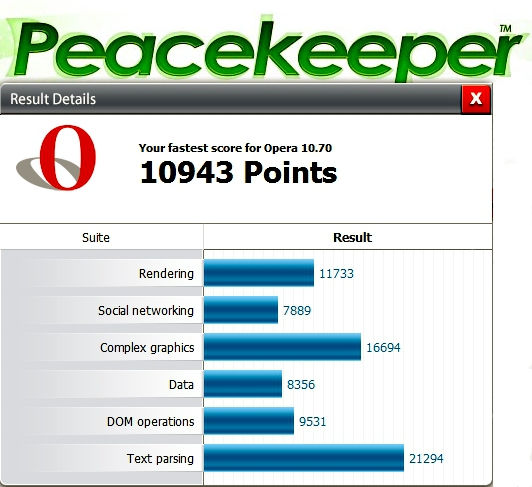
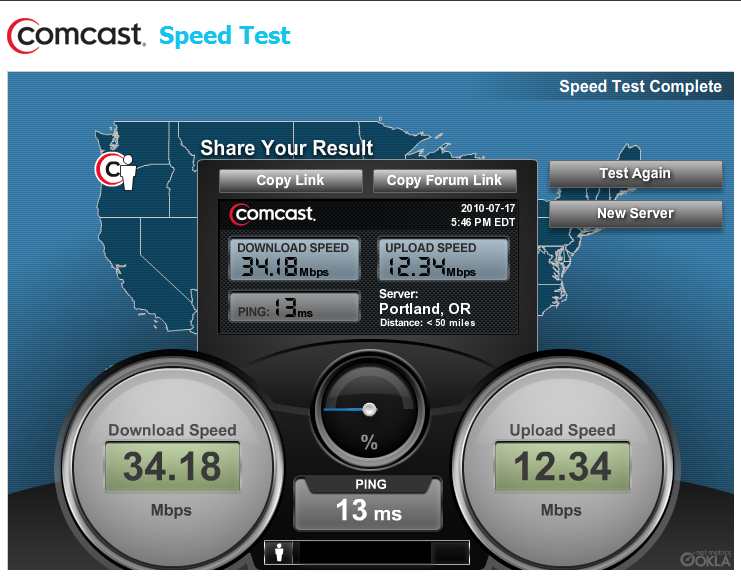
I really don't understand this because Opera runs at 2X the download bandwidth that IE does on my computers. Could you provide the Peacekeeper Benchmark of both your Oprea and IE browsers? It only takes a few minutes to do and possibly we could learn something about why Opera is running so slow on your computer.

Even better have you tweaked the Settings> Preferences> Advanced> Network> Max connections to server and Max total connections settings in Opera yet? Bumping them up from 16 and 64 respectively to 128 each made Opera fly on my computer!

35b272db.png


~Maxx~
.
da59fa57.png
 

My Computer

Computer Manufacturer/Model Number
HP HPE 270f
OS
Windows 7 x64 Home Premium
CPU
Intel Core i7 930 @ 2.8 Ghz Socket 1366 LGA
Motherboard
Pegatron Truckee v1.04E41
Memory
8 GB 1366 Mhz DDR3 (PC3-10700) RAM
Graphics Card(s)
ATI Radeon 5770 1 GB DDR5 RAM
Sound Card
Realtech High Definition
Monitor(s) Displays
32" Sony Bravia
Screen Resolution
1366 X 768
Hard Drives
Intel 25nm 120 GB Series 320 SSD HD Tune- 265 MBps Read/ 130 MBps Write

LaCie 1TB + 1TB RAID 0 eSATA Drive HD Tune- 160 MBps Read/ 90 MBps Write
Keyboard
Logitech Illuminated
Mouse
Logitech MX Revolution
Internet Speed
36.4 Mbps Maximum on a 37 Mbps Motorola SB501 Modem
Maxxwire, Thanks for the answer. I will try the Peacekeeper Benchmarks tomorrow (it is after midnight in my neck of the woods).
I never use Opera for downloads, only for searching information on the web. I also have not changed any Opera settings. I expect a browser to have optimal performance "out of the box".
 

My Computer

Computer Manufacturer/Model Number
HP, Dell, Gateway, Toshiba - 4 laptops and 2 desktops
OS
Vista, Windows7, Mint Mate, Zorin, Windows 8
CPU
from 1.6GHz Duo to i7
Monitor(s) Displays
2x HP w2207
Hard Drives
5x HDD, 7x SSD, 12x Externals
Keyboard
with trackball - no mices
Mouse
Trackball mice
Internet Speed
DSL 6000
And every time I start it from scratch I get this little panel asking me whether I want to start with the Home page, the Speed Dial, etc. Really not very convenient.

I have seen what you are describing, but only when Opera had an abnormal shutdown.

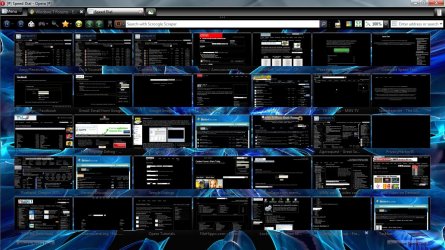
Normally if you access Settings> Preferences> General> Startup you can choose what page Opera displays on startup. I have chosen speed dial because there is a way to instruct Opera to display not just the maximum 25 speed dial tiles but up to 40 of them. I have Opera Speed Dial set at 35 tiles with a choice of normal or reverse contrast display.

~Maxx~
.
da59fa57.png
 

Attachments

  • Opera 10.70 b9048 Speed Dial.jpg
    Opera 10.70 b9048 Speed Dial.jpg
    848.8 KB · Views: 13
  • Opera 10.70 b9048 Speed Dial B.jpg
    Opera 10.70 b9048 Speed Dial B.jpg
    790.5 KB · Views: 7

My Computer

Computer Manufacturer/Model Number
HP HPE 270f
OS
Windows 7 x64 Home Premium
CPU
Intel Core i7 930 @ 2.8 Ghz Socket 1366 LGA
Motherboard
Pegatron Truckee v1.04E41
Memory
8 GB 1366 Mhz DDR3 (PC3-10700) RAM
Graphics Card(s)
ATI Radeon 5770 1 GB DDR5 RAM
Sound Card
Realtech High Definition
Monitor(s) Displays
32" Sony Bravia
Screen Resolution
1366 X 768
Hard Drives
Intel 25nm 120 GB Series 320 SSD HD Tune- 265 MBps Read/ 130 MBps Write

LaCie 1TB + 1TB RAID 0 eSATA Drive HD Tune- 160 MBps Read/ 90 MBps Write
Keyboard
Logitech Illuminated
Mouse
Logitech MX Revolution
Internet Speed
36.4 Mbps Maximum on a 37 Mbps Motorola SB501 Modem
Back
Top