save file default

dennis7490

New member
Local time
2:21 PM
Messages
19
When i write something and i click save, it defaults to "documents" folder, which is empty. all my folders are in "My documents shortcut". How do i get al of thsi together, so i don't have to search for "My documents shortcut" all the time.

I have everything i do in My documents Library, but it's hard to find. so, how do organize this so all of my documents are in the default "my documents"?

thanks,

Dennis
 

My Computer

OS
windows 7
Don't quite understand what you're saying... By default, My Documents folder is in the Documents Library. So, if you search Windows Explorer by way of the Documents Library, you are searching all of your folders within that library, of which My Documents folder is there by default.

Or at sometime past, did you choose to save a document in another location? If so, it may be saving all documents to that folder. You just need to "Save As" and choose the My Documents folder.
 

My Computer

Computer Manufacturer/Model Number
Rig 1
OS
Windows 7 Ultimate x64
CPU
AMD Phenom II X4 940 Black Edition @ 3.4GHz (AM2+)
Motherboard
Gigabyte GA-MA790X-UD4P (AM2+)
Memory
Corsair CM2X4096-8500C5 (4 X 2GB)
Graphics Card(s)
XFX Radeon HD 5770 / Diamond Radeon HD 5770 CrossFireX
Sound Card
Asus Xonar DS (PCI)
Monitor(s) Displays
Samsung SyncMaster 932bw+ (3)
Screen Resolution
4320x900
Hard Drives
OCZ Vertex 2 80 GB - Windows 7 System --
WD Caviar Black 1TB - Music, Movies, Vids, Pics --
WD Caviar Black 640GB - User Profiles & Games --
WD My Book 320GB external
PSU
Corsair CMPSU-750TX
Case
Cooler Master HAF 932
Cooling
Corsair Hydro Series H50
Keyboard
Logitech Desktop Wave
Mouse
Logitech LX8 Laser
Internet Speed
20 down / 2 up
Other Info
LG GGC-H20L Blu-Ray / HDDVD combo --
Hauppauge HVR-1250 --
Silverstone MFP-51 --
Logitech Webcam C600
save as default

let me try to explain.

If I write something in WORD and and I got to the save icon, it defaults to "My documents" which is an empty folder. I don't know why its empty. It should have all of my folders.

then I have to pull down the menu, go to "desktop" then in desktop go to "My documents shortcut" where all of my files are.

I want all of my files to be in "My documents" AND "My documents shortcut" they should be identical, the shortcut file being nothing more than a ...well, shortcut.

thanks,

Dennis
 

My Computer

OS
windows 7
:confused:
I'm really confused... How are you saving documents to a shortcut? If the default save directory is My Documents then why would you need to go to Desktop > My Documents?

Think you can post a snip or screen shot of what you're trying to describe?
 

My Computer

Computer Manufacturer/Model Number
Rig 1
OS
Windows 7 Ultimate x64
CPU
AMD Phenom II X4 940 Black Edition @ 3.4GHz (AM2+)
Motherboard
Gigabyte GA-MA790X-UD4P (AM2+)
Memory
Corsair CM2X4096-8500C5 (4 X 2GB)
Graphics Card(s)
XFX Radeon HD 5770 / Diamond Radeon HD 5770 CrossFireX
Sound Card
Asus Xonar DS (PCI)
Monitor(s) Displays
Samsung SyncMaster 932bw+ (3)
Screen Resolution
4320x900
Hard Drives
OCZ Vertex 2 80 GB - Windows 7 System --
WD Caviar Black 1TB - Music, Movies, Vids, Pics --
WD Caviar Black 640GB - User Profiles & Games --
WD My Book 320GB external
PSU
Corsair CMPSU-750TX
Case
Cooler Master HAF 932
Cooling
Corsair Hydro Series H50
Keyboard
Logitech Desktop Wave
Mouse
Logitech LX8 Laser
Internet Speed
20 down / 2 up
Other Info
LG GGC-H20L Blu-Ray / HDDVD combo --
Hauppauge HVR-1250 --
Silverstone MFP-51 --
Logitech Webcam C600
Hello dennis7490.


Have a look at the tutorial at the link below to see if that's what you want; be sure to post back to keep us informed.
Also have a look through the "Related Tutorials" at the bottom of the tutorial.

Library - Set Save Folder
 

My Computer

Computer Manufacturer/Model Number
* BFK Customs *
OS
W 7 64-bit Ultimate
CPU
Intel Q9550 Yorkfield
Motherboard
ASUS P5Q Pro
Memory
8GB Dominator 8500C5D
Graphics Card(s)
ATI : XFX 5870
Sound Card
Realtek HD Audio 7-1
Monitor(s) Displays
1x 47" LCD HDMI & 3x 26" LCD HDMI
Screen Resolution
1920x1080P & 1920x1200
Hard Drives
1x 80GB Intel X25-M G2 SSD : 1x 500GB & 1x 640GB WD Caviar Black(s)
PSU
Corsair 620HX
Case
Cooler Master RC-690
Cooling
Tuniq Tower 120, 2x 140mm and 3x 120mm case fans
Keyboard
Microsoft 500
Mouse
Razer Diamondback 3G
Internet Speed
14 Mb/s
Other Info
1x Koutech 3Gb/s SATA HDD Hot Swap Rack
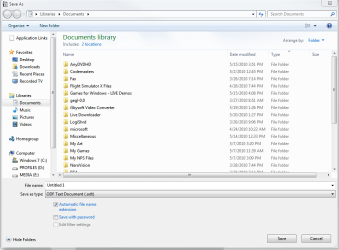
I don't have Word, but from my word processor I started a document. I hit File, and save...

...The default directory is Documents Library and the name of the document is Untitled 1...

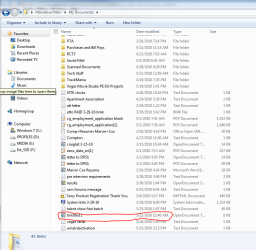
...The last photo is the actual My Documents folder. When I saved to my default location, Documents Library, the item is automatically saved in My Documents. By default, My Documents and Public Documents are included in the Documents Library.

If that is not what is happening in your case, it may be that, somehow, the My Documents folder is not included in the Documents Library. If that is the case, click Start > your user profile at the top right of the menu > right click My Documents folder > select Include In Library > select Documents.
 

Attachments

  • Test1.png
    Test1.png
    32.5 KB · Views: 3
  • test2.PNG
    test2.PNG
    37.6 KB · Views: 5
  • test3.PNG
    test3.PNG
    43.6 KB · Views: 8

My Computer

Computer Manufacturer/Model Number
Rig 1
OS
Windows 7 Ultimate x64
CPU
AMD Phenom II X4 940 Black Edition @ 3.4GHz (AM2+)
Motherboard
Gigabyte GA-MA790X-UD4P (AM2+)
Memory
Corsair CM2X4096-8500C5 (4 X 2GB)
Graphics Card(s)
XFX Radeon HD 5770 / Diamond Radeon HD 5770 CrossFireX
Sound Card
Asus Xonar DS (PCI)
Monitor(s) Displays
Samsung SyncMaster 932bw+ (3)
Screen Resolution
4320x900
Hard Drives
OCZ Vertex 2 80 GB - Windows 7 System --
WD Caviar Black 1TB - Music, Movies, Vids, Pics --
WD Caviar Black 640GB - User Profiles & Games --
WD My Book 320GB external
PSU
Corsair CMPSU-750TX
Case
Cooler Master HAF 932
Cooling
Corsair Hydro Series H50
Keyboard
Logitech Desktop Wave
Mouse
Logitech LX8 Laser
Internet Speed
20 down / 2 up
Other Info
LG GGC-H20L Blu-Ray / HDDVD combo --
Hauppauge HVR-1250 --
Silverstone MFP-51 --
Logitech Webcam C600
Thansk. i tried that (last post above) and it says
"My documents" is already included in Documents Libray.

It is not.

My documents in user profile is empty

My documents shortcut has all my files.

How do i get them to be one and the same?

Thanks,

Dennis
 

My Computer

OS
windows 7
Guys or Gals:

I have tried all of the above, and none of it works. let me try to state my problem again.

1 - I open an a NEW WORD DOC.

2 - I write something.

3 - I click on the SAVE icon on the toolbar.

4 - It defaults to My Documents. (where it says "Save In")

5 - My documents says "Empty folder"

Now, here's the catch. Try and follow this.

If I go to

START
DOCUMENTS

It opens to DOCUMETNS LIBRARY

In DOCUMENTS LIBRARY There is MY DOCUMENTS which is NOT empty . It has all of my documents.

What i want WORD to do is to default to the MY DOCUMENTS that contains all of my folders and NOT to the empty "My Documents"

I do not know how to post pictures of this process, or i wold.

thanks for all your help. If one of you is willing to do a remote assist that would be great.

Dennis
 

My Computer

OS
windows 7
Forgive me if I haven't fully grasped your problem or your frustration, but as your example above states, if you save the document in the default location, which, as you say looks empty, but when you go to Start > Documents, your documents are there, isn't it saving to where you want them to be?

Also, what are the formats of your other files in the folder? If you create a file in Word with a .doc extension and there is no other file within the folder with a .doc extension, when you save you document, it will appear that the folder is empty--the folder is just showing other files with the same extension. I hope that made sense. Let me try to explain in other words: If I save a picture, my default location is My Pictures folder. If the picture is a .png and all of the other pictures in the folder are .jpg, then when I save the .png file, the dialog box will not show any other files--the .jpg's are still there, but the dialog box show the files of the same extension within that dialog box. I hope that wasn't confusing.
 

My Computer

Computer Manufacturer/Model Number
Rig 1
OS
Windows 7 Ultimate x64
CPU
AMD Phenom II X4 940 Black Edition @ 3.4GHz (AM2+)
Motherboard
Gigabyte GA-MA790X-UD4P (AM2+)
Memory
Corsair CM2X4096-8500C5 (4 X 2GB)
Graphics Card(s)
XFX Radeon HD 5770 / Diamond Radeon HD 5770 CrossFireX
Sound Card
Asus Xonar DS (PCI)
Monitor(s) Displays
Samsung SyncMaster 932bw+ (3)
Screen Resolution
4320x900
Hard Drives
OCZ Vertex 2 80 GB - Windows 7 System --
WD Caviar Black 1TB - Music, Movies, Vids, Pics --
WD Caviar Black 640GB - User Profiles & Games --
WD My Book 320GB external
PSU
Corsair CMPSU-750TX
Case
Cooler Master HAF 932
Cooling
Corsair Hydro Series H50
Keyboard
Logitech Desktop Wave
Mouse
Logitech LX8 Laser
Internet Speed
20 down / 2 up
Other Info
LG GGC-H20L Blu-Ray / HDDVD combo --
Hauppauge HVR-1250 --
Silverstone MFP-51 --
Logitech Webcam C600
I think Doc and Ping are out to lunch. (little humor, much needed)
"If you create a file in Word with a .doc extension and there is no other file within the folder with a .doc extension, when you save you document, it will appear that the folder is empty--the folder is just showing other files with the same extension."

No. When I click the save icon it shows NO FOLDERS. It says FOLDER EMPTY. it is NOT referring to the file i am trying to save, but to the MY DOCUMENTS FOLDER.
In other words i believe I have 2 MY DOCUMENTS. One that has all my files, which I find by going to MY DOCUMENTS SHORTCUT, and the other which has no files.
Is this clearer?

thanks,

Dennis
 

My Computer

OS
windows 7
Back
Top