Saving Animated Pictures

DeJaVu

New member
Local time
9:46 AM
Messages
9
Location
Canada
I'm having issues with saving any animated pictures. Is anyone else
having this problem? It saves all of them as bmp. How can I change
the settings to jpeg or whatever else I need? Does win7 have
an easy option for this? I'd hate to have to download a program
for something so simple it should be an automatically installed feature.
That's the suggestion when you google for an answer. Yikes!
 

My Computer

OS
Windows 7 Home Edition
Try saving it as .GIF. Then open it with Windows Media Player.
 

My Computer

Computer type
Laptop
Computer Manufacturer/Model Number
Toshiba P775-S7100
OS
Windows 7 Professional SP1 64-bit
CPU
Intel Core i5-2450M @2.5 GHz
Memory
6 GB DDR3 1333MHz
Graphics Card(s)
Intel HD 3000
Monitor(s) Displays
Built-in 17.3" LED; 22" Insignia NS-L22Q-10A
Screen Resolution
1600x900; 1360x768
Hard Drives
750 GB Hitachi
1TB Seagate FreeAgent External
Internet Speed
Verizon DSL Speed(Down/Up): 3360 Kbps / 800 Kbps
Antivirus
MSE and MBAM Pro
Browser
IE10
Please can you tell several things.

Where are you downloading them from and in what file type? (GIF, Motion JPEG etc.) or what editor are you using.

How are you trying to download them? (drag and drop, Right click save as etc.)

Oli
 

My Computer

Computer Manufacturer/Model Number
Apple MacBook 5,1
OS
Windows 7 Profesional x86, Mac OS X 10.6 Snow Leopard
CPU
Intel Core 2 Duo 2.4Ghz
Memory
4GB DDR3
Graphics Card(s)
Nvidia 9400m
Monitor(s) Displays
13.3" Internal + 22" DVI + 21.5" USB
Screen Resolution
1280x800 + 1920x1080 + 1920x1080
Hard Drives
Internal SATA 2.5" 500GB (395GB Mac HFS+, 105GB Windows NTFS)
2.48TB RAID consisting of 5 disks (HFS+)
Case
Aluminium Unibody
Keyboard
Apple Late 2009 Wireless Keyboard (US)
Mouse
Apple Magic Mouse
Internet Speed
6.33Mb/s up. 0.36Mb/s down.
Other Info
Harman Kardon Soundsticks II Speakers
I'm just downloading them from Photobucket, and online group forums. I've just noticed that
some are saving as PNG too. I'm not sure what "editor" I'm using, I'm not too pc savvy lol.
I usually right click to save them. 'Appreciate your input


My Computer

OS
Windows 7 Home Edition
What browser are you using? Try just dragging and dropping them onto your desktop.

Oli
 

My Computer

Computer Manufacturer/Model Number
Apple MacBook 5,1
OS
Windows 7 Profesional x86, Mac OS X 10.6 Snow Leopard
CPU
Intel Core 2 Duo 2.4Ghz
Memory
4GB DDR3
Graphics Card(s)
Nvidia 9400m
Monitor(s) Displays
13.3" Internal + 22" DVI + 21.5" USB
Screen Resolution
1280x800 + 1920x1080 + 1920x1080
Hard Drives
Internal SATA 2.5" 500GB (395GB Mac HFS+, 105GB Windows NTFS)
2.48TB RAID consisting of 5 disks (HFS+)
Case
Aluminium Unibody
Keyboard
Apple Late 2009 Wireless Keyboard (US)
Mouse
Apple Magic Mouse
Internet Speed
6.33Mb/s up. 0.36Mb/s down.
Other Info
Harman Kardon Soundsticks II Speakers
Did that. Nada. It's not saving anything animated.
My browser's Maxthon classic, 'been using it for years
and have no problems with it. It worked awesome with XP
I am looking to see if there's an option for Win7 in
it somewhere for such a thing.
 

My Computer

OS
Windows 7 Home Edition
Did that. Nada. It's not saving anything animated.
My browser's Maxthon classic, 'been using it for years
and have no problems with it. It worked awesome with XP
I am looking to see if there's an option for Win7 in
it somewhere for such a thing.

Does this happen in other browsers? (IE8 FF, GC, OP etc.)

Oli
 

My Computer

Computer Manufacturer/Model Number
Apple MacBook 5,1
OS
Windows 7 Profesional x86, Mac OS X 10.6 Snow Leopard
CPU
Intel Core 2 Duo 2.4Ghz
Memory
4GB DDR3
Graphics Card(s)
Nvidia 9400m
Monitor(s) Displays
13.3" Internal + 22" DVI + 21.5" USB
Screen Resolution
1280x800 + 1920x1080 + 1920x1080
Hard Drives
Internal SATA 2.5" 500GB (395GB Mac HFS+, 105GB Windows NTFS)
2.48TB RAID consisting of 5 disks (HFS+)
Case
Aluminium Unibody
Keyboard
Apple Late 2009 Wireless Keyboard (US)
Mouse
Apple Magic Mouse
Internet Speed
6.33Mb/s up. 0.36Mb/s down.
Other Info
Harman Kardon Soundsticks II Speakers
Good question lol Let me try it using IE8 and
I'll letcha know. BRB lol ... I hope.

Well, that didn't work either.
There's no option for saving as a GIF.
This is puzzling ...

Ok this is interesting. I see that thru the default program that Win7 Photo Viewer didn't have the GIF checked, but everything else did. The odd thing too is that if you want to have GIF, it's only "viewer" is thru the internet, not Photo Viewer. I checked it anyway to give it a shot, and experimented. I used IE8 and tried saving it and viewing it that way. No animation again. Dragged it to my desktop and tried that. Still nothing. These smilies over here ---> can't even be saved as animations.
There has to be an easy solution. I'll keep looking, but please let me know if you have any suggestions. I do appreciate your help, thank you.
 
Last edited by a moderator:

My Computer

OS
Windows 7 Home Edition
animate gif

I can use gif and open with Irfran View. Free.
Avie:D
 

My Computer

Computer Manufacturer/Model Number
HP Pavillon
OS
Microsoft Windows 7 Home Premium 64-bit 7601 Multiprocessor Free Service Pack 1
CPU
AMD Athlon(tm) 64 X2 Dual Core Processor 4400+
Motherboard
ASUSTek Computer INC. NARRA2
Memory
4.00 GB
Graphics Card(s)
NVIDIA GeForce 6150SE nForce 430 (Microsoft Corporation - WD
Sound Card
Realtek High Definition Audio
Monitor(s) Displays
Samsung
Screen Resolution
1280 x 1024 x 32 bits (4294967296 colors) @ 60 Hz
Hard Drives
(1) ST332082 0AS SCSI Disk Device (2) Generic- Compact Flash USB Device (3) Generic- MS/MS-Pro USB Device (4) Generic- SD/MMC USB Device (5) Generic- SM/xD-Picture USB Device
Browser
Firfefox 25
Have you tried WMP like I suggested. A I like to save a lot of GIfs and other animated pictures too and WMP is the only program I can get them to work properly in that is built in to Windows.
 

My Computer

Computer type
Laptop
Computer Manufacturer/Model Number
Toshiba P775-S7100
OS
Windows 7 Professional SP1 64-bit
CPU
Intel Core i5-2450M @2.5 GHz
Memory
6 GB DDR3 1333MHz
Graphics Card(s)
Intel HD 3000
Monitor(s) Displays
Built-in 17.3" LED; 22" Insignia NS-L22Q-10A
Screen Resolution
1600x900; 1360x768
Hard Drives
750 GB Hitachi
1TB Seagate FreeAgent External
Internet Speed
Verizon DSL Speed(Down/Up): 3360 Kbps / 800 Kbps
Antivirus
MSE and MBAM Pro
Browser
IE10
I'll give it a shot and letcha know
Thank you, both
Well, I would if I knew how lol
'Told ya I wasn't all computer savvy :huh:
 

My Computer

OS
Windows 7 Home Edition
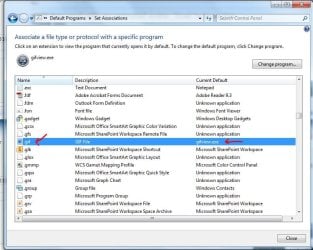
I use gifview, but you have to set it up as the default viewer for .gifs in folder options.
 

My Computer

Computer type
PC/Desktop
Computer Manufacturer/Model Number
Built them myself, Science Experiments !
OS
Win7 Enterprise, Win7 x86 (Ult 7600), Win7 x64 Ult 7600, TechNet RTM on AMD x64 (2.8Ghz)
CPU
AMD fx8350 4ghz, AMD-32 2400mhz, AMD-64 3200mhz, AMDx64 2.8G
Motherboard
SIS 755, ECS-K8M890M-M (Ult 7600), GigaByte & others
Memory
2gb, 4gb on the Ult 7600, 4gb on Technet RTM, 32gb on FX8350
Graphics Card(s)
Draw my own Graphics, several nVidia cards
Sound Card
on motherboard
Monitor(s) Displays
19" flat scr, 28" I-Inc widescr,22" Emprex Widescr, 23" Acer
Screen Resolution
1280 x 1024, 1440 x 900, 1920 x 1080
Hard Drives
6 pata Ide HD's & 2 Sata HD's
added 80gb external on Ult 7600 computer,
numerous extra 1tb, 2TB, 3Tb SATA HD's
A collection of ext HD Docks w/ HDs
PSU
430w, 550w, 600w, 700, 800, etc
Case
All Generic Full Towers
Cooling
Open Air & a few fans, some w/ colored LEDs
Keyboard
Compaq & Dell recycled from GoodWill
Mouse
Made in China Optical Wired Mouse
Internet Speed
Fast Cable InterNet
Antivirus
AVG Free on 24 different Desktops, NO Problems!
Browser
IE 8 is preferred, but use FireFox sometimes
Other Info
Linksys Routers, switches, & Hubs
Too Many USB Flash Drives to count, Biggest is 64GB !
Eight computers in my home network.
Sixteen computers at my business network.
Linked via TeamViewer !
Lots of old used spare computer parts everywhere!
'Not sure where my post ran off to, but here's the latest.
I would give it a try but don't know how. Obviously I'm
not computer savvy in that area. I'd love to help others with
this as soon as I can figure it out. It really shouldn't have to
be such a hassle, but thank you for helping.
My dragon avatar is animated, but saving and viewing it,
it didn't. It didn't get "animated" till I posted it here.
Weird, huh?
 

My Computer

OS
Windows 7 Home Edition
My avatar is not working with this site. I can see it in my profile. It works on my desktop, etc. with Irfran View very well. I am going to try the WMP. Let you know. Avie
 

My Computer

Computer Manufacturer/Model Number
HP Pavillon
OS
Microsoft Windows 7 Home Premium 64-bit 7601 Multiprocessor Free Service Pack 1
CPU
AMD Athlon(tm) 64 X2 Dual Core Processor 4400+
Motherboard
ASUSTek Computer INC. NARRA2
Memory
4.00 GB
Graphics Card(s)
NVIDIA GeForce 6150SE nForce 430 (Microsoft Corporation - WD
Sound Card
Realtek High Definition Audio
Monitor(s) Displays
Samsung
Screen Resolution
1280 x 1024 x 32 bits (4294967296 colors) @ 60 Hz
Hard Drives
(1) ST332082 0AS SCSI Disk Device (2) Generic- Compact Flash USB Device (3) Generic- MS/MS-Pro USB Device (4) Generic- SD/MMC USB Device (5) Generic- SM/xD-Picture USB Device
Browser
Firfefox 25
WMP does work with my animated avatar. Great to know this.
Thank you.
Avie:D
 

My Computer

Computer Manufacturer/Model Number
HP Pavillon
OS
Microsoft Windows 7 Home Premium 64-bit 7601 Multiprocessor Free Service Pack 1
CPU
AMD Athlon(tm) 64 X2 Dual Core Processor 4400+
Motherboard
ASUSTek Computer INC. NARRA2
Memory
4.00 GB
Graphics Card(s)
NVIDIA GeForce 6150SE nForce 430 (Microsoft Corporation - WD
Sound Card
Realtek High Definition Audio
Monitor(s) Displays
Samsung
Screen Resolution
1280 x 1024 x 32 bits (4294967296 colors) @ 60 Hz
Hard Drives
(1) ST332082 0AS SCSI Disk Device (2) Generic- Compact Flash USB Device (3) Generic- MS/MS-Pro USB Device (4) Generic- SD/MMC USB Device (5) Generic- SM/xD-Picture USB Device
Browser
Firfefox 25
Gifview?

Doc,
I am not able to under stand how to get the fie to folder options for association with my gif file. /Duh.
PS my Prevx hit your download with big red alert. Then scanned farther with no problem.
Avie:confused:
 

My Computer

Computer Manufacturer/Model Number
HP Pavillon
OS
Microsoft Windows 7 Home Premium 64-bit 7601 Multiprocessor Free Service Pack 1
CPU
AMD Athlon(tm) 64 X2 Dual Core Processor 4400+
Motherboard
ASUSTek Computer INC. NARRA2
Memory
4.00 GB
Graphics Card(s)
NVIDIA GeForce 6150SE nForce 430 (Microsoft Corporation - WD
Sound Card
Realtek High Definition Audio
Monitor(s) Displays
Samsung
Screen Resolution
1280 x 1024 x 32 bits (4294967296 colors) @ 60 Hz
Hard Drives
(1) ST332082 0AS SCSI Disk Device (2) Generic- Compact Flash USB Device (3) Generic- MS/MS-Pro USB Device (4) Generic- SD/MMC USB Device (5) Generic- SM/xD-Picture USB Device
Browser
Firfefox 25
Doc,
I am not able to under stand how to get the fie to folder options for association with my gif file. /Duh.
PS my Prevx hit your download with big red alert. Then scanned farther with no problem.
Avie:confused:

Start :ar: Control Panel :ar: All Control Panel Items :ar: Default Programs :ar:

Set Associations


:orb:

Hope this helps ;)
 

Attachments

  • file_associations.JPG
    file_associations.JPG
    48.9 KB · Views: 10
  • file_associations_2.JPG
    file_associations_2.JPG
    84.4 KB · Views: 25

My Computer

Computer type
PC/Desktop
Computer Manufacturer/Model Number
Built them myself, Science Experiments !
OS
Win7 Enterprise, Win7 x86 (Ult 7600), Win7 x64 Ult 7600, TechNet RTM on AMD x64 (2.8Ghz)
CPU
AMD fx8350 4ghz, AMD-32 2400mhz, AMD-64 3200mhz, AMDx64 2.8G
Motherboard
SIS 755, ECS-K8M890M-M (Ult 7600), GigaByte & others
Memory
2gb, 4gb on the Ult 7600, 4gb on Technet RTM, 32gb on FX8350
Graphics Card(s)
Draw my own Graphics, several nVidia cards
Sound Card
on motherboard
Monitor(s) Displays
19" flat scr, 28" I-Inc widescr,22" Emprex Widescr, 23" Acer
Screen Resolution
1280 x 1024, 1440 x 900, 1920 x 1080
Hard Drives
6 pata Ide HD's & 2 Sata HD's
added 80gb external on Ult 7600 computer,
numerous extra 1tb, 2TB, 3Tb SATA HD's
A collection of ext HD Docks w/ HDs
PSU
430w, 550w, 600w, 700, 800, etc
Case
All Generic Full Towers
Cooling
Open Air & a few fans, some w/ colored LEDs
Keyboard
Compaq & Dell recycled from GoodWill
Mouse
Made in China Optical Wired Mouse
Internet Speed
Fast Cable InterNet
Antivirus
AVG Free on 24 different Desktops, NO Problems!
Browser
IE 8 is preferred, but use FireFox sometimes
Other Info
Linksys Routers, switches, & Hubs
Too Many USB Flash Drives to count, Biggest is 64GB !
Eight computers in my home network.
Sixteen computers at my business network.
Linked via TeamViewer !
Lots of old used spare computer parts everywhere!
Thank you again for your suggestions. However I did try it and still nothing. I can't even save a smiley. :cry: Since I make websets for groups this is very frustrating. I even tried sending the pictures onto my desktop using wmp and failed miserably. I'll keep looking into it of course but it's not looking good. This shouldn't have to be so fussy. I did look into the WMP list and the "gif" still isn't listed. It's not there, even tho I set the default accordingly.
 

My Computer

OS
Windows 7 Home Edition
I'm not sure what I'm doing wrong. I keep looking into the default program for WMP and there's no "gif" there at all. No matter how many times I try to set it there, it won't go there. There's no file. I also looked for the gifview and couldn't find it. Why is it not directing the settings? I looked into Browse options, still no gifview or even WMP options in drop-down list.
 

My Computer

OS
Windows 7 Home Edition
I am a new at this also. I got mine set. find gif and then set windows (browse for) media player (open with) and it works. If you install Infran View it also works if you check gif in all the choices Irfan has. .
 

My Computer

Computer Manufacturer/Model Number
HP Pavillon
OS
Microsoft Windows 7 Home Premium 64-bit 7601 Multiprocessor Free Service Pack 1
CPU
AMD Athlon(tm) 64 X2 Dual Core Processor 4400+
Motherboard
ASUSTek Computer INC. NARRA2
Memory
4.00 GB
Graphics Card(s)
NVIDIA GeForce 6150SE nForce 430 (Microsoft Corporation - WD
Sound Card
Realtek High Definition Audio
Monitor(s) Displays
Samsung
Screen Resolution
1280 x 1024 x 32 bits (4294967296 colors) @ 60 Hz
Hard Drives
(1) ST332082 0AS SCSI Disk Device (2) Generic- Compact Flash USB Device (3) Generic- MS/MS-Pro USB Device (4) Generic- SD/MMC USB Device (5) Generic- SM/xD-Picture USB Device
Browser
Firfefox 25
Back
Top