Screen becomes unresponsive

splash104

New member
Local time
12:07 AM
Messages
16
Hi all,

I have windows 7 home premium x64. I am having problem of screen becoming unresponsive at times when the fan is running at its highest. Nothing solves it unless I reboot it.

Any ideas?
 

My Computer

Computer Manufacturer/Model Number
HP Pavilion dv6-6159tx
OS
Windows 7 Home Premium x64
CPU
Intel Core i5 @ 2.4 GHz
Memory
8 GB RAM
Graphics Card(s)
Radeon 6770M (1 GB VRAM)
Hard Drives
620 GB (5400 rpm)
Hello splash, welcome to the Sevenforums!

Which fan is running at its highest, and is it because your computer is getting hot and or filled with dust?

Do you have the latest graphics drivers downloaded?

Have you tried switching the plugs around so that the power sources are different as a test?

What is the wattage on your Power supply unit? Is your graphics card getting enough watts?
 

My Computer

Computer type
PC/Desktop
Computer Manufacturer/Model Number
Custom Asus Build
OS
Microsoft Windows 8.1 Pro 64-bit
CPU
Intel(R) Core(TM) i3-4130 CPU @ 3.40GHz
Motherboard
B85M-E
Memory
8.00 GB
Graphics Card(s)
None
Sound Card
Realtek High Definition Audio
Monitor(s) Displays
Asus 23.6" Monitor
Screen Resolution
1920 x 1080 x 32 bits (4294967296 colors) @ 60 Hz
Hard Drives
INTEL SSDSC2BW180A4
Samsung SSD 840 PRO Series
PSU
Seasonic S12II-380Bronze
Case
Lian Li
Cooling
Fan, Passive
Keyboard
Logitech K120
Mouse
Microsoft Touch Mouse
Internet Speed
4ms Ping, 19.0 Mbps Download, 19.0 Mbps Upload
Antivirus
Eset Endpoint
Browser
Internet Explorer, Chrome
Hello,

It's the exhaust fan perhaps at the bottom left expelling heat. Whether on ac power or not, the fan seems to keep running at highest mostly. Dust can't be an issue yet as the laptop is brand new got it about 2 weeks back. I didn't check for the latest drivers can you please refer me to the Radeon 6770M card driver?
 

My Computer

Computer Manufacturer/Model Number
HP Pavilion dv6-6159tx
OS
Windows 7 Home Premium x64
CPU
Intel Core i5 @ 2.4 GHz
Memory
8 GB RAM
Graphics Card(s)
Radeon 6770M (1 GB VRAM)
Hard Drives
620 GB (5400 rpm)
You will need to install most of the computer's drivers, if not all. Here is where they are all located, including the graphics: Software & Driver Downloads HP Pavilion dv6-6159tx Entertainment Notebook PC - HP Customer Care (United States - English) - unfortunately, I think the website lists multiple versions of a single driver, so it may get somewhat confusing. Only use the most recent of any single driver (dates are listed), otherwise you'll be downloading 3 of the same driver.

Also, make sure you use windows update to get the latest updates.
 

My Computer

Computer type
PC/Desktop
Computer Manufacturer/Model Number
Custom Asus Build
OS
Microsoft Windows 8.1 Pro 64-bit
CPU
Intel(R) Core(TM) i3-4130 CPU @ 3.40GHz
Motherboard
B85M-E
Memory
8.00 GB
Graphics Card(s)
None
Sound Card
Realtek High Definition Audio
Monitor(s) Displays
Asus 23.6" Monitor
Screen Resolution
1920 x 1080 x 32 bits (4294967296 colors) @ 60 Hz
Hard Drives
INTEL SSDSC2BW180A4
Samsung SSD 840 PRO Series
PSU
Seasonic S12II-380Bronze
Case
Lian Li
Cooling
Fan, Passive
Keyboard
Logitech K120
Mouse
Microsoft Touch Mouse
Internet Speed
4ms Ping, 19.0 Mbps Download, 19.0 Mbps Upload
Antivirus
Eset Endpoint
Browser
Internet Explorer, Chrome
if you just got the laptop and your having trouble with it already i'd take it back and have them fix/replace it.

scrooge
 

My Computer

Computer Manufacturer/Model Number
home build
OS
win 7 ( 64 bit)
CPU
Intel Core i7-870 Lynnfield 2.93GHz 8MB L3 Cache LGA 1156 95
Motherboard
ASUS P7P55 LX LGA 1156
Memory
G.SKILL Sniper Series 16GB (4 x 4GB) 240-Pin DDR3 SDRAM
Graphics Card(s)
ATI Radeon HD6800 Series
Sound Card
hdmi
Monitor(s) Displays
42" lg 3d tv
Screen Resolution
1920 x 1080
Hard Drives
1 ssd pci-e revodrive
4 seagate 1.5 tb
PSU
Rosewill BRONZE Series RBR1000-M 1000W Continuous@40°C, 80Pl
Case
CoolMaster 922
Cooling
CORSAIR CWCH60 Hydro Series H60 High Performance Liquid CPU
Keyboard
logtech
Mouse
logitect
Internet Speed
5 mbit

My Computer

Computer type
PC/Desktop
Computer Manufacturer/Model Number
Custom Asus Build
OS
Microsoft Windows 8.1 Pro 64-bit
CPU
Intel(R) Core(TM) i3-4130 CPU @ 3.40GHz
Motherboard
B85M-E
Memory
8.00 GB
Graphics Card(s)
None
Sound Card
Realtek High Definition Audio
Monitor(s) Displays
Asus 23.6" Monitor
Screen Resolution
1920 x 1080 x 32 bits (4294967296 colors) @ 60 Hz
Hard Drives
INTEL SSDSC2BW180A4
Samsung SSD 840 PRO Series
PSU
Seasonic S12II-380Bronze
Case
Lian Li
Cooling
Fan, Passive
Keyboard
Logitech K120
Mouse
Microsoft Touch Mouse
Internet Speed
4ms Ping, 19.0 Mbps Download, 19.0 Mbps Upload
Antivirus
Eset Endpoint
Browser
Internet Explorer, Chrome
Thanx for the help guys. Will look into it.

I just noticed that I was away for some time and when I got back to the laptop, it's screen was like it's supposed after going into idle. But when I clicked, pressed a key, moved the cursor, nothing happened! Then I pressed the power key once which took it to sleep mode and then recovered fine. But am really amused as all these problems seem to appear just in a matter of about 4-5 hours :/ ....
 

My Computer

Computer Manufacturer/Model Number
HP Pavilion dv6-6159tx
OS
Windows 7 Home Premium x64
CPU
Intel Core i5 @ 2.4 GHz
Memory
8 GB RAM
Graphics Card(s)
Radeon 6770M (1 GB VRAM)
Hard Drives
620 GB (5400 rpm)
You will need to install most of the computer's drivers, if not all. Here is where they are all located, including the graphics: Software & Driver Downloads HP Pavilion dv6-6159tx Entertainment Notebook PC - HP Customer Care (United States - English) - unfortunately, I think the website lists multiple versions of a single driver, so it may get somewhat confusing. Only use the most recent of any single driver (dates are listed), otherwise you'll be downloading 3 of the same driver.

Also, make sure you use windows update to get the latest updates.

Would I need to un-install the older versions first for all devices then install the new ones or will they over write the older ones by themselves?
 

My Computer

Computer Manufacturer/Model Number
HP Pavilion dv6-6159tx
OS
Windows 7 Home Premium x64
CPU
Intel Core i5 @ 2.4 GHz
Memory
8 GB RAM
Graphics Card(s)
Radeon 6770M (1 GB VRAM)
Hard Drives
620 GB (5400 rpm)
Splash,

Other than the network ones, I would go into control panel and uninstall all drivers first. Just ensures there are no problems. For the network ones, you will need to download the drivers first, THEN uninstall the old ones, as you won't have an internet connection during that time.

And Scrooge is right, if you think the computer is messing up on its own, you should take it back for a free replacement. It shouldn't be doing those things even without drivers, unless you are running some hardcore applications.
 

My Computer

Computer type
PC/Desktop
Computer Manufacturer/Model Number
Custom Asus Build
OS
Microsoft Windows 8.1 Pro 64-bit
CPU
Intel(R) Core(TM) i3-4130 CPU @ 3.40GHz
Motherboard
B85M-E
Memory
8.00 GB
Graphics Card(s)
None
Sound Card
Realtek High Definition Audio
Monitor(s) Displays
Asus 23.6" Monitor
Screen Resolution
1920 x 1080 x 32 bits (4294967296 colors) @ 60 Hz
Hard Drives
INTEL SSDSC2BW180A4
Samsung SSD 840 PRO Series
PSU
Seasonic S12II-380Bronze
Case
Lian Li
Cooling
Fan, Passive
Keyboard
Logitech K120
Mouse
Microsoft Touch Mouse
Internet Speed
4ms Ping, 19.0 Mbps Download, 19.0 Mbps Upload
Antivirus
Eset Endpoint
Browser
Internet Explorer, Chrome
Ye it's still under warantee but just making sure if it's just a driver issue then it'll be fine. Have upated the AMD graphic driver though so let's hope it does rectify the issue ...
 

My Computer

Computer Manufacturer/Model Number
HP Pavilion dv6-6159tx
OS
Windows 7 Home Premium x64
CPU
Intel Core i5 @ 2.4 GHz
Memory
8 GB RAM
Graphics Card(s)
Radeon 6770M (1 GB VRAM)
Hard Drives
620 GB (5400 rpm)
It says on the box that I have got 1 GB of vRAM but total it shows 726 MB, where did the rest of it go??
 

My Computer

Computer Manufacturer/Model Number
HP Pavilion dv6-6159tx
OS
Windows 7 Home Premium x64
CPU
Intel Core i5 @ 2.4 GHz
Memory
8 GB RAM
Graphics Card(s)
Radeon 6770M (1 GB VRAM)
Hard Drives
620 GB (5400 rpm)
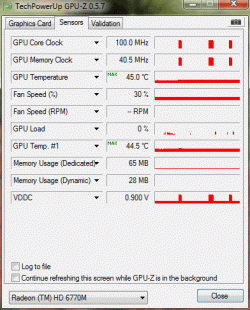
Please check the temperatures I'm attaching about my Graphic card using GPU-Z and let me know what does it say:
 

Attachments

  • temperatures.gif
    temperatures.gif
    17.9 KB · Views: 8

My Computer

Computer Manufacturer/Model Number
HP Pavilion dv6-6159tx
OS
Windows 7 Home Premium x64
CPU
Intel Core i5 @ 2.4 GHz
Memory
8 GB RAM
Graphics Card(s)
Radeon 6770M (1 GB VRAM)
Hard Drives
620 GB (5400 rpm)
It is probably using the other vRAM, it didn't go anywhere. And those temps look fine
 

My Computer

Computer type
PC/Desktop
Computer Manufacturer/Model Number
Custom Asus Build
OS
Microsoft Windows 8.1 Pro 64-bit
CPU
Intel(R) Core(TM) i3-4130 CPU @ 3.40GHz
Motherboard
B85M-E
Memory
8.00 GB
Graphics Card(s)
None
Sound Card
Realtek High Definition Audio
Monitor(s) Displays
Asus 23.6" Monitor
Screen Resolution
1920 x 1080 x 32 bits (4294967296 colors) @ 60 Hz
Hard Drives
INTEL SSDSC2BW180A4
Samsung SSD 840 PRO Series
PSU
Seasonic S12II-380Bronze
Case
Lian Li
Cooling
Fan, Passive
Keyboard
Logitech K120
Mouse
Microsoft Touch Mouse
Internet Speed
4ms Ping, 19.0 Mbps Download, 19.0 Mbps Upload
Antivirus
Eset Endpoint
Browser
Internet Explorer, Chrome
Back
Top