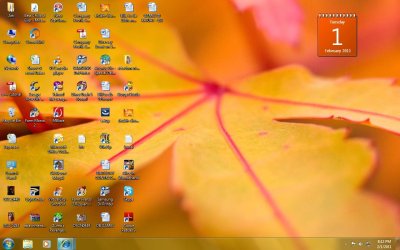
Screen display not clear

artihegs

New member
Local time
3:21 PM
Messages
14
Hi,

I have a dv6000 laptop and have installed windows 7.The display of my laptop screen is not clear .the present resolution is 1280*800.IS this the right resolution?

i could get the hardware id but do not know what to do next to increase the resolution of the laptop.
Please help
 

My Computer

OS
windows 7 32 bit
it's a few years old now but with a 15.4" display I would think the native resolution would be more in the 1440x900 area. I can't find anything to confirm that though.
Slightly lowered resolution to native shouldn't lead to to a noticeably fuzzy image unless you are just very picky though.
EDIT : yes the native resolution is apparently 1280x800.
A screenshot might help with diagnosing your 'fuzzy' screen.
 

My Computer

Computer Manufacturer/Model Number
Insane hobo technologies. ;-)
OS
Windows 7 x64
CPU
Intel i7 2600k
Motherboard
Asrock z68 extreme 4 gen 3
Memory
G.skill Ripjaw 16gigs @ 1866
Graphics Card(s)
Nvidia gtx580 (evga)
Sound Card
Integrated HD audio + hdmi
Monitor(s) Displays
24" ASUS widescreen + 42" insignia
Screen Resolution
1080p (1920x1080)
Hard Drives
128 Samsung 830
256 Samsung 840
3 x 1tb storage drive (various)
1 western digital 1tb (eSATA)
1 Seagate 1tb (eSATA)
PSU
1 kilowatt SLI/Crossfire rated Silverstone modular
Case
NZXT Phantom + additional 220 fan
Cooling
Zalmann
Keyboard
Microsoft wireless 3000 (v2)
Mouse
MS - wireless 5000 (bluetrack)
Internet Speed
depends on if you ask me or my provider.
Other Info
The above information is provided as is, and the author assumes no responsibility for issues it may cause with your sanity or fanboyism.
Hi Maguscreed

thanks for your reply.
well the display for my laptop was all fine till yesterday until i was playing a game on my lapot and suddenly i could see the screen a little fuzzy.what i could know is may be soemthing realted to the resolution.

I have attached the screenshot for the same.
 

Attachments

  • screen.jpg
    screen.jpg
    117.5 KB · Views: 293

My Computer

OS
windows 7 32 bit
Well I'm not seeing anything that suggests a burned up video gpu or ram, which is a good thing. In fact I'm not seeing any real corruption at all. Though it looks like cleartype was never set up properly.
This can be done by right clicking the empty space on your desktop and selecting personalize. then on the right click display. On the right side of the window that opens you will see a link titled 'adjust cleartype text' Click that and follow the instructions.
Let me know if that clears things up for you at all.
 

My Computer

Computer Manufacturer/Model Number
Insane hobo technologies. ;-)
OS
Windows 7 x64
CPU
Intel i7 2600k
Motherboard
Asrock z68 extreme 4 gen 3
Memory
G.skill Ripjaw 16gigs @ 1866
Graphics Card(s)
Nvidia gtx580 (evga)
Sound Card
Integrated HD audio + hdmi
Monitor(s) Displays
24" ASUS widescreen + 42" insignia
Screen Resolution
1080p (1920x1080)
Hard Drives
128 Samsung 830
256 Samsung 840
3 x 1tb storage drive (various)
1 western digital 1tb (eSATA)
1 Seagate 1tb (eSATA)
PSU
1 kilowatt SLI/Crossfire rated Silverstone modular
Case
NZXT Phantom + additional 220 fan
Cooling
Zalmann
Keyboard
Microsoft wireless 3000 (v2)
Mouse
MS - wireless 5000 (bluetrack)
Internet Speed
depends on if you ask me or my provider.
Other Info
The above information is provided as is, and the author assumes no responsibility for issues it may cause with your sanity or fanboyism.
Hi Maguscreed,

I tried to adjust with the clear type text but no luck.
text is quiet redable.
But the images or pictues are fuzzy or i would say little smugged.
 

My Computer

OS
windows 7 32 bit
Ah okay so the flower is supposed to be clear, I thought that was just a stylized wallpaper image. The screenshot you provided is the correct resolution for what I read to be the specs of your particular laptop. Is only the wallpaper blurry, or is this happening regardless of the image on the screen?
 

My Computer

Computer Manufacturer/Model Number
Insane hobo technologies. ;-)
OS
Windows 7 x64
CPU
Intel i7 2600k
Motherboard
Asrock z68 extreme 4 gen 3
Memory
G.skill Ripjaw 16gigs @ 1866
Graphics Card(s)
Nvidia gtx580 (evga)
Sound Card
Integrated HD audio + hdmi
Monitor(s) Displays
24" ASUS widescreen + 42" insignia
Screen Resolution
1080p (1920x1080)
Hard Drives
128 Samsung 830
256 Samsung 840
3 x 1tb storage drive (various)
1 western digital 1tb (eSATA)
1 Seagate 1tb (eSATA)
PSU
1 kilowatt SLI/Crossfire rated Silverstone modular
Case
NZXT Phantom + additional 220 fan
Cooling
Zalmann
Keyboard
Microsoft wireless 3000 (v2)
Mouse
MS - wireless 5000 (bluetrack)
Internet Speed
depends on if you ask me or my provider.
Other Info
The above information is provided as is, and the author assumes no responsibility for issues it may cause with your sanity or fanboyism.
Hi Maguscreed,

I can know that the screen shot i have sent you is quiet clear on your side.
i opened the same attachment on teh other laptop with no problem and the screen shot looks fine to me also.
But the same screen shot on my laptop is smugged.

whats wrong with my laptops display :(
 

My Computer

OS
windows 7 32 bit
:cry: i feel like a fool now....
its not only with my wall paper picture but with any picture i open on my laptop is smugged.

guess iam not able to put forward my problem.
But the same screen shot or images on my laptop are not clear and also the text seems to be more outlined like which is atleast readable.

also i tried lots to get a solution through google...i tired to update my graphic drivers but no go :(
 

My Computer

OS
windows 7 32 bit
If this is the case, the system is outputting a clear image and the display is somehow corrupting it. Unfortunately I don't have a frame of reference for troubleshooting this. I only hope the display itself isn't damaged, that's basically grounds for replacing the laptop.

I am at my limit here, I'm primarily software side, and this is beginning to seem a hardware issue. Hopefully someone else will chime in with further support for you.
 

My Computer

Computer Manufacturer/Model Number
Insane hobo technologies. ;-)
OS
Windows 7 x64
CPU
Intel i7 2600k
Motherboard
Asrock z68 extreme 4 gen 3
Memory
G.skill Ripjaw 16gigs @ 1866
Graphics Card(s)
Nvidia gtx580 (evga)
Sound Card
Integrated HD audio + hdmi
Monitor(s) Displays
24" ASUS widescreen + 42" insignia
Screen Resolution
1080p (1920x1080)
Hard Drives
128 Samsung 830
256 Samsung 840
3 x 1tb storage drive (various)
1 western digital 1tb (eSATA)
1 Seagate 1tb (eSATA)
PSU
1 kilowatt SLI/Crossfire rated Silverstone modular
Case
NZXT Phantom + additional 220 fan
Cooling
Zalmann
Keyboard
Microsoft wireless 3000 (v2)
Mouse
MS - wireless 5000 (bluetrack)
Internet Speed
depends on if you ask me or my provider.
Other Info
The above information is provided as is, and the author assumes no responsibility for issues it may cause with your sanity or fanboyism.
so then which forum do u think i should post this thread into.
also i do not see the reason for the display to be damaged as this change happened when i was playing game on my laptop and my laptop didnt fall off or anything like that
 

My Computer

OS
windows 7 32 bit
Just give it time, it's a off time of day, I'm sure another informed user will happen by, if not I will pm one of them later this afternoon requesting further assistance for you. Just be patient.
 

My Computer

Computer Manufacturer/Model Number
Insane hobo technologies. ;-)
OS
Windows 7 x64
CPU
Intel i7 2600k
Motherboard
Asrock z68 extreme 4 gen 3
Memory
G.skill Ripjaw 16gigs @ 1866
Graphics Card(s)
Nvidia gtx580 (evga)
Sound Card
Integrated HD audio + hdmi
Monitor(s) Displays
24" ASUS widescreen + 42" insignia
Screen Resolution
1080p (1920x1080)
Hard Drives
128 Samsung 830
256 Samsung 840
3 x 1tb storage drive (various)
1 western digital 1tb (eSATA)
1 Seagate 1tb (eSATA)
PSU
1 kilowatt SLI/Crossfire rated Silverstone modular
Case
NZXT Phantom + additional 220 fan
Cooling
Zalmann
Keyboard
Microsoft wireless 3000 (v2)
Mouse
MS - wireless 5000 (bluetrack)
Internet Speed
depends on if you ask me or my provider.
Other Info
The above information is provided as is, and the author assumes no responsibility for issues it may cause with your sanity or fanboyism.
Thank you realy awaiting a reply....
 

My Computer

OS
windows 7 32 bit
hi there any inputs on this issue
 

My Computer

OS
windows 7 32 bit
Hello artihegs,
Maguscreed did well...

If you need to adjust your screen resolution...

1. On desktop, right click and click screen resolution.
2. From there, there will be a list of screen resolution that is compatible with your HP dv6000 laptop. Find which resolution suits for you.
 

My Computer

Computer Manufacturer/Model Number
Macbook Pro 15" (2011) (Matte Version)
OS
Win 7 Pro x64 SP1 OS X Snow Leopard 10.6.7
CPU
Intel Core i7 2820QM 2.3GHz (Quad-Core)
Motherboard
N/A
Memory
8GB 1333 MHz PC3-10600 DDR3 SDRAM
Graphics Card(s)
ATI Radeon HD 6750M (1GB, GDDR5)
Sound Card
N/A
Monitor(s) Displays
1 Display
Screen Resolution
1,680 x 1050 (Matte Screen, Anti-Glare)
Hard Drives
750GB SATA (5400 rpm)
WD My Passport Essential 1TB Portable Hard Drive
PSU
N/A
Case
N/A
Cooling
N/A
Keyboard
Apple Wireless Keyboard
Mouse
Apple Wireless Magic Mouse
Internet Speed
Max - 2.2MB/sec; DSL provided by Telecom NZ
Other Info
MS Office Professional 2010
McAfee Total Protection 2011
On a Laptop Stand (Hand-Built)
Hi Dean,
well and yes thanks a lot to Maguscreed for his help

my present resolution is 1280*800.i cannot go more than this resolution.
and any resolution less than this does not suit.
 

My Computer

OS
windows 7 32 bit
When you installed Windows 7 - did you upgrade from a previous OS or it had no OS?
 

My Computer

Computer Manufacturer/Model Number
Macbook Pro 15" (2011) (Matte Version)
OS
Win 7 Pro x64 SP1 OS X Snow Leopard 10.6.7
CPU
Intel Core i7 2820QM 2.3GHz (Quad-Core)
Motherboard
N/A
Memory
8GB 1333 MHz PC3-10600 DDR3 SDRAM
Graphics Card(s)
ATI Radeon HD 6750M (1GB, GDDR5)
Sound Card
N/A
Monitor(s) Displays
1 Display
Screen Resolution
1,680 x 1050 (Matte Screen, Anti-Glare)
Hard Drives
750GB SATA (5400 rpm)
WD My Passport Essential 1TB Portable Hard Drive
PSU
N/A
Case
N/A
Cooling
N/A
Keyboard
Apple Wireless Keyboard
Mouse
Apple Wireless Magic Mouse
Internet Speed
Max - 2.2MB/sec; DSL provided by Telecom NZ
Other Info
MS Office Professional 2010
McAfee Total Protection 2011
On a Laptop Stand (Hand-Built)
my laptop had windows xp when i bought it 3 years back.
then i increased the ram to 2.5 gb and the system was formatted and installed with windows 7 almost a year back.
it was all working fine untill i was playing a game on my laptop and suddenly i could see the difference in the display.
what i feel is may be some graphic drivers have gone corrupt.(ma be there is problem with the harware also,but i guess not with the screen ,it may be the graphic card)
i tried to search the latest graphic drivers but i dono which is the graphic card in my dv6000 and the suitable drivers for the same.
as mentioned my present resolution is 1280*800, i dono what was previous to this.
 

My Computer

OS
windows 7 32 bit
What is your HP product name and model? (full detail please - not like dv6000. Must be dv6***)
 

My Computer

Computer Manufacturer/Model Number
Macbook Pro 15" (2011) (Matte Version)
OS
Win 7 Pro x64 SP1 OS X Snow Leopard 10.6.7
CPU
Intel Core i7 2820QM 2.3GHz (Quad-Core)
Motherboard
N/A
Memory
8GB 1333 MHz PC3-10600 DDR3 SDRAM
Graphics Card(s)
ATI Radeon HD 6750M (1GB, GDDR5)
Sound Card
N/A
Monitor(s) Displays
1 Display
Screen Resolution
1,680 x 1050 (Matte Screen, Anti-Glare)
Hard Drives
750GB SATA (5400 rpm)
WD My Passport Essential 1TB Portable Hard Drive
PSU
N/A
Case
N/A
Cooling
N/A
Keyboard
Apple Wireless Keyboard
Mouse
Apple Wireless Magic Mouse
Internet Speed
Max - 2.2MB/sec; DSL provided by Telecom NZ
Other Info
MS Office Professional 2010
McAfee Total Protection 2011
On a Laptop Stand (Hand-Built)
Back
Top