Solved Screen Shot for Windows 7

huffman

New member
Pro User
Local time
4:19 AM
Messages
715
I know not why I can't do a screen shot in Windows 7

How do I do that
 

My Computer My Computer

At a glance

Windows 7 ProIntel(R) Pentium(R) Duel CPU E2200 2.20 Ghz4 gb 2.96 UsableOnboard
OS
Windows 7 Pro
CPU
Intel(R) Pentium(R) Duel CPU E2200 2.20 Ghz
Motherboard
GA-G41M-ES2L
Memory
4 gb 2.96 Usable
Graphics Card(s)
Onboard
Sound Card
Onboard
Hard Drives
2 - 1TB WD Sata Drives
snippingtool
 

My Computers My Computers

  • At a glance

    7 X64i5 84002x8gb 3200mhz
    Computer type
    PC/Desktop
    OS
    7 X64
    CPU
    i5 8400
    Motherboard
    gigabyte b365m ds3h
    Memory
    2x8gb 3200mhz
    Hard Drives
    various
    PSU
    pure power 11 400w cm
    Case
    Coolermaster
    Cooling
    cryorig m9i
  • At a glance

    7x64g54008gb ddr4 2400
    Computer type
    PC/Desktop
    OS
    7x64
    CPU
    g5400
    Motherboard
    ga b365m ds3h
    Memory
    8gb ddr4 2400
    PSU
    xfx pro 450w
Press the "Print Screen" button on your keyboard.
Use greenshot or any other snipping tool.
 

My Computers My Computers

  • At a glance

    Windows 11
    Computer type
    PC/Desktop
    OS
    Windows 11
  • Computer type
    PC/Desktop
OK, [FONT=&quot]peter58ha. I had totally forgot forgot about the "Print Screen" button

Thanks again[/FONT]
 

My Computer My Computer

At a glance

Windows 7 ProIntel(R) Pentium(R) Duel CPU E2200 2.20 Ghz4 gb 2.96 UsableOnboard
OS
Windows 7 Pro
CPU
Intel(R) Pentium(R) Duel CPU E2200 2.20 Ghz
Motherboard
GA-G41M-ES2L
Memory
4 gb 2.96 Usable
Graphics Card(s)
Onboard
Sound Card
Onboard
Hard Drives
2 - 1TB WD Sata Drives
Print screen copies the viewing area (including extra monitors). Alt + print screen gets the active window. Then you have to paste in paint, word, or wordpad. You can also use snipping tool which is what I prefer because it will allow you to save as a file without opening up a separate app. Plus it has a few different modes.
 

My Computers My Computers

  • At a glance

    Windows 7 pro/Windows 10 ProIntel i7 860 Quad core 2.8 ghz8 gbATI Radeon HD 5770 1 gb ram
    Computer type
    PC/Desktop
    Computer Manufacturer/Model Number
    HP Pavillion Elite HPE-250f
    OS
    Windows 7 pro/Windows 10 Pro
    CPU
    Intel i7 860 Quad core 2.8 ghz
    Memory
    8 gb
    Graphics Card(s)
    ATI Radeon HD 5770 1 gb ram
    Monitor(s) Displays
    Alienware 25 AW2521HF & Viewsonic
    Screen Resolution
    1920 x1080 & 1680x1050
    Hard Drives
    WD blue 1 tb & 500 gb.
    Browser
    FF of course.
    Other Info
    https://www.bestbuy.com/site/hp-pavilion-elite-desktop-intel-core-i7-processor-8gb-memory-1tb-hard-drive/9921493.p?skuId=9921493
  • At a glance

    Windows 2012 R2 Data center/Linux Minti3 9100 3.6GHz, 8M cache, 4C/4T8GB 2666MT/s DDR4 ECC UDIMM
    Computer type
    PC/Desktop
    System Manufacturer/Model Number
    Dell Poweredge T140
    OS
    Windows 2012 R2 Data center/Linux Mint
    CPU
    i3 9100 3.6GHz, 8M cache, 4C/4T
    Memory
    8GB 2666MT/s DDR4 ECC UDIMM
    Monitor(s) Displays
    Viewsonic
    Screen Resolution
    1680x1050
    Hard Drives
    1 TB & 750 GB
    Other Info
    https://www.dell.com/en-us/work/shop/productdetailstxn/poweredge-t140?~ck=bt
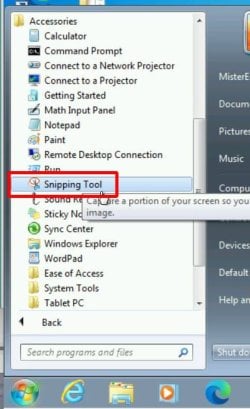
The Snipping Tool is found in the Program > Accessories

snip1.jpg

The default action is Rectangular Snip but you can also choose other options such as Windows Snip or Full-screen Snip

snip2.jpg

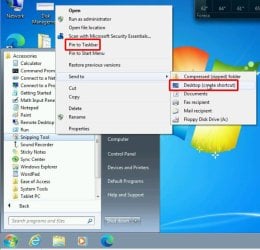
For easier use you can right-click on it in the programs menu and select to pin it to taskbar or create a shortcut on desktop

snip3.jpg
 

My Computers My Computers

  • At a glance

    Windows 7 Professional 64bit / Windows 10 Hom...AMD FX-8350GSKILL Ripjaw-X PC3 12800 12GB (2x4GB, 2x2GB)ASUS ENGTX560 DCII OC/2DI/1GD5 1GB
    Computer type
    PC/Desktop
    Computer Manufacturer/Model Number
    Custom build
    OS
    Windows 7 Professional 64bit / Windows 10 Home 64bit
    CPU
    AMD FX-8350
    Motherboard
    Gigabyte GA-990FXA-UD3 (AM3+) Rev. 4.0
    Memory
    GSKILL Ripjaw-X PC3 12800 12GB (2x4GB, 2x2GB)
    Graphics Card(s)
    ASUS ENGTX560 DCII OC/2DI/1GD5 1GB
    Sound Card
    Integrated
    Monitor(s) Displays
    Asus VE228H (21.5-in)
    Screen Resolution
    1920x1080 60Hz
    Hard Drives
    SAMSUNG 870 EVO 1TB (2.5" SATA SSD)
    SAMSUNG 870 EVO 500GB (2.5" SATA SSD)
    PSU
    Antec TruePower (new) TP-650 (650 watts)
    Case
    Antec Three Hundred
    Cooling
    AMD stock (plan to upgrade to Cooler Master Hyper 212 EVO)
    Keyboard
    Logitech K540 (wireless)
    Mouse
    Logitech M310 (wireless)
    Internet Speed
    Comcast Gigabit X2 Internet (2100Mbps down / 300Mbps up)
    Browser
    Firefox, Edge, Chrome
    Other Info
    Optical drive: ASUS DRW-24B3ST/BLK/G (Black) (24X)
    External hard drives: 2TB & 6TB
    Internet Gateway: Comcast XB8
  • Computer type
    PC/Desktop
Sincere thanks to MisterEd.
I have often wanted to save a screenshot but never worked out how to do it. Your explanation makes it so easy.
 

My Computer My Computer

At a glance

Windows 7 Pro 64bitIntel® Core™ i3 Processor 3.7ghzCrucial (2x8GB) DDR4-2400on board
Computer type
PC/Desktop
Computer Manufacturer/Model Number
Home built Asus
OS
Windows 7 Pro 64bit
CPU
Intel® Core™ i3 Processor 3.7ghz
Motherboard
Asus Intel Prime H270-Pro LGA 1151 ATX
Memory
Crucial (2x8GB) DDR4-2400
Graphics Card(s)
on board
Monitor(s) Displays
BENQ GL2450HE (24 inch)
Screen Resolution
1980 x 1080
Hard Drives
C drive is SSD Crucial 500gb mostly for the OS
PSU
Corsair CX750
Case
A big black one
Cooling
Cooler Master Hyper TX3i on the processor
Keyboard
Logitech k2700 wireless
Mouse
Logitech M575 wireless trackball
Internet Speed
Just under about 7mb/s on a good day
Antivirus
Avira Free
Browser
Opera, Firefox, Chrome, and Supermium
Back
Top