Seagate external

TechSeven

member
Member
VIP
Local time
10:44 AM
Messages
407
Why does my seagate 3tb external not show up for a long while and then get message saying "you need to format the disk in drive F: before you can use it", and sometimes very rarely i can access the external and copy files at a very slow speed:(

The drive shows under disk drives but disk management does not load up.

:cry:
 

My Computer

Computer type
PC/Desktop
Computer Manufacturer/Model Number
Custom Build (First built from scratch in 2010 by someone else.. then I rebuilt it in 2015).
OS
Windows 7 Home Premium 64bit
CPU
i7 4790k processor
Motherboard
Z97 Sabertooth Mark 1
Memory
Patriot 16gb
Graphics Card(s)
EVGA GeForce GTX 980 Ti FTW
Monitor(s) Displays
19" Monitor
Screen Resolution
1920 x 1080
Hard Drives
Samsung 850 Evo 120gb ssd
PSU
Corsair Cx600
Case
Haf 922
Cooling
Hydro Series H60 High Performance 120 mm
Keyboard
Microsoft
Mouse
Logitech
Browser
Firefox 37.0.4
Other Info
*Computer Manufacturer/Model Number: HP 15-d002tx Notebook* /

OS: Windows 7 Home Premium 64-bit / CPU: Intel Core i3-3110M / Memory: DDR3 4GB / Graphics Card: Intel HD Graphics 4000, GeForce 820M / Keyboard: Microsoft / Browser: Firefox 37.0
Your Seagate 3 TB external drive is a GPT drive.

I shall straight away get into Data Recovery mode using Test Disk. You must have an empty formatted drive of adequate capacity connected to copy all data into it. If that drive does not have sufficient capacity then you have to select only the important files and copy those to it when we come to that ( and if we come to it :D. Yep, Data Recovery is a dirty job with results unpredictable,except in most simple cases.)

Read Part 1 and Part 2 of my guide here http://www.sevenforums.com/software/190430-regain-lost-drive-using-test-disk-illustrated-guide.html

Download TestDisk Windows version 6.14 TestDisk Download - CGSecurity , extract it to your C drive. Right click on testdisk.exe in Testdisk-6.14 folder and run as administrator.

Ready to go?

First screen - No Log [ENTER]

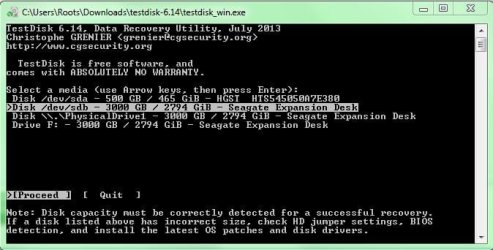
Second Screen: You must be seeing three drives. Your system drive , your faulty drive and your destination drive to copy from your faulty drive.
( As a matter of fact you can go upto this stage without a destination drive connected just to make sure that your faulty drive is visible to TestDisk. If it is visible then close TestDisk by clicking on X on top right corner, connect your destination drive and start TestDisk all over again.)

Select your faulty drive , Proceed [ENTER]

Third Screen :Here you will select [EFI GPT] [ENTER]

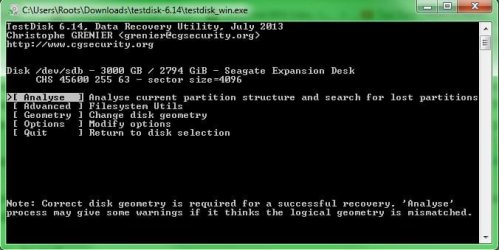
Fourth Screen: Analyse [ENTER]

Fifth Screen: 1. If TestDisk is able to find the valid Partition Table, the partition/s will be indicated followed by the message No partition is bootable.
2. If not, you will get only No parttion is bootable message.

In either case,[Quick Search] [ENTER]

Sixth Screen: If 1. above (partitions found), you will straight away get a screen saying Structure
OK ......blah, blah...

If 2. above(no partitions found) you will get a question "Should TestDisk search for partition
created by Vista or later? [Y/N] (answer yes if you are unsure) Press [Y]. If TestDisk finds
the partition/s, these will be indicated in the next screen saying Structure OK.... blah blah

When you come to this screen saying structure OK ..... blah blah, halt halt halt. if you read it carefully it says 'P- list files" and that is what you will do. It is capital P.So select the partition and press Shift+P and all the files will be listed.

Select the files you want to copy and copy it to the destination drive.

How to copy the files to your destination drive: http://www.sevenforums.com/hardware...suddenly-became-unllocated-3.html#post2395385

You can also try to use "Partition Copy" in Partition Wizard Home Edition Free download Magic Partition Manager Software, partition magic alternative, free partition magic, partition magic Windows 7 and server partition software - Partition Wizard Online

If your faulty drive is visible in Partition Wizard you can select the partition and use "Copy Partition" in it to copy to the destination drive. Ideally your destination drive should be the same Seagate, same model 3 TB drive or any drive greater than 3TB say 4 TB.

 

My Computer

OS
Windows 7 Home Premium 32 bit
I dont know if my external is GPT

Is TestDisk Windows safe to use? Does it write over the data thats already on the external?

Reason im asking this is because for now whenever i have the little chances to save data from the external i can at the slowest of speeds. I hope testdisk does not prevent me from saving data after its finished.

I havn't tried the test disk yet but im trying to find a way to get access the external again :mad:.

Yesterday i was using EaseUS data recovery and i was about a day into the recovering process and my external just came alive and let me access it however it did not show in disk management. This is the strange behaviour of the external, the data is still definetly on there. Just difficult to access it.

Now im trying to get access to the drive again :cry:
 

My Computer

Computer type
PC/Desktop
Computer Manufacturer/Model Number
Custom Build (First built from scratch in 2010 by someone else.. then I rebuilt it in 2015).
OS
Windows 7 Home Premium 64bit
CPU
i7 4790k processor
Motherboard
Z97 Sabertooth Mark 1
Memory
Patriot 16gb
Graphics Card(s)
EVGA GeForce GTX 980 Ti FTW
Monitor(s) Displays
19" Monitor
Screen Resolution
1920 x 1080
Hard Drives
Samsung 850 Evo 120gb ssd
PSU
Corsair Cx600
Case
Haf 922
Cooling
Hydro Series H60 High Performance 120 mm
Keyboard
Microsoft
Mouse
Logitech
Browser
Firefox 37.0.4
Other Info
*Computer Manufacturer/Model Number: HP 15-d002tx Notebook* /

OS: Windows 7 Home Premium 64-bit / CPU: Intel Core i3-3110M / Memory: DDR3 4GB / Graphics Card: Intel HD Graphics 4000, GeForce 820M / Keyboard: Microsoft / Browser: Firefox 37.0
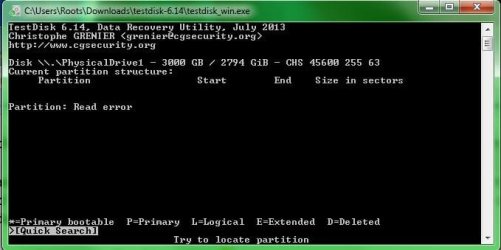
I tried running the testdisk guide but this is what happened:

Fifth window (in testdisk guide): After analyse, it says "Partition: Read Error". and No partition is listed.
 

Attachments

  • Testdisk Error.JPG
    Testdisk Error.JPG
    33.8 KB · Views: 58
  • Testdisk.PNG
    Testdisk.PNG
    12.7 KB · Views: 58

My Computer

Computer type
PC/Desktop
Computer Manufacturer/Model Number
Custom Build (First built from scratch in 2010 by someone else.. then I rebuilt it in 2015).
OS
Windows 7 Home Premium 64bit
CPU
i7 4790k processor
Motherboard
Z97 Sabertooth Mark 1
Memory
Patriot 16gb
Graphics Card(s)
EVGA GeForce GTX 980 Ti FTW
Monitor(s) Displays
19" Monitor
Screen Resolution
1920 x 1080
Hard Drives
Samsung 850 Evo 120gb ssd
PSU
Corsair Cx600
Case
Haf 922
Cooling
Hydro Series H60 High Performance 120 mm
Keyboard
Microsoft
Mouse
Logitech
Browser
Firefox 37.0.4
Other Info
*Computer Manufacturer/Model Number: HP 15-d002tx Notebook* /

OS: Windows 7 Home Premium 64-bit / CPU: Intel Core i3-3110M / Memory: DDR3 4GB / Graphics Card: Intel HD Graphics 4000, GeForce 820M / Keyboard: Microsoft / Browser: Firefox 37.0
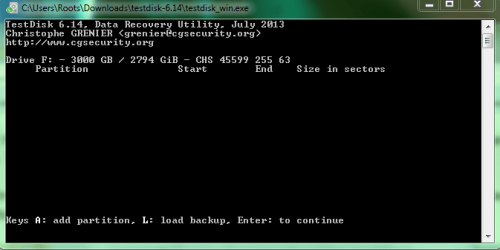
I also get this
 

Attachments

  • 1.JPG
    1.JPG
    43.8 KB · Views: 56
  • 2.JPG
    2.JPG
    33.9 KB · Views: 56
  • 3.JPG
    3.JPG
    25.1 KB · Views: 56

My Computer

Computer type
PC/Desktop
Computer Manufacturer/Model Number
Custom Build (First built from scratch in 2010 by someone else.. then I rebuilt it in 2015).
OS
Windows 7 Home Premium 64bit
CPU
i7 4790k processor
Motherboard
Z97 Sabertooth Mark 1
Memory
Patriot 16gb
Graphics Card(s)
EVGA GeForce GTX 980 Ti FTW
Monitor(s) Displays
19" Monitor
Screen Resolution
1920 x 1080
Hard Drives
Samsung 850 Evo 120gb ssd
PSU
Corsair Cx600
Case
Haf 922
Cooling
Hydro Series H60 High Performance 120 mm
Keyboard
Microsoft
Mouse
Logitech
Browser
Firefox 37.0.4
Other Info
*Computer Manufacturer/Model Number: HP 15-d002tx Notebook* /

OS: Windows 7 Home Premium 64-bit / CPU: Intel Core i3-3110M / Memory: DDR3 4GB / Graphics Card: Intel HD Graphics 4000, GeForce 820M / Keyboard: Microsoft / Browser: Firefox 37.0
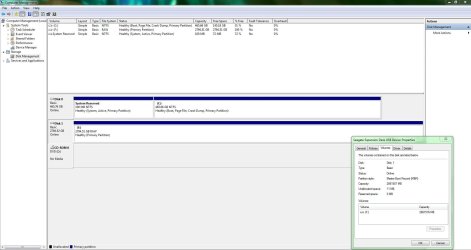
Here is a prntscrn of disk management.

It just loaded up for the first time in longtime.
 

Attachments

  • 4.JPG
    4.JPG
    122.6 KB · Views: 14

My Computer

Computer type
PC/Desktop
Computer Manufacturer/Model Number
Custom Build (First built from scratch in 2010 by someone else.. then I rebuilt it in 2015).
OS
Windows 7 Home Premium 64bit
CPU
i7 4790k processor
Motherboard
Z97 Sabertooth Mark 1
Memory
Patriot 16gb
Graphics Card(s)
EVGA GeForce GTX 980 Ti FTW
Monitor(s) Displays
19" Monitor
Screen Resolution
1920 x 1080
Hard Drives
Samsung 850 Evo 120gb ssd
PSU
Corsair Cx600
Case
Haf 922
Cooling
Hydro Series H60 High Performance 120 mm
Keyboard
Microsoft
Mouse
Logitech
Browser
Firefox 37.0.4
Other Info
*Computer Manufacturer/Model Number: HP 15-d002tx Notebook* /

OS: Windows 7 Home Premium 64-bit / CPU: Intel Core i3-3110M / Memory: DDR3 4GB / Graphics Card: Intel HD Graphics 4000, GeForce 820M / Keyboard: Microsoft / Browser: Firefox 37.0
To answer your queries, TestDisk is safe to use and will not write anything to the drive as long as you do not give the [Write] command somewhere down the line. Some new users in their anxiety go overboard and that is why I took all the pains to delineate the step by step procedure telling you where to stop.

Anyway since TestDisk now gives a read error, we will put it into cold storage now and see what Partition Wizard says.. The one thing I want to make sure is that you selected [EFI GPT] and not Intel.( All drives over 2TB will have to be in GPT format.

Did you change the USB cable and see? A faulty cable can play tricks. Keep recovering whenever it shows up.

Now run Partition Wizard and post a screenshot of how your external looks like it. Run Partition Recovery Wizard, by clicking on it in the left Pane. Select the faulty drive and do a Quick Scan. If everything goes fine, after the Quick Scan you will get a screen showing the partition/s. Post a screenshot, If that happens double click on the partition/s shown as indicated in that Window. If it shows all your files then select those partition/s by putting tick marks in the box. Watch the preview map at the bottom. If right, it should turn from Unallocated to what it was before with the file system shown. At this stage post a screenshot of that for me to examine and instruct further.

I know your night is approching so do it in the next one or two hours and then you can retire. (Do not close Partition Wizard till you get further instructions.)

If quick scan takes a long time leave it running overnight and look into it in the morning.
 

My Computer

OS
Windows 7 Home Premium 32 bit
OMG, I missed to see your post No.5 that followed #4 in quick succession..

See, you overshot and tried to write instead of Shift+P as instructed to copy files.Exactly what I did not want you to do.

My post #2:

"When you come to this screen saying structure OK ..... blah blah, halt halt halt. if you read it carefully it says 'P- list files" and that is what you will do. It is capital P.So select the partition and press Shift+P and all the files will be listed"

Anyway no harm done since it failed to write. Repeat Test Disk. Do it and if files are shown select and copy.
 

My Computer

OS
Windows 7 Home Premium 32 bit
I think i must have followed the wrong steps maybe?

I followed the steps listed in Regain a lost drive using Test Disk - An Illustrated Guide. Where it said Select partition type, Intel Intel/PC partition thats what i selected. Now i realise im suppose to select [EFI GPT].

I dont think any harm is done like you mentioned.

So i tried following the right steps as you mentioned and i get to the 5th screen as you can see in the prtscn picture. I then hit enter to quick search so far its not doing nothing. I will keep you updated jumanji. Thak you for your time and patient for helping me.


Attachments

  • 5th screen.JPG
    5th screen.JPG
    36.9 KB · Views: 53
  • 4th screen.JPG
    4th screen.JPG
    38.2 KB · Views: 50
  • 3rd screen.JPG
    3rd screen.JPG
    46.8 KB · Views: 50
  • 2nd screen.JPG
    2nd screen.JPG
    42.1 KB · Views: 50

My Computer

Computer type
PC/Desktop
Computer Manufacturer/Model Number
Custom Build (First built from scratch in 2010 by someone else.. then I rebuilt it in 2015).
OS
Windows 7 Home Premium 64bit
CPU
i7 4790k processor
Motherboard
Z97 Sabertooth Mark 1
Memory
Patriot 16gb
Graphics Card(s)
EVGA GeForce GTX 980 Ti FTW
Monitor(s) Displays
19" Monitor
Screen Resolution
1920 x 1080
Hard Drives
Samsung 850 Evo 120gb ssd
PSU
Corsair Cx600
Case
Haf 922
Cooling
Hydro Series H60 High Performance 120 mm
Keyboard
Microsoft
Mouse
Logitech
Browser
Firefox 37.0.4
Other Info
*Computer Manufacturer/Model Number: HP 15-d002tx Notebook* /

OS: Windows 7 Home Premium 64-bit / CPU: Intel Core i3-3110M / Memory: DDR3 4GB / Graphics Card: Intel HD Graphics 4000, GeForce 820M / Keyboard: Microsoft / Browser: Firefox 37.0
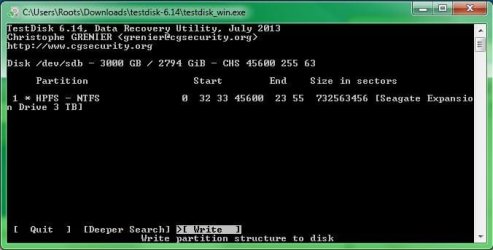
Ok it was just busy but this is the next thing i see
 

Attachments

  • 6th screen.JPG
    6th screen.JPG
    30.5 KB · Views: 50

My Computer

Computer type
PC/Desktop
Computer Manufacturer/Model Number
Custom Build (First built from scratch in 2010 by someone else.. then I rebuilt it in 2015).
OS
Windows 7 Home Premium 64bit
CPU
i7 4790k processor
Motherboard
Z97 Sabertooth Mark 1
Memory
Patriot 16gb
Graphics Card(s)
EVGA GeForce GTX 980 Ti FTW
Monitor(s) Displays
19" Monitor
Screen Resolution
1920 x 1080
Hard Drives
Samsung 850 Evo 120gb ssd
PSU
Corsair Cx600
Case
Haf 922
Cooling
Hydro Series H60 High Performance 120 mm
Keyboard
Microsoft
Mouse
Logitech
Browser
Firefox 37.0.4
Other Info
*Computer Manufacturer/Model Number: HP 15-d002tx Notebook* /

OS: Windows 7 Home Premium 64-bit / CPU: Intel Core i3-3110M / Memory: DDR3 4GB / Graphics Card: Intel HD Graphics 4000, GeForce 820M / Keyboard: Microsoft / Browser: Firefox 37.0
Not sure where to go from here.

Also...
I have about 144gb left on this c drive.
I have another external with space but i cant find the power lead to it. If my c drive runs out of space when recovering data, i could disconnect the seagate and take out the power lead and use it for other external that works.

Moving data from cdrive to other external that works... this will leave space on c drive so i can continue recovering more data from seagate when it lets me.
 

My Computer

Computer type
PC/Desktop
Computer Manufacturer/Model Number
Custom Build (First built from scratch in 2010 by someone else.. then I rebuilt it in 2015).
OS
Windows 7 Home Premium 64bit
CPU
i7 4790k processor
Motherboard
Z97 Sabertooth Mark 1
Memory
Patriot 16gb
Graphics Card(s)
EVGA GeForce GTX 980 Ti FTW
Monitor(s) Displays
19" Monitor
Screen Resolution
1920 x 1080
Hard Drives
Samsung 850 Evo 120gb ssd
PSU
Corsair Cx600
Case
Haf 922
Cooling
Hydro Series H60 High Performance 120 mm
Keyboard
Microsoft
Mouse
Logitech
Browser
Firefox 37.0.4
Other Info
*Computer Manufacturer/Model Number: HP 15-d002tx Notebook* /

OS: Windows 7 Home Premium 64-bit / CPU: Intel Core i3-3110M / Memory: DDR3 4GB / Graphics Card: Intel HD Graphics 4000, GeForce 820M / Keyboard: Microsoft / Browser: Firefox 37.0
DO NOT WRITE. Close Test Disk. Wait for further instructions that will follow in about half-an-hour. if you want you may retire now and see the instructions tomorrow morning. Heavens will not be lost.:)
 

My Computer

OS
Windows 7 Home Premium 32 bit
Ok thanks...i feel like there is some hope with your support. Data is still on the seagate to so its not to bad :)
 

My Computer

Computer type
PC/Desktop
Computer Manufacturer/Model Number
Custom Build (First built from scratch in 2010 by someone else.. then I rebuilt it in 2015).
OS
Windows 7 Home Premium 64bit
CPU
i7 4790k processor
Motherboard
Z97 Sabertooth Mark 1
Memory
Patriot 16gb
Graphics Card(s)
EVGA GeForce GTX 980 Ti FTW
Monitor(s) Displays
19" Monitor
Screen Resolution
1920 x 1080
Hard Drives
Samsung 850 Evo 120gb ssd
PSU
Corsair Cx600
Case
Haf 922
Cooling
Hydro Series H60 High Performance 120 mm
Keyboard
Microsoft
Mouse
Logitech
Browser
Firefox 37.0.4
Other Info
*Computer Manufacturer/Model Number: HP 15-d002tx Notebook* /

OS: Windows 7 Home Premium 64-bit / CPU: Intel Core i3-3110M / Memory: DDR3 4GB / Graphics Card: Intel HD Graphics 4000, GeForce 820M / Keyboard: Microsoft / Browser: Firefox 37.0
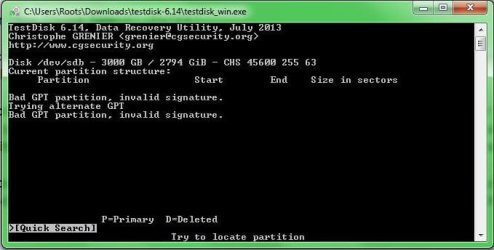
OK, in the final analysis, based on the screenshots you provided in post#9 and in quick succession #10, I have to hyphothesise that your 3TB HDD was indeed an MBR drive which used Advanced formatting - a trick played by both Seagate and Western Digital with a modified firmware to play that trick.

That is the reason why Test Disk could not find the GPT Partition Table either in its primary location ( Sector 2) or in its alternate location (n-32 sector, where n is the last sector of the drive) - your screenshot in post#9, the last one in it.

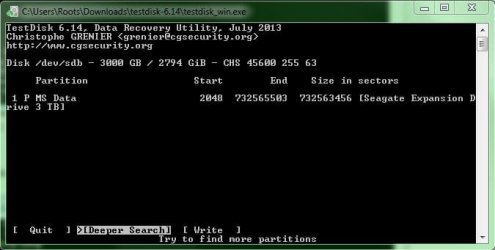
TestDisk did find a partition at sector 2048 (your screenshot in post#10) and that further confirms that it is an MBR disk.

That's just theory. Now what?

I have got to go out now. And will resume when I am back at my desk.
 

My Computer

OS
Windows 7 Home Premium 32 bit
Ok thats fine. I will check later here ... enjoy your outing :)
 

My Computer

Computer type
PC/Desktop
Computer Manufacturer/Model Number
Custom Build (First built from scratch in 2010 by someone else.. then I rebuilt it in 2015).
OS
Windows 7 Home Premium 64bit
CPU
i7 4790k processor
Motherboard
Z97 Sabertooth Mark 1
Memory
Patriot 16gb
Graphics Card(s)
EVGA GeForce GTX 980 Ti FTW
Monitor(s) Displays
19" Monitor
Screen Resolution
1920 x 1080
Hard Drives
Samsung 850 Evo 120gb ssd
PSU
Corsair Cx600
Case
Haf 922
Cooling
Hydro Series H60 High Performance 120 mm
Keyboard
Microsoft
Mouse
Logitech
Browser
Firefox 37.0.4
Other Info
*Computer Manufacturer/Model Number: HP 15-d002tx Notebook* /

OS: Windows 7 Home Premium 64-bit / CPU: Intel Core i3-3110M / Memory: DDR3 4GB / Graphics Card: Intel HD Graphics 4000, GeForce 820M / Keyboard: Microsoft / Browser: Firefox 37.0
You mentioned my seagate external is MBR drive which is correct.

If you look at post#6 ... i did a prtscn of disk management and the properties box. It says partition style : Master Boot Record (MBR)
 

My Computer

Computer type
PC/Desktop
Computer Manufacturer/Model Number
Custom Build (First built from scratch in 2010 by someone else.. then I rebuilt it in 2015).
OS
Windows 7 Home Premium 64bit
CPU
i7 4790k processor
Motherboard
Z97 Sabertooth Mark 1
Memory
Patriot 16gb
Graphics Card(s)
EVGA GeForce GTX 980 Ti FTW
Monitor(s) Displays
19" Monitor
Screen Resolution
1920 x 1080
Hard Drives
Samsung 850 Evo 120gb ssd
PSU
Corsair Cx600
Case
Haf 922
Cooling
Hydro Series H60 High Performance 120 mm
Keyboard
Microsoft
Mouse
Logitech
Browser
Firefox 37.0.4
Other Info
*Computer Manufacturer/Model Number: HP 15-d002tx Notebook* /

OS: Windows 7 Home Premium 64-bit / CPU: Intel Core i3-3110M / Memory: DDR3 4GB / Graphics Card: Intel HD Graphics 4000, GeForce 820M / Keyboard: Microsoft / Browser: Firefox 37.0
Yep, I did see it being shown as MBR but overlooked it as an aberration because I was so confident that your 3TB drive must be a GPT drive as most are until it was shattered by TestDisk :D

You wouldn't find any advanced formatted 3TB MBR drives any longer. This was introduced long back to make the large capacity drives >2TB compatible with Windows XP being used at that time.

Resuming from where I left in my last post, I recall that you said that periodically or at times the disk was disappearing. I asked you to try with a different cable. It is not the cable now.

Your HDD's sector 0, which holds the MBR code and the partition table has gone faulty. ( if you want to know why read my post here http://www.sevenforums.com/hardware...-disappear-how-does-happen-3.html#post2996670)

In one sentence sector 0 - the all important heart of the drive holding the MBR Code and partition table -has lost its magnetism and is just hovering around the signal detection threshold level - reads sometimes, fails to read most of the time. Remember TestDisk gave a write error when you ran it the first time and then "mistakenly ???" selected Intel and "overshot" the instructions given and gave a Write Command.

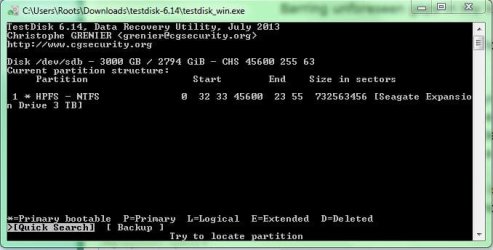
Now go ahead and run TestDisk, select [Intel] Intel/PC partition and when you come to the screen where it says Structure OK ..... blah blah, halt halt halt. If you read it carefully it says 'P- list files" and that is what you will do. It is capital P. So select the partition and press Shift+P and all the files will be listed.
Barring unforeseen gaps in my knowledge base, I hope you will be seeing all the files.

Straightaway select and copy those files to another external drive. How to: http://www.sevenforums.com/hardware...suddenly-became-unllocated-3.html#post2395385

Note: I do not recommend copying to your System drive. Another OP did it and ruined it. We do not know what exactly happened - it could have been a user error - but since then we always recommend another External drive and not into System drive. So defer using the faulty drive in anyway till you find adequate space in an external drive and if necessary you buy a new one.

We know now that the sector 0 is bad, but we do not know whether the malice of bad sectors is spreading. We have already taxed it much and no more till you find adequate space in an external drive.
 

My Computer

OS
Windows 7 Home Premium 32 bit
I selected intel, and then enter on analyze... but this is what i see. I do not see p list files
 

Attachments

  • dont see p list files.JPG
    dont see p list files.JPG
    35.4 KB · Views: 26

My Computer

Computer type
PC/Desktop
Computer Manufacturer/Model Number
Custom Build (First built from scratch in 2010 by someone else.. then I rebuilt it in 2015).
OS
Windows 7 Home Premium 64bit
CPU
i7 4790k processor
Motherboard
Z97 Sabertooth Mark 1
Memory
Patriot 16gb
Graphics Card(s)
EVGA GeForce GTX 980 Ti FTW
Monitor(s) Displays
19" Monitor
Screen Resolution
1920 x 1080
Hard Drives
Samsung 850 Evo 120gb ssd
PSU
Corsair Cx600
Case
Haf 922
Cooling
Hydro Series H60 High Performance 120 mm
Keyboard
Microsoft
Mouse
Logitech
Browser
Firefox 37.0.4
Other Info
*Computer Manufacturer/Model Number: HP 15-d002tx Notebook* /

OS: Windows 7 Home Premium 64-bit / CPU: Intel Core i3-3110M / Memory: DDR3 4GB / Graphics Card: Intel HD Graphics 4000, GeForce 820M / Keyboard: Microsoft / Browser: Firefox 37.0
Do you feel we are running out of options to recover data?

Another question jumanji, what is a good external to buy for storage purpose? To prevent going through this situation again. Will also make few backups on other drives.
 

My Computer

Computer type
PC/Desktop
Computer Manufacturer/Model Number
Custom Build (First built from scratch in 2010 by someone else.. then I rebuilt it in 2015).
OS
Windows 7 Home Premium 64bit
CPU
i7 4790k processor
Motherboard
Z97 Sabertooth Mark 1
Memory
Patriot 16gb
Graphics Card(s)
EVGA GeForce GTX 980 Ti FTW
Monitor(s) Displays
19" Monitor
Screen Resolution
1920 x 1080
Hard Drives
Samsung 850 Evo 120gb ssd
PSU
Corsair Cx600
Case
Haf 922
Cooling
Hydro Series H60 High Performance 120 mm
Keyboard
Microsoft
Mouse
Logitech
Browser
Firefox 37.0.4
Other Info
*Computer Manufacturer/Model Number: HP 15-d002tx Notebook* /

OS: Windows 7 Home Premium 64-bit / CPU: Intel Core i3-3110M / Memory: DDR3 4GB / Graphics Card: Intel HD Graphics 4000, GeForce 820M / Keyboard: Microsoft / Browser: Firefox 37.0
No, Not yet.:)

Press enter when Quick Search is highlighted and hopefully it will take you to the next screen which says "Structure OK blah blah ....."

At this screen press Shift + P and that should show your files.
 

My Computer

OS
Windows 7 Home Premium 32 bit
Back
Top