
Seagate external

If i buy a new seagate 3tb and it turns out to be MBR, can i change it to GPT?

GPT seems to be better because it stors multiple copies of data and if data gets corrupted or even overwritten, it can be recovered.

Someone also wrote a review saying with windows 7, if the external is 4tb or maybe 3, you dont get the full amount and the size is reduced, maybe this can be sorted and maximised if turned to gpt?
 

My Computer

Computer type
PC/Desktop
Computer Manufacturer/Model Number
Custom Build (First built from scratch in 2010 by someone else.. then I rebuilt it in 2015).
OS
Windows 7 Home Premium 64bit
CPU
i7 4790k processor
Motherboard
Z97 Sabertooth Mark 1
Memory
Patriot 16gb
Graphics Card(s)
EVGA GeForce GTX 980 Ti FTW
Monitor(s) Displays
19" Monitor
Screen Resolution
1920 x 1080
Hard Drives
Samsung 850 Evo 120gb ssd
PSU
Corsair Cx600
Case
Haf 922
Cooling
Hydro Series H60 High Performance 120 mm
Keyboard
Microsoft
Mouse
Logitech
Browser
Firefox 37.0.4
Other Info
*Computer Manufacturer/Model Number: HP 15-d002tx Notebook* /

OS: Windows 7 Home Premium 64-bit / CPU: Intel Core i3-3110M / Memory: DDR3 4GB / Graphics Card: Intel HD Graphics 4000, GeForce 820M / Keyboard: Microsoft / Browser: Firefox 37.0
Since I had stopped purchasing any hard drives especially drives greater than 2TB, I wouldn't know whether the current breed of > 2TB externals come formatted as MBR or GPT out of the factory. But generally if the specifications say Windows XP, Vista ,Windows 7 and later you may expect it to be MBR formatted. If it says Windows 7 and later (omitting Windows XP ) then you may expect it to be GPT formatted. If you give details of the specific model you intend to buy, may be someone who has purchased it recently should be able to tell you correctly.

See the following screenshot which shows my 750GB Seagate GoFlex GPT formatted drive.

13-03-2015 15-49-39.jpg

In Windows Disk Management showing your external drive right click on the left most portion of the disk map. If the menu shows Convert to MBR - whether greyed out or not - then it is a GPT drive. You can also click on Properties > Volume the partition Style will be indicated as GUID Parttion Table (GPT)

Next GPT does not store multiples copies of user data. It only has a backup of the GPT structure - GPT Header and GPT Partition Table - in the last 32 sectors of the drive. If the primary GPT Header or Partition Tables get corrupted it automatically reads those from the backup so that your drive and user data will still be accessible.

All these are explained in detail in the posts I had referenced in my post #40 and so I do not want to repeat.
 

My Computer

OS
Windows 7 Home Premium 32 bit
As per your post #28, you were able to see all the files and you only had to copy the files.

In your PM you had mentioned the drive has now turned as not initialized and unallocated. I really do not know how this could have happened unless you had tried to do something.. Did you try any further operations with any software since your post at #28?

Post a screenshot how that drive looks in Windows Disk Management as well as in Partition Wizard.
 

My Computer

OS
Windows 7 Home Premium 32 bit
Oh no I did not try any further operations because you told me to give the drive a rest.

I Just turned it on a few days ago and went to disk management and say given a prompt. That's when it showed as unallocated.

This is what the prompt message said I think.
 

Attachments

  • Windows_server_2008_r2_initialize_disk.jpg
    Windows_server_2008_r2_initialize_disk.jpg
    18.7 KB · Views: 24

My Computer

Computer type
PC/Desktop
Computer Manufacturer/Model Number
Custom Build (First built from scratch in 2010 by someone else.. then I rebuilt it in 2015).
OS
Windows 7 Home Premium 64bit
CPU
i7 4790k processor
Motherboard
Z97 Sabertooth Mark 1
Memory
Patriot 16gb
Graphics Card(s)
EVGA GeForce GTX 980 Ti FTW
Monitor(s) Displays
19" Monitor
Screen Resolution
1920 x 1080
Hard Drives
Samsung 850 Evo 120gb ssd
PSU
Corsair Cx600
Case
Haf 922
Cooling
Hydro Series H60 High Performance 120 mm
Keyboard
Microsoft
Mouse
Logitech
Browser
Firefox 37.0.4
Other Info
*Computer Manufacturer/Model Number: HP 15-d002tx Notebook* /

OS: Windows 7 Home Premium 64-bit / CPU: Intel Core i3-3110M / Memory: DDR3 4GB / Graphics Card: Intel HD Graphics 4000, GeForce 820M / Keyboard: Microsoft / Browser: Firefox 37.0
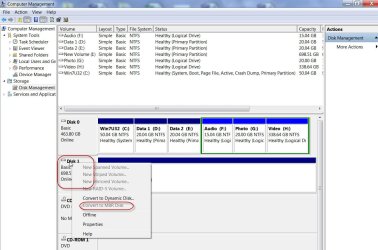
The only things I tried say going over the test disk instructions when I brought a new external. But no luck. Didn't show the list like before. And now I'm trying partition wizard. Its still scanning and I'm not at home right now. I will return home tomorrow to check on it.
 

My Computer

Computer type
PC/Desktop
Computer Manufacturer/Model Number
Custom Build (First built from scratch in 2010 by someone else.. then I rebuilt it in 2015).
OS
Windows 7 Home Premium 64bit
CPU
i7 4790k processor
Motherboard
Z97 Sabertooth Mark 1
Memory
Patriot 16gb
Graphics Card(s)
EVGA GeForce GTX 980 Ti FTW
Monitor(s) Displays
19" Monitor
Screen Resolution
1920 x 1080
Hard Drives
Samsung 850 Evo 120gb ssd
PSU
Corsair Cx600
Case
Haf 922
Cooling
Hydro Series H60 High Performance 120 mm
Keyboard
Microsoft
Mouse
Logitech
Browser
Firefox 37.0.4
Other Info
*Computer Manufacturer/Model Number: HP 15-d002tx Notebook* /

OS: Windows 7 Home Premium 64-bit / CPU: Intel Core i3-3110M / Memory: DDR3 4GB / Graphics Card: Intel HD Graphics 4000, GeForce 820M / Keyboard: Microsoft / Browser: Firefox 37.0
The only things I tried was going over the test disk instructions you had left*

I was reading one of your other instructions from another thread and tried a little of that because wasn't getting the results like on test disk last time when you was around jumanji.

The furthest I have reached is just upto scanning stage. It was upto any 75 percent when I left home.
 

My Computer

Computer type
PC/Desktop
Computer Manufacturer/Model Number
Custom Build (First built from scratch in 2010 by someone else.. then I rebuilt it in 2015).
OS
Windows 7 Home Premium 64bit
CPU
i7 4790k processor
Motherboard
Z97 Sabertooth Mark 1
Memory
Patriot 16gb
Graphics Card(s)
EVGA GeForce GTX 980 Ti FTW
Monitor(s) Displays
19" Monitor
Screen Resolution
1920 x 1080
Hard Drives
Samsung 850 Evo 120gb ssd
PSU
Corsair Cx600
Case
Haf 922
Cooling
Hydro Series H60 High Performance 120 mm
Keyboard
Microsoft
Mouse
Logitech
Browser
Firefox 37.0.4
Other Info
*Computer Manufacturer/Model Number: HP 15-d002tx Notebook* /

OS: Windows 7 Home Premium 64-bit / CPU: Intel Core i3-3110M / Memory: DDR3 4GB / Graphics Card: Intel HD Graphics 4000, GeForce 820M / Keyboard: Microsoft / Browser: Firefox 37.0
About *
 

My Computer

Computer type
PC/Desktop
Computer Manufacturer/Model Number
Custom Build (First built from scratch in 2010 by someone else.. then I rebuilt it in 2015).
OS
Windows 7 Home Premium 64bit
CPU
i7 4790k processor
Motherboard
Z97 Sabertooth Mark 1
Memory
Patriot 16gb
Graphics Card(s)
EVGA GeForce GTX 980 Ti FTW
Monitor(s) Displays
19" Monitor
Screen Resolution
1920 x 1080
Hard Drives
Samsung 850 Evo 120gb ssd
PSU
Corsair Cx600
Case
Haf 922
Cooling
Hydro Series H60 High Performance 120 mm
Keyboard
Microsoft
Mouse
Logitech
Browser
Firefox 37.0.4
Other Info
*Computer Manufacturer/Model Number: HP 15-d002tx Notebook* /

OS: Windows 7 Home Premium 64-bit / CPU: Intel Core i3-3110M / Memory: DDR3 4GB / Graphics Card: Intel HD Graphics 4000, GeForce 820M / Keyboard: Microsoft / Browser: Firefox 37.0
Ok when I get home tomorrow I will update you.

Thank you jumanji.
 

My Computer

Computer type
PC/Desktop
Computer Manufacturer/Model Number
Custom Build (First built from scratch in 2010 by someone else.. then I rebuilt it in 2015).
OS
Windows 7 Home Premium 64bit
CPU
i7 4790k processor
Motherboard
Z97 Sabertooth Mark 1
Memory
Patriot 16gb
Graphics Card(s)
EVGA GeForce GTX 980 Ti FTW
Monitor(s) Displays
19" Monitor
Screen Resolution
1920 x 1080
Hard Drives
Samsung 850 Evo 120gb ssd
PSU
Corsair Cx600
Case
Haf 922
Cooling
Hydro Series H60 High Performance 120 mm
Keyboard
Microsoft
Mouse
Logitech
Browser
Firefox 37.0.4
Other Info
*Computer Manufacturer/Model Number: HP 15-d002tx Notebook* /

OS: Windows 7 Home Premium 64-bit / CPU: Intel Core i3-3110M / Memory: DDR3 4GB / Graphics Card: Intel HD Graphics 4000, GeForce 820M / Keyboard: Microsoft / Browser: Firefox 37.0
It was scanning and now its gone onto this type of scan and it might take a long time to complete.
 

Attachments

  • patition.JPG
    patition.JPG
    68.1 KB · Views: 1

My Computer

Computer type
PC/Desktop
Computer Manufacturer/Model Number
Custom Build (First built from scratch in 2010 by someone else.. then I rebuilt it in 2015).
OS
Windows 7 Home Premium 64bit
CPU
i7 4790k processor
Motherboard
Z97 Sabertooth Mark 1
Memory
Patriot 16gb
Graphics Card(s)
EVGA GeForce GTX 980 Ti FTW
Monitor(s) Displays
19" Monitor
Screen Resolution
1920 x 1080
Hard Drives
Samsung 850 Evo 120gb ssd
PSU
Corsair Cx600
Case
Haf 922
Cooling
Hydro Series H60 High Performance 120 mm
Keyboard
Microsoft
Mouse
Logitech
Browser
Firefox 37.0.4
Other Info
*Computer Manufacturer/Model Number: HP 15-d002tx Notebook* /

OS: Windows 7 Home Premium 64-bit / CPU: Intel Core i3-3110M / Memory: DDR3 4GB / Graphics Card: Intel HD Graphics 4000, GeForce 820M / Keyboard: Microsoft / Browser: Firefox 37.0
Sorry, you have gone for Data Recovery using MiniTools Power Data Recovery. which even if it succeeds will allow you to recover only 1GB of data unless you buy it.

Please run Minitools Partition Wizard as indicated in my post #8 in this thread http://www.sevenforums.com/hardware-devices/366797-raid-5-became-unallocated.html#post3045528
and post the screenshots.

I didn't want to repeat the whole thing again and that is why I referred to the above post in my previous post #48 and asked you to do acccordingly.

You seem to have overlooked on it and going on a different path.
 

My Computer

OS
Windows 7 Home Premium 32 bit
Sorry for changing lanes. Let me try and come back in the same lane as you.

I will download the software from >> Free Partition Manager for Window PC | MiniTool Partition Wizard Free Edition

Then i will run the software.

Shall i cancel this scanning process? It seems to have froze i think, and if it hasn't i feel it will take weeks. Tried using easeus also few weeks ago and it did not recover everything. But the time kept moving and this was a way to know it did not freeze.
 

My Computer

Computer type
PC/Desktop
Computer Manufacturer/Model Number
Custom Build (First built from scratch in 2010 by someone else.. then I rebuilt it in 2015).
OS
Windows 7 Home Premium 64bit
CPU
i7 4790k processor
Motherboard
Z97 Sabertooth Mark 1
Memory
Patriot 16gb
Graphics Card(s)
EVGA GeForce GTX 980 Ti FTW
Monitor(s) Displays
19" Monitor
Screen Resolution
1920 x 1080
Hard Drives
Samsung 850 Evo 120gb ssd
PSU
Corsair Cx600
Case
Haf 922
Cooling
Hydro Series H60 High Performance 120 mm
Keyboard
Microsoft
Mouse
Logitech
Browser
Firefox 37.0.4
Other Info
*Computer Manufacturer/Model Number: HP 15-d002tx Notebook* /

OS: Windows 7 Home Premium 64-bit / CPU: Intel Core i3-3110M / Memory: DDR3 4GB / Graphics Card: Intel HD Graphics 4000, GeForce 820M / Keyboard: Microsoft / Browser: Firefox 37.0
Ok i had to disconnect and reconnect the external for the wizard to recognise the external.

Here is a screenshot.
 

Attachments

  • wiz.jpg
    wiz.jpg
    81.5 KB · Views: 1

My Computer

Computer type
PC/Desktop
Computer Manufacturer/Model Number
Custom Build (First built from scratch in 2010 by someone else.. then I rebuilt it in 2015).
OS
Windows 7 Home Premium 64bit
CPU
i7 4790k processor
Motherboard
Z97 Sabertooth Mark 1
Memory
Patriot 16gb
Graphics Card(s)
EVGA GeForce GTX 980 Ti FTW
Monitor(s) Displays
19" Monitor
Screen Resolution
1920 x 1080
Hard Drives
Samsung 850 Evo 120gb ssd
PSU
Corsair Cx600
Case
Haf 922
Cooling
Hydro Series H60 High Performance 120 mm
Keyboard
Microsoft
Mouse
Logitech
Browser
Firefox 37.0.4
Other Info
*Computer Manufacturer/Model Number: HP 15-d002tx Notebook* /

OS: Windows 7 Home Premium 64-bit / CPU: Intel Core i3-3110M / Memory: DDR3 4GB / Graphics Card: Intel HD Graphics 4000, GeForce 820M / Keyboard: Microsoft / Browser: Firefox 37.0
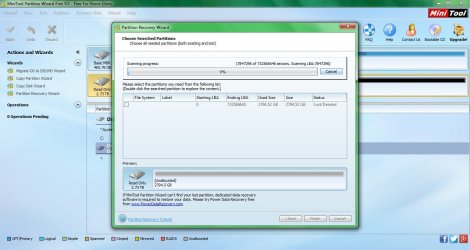
Im allowing the quick scan process to complete. I think this scan will take some days lol.
 

My Computer

Computer type
PC/Desktop
Computer Manufacturer/Model Number
Custom Build (First built from scratch in 2010 by someone else.. then I rebuilt it in 2015).
OS
Windows 7 Home Premium 64bit
CPU
i7 4790k processor
Motherboard
Z97 Sabertooth Mark 1
Memory
Patriot 16gb
Graphics Card(s)
EVGA GeForce GTX 980 Ti FTW
Monitor(s) Displays
19" Monitor
Screen Resolution
1920 x 1080
Hard Drives
Samsung 850 Evo 120gb ssd
PSU
Corsair Cx600
Case
Haf 922
Cooling
Hydro Series H60 High Performance 120 mm
Keyboard
Microsoft
Mouse
Logitech
Browser
Firefox 37.0.4
Other Info
*Computer Manufacturer/Model Number: HP 15-d002tx Notebook* /

OS: Windows 7 Home Premium 64-bit / CPU: Intel Core i3-3110M / Memory: DDR3 4GB / Graphics Card: Intel HD Graphics 4000, GeForce 820M / Keyboard: Microsoft / Browser: Firefox 37.0
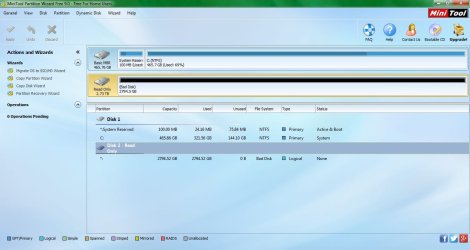
Ok it is Read only. Again you failed to post the screenshot of the drive in windows Disk management. That is the first screenshot I had asked for. that to be followed by PW screenshot. I always require those to be snapped at almost the same time one after the other - and not any past screenshots. And the third after quick scan.

Please present all three in one post. It is going to be a slow process where we may need to go back and forth.
 

My Computer

OS
Windows 7 Home Premium 32 bit
I also brought the new seage 3tb.
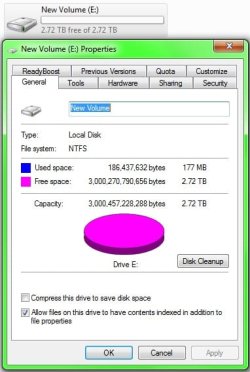
I changed it to gpt .. does the capacity look right? It's not 3tb exactly.
 

Attachments

  • Untitled.jpg
    Untitled.jpg
    98.6 KB · Views: 2
  • Untitled2.jpg
    Untitled2.jpg
    34 KB · Views: 18

My Computer

Computer type
PC/Desktop
Computer Manufacturer/Model Number
Custom Build (First built from scratch in 2010 by someone else.. then I rebuilt it in 2015).
OS
Windows 7 Home Premium 64bit
CPU
i7 4790k processor
Motherboard
Z97 Sabertooth Mark 1
Memory
Patriot 16gb
Graphics Card(s)
EVGA GeForce GTX 980 Ti FTW
Monitor(s) Displays
19" Monitor
Screen Resolution
1920 x 1080
Hard Drives
Samsung 850 Evo 120gb ssd
PSU
Corsair Cx600
Case
Haf 922
Cooling
Hydro Series H60 High Performance 120 mm
Keyboard
Microsoft
Mouse
Logitech
Browser
Firefox 37.0.4
Other Info
*Computer Manufacturer/Model Number: HP 15-d002tx Notebook* /

OS: Windows 7 Home Premium 64-bit / CPU: Intel Core i3-3110M / Memory: DDR3 4GB / Graphics Card: Intel HD Graphics 4000, GeForce 820M / Keyboard: Microsoft / Browser: Firefox 37.0
Oh i did it wrong again? Hmm
 

My Computer

Computer type
PC/Desktop
Computer Manufacturer/Model Number
Custom Build (First built from scratch in 2010 by someone else.. then I rebuilt it in 2015).
OS
Windows 7 Home Premium 64bit
CPU
i7 4790k processor
Motherboard
Z97 Sabertooth Mark 1
Memory
Patriot 16gb
Graphics Card(s)
EVGA GeForce GTX 980 Ti FTW
Monitor(s) Displays
19" Monitor
Screen Resolution
1920 x 1080
Hard Drives
Samsung 850 Evo 120gb ssd
PSU
Corsair Cx600
Case
Haf 922
Cooling
Hydro Series H60 High Performance 120 mm
Keyboard
Microsoft
Mouse
Logitech
Browser
Firefox 37.0.4
Other Info
*Computer Manufacturer/Model Number: HP 15-d002tx Notebook* /

OS: Windows 7 Home Premium 64-bit / CPU: Intel Core i3-3110M / Memory: DDR3 4GB / Graphics Card: Intel HD Graphics 4000, GeForce 820M / Keyboard: Microsoft / Browser: Firefox 37.0
Here's the scrnshots

Not sure if you want the shot of the scan.
 

Attachments

  • 1.jpg
    1.jpg
    98 KB · Views: 2
  • 2.jpg
    2.jpg
    99.5 KB · Views: 3

My Computer

Computer type
PC/Desktop
Computer Manufacturer/Model Number
Custom Build (First built from scratch in 2010 by someone else.. then I rebuilt it in 2015).
OS
Windows 7 Home Premium 64bit
CPU
i7 4790k processor
Motherboard
Z97 Sabertooth Mark 1
Memory
Patriot 16gb
Graphics Card(s)
EVGA GeForce GTX 980 Ti FTW
Monitor(s) Displays
19" Monitor
Screen Resolution
1920 x 1080
Hard Drives
Samsung 850 Evo 120gb ssd
PSU
Corsair Cx600
Case
Haf 922
Cooling
Hydro Series H60 High Performance 120 mm
Keyboard
Microsoft
Mouse
Logitech
Browser
Firefox 37.0.4
Other Info
*Computer Manufacturer/Model Number: HP 15-d002tx Notebook* /

OS: Windows 7 Home Premium 64-bit / CPU: Intel Core i3-3110M / Memory: DDR3 4GB / Graphics Card: Intel HD Graphics 4000, GeForce 820M / Keyboard: Microsoft / Browser: Firefox 37.0
I have a one track mind :). So wouldn't discuss your new 3Tb drive in detail now. But just tell me what software you used to format it. One disturbing feature I notice is convert to MBR is greyed out.Why?

But may be soon I will ask you to format it as a GPT drive using Partition Wizard and post a screenshot.
 

My Computer

OS
Windows 7 Home Premium 32 bit
I used disk management only. Maybe i did not do it right.
 

My Computer

Computer type
PC/Desktop
Computer Manufacturer/Model Number
Custom Build (First built from scratch in 2010 by someone else.. then I rebuilt it in 2015).
OS
Windows 7 Home Premium 64bit
CPU
i7 4790k processor
Motherboard
Z97 Sabertooth Mark 1
Memory
Patriot 16gb
Graphics Card(s)
EVGA GeForce GTX 980 Ti FTW
Monitor(s) Displays
19" Monitor
Screen Resolution
1920 x 1080
Hard Drives
Samsung 850 Evo 120gb ssd
PSU
Corsair Cx600
Case
Haf 922
Cooling
Hydro Series H60 High Performance 120 mm
Keyboard
Microsoft
Mouse
Logitech
Browser
Firefox 37.0.4
Other Info
*Computer Manufacturer/Model Number: HP 15-d002tx Notebook* /

OS: Windows 7 Home Premium 64-bit / CPU: Intel Core i3-3110M / Memory: DDR3 4GB / Graphics Card: Intel HD Graphics 4000, GeForce 820M / Keyboard: Microsoft / Browser: Firefox 37.0
Back
Top