Seagate external

We know it is good drive. So you need not have ticked it. But when you tick it and select the partitions the preview map at the bottom of the window would have turned from unallocated to the original state showing the two partitions.

(In an actual case where the partition data is lost and the drive shows as RAW, we run QuickScan. Out of partitions found - which will say Lost/deleted in the last column - we tick those partitions watching the disk map below. The selections which turn the disk map full without any unallocated space and shows it in original state is the right one and then one can click finish to rewrite the lost partition table into sector 0. The drive will be back to its original accessible state. In your case it will not rewrite the partition table even if you click Finish and Apply since it already exists and the partitions are shown as existing in the Window. :))

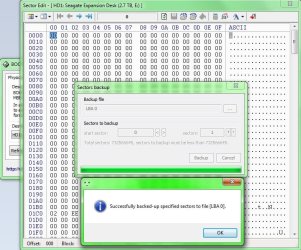
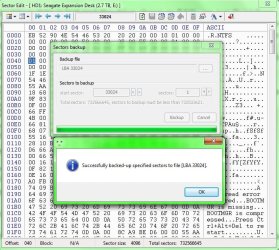
The start sectors shown in the Window tally perfectly with the partition Table shown by bootice. Now you can save the following sectors with bootice.

LBA 0 - the protective MBR

LBA 1 - the GPT header

LBA 2 - GPT Partition Table

LBA 6 - the start of the MSR partition

LBA 33024 - The first NTFS Volume/Partition Boot Record

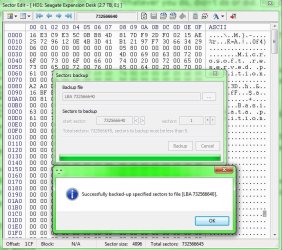
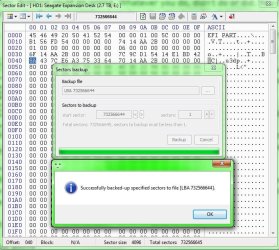
LBA 732566644 - the last sector (n) and the backup of the GPT header (I know for sure that GPTdata will be there here.)

LBA 732566640: n-4=732566644-4=7325666410- this should be a byte by byte copy of GPT Partition table at LBA 2. Just check and confirm. Your drive is a 4096byte sector size. I don't have a more than 2tB drive with this sector size to check this.With less than 2TB GPT drive with 512byte sector size this will be n-32

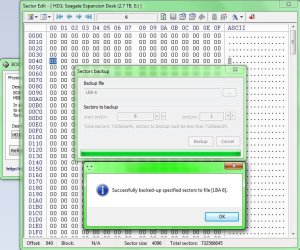
How to save is given in my reference. So I do not want to repeat.

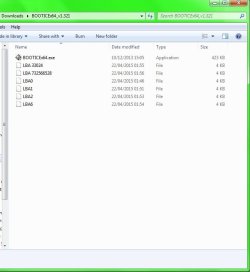
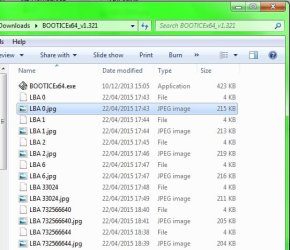
By default bootice will save it to its folder. Name them as LBA0, LBA1, etc., by LBAnumber.

Confirm that all is saved in that folder.

Also note that when you shift from one program to another like PW/Bootice/Windows Disk Management you may have safely remove the drive and replug it for the other program to release it.

I shall come in again only if you need any clarifications. After saving post a screenshot of the bootice folder showing all the saves.
 
Last edited:

My Computer

OS
Windows 7 Home Premium 32 bit
I wasn't suppose to tick both boxes. So in the second paragraph:

"In your case it will not rewrite the partition table even if you click Finish and Apply since it already exists and the partitions are shown as existing in the Window"

Is this a bad thing? Should i be worried?
 

My Computer

Computer type
PC/Desktop
Computer Manufacturer/Model Number
Custom Build (First built from scratch in 2010 by someone else.. then I rebuilt it in 2015).
OS
Windows 7 Home Premium 64bit
CPU
i7 4790k processor
Motherboard
Z97 Sabertooth Mark 1
Memory
Patriot 16gb
Graphics Card(s)
EVGA GeForce GTX 980 Ti FTW
Monitor(s) Displays
19" Monitor
Screen Resolution
1920 x 1080
Hard Drives
Samsung 850 Evo 120gb ssd
PSU
Corsair Cx600
Case
Haf 922
Cooling
Hydro Series H60 High Performance 120 mm
Keyboard
Microsoft
Mouse
Logitech
Browser
Firefox 37.0.4
Other Info
*Computer Manufacturer/Model Number: HP 15-d002tx Notebook* /

OS: Windows 7 Home Premium 64-bit / CPU: Intel Core i3-3110M / Memory: DDR3 4GB / Graphics Card: Intel HD Graphics 4000, GeForce 820M / Keyboard: Microsoft / Browser: Firefox 37.0
Scrnshot

Not sure if "LBA 732566528" is labelled correctly.
 

Attachments

  • Lba.jpg
    Lba.jpg
    32.4 KB · Views: 1

My Computer

Computer type
PC/Desktop
Computer Manufacturer/Model Number
Custom Build (First built from scratch in 2010 by someone else.. then I rebuilt it in 2015).
OS
Windows 7 Home Premium 64bit
CPU
i7 4790k processor
Motherboard
Z97 Sabertooth Mark 1
Memory
Patriot 16gb
Graphics Card(s)
EVGA GeForce GTX 980 Ti FTW
Monitor(s) Displays
19" Monitor
Screen Resolution
1920 x 1080
Hard Drives
Samsung 850 Evo 120gb ssd
PSU
Corsair Cx600
Case
Haf 922
Cooling
Hydro Series H60 High Performance 120 mm
Keyboard
Microsoft
Mouse
Logitech
Browser
Firefox 37.0.4
Other Info
*Computer Manufacturer/Model Number: HP 15-d002tx Notebook* /

OS: Windows 7 Home Premium 64-bit / CPU: Intel Core i3-3110M / Memory: DDR3 4GB / Graphics Card: Intel HD Graphics 4000, GeForce 820M / Keyboard: Microsoft / Browser: Firefox 37.0
I don't know how to check the sector size. I will browse around and see if i can find out.
 

My Computer

Computer type
PC/Desktop
Computer Manufacturer/Model Number
Custom Build (First built from scratch in 2010 by someone else.. then I rebuilt it in 2015).
OS
Windows 7 Home Premium 64bit
CPU
i7 4790k processor
Motherboard
Z97 Sabertooth Mark 1
Memory
Patriot 16gb
Graphics Card(s)
EVGA GeForce GTX 980 Ti FTW
Monitor(s) Displays
19" Monitor
Screen Resolution
1920 x 1080
Hard Drives
Samsung 850 Evo 120gb ssd
PSU
Corsair Cx600
Case
Haf 922
Cooling
Hydro Series H60 High Performance 120 mm
Keyboard
Microsoft
Mouse
Logitech
Browser
Firefox 37.0.4
Other Info
*Computer Manufacturer/Model Number: HP 15-d002tx Notebook* /

OS: Windows 7 Home Premium 64-bit / CPU: Intel Core i3-3110M / Memory: DDR3 4GB / Graphics Card: Intel HD Graphics 4000, GeForce 820M / Keyboard: Microsoft / Browser: Firefox 37.0
(Your post # 202 - Not to worry. Nothing could go wrong. Whatever you do, didn't do or did. You can repeat and see. After seeing the partitions in the Partition window just close the Windows by clicking on X or Cancel buttons.)

You seem to have done right with backing up LBA 0,1, 2, 6 and 33024. These are the primary GPT data as detailed in my previous post.

1. You clicked on the Partition table entry in bootice to go to that sector and saved it, Right? I usually keep a screenshot of these sectors also in the same folder, which I forgot to mention. You may save the screenshots also in the same folder and also upload it here.

2. There is no need to save the Unassigned Space LBA 732566528. You can delete it from the folder.

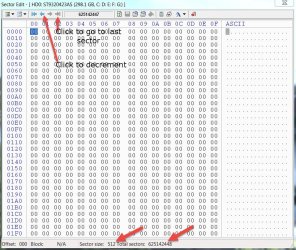
3. The backup of the GPT Header LBA 1 is kept in the last sector of the drive. Click on the last sector arrow to go to the last sector n. Save this sector. In your case it will be 732566644. Save this sector. Also take a screenshot and save to the folder and upload it.

4.The backup of the GPT Partition Table will be in n-4. In your case it will be 732566640. From the last sector decrement with the decrement arrow and go to that sector and save it.Also a screenshot to the folder as well as upload for me to confirm.One sector up or one down it will all be zeros.

The Sector size and total sectors will be shown at the end.

See the screenshot to carryout above .

2015-04-21_22-23-56.jpg

(This is my laptop sytsem drive. But as long as I do not make changes to the sectors and save the changes to the drive I can play around with bootice to familiarize myself. You may familiarize yourself with your external drive.) With this I close down for the day.
 

My Computer

OS
Windows 7 Home Premium 32 bit
1. You clicked on the Partition table entry in bootice to go to that sector and saved it, Right?

By this you mean clicking on the partition drop down menu and selecting the different lba sectors and then saving right?
 

My Computer

Computer type
PC/Desktop
Computer Manufacturer/Model Number
Custom Build (First built from scratch in 2010 by someone else.. then I rebuilt it in 2015).
OS
Windows 7 Home Premium 64bit
CPU
i7 4790k processor
Motherboard
Z97 Sabertooth Mark 1
Memory
Patriot 16gb
Graphics Card(s)
EVGA GeForce GTX 980 Ti FTW
Monitor(s) Displays
19" Monitor
Screen Resolution
1920 x 1080
Hard Drives
Samsung 850 Evo 120gb ssd
PSU
Corsair Cx600
Case
Haf 922
Cooling
Hydro Series H60 High Performance 120 mm
Keyboard
Microsoft
Mouse
Logitech
Browser
Firefox 37.0.4
Other Info
*Computer Manufacturer/Model Number: HP 15-d002tx Notebook* /

OS: Windows 7 Home Premium 64-bit / CPU: Intel Core i3-3110M / Memory: DDR3 4GB / Graphics Card: Intel HD Graphics 4000, GeForce 820M / Keyboard: Microsoft / Browser: Firefox 37.0
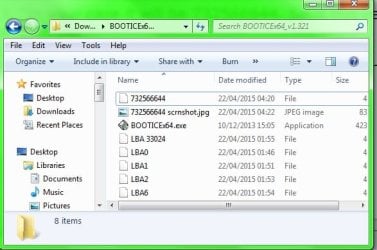
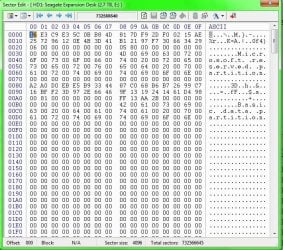
3. "In your case it will be 732566644. Save this sector. Also take a screenshot and save to the folder and upload it."

Here i saved the file as 732566644, not sure if correct.
 

Attachments

  • 732566644 scrnshot.jpg
    732566644 scrnshot.jpg
    38.4 KB · Views: 17
Last edited:

My Computer

Computer type
PC/Desktop
Computer Manufacturer/Model Number
Custom Build (First built from scratch in 2010 by someone else.. then I rebuilt it in 2015).
OS
Windows 7 Home Premium 64bit
CPU
i7 4790k processor
Motherboard
Z97 Sabertooth Mark 1
Memory
Patriot 16gb
Graphics Card(s)
EVGA GeForce GTX 980 Ti FTW
Monitor(s) Displays
19" Monitor
Screen Resolution
1920 x 1080
Hard Drives
Samsung 850 Evo 120gb ssd
PSU
Corsair Cx600
Case
Haf 922
Cooling
Hydro Series H60 High Performance 120 mm
Keyboard
Microsoft
Mouse
Logitech
Browser
Firefox 37.0.4
Other Info
*Computer Manufacturer/Model Number: HP 15-d002tx Notebook* /

OS: Windows 7 Home Premium 64-bit / CPU: Intel Core i3-3110M / Memory: DDR3 4GB / Graphics Card: Intel HD Graphics 4000, GeForce 820M / Keyboard: Microsoft / Browser: Firefox 37.0
4.The backup of the GPT Partition Table will be in n-4. In your case it will be 732566640. From the last sector decrement with the decrement arrow and go to that sector and save it.Also a screenshot to the folder as well as upload for me to confirm.One sector up or one down it will all be zeros.

Here im not really sure what im suppose to be doing and what im suppose to take a screen shot of.

In post #207, i did a scrnshot of the .jpeg file inside the bootice folder.
In this post i did a shot of 732566640 showing (don't know what im doing at this stage).

Im feel a little lost.
 

Attachments

  • 732566640 scrnshot.jpg
    732566640 scrnshot.jpg
    135.2 KB · Views: 1

My Computer

Computer type
PC/Desktop
Computer Manufacturer/Model Number
Custom Build (First built from scratch in 2010 by someone else.. then I rebuilt it in 2015).
OS
Windows 7 Home Premium 64bit
CPU
i7 4790k processor
Motherboard
Z97 Sabertooth Mark 1
Memory
Patriot 16gb
Graphics Card(s)
EVGA GeForce GTX 980 Ti FTW
Monitor(s) Displays
19" Monitor
Screen Resolution
1920 x 1080
Hard Drives
Samsung 850 Evo 120gb ssd
PSU
Corsair Cx600
Case
Haf 922
Cooling
Hydro Series H60 High Performance 120 mm
Keyboard
Microsoft
Mouse
Logitech
Browser
Firefox 37.0.4
Other Info
*Computer Manufacturer/Model Number: HP 15-d002tx Notebook* /

OS: Windows 7 Home Premium 64-bit / CPU: Intel Core i3-3110M / Memory: DDR3 4GB / Graphics Card: Intel HD Graphics 4000, GeForce 820M / Keyboard: Microsoft / Browser: Firefox 37.0
Question

Is my new external ready to store data?

I have saved most of the main sectors in bootice, if in future i get a problem like the faulty drive, i can just restore the sectors in bootice and it will cure the issue right? I will also make back ups.
 

My Computer

Computer type
PC/Desktop
Computer Manufacturer/Model Number
Custom Build (First built from scratch in 2010 by someone else.. then I rebuilt it in 2015).
OS
Windows 7 Home Premium 64bit
CPU
i7 4790k processor
Motherboard
Z97 Sabertooth Mark 1
Memory
Patriot 16gb
Graphics Card(s)
EVGA GeForce GTX 980 Ti FTW
Monitor(s) Displays
19" Monitor
Screen Resolution
1920 x 1080
Hard Drives
Samsung 850 Evo 120gb ssd
PSU
Corsair Cx600
Case
Haf 922
Cooling
Hydro Series H60 High Performance 120 mm
Keyboard
Microsoft
Mouse
Logitech
Browser
Firefox 37.0.4
Other Info
*Computer Manufacturer/Model Number: HP 15-d002tx Notebook* /

OS: Windows 7 Home Premium 64-bit / CPU: Intel Core i3-3110M / Memory: DDR3 4GB / Graphics Card: Intel HD Graphics 4000, GeForce 820M / Keyboard: Microsoft / Browser: Firefox 37.0
I am also thinking of doing what DavidE mentioned, making the drive go through some tests and see how it responds.

I don't know any applications from the top of my head apart from seatools.

Which tools/applications can i try and test this new external on?


Thanks
 

My Computer

Computer type
PC/Desktop
Computer Manufacturer/Model Number
Custom Build (First built from scratch in 2010 by someone else.. then I rebuilt it in 2015).
OS
Windows 7 Home Premium 64bit
CPU
i7 4790k processor
Motherboard
Z97 Sabertooth Mark 1
Memory
Patriot 16gb
Graphics Card(s)
EVGA GeForce GTX 980 Ti FTW
Monitor(s) Displays
19" Monitor
Screen Resolution
1920 x 1080
Hard Drives
Samsung 850 Evo 120gb ssd
PSU
Corsair Cx600
Case
Haf 922
Cooling
Hydro Series H60 High Performance 120 mm
Keyboard
Microsoft
Mouse
Logitech
Browser
Firefox 37.0.4
Other Info
*Computer Manufacturer/Model Number: HP 15-d002tx Notebook* /

OS: Windows 7 Home Premium 64-bit / CPU: Intel Core i3-3110M / Memory: DDR3 4GB / Graphics Card: Intel HD Graphics 4000, GeForce 820M / Keyboard: Microsoft / Browser: Firefox 37.0
jumanji disagreed with my approach in post #196 with
I entirely disagree with the first statement made by DavidE.
I'm curious why ???

When i buy a new HD I use the HD manufacturers test utility, Seatools, Windows Check Disk, ATTO, Crystal Disk Info ...
If any of these tools have a problem, i want to know why, before i commit to keeping and using the HD ...
I prefer to try and find a faulty HD ASAP... not years later ...
 

My Computer

Computer type
PC/Desktop
Computer Manufacturer/Model Number
home built
OS
Multi-Boot W7_Pro_x64 W8.1_Pro_x64 W10_Pro_x64 +Linux_VMs +Chromium_VM
CPU
AMD Athlon II x4 620
Motherboard
Gigabyte GA-MA785G-UD3H
Memory
6GB GSkill DDR2 800
Graphics Card(s)
AMD 4670 GPU + AMD 4200 IGP
Sound Card
on board Realtek ALC889A
Monitor(s) Displays
RCA 40" LCD TV, Insignia 32" LCD TV, HP 15" LCD monitor
Screen Resolution
1680 x 1050
Hard Drives
OCZ Vertex 3 120GB,
Samsung F3 1TB (3),
Several others - WD, Seagate, Hitachi, ...
PSU
Corsair 500 W
Case
Rosewill mid tower
Cooling
CM 90mm rifle
Keyboard
Gyration wireless, Logitech wireless, Dell USB wired
Mouse
Gyration wireless, Logitech wireless, V7 USB wired
Internet Speed
Spectrum - 100Mbps D / 10Mbps U
Antivirus
Avast, MBAM3, EMET, WinPatrol
Browser
Pale Moon, Firefox, IE
Other Info
2 multi-boot PC's
Mainly HTPC/Office/Gen purpose (no gaming).
Trendnet USB KVM.
LG DVD burner/Blue Ray Player.
Tray system for removable SATA backup drives.

Not currently OCd, under-volted.
I use Hybrid sleep, rarely re-boot or shutdown.

Hauppauge HD-PVR, Avermedia PCIe TV Tuner, Hauppauge PCI TV Tuner.
1. You clicked on the Partition table entry in bootice to go to that sector and saved it, Right?

By this you mean clicking on the partition drop down menu and selecting the different lba sectors and then saving right?

Exactly. I just wanted to confirm that you are doing the right thing.

Now about the screenshots that you will be saving immediately after you save a sector naming that by sector no:

After saving all the important sectors, just check that you have named the sector numbers correctly by comparing it with the screenshot which shows the sector number in the sector field.

Most people make mistakes when writing large numbers.For example you would have saved Sector 722566644 but wrongly named it as 72256644 - omission of a digit. Years later when a need to restore arises you will be restoring it to a wrong sector 72256644 instead of 722566644.

So the procedure: save a sector and immediately save a screenshot of the sector too. Verify that you have named the sector file with correct sector number.Rename the saved sector file with the correct sector number in case of mistakes.

Now I assume you have correctly saved the sectors, 0,1,2,3,6,33024, 732566644, and 732566640 and verified that you have named the saved sector files with the correct sector number.You are done. ( Sectors saved - Protective MBR 0, GPT Header 1, GPT Partition Table 2, Beginning of MBR Partition 6, Beginning of data partition(VBR - NTFS) 33024, Backup of GPT Header at last sector n , here 732566644, Backup of Partition table at n-4 - here 732566640.In all you will be saving six sectors and each saved file size will be 4096bytes)

Now perform a restore operation so that you know how to restore.Make sure you have selected the correct external drive in Bootice. Performing this on your system drive by mistake will render your system inaccessible. We are going to do a write to disk operation.

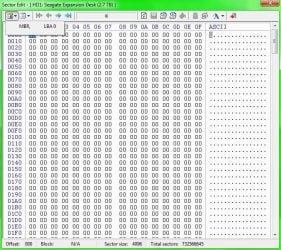
For this you will be intentionally corrupting sector 0, the protective MBR, see what effect it had on the drive and then restore sector 0 to regain the drive.( A boot sector virus can corrupt sector 0 and make your drive inaccessible)

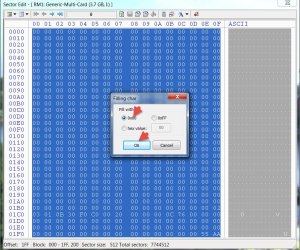
Select all fields in Sector 0 by running the mouse pointer from the first field to the last field, Right click > Fill Selection> Fill 0x00 > OK. All fields would have turned to 00. Click on Save Changes button on the tool bar. You have written all zeros to Sector 0 of your external drive.Close Bootice.

2015-04-22_10-34-54.jpg

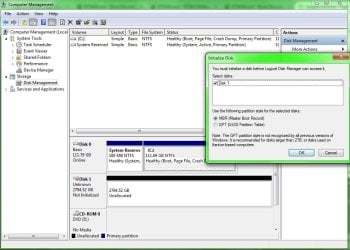
"Safely remove" your external drive and then plug it in again.You will most probably get a "you need to format the drive" message.View the drive in Windows Disk Management. You will see it as unallocated.Do not initialize.Cancel and close the Windows Disk management.

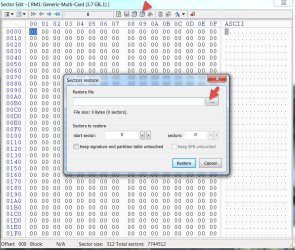
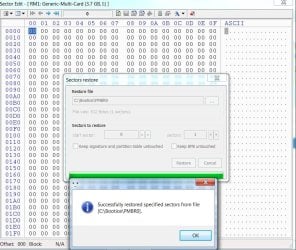
Run bootice, go to Sector 0, click on Restore from file button, select the saved sector 0 file and click on Restore.You should get a successfully restored message. Say ok and close bootice.

2015-04-22_10-01-51.jpg

2015-04-22_10-24-53.jpg

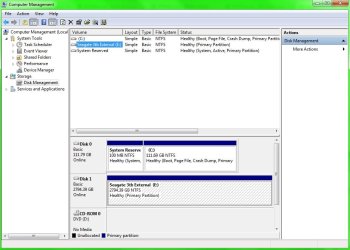
You have successfully restored your drive. Safely remove it and plug it in again. Your drive will be accessible again.
 

My Computer

OS
Windows 7 Home Premium 32 bit
jumanji disagreed with my approach in post #196 with
I entirely disagree with the first statement made by DavidE.
I'm curious why ???

When i buy a new HD I use the HD manufacturers test utility, Seatools, Windows Check Disk, ATTO, Crystal Disk Info ...
If any of these tools have a problem, i want to know why, before i commit to keeping and using the HD ...
I prefer to try and find a faulty HD ASAP... not years later ...

Your first statement I referred and disagreed was "jumanji is light years ahead of me with HD knowledge, recovery, etc., so follow his advice" I shun being put on a pedestal. Am just an ordinary user with above average skills which I honed as a member of this forum. I am nothing more than that.:)

I entirely agreed with your second statement "What I always do with a new HD is run every test i can find to see if it passes all tests, performs well, etc.I would run all the Seagate Seatools tests to make sure everything passes, run benchmark utilities, etc.I prefer to try an find a fault while the HD can be easily RMA'd if there are any problems" and had advised the OP to try what all he wants to do before putting the drive to active use. - especially saving and restoring with bootice from my perspective.

He has asked what else than Seatools. I don't know. You have to tell him the specific tools you may want him to try and familiarize with. That is why I had skipped that question (as if I had not seen that at all :D)
 

My Computer

OS
Windows 7 Home Premium 32 bit
Let me post scrnshots of my work >>> Here i have saved scrnshot of sectors, 0,1,2,3,6,33024, 732566644, and 732566640 and verified the sectors and numbers match up.

I went over it and i feel i have done better this time. Once i get the comfirmation from you that it seems correct then i will start to go onto the next stage and try to corrupt some sectors and then restore.
 

Attachments

  • LBA 6.jpg
    LBA 6.jpg
    101.1 KB · Views: 1
  • LBA 2.jpg
    LBA 2.jpg
    103.1 KB · Views: 2
  • LBA 1.jpg
    LBA 1.jpg
    100.6 KB · Views: 1
  • LBA 0.jpg
    LBA 0.jpg
    101.8 KB · Views: 1
  • preview of folder.jpg
    preview of folder.jpg
    41.7 KB · Views: 28
  • LBA 33024.jpg
    LBA 33024.jpg
    101.1 KB · Views: 2
  • LBA 732566640.jpg
    LBA 732566640.jpg
    97.4 KB · Views: 1
  • LBA 732566644.jpg
    LBA 732566644.jpg
    96.7 KB · Views: 1

My Computer

Computer type
PC/Desktop
Computer Manufacturer/Model Number
Custom Build (First built from scratch in 2010 by someone else.. then I rebuilt it in 2015).
OS
Windows 7 Home Premium 64bit
CPU
i7 4790k processor
Motherboard
Z97 Sabertooth Mark 1
Memory
Patriot 16gb
Graphics Card(s)
EVGA GeForce GTX 980 Ti FTW
Monitor(s) Displays
19" Monitor
Screen Resolution
1920 x 1080
Hard Drives
Samsung 850 Evo 120gb ssd
PSU
Corsair Cx600
Case
Haf 922
Cooling
Hydro Series H60 High Performance 120 mm
Keyboard
Microsoft
Mouse
Logitech
Browser
Firefox 37.0.4
Other Info
*Computer Manufacturer/Model Number: HP 15-d002tx Notebook* /

OS: Windows 7 Home Premium 64-bit / CPU: Intel Core i3-3110M / Memory: DDR3 4GB / Graphics Card: Intel HD Graphics 4000, GeForce 820M / Keyboard: Microsoft / Browser: Firefox 37.0
"Select all fields in Sector 0 by running the mouse pointer from the first field to the last field"

I gave this a go and started from beginning to the very end. But as i do this the sector indicator field changes to 1.
I dragged from start until the scroll bar on the right hand side scrolled along all the way to the bottom, but problem with this is the sector indicator field number starts to increase.
 

My Computer

Computer type
PC/Desktop
Computer Manufacturer/Model Number
Custom Build (First built from scratch in 2010 by someone else.. then I rebuilt it in 2015).
OS
Windows 7 Home Premium 64bit
CPU
i7 4790k processor
Motherboard
Z97 Sabertooth Mark 1
Memory
Patriot 16gb
Graphics Card(s)
EVGA GeForce GTX 980 Ti FTW
Monitor(s) Displays
19" Monitor
Screen Resolution
1920 x 1080
Hard Drives
Samsung 850 Evo 120gb ssd
PSU
Corsair Cx600
Case
Haf 922
Cooling
Hydro Series H60 High Performance 120 mm
Keyboard
Microsoft
Mouse
Logitech
Browser
Firefox 37.0.4
Other Info
*Computer Manufacturer/Model Number: HP 15-d002tx Notebook* /

OS: Windows 7 Home Premium 64-bit / CPU: Intel Core i3-3110M / Memory: DDR3 4GB / Graphics Card: Intel HD Graphics 4000, GeForce 820M / Keyboard: Microsoft / Browser: Firefox 37.0
May be I didn't give the instruction right.

Keep the mouse pointer on the first field in the sector which is 00, Right click and drag the pointer till the last field which is AA.

This is the normal selection process with the mouse which you adopt to select words/sentences in a text file.

I am now out for shopping. That is why I came in the morning and finished my post.
 

My Computer

OS
Windows 7 Home Premium 32 bit
I did it.

Its back to normal. :)

I have another seagate external, but this time i think it's 1tb. Must be mbr.

Can i do the same in bootice and save the sectors? I have had it for few years now. It hasn't gone faulty yet. Im thinking to save the sectors before it does.

Also will the buttons every grey out even tho i have saved the sectors on the new drive?
 

Attachments

  • corrupted sectors.jpg
    corrupted sectors.jpg
    82.8 KB · Views: 1
  • corrupted sectors 2.jpg
    corrupted sectors 2.jpg
    128.5 KB · Views: 1
  • fixed.jpg
    fixed.jpg
    71.9 KB · Views: 1

My Computer

Computer type
PC/Desktop
Computer Manufacturer/Model Number
Custom Build (First built from scratch in 2010 by someone else.. then I rebuilt it in 2015).
OS
Windows 7 Home Premium 64bit
CPU
i7 4790k processor
Motherboard
Z97 Sabertooth Mark 1
Memory
Patriot 16gb
Graphics Card(s)
EVGA GeForce GTX 980 Ti FTW
Monitor(s) Displays
19" Monitor
Screen Resolution
1920 x 1080
Hard Drives
Samsung 850 Evo 120gb ssd
PSU
Corsair Cx600
Case
Haf 922
Cooling
Hydro Series H60 High Performance 120 mm
Keyboard
Microsoft
Mouse
Logitech
Browser
Firefox 37.0.4
Other Info
*Computer Manufacturer/Model Number: HP 15-d002tx Notebook* /

OS: Windows 7 Home Premium 64-bit / CPU: Intel Core i3-3110M / Memory: DDR3 4GB / Graphics Card: Intel HD Graphics 4000, GeForce 820M / Keyboard: Microsoft / Browser: Firefox 37.0
Have another question that came to mind.

When a hdd goes faulty, how do you know which LBA to restore?

Do we just restore all back up files that we saved? That should bring it back to life. Lol
 

My Computer

Computer type
PC/Desktop
Computer Manufacturer/Model Number
Custom Build (First built from scratch in 2010 by someone else.. then I rebuilt it in 2015).
OS
Windows 7 Home Premium 64bit
CPU
i7 4790k processor
Motherboard
Z97 Sabertooth Mark 1
Memory
Patriot 16gb
Graphics Card(s)
EVGA GeForce GTX 980 Ti FTW
Monitor(s) Displays
19" Monitor
Screen Resolution
1920 x 1080
Hard Drives
Samsung 850 Evo 120gb ssd
PSU
Corsair Cx600
Case
Haf 922
Cooling
Hydro Series H60 High Performance 120 mm
Keyboard
Microsoft
Mouse
Logitech
Browser
Firefox 37.0.4
Other Info
*Computer Manufacturer/Model Number: HP 15-d002tx Notebook* /

OS: Windows 7 Home Premium 64-bit / CPU: Intel Core i3-3110M / Memory: DDR3 4GB / Graphics Card: Intel HD Graphics 4000, GeForce 820M / Keyboard: Microsoft / Browser: Firefox 37.0
Your post 217: Everything looks good.:)

So now you know how to save the GPT data structure and how to restore it back. Keep the backups safely and be happy. Should you encounter any Unallocated or RAW drive in future (only this drive), simply restore the GPTdata structure. 90% your drive should be back to normal. Even if it isn't (the rest 10% probability) having restored the GPT structure and brought it to as near original as possible you are in a better position if data recovery becomes imperative.

For the MBR drive, you need to save only sector 0. It contains both the MBR code and Partition Table. In most cases where the drive turns RAW/Unallocated, simply restoring sector 0 should bring the drive alive.There will be no need to run Partition Wizard to write the partition table or rebuild MBR with it.

But be aware that in both cases if you change the partition structure like adding partitions, deleting, merging, extending etc, you need to save all this essential data (the sectors) again afresh and discard the old saved data.

Also this data has to be saved on another drive and not in the same drive.
 

My Computer

OS
Windows 7 Home Premium 32 bit
So now i can use my new external and store things on it? Ok im looking forward to using this external for storage now. I will throw stress tests at it to. I think DavidE mentioned few programs can try out in the earlier posts.

You mentioned >> But be aware that in both cases if you change the partition structure like adding partitions, deleting, merging, extending etc, <<< Do you mean changing the partition structure from disk management, partition wizard?

So the data also has to be stored maybe on my c drive or a different external? So im thinking my 1tb mbr i can store it's back up on my new 3tb external.
 

My Computer

Computer type
PC/Desktop
Computer Manufacturer/Model Number
Custom Build (First built from scratch in 2010 by someone else.. then I rebuilt it in 2015).
OS
Windows 7 Home Premium 64bit
CPU
i7 4790k processor
Motherboard
Z97 Sabertooth Mark 1
Memory
Patriot 16gb
Graphics Card(s)
EVGA GeForce GTX 980 Ti FTW
Monitor(s) Displays
19" Monitor
Screen Resolution
1920 x 1080
Hard Drives
Samsung 850 Evo 120gb ssd
PSU
Corsair Cx600
Case
Haf 922
Cooling
Hydro Series H60 High Performance 120 mm
Keyboard
Microsoft
Mouse
Logitech
Browser
Firefox 37.0.4
Other Info
*Computer Manufacturer/Model Number: HP 15-d002tx Notebook* /

OS: Windows 7 Home Premium 64-bit / CPU: Intel Core i3-3110M / Memory: DDR3 4GB / Graphics Card: Intel HD Graphics 4000, GeForce 820M / Keyboard: Microsoft / Browser: Firefox 37.0
Back
Top