Second Copy not running schedule with Windows 7

johncLV

New member
Local time
4:19 AM
Messages
2
I have seen quite a few people recommending "Second Copy" as a backup solution for Windows 7.

Since changing from XP to Windows 7, I can not get my Second Copy scheduled backup profiles to run.

I have each profile scheduled to run during the night, however they don't run. Instead they start the moment I wake up the computer to start my day's work. This sucks as I do a lot of graphics work and I definitely feel the difference when Second Copy is running in the background.

I have my system sleep after 2 hours. Is it possible that Second Copy cannot wake the system to run the backups?

Does anyone have a suggestion on what I need to do to get these backups running as scheduled?

Thanks.
 

My Computer My Computer

At a glance

Windows 7 64 bitintel Core2 6600 2.4GHz8GBNVidia GeForce 9800 GTX+
Computer Manufacturer/Model Number
self made
OS
Windows 7 64 bit
CPU
intel Core2 6600 2.4GHz
Motherboard
ASUS PB5 deluxe
Memory
8GB
Graphics Card(s)
NVidia GeForce 9800 GTX+
Sound Card
on board
Monitor(s) Displays
Dual Display
Hard Drives
Sata
PSU
500W
Case
Lian Li
Cooling
fans
There should be a setting in the control panel-
that will say scheduale backups
just run that and go throught the se4ttings they ask
 

My Computer My Computer

At a glance

Windows 7 Ultimate 64 bitAMD PHenom(tm) II X4 955 Processor4GB HYperX Kingston CL5Sapphire HD 6950 2GB GDDR5
Computer Manufacturer/Model Number
ASUS custamized build
OS
Windows 7 Ultimate 64 bit
CPU
AMD PHenom(tm) II X4 955 Processor
Motherboard
ASUS M4N68T-LE V2
Memory
4GB HYperX Kingston CL5
Graphics Card(s)
Sapphire HD 6950 2GB GDDR5
Sound Card
Onboard
Monitor(s) Displays
1 22 INCH monitor, 1 32 INCH LCD tv
Screen Resolution
1600 x 1200
Hard Drives
C drive Sata 150 gb
1 portable hardrive 250 gb
PSU
650W Corsair TX
Case
CoolerMaster Storm Scout
Cooling
HyperX Memory Fan, 1 120m front, 120m top, 120m fan back
Keyboard
-
Mouse
-
Internet Speed
1MB
Thank you, but I don't want to use the Windows Backup... I tried that initially and it plodded along for DAYS making it almost impossible for me to work on the computer... and still only showed like 25% complete, when I gave up on it.

Second Copy was much faster and copies the files using normal file types...and not some windows proprietary backup file...

I want my daily Second Copy backups to run on the schedule I setup in the Second Copy profiles. I did it for years in XP without an issue.
 

My Computer My Computer

At a glance

Windows 7 64 bitintel Core2 6600 2.4GHz8GBNVidia GeForce 9800 GTX+
Computer Manufacturer/Model Number
self made
OS
Windows 7 64 bit
CPU
intel Core2 6600 2.4GHz
Motherboard
ASUS PB5 deluxe
Memory
8GB
Graphics Card(s)
NVidia GeForce 9800 GTX+
Sound Card
on board
Monitor(s) Displays
Dual Display
Hard Drives
Sata
PSU
500W
Case
Lian Li
Cooling
fans
Are you running some version of Second Copy 7?

I have used the prog for 10 years with no problems and I have no problems on Win 7, but I don't use schedules. I run everything manually and always have.


Did you import your profiles from an earlier OS, or did you create them fresh after you installed Windows 7?

Have you contacted Centered Systems for support? I never have had to use them, but I assume they have support of some kind?

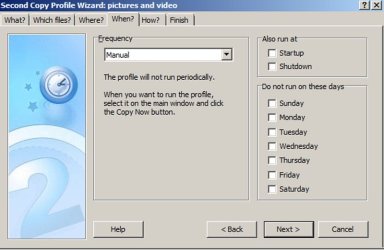
What settings do you have set in this tab?
 

Attachments

  • Untitled-1.jpg
    Untitled-1.jpg
    47.1 KB · Views: 35

My Computer My Computer

At a glance

Windows 7 Home Premium SP1, 64-bitIntel Skylake i5-6600K, not overclocked8 GB HyperX DDR4-2666 (2 x 4 GB)none; graphics are integrated on CPU
Computer type
PC/Desktop
Computer Manufacturer/Model Number
Ignatz Special; 4 speed manual gearbox; factory air conditioning; one of one
OS
Windows 7 Home Premium SP1, 64-bit
CPU
Intel Skylake i5-6600K, not overclocked
Motherboard
AsRock Z170M Extreme 4, micro ATX
Memory
8 GB HyperX DDR4-2666 (2 x 4 GB)
Graphics Card(s)
none; graphics are integrated on CPU
Sound Card
onboard: Realtek ALC1150; external: USB Behringer UF0-202
Monitor(s) Displays
Dell S2340M 23 inch IPS
Screen Resolution
1600 x 900
Hard Drives
System: Crucial MX100 series SSD, 128 GB;
Data: Samsung Spinpoint 103SJ, 1 TB;
Backup: WD Caviar Green WD30EZRX-00D8PB0, 3 TB
PSU
Rosewill SilentNight 500 watt fanless, semi-modular
Case
Antec Solo II
Cooling
Noctua NH-U12S; Noctua F12 intake, Noctua S12A exhaust
Keyboard
Microsoft 200 6JH-00001 USB
Mouse
Dell or Microsoft optical wired; USB
Antivirus
Microsoft Security Essentials and Malwarebytes Premium
Browser
Pale Moon
Other Info
All fans PWM; speeds at idle: CPU circa 500 rpm; intake circa 600 rpm; exhaust circa 600 rpm; CPU temps 27 idle and 47 C load in a warm room (27 C/81 F) when running Intel Extreme Tuning Utility stress test.
Back
Top