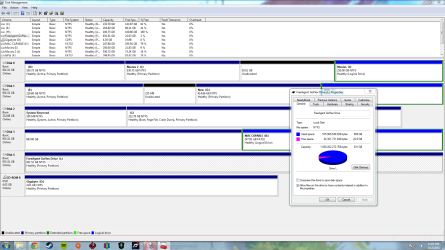
second ext. HD partition is not accessible.

zephod

New member
Local time
9:54 PM
Messages
4
My WD 1Tb external hard drive has two partitions, a FAT32 (called Mac capable) and a NTFS (called Liam Dewhurst).

I have just recently upgraded my graphics card, motherboard, and re-installed windows 7 on a SSD. This is the only problem that has come about.

When plugged into my pc, only the FAT32 partition displays. This doesn't happen in other computers, including my laptop.

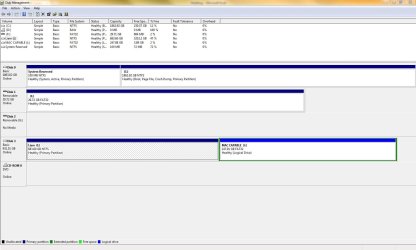
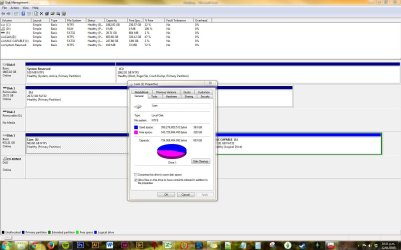
In disk management, I can see the partition but if I attempt to view properties or change anything then it gives me the error that the console is not up to date (see attached screen shot).

I'm open to any and all suggestions, thanks!

Note: I have upgraded HD twice, and this is why I have so many partitions (I realize this is a shambles and needs to be addressed).

Also: I had a good search of the forums but if this is a repost please let me know.
 

Attachments

  • trouble shooting.PNG
    trouble shooting.PNG
    162.4 KB · Views: 6

My Computer

Computer type
PC/Desktop
Computer Manufacturer/Model Number
Custom build
OS
Windows 7 x64 Professional
CPU
Phenom black x4 965 3.4Ghz
Motherboard
Gigabyte 970A-D3P
Memory
12Gb DDR3 1833Mhz kingston hyper x
Graphics Card(s)
AMD Radeon R9 290x tri-x
Hard Drives
Samsung SSD 840 Evo - 250 Gb
WD black caviar - 1 Tb
Antivirus
Windows Security Essentials
Browser
Chrome
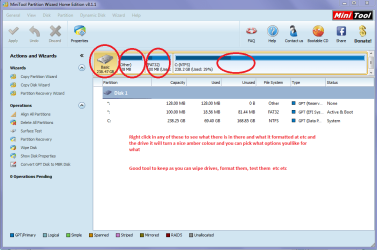
Hello and welcome (I am presuming Liam) mate try using Partition Wizard and see if that partition can be changed to whatever you need it for as I am not an expert I cannot see what is supposed to be on that partition.
If you run PW then right click on that partition and hit Explore to see what it is listed in it and then it gives you a few options to make changes to the partition (or drive) as well.
MiniTool Free Partition Manager for Window 8/7/vista/xp | Partition Wizard Home Edition
See pic as for what you will see this is my laptop so only one drive yet.
PS Meant to add it will see other drives ie USB stuff as well
 

Attachments

  • MINI TOOL 1.PNG
    MINI TOOL 1.PNG
    38.9 KB · Views: 0

My Computer

Computer type
PC/Desktop
Computer Manufacturer/Model Number
Own build (new) Desk1 / Asus ROG Win 7 / Desk2 1st build
OS
Desk1 7 Home Prem / Desk2 10 Pro / Main lap Asus ROG 10 Pro 2 laptop Toshiba 7 Pro Asus P2520 7 & 10
CPU
Desk1 i5 3750K / Laptop i7 GTX 860M / Desk2 i5 2500
Motherboard
Desk1 Asus P877-V / Desk2 Gigabyte H67 UD3H / Laptop ?
Memory
Desk1 8GB (1866) / Desk2 16GB (1333) / Laptop 8Gb DDR3
Graphics Card(s)
Desk 1& 2NVidia GTX 650 & Laptops on board Intel
Sound Card
Desk 1 & 2 -XONAR DG Realtek High Def audio Laptop
Monitor(s) Displays
Desk 1 Benq HD 2450 / Desk2 Philips 24" / Laptop 17.5"
Screen Resolution
1920x1080 D1 & D2 & Laptop 1
Hard Drives
Desk1 Samsung 120GB 830 SSD
Asus ROG 256GB 850 Pro SSD
Desk2 Samsung 840 256 SSD
Toshiba 120GB EVO
PSU
Desk 1 Corsair HX 1050/ Laptop ? / Desk 2 Corsair HX 650
Case
Desk 1 Cooler HAF XM ? Toshiba laptop / Desk2 Coolermaster
Cooling
Fans on all Desk1 -2 Desk2 - all Coolermasters 5 Laptop ?
Keyboard
Desk 1 MS Sidewinder X6 Desk 2 MS Sidewinder X 4
Mouse
Desk 1&2 - Gigabyte MS 900 gamer - laptop - Logitec wireless
Internet Speed
ADSL2+
Other Info
One other Desktop (tester) and spare Toshba laptop both with SSD's
Running Kaspersky 2016 ISS on all machines config'd identically
Logitec audio stereo systems on each machine (x3)
Canon MG5250MFC
Router/modem TP-Link running WPA2SK
My WD 1Tb external hard drive has two partitions, a FAT32 (called Mac capable) and a NTFS (called Liam Dewhurst).

I have just recently upgraded my graphics card, motherboard, and re-installed windows 7 on a SSD. This is the only problem that has come about.

When plugged into my pc, only the FAT32 partition displays. This doesn't happen in other computers, including my laptop.
Can you post a screenshot from DISKMGMT.MSC (or Partition Wizard) of that drive when viewed from your laptop, where you say you can see the contents of that NTFS partition?

How did you create that problem NTFS partition? Is it a "copy" of another partition on one of your other drives? Or was it simply newly created and then formatted at some time in the past, and if so when was that done and what did you use to create/format the partition?
 

My Computer

Computer type
PC/Desktop
Computer Manufacturer/Model Number
Home-built, two systems (1) and (2)
OS
Windows 7 Pro x64 (1), Win7 Pro X64 (2)
CPU
i5-3350p 3.1Ghz/6MB-cache (1); E8400 3.0Ghz/6MB-cache (2)
Motherboard
ASUS P8Z77-V Pro (1); ASUS P5Q3 (2)
Memory
8GB PC3-12800 DDR3 (1); 4GB PC3-10600 DDR3 (2)
Graphics Card(s)
ATI HD7750 (1), (see TV cards); ATI R7 250 (2)
Sound Card
Realtek ALC892 HD Audio (1); Realtek ALC1200 HD Audio (2)
Monitor(s) Displays
Eizo HD2441W LCD, Eizo S2433W (1); Eizo 24" S2433W (2)
Screen Resolution
1920x1200, 1920x1200 (1); 1920x1200 (2)
Hard Drives
(1) 1TB SATA-II (7200RPM), 2x2TB SATA-III (7200RPM), 250GB SATA-III (10000RPM) for OS; 2x2TB external USB 3.0

(2) 320GB SATA-II (7200RPM), 750GB SATA-II (7200RPM), 150GB SATA-II (10000RPM) for OS; 2TB external USB 3.0
PSU
Nesteq ECS-6001 600W (1); Nesteq ECS-5001 500W (2)
Case
Acousti-Case 360 (1) and (2)
Cooling
Noctua NH-U12P SE2 for CPU, 2x120mm case fans (1) and (2)
Keyboard
IBM PS/2 (1) and (2)
Mouse
Logitech MX Revolution wireless (1); Microsoft wired (2)
Internet Speed
100mbps down / 10mbps up
Antivirus
Microsoft Security Essentials; Malwarebyte Anti-Malware Pro
Browser
Firefox
Other Info
Ceton InfiniTV 4-tuner cablecard-enabled TV card as well as Hauppauge HVR-2250 OTA/ATSC 2-tuner TV card in (1), running under Win7 WMC
My WD 1Tb external hard drive has two partitions, a FAT32 (called Mac capable) and a NTFS (called Liam Dewhurst).

I have just recently upgraded my graphics card, motherboard, and re-installed windows 7 on a SSD. This is the only problem that has come about.

When plugged into my pc, only the FAT32 partition displays. This doesn't happen in other computers, including my laptop.
Can you post a screenshot from DISKMGMT.MSC (or Partition Wizard) of that drive when viewed from your laptop, where you say you can see the contents of that NTFS partition?

How did you create that problem NTFS partition? Is it a "copy" of another partition on one of your other drives? Or was it simply newly created and then formatted at some time in the past, and if so when was that done and what did you use to create/format the partition?
Good idea mate and what I ws thinking of asking but for being at work and having to jump on and off the laptop:o
 

My Computer

Computer type
PC/Desktop
Computer Manufacturer/Model Number
Own build (new) Desk1 / Asus ROG Win 7 / Desk2 1st build
OS
Desk1 7 Home Prem / Desk2 10 Pro / Main lap Asus ROG 10 Pro 2 laptop Toshiba 7 Pro Asus P2520 7 & 10
CPU
Desk1 i5 3750K / Laptop i7 GTX 860M / Desk2 i5 2500
Motherboard
Desk1 Asus P877-V / Desk2 Gigabyte H67 UD3H / Laptop ?
Memory
Desk1 8GB (1866) / Desk2 16GB (1333) / Laptop 8Gb DDR3
Graphics Card(s)
Desk 1& 2NVidia GTX 650 & Laptops on board Intel
Sound Card
Desk 1 & 2 -XONAR DG Realtek High Def audio Laptop
Monitor(s) Displays
Desk 1 Benq HD 2450 / Desk2 Philips 24" / Laptop 17.5"
Screen Resolution
1920x1080 D1 & D2 & Laptop 1
Hard Drives
Desk1 Samsung 120GB 830 SSD
Asus ROG 256GB 850 Pro SSD
Desk2 Samsung 840 256 SSD
Toshiba 120GB EVO
PSU
Desk 1 Corsair HX 1050/ Laptop ? / Desk 2 Corsair HX 650
Case
Desk 1 Cooler HAF XM ? Toshiba laptop / Desk2 Coolermaster
Cooling
Fans on all Desk1 -2 Desk2 - all Coolermasters 5 Laptop ?
Keyboard
Desk 1 MS Sidewinder X6 Desk 2 MS Sidewinder X 4
Mouse
Desk 1&2 - Gigabyte MS 900 gamer - laptop - Logitec wireless
Internet Speed
ADSL2+
Other Info
One other Desktop (tester) and spare Toshba laptop both with SSD's
Running Kaspersky 2016 ISS on all machines config'd identically
Logitec audio stereo systems on each machine (x3)
Canon MG5250MFC
Router/modem TP-Link running WPA2SK
Was this drive and that partition formatted on a Mac? Mac uses HFS+ file system which Windows cannot read.

Those computers - where you say you can access the partition is true - might have been installed with some program like HFS Explorer which facilitates reading HFS by Windows.

Most probably there are more than one user of the computers in your household and there is also a Mac and one does not know what the other has done. :)
 

My Computer

OS
Windows 7 Home Premium 32 bit
Quick message from work (NZ has a strange time zone)

Hi all,

Cheers for the quick replies here!

- The partition was created using partition magic (version 8.0 I think?) as an empty NTFS sector (using win 7 on my laptop) and then populated with files.
- I was at design school in Wellington and used the FAT32 partition on the macs there, so there's no longer access to a mac based OS (unless I beg/borrow/steal from a colleague).

I'm at work - and will post a screen grab of the disk manager from my laptop in 8 hours time...

- The point about HFS explorer is interesting and sounds like it may be worth a try? I'll post that at the same time.
- Also to note: the drive is 1 year old, and has lived a sedate life - I don't think this is a hardware issue. I have checked event/error log just in case, and ran the WD ext HD lifeguard diagnostic tool.
 

My Computer

Computer type
PC/Desktop
Computer Manufacturer/Model Number
Custom build
OS
Windows 7 x64 Professional
CPU
Phenom black x4 965 3.4Ghz
Motherboard
Gigabyte 970A-D3P
Memory
12Gb DDR3 1833Mhz kingston hyper x
Graphics Card(s)
AMD Radeon R9 290x tri-x
Hard Drives
Samsung SSD 840 Evo - 250 Gb
WD black caviar - 1 Tb
Antivirus
Windows Security Essentials
Browser
Chrome
OK mate you need to do that as the others are a little more experienced than me with partitioning stuff and yep it is like a time warp down here eh?? LOL!!
 

My Computer

Computer type
PC/Desktop
Computer Manufacturer/Model Number
Own build (new) Desk1 / Asus ROG Win 7 / Desk2 1st build
OS
Desk1 7 Home Prem / Desk2 10 Pro / Main lap Asus ROG 10 Pro 2 laptop Toshiba 7 Pro Asus P2520 7 & 10
CPU
Desk1 i5 3750K / Laptop i7 GTX 860M / Desk2 i5 2500
Motherboard
Desk1 Asus P877-V / Desk2 Gigabyte H67 UD3H / Laptop ?
Memory
Desk1 8GB (1866) / Desk2 16GB (1333) / Laptop 8Gb DDR3
Graphics Card(s)
Desk 1& 2NVidia GTX 650 & Laptops on board Intel
Sound Card
Desk 1 & 2 -XONAR DG Realtek High Def audio Laptop
Monitor(s) Displays
Desk 1 Benq HD 2450 / Desk2 Philips 24" / Laptop 17.5"
Screen Resolution
1920x1080 D1 & D2 & Laptop 1
Hard Drives
Desk1 Samsung 120GB 830 SSD
Asus ROG 256GB 850 Pro SSD
Desk2 Samsung 840 256 SSD
Toshiba 120GB EVO
PSU
Desk 1 Corsair HX 1050/ Laptop ? / Desk 2 Corsair HX 650
Case
Desk 1 Cooler HAF XM ? Toshiba laptop / Desk2 Coolermaster
Cooling
Fans on all Desk1 -2 Desk2 - all Coolermasters 5 Laptop ?
Keyboard
Desk 1 MS Sidewinder X6 Desk 2 MS Sidewinder X 4
Mouse
Desk 1&2 - Gigabyte MS 900 gamer - laptop - Logitec wireless
Internet Speed
ADSL2+
Other Info
One other Desktop (tester) and spare Toshba laptop both with SSD's
Running Kaspersky 2016 ISS on all machines config'd identically
Logitec audio stereo systems on each machine (x3)
Canon MG5250MFC
Router/modem TP-Link running WPA2SK
Limited success

Hi all,

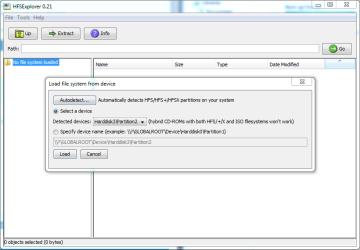
- I installed the HFS explorer just in case, after a restart and an attempt at a read from device (see image) I didn't have any luck.
- I've attached two snips of the healthy partition in my partners desktop - it shows that I can change the drive name. I altered the name just in case that might solve the issue.
- I also shifted several reference letters for drives in case I needed to clear room. (i.e. I moved drive J to K, so that one early spot was clear)

- It sounds like my computer is the problem.
- Is there a maximum number of drives that can be displayed other than 26 due to the 26 letters? (though I just plugged in an additional drive and it displayed fine)

Note: I have hooked in a single partition NTFS drive and it displayed perfectly.

Cheers for the continuing help?? I am perplexed.
 

Attachments

  • healthy partition.JPG
    healthy partition.JPG
    122.7 KB · Views: 3
  • properties.JPG
    properties.JPG
    158 KB · Views: 3
  • HFS explorer.PNG
    HFS explorer.PNG
    18.5 KB · Views: 0
  • NTFS single partition drive working.PNG
    NTFS single partition drive working.PNG
    87 KB · Views: 2

My Computer

Computer type
PC/Desktop
Computer Manufacturer/Model Number
Custom build
OS
Windows 7 x64 Professional
CPU
Phenom black x4 965 3.4Ghz
Motherboard
Gigabyte 970A-D3P
Memory
12Gb DDR3 1833Mhz kingston hyper x
Graphics Card(s)
AMD Radeon R9 290x tri-x
Hard Drives
Samsung SSD 840 Evo - 250 Gb
WD black caviar - 1 Tb
Antivirus
Windows Security Essentials
Browser
Chrome
I am now getting confused.:)

When you say you used Partition Magic, is it the old PowerQuest (taken over later by Symantec) Partition Magic ( which is dead now - will not work with Windows 7) or are you referring to the MiniTools Partition Wizard as Partition Magic?
 

My Computer

OS
Windows 7 Home Premium 32 bit
Partition magic

I used a copy of partition magic that was given to me by a friend. It looks very similar to this site here Download Partition Magic 8.0

But I can't be sure. It's something I installed, used and then removed.

I don't need my fat32 partition much anymore. I'm tempted to just delete it. Can i format the fat32 partition, and just expand the main ntfs drive?

Of course this is in the hope that nzs time warp will make the drive magically appear...
 

My Computer

Computer type
PC/Desktop
Computer Manufacturer/Model Number
Custom build
OS
Windows 7 x64 Professional
CPU
Phenom black x4 965 3.4Ghz
Motherboard
Gigabyte 970A-D3P
Memory
12Gb DDR3 1833Mhz kingston hyper x
Graphics Card(s)
AMD Radeon R9 290x tri-x
Hard Drives
Samsung SSD 840 Evo - 250 Gb
WD black caviar - 1 Tb
Antivirus
Windows Security Essentials
Browser
Chrome

My Computer

Computer type
PC/Desktop
Computer Manufacturer/Model Number
Own build (new) Desk1 / Asus ROG Win 7 / Desk2 1st build
OS
Desk1 7 Home Prem / Desk2 10 Pro / Main lap Asus ROG 10 Pro 2 laptop Toshiba 7 Pro Asus P2520 7 & 10
CPU
Desk1 i5 3750K / Laptop i7 GTX 860M / Desk2 i5 2500
Motherboard
Desk1 Asus P877-V / Desk2 Gigabyte H67 UD3H / Laptop ?
Memory
Desk1 8GB (1866) / Desk2 16GB (1333) / Laptop 8Gb DDR3
Graphics Card(s)
Desk 1& 2NVidia GTX 650 & Laptops on board Intel
Sound Card
Desk 1 & 2 -XONAR DG Realtek High Def audio Laptop
Monitor(s) Displays
Desk 1 Benq HD 2450 / Desk2 Philips 24" / Laptop 17.5"
Screen Resolution
1920x1080 D1 & D2 & Laptop 1
Hard Drives
Desk1 Samsung 120GB 830 SSD
Asus ROG 256GB 850 Pro SSD
Desk2 Samsung 840 256 SSD
Toshiba 120GB EVO
PSU
Desk 1 Corsair HX 1050/ Laptop ? / Desk 2 Corsair HX 650
Case
Desk 1 Cooler HAF XM ? Toshiba laptop / Desk2 Coolermaster
Cooling
Fans on all Desk1 -2 Desk2 - all Coolermasters 5 Laptop ?
Keyboard
Desk 1 MS Sidewinder X6 Desk 2 MS Sidewinder X 4
Mouse
Desk 1&2 - Gigabyte MS 900 gamer - laptop - Logitec wireless
Internet Speed
ADSL2+
Other Info
One other Desktop (tester) and spare Toshba laptop both with SSD's
Running Kaspersky 2016 ISS on all machines config'd identically
Logitec audio stereo systems on each machine (x3)
Canon MG5250MFC
Router/modem TP-Link running WPA2SK
I used a copy of partition magic that was given to me by a friend. It looks very similar to this site here Download Partition Magic 8.0

But I can't be sure. It's something I installed, used and then removed.

I don't need my fat32 partition much anymore. I'm tempted to just delete it. Can i format the fat32 partition, and just expand the main ntfs drive?

Of course this is in the hope that nzs time warp will make the drive magically appear...

Yes, my dear friend, you used the old and dead PowerQuest Partition Magic 8.(Upto Windows XP, I was using that but when I installed Windows 7 and used it on it it said the partitions were not correct and it will repair it and by doing that repair it only mucked it up. Then only I woke up and realised it can't be used on Windows 7 and discarded it. I still have the BART PE disks I created from the twin floppy images with other programs .)

On what computer you said you were able to access that partition? XP?

Whatever, if you do not have any important data on that partition, Install and run MiniTools Partition Wizard Home edition v8.1.1, Free download Magic Partition Manager Software, partition magic alternative, free partition magic, partition magic Windows 7 and server partition software - Partition Wizard Online ,delete both the partitions, create new volumes as you like and format it to NTFS.

Enjoy Newzealand http://www.sevenforums.com/chillout-room/346929-what-you-listening-10-a-31.html#post2981781
 
Last edited:

My Computer

OS
Windows 7 Home Premium 32 bit
Back
Top