Security updates not installing

civint

New member
Local time
4:05 PM
Messages
44
I just did a fresh install of windows 7 to repair an issue I had been having with C++ (which is fixed now, I am able to install my photo editing suite - Nikon View NX 2) however on installing the updates available the following updates failed to install:

Cumulative Update for media center for Windows 7 (KB977863)
Security Update for Windows 7 (KB975560)
Security Update for Windows 7 (KB977165)
Update for Windows 7 (KB974431)
Update for Windows 7 (KB977074)

The error message returned is 800736B3

I am running windows 7 professional 32bit

I have tried to get free support however when I prompted to enter my product ID it says that the free support period has expired, so I am unable to get support from MS without shelling out heaps of money.

I had a similar problem when I installed windows 7 previously (http://www.sevenforums.com/installa...ws-7-updates-failing-error-code-800736b3.html), only then I was able to get the issue fixed by MS Tech support, and I cannot remember how they did it, unfortunately.

I have no third party apps installed apart from the nvidia driver (installed by windows), firefox (which I chose using the MS Browser Choice Screen for EEA users) and my Nikon software.

please help!

many thanks
Civint
 

My Computer

OS
Windows 7 Professional (build 7600)
CPU
AMD Athlon 64x2 5000+
Memory
2.0GB
Graphics Card(s)
Nvidia 8400GS
Monitor(s) Displays
Samsung SyncMaster T220HD
Hard Drives
500GB Seagate Barracuda
I was able to get the issue fixed by MS Tech support, and I cannot remember how they did it, unfortunately.
It's a pitty you don't remmeber.Probably this error relate to issue with C:\Windows\WinSxS folder or trouble with drivers:

1.Run cmd.exe with administrative previlliges (right click on cmd.exe) as admin and type:

sfc /scannow

2.Run Readiness Tool Description of the System Update Readiness Tool for Windows Vista, for Windows Server 2008, for Windows 7, and for Windows Server 2008 R2
even if this tool don't solve problem it create CheckSur.log file in C:\Windows\Logs\CBS folder
3.Download firegenul Altair Technologies Ltd.
place firegenul.exe in C:\Windows\System32

next again run cmd.exe with admin previlliges and type:

firegenul

it creates report from WindowsUpdate.log and is saved to C:\Windows\System32 as FireGenReport.htm
4.Prepare log from VistaSysInfoTool VistaForums SysInfo Tool
5.Find CBS.log file in C:\Windows\Logs\CBS folder

all files CBS.log,CheckSur.log,firegenReport.htm and log from VistaSysInfo pack to ZIP format and attache to post
 

My Computer

Computer Manufacturer/Model Number
Custom made
OS
Windows 7 Professional x64 PL
CPU
AMD Athlon 4450e
Motherboard
Giga-Byte GA-MA69G-S3H
Memory
GoodRam DDR2 2x2048MB (FSB 800MHz)
Graphics Card(s)
nVidia GeForce 9600GT (G94-300) 1024 MB
Monitor(s) Displays
SAMSUNG SyncMaster HS2P301688
Hard Drives
Seagate ST3750330AS 750GB
PSU
Corsair 550W
Cooling
AeroCool ExtremeEngine 3T
I just downloaded the readiness tool, and when double clicking to run it it returnds the error message

Installer encountered an error: 0x8007000d
The data is invalid.

Any help?
 

My Computer

OS
Windows 7 Professional (build 7600)
CPU
AMD Athlon 64x2 5000+
Memory
2.0GB
Graphics Card(s)
Nvidia 8400GS
Monitor(s) Displays
Samsung SyncMaster T220HD
Hard Drives
500GB Seagate Barracuda
Installer encountered an error: 0x8007000d
The data is invalid.

Any help?

So attache to post remains logs:CBS.log,log from VistaSysInfoTool and firegenReport.htm.Besides

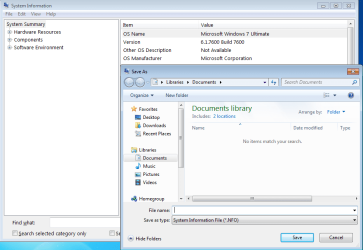
File>>Search>>msinfo32

next File >>Save as any name attache *.nfo file too.It looks like any issue with any service
 

My Computer

Computer Manufacturer/Model Number
Custom made
OS
Windows 7 Professional x64 PL
CPU
AMD Athlon 4450e
Motherboard
Giga-Byte GA-MA69G-S3H
Memory
GoodRam DDR2 2x2048MB (FSB 800MHz)
Graphics Card(s)
nVidia GeForce 9600GT (G94-300) 1024 MB
Monitor(s) Displays
SAMSUNG SyncMaster HS2P301688
Hard Drives
Seagate ST3750330AS 750GB
PSU
Corsair 550W
Cooling
AeroCool ExtremeEngine 3T

My Computer

Computer type
PC/Desktop
Computer Manufacturer/Model Number
Bruce ... somewhere in his 40's
OS
Windows 7 Ultimate 32bit SP1
CPU
Intel(R) Core(TM)2 Quad CPU @ 2.40GHz, 2400 MHz
Motherboard
INTEL/D975XBX2
Memory
4 GB
Graphics Card(s)
ATI Radeon HD 2600 Pro
Monitor(s) Displays
Samsung SyncMaster 914v
Screen Resolution
1280 x 1024
Hard Drives
2/500GB each ... ST3500630AS ATA Device.
One is not connected
PSU
Rocketfish 700 W
Case
G.Skill Gigabyte Chassis
Keyboard
Standard PS/2 Keyboard
Mouse
Microsoft PS/2 Mouse
Internet Speed
DSL
Antivirus
Avira Internet Security
Browser
IE 11
Other Info
ATI HDMI Audio
I have attached the CBS file from C:\Windows\Logs\CBS,the firegenReport.htm and the output from VistaSysInfoTool (all checkboxes ticked as I was unsure as to what you required).

I was not sure what you meant by

File>>Search>>msinfo32

next File >>Save as any name attache *.nfo file too

sorry!

there was no msinfo file, just the application and I didnt know what is needed from that, and there were no *.nfo files when I searched my C: drive (the only drive attached)

Many thanks for your help so far!
 

Attachments

My Computer

OS
Windows 7 Professional (build 7600)
CPU
AMD Athlon 64x2 5000+
Memory
2.0GB
Graphics Card(s)
Nvidia 8400GS
Monitor(s) Displays
Samsung SyncMaster T220HD
Hard Drives
500GB Seagate Barracuda

My Computer

OS
Windows 7 Professional (build 7600)
CPU
AMD Athlon 64x2 5000+
Memory
2.0GB
Graphics Card(s)
Nvidia 8400GS
Monitor(s) Displays
Samsung SyncMaster T220HD
Hard Drives
500GB Seagate Barracuda
I didnt know what is needed from that, and there were no *.nfo files when I searched my C: drive (the only drive attached)
nfo.png

*.nfo include general information about hardware,drivers,environments variables,services
If you already genereted *.nfo file it should be in Documents folder,of course if you didn't change location.

Of course I'll check remains log too but it may take few hours...
 

My Computer

Computer Manufacturer/Model Number
Custom made
OS
Windows 7 Professional x64 PL
CPU
AMD Athlon 4450e
Motherboard
Giga-Byte GA-MA69G-S3H
Memory
GoodRam DDR2 2x2048MB (FSB 800MHz)
Graphics Card(s)
nVidia GeForce 9600GT (G94-300) 1024 MB
Monitor(s) Displays
SAMSUNG SyncMaster HS2P301688
Hard Drives
Seagate ST3750330AS 750GB
PSU
Corsair 550W
Cooling
AeroCool ExtremeEngine 3T
I didnt realise that I had to do a 'save as', how embaressing :(

anyway, it is attached in a zip file (although I can't check it on my pc as it complains that it is invalid or incompatible with the verison of msinfo32 i have :sarc:.

I tried the fixit link but that had no effect unfortunately. If only life were that easy!!
(if I find a fix this time I will have to do a writeup to ensure nobody else suffers like this!!)

thanks for sticking with the problem!
Many thanks
Civ
 

Attachments

My Computer

OS
Windows 7 Professional (build 7600)
CPU
AMD Athlon 64x2 5000+
Memory
2.0GB
Graphics Card(s)
Nvidia 8400GS
Monitor(s) Displays
Samsung SyncMaster T220HD
Hard Drives
500GB Seagate Barracuda
Nothing wrong is your system only a few rubbish

1.Empty C:\Windows\Tasks folder
2.Empty C:\Windows\Servicing\SQM folder,to do that follow below:

-.Go to C:\Windows\Servicing\SQM and add your account to have full control for this folder
-.Remove all files from this folder
-.Remove your account from permissions to SQM folder

//useful link how to do that:http://www.vistax64.com/tutorials/15...rmissions.html
3.Empty C:\ProgramData\Microsoft\Crypto\RSA\S-1-5-18 folder
4.Empty C:\Windows\Temp folder

Please note C:\ProgramData folder is hidden,to see it you have to uncheck
"hide system files and folders" in folder options or use 3p file manager i.e Total Commander,there are many freeware file managers as well.I recommend to do that in safe mode because with some files you may have problem in normal mode.When you will do,try again install updates,if it also fail try install update following method:

1.Disable all non-system services in msconfig(so-called clean boot How to Troubleshoot a Problem by Performing a Clean Startup in Windows 7 or Vista) + restart
2.Create folders C:\Temp and C:\sandbox
3.Download all hotfixes which you have problem from Microsoft Download Center and place them in C:\Temp folder
4.Next open cmd.exe with administrative previlliges (right click on cmd.exe as admin)
5.Open task manager and disable process explorer.exe
3.In command prompt unpack & install each one hotfix i.e for hotfix KB977074,full hotfix name Windows6.1-KB977074-x86.msu type followings commands:

cd /d C:\Temp

press ENTER

expand -f:* Windows6.1-KB977074-x86.msu C:\Temp

press ENTER

expand -f:* Windows6.1-KB977074-x86.cab C:\Temp

press ENTER,next install hotfix in cmd.exe type:

start /w pkgmgr /m:C:\Temp\Windows6.1-KB977074-x86.cab /ip /s:C:\Sandbox

press ENTER and wait patiently untill appear again cursor in cmd.exe,next restart computer and in the same way install other hotfixes
 
Last edited by a moderator:

My Computer

Computer Manufacturer/Model Number
Custom made
OS
Windows 7 Professional x64 PL
CPU
AMD Athlon 4450e
Motherboard
Giga-Byte GA-MA69G-S3H
Memory
GoodRam DDR2 2x2048MB (FSB 800MHz)
Graphics Card(s)
nVidia GeForce 9600GT (G94-300) 1024 MB
Monitor(s) Displays
SAMSUNG SyncMaster HS2P301688
Hard Drives
Seagate ST3750330AS 750GB
PSU
Corsair 550W
Cooling
AeroCool ExtremeEngine 3T
thanks for the advice, will try it asap and reply to inform you as to progress, seems like some detailed instructions, so many thanks!! again thanks for your time i am v greatful for all your help so far
 

My Computer

OS
Windows 7 Professional (build 7600)
CPU
AMD Athlon 64x2 5000+
Memory
2.0GB
Graphics Card(s)
Nvidia 8400GS
Monitor(s) Displays
Samsung SyncMaster T220HD
Hard Drives
500GB Seagate Barracuda
To update, I tried both options, the first didnt work, and alas, so did the second one, exiting the attempted install of of the hotfix with error 0x800736B3 saying "the referenced assembly is not installed on your system".

This a strange problem indeed, it seems.
 

My Computer

OS
Windows 7 Professional (build 7600)
CPU
AMD Athlon 64x2 5000+
Memory
2.0GB
Graphics Card(s)
Nvidia 8400GS
Monitor(s) Displays
Samsung SyncMaster T220HD
Hard Drives
500GB Seagate Barracuda
Maybe this will work

remove all files and folders from

C:\Users\<your account>\AppData\Local\Apps

//remmeber this folder is hidded//
 

My Computer

Computer Manufacturer/Model Number
Custom made
OS
Windows 7 Professional x64 PL
CPU
AMD Athlon 4450e
Motherboard
Giga-Byte GA-MA69G-S3H
Memory
GoodRam DDR2 2x2048MB (FSB 800MHz)
Graphics Card(s)
nVidia GeForce 9600GT (G94-300) 1024 MB
Monitor(s) Displays
SAMSUNG SyncMaster HS2P301688
Hard Drives
Seagate ST3750330AS 750GB
PSU
Corsair 550W
Cooling
AeroCool ExtremeEngine 3T
There is no folder named "Apps" in C:\Users\civint\AppData\Local, only the following

Microsoft
Mozilla
Temp
VirtalStore

and some single files.
:S
 

My Computer

OS
Windows 7 Professional (build 7600)
CPU
AMD Athlon 64x2 5000+
Memory
2.0GB
Graphics Card(s)
Nvidia 8400GS
Monitor(s) Displays
Samsung SyncMaster T220HD
Hard Drives
500GB Seagate Barracuda
There is no folder named "Apps" in C:\Users\civint\AppData\Local, only the following
This option is possible.Create new admin account and on the new one try install updates.
 

My Computer

Computer Manufacturer/Model Number
Custom made
OS
Windows 7 Professional x64 PL
CPU
AMD Athlon 4450e
Motherboard
Giga-Byte GA-MA69G-S3H
Memory
GoodRam DDR2 2x2048MB (FSB 800MHz)
Graphics Card(s)
nVidia GeForce 9600GT (G94-300) 1024 MB
Monitor(s) Displays
SAMSUNG SyncMaster HS2P301688
Hard Drives
Seagate ST3750330AS 750GB
PSU
Corsair 550W
Cooling
AeroCool ExtremeEngine 3T
On the new 'update' account the same error occurs. I'm stumped!
 

My Computer

OS
Windows 7 Professional (build 7600)
CPU
AMD Athlon 64x2 5000+
Memory
2.0GB
Graphics Card(s)
Nvidia 8400GS
Monitor(s) Displays
Samsung SyncMaster T220HD
Hard Drives
500GB Seagate Barracuda
Try this

Install NET Framework SDK 2.0 Download details: .NET Framework 2.0 Software Development Kit (SDK) (x86)

when will do run cmd.exe with admin rights (right click on cmd.exe as admin) and type:

cd /d "C:\Program Files\Microsoft SDKs\Windows\v7.0\Bin"

press ENTER

Mage -cc

press ENTER


EDIT
1.If above suggestions don't help open regedit and make sure you don't have this key:

HKLM\Software\Classes\Software\Microsoft\Windows\CurrentVersion\Deployment

if you find it then delete it + restart

FYI

HKLM=HKEY_LOCALE_MACHINE
2.Uninstall Microsoft Visual C++ 2005 and install Microsoft Visual C++ 2008 SP1 http://www.microsoft.com/downloads/details.aspx?familyid=A5C84275-3B97-4AB7-A40D-3802B2AF5FC2&displaylang=en
 
Last edited:

My Computer

Computer Manufacturer/Model Number
Custom made
OS
Windows 7 Professional x64 PL
CPU
AMD Athlon 4450e
Motherboard
Giga-Byte GA-MA69G-S3H
Memory
GoodRam DDR2 2x2048MB (FSB 800MHz)
Graphics Card(s)
nVidia GeForce 9600GT (G94-300) 1024 MB
Monitor(s) Displays
SAMSUNG SyncMaster HS2P301688
Hard Drives
Seagate ST3750330AS 750GB
PSU
Corsair 550W
Cooling
AeroCool ExtremeEngine 3T
I tried the first option, however, the download link posted kept failing on install (corrupt file, apparently) so I tried a newer version of the software which installed fine, but instead of
cd /d "C:\Program Files\Microsoft SDKs\Windows\v7.0\Bin"
I only found
cd /d "C:\Program Files\Microsoft SDKs\Windows\v6.1\Bin"

I ran the command and nothing occurred.

So I looked for the registry key and it was not present.

I am currenntly downloading from cnet the .NET 2.0 SDK to see if it works, and if it does if it affects anything.

Otherwise, updates still failing.
Many thanks for your continued help.
 

My Computer

OS
Windows 7 Professional (build 7600)
CPU
AMD Athlon 64x2 5000+
Memory
2.0GB
Graphics Card(s)
Nvidia 8400GS
Monitor(s) Displays
Samsung SyncMaster T220HD
Hard Drives
500GB Seagate Barracuda
I am currenntly downloading from cnet the .NET 2.0 SDK to see if it works, and if it does if it affects anything.

Otherwise, updates still failing.
Many thanks for your continued help.
Ii's no strange it didn't work.mage.exe file is included in NET Framework SDK 2.0 if you don't have installed it,the command will never work.Install NET Framework SDK and try again.For me mage.exe is located in C:\Program Files\Microsoft SDKs\Windows\v7.0\Bin,and first you have to navigate to folder where this file is stored otherwise it will never work too.Thus is neccessary following command in console

cd /d "C:\Program Files\Microsoft SDKs\Windows\v7.0\Bin"

If mage command fail too try this method

rename C:\Windows\Assembly folder
 

My Computer

Computer Manufacturer/Model Number
Custom made
OS
Windows 7 Professional x64 PL
CPU
AMD Athlon 4450e
Motherboard
Giga-Byte GA-MA69G-S3H
Memory
GoodRam DDR2 2x2048MB (FSB 800MHz)
Graphics Card(s)
nVidia GeForce 9600GT (G94-300) 1024 MB
Monitor(s) Displays
SAMSUNG SyncMaster HS2P301688
Hard Drives
Seagate ST3750330AS 750GB
PSU
Corsair 550W
Cooling
AeroCool ExtremeEngine 3T
I had a look, and after installing 2.0 AND 3.5 (the newer one reccomended from the MS download site, and the 2.0 from cnet) and it still only has a 6.1 folder. But mage and mageui are still there.

I ran "mage -cc" and it gave me the result 'application cache cleared', but the updates still fail.

Again sorry for my lack of understanding, what should I be doing to
rename C:\Windows\Assembly folder
?

many thanks
Civ
 

My Computer

OS
Windows 7 Professional (build 7600)
CPU
AMD Athlon 64x2 5000+
Memory
2.0GB
Graphics Card(s)
Nvidia 8400GS
Monitor(s) Displays
Samsung SyncMaster T220HD
Hard Drives
500GB Seagate Barracuda
Back
Top