Security Warning on all Executables

xichael

New member
Member
Local time
2:14 PM
Messages
59
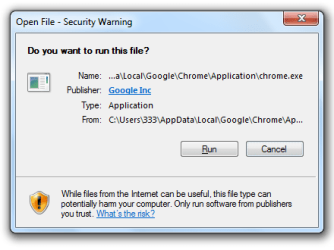
I just installed Windows 7 64-bit for the first time, and after installing all the "important" updates, I'm having this problem where all executable files (.exe, .msi, .bat), as well as shortcuts to .msc files (but not the files themselves) are prompting an "Open File - Security Warning / Do you want to run this file?" conformation (see attached screenshot).

I got it mostly under control with a combination of enabling "Launching applications and unsafe files" in the Internet Security Zone settings, and adding the above file types to the "Inclusion list for moderate risk file types" in the Group Policy Editor.

This has worked when launching files directly, but many installers extract their executables to the temp folder, where the're being blocked from running.

I'd love to get at the underlying cause of this problem, but I'll accept any other workarounds anyone can offer.
 

Attachments
  • confirm.png
    confirm.png
    11 KB · Views: 4

My Computer My Computer

At a glance

7
OS
7
Hello Xichael,

This is the normal warning message that you will get when you try to run or open a file that was downloaded from the internet or saved to your computer from an external source.

Normally, you would just need to unblock the file as in the tutorial below first to stop this message for the file.

http://www.sevenforums.com/tutorials/124367-open-file-security-warning-unblock-file.html


For the workaround that you mentioned:

http://www.sevenforums.com/tutorial...urity-warning-allow-prevent-unblock-file.html

Hope this helps,
Shawn
 

My Computer My Computer

At a glance

64-bit Windows 11 Pro for WorkstationsIntel i7-8700K OC'd to 5 GHz64 GB (4x16GB) G.SKILL TridentZ RGB DDR4 3600...ASUS ROG-STRIX-GTX1080TI-O11G-GAMING
Computer type
PC/Desktop
Computer Manufacturer/Model Number
Self built custom
OS
64-bit Windows 11 Pro for Workstations
CPU
Intel i7-8700K OC'd to 5 GHz
Motherboard
ASUS ROG Maximus XI Formula Z390
Memory
64 GB (4x16GB) G.SKILL TridentZ RGB DDR4 3600 MHz
Graphics Card(s)
ASUS ROG-STRIX-GTX1080TI-O11G-GAMING
Sound Card
Integrated
Monitor(s) Displays
2 x Samsung Odyssey G7 27"
Screen Resolution
2560x1440
Hard Drives
1TB Samsung 990 PRO M.2,
4TB Samsung 990 PRO PRO M.2,
TerraMaster F8 SSD Plus NAS
PSU
Seasonic Prime Titanium 850W
Case
Thermaltake Core P3
Cooling
Corsair Hydro H115i
Keyboard
Logitech wireless K800
Mouse
Logitech MX Master 4
Internet Speed
2 Gb/s Download and 100 Mb/s Upload
Antivirus
Malwarebyte Anti-Malware Premium
Browser
Google Chrome
Other Info
Logitech Z625 speaker system,
Logitech BRIO 4K Pro webcam,
HP Color LaserJet Pro MFP M477fdn,
APC SMART-UPS RT 1000 XL - SURT1000XLI,
Galaxy S23 Plus phone
This is the normal warning message that you will get when you try to run or open a file that was downloaded from the internet or saved to your computer from an external source.
This is not the usual warning you're thinking of. I'm familiar with this popping up for files I've downloaded, but this is happening with every executable file, including those installed with Windows - Internet Explorer or Notepad, for example - as well as programs I'd previously installed and run without incident - Chrome, Komodo Edit, etc.

As I mentioned, this started after first running Windows Update, if that's any clue.
 

My Computer My Computer

At a glance

7
OS
7

My Computer My Computer

At a glance

64-bit Windows 11 Pro for WorkstationsIntel i7-8700K OC'd to 5 GHz64 GB (4x16GB) G.SKILL TridentZ RGB DDR4 3600...ASUS ROG-STRIX-GTX1080TI-O11G-GAMING
Computer type
PC/Desktop
Computer Manufacturer/Model Number
Self built custom
OS
64-bit Windows 11 Pro for Workstations
CPU
Intel i7-8700K OC'd to 5 GHz
Motherboard
ASUS ROG Maximus XI Formula Z390
Memory
64 GB (4x16GB) G.SKILL TridentZ RGB DDR4 3600 MHz
Graphics Card(s)
ASUS ROG-STRIX-GTX1080TI-O11G-GAMING
Sound Card
Integrated
Monitor(s) Displays
2 x Samsung Odyssey G7 27"
Screen Resolution
2560x1440
Hard Drives
1TB Samsung 990 PRO M.2,
4TB Samsung 990 PRO PRO M.2,
TerraMaster F8 SSD Plus NAS
PSU
Seasonic Prime Titanium 850W
Case
Thermaltake Core P3
Cooling
Corsair Hydro H115i
Keyboard
Logitech wireless K800
Mouse
Logitech MX Master 4
Internet Speed
2 Gb/s Download and 100 Mb/s Upload
Antivirus
Malwarebyte Anti-Malware Premium
Browser
Google Chrome
Other Info
Logitech Z625 speaker system,
Logitech BRIO 4K Pro webcam,
HP Color LaserJet Pro MFP M477fdn,
APC SMART-UPS RT 1000 XL - SURT1000XLI,
Galaxy S23 Plus phone
This does solve the problem for when opening files directly, but for installing apps that extract to the temp folder, the problem remains.

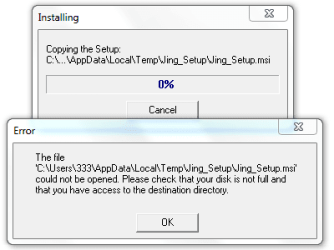
For example, when installing Jing, it extracted an .msi file, but failed when attempting to run it (see attached screenshot). I could, however, open the temp folder and run it myself.

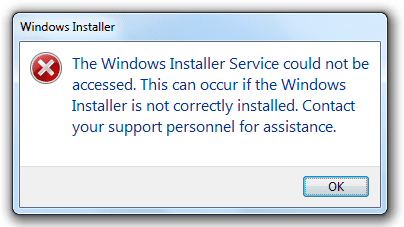
I just tried installing Java as well, and it doesn't even get as far as extracting itself (2nd screenshot). Not sure how to get this installed.

I really appreciate the help, Shawn.
 

Attachments

  • jing_install_error.png
    jing_install_error.png
    6.8 KB · Views: 2
  • java_install_error.png
    java_install_error.png
    7.9 KB · Views: 3

My Computer My Computer

At a glance

7
OS
7

My Computer My Computer

At a glance

64-bit Windows 11 Pro for WorkstationsIntel i7-8700K OC'd to 5 GHz64 GB (4x16GB) G.SKILL TridentZ RGB DDR4 3600...ASUS ROG-STRIX-GTX1080TI-O11G-GAMING
Computer type
PC/Desktop
Computer Manufacturer/Model Number
Self built custom
OS
64-bit Windows 11 Pro for Workstations
CPU
Intel i7-8700K OC'd to 5 GHz
Motherboard
ASUS ROG Maximus XI Formula Z390
Memory
64 GB (4x16GB) G.SKILL TridentZ RGB DDR4 3600 MHz
Graphics Card(s)
ASUS ROG-STRIX-GTX1080TI-O11G-GAMING
Sound Card
Integrated
Monitor(s) Displays
2 x Samsung Odyssey G7 27"
Screen Resolution
2560x1440
Hard Drives
1TB Samsung 990 PRO M.2,
4TB Samsung 990 PRO PRO M.2,
TerraMaster F8 SSD Plus NAS
PSU
Seasonic Prime Titanium 850W
Case
Thermaltake Core P3
Cooling
Corsair Hydro H115i
Keyboard
Logitech wireless K800
Mouse
Logitech MX Master 4
Internet Speed
2 Gb/s Download and 100 Mb/s Upload
Antivirus
Malwarebyte Anti-Malware Premium
Browser
Google Chrome
Other Info
Logitech Z625 speaker system,
Logitech BRIO 4K Pro webcam,
HP Color LaserJet Pro MFP M477fdn,
APC SMART-UPS RT 1000 XL - SURT1000XLI,
Galaxy S23 Plus phone
I had actually tried that, but it had no effect. :(
 

My Computer My Computer

At a glance

7
OS
7
I am truly bewildered. I just went through and uninstalled every update (except a couple which didn't have the option: KB2533552 and KB976902). It had no affect.

I then created a new user account, which has the same problem.

I tried installing Microsoft Security Essentials. It failed as well, giving me a link to this article for a remedy which did not work.

I suppose I could do a repair install, but I'd rather not have to. I don't have much faith that it would work anyway.

Should I just go back to my trusty 32-bit? I had hopes of getting more RAM soon, but 64-bit is proving to be a debacle.

But why? What has happened to my system? I've never encountered such an impenetrable conundrum.
 

My Computer My Computer

At a glance

7
OS
7
I think you may just have a bad install caused by something.

I would usually recommend trying a system restore using a restore point dated before this happened, but since you just installed Windows you may not have one and a clean install of either 32-bit or 64-bit may be the option to do instead. :(
 

My Computer My Computer

At a glance

64-bit Windows 11 Pro for WorkstationsIntel i7-8700K OC'd to 5 GHz64 GB (4x16GB) G.SKILL TridentZ RGB DDR4 3600...ASUS ROG-STRIX-GTX1080TI-O11G-GAMING
Computer type
PC/Desktop
Computer Manufacturer/Model Number
Self built custom
OS
64-bit Windows 11 Pro for Workstations
CPU
Intel i7-8700K OC'd to 5 GHz
Motherboard
ASUS ROG Maximus XI Formula Z390
Memory
64 GB (4x16GB) G.SKILL TridentZ RGB DDR4 3600 MHz
Graphics Card(s)
ASUS ROG-STRIX-GTX1080TI-O11G-GAMING
Sound Card
Integrated
Monitor(s) Displays
2 x Samsung Odyssey G7 27"
Screen Resolution
2560x1440
Hard Drives
1TB Samsung 990 PRO M.2,
4TB Samsung 990 PRO PRO M.2,
TerraMaster F8 SSD Plus NAS
PSU
Seasonic Prime Titanium 850W
Case
Thermaltake Core P3
Cooling
Corsair Hydro H115i
Keyboard
Logitech wireless K800
Mouse
Logitech MX Master 4
Internet Speed
2 Gb/s Download and 100 Mb/s Upload
Antivirus
Malwarebyte Anti-Malware Premium
Browser
Google Chrome
Other Info
Logitech Z625 speaker system,
Logitech BRIO 4K Pro webcam,
HP Color LaserJet Pro MFP M477fdn,
APC SMART-UPS RT 1000 XL - SURT1000XLI,
Galaxy S23 Plus phone
Last edited by a moderator:

My Computer My Computer

At a glance

Win 7 Pro x64i7 2630QM @ 2Ghz6 GBMobile Intel HD / Radeon 6650M
Computer Manufacturer/Model Number
Acer Aspire 7750G-9657
OS
Win 7 Pro x64
CPU
i7 2630QM @ 2Ghz
Memory
6 GB
Graphics Card(s)
Mobile Intel HD / Radeon 6650M
Screen Resolution
1600x900
Hard Drives
Toshiba 750GB
Case
Laptop
Mouse
Logitech M305 USB Wireless Mouse
Internet Speed
Whatever I can get for free. :)
Have you tried setting the UAC to "Never notify"?
That's one of the first things I do when setting up Windows. This, unfortunately, goes beyond the realm of UAC.


I ended up having to reinstall Windows altogether. This problem was so insidious, I couldn't even do a repair install (as per this tutorial). Setup.exe would just crash immediately after clicking "Install now", where it would normally say "Setup is copying temporary files". Absolutely nothing was immune to this bug.

So, this time around, I've set restore points every step of the way. Hopefully, I won't have to use them.
 

My Computer My Computer

At a glance

7
OS
7
Xichael,

I'm happy to hear that you got it sorted. To bad it took a clean install to do it.
 

My Computer My Computer

At a glance

64-bit Windows 11 Pro for WorkstationsIntel i7-8700K OC'd to 5 GHz64 GB (4x16GB) G.SKILL TridentZ RGB DDR4 3600...ASUS ROG-STRIX-GTX1080TI-O11G-GAMING
Computer type
PC/Desktop
Computer Manufacturer/Model Number
Self built custom
OS
64-bit Windows 11 Pro for Workstations
CPU
Intel i7-8700K OC'd to 5 GHz
Motherboard
ASUS ROG Maximus XI Formula Z390
Memory
64 GB (4x16GB) G.SKILL TridentZ RGB DDR4 3600 MHz
Graphics Card(s)
ASUS ROG-STRIX-GTX1080TI-O11G-GAMING
Sound Card
Integrated
Monitor(s) Displays
2 x Samsung Odyssey G7 27"
Screen Resolution
2560x1440
Hard Drives
1TB Samsung 990 PRO M.2,
4TB Samsung 990 PRO PRO M.2,
TerraMaster F8 SSD Plus NAS
PSU
Seasonic Prime Titanium 850W
Case
Thermaltake Core P3
Cooling
Corsair Hydro H115i
Keyboard
Logitech wireless K800
Mouse
Logitech MX Master 4
Internet Speed
2 Gb/s Download and 100 Mb/s Upload
Antivirus
Malwarebyte Anti-Malware Premium
Browser
Google Chrome
Other Info
Logitech Z625 speaker system,
Logitech BRIO 4K Pro webcam,
HP Color LaserJet Pro MFP M477fdn,
APC SMART-UPS RT 1000 XL - SURT1000XLI,
Galaxy S23 Plus phone
The problem has returned. Nothing will write to any temp folder, and therefore nothing can be installed—including a repair installation of windows. Going back to one of my original restore points didn't work either.

I'm giving up on 64-bit Windows for now. I'd never seen this problem until now. Hopefully I'll never see this system-destroying bug again.

Now off to wipe and copy back 1TB of data and reinstall dozens of apps for the third time. :cry:
 

My Computer My Computer

At a glance

7
OS
7
I'm sorry to hear that Xichael. I hope the new installation goes and runs smoothly for you. :(
 

My Computer My Computer

At a glance

64-bit Windows 11 Pro for WorkstationsIntel i7-8700K OC'd to 5 GHz64 GB (4x16GB) G.SKILL TridentZ RGB DDR4 3600...ASUS ROG-STRIX-GTX1080TI-O11G-GAMING
Computer type
PC/Desktop
Computer Manufacturer/Model Number
Self built custom
OS
64-bit Windows 11 Pro for Workstations
CPU
Intel i7-8700K OC'd to 5 GHz
Motherboard
ASUS ROG Maximus XI Formula Z390
Memory
64 GB (4x16GB) G.SKILL TridentZ RGB DDR4 3600 MHz
Graphics Card(s)
ASUS ROG-STRIX-GTX1080TI-O11G-GAMING
Sound Card
Integrated
Monitor(s) Displays
2 x Samsung Odyssey G7 27"
Screen Resolution
2560x1440
Hard Drives
1TB Samsung 990 PRO M.2,
4TB Samsung 990 PRO PRO M.2,
TerraMaster F8 SSD Plus NAS
PSU
Seasonic Prime Titanium 850W
Case
Thermaltake Core P3
Cooling
Corsair Hydro H115i
Keyboard
Logitech wireless K800
Mouse
Logitech MX Master 4
Internet Speed
2 Gb/s Download and 100 Mb/s Upload
Antivirus
Malwarebyte Anti-Malware Premium
Browser
Google Chrome
Other Info
Logitech Z625 speaker system,
Logitech BRIO 4K Pro webcam,
HP Color LaserJet Pro MFP M477fdn,
APC SMART-UPS RT 1000 XL - SURT1000XLI,
Galaxy S23 Plus phone
My god, it's back.

I believe I witnessed the genesis of the problem this time; it began immediately after running IE9 for the first time. I uninstalled it to no avail.

There must be a solution to this short of reinstalling Windows yet again.

Help!
 

My Computer My Computer

At a glance

7
OS
7
Back
Top