Seeing over double free disk space after moving files around...

hikerguy

New member
Local time
9:50 AM
Messages
7
I decided to move all of my data files under a primary folder to make backing up my personal data files easier. I did a check before and after of my free space and surprisingly, my free disk space has more than doubled after doing this (and I did not delete any files, nor did I empty my Trash after moving the files).

This happened on the primary disk AND a backup drive I have at the house. The first time I did it I thought I was losing it, but after taking before and after snapshots again with my backup drive, I'm convinced I'm not :D

Is there any explanation as to why Win7 is reporting more than double the free disk space when all I've done is moved all of my personal data files under a main folder???? It just makes no sense.

Thanks,

Andy
 

My Computer My Computer

At a glance

Win7 Home Premium 64 bitIntelCorei5-2400SandyBridge3.1GHzCORSAIRVengeance8GB(2x4GB)240-PinDDR3SDRAMDDR...
Computer type
PC/Desktop
Computer Manufacturer/Model Number
Custom built
OS
Win7 Home Premium 64 bit
CPU
IntelCorei5-2400SandyBridge3.1GHz
Motherboard
ASRockP67EXTREME6(B3)LGA1155Intel
Memory
CORSAIRVengeance8GB(2x4GB)240-PinDDR3SDRAMDDR31600
Antivirus
Avast
Browser
IE and FF
Hmmm.......

Does the amount of free space you NOW see at least roughly correspond to what you'd expect to see?

Do other hard drive tools also report much more free space?

Do you seem to be missing anything? All apps work and all personal files appear to be there and OK?

Offhand--maybe you had 2 instances of each file and now have only 1?

Do you or did you keep this data somewhere under C:\users?

Libraries are foreign to me and for that reason I don't use them, but they may have caused you some confusion.

I keep my data OUTSIDE of C:\users on D, with no connection to the library.
 

My Computer My Computer

At a glance

Windows 7 Home Premium SP1, 64-bitIntel Skylake i5-6600K, not overclocked8 GB HyperX DDR4-2666 (2 x 4 GB)none; graphics are integrated on CPU
Computer type
PC/Desktop
Computer Manufacturer/Model Number
Ignatz Special; 4 speed manual gearbox; factory air conditioning; one of one
OS
Windows 7 Home Premium SP1, 64-bit
CPU
Intel Skylake i5-6600K, not overclocked
Motherboard
AsRock Z170M Extreme 4, micro ATX
Memory
8 GB HyperX DDR4-2666 (2 x 4 GB)
Graphics Card(s)
none; graphics are integrated on CPU
Sound Card
onboard: Realtek ALC1150; external: USB Behringer UF0-202
Monitor(s) Displays
Dell S2340M 23 inch IPS
Screen Resolution
1600 x 900
Hard Drives
System: Crucial MX100 series SSD, 128 GB;
Data: Samsung Spinpoint 103SJ, 1 TB;
Backup: WD Caviar Green WD30EZRX-00D8PB0, 3 TB
PSU
Rosewill SilentNight 500 watt fanless, semi-modular
Case
Antec Solo II
Cooling
Noctua NH-U12S; Noctua F12 intake, Noctua S12A exhaust
Keyboard
Microsoft 200 6JH-00001 USB
Mouse
Dell or Microsoft optical wired; USB
Antivirus
Microsoft Security Essentials and Malwarebytes Premium
Browser
Pale Moon
Other Info
All fans PWM; speeds at idle: CPU circa 500 rpm; intake circa 600 rpm; exhaust circa 600 rpm; CPU temps 27 idle and 47 C load in a warm room (27 C/81 F) when running Intel Extreme Tuning Utility stress test.
Thanks for your reply. Below are my replies to your questions:

Does the amount of free space you NOW see at least roughly correspond to what you'd expect to see?

I can only go on what I captured earlier (by right-clicking the drive and choosing Properties). The free space shown AFTER the file moves is over double what I had seen before.

Do other hard drive tools also report much more free space?

What other harddrive tools would you recommned I use to check?

Do you seem to be missing anything? All apps work and all personal files appear to be there and OK?

From the checking I did, everything appears to be there, but I don't see how it could if I have more than twice the free space now.

Offhand--maybe you had 2 instances of each file and now have only 1?

I don't see that as a possiblitly. I just drug each of my folders (e.g. PHOTOS, MUSIC, etc.), under a primary folder I name ANDY.

Do you or did you keep this data somewhere under C:\users?

This drive only had one partition, so everything was under c:\

Libraries are foreign to me and for that reason I don't use them, but they may have caused you some confusion.

I'm not familiar with libraries either, so I think we can rule that out.
 

My Computer My Computer

At a glance

Win7 Home Premium 64 bitIntelCorei5-2400SandyBridge3.1GHzCORSAIRVengeance8GB(2x4GB)240-PinDDR3SDRAMDDR...
Computer type
PC/Desktop
Computer Manufacturer/Model Number
Custom built
OS
Win7 Home Premium 64 bit
CPU
IntelCorei5-2400SandyBridge3.1GHz
Motherboard
ASRockP67EXTREME6(B3)LGA1155Intel
Memory
CORSAIRVengeance8GB(2x4GB)240-PinDDR3SDRAMDDR31600
Antivirus
Avast
Browser
IE and FF
You are using Avast and "maybe" hit with its System Restore set to 50% "feature" :P I guess the feature is either fixed by now or at beta stage.

See my old copy paste about it:
Please read https://forum.avast.com/index.php?topic=162041.0
Also check https://forum.avast.com/index.php?topic=166697.0

You can try:
- go to control panel-> programs and features -> Avast -> change
- remove the component NG (may also be called-Secure Virtual Machines or Sandbox).
- change % back to 10% (windows default) or whatever you like it
- restart
- check if % is what you set
- check restore points (seems this NG delete old restore points when run out of space)
- manually create a restore point if there are none
- open command prompt ->vssadmin list shadowstorage
- see how much space it takes.
You can also try uninstalling Grimefighter.

In short go check System Restore settings, and see if they are set to 50%.
 

My Computer My Computer

At a glance

Windows 7 Ultimate x64 SP1AMD Phenom 2 1090T2x8GB Kingston HyperX Fury Black 1600Mhz Unga...MSI GTX 970 Gaming 4G
Computer type
PC/Desktop
Computer Manufacturer/Model Number
Custom Build
OS
Windows 7 Ultimate x64 SP1
CPU
AMD Phenom 2 1090T
Motherboard
Gigabyte GA-890FXA-UD5
Memory
2x8GB Kingston HyperX Fury Black 1600Mhz Unganged
Graphics Card(s)
MSI GTX 970 Gaming 4G
Sound Card
Realtek On-Board HD 7.1 Audio / Logitech G35
Monitor(s) Displays
3xAcer GD245HQ
Screen Resolution
1920x1080
Hard Drives
Samsung 850 Pro 512GB SSD - OS /
WD Caviar Black SATA 3 - 1 TBx2 - Dynamic RAID 0 /
WD Caviar Green SATA 2 - 640GBx2 - Dynamic RAID 0 /
WD Caviar Green SATA 2 - 640GB - Internal Backup /
Seagate Barracude SATA 3 - 3TB - External Backup/ Sync
PSU
HighPower 1000W
Case
Cooler Master HAF 932
Cooling
Noctua NH-D14
Keyboard
Logitech G19
Mouse
Logitech G500
Internet Speed
100/4 Mbit Cable (100GB quota)
Antivirus
ZoneAlarm Extreme Security / MBAM Pro / MBAE Free / SAS Free
Browser
IE 11 - Firefox - Chrome
Other Info
Logitech F710/ G27/ G940/ Z5500 // TrackIR 5 // Nvidia 3D Surround Vision
The 50% bug should be fixed in the latest version of Avast.
I was just reading a thread on the Avast forum where someone reported now Avast deleted all restore points :eek:

@hikerguy
Do you have a system backup image such as Macrium, from before the change.
If you do, you could mount the image and compare it to your current space usage.
 

My Computer My Computer

At a glance

Multi-Boot W7_Pro_x64 W8.1_Pro_x64 W10_Pro_x6...AMD Athlon II x4 6206GB GSkill DDR2 800AMD 4670 GPU + AMD 4200 IGP
Computer type
PC/Desktop
Computer Manufacturer/Model Number
home built
OS
Multi-Boot W7_Pro_x64 W8.1_Pro_x64 W10_Pro_x64 +Linux_VMs +Chromium_VM
CPU
AMD Athlon II x4 620
Motherboard
Gigabyte GA-MA785G-UD3H
Memory
6GB GSkill DDR2 800
Graphics Card(s)
AMD 4670 GPU + AMD 4200 IGP
Sound Card
on board Realtek ALC889A
Monitor(s) Displays
RCA 40" LCD TV, Insignia 32" LCD TV, HP 15" LCD monitor
Screen Resolution
1680 x 1050
Hard Drives
OCZ Vertex 3 120GB,
Samsung F3 1TB (3),
Several others - WD, Seagate, Hitachi, ...
PSU
Corsair 500 W
Case
Rosewill mid tower
Cooling
CM 90mm rifle
Keyboard
Gyration wireless, Logitech wireless, Dell USB wired
Mouse
Gyration wireless, Logitech wireless, V7 USB wired
Internet Speed
Spectrum - 100Mbps D / 10Mbps U
Antivirus
Avast, MBAM3, EMET, WinPatrol
Browser
Pale Moon, Firefox, IE
Other Info
2 multi-boot PC's
Mainly HTPC/Office/Gen purpose (no gaming).
Trendnet USB KVM.
LG DVD burner/Blue Ray Player.
Tray system for removable SATA backup drives.

Not currently OCd, under-volted.
I use Hybrid sleep, rarely re-boot or shutdown.

Hauppauge HD-PVR, Avermedia PCIe TV Tuner, Hauppauge PCI TV Tuner.
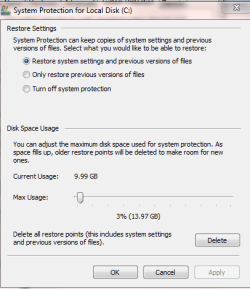
I have never heard of this problem with Avast. When I checked how much was being used for my restore point, it only showed 3% (see attachment). So, can this still be the problem in my case? I did go ahead and unchecked "Secure Virtual Machines" and rebooted.

Do you think it's safe for me to assume the extra free space was due to Avast????

Thanks,

Andy
 

Attachments

  • system protection.PNG
    system protection.PNG
    12.1 KB · Views: 8

My Computer My Computer

At a glance

Win7 Home Premium 64 bitIntelCorei5-2400SandyBridge3.1GHzCORSAIRVengeance8GB(2x4GB)240-PinDDR3SDRAMDDR...
Computer type
PC/Desktop
Computer Manufacturer/Model Number
Custom built
OS
Win7 Home Premium 64 bit
CPU
IntelCorei5-2400SandyBridge3.1GHz
Motherboard
ASRockP67EXTREME6(B3)LGA1155Intel
Memory
CORSAIRVengeance8GB(2x4GB)240-PinDDR3SDRAMDDR31600
Antivirus
Avast
Browser
IE and FF
No, if it was 3% it was not your problem.

I am with David here regarding:
Do you have a system backup image such as Macrium, from before the change.
If you do, you could mount the image and compare it to your current space usage.
 

My Computer My Computer

At a glance

Windows 7 Ultimate x64 SP1AMD Phenom 2 1090T2x8GB Kingston HyperX Fury Black 1600Mhz Unga...MSI GTX 970 Gaming 4G
Computer type
PC/Desktop
Computer Manufacturer/Model Number
Custom Build
OS
Windows 7 Ultimate x64 SP1
CPU
AMD Phenom 2 1090T
Motherboard
Gigabyte GA-890FXA-UD5
Memory
2x8GB Kingston HyperX Fury Black 1600Mhz Unganged
Graphics Card(s)
MSI GTX 970 Gaming 4G
Sound Card
Realtek On-Board HD 7.1 Audio / Logitech G35
Monitor(s) Displays
3xAcer GD245HQ
Screen Resolution
1920x1080
Hard Drives
Samsung 850 Pro 512GB SSD - OS /
WD Caviar Black SATA 3 - 1 TBx2 - Dynamic RAID 0 /
WD Caviar Green SATA 2 - 640GBx2 - Dynamic RAID 0 /
WD Caviar Green SATA 2 - 640GB - Internal Backup /
Seagate Barracude SATA 3 - 3TB - External Backup/ Sync
PSU
HighPower 1000W
Case
Cooler Master HAF 932
Cooling
Noctua NH-D14
Keyboard
Logitech G19
Mouse
Logitech G500
Internet Speed
100/4 Mbit Cable (100GB quota)
Antivirus
ZoneAlarm Extreme Security / MBAM Pro / MBAE Free / SAS Free
Browser
IE 11 - Firefox - Chrome
Other Info
Logitech F710/ G27/ G940/ Z5500 // TrackIR 5 // Nvidia 3D Surround Vision
Didn't think so, but what was being said would have explained my "problem" lol

No, I don't have a system backup image. I've always cloned my entire drive using Clonezilla.

Any thoughts on what else could have caused the free space to more than double after I moved files around?

Thanks,

Andy
 

My Computer My Computer

At a glance

Win7 Home Premium 64 bitIntelCorei5-2400SandyBridge3.1GHzCORSAIRVengeance8GB(2x4GB)240-PinDDR3SDRAMDDR...
Computer type
PC/Desktop
Computer Manufacturer/Model Number
Custom built
OS
Win7 Home Premium 64 bit
CPU
IntelCorei5-2400SandyBridge3.1GHz
Motherboard
ASRockP67EXTREME6(B3)LGA1155Intel
Memory
CORSAIRVengeance8GB(2x4GB)240-PinDDR3SDRAMDDR31600
Antivirus
Avast
Browser
IE and FF
Download something like TreeSize Free to see if it agrees with Windows Explorer as to how much free space you have.

Or any other drive tool that comes to your mind.

I've seen cases where Explorer isn't highly accurate. I'm assuming that's what you are relying on now.
 

My Computer My Computer

At a glance

Windows 7 Home Premium SP1, 64-bitIntel Skylake i5-6600K, not overclocked8 GB HyperX DDR4-2666 (2 x 4 GB)none; graphics are integrated on CPU
Computer type
PC/Desktop
Computer Manufacturer/Model Number
Ignatz Special; 4 speed manual gearbox; factory air conditioning; one of one
OS
Windows 7 Home Premium SP1, 64-bit
CPU
Intel Skylake i5-6600K, not overclocked
Motherboard
AsRock Z170M Extreme 4, micro ATX
Memory
8 GB HyperX DDR4-2666 (2 x 4 GB)
Graphics Card(s)
none; graphics are integrated on CPU
Sound Card
onboard: Realtek ALC1150; external: USB Behringer UF0-202
Monitor(s) Displays
Dell S2340M 23 inch IPS
Screen Resolution
1600 x 900
Hard Drives
System: Crucial MX100 series SSD, 128 GB;
Data: Samsung Spinpoint 103SJ, 1 TB;
Backup: WD Caviar Green WD30EZRX-00D8PB0, 3 TB
PSU
Rosewill SilentNight 500 watt fanless, semi-modular
Case
Antec Solo II
Cooling
Noctua NH-U12S; Noctua F12 intake, Noctua S12A exhaust
Keyboard
Microsoft 200 6JH-00001 USB
Mouse
Dell or Microsoft optical wired; USB
Antivirus
Microsoft Security Essentials and Malwarebytes Premium
Browser
Pale Moon
Other Info
All fans PWM; speeds at idle: CPU circa 500 rpm; intake circa 600 rpm; exhaust circa 600 rpm; CPU temps 27 idle and 47 C load in a warm room (27 C/81 F) when running Intel Extreme Tuning Utility stress test.

My Computer My Computer

At a glance

Windows 7 Ultimate x64 SP1AMD Phenom 2 1090T2x8GB Kingston HyperX Fury Black 1600Mhz Unga...MSI GTX 970 Gaming 4G
Computer type
PC/Desktop
Computer Manufacturer/Model Number
Custom Build
OS
Windows 7 Ultimate x64 SP1
CPU
AMD Phenom 2 1090T
Motherboard
Gigabyte GA-890FXA-UD5
Memory
2x8GB Kingston HyperX Fury Black 1600Mhz Unganged
Graphics Card(s)
MSI GTX 970 Gaming 4G
Sound Card
Realtek On-Board HD 7.1 Audio / Logitech G35
Monitor(s) Displays
3xAcer GD245HQ
Screen Resolution
1920x1080
Hard Drives
Samsung 850 Pro 512GB SSD - OS /
WD Caviar Black SATA 3 - 1 TBx2 - Dynamic RAID 0 /
WD Caviar Green SATA 2 - 640GBx2 - Dynamic RAID 0 /
WD Caviar Green SATA 2 - 640GB - Internal Backup /
Seagate Barracude SATA 3 - 3TB - External Backup/ Sync
PSU
HighPower 1000W
Case
Cooler Master HAF 932
Cooling
Noctua NH-D14
Keyboard
Logitech G19
Mouse
Logitech G500
Internet Speed
100/4 Mbit Cable (100GB quota)
Antivirus
ZoneAlarm Extreme Security / MBAM Pro / MBAE Free / SAS Free
Browser
IE 11 - Firefox - Chrome
Other Info
Logitech F710/ G27/ G940/ Z5500 // TrackIR 5 // Nvidia 3D Surround Vision
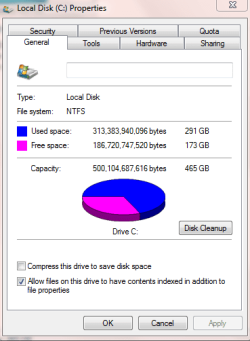
I was going by the Properties window on the c: drive (see attachment). I also remembered I had WinDirStat installed. It's showing 173.9 GB free, it matches what Windows is reporting as well. I'm not understanding what happened. Just makes no sense.
 

Attachments

  • size.PNG
    size.PNG
    12.6 KB · Views: 5

My Computer My Computer

At a glance

Win7 Home Premium 64 bitIntelCorei5-2400SandyBridge3.1GHzCORSAIRVengeance8GB(2x4GB)240-PinDDR3SDRAMDDR...
Computer type
PC/Desktop
Computer Manufacturer/Model Number
Custom built
OS
Win7 Home Premium 64 bit
CPU
IntelCorei5-2400SandyBridge3.1GHz
Motherboard
ASRockP67EXTREME6(B3)LGA1155Intel
Memory
CORSAIRVengeance8GB(2x4GB)240-PinDDR3SDRAMDDR31600
Antivirus
Avast
Browser
IE and FF
What version of Avast are you using now, and did you recently do a program update ?
Secure Virtual Machines is the tool that causes the 50% bug.
It's possible your max storage was at 50% and changed to 3%.
If you don't know what it was at before, i don't think anyone can answer definitely if that is the problem.
In the Avast thread the OP reported Avast set System Restore space to 3%.
https://forum.avast.com/index.php?topic=174508.0

Do you have a recent cloned HD you could compare to ?
 

My Computer My Computer

At a glance

Multi-Boot W7_Pro_x64 W8.1_Pro_x64 W10_Pro_x6...AMD Athlon II x4 6206GB GSkill DDR2 800AMD 4670 GPU + AMD 4200 IGP
Computer type
PC/Desktop
Computer Manufacturer/Model Number
home built
OS
Multi-Boot W7_Pro_x64 W8.1_Pro_x64 W10_Pro_x64 +Linux_VMs +Chromium_VM
CPU
AMD Athlon II x4 620
Motherboard
Gigabyte GA-MA785G-UD3H
Memory
6GB GSkill DDR2 800
Graphics Card(s)
AMD 4670 GPU + AMD 4200 IGP
Sound Card
on board Realtek ALC889A
Monitor(s) Displays
RCA 40" LCD TV, Insignia 32" LCD TV, HP 15" LCD monitor
Screen Resolution
1680 x 1050
Hard Drives
OCZ Vertex 3 120GB,
Samsung F3 1TB (3),
Several others - WD, Seagate, Hitachi, ...
PSU
Corsair 500 W
Case
Rosewill mid tower
Cooling
CM 90mm rifle
Keyboard
Gyration wireless, Logitech wireless, Dell USB wired
Mouse
Gyration wireless, Logitech wireless, V7 USB wired
Internet Speed
Spectrum - 100Mbps D / 10Mbps U
Antivirus
Avast, MBAM3, EMET, WinPatrol
Browser
Pale Moon, Firefox, IE
Other Info
2 multi-boot PC's
Mainly HTPC/Office/Gen purpose (no gaming).
Trendnet USB KVM.
LG DVD burner/Blue Ray Player.
Tray system for removable SATA backup drives.

Not currently OCd, under-volted.
I use Hybrid sleep, rarely re-boot or shutdown.

Hauppauge HD-PVR, Avermedia PCIe TV Tuner, Hauppauge PCI TV Tuner.
I'm running Avast 2015, and have been for several months. No program updates to Avast (if that's what you're asking). No new software installs of any kind for about three weeks).

I DO have one more drive that I keep in our safe deposit back at our bank that's about a month old, but I'd like to find out what is going on before I start messing aroud with that drive.

I went from about 77Gb to 173Gb after moving all the files around (but NOT deleting ANYTHING in the process).
 

My Computer My Computer

At a glance

Win7 Home Premium 64 bitIntelCorei5-2400SandyBridge3.1GHzCORSAIRVengeance8GB(2x4GB)240-PinDDR3SDRAMDDR...
Computer type
PC/Desktop
Computer Manufacturer/Model Number
Custom built
OS
Win7 Home Premium 64 bit
CPU
IntelCorei5-2400SandyBridge3.1GHz
Motherboard
ASRockP67EXTREME6(B3)LGA1155Intel
Memory
CORSAIRVengeance8GB(2x4GB)240-PinDDR3SDRAMDDR31600
Antivirus
Avast
Browser
IE and FF
Maybe you have an older Avast 2015 version ?

Version 2015.10.3.2223 is the release that should have fixed the 50% bug, apx. 2 weeks ago.
http://www.sevenforums.com/system-security/497-latest-version-avast-antivirus-79.html#post3107835

With the 50% bug, from what i have read, max space could get set up to 50%, and then later Avast might delete all restore points, and start over again ...

Version 2015.10.3.2225 was just released a couple of days ago.

It's possible Avast changed your free space, but i don't know how you can definitely say for sure with the info you have.
 

My Computer My Computer

At a glance

Multi-Boot W7_Pro_x64 W8.1_Pro_x64 W10_Pro_x6...AMD Athlon II x4 6206GB GSkill DDR2 800AMD 4670 GPU + AMD 4200 IGP
Computer type
PC/Desktop
Computer Manufacturer/Model Number
home built
OS
Multi-Boot W7_Pro_x64 W8.1_Pro_x64 W10_Pro_x64 +Linux_VMs +Chromium_VM
CPU
AMD Athlon II x4 620
Motherboard
Gigabyte GA-MA785G-UD3H
Memory
6GB GSkill DDR2 800
Graphics Card(s)
AMD 4670 GPU + AMD 4200 IGP
Sound Card
on board Realtek ALC889A
Monitor(s) Displays
RCA 40" LCD TV, Insignia 32" LCD TV, HP 15" LCD monitor
Screen Resolution
1680 x 1050
Hard Drives
OCZ Vertex 3 120GB,
Samsung F3 1TB (3),
Several others - WD, Seagate, Hitachi, ...
PSU
Corsair 500 W
Case
Rosewill mid tower
Cooling
CM 90mm rifle
Keyboard
Gyration wireless, Logitech wireless, Dell USB wired
Mouse
Gyration wireless, Logitech wireless, V7 USB wired
Internet Speed
Spectrum - 100Mbps D / 10Mbps U
Antivirus
Avast, MBAM3, EMET, WinPatrol
Browser
Pale Moon, Firefox, IE
Other Info
2 multi-boot PC's
Mainly HTPC/Office/Gen purpose (no gaming).
Trendnet USB KVM.
LG DVD burner/Blue Ray Player.
Tray system for removable SATA backup drives.

Not currently OCd, under-volted.
I use Hybrid sleep, rarely re-boot or shutdown.

Hauppauge HD-PVR, Avermedia PCIe TV Tuner, Hauppauge PCI TV Tuner.
It shows I'm running that exact version now, but I also noticed I had it set to auto update (which I just changed to "Ask when an update is available".

I guess all I can really do is assume this was because of the Avast bug. It's the only thing that makes sense, since it happened on two drives (and one is a clone of the other, only a couple of months older).

Thanks for everyone's help!

Andy
 
Last edited:

My Computer My Computer

At a glance

Win7 Home Premium 64 bitIntelCorei5-2400SandyBridge3.1GHzCORSAIRVengeance8GB(2x4GB)240-PinDDR3SDRAMDDR...
Computer type
PC/Desktop
Computer Manufacturer/Model Number
Custom built
OS
Win7 Home Premium 64 bit
CPU
IntelCorei5-2400SandyBridge3.1GHz
Motherboard
ASRockP67EXTREME6(B3)LGA1155Intel
Memory
CORSAIRVengeance8GB(2x4GB)240-PinDDR3SDRAMDDR31600
Antivirus
Avast
Browser
IE and FF
Back
Top