Send To Context Menu - Remove or Restore Default Items

How to Remove and Restore Default "Send To" Context Menu Items in Windows 7 and Windows 8

   Information
This will show you how to either remove or restore the default Send To context (right click) menu. This includes the Compressed (zipped) Folder, Desktop (create shortcut), Documents, Fax recipient, and Mail recipient menu items.

You can press and hold SHIFT + Right Click and release SHIFT on a item to see an expanded Sent To context menu.

   Note
The hidden SendTo system folder is located at the path below:

C:\Users\(user-name)\AppData\Roaming\Microsoft\Windows\SendTo

OR (shorter)

Shell:SendTo


EXAMPLE: Default Send To Context Menu
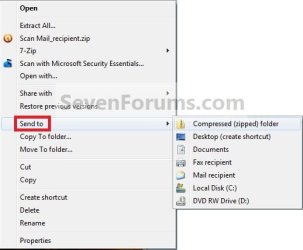
Context_menu.jpg
EXAMPLE: Expanded Send To Context Menu
NOTE: The expanded Send To context menu is opened by pressing and holding Shift before right clicking on the file or folder, then clicking on Send To.
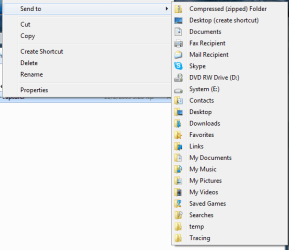
sendto2.png


OPTION ONE

To Manually Restore Send to Context Menu Items


1. Go to the hidden folder location below, and do step 2 or 3 below for what you would like to do.
C:\Users\Default\AppData\Roaming\Microsoft\Windows
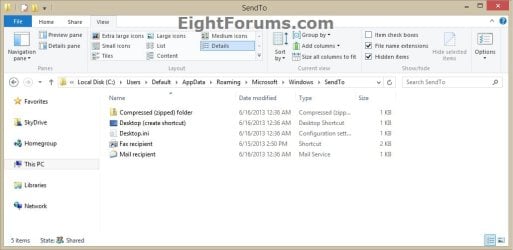
Default_SendTo.jpg
2. To Restore SendTo Folder and All Send to Context Menu Items
A) Copy the SendTo folder.

B) Go to the hidden folder (shell:sendto) location below.
C:\Users\(your user-name)\AppData\Roaming\Microsoft\Windows

C) Paste the SendTo folder, and approve.
3. To Restore Specific Send to Context Menu Item(s)
A) Open the SendTo folder.

B) Copy the shortcuts that you want to restore.

C) Go to the hidden folder (shell:sendto) location below.
C:\Users\(your user-name)\AppData\Roaming\Microsoft\Windows\SendTo
D) Paste the shortcuts into your SendTo folder, and approve.
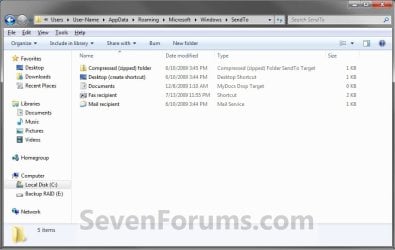
Send_To.jpg


OPTION TWO

To Restore a Send to Context Menu Item with a Download


1. To Restore Compressed (zipped) Folder
A) Click on the download button below to download the Compressed_(zipped)_folder.zip file.

Download


2. To Restore Desktop (create shortcut)
A) Click/tap on the download button below to download the Desktop_(create shortcut).zip file.

Download


3. To Restore Documents
A) Click/tap on the download button below to download the Documents.zip file.

Download


4. To Restore Fax Recipient
A) Click/tap on the download button below to download the Fax_Recipient .zip file.

Download


5. To Restore Mail Recipient
A) Click/tap on the download button below to download the Mail_Recipient .zip file.

Download


6. Save the ZIP file to your Desktop.

7. Open the .zip file and extract (drag and drop) the shortcut file to your desktop.

8. Right click on the shortcut, then click/tap on Properties, General tab, and on the Unblock button. (see screenshot below)
NOTE: If you do not have a Unblock button under the General tab, then the shortcut is already unblocked and you can continue on to step 9.
Unblock.jpg
9. Press the Windows + R keys to open the Run dialog, type shell:sendto, and press Enter.

10. Move the extracted shortcut(s) (step 7) into the SentTo folder. (see screenshot below)
NOTE: If you wanted to remove a Send To context menu item, then right click on a shortcut in the SendTo folder and click on Delete and Yes.
Send_To.jpg
11. When done, close the SendTo folder and delete the ZIP file on the desktop if you would like to.
That's it,
Shawn


Attachments

Last edited:
It worked, but wouldn't extract. I just dragged to shortcut and did from there what you said. Tanx, Aficious.

EDIT:
Spoke too soon. Still isn't in "send to". Aficious.
 

My Computer

Computer Manufacturer/Model Number
HP dv7-1000 CTO
OS
Windows7
Hello Aficious, and welcome to Seven Forums.

Were you able to extract the shortcut from the ZIP file, and copy it into the SendTo folder?
 

My Computer

Computer type
PC/Desktop
Computer Manufacturer/Model Number
Self built custom
OS
64-bit Windows 11 Pro for Workstations
CPU
Intel i7-8700K OC'd to 5 GHz
Motherboard
ASUS ROG Maximus XI Formula Z390
Memory
64 GB (4x16GB) G.SKILL TridentZ RGB DDR4 3600 MHz
Graphics Card(s)
ASUS ROG-STRIX-GTX1080TI-O11G-GAMING
Sound Card
Integrated
Monitor(s) Displays
2 x Samsung Odyssey G7 27"
Screen Resolution
2560x1440
Hard Drives
1TB Samsung 990 PRO M.2,
4TB Samsung 990 PRO PRO M.2,
TerraMaster F8 SSD Plus NAS
PSU
Seasonic Prime Titanium 850W
Case
Thermaltake Core P3
Cooling
Corsair Hydro H115i
Keyboard
Logitech wireless K800
Mouse
Logitech MX Master 4
Internet Speed
2 Gb/s Download and 100 Mb/s Upload
Antivirus
Malwarebyte Anti-Malware Premium
Browser
Google Chrome
Other Info
Logitech Z625 speaker system,
Logitech BRIO 4K Pro webcam,
HP Color LaserJet Pro MFP M477fdn,
APC SMART-UPS RT 1000 XL - SURT1000XLI,
Galaxy S23 Plus phone
Got it! Tanx, Aficious.
 

My Computer

Computer Manufacturer/Model Number
HP dv7-1000 CTO
OS
Windows7
No problem. I'm happy to hear that you got it sorted. :)
 

My Computer

Computer type
PC/Desktop
Computer Manufacturer/Model Number
Self built custom
OS
64-bit Windows 11 Pro for Workstations
CPU
Intel i7-8700K OC'd to 5 GHz
Motherboard
ASUS ROG Maximus XI Formula Z390
Memory
64 GB (4x16GB) G.SKILL TridentZ RGB DDR4 3600 MHz
Graphics Card(s)
ASUS ROG-STRIX-GTX1080TI-O11G-GAMING
Sound Card
Integrated
Monitor(s) Displays
2 x Samsung Odyssey G7 27"
Screen Resolution
2560x1440
Hard Drives
1TB Samsung 990 PRO M.2,
4TB Samsung 990 PRO PRO M.2,
TerraMaster F8 SSD Plus NAS
PSU
Seasonic Prime Titanium 850W
Case
Thermaltake Core P3
Cooling
Corsair Hydro H115i
Keyboard
Logitech wireless K800
Mouse
Logitech MX Master 4
Internet Speed
2 Gb/s Download and 100 Mb/s Upload
Antivirus
Malwarebyte Anti-Malware Premium
Browser
Google Chrome
Other Info
Logitech Z625 speaker system,
Logitech BRIO 4K Pro webcam,
HP Color LaserJet Pro MFP M477fdn,
APC SMART-UPS RT 1000 XL - SURT1000XLI,
Galaxy S23 Plus phone
Restore "Mail Recipient" To Short Cut Menu

I downloaded the Mail Recipient item provided by one of the posters in this thread and then cut and pasted it in the Send To folder at

C:\Users\(user-name)\AppData\Roaming\Microsoft\Windows\SendTo.

Now I have it back when I right click on a photo or document. Simple fix.

:D
 

My Computer

OS
Win7HomePrem 64bit
problem with SEND TO,

JUST SHOW A FOLDER CALLED SEND TO ,BUT NO THE LINKS THAT ARE IN THERE
 

Attachments

  • Capture.JPG
    Capture.JPG
    56.7 KB · Views: 2,373

My Computer

OS
windows 7 /32 its
Hello Sagitariojahm, and welcome to Seven Forums.

What happens when you add the ones you are missing using the tutorial here?
 

My Computer

Computer type
PC/Desktop
Computer Manufacturer/Model Number
Self built custom
OS
64-bit Windows 11 Pro for Workstations
CPU
Intel i7-8700K OC'd to 5 GHz
Motherboard
ASUS ROG Maximus XI Formula Z390
Memory
64 GB (4x16GB) G.SKILL TridentZ RGB DDR4 3600 MHz
Graphics Card(s)
ASUS ROG-STRIX-GTX1080TI-O11G-GAMING
Sound Card
Integrated
Monitor(s) Displays
2 x Samsung Odyssey G7 27"
Screen Resolution
2560x1440
Hard Drives
1TB Samsung 990 PRO M.2,
4TB Samsung 990 PRO PRO M.2,
TerraMaster F8 SSD Plus NAS
PSU
Seasonic Prime Titanium 850W
Case
Thermaltake Core P3
Cooling
Corsair Hydro H115i
Keyboard
Logitech wireless K800
Mouse
Logitech MX Master 4
Internet Speed
2 Gb/s Download and 100 Mb/s Upload
Antivirus
Malwarebyte Anti-Malware Premium
Browser
Google Chrome
Other Info
Logitech Z625 speaker system,
Logitech BRIO 4K Pro webcam,
HP Color LaserJet Pro MFP M477fdn,
APC SMART-UPS RT 1000 XL - SURT1000XLI,
Galaxy S23 Plus phone
send to ......show hiden folder istead of drop down

well inside the folder are all the links also the zip option , I open the folder where the sendto folder is and all items are inthere ,just when i clik on send to "show the hiden send to folder instead of drop down the items inside ...also i did sfc /scannow,check disc
and still. thanks
 

My Computer

OS
windows 7 /32 its
You might see if doing a system restore using a restore point dated before you had this issue may be able to fix this for you.
 

My Computer

Computer type
PC/Desktop
Computer Manufacturer/Model Number
Self built custom
OS
64-bit Windows 11 Pro for Workstations
CPU
Intel i7-8700K OC'd to 5 GHz
Motherboard
ASUS ROG Maximus XI Formula Z390
Memory
64 GB (4x16GB) G.SKILL TridentZ RGB DDR4 3600 MHz
Graphics Card(s)
ASUS ROG-STRIX-GTX1080TI-O11G-GAMING
Sound Card
Integrated
Monitor(s) Displays
2 x Samsung Odyssey G7 27"
Screen Resolution
2560x1440
Hard Drives
1TB Samsung 990 PRO M.2,
4TB Samsung 990 PRO PRO M.2,
TerraMaster F8 SSD Plus NAS
PSU
Seasonic Prime Titanium 850W
Case
Thermaltake Core P3
Cooling
Corsair Hydro H115i
Keyboard
Logitech wireless K800
Mouse
Logitech MX Master 4
Internet Speed
2 Gb/s Download and 100 Mb/s Upload
Antivirus
Malwarebyte Anti-Malware Premium
Browser
Google Chrome
Other Info
Logitech Z625 speaker system,
Logitech BRIO 4K Pro webcam,
HP Color LaserJet Pro MFP M477fdn,
APC SMART-UPS RT 1000 XL - SURT1000XLI,
Galaxy S23 Plus phone
Expand DOCUMENTS folder

Is there a way to expand the Documents menu from the Send To context menu?
 

Attachments

  • Send To.jpg
    Send To.jpg
    35.1 KB · Views: 1,706

My Computer

OS
Win 7
Hello Mannee, and welcome to Seven Forums.

Sorry, but not that I am aware of. :(
 

My Computer

Computer type
PC/Desktop
Computer Manufacturer/Model Number
Self built custom
OS
64-bit Windows 11 Pro for Workstations
CPU
Intel i7-8700K OC'd to 5 GHz
Motherboard
ASUS ROG Maximus XI Formula Z390
Memory
64 GB (4x16GB) G.SKILL TridentZ RGB DDR4 3600 MHz
Graphics Card(s)
ASUS ROG-STRIX-GTX1080TI-O11G-GAMING
Sound Card
Integrated
Monitor(s) Displays
2 x Samsung Odyssey G7 27"
Screen Resolution
2560x1440
Hard Drives
1TB Samsung 990 PRO M.2,
4TB Samsung 990 PRO PRO M.2,
TerraMaster F8 SSD Plus NAS
PSU
Seasonic Prime Titanium 850W
Case
Thermaltake Core P3
Cooling
Corsair Hydro H115i
Keyboard
Logitech wireless K800
Mouse
Logitech MX Master 4
Internet Speed
2 Gb/s Download and 100 Mb/s Upload
Antivirus
Malwarebyte Anti-Malware Premium
Browser
Google Chrome
Other Info
Logitech Z625 speaker system,
Logitech BRIO 4K Pro webcam,
HP Color LaserJet Pro MFP M477fdn,
APC SMART-UPS RT 1000 XL - SURT1000XLI,
Galaxy S23 Plus phone
Is it feasible to remove drives from the Send To context menu?

23u6a7q.jpg
 

My Computer

OS
Windows 7

My Computer

Computer type
PC/Desktop
Computer Manufacturer/Model Number
Self built custom
OS
64-bit Windows 11 Pro for Workstations
CPU
Intel i7-8700K OC'd to 5 GHz
Motherboard
ASUS ROG Maximus XI Formula Z390
Memory
64 GB (4x16GB) G.SKILL TridentZ RGB DDR4 3600 MHz
Graphics Card(s)
ASUS ROG-STRIX-GTX1080TI-O11G-GAMING
Sound Card
Integrated
Monitor(s) Displays
2 x Samsung Odyssey G7 27"
Screen Resolution
2560x1440
Hard Drives
1TB Samsung 990 PRO M.2,
4TB Samsung 990 PRO PRO M.2,
TerraMaster F8 SSD Plus NAS
PSU
Seasonic Prime Titanium 850W
Case
Thermaltake Core P3
Cooling
Corsair Hydro H115i
Keyboard
Logitech wireless K800
Mouse
Logitech MX Master 4
Internet Speed
2 Gb/s Download and 100 Mb/s Upload
Antivirus
Malwarebyte Anti-Malware Premium
Browser
Google Chrome
Other Info
Logitech Z625 speaker system,
Logitech BRIO 4K Pro webcam,
HP Color LaserJet Pro MFP M477fdn,
APC SMART-UPS RT 1000 XL - SURT1000XLI,
Galaxy S23 Plus phone
Nice tip !

Thanks for these tips. The Send Mail restore tip worked great. Thanks !:D
 

My Computer

OS
Windows 7 Enterprise
You're most welcome Russell, and welcome to Seven Forums. :)
 

My Computer

Computer type
PC/Desktop
Computer Manufacturer/Model Number
Self built custom
OS
64-bit Windows 11 Pro for Workstations
CPU
Intel i7-8700K OC'd to 5 GHz
Motherboard
ASUS ROG Maximus XI Formula Z390
Memory
64 GB (4x16GB) G.SKILL TridentZ RGB DDR4 3600 MHz
Graphics Card(s)
ASUS ROG-STRIX-GTX1080TI-O11G-GAMING
Sound Card
Integrated
Monitor(s) Displays
2 x Samsung Odyssey G7 27"
Screen Resolution
2560x1440
Hard Drives
1TB Samsung 990 PRO M.2,
4TB Samsung 990 PRO PRO M.2,
TerraMaster F8 SSD Plus NAS
PSU
Seasonic Prime Titanium 850W
Case
Thermaltake Core P3
Cooling
Corsair Hydro H115i
Keyboard
Logitech wireless K800
Mouse
Logitech MX Master 4
Internet Speed
2 Gb/s Download and 100 Mb/s Upload
Antivirus
Malwarebyte Anti-Malware Premium
Browser
Google Chrome
Other Info
Logitech Z625 speaker system,
Logitech BRIO 4K Pro webcam,
HP Color LaserJet Pro MFP M477fdn,
APC SMART-UPS RT 1000 XL - SURT1000XLI,
Galaxy S23 Plus phone
Hi, these methods are working for me and the missing "Send To" shortcuts are restored. My issue is that they keep on disappearing after some random time and I have to keep on restoring them. The issue I have is always with "Desktop (create shortcut" and "Mail recipient" any idea what might be causing them to keep on disappearing from the SendTo context menu ?
 

My Computer

Computer type
Laptop
OS
Microsoft Windows 7 Enterprise SP1 64-bit
Hello Captain,

Are you using any type of registry cleaning or other utility program before this happens?
 

My Computer

Computer type
PC/Desktop
Computer Manufacturer/Model Number
Self built custom
OS
64-bit Windows 11 Pro for Workstations
CPU
Intel i7-8700K OC'd to 5 GHz
Motherboard
ASUS ROG Maximus XI Formula Z390
Memory
64 GB (4x16GB) G.SKILL TridentZ RGB DDR4 3600 MHz
Graphics Card(s)
ASUS ROG-STRIX-GTX1080TI-O11G-GAMING
Sound Card
Integrated
Monitor(s) Displays
2 x Samsung Odyssey G7 27"
Screen Resolution
2560x1440
Hard Drives
1TB Samsung 990 PRO M.2,
4TB Samsung 990 PRO PRO M.2,
TerraMaster F8 SSD Plus NAS
PSU
Seasonic Prime Titanium 850W
Case
Thermaltake Core P3
Cooling
Corsair Hydro H115i
Keyboard
Logitech wireless K800
Mouse
Logitech MX Master 4
Internet Speed
2 Gb/s Download and 100 Mb/s Upload
Antivirus
Malwarebyte Anti-Malware Premium
Browser
Google Chrome
Other Info
Logitech Z625 speaker system,
Logitech BRIO 4K Pro webcam,
HP Color LaserJet Pro MFP M477fdn,
APC SMART-UPS RT 1000 XL - SURT1000XLI,
Galaxy S23 Plus phone
Hello Captain,

Are you using any type of registry cleaning or other utility program before this happens?

No I am not using any, it just disappears at a certain time.
 

My Computer

Computer type
Laptop
OS
Microsoft Windows 7 Enterprise SP1 64-bit
As a test, run a sfc /scannow command to see if it finds any corrupted system files, and is able to repair them if any found.
 

My Computer

Computer type
PC/Desktop
Computer Manufacturer/Model Number
Self built custom
OS
64-bit Windows 11 Pro for Workstations
CPU
Intel i7-8700K OC'd to 5 GHz
Motherboard
ASUS ROG Maximus XI Formula Z390
Memory
64 GB (4x16GB) G.SKILL TridentZ RGB DDR4 3600 MHz
Graphics Card(s)
ASUS ROG-STRIX-GTX1080TI-O11G-GAMING
Sound Card
Integrated
Monitor(s) Displays
2 x Samsung Odyssey G7 27"
Screen Resolution
2560x1440
Hard Drives
1TB Samsung 990 PRO M.2,
4TB Samsung 990 PRO PRO M.2,
TerraMaster F8 SSD Plus NAS
PSU
Seasonic Prime Titanium 850W
Case
Thermaltake Core P3
Cooling
Corsair Hydro H115i
Keyboard
Logitech wireless K800
Mouse
Logitech MX Master 4
Internet Speed
2 Gb/s Download and 100 Mb/s Upload
Antivirus
Malwarebyte Anti-Malware Premium
Browser
Google Chrome
Other Info
Logitech Z625 speaker system,
Logitech BRIO 4K Pro webcam,
HP Color LaserJet Pro MFP M477fdn,
APC SMART-UPS RT 1000 XL - SURT1000XLI,
Galaxy S23 Plus phone
Back
Top