

Umm, dunno 
The only think I can think of at this point is to see if there's anything to back out of...
You'll need to boot to the Repair Environment -as soon as the machine restarts, start tapping F8 - this should bring up the Advanced Boot Menu, at the top of which should be the option 'Repair my Computer'
Pick that
You'll have to log in with your username and password.
Pick the option to use a Command Prompt
At the prompt type
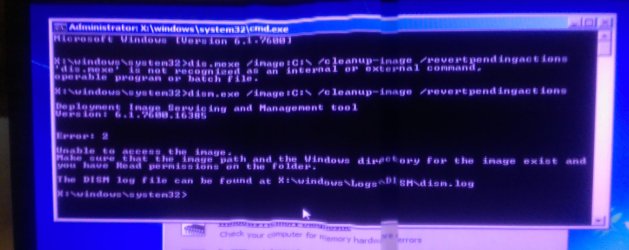
dism.exe /image:C:\ /cleanup-image /revertpendingactions
This is supposed to revert all pended updates.
post back with the result
The only think I can think of at this point is to see if there's anything to back out of...
You'll need to boot to the Repair Environment -as soon as the machine restarts, start tapping F8 - this should bring up the Advanced Boot Menu, at the top of which should be the option 'Repair my Computer'
Pick that
You'll have to log in with your username and password.
Pick the option to use a Command Prompt
At the prompt type
dism.exe /image:C:\ /cleanup-image /revertpendingactions
This is supposed to revert all pended updates.
post back with the result
My Computer
- Computer type
- Laptop
- Computer Manufacturer/Model Number
- Asus K52F or Lenovo B51-80
- OS
- Win 7 x64 Home Premium (and x86 VirtualBox VM)/Win10
- CPU
- i3 370M/i7 6500U
- Motherboard
- Asus/Lenovo
- Memory
- 8GB - finally :)/8GB
- Graphics Card(s)
- it's an i3, dude!/dual Intel&nVidia
- Sound Card
- onboard
- Monitor(s) Displays
- 15.6" built-in
- Screen Resolution
- 1366x768/1920x1080
- Hard Drives
- 750GB Seagate internal
Sundry external drives attached to other computers on the local network
1TB SSD on the Lenovo
- PSU
- n/a
- Internet Speed
- as much as I can get - usually on a dongle/phone, so <1MB/s
- Antivirus
- MSE/Defender
- Browser
- IE11/12/Edge/Chrome/FF(if I must)
 :\ /cleanup-image /revertpendingactions


