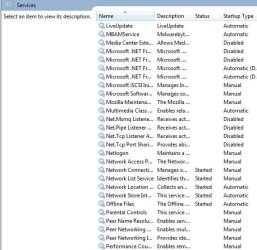
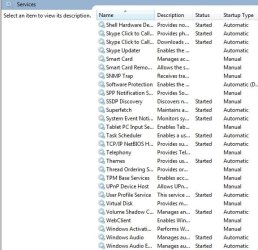
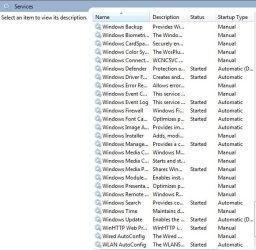
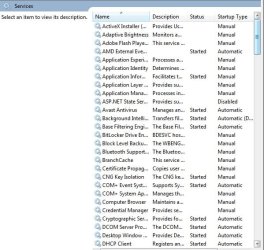
services settings

bluesfloyd

New member
Local time
3:46 PM
Messages
38
hi guys,
i have a laptop with windows7,could you guys look at my services settings and just check all is OK and on the correct startup type,

thanks for your time guys, bluesfloyd,
 

Attachments
  • 1.jpg
    1.jpg
    55 KB · Views: 31
  • 2.jpg
    2.jpg
    54.3 KB · Views: 31
  • 3.jpg
    3.jpg
    50.7 KB · Views: 31
  • 4.jpg
    4.jpg
    52.2 KB · Views: 31
  • 5.jpg
    5.jpg
    52.4 KB · Views: 31
  • 6.jpg
    6.jpg
    54.5 KB · Views: 31
  • 7.jpg
    7.jpg
    6.1 KB · Views: 32

My Computer

Computer type
PC/Desktop
OS
32 bits window7
Hello, if you're not sure about services, you may take a look at this tutorial to reset all to default: http://www.sevenforums.com/tutorials/236709-services-restore-default-services-windows-7-a.html

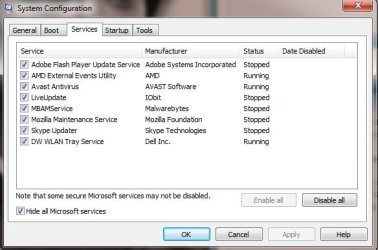
Anyway, will be good to see print from this;

Start->Run-> msconfig.
Open Services tab, and there click hide all Microsoft services.
Post a print from what you have there.

Edit:

"Qucik tip" that I'm using. I'm disabling the "print spooler" service always, because I never use printers. :)
 

My Computer

Computer type
PC/Desktop
Computer Manufacturer/Model Number
Custom Build
OS
Windows 10 Pro x64
CPU
Intel Core i5 4440 @Stock
Motherboard
Gigabyte Z97 D3H
Memory
4 x 4GB HyperX Fury DDR3
Graphics Card(s)
Gigabyte GTX 1050Ti O4G
Sound Card
Integrated
Monitor(s) Displays
Dell P2417H
Screen Resolution
1920 x 1080
Hard Drives
Samsung EVO 850 120GB / Toshiba DT01ACA050 1TB 7200prm 32MB
PSU
Riotoro Onyx 750W
Case
NZXT H500 Black-Red
Cooling
Stock CPU + NZXT 120mm + 2x120mm red fans
Keyboard
Modecom Volcano Lanparty
Mouse
Asus ROG Gladius / DeepCool E-Pad Plus
Internet Speed
DOCSIS 50/3 Mbit
Browser
Google Chrome
Other Info
Asus K55VJ(i5 3210M, GT635M / 2GB, 8GB DDR3, 500GB HDD)
hi, StalkeR
sorry about time getting back,i think this is what you want to see,

thanks for your time, bluesfloyd.
 

Attachments

  • jj.jpg
    jj.jpg
    32.9 KB · Views: 18

My Computer

Computer type
PC/Desktop
OS
32 bits window7
I'll just let stay this: Adobe Flash Update Service, Avast AV, MBAM. The rest of them you can disable.

Also, I forgot to ask, you have any problems with your pc startup (slow startup) or ?
 

My Computer

Computer type
PC/Desktop
Computer Manufacturer/Model Number
Custom Build
OS
Windows 10 Pro x64
CPU
Intel Core i5 4440 @Stock
Motherboard
Gigabyte Z97 D3H
Memory
4 x 4GB HyperX Fury DDR3
Graphics Card(s)
Gigabyte GTX 1050Ti O4G
Sound Card
Integrated
Monitor(s) Displays
Dell P2417H
Screen Resolution
1920 x 1080
Hard Drives
Samsung EVO 850 120GB / Toshiba DT01ACA050 1TB 7200prm 32MB
PSU
Riotoro Onyx 750W
Case
NZXT H500 Black-Red
Cooling
Stock CPU + NZXT 120mm + 2x120mm red fans
Keyboard
Modecom Volcano Lanparty
Mouse
Asus ROG Gladius / DeepCool E-Pad Plus
Internet Speed
DOCSIS 50/3 Mbit
Browser
Google Chrome
Other Info
Asus K55VJ(i5 3210M, GT635M / 2GB, 8GB DDR3, 500GB HDD)
Back
Top