Setting up multiple screen outputs

gbu

New member
Member
VIP
Local time
9:46 AM
Messages
144
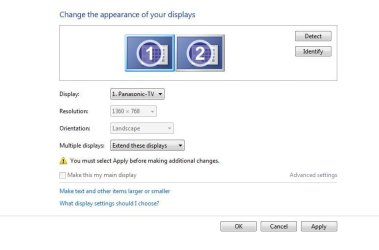
I have recently run a HDMI cable from my PC to my TV, but im finding i have to set the output screen every time i wish to watch on TV.

What im currently doing is each time i have to right click on desktop then select Screen Resolution.
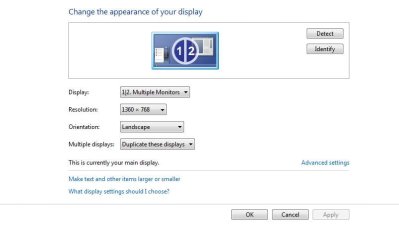
Its already set to multiple monitors but the TV has black screen.
I then select Extend these displays
This enables the TV to show the picture but then the PC monitor goes off and the TV is bad ratio.
I then have to press 'revert' this makes both Monitor and TV resolution watchable.

I was hoping for a way to always have both screens on so i dont have to go through this method each time.

I have attached pics to show
 

Attachments
  • screen1.JPG
    screen1.JPG
    30.7 KB · Views: 1
  • screen2.JPG
    screen2.JPG
    34.3 KB · Views: 1

My Computer

Computer type
PC/Desktop
OS
Windows 7 Ultimate x64 SP1
CPU
INTEL Core 2 Quad Q8400 2.66GHz 4Mb LGA775 FSB1333
Motherboard
Gigabyte GA-G41MT-S2PT
Memory
Crucial 8GB Kit (4GBx2), 240-pin DIMM, DDR3-1333 • 1.5V
Graphics Card(s)
ASUS EAH4350 Silent 1GB
Hard Drives
x2 640GB Western Digital WD6400AARS Caviar Green, SATA 3Gb/s, 5400rpm, 32MB Cache

SEAGATE ST500DM005 BARRACUDA SPINPOINT 500GB 3.5IN 7200RPM SATA HD502HJ IN OS Windows 7 Installed
PSU
Corsair CMPSU-600CX 600W
Case
Zalman Z9-Plus Mid Tower Case
Cooling
Arctic Cooling Freezer 7 Pro Rev2 Quiet CPU Cooler
Hey,
You don't need to keep TV on all the time.
Extend the desktop to TV display and set resolution. Then disable that display.
Now, press WIN+P this should open a menu, you can select display configuration easy with this. Ideally projector should be the TV display but mine are reversed. So experiment with settings.

You should see the mess with 3 monitors and a TV on top :p
 

My Computer

Computer type
PC/Desktop
Computer Manufacturer/Model Number
Custom Build
OS
Windows 7 Ultimate x64 SP1
CPU
AMD Phenom 2 1090T
Motherboard
Gigabyte GA-890FXA-UD5
Memory
2x8GB Kingston HyperX Fury Black 1600Mhz Unganged
Graphics Card(s)
MSI GTX 970 Gaming 4G
Sound Card
Realtek On-Board HD 7.1 Audio / Logitech G35
Monitor(s) Displays
3xAcer GD245HQ
Screen Resolution
1920x1080
Hard Drives
Samsung 850 Pro 512GB SSD - OS /
WD Caviar Black SATA 3 - 1 TBx2 - Dynamic RAID 0 /
WD Caviar Green SATA 2 - 640GBx2 - Dynamic RAID 0 /
WD Caviar Green SATA 2 - 640GB - Internal Backup /
Seagate Barracude SATA 3 - 3TB - External Backup/ Sync
PSU
HighPower 1000W
Case
Cooler Master HAF 932
Cooling
Noctua NH-D14
Keyboard
Logitech G19
Mouse
Logitech G500
Internet Speed
100/4 Mbit Cable (100GB quota)
Antivirus
ZoneAlarm Extreme Security / MBAM Pro / MBAE Free / SAS Free
Browser
IE 11 - Firefox - Chrome
Other Info
Logitech F710/ G27/ G940/ Z5500 // TrackIR 5 // Nvidia 3D Surround Vision
Thanks for your reply I think i have set it up correwctly

However like you said for your configuration i think mine have reversed, my projector is now the PC and my PC is the TV.

Can i change these at all so they relate to the correct one?
 

My Computer

Computer type
PC/Desktop
OS
Windows 7 Ultimate x64 SP1
CPU
INTEL Core 2 Quad Q8400 2.66GHz 4Mb LGA775 FSB1333
Motherboard
Gigabyte GA-G41MT-S2PT
Memory
Crucial 8GB Kit (4GBx2), 240-pin DIMM, DDR3-1333 • 1.5V
Graphics Card(s)
ASUS EAH4350 Silent 1GB
Hard Drives
x2 640GB Western Digital WD6400AARS Caviar Green, SATA 3Gb/s, 5400rpm, 32MB Cache

SEAGATE ST500DM005 BARRACUDA SPINPOINT 500GB 3.5IN 7200RPM SATA HD502HJ IN OS Windows 7 Installed
PSU
Corsair CMPSU-600CX 600W
Case
Zalman Z9-Plus Mid Tower Case
Cooling
Arctic Cooling Freezer 7 Pro Rev2 Quiet CPU Cooler
I don't even know how to search for it :)

Maybe there is a registry key to edit?

What I notice is my TV has #1 assigned to it in Screen Resolution, while the monitor being #2. It seems HDMI always gets #1, fooling Windows to think #1 is the "Computer Only" setting.
 

My Computer

Computer type
PC/Desktop
Computer Manufacturer/Model Number
Custom Build
OS
Windows 7 Ultimate x64 SP1
CPU
AMD Phenom 2 1090T
Motherboard
Gigabyte GA-890FXA-UD5
Memory
2x8GB Kingston HyperX Fury Black 1600Mhz Unganged
Graphics Card(s)
MSI GTX 970 Gaming 4G
Sound Card
Realtek On-Board HD 7.1 Audio / Logitech G35
Monitor(s) Displays
3xAcer GD245HQ
Screen Resolution
1920x1080
Hard Drives
Samsung 850 Pro 512GB SSD - OS /
WD Caviar Black SATA 3 - 1 TBx2 - Dynamic RAID 0 /
WD Caviar Green SATA 2 - 640GBx2 - Dynamic RAID 0 /
WD Caviar Green SATA 2 - 640GB - Internal Backup /
Seagate Barracude SATA 3 - 3TB - External Backup/ Sync
PSU
HighPower 1000W
Case
Cooler Master HAF 932
Cooling
Noctua NH-D14
Keyboard
Logitech G19
Mouse
Logitech G500
Internet Speed
100/4 Mbit Cable (100GB quota)
Antivirus
ZoneAlarm Extreme Security / MBAM Pro / MBAE Free / SAS Free
Browser
IE 11 - Firefox - Chrome
Other Info
Logitech F710/ G27/ G940/ Z5500 // TrackIR 5 // Nvidia 3D Surround Vision
Oh ok thanks i thought was a simple setting but im not fussed to look that hard for the answer lol
 

My Computer

Computer type
PC/Desktop
OS
Windows 7 Ultimate x64 SP1
CPU
INTEL Core 2 Quad Q8400 2.66GHz 4Mb LGA775 FSB1333
Motherboard
Gigabyte GA-G41MT-S2PT
Memory
Crucial 8GB Kit (4GBx2), 240-pin DIMM, DDR3-1333 • 1.5V
Graphics Card(s)
ASUS EAH4350 Silent 1GB
Hard Drives
x2 640GB Western Digital WD6400AARS Caviar Green, SATA 3Gb/s, 5400rpm, 32MB Cache

SEAGATE ST500DM005 BARRACUDA SPINPOINT 500GB 3.5IN 7200RPM SATA HD502HJ IN OS Windows 7 Installed
PSU
Corsair CMPSU-600CX 600W
Case
Zalman Z9-Plus Mid Tower Case
Cooling
Arctic Cooling Freezer 7 Pro Rev2 Quiet CPU Cooler
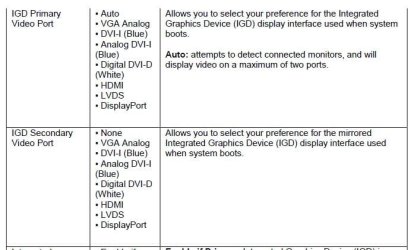
For integrated graphics devices, the primary and secondary video ports are set in the BIOS. This is done by deselecting "Auto" and assigning the port manually and keeps the 1-2 flip-flop from happening. Otherwise, Windows will default to the best quality display. (Usually HDMI)

Check the options for your graphics card for similar options. If there are none, perhaps it uses the BIOS settings also.
 

Attachments

  • IDG Select.JPG
    IDG Select.JPG
    44 KB · Views: 6

My Computer

Computer type
PC/Desktop
Computer Manufacturer/Model Number
Built 2/11/2011
OS
Windows 7 Pro-x64
CPU
i7-2600 3.4GHz - 3.8GHz Turbo
Motherboard
Intel DH67BL-B3
Memory
8Gb - 2x4GB, Muskin 991770 PC3-1333
Graphics Card(s)
Integrated Intel HD 2000
Sound Card
Integrated Intel 10.1 HD, RealTek ALC892
Monitor(s) Displays
Asus LCD VH222H, Haier HL24XSL2a
Screen Resolution
1920x1080, 1920x1080
Hard Drives
Crucial SSD C300-128Gb,
Western Digital WD5002AALX - 500Gb,
Western Digital WD7501AALS - 750Gb
PSU
Seasonic 650W 80+ Gold Modular
Case
Rosewill Defender
Cooling
Stock CPU, Four 120mm case fans, PCH fan added
Keyboard
Logitech EX100 Y-RBH94 Wireless
Mouse
Logitech EX100 M-RCE95 Wireless
Internet Speed
3.0/1.5 Mbs
Antivirus
Microsoft Security Essentials
Browser
Microsoft Internet Explorer 11
Other Info
Antec Veris Premier-Multimedia IR Station,
Cyber Accoustics-3602 Speakers,
AFT XM-5U Card Reader,
Hauppauge TV-HVR-2250,
Sony LX300 USB Turntable
I haven't seen any options in motherboard BIOS (no IGPU) and surely none in NVidia CP. However, maybe it is in the GPU BIOS?
 

My Computer

Computer type
PC/Desktop
Computer Manufacturer/Model Number
Custom Build
OS
Windows 7 Ultimate x64 SP1
CPU
AMD Phenom 2 1090T
Motherboard
Gigabyte GA-890FXA-UD5
Memory
2x8GB Kingston HyperX Fury Black 1600Mhz Unganged
Graphics Card(s)
MSI GTX 970 Gaming 4G
Sound Card
Realtek On-Board HD 7.1 Audio / Logitech G35
Monitor(s) Displays
3xAcer GD245HQ
Screen Resolution
1920x1080
Hard Drives
Samsung 850 Pro 512GB SSD - OS /
WD Caviar Black SATA 3 - 1 TBx2 - Dynamic RAID 0 /
WD Caviar Green SATA 2 - 640GBx2 - Dynamic RAID 0 /
WD Caviar Green SATA 2 - 640GB - Internal Backup /
Seagate Barracude SATA 3 - 3TB - External Backup/ Sync
PSU
HighPower 1000W
Case
Cooler Master HAF 932
Cooling
Noctua NH-D14
Keyboard
Logitech G19
Mouse
Logitech G500
Internet Speed
100/4 Mbit Cable (100GB quota)
Antivirus
ZoneAlarm Extreme Security / MBAM Pro / MBAE Free / SAS Free
Browser
IE 11 - Firefox - Chrome
Other Info
Logitech F710/ G27/ G940/ Z5500 // TrackIR 5 // Nvidia 3D Surround Vision
Could be. I don't have a video card but for IGD the VBIOS parameters are part of the BIOS. That's why I thought the options would be similar. I searched around and it appears there's numerous utilities for modifying the VBIOS for graphics cards but I would be careful and use one that's specific to the card OEM and model. It also wasn't clear whether setting the primary and secondary display was even an option. Somebody with a video card will need to explore this.
 

My Computer

Computer type
PC/Desktop
Computer Manufacturer/Model Number
Built 2/11/2011
OS
Windows 7 Pro-x64
CPU
i7-2600 3.4GHz - 3.8GHz Turbo
Motherboard
Intel DH67BL-B3
Memory
8Gb - 2x4GB, Muskin 991770 PC3-1333
Graphics Card(s)
Integrated Intel HD 2000
Sound Card
Integrated Intel 10.1 HD, RealTek ALC892
Monitor(s) Displays
Asus LCD VH222H, Haier HL24XSL2a
Screen Resolution
1920x1080, 1920x1080
Hard Drives
Crucial SSD C300-128Gb,
Western Digital WD5002AALX - 500Gb,
Western Digital WD7501AALS - 750Gb
PSU
Seasonic 650W 80+ Gold Modular
Case
Rosewill Defender
Cooling
Stock CPU, Four 120mm case fans, PCH fan added
Keyboard
Logitech EX100 Y-RBH94 Wireless
Mouse
Logitech EX100 M-RCE95 Wireless
Internet Speed
3.0/1.5 Mbs
Antivirus
Microsoft Security Essentials
Browser
Microsoft Internet Explorer 11
Other Info
Antec Veris Premier-Multimedia IR Station,
Cyber Accoustics-3602 Speakers,
AFT XM-5U Card Reader,
Hauppauge TV-HVR-2250,
Sony LX300 USB Turntable
Back
Top