I have recently run a HDMI cable from my PC to my TV, but im finding i have to set the output screen every time i wish to watch on TV.
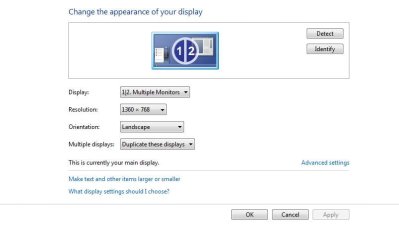
What im currently doing is each time i have to right click on desktop then select Screen Resolution.
Its already set to multiple monitors but the TV has black screen.
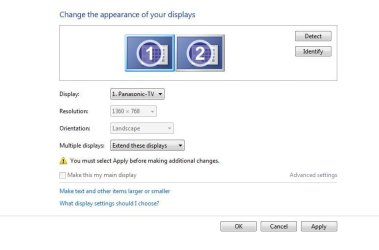
I then select Extend these displays
This enables the TV to show the picture but then the PC monitor goes off and the TV is bad ratio.
I then have to press 'revert' this makes both Monitor and TV resolution watchable.
I was hoping for a way to always have both screens on so i dont have to go through this method each time.
I have attached pics to show
What im currently doing is each time i have to right click on desktop then select Screen Resolution.
Its already set to multiple monitors but the TV has black screen.
I then select Extend these displays
This enables the TV to show the picture but then the PC monitor goes off and the TV is bad ratio.
I then have to press 'revert' this makes both Monitor and TV resolution watchable.
I was hoping for a way to always have both screens on so i dont have to go through this method each time.
I have attached pics to show
Attachments
My Computer
- Computer type
- PC/Desktop
- OS
- Windows 7 Ultimate x64 SP1
- CPU
- INTEL Core 2 Quad Q8400 2.66GHz 4Mb LGA775 FSB1333
- Motherboard
- Gigabyte GA-G41MT-S2PT
- Memory
- Crucial 8GB Kit (4GBx2), 240-pin DIMM, DDR3-1333 • 1.5V
- Graphics Card(s)
- ASUS EAH4350 Silent 1GB
- Hard Drives
- x2 640GB Western Digital WD6400AARS Caviar Green, SATA 3Gb/s, 5400rpm, 32MB Cache
SEAGATE ST500DM005 BARRACUDA SPINPOINT 500GB 3.5IN 7200RPM SATA HD502HJ IN OS Windows 7 Installed
- PSU
- Corsair CMPSU-600CX 600W
- Case
- Zalman Z9-Plus Mid Tower Case
- Cooling
- Arctic Cooling Freezer 7 Pro Rev2 Quiet CPU Cooler