Setup was unable to create a new system partition....

wykyd

New member
Local time
11:41 AM
Messages
28
okay, so... where to start...

I built a new rig 4 days ago. started installing windows 7 and had nothing but issues. I wanted to install the os on my SSD, but it wouldn't show up in the windows install. I found out that I had to prep the drive and install drivers before I could use it. so I installed the os on one of my HDDs which wasn't easy either. for some reason I had to convert the disk to MBR, after doing so everything went easy. installed the os, downloaded the software and drivers for the SSD, cloned the os to the SSD and continued. then after trying to fix a sound issue something went severely wrong. I tried updating all my drivers and I'm assuming something got messed up. my keyboard stopped working, then wouldn't show up except as a default keyboard. sound stopped working right, games wouldn't load (kept getting a (0xc0000005) error). so I opted to reinstall windows since I figured out how to do it now.... wrong.

so I did end up getting the os to install again, tho this time it said that UEF or EFI systems have to be gpt. I got all the way to cloning the drive to the SSD only for it to say it took it offline due to it having the same signature as another drive. I turned it back on and tried to boot... it was successful except it sat at preparing desktop for 20 min before going to a light blue screen that says "Not a valid version of Windows" or something along those lines.

since then I have tried reinstalling Windows both ways that it worked before and have not succeeded... I'm currently following some instructions on another post to see if that works, but I'm highly doubtful. someone ease rescue me from this nightmare!!!

I can provide much more detailed info if needed
 

My Computer My Computer

Computer type
PC/Desktop
Computer Manufacturer/Model Number
Custom Rig
OS
Windows 10 Home x64
CPU
Intel(R) Core(TM) i7-7700K CPU @ 4.20GHz
Motherboard
ASUSTeK COMPUTER INC. MAXIMUS IX HERO
Memory
G.Skill Tridentz DDR4 8gb x2
Graphics Card(s)
Nvidia GeForce GTX 1070 SC Gaming Black Edition
Sound Card
Onboard RealTek HD
Monitor(s) Displays
Acer H243H x2
Screen Resolution
1920x1080
Hard Drives
Samsung 960 Evo 256gb SSD - WD 1tb SATA - WD 500gb SATA - Seagate 160gb SATA
PSU
KINGWIN Mach 1 1000w
Case
Cooler Master HAF 932
Cooling
B.A.F.
Keyboard
G. Skill Ripjaws KM780 RGB
Mouse
Razer Naga
Internet Speed
200mb/s DL - 15mb/s UL
Antivirus
Avast Free
Browser
Chrome
After you installed Windows 7 did you install the drivers that are on the motherboard DVD/CD?

Jack
 

My Computer My Computer

Computer type
PC/Desktop
Computer Manufacturer/Model Number
Home made Desktop
OS
Windows 10 Pro. 64/ version 1709 Windows 7 Pro/64
CPU
Intel i7-6800K @ 4.3
Motherboard
ASUS X-99 Deluxe II
Memory
Corsair Platinum 16 gig @2400
Graphics Card(s)
EVGA GTX 1070 OC
Monitor(s) Displays
Asus 27" LED LCD/VE278Q
Screen Resolution
1920-1080 or 1280-720 HDMI
Hard Drives
INTEL SSD 730-240 Gb Sata 3.0/
PSU
EVGA Platium 1200W
Case
Phanteks Luxe Tempered Glass 8 fans/ one radiator
Cooling
XSPC/ Water Cooled CPU
Keyboard
Das 4 Professional
Mouse
Logitech M705/MX Anywhere 2-S
Internet Speed
100 mbits
Antivirus
Microsoft Security Essentials/ Malwarebytes Premium 3.0/ SAS
Browser
I.E. 11 default/Firefox/ ISP Time Warner Cable/Spectrum
Other Info
LG BluRay Burner/
Sound system-KLipsch-THX/
Icy Dock ssd Hot Swap bays.
So, it seems as if I was able to get everything installed properly. Got windows installed, cloned to my SSD and most updates/drivers installed without much issue.

I start with installing most drivers from their CD, I did use and install updated drivers for my gfx card, sound, ssd and updated bios.

My OS drive just doesn't look like most screenshots I've seen. It doesn't have the System Reserved or Boot partitions that most UEFI setup drives have. Curious if maybe I will have issues down the road.
 

Attachments

  • 2017-03-05_16-15-30.png
    2017-03-05_16-15-30.png
    31.8 KB · Views: 3

My Computer My Computer

Computer type
PC/Desktop
Computer Manufacturer/Model Number
Custom Rig
OS
Windows 10 Home x64
CPU
Intel(R) Core(TM) i7-7700K CPU @ 4.20GHz
Motherboard
ASUSTeK COMPUTER INC. MAXIMUS IX HERO
Memory
G.Skill Tridentz DDR4 8gb x2
Graphics Card(s)
Nvidia GeForce GTX 1070 SC Gaming Black Edition
Sound Card
Onboard RealTek HD
Monitor(s) Displays
Acer H243H x2
Screen Resolution
1920x1080
Hard Drives
Samsung 960 Evo 256gb SSD - WD 1tb SATA - WD 500gb SATA - Seagate 160gb SATA
PSU
KINGWIN Mach 1 1000w
Case
Cooler Master HAF 932
Cooling
B.A.F.
Keyboard
G. Skill Ripjaws KM780 RGB
Mouse
Razer Naga
Internet Speed
200mb/s DL - 15mb/s UL
Antivirus
Avast Free
Browser
Chrome
Are you installing with service pack included on DVD normally it should see the SSD drive or you can give it drivers during installation. Windows writes a signature to the disk so if you clone and leave both drives in it sees they both have same signature. Swap ports so c is disk 0
 

My Computer My Computer

Computer type
PC/Desktop
OS
win 8 32 bit
No, the Win7 DVD I have must be pre SP1.

My SSD is a PCI card while my other drives are SATA... Is there another way to make it drive 0?
 

My Computer My Computer

Computer type
PC/Desktop
Computer Manufacturer/Model Number
Custom Rig
OS
Windows 10 Home x64
CPU
Intel(R) Core(TM) i7-7700K CPU @ 4.20GHz
Motherboard
ASUSTeK COMPUTER INC. MAXIMUS IX HERO
Memory
G.Skill Tridentz DDR4 8gb x2
Graphics Card(s)
Nvidia GeForce GTX 1070 SC Gaming Black Edition
Sound Card
Onboard RealTek HD
Monitor(s) Displays
Acer H243H x2
Screen Resolution
1920x1080
Hard Drives
Samsung 960 Evo 256gb SSD - WD 1tb SATA - WD 500gb SATA - Seagate 160gb SATA
PSU
KINGWIN Mach 1 1000w
Case
Cooler Master HAF 932
Cooling
B.A.F.
Keyboard
G. Skill Ripjaws KM780 RGB
Mouse
Razer Naga
Internet Speed
200mb/s DL - 15mb/s UL
Antivirus
Avast Free
Browser
Chrome
I build my skylake computer last June and also had some problems.
I'll give you a general guide. If you need more details, please be free to ask.
- Download the Win 7 SP1 iso - With the MS iso downloader (https://www.heidoc.net/php/Windows ISO Downloader.exe) download your win 7 brand.
- You have to add the SATA, AHCI, USB 3 and M.2 drivers to the Win 7 SP1 installation disk. Asus has an application to do it. http://dlcdnet.asus.com/pub/ASUS/misc/utils/ASUS_EZInstaller.zip?_ga=1.228515669.9532852.1488762401
Read my tutorial Create a Windows 7 USB flash installation with new drives for new MB's
- Once the drivers are inserted to the Win 7 SP1, burn a DVD or use Rufus to make a USB flash disk boot able. Make it UEFI boot able. Rufus - Create bootable USB drives the easy way
- On BIOS, disable fast boot, secure boot and enable CSM (Compatible System Mode). Under CSM, set boot disk priority to UEFI and disable net boot.

Detach all other HDD or SSD leaving on only the M.2 960.
Boot your modified Win 7 SP1 installation disk on UEFI mode, not legacy.
Go to install - Advanced - Delete ALL partitions - create new. It will create 3 partitions.
- UEFI - 100M - Fat32
- MSR - 120M - RAW
- Large NTFS
Choose to install on the large NTFS.

Once installation is over, open device manager and load all missing drivers.

For the updates:
MS releases SP2 for Windows 7
 
Last edited:

My Computers My Computers

System One System Two

  • Computer type
    PC/Desktop
    Computer Manufacturer/Model Number
    custom build
    OS
    Windows 7 HP 64
    CPU
    i5 6600K - 800MHz to 4200MHz
    Motherboard
    GA-Z170-HD3P
    Memory
    4+4G GSkill DDR4 3000
    Graphics Card(s)
    IG - Intel 530
    Monitor(s) Displays
    Samsung 226BW
    Screen Resolution
    1680x1050
    Hard Drives
    (1) -1 SM951 – 128GB M.2 AHCI PCIe SSD drive for Windows 7 and Lubuntu
    (2) -1 WD SATA 3 - 1T for Data
    (3) -1 WD SATA 3 - 1T for backup
    PSU
    Thermaltake 450W TR2 gold
    Keyboard
    Old and good Chicony mechanical keyboard
    Mouse
    Logitech mX performance - 9 buttons (had to disable some)
    Internet Speed
    500Mb/s
    Browser
    Firefox 64
    Other Info
    TinyWall firewall
  • Computer type
    Laptop
    System Manufacturer/Model Number
    Asus Q550LF
    OS
    Windows 7 Pro
    CPU
    i7-4500U 800MHz to 3.0GHz
    Motherboard
    Asus Q550LF
    Memory
    (4+4)G DDR3 1600
    Graphics Card(s)
    IG intel 4400 + NVIDIA GeForce GT 745M
    Sound Card
    Realtek
    Monitor(s) Displays
    LG Display LP156WF4-SPH1
    Screen Resolution
    1920 x 1080
    Hard Drives
    BX500 120G SSD for Windows and programs +
    1T HDD for data
    Internet Speed
    500 Mb/s
    Browser
    Firefox
    Other Info
    TinyWall firewall
Whelp, I think I will be giving this a shot tomorrow so that way everything is the way that it should be. Do I need to unhook all my other HDDs? I was very intrigued by a post I was reading about a legit way to install windows, customizing the install the whole way thru and I would love to move the User folders as was described in the post. I just want to do this one last time and not have to deal with it anymore. My computer also failed upgrading to Windows 10 today so I'm assuming there are still some issues.
 

My Computer My Computer

Computer type
PC/Desktop
Computer Manufacturer/Model Number
Custom Rig
OS
Windows 10 Home x64
CPU
Intel(R) Core(TM) i7-7700K CPU @ 4.20GHz
Motherboard
ASUSTeK COMPUTER INC. MAXIMUS IX HERO
Memory
G.Skill Tridentz DDR4 8gb x2
Graphics Card(s)
Nvidia GeForce GTX 1070 SC Gaming Black Edition
Sound Card
Onboard RealTek HD
Monitor(s) Displays
Acer H243H x2
Screen Resolution
1920x1080
Hard Drives
Samsung 960 Evo 256gb SSD - WD 1tb SATA - WD 500gb SATA - Seagate 160gb SATA
PSU
KINGWIN Mach 1 1000w
Case
Cooler Master HAF 932
Cooling
B.A.F.
Keyboard
G. Skill Ripjaws KM780 RGB
Mouse
Razer Naga
Internet Speed
200mb/s DL - 15mb/s UL
Antivirus
Avast Free
Browser
Chrome
What are the benefits to upgrading to Windows 10? I was discussing my issues with someone from one of the games I play and they highly recommended me upgrading to Windows 10. What would the benefits be if any? Is it worth it?
 

My Computer My Computer

Computer type
PC/Desktop
Computer Manufacturer/Model Number
Custom Rig
OS
Windows 10 Home x64
CPU
Intel(R) Core(TM) i7-7700K CPU @ 4.20GHz
Motherboard
ASUSTeK COMPUTER INC. MAXIMUS IX HERO
Memory
G.Skill Tridentz DDR4 8gb x2
Graphics Card(s)
Nvidia GeForce GTX 1070 SC Gaming Black Edition
Sound Card
Onboard RealTek HD
Monitor(s) Displays
Acer H243H x2
Screen Resolution
1920x1080
Hard Drives
Samsung 960 Evo 256gb SSD - WD 1tb SATA - WD 500gb SATA - Seagate 160gb SATA
PSU
KINGWIN Mach 1 1000w
Case
Cooler Master HAF 932
Cooling
B.A.F.
Keyboard
G. Skill Ripjaws KM780 RGB
Mouse
Razer Naga
Internet Speed
200mb/s DL - 15mb/s UL
Antivirus
Avast Free
Browser
Chrome

My Computer My Computer

Computer type
PC/Desktop
Computer Manufacturer/Model Number
Custom assembled by me :}
OS
Win-7-Pro64bit 7-H-Prem-64bit
CPU
i7-5930K 2nd i9-9940x both water blocked VRM's too
Motherboard
ASUS SABERTOOTH X99 2nd ASUS x299 Apex
Memory
Trident-z 3200C14 2nd Trident-z 3600C16
Graphics Card(s)
EVGA 1080ti ftw3 2nd Titan Xp both water blocked
Sound Card
Built-in Realtek
Monitor(s) Displays
1-AOC G2460PG 24"G-Sync 144Hz/ 2nd 1-ASUS VG248QE 24" 144Hz
Screen Resolution
1920 x 1080 144Hz
Hard Drives
2-Samsung M.2 Evo & Evo Plus
2-Samsung 850 EVO 500GB SSD's/ 3-2.5 W.D. Black 1tb-&3-1tb/3-3.5 WD Black 1tb hdd's
PSU
EVGA SuperNOVA 1000-P2 2nd 1200-P2
Case
2-Corsair Obsidian Series 450D Black ATX Mid Tower
Cooling
Custom water loops
Keyboard
Logitech G710+/ 2nd Logitech G910
Mouse
2-RedDragon M901 Perdition 16400 dpi Gaming mouse = wired
Internet Speed
Comcast Ping 19ms 89.31mbps download speed 6.12mbps upload
Antivirus
Malwarebytes Pro/ Superantispyware Pro
Browser
FireFox & Pale moon
Other Info
2nd ASUS X299 Apex/Intel i9-9940x with Custom water loop/7H-Prem-x64/Corsair 450D case/Ram Trident-z 3600C16 4x8gb / Samsung970Evo plus 500gb SSD/Dual ssd EZ swap evo/PSU EVGA SuperNova 1200w-P2 80+Platinum/GPU Titan Xp /8-ML-140 on push-pull on 2-280GTX rads
I've done some reading here and there and had windows 10 on my old rig (the free upgrade). But since I'd either have to pay for it now... or use a verify hack, I think I'll just stick to 7. What size USB drive should I get for the installer? 2.0 or 3.0? I don't have anything currently big enough (largest is 4gb).
 

My Computer My Computer

Computer type
PC/Desktop
Computer Manufacturer/Model Number
Custom Rig
OS
Windows 10 Home x64
CPU
Intel(R) Core(TM) i7-7700K CPU @ 4.20GHz
Motherboard
ASUSTeK COMPUTER INC. MAXIMUS IX HERO
Memory
G.Skill Tridentz DDR4 8gb x2
Graphics Card(s)
Nvidia GeForce GTX 1070 SC Gaming Black Edition
Sound Card
Onboard RealTek HD
Monitor(s) Displays
Acer H243H x2
Screen Resolution
1920x1080
Hard Drives
Samsung 960 Evo 256gb SSD - WD 1tb SATA - WD 500gb SATA - Seagate 160gb SATA
PSU
KINGWIN Mach 1 1000w
Case
Cooler Master HAF 932
Cooling
B.A.F.
Keyboard
G. Skill Ripjaws KM780 RGB
Mouse
Razer Naga
Internet Speed
200mb/s DL - 15mb/s UL
Antivirus
Avast Free
Browser
Chrome
- For installing any Win (7 or 10) you must detach (power or SATA cable) of ALL other HDD or SSD or you may end with Win in one disk and the boot loader on another.
- I don't like win 10. There is nothing there I like or need. And I don't like the idea to share my stuff without permission.
- You can install win 10 using the Win 7 key. Still works.
- For the USB flash disk to have win 7 (or 10) installation, you should look for 4G or bigger.
- As your M.2 is 256G there is no need to move \Users to the HDD. In my case I have a 128G with Win 7 and Lubuntu, so I moved \Users to D: using Kari tutorial. The needed files to relocate on Win 7 are here. https://www.sevenforums.com/attachm...-while-hdd-light-turns-solid-red-relocate.zip
Attached are the files to relocate on Win 10
 

Attachments

Last edited:

My Computers My Computers

System One System Two

  • Computer type
    PC/Desktop
    Computer Manufacturer/Model Number
    custom build
    OS
    Windows 7 HP 64
    CPU
    i5 6600K - 800MHz to 4200MHz
    Motherboard
    GA-Z170-HD3P
    Memory
    4+4G GSkill DDR4 3000
    Graphics Card(s)
    IG - Intel 530
    Monitor(s) Displays
    Samsung 226BW
    Screen Resolution
    1680x1050
    Hard Drives
    (1) -1 SM951 – 128GB M.2 AHCI PCIe SSD drive for Windows 7 and Lubuntu
    (2) -1 WD SATA 3 - 1T for Data
    (3) -1 WD SATA 3 - 1T for backup
    PSU
    Thermaltake 450W TR2 gold
    Keyboard
    Old and good Chicony mechanical keyboard
    Mouse
    Logitech mX performance - 9 buttons (had to disable some)
    Internet Speed
    500Mb/s
    Browser
    Firefox 64
    Other Info
    TinyWall firewall
  • Computer type
    Laptop
    System Manufacturer/Model Number
    Asus Q550LF
    OS
    Windows 7 Pro
    CPU
    i7-4500U 800MHz to 3.0GHz
    Motherboard
    Asus Q550LF
    Memory
    (4+4)G DDR3 1600
    Graphics Card(s)
    IG intel 4400 + NVIDIA GeForce GT 745M
    Sound Card
    Realtek
    Monitor(s) Displays
    LG Display LP156WF4-SPH1
    Screen Resolution
    1920 x 1080
    Hard Drives
    BX500 120G SSD for Windows and programs +
    1T HDD for data
    Internet Speed
    500 Mb/s
    Browser
    Firefox
    Other Info
    TinyWall firewall
Hi,
4gb's should be large enough for a 7 or 10 installer I would normally use Rufus I believe option 3 here,
USB Windows 7 Installation Key Drive - Create

I also believe one can still upgrade for free one just has to contact MS directly or use the win-7 activation key after 10 is installed.
 

My Computer My Computer

Computer type
PC/Desktop
Computer Manufacturer/Model Number
Custom assembled by me :}
OS
Win-7-Pro64bit 7-H-Prem-64bit
CPU
i7-5930K 2nd i9-9940x both water blocked VRM's too
Motherboard
ASUS SABERTOOTH X99 2nd ASUS x299 Apex
Memory
Trident-z 3200C14 2nd Trident-z 3600C16
Graphics Card(s)
EVGA 1080ti ftw3 2nd Titan Xp both water blocked
Sound Card
Built-in Realtek
Monitor(s) Displays
1-AOC G2460PG 24"G-Sync 144Hz/ 2nd 1-ASUS VG248QE 24" 144Hz
Screen Resolution
1920 x 1080 144Hz
Hard Drives
2-Samsung M.2 Evo & Evo Plus
2-Samsung 850 EVO 500GB SSD's/ 3-2.5 W.D. Black 1tb-&3-1tb/3-3.5 WD Black 1tb hdd's
PSU
EVGA SuperNOVA 1000-P2 2nd 1200-P2
Case
2-Corsair Obsidian Series 450D Black ATX Mid Tower
Cooling
Custom water loops
Keyboard
Logitech G710+/ 2nd Logitech G910
Mouse
2-RedDragon M901 Perdition 16400 dpi Gaming mouse = wired
Internet Speed
Comcast Ping 19ms 89.31mbps download speed 6.12mbps upload
Antivirus
Malwarebytes Pro/ Superantispyware Pro
Browser
FireFox & Pale moon
Other Info
2nd ASUS X299 Apex/Intel i9-9940x with Custom water loop/7H-Prem-x64/Corsair 450D case/Ram Trident-z 3600C16 4x8gb / Samsung970Evo plus 500gb SSD/Dual ssd EZ swap evo/PSU EVGA SuperNova 1200w-P2 80+Platinum/GPU Titan Xp /8-ML-140 on push-pull on 2-280GTX rads
Once installation is over, open device manager and load all missing drivers.

What exactly do you mean by this? I had planned on downloading driver software once I was finished. From what I read, I was under the impression that pre-loading all the drivers was so they would install themselves. I'm looking to try and at least setup the Win7 install tonight if not do the install as well. I just want to be 100% before I do anything else.

Not gonna lie, I'm a bit daunted by the process, but I've never turned down a challenge. I've been out of the computer tech game for a long time, but this can't be much harder than the html coding I used to do... I can only hope at least xD
 

My Computer My Computer

Computer type
PC/Desktop
Computer Manufacturer/Model Number
Custom Rig
OS
Windows 10 Home x64
CPU
Intel(R) Core(TM) i7-7700K CPU @ 4.20GHz
Motherboard
ASUSTeK COMPUTER INC. MAXIMUS IX HERO
Memory
G.Skill Tridentz DDR4 8gb x2
Graphics Card(s)
Nvidia GeForce GTX 1070 SC Gaming Black Edition
Sound Card
Onboard RealTek HD
Monitor(s) Displays
Acer H243H x2
Screen Resolution
1920x1080
Hard Drives
Samsung 960 Evo 256gb SSD - WD 1tb SATA - WD 500gb SATA - Seagate 160gb SATA
PSU
KINGWIN Mach 1 1000w
Case
Cooler Master HAF 932
Cooling
B.A.F.
Keyboard
G. Skill Ripjaws KM780 RGB
Mouse
Razer Naga
Internet Speed
200mb/s DL - 15mb/s UL
Antivirus
Avast Free
Browser
Chrome
From your guide...

- From your MB manufacture site, download the latest chipset USB 3, SATA drivers (32 and 64 bits) and any other drivers you need (like MVMe disk driver). They must be multi file type (*.inf, *.cat, *.sys) and not a *.exe, *.msi or *.msu type.

And here is where I have ran into my first problem. My SSD drivers are on an .exe as are my chipset and SATA. Is there a work around for this?

(EDIT)
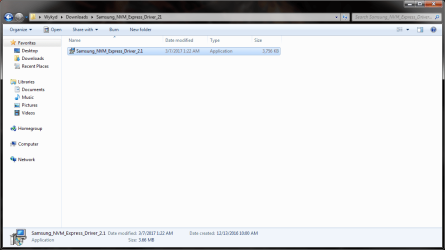
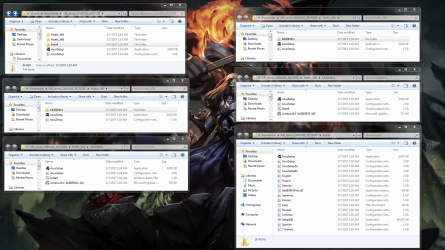
I think I was able to figure out the SATA drivers. I also think I figured out the drivers for Intel(R) Management Engine Interface (if I even need these), but am curious because on Intel's site they say I need to do a win7 update before installing those drivers. (Kernel-Mode Driver Framework 1.11 (KB 2685811) must first be installed if you are using Windows 7*.) My question for those is they go in the "others" folder?
 

Attachments

  • 2017-03-07_01-26-02.png
    2017-03-07_01-26-02.png
    33.9 KB · Views: 1
  • 2017-03-07_01-29-04.png
    2017-03-07_01-29-04.png
    457.6 KB · Views: 2
Last edited:

My Computer My Computer

Computer type
PC/Desktop
Computer Manufacturer/Model Number
Custom Rig
OS
Windows 10 Home x64
CPU
Intel(R) Core(TM) i7-7700K CPU @ 4.20GHz
Motherboard
ASUSTeK COMPUTER INC. MAXIMUS IX HERO
Memory
G.Skill Tridentz DDR4 8gb x2
Graphics Card(s)
Nvidia GeForce GTX 1070 SC Gaming Black Edition
Sound Card
Onboard RealTek HD
Monitor(s) Displays
Acer H243H x2
Screen Resolution
1920x1080
Hard Drives
Samsung 960 Evo 256gb SSD - WD 1tb SATA - WD 500gb SATA - Seagate 160gb SATA
PSU
KINGWIN Mach 1 1000w
Case
Cooler Master HAF 932
Cooling
B.A.F.
Keyboard
G. Skill Ripjaws KM780 RGB
Mouse
Razer Naga
Internet Speed
200mb/s DL - 15mb/s UL
Antivirus
Avast Free
Browser
Chrome
Hi,
You would only install 64 bit drivers if using a 64 bit machine so it would not need the 32 bit driver so discard those.
Each one would have a setup.exe it is the installer but as stated you only install the one that applies to the bit you're installing 64 bit or 32 bit not both.

Device Manager - Finding Unknown Devices
 

My Computer My Computer

Computer type
PC/Desktop
Computer Manufacturer/Model Number
Custom assembled by me :}
OS
Win-7-Pro64bit 7-H-Prem-64bit
CPU
i7-5930K 2nd i9-9940x both water blocked VRM's too
Motherboard
ASUS SABERTOOTH X99 2nd ASUS x299 Apex
Memory
Trident-z 3200C14 2nd Trident-z 3600C16
Graphics Card(s)
EVGA 1080ti ftw3 2nd Titan Xp both water blocked
Sound Card
Built-in Realtek
Monitor(s) Displays
1-AOC G2460PG 24"G-Sync 144Hz/ 2nd 1-ASUS VG248QE 24" 144Hz
Screen Resolution
1920 x 1080 144Hz
Hard Drives
2-Samsung M.2 Evo & Evo Plus
2-Samsung 850 EVO 500GB SSD's/ 3-2.5 W.D. Black 1tb-&3-1tb/3-3.5 WD Black 1tb hdd's
PSU
EVGA SuperNOVA 1000-P2 2nd 1200-P2
Case
2-Corsair Obsidian Series 450D Black ATX Mid Tower
Cooling
Custom water loops
Keyboard
Logitech G710+/ 2nd Logitech G910
Mouse
2-RedDragon M901 Perdition 16400 dpi Gaming mouse = wired
Internet Speed
Comcast Ping 19ms 89.31mbps download speed 6.12mbps upload
Antivirus
Malwarebytes Pro/ Superantispyware Pro
Browser
FireFox & Pale moon
Other Info
2nd ASUS X299 Apex/Intel i9-9940x with Custom water loop/7H-Prem-x64/Corsair 450D case/Ram Trident-z 3600C16 4x8gb / Samsung970Evo plus 500gb SSD/Dual ssd EZ swap evo/PSU EVGA SuperNova 1200w-P2 80+Platinum/GPU Titan Xp /8-ML-140 on push-pull on 2-280GTX rads
wykyd said:
(EDIT)
I think I was able to figure out the chipset drivers.

I'm sorry, I meant the SATA drivers.

Also, how do you do that folder view to show the different paths? I would like to post my current setup to make sure I'm doing this right... :P

(EDIT)
Not sure if this is how it should be done, but worked :P
 

Attachments

  • explorer_2017-03-07_08-21-16.png
    explorer_2017-03-07_08-21-16.png
    4.6 KB · Views: 12

My Computer My Computer

Computer type
PC/Desktop
Computer Manufacturer/Model Number
Custom Rig
OS
Windows 10 Home x64
CPU
Intel(R) Core(TM) i7-7700K CPU @ 4.20GHz
Motherboard
ASUSTeK COMPUTER INC. MAXIMUS IX HERO
Memory
G.Skill Tridentz DDR4 8gb x2
Graphics Card(s)
Nvidia GeForce GTX 1070 SC Gaming Black Edition
Sound Card
Onboard RealTek HD
Monitor(s) Displays
Acer H243H x2
Screen Resolution
1920x1080
Hard Drives
Samsung 960 Evo 256gb SSD - WD 1tb SATA - WD 500gb SATA - Seagate 160gb SATA
PSU
KINGWIN Mach 1 1000w
Case
Cooler Master HAF 932
Cooling
B.A.F.
Keyboard
G. Skill Ripjaws KM780 RGB
Mouse
Razer Naga
Internet Speed
200mb/s DL - 15mb/s UL
Antivirus
Avast Free
Browser
Chrome
Hi,
Not sure what you're showing exactly
That screen shot shows the chipset zipped folders contents you extracted all from ?
 

My Computer My Computer

Computer type
PC/Desktop
Computer Manufacturer/Model Number
Custom assembled by me :}
OS
Win-7-Pro64bit 7-H-Prem-64bit
CPU
i7-5930K 2nd i9-9940x both water blocked VRM's too
Motherboard
ASUS SABERTOOTH X99 2nd ASUS x299 Apex
Memory
Trident-z 3200C14 2nd Trident-z 3600C16
Graphics Card(s)
EVGA 1080ti ftw3 2nd Titan Xp both water blocked
Sound Card
Built-in Realtek
Monitor(s) Displays
1-AOC G2460PG 24"G-Sync 144Hz/ 2nd 1-ASUS VG248QE 24" 144Hz
Screen Resolution
1920 x 1080 144Hz
Hard Drives
2-Samsung M.2 Evo & Evo Plus
2-Samsung 850 EVO 500GB SSD's/ 3-2.5 W.D. Black 1tb-&3-1tb/3-3.5 WD Black 1tb hdd's
PSU
EVGA SuperNOVA 1000-P2 2nd 1200-P2
Case
2-Corsair Obsidian Series 450D Black ATX Mid Tower
Cooling
Custom water loops
Keyboard
Logitech G710+/ 2nd Logitech G910
Mouse
2-RedDragon M901 Perdition 16400 dpi Gaming mouse = wired
Internet Speed
Comcast Ping 19ms 89.31mbps download speed 6.12mbps upload
Antivirus
Malwarebytes Pro/ Superantispyware Pro
Browser
FireFox & Pale moon
Other Info
2nd ASUS X299 Apex/Intel i9-9940x with Custom water loop/7H-Prem-x64/Corsair 450D case/Ram Trident-z 3600C16 4x8gb / Samsung970Evo plus 500gb SSD/Dual ssd EZ swap evo/PSU EVGA SuperNova 1200w-P2 80+Platinum/GPU Titan Xp /8-ML-140 on push-pull on 2-280GTX rads
I build my skylake computer last June and also had some problems.
I'll give you a general guide. If you need more details, please be free to ask.
- Download the Win 7 SP1 iso - With the MS iso downloader (https://www.heidoc.net/php/Windows ISO Downloader.exe) download your win 7 brand.
- You have to add the SATA, AHCI, USB 3 and M.2 drivers to the Win 7 SP1 installation disk. Asus has an application to do it. http://dlcdnet.asus.com/pub/ASUS/misc/utils/ASUS_EZInstaller.zip?_ga=1.228515669.9532852.1488762401
Read my tutorial Create a Windows 7 USB flash installation with new drives for new MB's
- Once the drivers are inserted to the Win 7 SP1, burn a DVD or use Rufus to make a USB flash disk boot able. Make it UEFI boot able. Rufus - Create bootable USB drives the easy way
- On BIOS, disable fast boot, secure boot and enable CSM (Compatible System Mode). Under CSM, set boot disk priority to UEFI and disable net boot.

Detach all other HDD or SSD leaving on only the M.2 960.
Boot your modified Win 7 SP1 installation disk on UEFI mode, not legacy.
Go to install - Advanced - Delete ALL partitions - create new. It will create 3 partitions.
- UEFI - 100M - Fat32
- MSR - 120M - RAW
- Large NTFS
Choose to install on the large NTFS.

Once installation is over, open device manager and load all missing drivers.

For the updates:
MS releases SP2 for Windows 7

This is what I'm doing. I'm trying to make an installer that I can directly install Win7 to my SSD. The problem I'm running into is the drivers for the chipset and the NVMe drive. Using this guide: Create a Windows 7 USB flash installation with new drives for new MB's
 

My Computer My Computer

Computer type
PC/Desktop
Computer Manufacturer/Model Number
Custom Rig
OS
Windows 10 Home x64
CPU
Intel(R) Core(TM) i7-7700K CPU @ 4.20GHz
Motherboard
ASUSTeK COMPUTER INC. MAXIMUS IX HERO
Memory
G.Skill Tridentz DDR4 8gb x2
Graphics Card(s)
Nvidia GeForce GTX 1070 SC Gaming Black Edition
Sound Card
Onboard RealTek HD
Monitor(s) Displays
Acer H243H x2
Screen Resolution
1920x1080
Hard Drives
Samsung 960 Evo 256gb SSD - WD 1tb SATA - WD 500gb SATA - Seagate 160gb SATA
PSU
KINGWIN Mach 1 1000w
Case
Cooler Master HAF 932
Cooling
B.A.F.
Keyboard
G. Skill Ripjaws KM780 RGB
Mouse
Razer Naga
Internet Speed
200mb/s DL - 15mb/s UL
Antivirus
Avast Free
Browser
Chrome
Hi,
Okay,
Which manufacture each has a utility to create the installation media
Access Denied
 

My Computer My Computer

Computer type
PC/Desktop
Computer Manufacturer/Model Number
Custom assembled by me :}
OS
Win-7-Pro64bit 7-H-Prem-64bit
CPU
i7-5930K 2nd i9-9940x both water blocked VRM's too
Motherboard
ASUS SABERTOOTH X99 2nd ASUS x299 Apex
Memory
Trident-z 3200C14 2nd Trident-z 3600C16
Graphics Card(s)
EVGA 1080ti ftw3 2nd Titan Xp both water blocked
Sound Card
Built-in Realtek
Monitor(s) Displays
1-AOC G2460PG 24"G-Sync 144Hz/ 2nd 1-ASUS VG248QE 24" 144Hz
Screen Resolution
1920 x 1080 144Hz
Hard Drives
2-Samsung M.2 Evo & Evo Plus
2-Samsung 850 EVO 500GB SSD's/ 3-2.5 W.D. Black 1tb-&3-1tb/3-3.5 WD Black 1tb hdd's
PSU
EVGA SuperNOVA 1000-P2 2nd 1200-P2
Case
2-Corsair Obsidian Series 450D Black ATX Mid Tower
Cooling
Custom water loops
Keyboard
Logitech G710+/ 2nd Logitech G910
Mouse
2-RedDragon M901 Perdition 16400 dpi Gaming mouse = wired
Internet Speed
Comcast Ping 19ms 89.31mbps download speed 6.12mbps upload
Antivirus
Malwarebytes Pro/ Superantispyware Pro
Browser
FireFox & Pale moon
Other Info
2nd ASUS X299 Apex/Intel i9-9940x with Custom water loop/7H-Prem-x64/Corsair 450D case/Ram Trident-z 3600C16 4x8gb / Samsung970Evo plus 500gb SSD/Dual ssd EZ swap evo/PSU EVGA SuperNova 1200w-P2 80+Platinum/GPU Titan Xp /8-ML-140 on push-pull on 2-280GTX rads
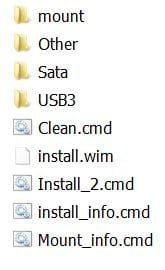
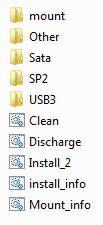
And not that I've made it this far yet, but I had another question. In the guide, at the end the different cmd files that are made does not include the "Discharge" cmd that is included in the zip file. What is it's purpose and when would you run that cmd? (Left image is from your guide, right image is from the Drives7.zip

Go to Drives7\Install.
Run Install_info.cmd. You’ll see the four indexes.
Run Install_X.cmd as administrator (right click).
Every step finishes with a pause so you can check if successful.
When all successful and done, run the Clean.cmd and then Mount_Info.cmd. Mount_Info should give you a No mounted images found. Congratulations: first step done
 

Attachments

  • Install1.JPG
    Install1.JPG
    14.7 KB · Views: 11
  • explorer_2017-03-07_09-29-54.png
    explorer_2017-03-07_09-29-54.png
    1.9 KB · Views: 11

My Computer My Computer

Computer type
PC/Desktop
Computer Manufacturer/Model Number
Custom Rig
OS
Windows 10 Home x64
CPU
Intel(R) Core(TM) i7-7700K CPU @ 4.20GHz
Motherboard
ASUSTeK COMPUTER INC. MAXIMUS IX HERO
Memory
G.Skill Tridentz DDR4 8gb x2
Graphics Card(s)
Nvidia GeForce GTX 1070 SC Gaming Black Edition
Sound Card
Onboard RealTek HD
Monitor(s) Displays
Acer H243H x2
Screen Resolution
1920x1080
Hard Drives
Samsung 960 Evo 256gb SSD - WD 1tb SATA - WD 500gb SATA - Seagate 160gb SATA
PSU
KINGWIN Mach 1 1000w
Case
Cooler Master HAF 932
Cooling
B.A.F.
Keyboard
G. Skill Ripjaws KM780 RGB
Mouse
Razer Naga
Internet Speed
200mb/s DL - 15mb/s UL
Antivirus
Avast Free
Browser
Chrome
Back
Top