Solved SFC cannot repair files

beehive

New member
Local time
1:10 PM
Messages
17
I installed some updated drivers from the Dell website & all seemed to be OK. Decided to run SFC & it said there were problems it could not repair. I have attached the CBS.log file.

Thanks for your help.
 

My Computer

Computer type
PC/Desktop
Computer Manufacturer/Model Number
Dell optiplex 390
OS
Win 7 Pro x64
CPU
core i3
Memory
4G
Antivirus
McAfee
Try running these commands from a Elevated Command Prompt:

Dism /Online /Cleanup-Image /StartComponentCleanup

Dism /Online /Cleanup-Image /RestoreHealth

SFC /scannow


Or put them in a batch (.bat) file then run the batch file. It will then execute the commands sequentially without your interaction.

If you call the batch file DISMandSFC.bat and you run it like this:

DISMandSFC.bat 2>&1 > DISMandSFC.log

You won't see anything until the commands finish, which could be an hour or more, but all the output you would normally see will be placed in DISMandSFC.log.

The 2>&1 redirects standard error and standard output together into DISMandSFC.log.
 

My Computer

Computer type
PC/Desktop
Computer Manufacturer/Model Number
Lenovo IdeaCenter 450
OS
Windows 10 Pro X64
CPU
Intel Quad Core i7-4770 @ 3.4Ghz
Memory
16.0GB PC3-12800 DDR3 SDRAM 1600 MHz
Graphics Card(s)
Intel Integrated HD Graphics
Sound Card
Realtek HD Audio
Monitor(s) Displays
HP 22" LCD
Screen Resolution
1680 x 1050
Hard Drives
250GB Samsung EVO SATA-3 SSD
2TB Seagate ST2000DM001 SATA-2
1.5TB Seagate ST3150041AS SATA
Keyboard
Dell USB
Mouse
Lenovo USB
Internet Speed
Cable via Road Runner 3MB Upload, 30MB Download
Antivirus
Windows Defender, MBAM Pro, MBAE
Browser
Seamonkey
Other Info
UEFI/GPT
PLDS DVD-RW DH16AERSH
A better way to do this is to install a windows port of the UNIX tee command. Then you woul enter:

DISMandSFC.bat" | tee DISMandSFC.log

You would get the normal output to the display and record it in DISMandSFC.log.

From: Windows batch: 'tee' command, 2nd response:

The GNU tool collection is always a good choice:
GnuWin32
The tee implementation is part of the core package:
CoreUtils for Windows
 

My Computer

Computer type
PC/Desktop
Computer Manufacturer/Model Number
Lenovo IdeaCenter 450
OS
Windows 10 Pro X64
CPU
Intel Quad Core i7-4770 @ 3.4Ghz
Memory
16.0GB PC3-12800 DDR3 SDRAM 1600 MHz
Graphics Card(s)
Intel Integrated HD Graphics
Sound Card
Realtek HD Audio
Monitor(s) Displays
HP 22" LCD
Screen Resolution
1680 x 1050
Hard Drives
250GB Samsung EVO SATA-3 SSD
2TB Seagate ST2000DM001 SATA-2
1.5TB Seagate ST3150041AS SATA
Keyboard
Dell USB
Mouse
Lenovo USB
Internet Speed
Cable via Road Runner 3MB Upload, 30MB Download
Antivirus
Windows Defender, MBAM Pro, MBAE
Browser
Seamonkey
Other Info
UEFI/GPT
PLDS DVD-RW DH16AERSH
I tried to run the first command & received the reply "error 87 the startcomponenetcleanup option is not recognized in this context". Looking in the help section, I did not see a "startcomponenetcleanup" or a "restorehealth" command either. The only option that I saw that looked useful was "scanhealth", so I am running that.
 

My Computer

Computer type
PC/Desktop
Computer Manufacturer/Model Number
Dell optiplex 390
OS
Win 7 Pro x64
CPU
core i3
Memory
4G
Antivirus
McAfee
Attached is the "checkSUR.log" from that scan.
 

Attachments

My Computer

Computer type
PC/Desktop
Computer Manufacturer/Model Number
Dell optiplex 390
OS
Win 7 Pro x64
CPU
core i3
Memory
4G
Antivirus
McAfee
My fault. Windows 7 uses SURT (System Update Readiness Tool). not DISM. That switch to DISM came in with Windows 8. Sorry about the mistake.

See here: What is the System Update Readiness Tool? - Windows Help

Download and run it then run sfc /scannow, see if SURT fixed anything.

You can also run sfc /scannow multiple (3-4) times as sometimes each run repairs a bit more.
 

My Computer

Computer type
PC/Desktop
Computer Manufacturer/Model Number
Lenovo IdeaCenter 450
OS
Windows 10 Pro X64
CPU
Intel Quad Core i7-4770 @ 3.4Ghz
Memory
16.0GB PC3-12800 DDR3 SDRAM 1600 MHz
Graphics Card(s)
Intel Integrated HD Graphics
Sound Card
Realtek HD Audio
Monitor(s) Displays
HP 22" LCD
Screen Resolution
1680 x 1050
Hard Drives
250GB Samsung EVO SATA-3 SSD
2TB Seagate ST2000DM001 SATA-2
1.5TB Seagate ST3150041AS SATA
Keyboard
Dell USB
Mouse
Lenovo USB
Internet Speed
Cable via Road Runner 3MB Upload, 30MB Download
Antivirus
Windows Defender, MBAM Pro, MBAE
Browser
Seamonkey
Other Info
UEFI/GPT
PLDS DVD-RW DH16AERSH
I ran SUR & it came back with no problems. I have run SFC multiple times now & checked SFCdetails & it always reports the same 3 files as corrupt. As I understand the log, it is looking at another copy of each file & says they are corrupt also. I have searched for the 3 files & get at least 8 copies of each file on this machine. Looking at the date & time stamp, there are different files of each. I have done a hash comparison of the files, & have at least 3 copies of each file that are the same. Most of the files are dated this year, but each 1 also has a file dated from 2010 or 11. I have the Win7 install disk from Dell, can I find a good copy of the files there? Or have they been updated with a newer version? Attached is the latest SFCdetails.

As a side note, there were 12 MS updates that were installed last night. All installed without problems except the malicious software removal tool, which I was able to install this morning with no complaint?!
 

Attachments

My Computer

Computer type
PC/Desktop
Computer Manufacturer/Model Number
Dell optiplex 390
OS
Win 7 Pro x64
CPU
core i3
Memory
4G
Antivirus
McAfee
I have no expertise in fixing SFC problems. Never been able to figure it out. Seems like they could make the error messages simpler and more specific so it is obvious exactly which file or files are corrupted.

Hopefully one of the other folks here can help.
 

My Computer

Computer type
PC/Desktop
Computer Manufacturer/Model Number
Lenovo IdeaCenter 450
OS
Windows 10 Pro X64
CPU
Intel Quad Core i7-4770 @ 3.4Ghz
Memory
16.0GB PC3-12800 DDR3 SDRAM 1600 MHz
Graphics Card(s)
Intel Integrated HD Graphics
Sound Card
Realtek HD Audio
Monitor(s) Displays
HP 22" LCD
Screen Resolution
1680 x 1050
Hard Drives
250GB Samsung EVO SATA-3 SSD
2TB Seagate ST2000DM001 SATA-2
1.5TB Seagate ST3150041AS SATA
Keyboard
Dell USB
Mouse
Lenovo USB
Internet Speed
Cable via Road Runner 3MB Upload, 30MB Download
Antivirus
Windows Defender, MBAM Pro, MBAE
Browser
Seamonkey
Other Info
UEFI/GPT
PLDS DVD-RW DH16AERSH
Yep, I agree, it seems like it could be easier. I think I have figured out the 3 files that are corrupt, but where are they located & where do I find good ones to copy? I have found multiple copies of each file on the machine & some of them have exact hash matches, so they can't all be corrupt (or can they?). And which one is the working copy? So far it is a mystery.

Thanks for your help.
 

My Computer

Computer type
PC/Desktop
Computer Manufacturer/Model Number
Dell optiplex 390
OS
Win 7 Pro x64
CPU
core i3
Memory
4G
Antivirus
McAfee
Here's the error list from SFC's summary...
Code:
2014-11-12 07:29:53, Info                  CSI    00000372 [SR] Beginning Verify and Repair transaction
2014-11-12 07:29:53, Info                  CSI    00000374 [SR] Cannot repair member file [l:54{27}]"PresentationHostDLL.dll.mui" of Microsoft-Windows-WPFCoreComp.Resources, Version = 6.1.7601.18523, pA = PROCESSOR_ARCHITECTURE_AMD64 (9), Culture = [l:10{5}]"en-us", VersionScope = 1 nonSxS, PublicKeyToken = {l:8 b:31bf3856ad364e35}, Type neutral, TypeName neutral, PublicKey neutral in the store, hash mismatch

2014-11-12 07:29:53, Info                  CSI    00000376 [SR] Cannot repair member file [l:74{37}]"Microsoft.Transactions.Bridge.Dtc.dll" of Microsoft.Transactions.Bridge.Dtc, Version = 6.1.7601.18523, pA = PROCESSOR_ARCHITECTURE_AMD64 (9), Culture neutral, VersionScope neutral, PublicKeyToken = {l:8 b:b03f5f7f11d50a3a}, Type neutral, TypeName neutral, PublicKey neutral in the store, hash mismatch
2014-11-12 07:29:53, Info                  CSI    00000378 [SR] Cannot repair member file [l:42{21}]"SMConfigInstaller.exe" of WCF-M_SM_CFG_INS_EXE, Version = 6.1.7601.18523, pA = PROCESSOR_ARCHITECTURE_AMD64 (9), Culture neutral, VersionScope = 1 nonSxS, PublicKeyToken = {l:8 b:31bf3856ad364e35}, Type neutral, TypeName neutral, PublicKey neutral in the store, hash mismatch
2014-11-12 07:29:53, Info                  CSI    0000037a [SR] Cannot repair member file [l:54{27}]"PresentationHostDLL.dll.mui" of Microsoft-Windows-WPFCoreComp.Resources, Version = 6.1.7601.18523, pA = PROCESSOR_ARCHITECTURE_INTEL (0), Culture = [l:10{5}]"en-us", VersionScope = 1 nonSxS, PublicKeyToken = {l:8 b:31bf3856ad364e35}, Type neutral, TypeName neutral, PublicKey neutral in the store, hash mismatch
2014-11-12 07:29:53, Info                  CSI    0000037c [SR] Cannot repair member file [l:74{37}]"Microsoft.Transactions.Bridge.Dtc.dll" of Microsoft.Transactions.Bridge.Dtc, Version = 6.1.7601.18523, pA = PROCESSOR_ARCHITECTURE_INTEL (0), Culture neutral, VersionScope neutral, PublicKeyToken = {l:8 b:b03f5f7f11d50a3a}, Type neutral, TypeName neutral, PublicKey neutral in the store, hash mismatch
2014-11-12 07:29:53, Info                  CSI    0000037e [SR] Cannot repair member file [l:42{21}]"SMConfigInstaller.exe" of WCF-M_SM_CFG_INS_EXE, Version = 6.1.7601.18523, pA = PROCESSOR_ARCHITECTURE_INTEL (0), Culture neutral, VersionScope = 1 nonSxS, PublicKeyToken = {l:8 b:31bf3856ad364e35}, Type neutral, TypeName neutral, PublicKey neutral in the store, hash mismatch
These seem to have crept in since your earlier thread!

I'll post a fix protocol when I can - after work!
 

My Computer

Computer type
Laptop
Computer Manufacturer/Model Number
Asus K52F or Lenovo B51-80
OS
Win 7 x64 Home Premium (and x86 VirtualBox VM)/Win10
CPU
i3 370M/i7 6500U
Motherboard
Asus/Lenovo
Memory
8GB - finally :)/8GB
Graphics Card(s)
it's an i3, dude!/dual Intel&nVidia
Sound Card
onboard
Monitor(s) Displays
15.6" built-in
Screen Resolution
1366x768/1920x1080
Hard Drives
750GB Seagate internal
Sundry external drives attached to other computers on the local network
1TB SSD on the Lenovo
PSU
n/a
Internet Speed
as much as I can get - usually on a dongle/phone, so <1MB/s
Antivirus
MSE/Defender
Browser
IE11/12/Edge/Chrome/FF(if I must)
Yep, those are the 3 files I noted. How did they get corrupted, updates, or?? I ran chkdsk & it came back with no problems found.

Glad you know how to decode those error messages & devise a fix; & are willing to share!

Thanks again.
 

My Computer

Computer type
PC/Desktop
Computer Manufacturer/Model Number
Dell optiplex 390
OS
Win 7 Pro x64
CPU
core i3
Memory
4G
Antivirus
McAfee
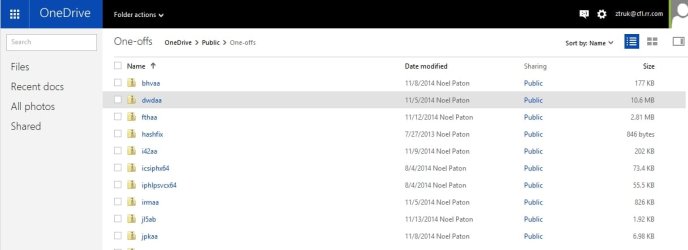
I've uploaded afile - bhvab.zip - to my OneDrive at Noel'sOneDrive
Please downloadand save it.

Right-click onthe saved file and select Extract all...
Change the targetto C:\ and click on Extract
Close all windows(it would be a good idea to print these instructions!)

Now reboot to theRepair Environment - as soon as the machine restarts, start tapping F8 - this should bring up the Advanced BootMenu, at the top of which should be the option'Repair my Computer'
Pick that

You'll have tolog in with your username and password.

Pick the optionto use a Command Prompt

At the prompttype
DIR C:\bhvab
hit the enter key- if you get a 'Not Found' error try

DIR D:\bhvab

or

DIR E:\bhvab


The drive letterin use when you find the folder will need to be substituted (for<drive>)into the following command...

XCOPY <drive>:\hznaa <drive>:\windows\winsxs /y /i /s /v /h

(e.g. XCOPYP:\wfire P:\windows\winsxs /y /i /s /v /h )

run the command(it should take almost no time) and when the prompt returns, type

EXIT

and hit the Enterkey to exit Command Prompt - reboot to Normal Mode Windows.

Now run SFC /SCANNOW in an Elevated Command Prompt

then reboot andupload the new CBS.log file to your reply
 

My Computer

Computer type
Laptop
Computer Manufacturer/Model Number
Asus K52F or Lenovo B51-80
OS
Win 7 x64 Home Premium (and x86 VirtualBox VM)/Win10
CPU
i3 370M/i7 6500U
Motherboard
Asus/Lenovo
Memory
8GB - finally :)/8GB
Graphics Card(s)
it's an i3, dude!/dual Intel&nVidia
Sound Card
onboard
Monitor(s) Displays
15.6" built-in
Screen Resolution
1366x768/1920x1080
Hard Drives
750GB Seagate internal
Sundry external drives attached to other computers on the local network
1TB SSD on the Lenovo
PSU
n/a
Internet Speed
as much as I can get - usually on a dongle/phone, so <1MB/s
Antivirus
MSE/Defender
Browser
IE11/12/Edge/Chrome/FF(if I must)
I don't see *bhvab* available on the link. There is *bhvaa*, which I downloaded & looked at; but it doesn't look appropriate, so I have stopped there.
 

My Computer

Computer type
PC/Desktop
Computer Manufacturer/Model Number
Dell optiplex 390
OS
Win 7 Pro x64
CPU
core i3
Memory
4G
Antivirus
McAfee
Try again - it should be up there now.
 

My Computer

Computer type
Laptop
Computer Manufacturer/Model Number
Asus K52F or Lenovo B51-80
OS
Win 7 x64 Home Premium (and x86 VirtualBox VM)/Win10
CPU
i3 370M/i7 6500U
Motherboard
Asus/Lenovo
Memory
8GB - finally :)/8GB
Graphics Card(s)
it's an i3, dude!/dual Intel&nVidia
Sound Card
onboard
Monitor(s) Displays
15.6" built-in
Screen Resolution
1366x768/1920x1080
Hard Drives
750GB Seagate internal
Sundry external drives attached to other computers on the local network
1TB SSD on the Lenovo
PSU
n/a
Internet Speed
as much as I can get - usually on a dongle/phone, so <1MB/s
Antivirus
MSE/Defender
Browser
IE11/12/Edge/Chrome/FF(if I must)
I still don't see it.
 

My Computer

Computer type
PC/Desktop
Computer Manufacturer/Model Number
Dell optiplex 390
OS
Win 7 Pro x64
CPU
core i3
Memory
4G
Antivirus
McAfee
Not visible to the public:

NoelDP.jpg
 

My Computer

Computer type
PC/Desktop
Computer Manufacturer/Model Number
Lenovo IdeaCenter 450
OS
Windows 10 Pro X64
CPU
Intel Quad Core i7-4770 @ 3.4Ghz
Memory
16.0GB PC3-12800 DDR3 SDRAM 1600 MHz
Graphics Card(s)
Intel Integrated HD Graphics
Sound Card
Realtek HD Audio
Monitor(s) Displays
HP 22" LCD
Screen Resolution
1680 x 1050
Hard Drives
250GB Samsung EVO SATA-3 SSD
2TB Seagate ST2000DM001 SATA-2
1.5TB Seagate ST3150041AS SATA
Keyboard
Dell USB
Mouse
Lenovo USB
Internet Speed
Cable via Road Runner 3MB Upload, 30MB Download
Antivirus
Windows Defender, MBAM Pro, MBAE
Browser
Seamonkey
Other Info
UEFI/GPT
PLDS DVD-RW DH16AERSH
It's definitely there now ;)
 

My Computer

Computer type
Laptop
Computer Manufacturer/Model Number
Asus K52F or Lenovo B51-80
OS
Win 7 x64 Home Premium (and x86 VirtualBox VM)/Win10
CPU
i3 370M/i7 6500U
Motherboard
Asus/Lenovo
Memory
8GB - finally :)/8GB
Graphics Card(s)
it's an i3, dude!/dual Intel&nVidia
Sound Card
onboard
Monitor(s) Displays
15.6" built-in
Screen Resolution
1366x768/1920x1080
Hard Drives
750GB Seagate internal
Sundry external drives attached to other computers on the local network
1TB SSD on the Lenovo
PSU
n/a
Internet Speed
as much as I can get - usually on a dongle/phone, so <1MB/s
Antivirus
MSE/Defender
Browser
IE11/12/Edge/Chrome/FF(if I must)
I found it. SFC failed again, but it looks like we are down to 1 file now. I have attached both the cbs.log & the details.txt.

Thanks,
Dave
 

Attachments

My Computer

Computer type
PC/Desktop
Computer Manufacturer/Model Number
Dell optiplex 390
OS
Win 7 Pro x64
CPU
core i3
Memory
4G
Antivirus
McAfee
Hmm - according to SFCDetails...
Code:
2014-11-15 09:55:35, Info                  CSI    00000351 [SR] Repairing 2 components
2014-11-15 09:55:35, Info                  CSI    00000352 [SR] Beginning Verify and Repair transaction
2014-11-15 09:55:35, Info                  CSI    00000354 [SR] Cannot repair member file [l:74{37}]"Microsoft.Transactions.Bridge.Dtc.dll" of Microsoft.Transactions.Bridge.Dtc, Version = 6.1.7601.18523, pA = PROCESSOR_ARCHITECTURE_AMD64 (9), Culture neutral, VersionScope neutral, PublicKeyToken = {l:8 b:b03f5f7f11d50a3a}, Type neutral, TypeName neutral, PublicKey neutral in the store, hash mismatch
2014-11-15 09:55:35, Info                  CSI    00000356 [SR] Cannot repair member file [l:74{37}]"Microsoft.Transactions.Bridge.Dtc.dll" of Microsoft.Transactions.Bridge.Dtc, Version = 6.1.7601.18523, pA = PROCESSOR_ARCHITECTURE_INTEL (0), Culture neutral, VersionScope neutral, PublicKeyToken = {l:8 b:b03f5f7f11d50a3a}, Type neutral, TypeName neutral, PublicKey neutral in the store, hash mismatch

... according to the CBS log - which gives a LOT more data...
Code:
2014-11-15 09:55:35, Info                  CSI    00000351 [SR] Repairing 2 components
2014-11-15 09:55:35, Info                  CSI    00000352 [SR] Beginning Verify and Repair transaction
2014-11-15 09:55:35, Info                  CSI    00000353 Hashes for file member \SystemRoot\WinSxS\amd64_microsoft.transactions.bridge.dtc_b03f5f7f11d50a3a_6.1.7601.18523_none_7bd502773b0e2c7b\Microsoft.Transactions.Bridge.Dtc.dll do not match actual file [l:74{37}]"Microsoft.Transactions.Bridge.Dtc.dll" :
  Found: {l:20 b:xjI/BGvhmygsfqI1omJ7cSLY1hg=} Expected: {l:20 b:G1OsZ4cl0Spu8YsD6I1Md9yv0+Y=}
  Found: {l:32 b:bN0lnI7L5h+8Np8yk8GWFUE4aVSiI7F6N4mdf9mtQto=} Expected: {l:32 b:BYpiQPNjoALrRkqDPzDnsUHluOFsBxFFfqMFa2KqpOU=}
2014-11-15 09:55:35, Info                  CSI    00000354 [SR] Cannot repair member file [l:74{37}]"Microsoft.Transactions.Bridge.Dtc.dll" of Microsoft.Transactions.Bridge.Dtc, Version = 6.1.7601.18523, pA = PROCESSOR_ARCHITECTURE_AMD64 (9), Culture neutral, VersionScope neutral, PublicKeyToken = {l:8 b:b03f5f7f11d50a3a}, Type neutral, TypeName neutral, PublicKey neutral in the store, hash mismatch
2014-11-15 09:55:35, Info                  CSI    00000355 Hashes for file member \SystemRoot\WinSxS\x86_microsoft.transactions.bridge.dtc_b03f5f7f11d50a3a_6.1.7601.18523_none_c382394e4f8a5581\Microsoft.Transactions.Bridge.Dtc.dll do not match actual file [l:74{37}]"Microsoft.Transactions.Bridge.Dtc.dll" :
  Found: {l:20 b:xjI/BGvhmygsfqI1omJ7cSLY1hg=} Expected: {l:20 b:2CYfUFY/bZHw58cBmVUiwk4DJ44=}
  Found: {l:32 b:bN0lnI7L5h+8Np8yk8GWFUE4aVSiI7F6N4mdf9mtQto=} Expected: {l:32 b:2jjxig7vszlhsaGwggbc1iXZwM8AM6VbLmerS278Yf8=}
2014-11-15 09:55:35, Info                  CSI    00000356 [SR] Cannot repair member file [l:74{37}]"Microsoft.Transactions.Bridge.Dtc.dll" of Microsoft.Transactions.Bridge.Dtc, Version = 6.1.7601.18523, pA = PROCESSOR_ARCHITECTURE_INTEL (0), Culture neutral, VersionScope neutral, PublicKeyToken = {l:8 b:b03f5f7f11d50a3a}, Type neutral, TypeName neutral, PublicKey neutral in the store, hash mismatch
2014-11-15 09:55:35, Info                  CSI    00000357 Hashes for file member \SystemRoot\WinSxS\amd64_microsoft.transactions.bridge.dtc_b03f5f7f11d50a3a_6.1.7601.18523_none_7bd502773b0e2c7b\Microsoft.Transactions.Bridge.Dtc.dll do not match actual file [l:74{37}]"Microsoft.Transactions.Bridge.Dtc.dll" :
  Found: {l:20 b:xjI/BGvhmygsfqI1omJ7cSLY1hg=} Expected: {l:20 b:G1OsZ4cl0Spu8YsD6I1Md9yv0+Y=}
  Found: {l:32 b:bN0lnI7L5h+8Np8yk8GWFUE4aVSiI7F6N4mdf9mtQto=} Expected: {l:32 b:BYpiQPNjoALrRkqDPzDnsUHluOFsBxFFfqMFa2KqpOU=}
2014-11-15 09:55:35, Info                  CSI    00000358 [SR] Cannot repair member file [l:74{37}]"Microsoft.Transactions.Bridge.Dtc.dll" of Microsoft.Transactions.Bridge.Dtc, Version = 6.1.7601.18523, pA = PROCESSOR_ARCHITECTURE_AMD64 (9), Culture neutral, VersionScope neutral, PublicKeyToken = {l:8 b:b03f5f7f11d50a3a}, Type neutral, TypeName neutral, PublicKey neutral in the store, hash mismatch
2014-11-15 09:55:35, Info                  CSI    00000359 [SR] This component was referenced by [l:160{80}]"Package_97_for_KB2943357~31bf3856ad364e35~amd64~~6.1.1.3.2943357-670_neutral_GDR"
2014-11-15 09:55:35, Info                  CSI    0000035a Hashes for file member \??\C:\Windows\Microsoft.NET\Framework64\v3.0\Windows Communication Foundation\Microsoft.Transactions.Bridge.Dtc.dll do not match actual file [l:74{37}]"Microsoft.Transactions.Bridge.Dtc.dll" :
  Found: {l:20 b:xjI/BGvhmygsfqI1omJ7cSLY1hg=} Expected: {l:20 b:G1OsZ4cl0Spu8YsD6I1Md9yv0+Y=}
  Found: {l:32 b:bN0lnI7L5h+8Np8yk8GWFUE4aVSiI7F6N4mdf9mtQto=} Expected: {l:32 b:BYpiQPNjoALrRkqDPzDnsUHluOFsBxFFfqMFa2KqpOU=}
2014-11-15 09:55:35, Info                  CSI    0000035b Hashes for file member \SystemRoot\WinSxS\amd64_microsoft.transactions.bridge.dtc_b03f5f7f11d50a3a_6.1.7601.18523_none_7bd502773b0e2c7b\Microsoft.Transactions.Bridge.Dtc.dll do not match actual file [l:74{37}]"Microsoft.Transactions.Bridge.Dtc.dll" :
  Found: {l:20 b:xjI/BGvhmygsfqI1omJ7cSLY1hg=} Expected: {l:20 b:G1OsZ4cl0Spu8YsD6I1Md9yv0+Y=}
  Found: {l:32 b:bN0lnI7L5h+8Np8yk8GWFUE4aVSiI7F6N4mdf9mtQto=} Expected: {l:32 b:BYpiQPNjoALrRkqDPzDnsUHluOFsBxFFfqMFa2KqpOU=}
2014-11-15 09:55:35, Info                  CSI    0000035c [SR] Could not reproject corrupted file [ml:520{260},l:156{78}]"\??\C:\Windows\Microsoft.NET\Framework64\v3.0\Windows Communication Foundation"\[l:74{37}]"Microsoft.Transactions.Bridge.Dtc.dll"; source file in store is also corrupted
2014-11-15 09:55:35, Info                  CSI    0000035d Hashes for file member \SystemRoot\WinSxS\x86_microsoft.transactions.bridge.dtc_b03f5f7f11d50a3a_6.1.7601.18523_none_c382394e4f8a5581\Microsoft.Transactions.Bridge.Dtc.dll do not match actual file [l:74{37}]"Microsoft.Transactions.Bridge.Dtc.dll" :
  Found: {l:20 b:xjI/BGvhmygsfqI1omJ7cSLY1hg=} Expected: {l:20 b:2CYfUFY/bZHw58cBmVUiwk4DJ44=}
  Found: {l:32 b:bN0lnI7L5h+8Np8yk8GWFUE4aVSiI7F6N4mdf9mtQto=} Expected: {l:32 b:2jjxig7vszlhsaGwggbc1iXZwM8AM6VbLmerS278Yf8=}
2014-11-15 09:55:35, Info                  CSI    0000035e [SR] Cannot repair member file [l:74{37}]"Microsoft.Transactions.Bridge.Dtc.dll" of Microsoft.Transactions.Bridge.Dtc, Version = 6.1.7601.18523, pA = PROCESSOR_ARCHITECTURE_INTEL (0), Culture neutral, VersionScope neutral, PublicKeyToken = {l:8 b:b03f5f7f11d50a3a}, Type neutral, TypeName neutral, PublicKey neutral in the store, hash mismatch
2014-11-15 09:55:35, Info                  CSI    0000035f [SR] This component was referenced by [l:162{81}]"Package_100_for_KB2943357~31bf3856ad364e35~amd64~~6.1.1.3.2943357-727_neutral_GDR"
2014-11-15 09:55:35, Info                  CSI    00000360 Hashes for file member \??\C:\Windows\Microsoft.NET\Framework\v3.0\Windows Communication Foundation\Microsoft.Transactions.Bridge.Dtc.dll do not match actual file [l:74{37}]"Microsoft.Transactions.Bridge.Dtc.dll" :
  Found: {l:20 b:xjI/BGvhmygsfqI1omJ7cSLY1hg=} Expected: {l:20 b:2CYfUFY/bZHw58cBmVUiwk4DJ44=}
  Found: {l:32 b:bN0lnI7L5h+8Np8yk8GWFUE4aVSiI7F6N4mdf9mtQto=} Expected: {l:32 b:2jjxig7vszlhsaGwggbc1iXZwM8AM6VbLmerS278Yf8=}
2014-11-15 09:55:35, Info                  CSI    00000361 Hashes for file member \SystemRoot\WinSxS\x86_microsoft.transactions.bridge.dtc_b03f5f7f11d50a3a_6.1.7601.18523_none_c382394e4f8a5581\Microsoft.Transactions.Bridge.Dtc.dll do not match actual file [l:74{37}]"Microsoft.Transactions.Bridge.Dtc.dll" :
  Found: {l:20 b:xjI/BGvhmygsfqI1omJ7cSLY1hg=} Expected: {l:20 b:2CYfUFY/bZHw58cBmVUiwk4DJ44=}
  Found: {l:32 b:bN0lnI7L5h+8Np8yk8GWFUE4aVSiI7F6N4mdf9mtQto=} Expected: {l:32 b:2jjxig7vszlhsaGwggbc1iXZwM8AM6VbLmerS278Yf8=}
2014-11-15 09:55:35, Info                  CSI    00000362 [SR] Could not reproject corrupted file [ml:520{260},l:152{76}]"\??\C:\Windows\Microsoft.NET\Framework\v3.0\Windows Communication Foundation"\[l:74{37}]"Microsoft.Transactions.Bridge.Dtc.dll"; source file in store is also corrupted
2014-11-15 09:55:35, Info                  CSI    00000363 Repair results created:
POQ 145 starts:
 
POQ 145 ends.
2014-11-15 09:55:35, Info                  CSI    00000364 [SR] Repair complete
There is a strange versioning in the files there - I need to investigate it and see if it means anything


Back soon...
 

My Computer

Computer type
Laptop
Computer Manufacturer/Model Number
Asus K52F or Lenovo B51-80
OS
Win 7 x64 Home Premium (and x86 VirtualBox VM)/Win10
CPU
i3 370M/i7 6500U
Motherboard
Asus/Lenovo
Memory
8GB - finally :)/8GB
Graphics Card(s)
it's an i3, dude!/dual Intel&nVidia
Sound Card
onboard
Monitor(s) Displays
15.6" built-in
Screen Resolution
1366x768/1920x1080
Hard Drives
750GB Seagate internal
Sundry external drives attached to other computers on the local network
1TB SSD on the Lenovo
PSU
n/a
Internet Speed
as much as I can get - usually on a dongle/phone, so <1MB/s
Antivirus
MSE/Defender
Browser
IE11/12/Edge/Chrome/FF(if I must)
Noel, where would be a good place to read about the SFC and CBS logs, how to interpret them to decide what needs to be done to fix the problems?
 

My Computer

Computer type
PC/Desktop
Computer Manufacturer/Model Number
Lenovo IdeaCenter 450
OS
Windows 10 Pro X64
CPU
Intel Quad Core i7-4770 @ 3.4Ghz
Memory
16.0GB PC3-12800 DDR3 SDRAM 1600 MHz
Graphics Card(s)
Intel Integrated HD Graphics
Sound Card
Realtek HD Audio
Monitor(s) Displays
HP 22" LCD
Screen Resolution
1680 x 1050
Hard Drives
250GB Samsung EVO SATA-3 SSD
2TB Seagate ST2000DM001 SATA-2
1.5TB Seagate ST3150041AS SATA
Keyboard
Dell USB
Mouse
Lenovo USB
Internet Speed
Cable via Road Runner 3MB Upload, 30MB Download
Antivirus
Windows Defender, MBAM Pro, MBAE
Browser
Seamonkey
Other Info
UEFI/GPT
PLDS DVD-RW DH16AERSH
Back
Top