sfc/scannow not fixing

mecanicogolf

New member
Local time
2:19 PM
Messages
32
Location
Seattle, WA /USA
Hello everyone.

Attached are my results from my sfc scan I just ran. My computer seems to run just fine, but knowing that some files are missing, just bugs me.

As you can see, I also ran the SFCFix tool and inserted my Win 7 disc as told but did not work for my 6 files that are missing.

Any hope for me? I would hate to reinstall Win 7 again as I just did after removing Win 10.

Thanks
 

Attachments

My Computer

Computer type
Laptop
Computer Manufacturer/Model Number
HP
OS
Windows 7 Home Premium 32bit 6.1.7601
CPU
Pentium(R) Dual-Core CPU T4500 @2.30 GHz
Motherboard
Intel Model 1526 HP
Memory
2,90 GB
Graphics Card(s)
Mobil Intel(R) 4 Series Express Chipset Family
Sound Card
IDT High Definition Audio CODEC
Monitor(s) Displays
Monitor PnP Generic
Screen Resolution
1366X768
Hard Drives
Fixed hard disc media
Case
HP 620 Laptop
Antivirus
Microsoft Security Essentials
Browser
Firefox
Awhile back there was a windows update that caused a false reading when running sfc. If I remember correctly it was KB3022345

How many times have you run it ??

sfc should be run at least 3 times to see if it will correct any error messages.
 

My Computer

Computer type
PC/Desktop
Computer Manufacturer/Model Number
Skylake Special #666
OS
Windows 10 Pro x64
CPU
Intel Core i7 6700K
Motherboard
Asus Sabertooth Z170 Mark 1
Memory
GSkill TridentZ RGB 16GB 3600 16-16-16-36
Graphics Card(s)
EVGA GTX 980 Ti SC x2
Sound Card
Realtek High Definition
Monitor(s) Displays
AOC G2460PG
Screen Resolution
1920 x 1080 144Hz
Hard Drives
Samsung 860 Pro 256GB, Seagate Barracuda 4TB x2
PSU
EVGA 1000 P2, EVGA White Custom Braided Cables
Case
Corsair Vengeance C70 Gunmetal Black
Cooling
Corsair H100i v2, Corsair ML120 x2, Thermal Grizzly Kryonaut
Keyboard
Logitech G910 Orion Spectrum
Mouse
Logitech G700s
Internet Speed
Verizon Fios Quantum Gateway 75/75
Antivirus
Windows Defender, Malwarebytes Free 3.8.3
Browser
Chrome
Other Info
Corsair SP120 x4, LG Blu-ray Drive, Durabrand HT-395 100 Watt Dolby Digital Amp, Corsair H2100 Wireless 7.1 Headset
Well, here it is, 2 months later and still have the same problem. I even ran the SFCfix.exe program which told me to insert the Win 7 Disc (and I did) with no results. As I stated above, the laptop runs just fine, but this bugs the hell out of me knowing somethin is missing.
As you can see, it´s exactly the same as my last scan. It´s been this way for about 5 months now, which is when I last did a Win 7 resurection.
Can anyone tell me what this files are and how to fix the? Where to download? SFCfix cannot get them from my disc.
I may try the Microsoft Help Forum if I cannot get help here.

Thanks
 

Attachments

My Computer

Computer type
Laptop
Computer Manufacturer/Model Number
HP
OS
Windows 7 Home Premium 32bit 6.1.7601
CPU
Pentium(R) Dual-Core CPU T4500 @2.30 GHz
Motherboard
Intel Model 1526 HP
Memory
2,90 GB
Graphics Card(s)
Mobil Intel(R) 4 Series Express Chipset Family
Sound Card
IDT High Definition Audio CODEC
Monitor(s) Displays
Monitor PnP Generic
Screen Resolution
1366X768
Hard Drives
Fixed hard disc media
Case
HP 620 Laptop
Antivirus
Microsoft Security Essentials
Browser
Firefox
Those files all belong to the MS visual Basics C++ programs, (in your progs).
If you dont use them uninstall them, there will be more than 1, all with different year dates.
If they are required in the future by other progs, it will tell you.

Roy
 

My Computer

Computer type
PC/Desktop
Computer Manufacturer/Model Number
medionl/Aspire 6930G/acer x55a
OS
W7 home premium 32bit/W7HP 64bit/w10 tp insider ring
CPU
E5300 dual core
Motherboard
medion MS7366
Memory
3gb
Graphics Card(s)
Nvidia Geforce 7100 Nforce 630i
Monitor(s) Displays
avixc
Internet Speed
n (isp resticted to 72)
Antivirus
mse/pands
Browser
palemoon
Other Info
Belkin Fd7050 n USB using Railink RT2870 drivers, more upto date
Thanks torchwood, I´ll try it right now and let you know.
Now I know why my Win 7 disc couldn´t fix them.

Well, I tried what you said and it didn´t work. I had 2 C++2005, 3 C++ 2008, 1 C++ 2010 and 1 C++ 2012. I erased all of them and ran the scan and got the same. I then decided that maybe they were corrupt and reinstalled them: Got the same results. Nothing has changed with or without C++.

I have decided that it must not be serious and will try and live with it, as I have had this for 5 months now and my computer runs very good with this "problem".

What I will not do again is reinstall Windows just to get rid of these errors. No way. It´s running great. Must not be real important.

Even though I really would like to fix this, if you have anymore suggestions, I´m all ears.

Attached is my current scan now. I reinstalled C++ 2008, C++2010 and C++ 2012. My system said I needed them. I believe for Nero.

Thank you for your help.
 

Attachments

Last edited:

My Computer

Computer type
Laptop
Computer Manufacturer/Model Number
HP
OS
Windows 7 Home Premium 32bit 6.1.7601
CPU
Pentium(R) Dual-Core CPU T4500 @2.30 GHz
Motherboard
Intel Model 1526 HP
Memory
2,90 GB
Graphics Card(s)
Mobil Intel(R) 4 Series Express Chipset Family
Sound Card
IDT High Definition Audio CODEC
Monitor(s) Displays
Monitor PnP Generic
Screen Resolution
1366X768
Hard Drives
Fixed hard disc media
Case
HP 620 Laptop
Antivirus
Microsoft Security Essentials
Browser
Firefox
Believe it or not, those errors come from the 2005 version, so try installing that version.

For the other error

Usually, that means the MTDSC.log file is either missing or somehow corrupted. The MSDTC log file is usually here so take a look:
C:\WINDOWS\System32\Msdtc

To reset and create a new MSDTC.log file, click Start, Run and in the box enter:

msdtc -resetlog (note the space)

Roy
 

My Computer

Computer type
PC/Desktop
Computer Manufacturer/Model Number
medionl/Aspire 6930G/acer x55a
OS
W7 home premium 32bit/W7HP 64bit/w10 tp insider ring
CPU
E5300 dual core
Motherboard
medion MS7366
Memory
3gb
Graphics Card(s)
Nvidia Geforce 7100 Nforce 630i
Monitor(s) Displays
avixc
Internet Speed
n (isp resticted to 72)
Antivirus
mse/pands
Browser
palemoon
Other Info
Belkin Fd7050 n USB using Railink RT2870 drivers, more upto date
Good. We´re getting closer. I reinstalled C++ 2005 and looks like that part is OK.(It originally came with my Nero 11 program I had installed a few months back)

I followed your MSDTC steps (hope I did it right) Openned Start and in the box I entered (copied your line to not to make mistakes) and hit enter. (By the way, I cannot open this file). I restarted the computer (just in case) and ran the scan again.
Attached is what I got.

P.S. I ran a SFCFix also and tried to insert the Win 7 disc. Did not work

P.S.S. I ran the mouse pointer over the MSDTC file and it tells me it´s empty. I also accessed the properties and it also says it´s empty. I remember it did have 113kb. ???¿¿¿
Maybe I need to replace this file?

Now I have 7 errors when I had 6 before?
Give me step by step details and I´ll try it again.
 

Attachments

Last edited:

My Computer

Computer type
Laptop
Computer Manufacturer/Model Number
HP
OS
Windows 7 Home Premium 32bit 6.1.7601
CPU
Pentium(R) Dual-Core CPU T4500 @2.30 GHz
Motherboard
Intel Model 1526 HP
Memory
2,90 GB
Graphics Card(s)
Mobil Intel(R) 4 Series Express Chipset Family
Sound Card
IDT High Definition Audio CODEC
Monitor(s) Displays
Monitor PnP Generic
Screen Resolution
1366X768
Hard Drives
Fixed hard disc media
Case
HP 620 Laptop
Antivirus
Microsoft Security Essentials
Browser
Firefox
there should be a copy of that log here, can you check
C:\Windows\winsxs\amd64_microsoft-windows-com-dtc-runtime_31bf3856ad364e35_6.1.7600.16385_none_7547f48c79b40229.

the new error relates to the removal of a language pack ??

Roy
 

My Computer

Computer type
PC/Desktop
Computer Manufacturer/Model Number
medionl/Aspire 6930G/acer x55a
OS
W7 home premium 32bit/W7HP 64bit/w10 tp insider ring
CPU
E5300 dual core
Motherboard
medion MS7366
Memory
3gb
Graphics Card(s)
Nvidia Geforce 7100 Nforce 630i
Monitor(s) Displays
avixc
Internet Speed
n (isp resticted to 72)
Antivirus
mse/pands
Browser
palemoon
Other Info
Belkin Fd7050 n USB using Railink RT2870 drivers, more upto date
C:\Windows\winsxs\amd64 doesn´t exsist on my PC. Looks like a 64 bit. Mine´s a 32 bit. ? There is nothing that starts with "amd64".

I have installed a Spanish language pack installed by Vistalizator and the Spanish language pack that goes with it. Never had trouble with it. If you think I should uninstall and reinstall? No problem.
 

My Computer

Computer type
Laptop
Computer Manufacturer/Model Number
HP
OS
Windows 7 Home Premium 32bit 6.1.7601
CPU
Pentium(R) Dual-Core CPU T4500 @2.30 GHz
Motherboard
Intel Model 1526 HP
Memory
2,90 GB
Graphics Card(s)
Mobil Intel(R) 4 Series Express Chipset Family
Sound Card
IDT High Definition Audio CODEC
Monitor(s) Displays
Monitor PnP Generic
Screen Resolution
1366X768
Hard Drives
Fixed hard disc media
Case
HP 620 Laptop
Antivirus
Microsoft Security Essentials
Browser
Firefox
Lets see if we can find it in the windows.old folder, that was created when you updated to 10, if its not been deleted
(i mean the MSDTC.log)
As regarding the Spanish language option, Only the Ultimate and Enterprise versions have the option to install different language packs, Visulator is a 3rd party program. Arguments abound regarding the legality of adding/changing languages on other versions but microsoft Eula states that you can only use your original set-up language.

Roy
 

My Computer

Computer type
PC/Desktop
Computer Manufacturer/Model Number
medionl/Aspire 6930G/acer x55a
OS
W7 home premium 32bit/W7HP 64bit/w10 tp insider ring
CPU
E5300 dual core
Motherboard
medion MS7366
Memory
3gb
Graphics Card(s)
Nvidia Geforce 7100 Nforce 630i
Monitor(s) Displays
avixc
Internet Speed
n (isp resticted to 72)
Antivirus
mse/pands
Browser
palemoon
Other Info
Belkin Fd7050 n USB using Railink RT2870 drivers, more upto date
It has been deleted. When I went from 7 to 10, I thought 10 was it. I started having some issues and the fact is that I JUST like Windows 7 a lot better. I still have 5 years and I´ll stick with 7. Anyway, all .old files are gone.

I bought this laptop in Spain with Windows 7 Home Premium Spanish Version originally. My keyboard is Spanish ñññ¿¿¿, as you can see. The problem is, I was never given a disc. I have a Windows repair disc (in English) then I change to Spanish. That´s the only way to get back to the original language. So this DID come with Spanish.
If you know of amore "legal" way to go to Spanish, I´m all ears and maybe fix this problem.

Thanks
 

My Computer

Computer type
Laptop
Computer Manufacturer/Model Number
HP
OS
Windows 7 Home Premium 32bit 6.1.7601
CPU
Pentium(R) Dual-Core CPU T4500 @2.30 GHz
Motherboard
Intel Model 1526 HP
Memory
2,90 GB
Graphics Card(s)
Mobil Intel(R) 4 Series Express Chipset Family
Sound Card
IDT High Definition Audio CODEC
Monitor(s) Displays
Monitor PnP Generic
Screen Resolution
1366X768
Hard Drives
Fixed hard disc media
Case
HP 620 Laptop
Antivirus
Microsoft Security Essentials
Browser
Firefox
Hi
Right ive managed to get hold of a MSdtc.log (32bit version).
CREATE A RESTORE POINT >>>> NOW <<<<,
if you cant, do not proceed
FROM an Administator command
(its a Zipped file so you will need to unzip it)
Drag it to your C:/windows/system32 folder

Roy
 

Attachments

My Computer

Computer type
PC/Desktop
Computer Manufacturer/Model Number
medionl/Aspire 6930G/acer x55a
OS
W7 home premium 32bit/W7HP 64bit/w10 tp insider ring
CPU
E5300 dual core
Motherboard
medion MS7366
Memory
3gb
Graphics Card(s)
Nvidia Geforce 7100 Nforce 630i
Monitor(s) Displays
avixc
Internet Speed
n (isp resticted to 72)
Antivirus
mse/pands
Browser
palemoon
Other Info
Belkin Fd7050 n USB using Railink RT2870 drivers, more upto date
I did exactly what you said and here are the results:

I restarted and everything before running the scan (just in case).

I now have the application (131kb) dated 13 July 2009 and the log file you just gave me right below it in my system32 folder. Hope that is correct.

After checking this one more time, I ran the scan
 

Attachments

Last edited:

My Computer

Computer type
Laptop
Computer Manufacturer/Model Number
HP
OS
Windows 7 Home Premium 32bit 6.1.7601
CPU
Pentium(R) Dual-Core CPU T4500 @2.30 GHz
Motherboard
Intel Model 1526 HP
Memory
2,90 GB
Graphics Card(s)
Mobil Intel(R) 4 Series Express Chipset Family
Sound Card
IDT High Definition Audio CODEC
Monitor(s) Displays
Monitor PnP Generic
Screen Resolution
1366X768
Hard Drives
Fixed hard disc media
Case
HP 620 Laptop
Antivirus
Microsoft Security Essentials
Browser
Firefox
Checking for next post
DO NOTHING

reg load HKLM\COMPONENTS %windir%\System32\config\COMPONENTS reg add "HKLM\COMPONENTS\DerivedData\Components\x86_microsoft-windows-com-dtc-runtime_31bf3856ad364e35_6.3.9600.17415_none_0a5dfdcc33c06e7e" /v f!msdtc.log /t REG_DWORD /d 00000001 /f
 
Last edited:

My Computer

Computer type
PC/Desktop
Computer Manufacturer/Model Number
medionl/Aspire 6930G/acer x55a
OS
W7 home premium 32bit/W7HP 64bit/w10 tp insider ring
CPU
E5300 dual core
Motherboard
medion MS7366
Memory
3gb
Graphics Card(s)
Nvidia Geforce 7100 Nforce 630i
Monitor(s) Displays
avixc
Internet Speed
n (isp resticted to 72)
Antivirus
mse/pands
Browser
palemoon
Other Info
Belkin Fd7050 n USB using Railink RT2870 drivers, more upto date
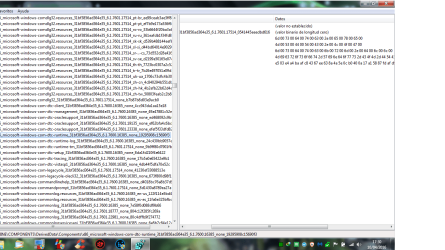
can we compare here please
Open Regedit HKLM > Expand
NOW we need to get the config data
top left click FILE > import hive> from C/windows/system32/config/components

Now its there
navigate to the file in screenshot

screenshot Bottom line follow the links

please post a screenshot of yours

Roy
 

Attachments

  • msdtcreg.PNG
    msdtcreg.PNG
    52.5 KB · Views: 8

My Computer

Computer type
PC/Desktop
Computer Manufacturer/Model Number
medionl/Aspire 6930G/acer x55a
OS
W7 home premium 32bit/W7HP 64bit/w10 tp insider ring
CPU
E5300 dual core
Motherboard
medion MS7366
Memory
3gb
Graphics Card(s)
Nvidia Geforce 7100 Nforce 630i
Monitor(s) Displays
avixc
Internet Speed
n (isp resticted to 72)
Antivirus
mse/pands
Browser
palemoon
Other Info
Belkin Fd7050 n USB using Railink RT2870 drivers, more upto date
I don´t know if you can see this well. I tried to upload a XPS file, but it wouldn´t take it.

My screenshot looks just like yours. I threw in a txt. I hope you can understand it.

If you need anything else, just let me know. It´s in spanish some of the words, but hope understandable.
 

Attachments

  • Sin título.png
    Sin título.png
    55.5 KB · Views: 6
  • Regedit.txt
    Regedit.txt
    2.2 KB · Views: 4
Last edited:

My Computer

Computer type
Laptop
Computer Manufacturer/Model Number
HP
OS
Windows 7 Home Premium 32bit 6.1.7601
CPU
Pentium(R) Dual-Core CPU T4500 @2.30 GHz
Motherboard
Intel Model 1526 HP
Memory
2,90 GB
Graphics Card(s)
Mobil Intel(R) 4 Series Express Chipset Family
Sound Card
IDT High Definition Audio CODEC
Monitor(s) Displays
Monitor PnP Generic
Screen Resolution
1366X768
Hard Drives
Fixed hard disc media
Case
HP 620 Laptop
Antivirus
Microsoft Security Essentials
Browser
Firefox
In Addrams reply (post2) did you uninstal KB3022345?

If not please do so.

Roy
 

My Computer

Computer type
PC/Desktop
Computer Manufacturer/Model Number
medionl/Aspire 6930G/acer x55a
OS
W7 home premium 32bit/W7HP 64bit/w10 tp insider ring
CPU
E5300 dual core
Motherboard
medion MS7366
Memory
3gb
Graphics Card(s)
Nvidia Geforce 7100 Nforce 630i
Monitor(s) Displays
avixc
Internet Speed
n (isp resticted to 72)
Antivirus
mse/pands
Browser
palemoon
Other Info
Belkin Fd7050 n USB using Railink RT2870 drivers, more upto date
I never uninstalled KB3022345. It was never on my system as I know of.

I now noticed that my msdtc file has a logo on it that looks like a delta in a circle.
More info:
File: 2001.12.8530.16385
Date: 07/13/2009 at 16:14 (time)
Created by C++8.0
Version: 6.1.7600.16385

If this helps any.
 

My Computer

Computer type
Laptop
Computer Manufacturer/Model Number
HP
OS
Windows 7 Home Premium 32bit 6.1.7601
CPU
Pentium(R) Dual-Core CPU T4500 @2.30 GHz
Motherboard
Intel Model 1526 HP
Memory
2,90 GB
Graphics Card(s)
Mobil Intel(R) 4 Series Express Chipset Family
Sound Card
IDT High Definition Audio CODEC
Monitor(s) Displays
Monitor PnP Generic
Screen Resolution
1366X768
Hard Drives
Fixed hard disc media
Case
HP 620 Laptop
Antivirus
Microsoft Security Essentials
Browser
Firefox
You know what? My Win 7 is running at all bad. This msdtc file or log doesn´t seem to affect my laptop. I think I´ll just keep going as I am and when or if some other file or program goes on the blink, then I´ll just reinstall Windows with my installation disc.
As I stated above, I´ve been running with msdtc like this for over 5 or 6 months now.

I do appreciate all of you help and concern with this matter and thank you very much for your interest.

mecanicogolf
 

My Computer

Computer type
Laptop
Computer Manufacturer/Model Number
HP
OS
Windows 7 Home Premium 32bit 6.1.7601
CPU
Pentium(R) Dual-Core CPU T4500 @2.30 GHz
Motherboard
Intel Model 1526 HP
Memory
2,90 GB
Graphics Card(s)
Mobil Intel(R) 4 Series Express Chipset Family
Sound Card
IDT High Definition Audio CODEC
Monitor(s) Displays
Monitor PnP Generic
Screen Resolution
1366X768
Hard Drives
Fixed hard disc media
Case
HP 620 Laptop
Antivirus
Microsoft Security Essentials
Browser
Firefox
Back
Top