
SFC showing errors / repair?

403Phaze

New member
Member
Local time
8:59 PM
Messages
56
Location
Calgary, AB, Canada
Hey,

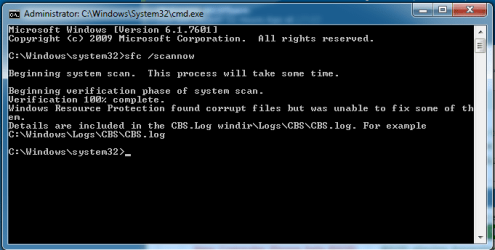
so the issue im having is the USB stopped working, so I attempted SFC/ Scannow..

which showed I had an error (repeated 2 - 3 times) so made a recovery CD and tried to do a start up - repair
which tells me

"The Partition table does not have a valid system".. from the forums I have searched all the people have been not able to boot into their OS..

where I am able to get into windows no issue.. just SFC tells me there was an issue unable to repair
 

Attachments
My Computer

Computer type
PC/Desktop
OS
Windows 7 Pro 64Bit
Hi 403,
please follow the instructions below please


  1. Download SFCFix.exe (by niemiro) and save this to your Desktop.
  2. Download the file below, SFCFix.zip, and save this to your Desktop. Ensure that this file is named SFCFix.zip - do not rename it.
  3. Save any open documents and close all open windows.
  4. On your Desktop, you should see two files: SFCFix.exe and SFCFix.zip.
  5. Drag the file SFCFix.zip onto the file SFCFix.exe and release it.
  6. SFCFix will now process the script.
  7. Upon completion, a file should be created on your Desktop: SFCFix.txt.
  8. Copy (Ctrl+C) and Paste (Ctrl+V) the contents of this file into your next post for me to analyse please - put tags around the log to break up the text.

https://dl.dropboxusercontent.com/u/...dpd/SFCFix.zip


Roy
 

My Computer

Computer type
PC/Desktop
Computer Manufacturer/Model Number
medionl/Aspire 6930G/acer x55a
OS
W7 home premium 32bit/W7HP 64bit/w10 tp insider ring
CPU
E5300 dual core
Motherboard
medion MS7366
Memory
3gb
Graphics Card(s)
Nvidia Geforce 7100 Nforce 630i
Monitor(s) Displays
avixc
Internet Speed
n (isp resticted to 72)
Antivirus
mse/pands
Browser
palemoon
Other Info
Belkin Fd7050 n USB using Railink RT2870 drivers, more upto date
#Torchwood

SFCFix version 3.0.0.0 by niemiro.
Start time: 2016-04-28 16:34:08.211
Microsoft Windows 7 Service Pack 1 - amd64
Using .zip script file at C:\Users\Owner\Desktop\SFCFix.zip [0]


PowerCopy::
Successfully took permissions for file or folder C:\Windows\winsxs\x86_microsoft-windows-n..ce_iassdo.resources_31bf3856ad364e35_6.1.7600.16385_en-us_e86c80b89a3f77b7\iassdo.dll.mui

Successfully copied file C:\Users\Owner\AppData\Local\niemiro\Archive\winsxs\x86_microsoft-windows-n..ce_iassdo.resources_31bf3856ad364e35_6.1.7600.16385_en-us_e86c80b89a3f77b7\iassdo.dll.mui to C:\Windows\winsxs\x86_microsoft-windows-n..ce_iassdo.resources_31bf3856ad364e35_6.1.7600.16385_en-us_e86c80b89a3f77b7\iassdo.dll.mui.

Successfully restored ownership for C:\Windows\winsxs\x86_microsoft-windows-n..ce_iassdo.resources_31bf3856ad364e35_6.1.7600.16385_en-us_e86c80b89a3f77b7\iassdo.dll.mui
Successfully restored permissions on C:\Windows\winsxs\x86_microsoft-windows-n..ce_iassdo.resources_31bf3856ad364e35_6.1.7600.16385_en-us_e86c80b89a3f77b7\iassdo.dll.mui
PowerCopy:: directive completed successfully.


Successfully processed all directives.
SFCFix version 3.0.0.0 by niemiro has completed.
Currently storing 1 datablocks.
Finish time: 2016-04-28 16:34:08.661
Script hash: UnzxGU7fKoW9N4pRmHJs+oTdoSB3MoDM9dasSPWbGlA=
----------------------EOF-----------------------
 

My Computer

Computer type
PC/Desktop
OS
Windows 7 Pro 64Bit
Hi 403,
Can you run another sfc scannow, the prog you ran should have replaced the set of Iasso errors.

Roy
 

My Computer

Computer type
PC/Desktop
Computer Manufacturer/Model Number
medionl/Aspire 6930G/acer x55a
OS
W7 home premium 32bit/W7HP 64bit/w10 tp insider ring
CPU
E5300 dual core
Motherboard
medion MS7366
Memory
3gb
Graphics Card(s)
Nvidia Geforce 7100 Nforce 630i
Monitor(s) Displays
avixc
Internet Speed
n (isp resticted to 72)
Antivirus
mse/pands
Browser
palemoon
Other Info
Belkin Fd7050 n USB using Railink RT2870 drivers, more upto date
Back
Top