Show Desktop Shortcut - Create

How to Create a "Show Desktop" Shortcut in Windows 7 and Windows 8


   Information
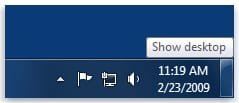
Show Desktop was a feature present in Windows XP and Windows Vista, but has been changed to the Aero Peek/Show Desktop button on the bottom right corner of the screen, near the Notification Area in Windows 7 and Windows 8.

This tutorial will show you how to create or download a Show Desktop shortcut that you can use anywhere in Windows 7 and Windows 8.

   Note
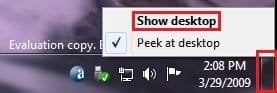
By default in Windows 7, the taskbar button on the far right side is for Show Desktop and Aero Peek.
Show_Desktop.jpg


OPTION ONE

To Download the "Show Desktop" Shortcut


1. Click/tap on the Download button below to download the Show_Desktop.zip file.

Download


2. Save the .zip file to your desktop.

3. Open the .zip file, and extract (drag and drop) the Show Desktop shortcut to your desktop.

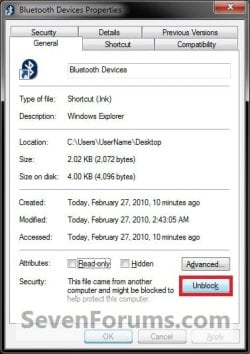
4. Unblock the Show Desktop shortcut.

5. In Windows 7, you can now Pin to Taskbar or Pin to Start Menu, add to Quick Launch, assign a keyboard shortcut to it, or move this shortcut to where you like for easy use.

6. In Windows 8 and 8.1, you can Pin to Taskbar on desktop, Pin to Start screen, add to Quick Launch,assign a keyboard shortcut to it, or move this shortcut to where you like for easy use.

7. When finished, you can delete the downloaded .zip file if you like.


OPTION TWO

To Manually Create the "Show Desktop" Shortcut


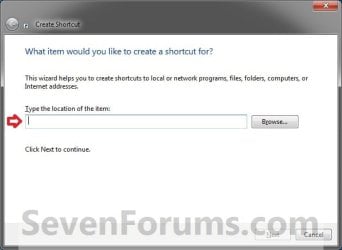
1. Right click or press and hold on an empty area on your desktop, and click/tap on New and Shortcut.

2. Copy and paste the location below into the location area, and click/tap on Next. (see screenshot below)
%windir%\explorer.exe shell:::{3080F90D-D7AD-11D9-BD98-0000947B0257}
Step1.jpg

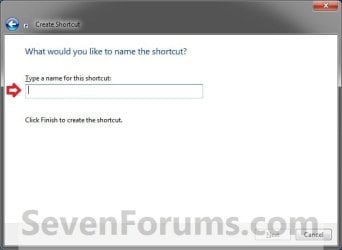
3. Type Show Desktop for the name, and click/tap on the Finish button. (see screenshot below)
NOTE: You can name this anything you would like though.
Step2.jpg
4. Right click or press and hold on the new Show Desktop shortcut, and click/tap on Properties.

5. Click/tap on the Shortcut tab, then click/tap on the Change Icon button. (see screenshot below)
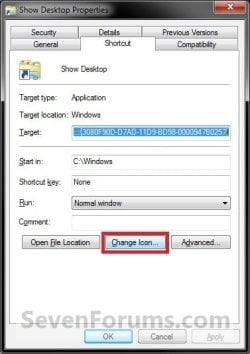
Step3.jpg
6. In the line under "Look for icons in this file", copy and paste the location below, and press Enter. (see screenshot below)
%SystemRoot%\system32\imageres.dll
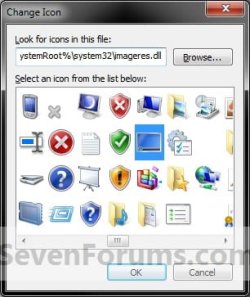
Step4.jpg
7. Select the icon highlighted in blue above, and click/tap on OK. (see screenshot above)
NOTE: You can use any icon that you would like instead though.

8. Click/tap on OK. (see screenshot below)
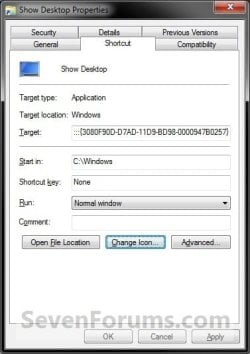
Step5.jpg
9. In Windows 7, you can now Pin to Taskbar or Pin to Start Menu, add to Quick Launch, assign a keyboard shortcut to it, or move this shortcut to where you like for easy use.

10. In Windows 8 and 8.1, you can Pin to Taskbar on desktop, Pin to Start screen, add to Quick Launch, assign a keyboard shortcut to it, or move this shortcut to where you like for easy use.


Hope this helps,
Victor Ly


Attachments
  • Show_Desktop.zip
    Show_Desktop.zip
    834 bytes · Views: 65,896
  • Unblock.jpg
    Unblock.jpg
    34.4 KB · Views: 17,197
Last edited by a moderator:
Awesome, that worked. I'm SO happy I have my Show Desktop button back, I missed it terribly. Thanks for the help, and to Vic for posting it in the first place!!
 

My Computer

OS
Windows 7 64 bit
never did work for me.
I just use the button next to the date on the far right of the task bar and works very well.
 

My Computer

Computer Manufacturer/Model Number
ASUS 1001P
OS
W-7 Starter
CPU
Intel atom N450
Memory
2 GB
Graphics Card(s)
Intel Grapics media 3150
Sound Card
Realtek HD
Screen Resolution
1024x600
Hard Drives
Hitachi 160GB
The Show Desktop shortcut in this tutorial has been updated to a new and easier way of creating one.

Enjoy. :)
 

My Computer

Computer type
PC/Desktop
Computer Manufacturer/Model Number
Self built custom
OS
64-bit Windows 11 Pro for Workstations
CPU
Intel i7-8700K OC'd to 5 GHz
Motherboard
ASUS ROG Maximus XI Formula Z390
Memory
64 GB (4x16GB) G.SKILL TridentZ RGB DDR4 3600 MHz
Graphics Card(s)
ASUS ROG-STRIX-GTX1080TI-O11G-GAMING
Sound Card
Integrated
Monitor(s) Displays
2 x Samsung Odyssey G7 27"
Screen Resolution
2560x1440
Hard Drives
1TB Samsung 990 PRO M.2,
4TB Samsung 990 PRO PRO M.2,
TerraMaster F8 SSD Plus NAS
PSU
Seasonic Prime Titanium 850W
Case
Thermaltake Core P3
Cooling
Corsair Hydro H115i
Keyboard
Logitech wireless K800
Mouse
Logitech MX Master 4
Internet Speed
2 Gb/s Download and 100 Mb/s Upload
Antivirus
Malwarebyte Anti-Malware Premium
Browser
Google Chrome
Other Info
Logitech Z625 speaker system,
Logitech BRIO 4K Pro webcam,
HP Color LaserJet Pro MFP M477fdn,
APC SMART-UPS RT 1000 XL - SURT1000XLI,
Galaxy S23 Plus phone
Brink,
Used the "manually and it worked very well!
thanks
 

My Computer

Computer Manufacturer/Model Number
ASUS 1001P
OS
W-7 Starter
CPU
Intel atom N450
Memory
2 GB
Graphics Card(s)
Intel Grapics media 3150
Sound Card
Realtek HD
Screen Resolution
1024x600
Hard Drives
Hitachi 160GB
Thanks for doing the shortcut. I didn't know how much I missed it. If anyone else is installing. Skip the first method and go straight to the "Manual". It works much better.
 

My Computer

Computer type
PC/Desktop
Computer Manufacturer/Model Number
Custom Build
OS
Windows 7 Home Premium 32-Bit - Build 7600 SP1
CPU
Intel Core i3-2120 3.30Ghz
Motherboard
Asus P8Z68-V LX Intel Z68 Socket H2 ATX
Memory
Kingston 4 GB DDR3 1333 mhz
Graphics Card(s)
AMD Radeon HD6670
Sound Card
Sound Blaster Audigy SE 24-Bit
Monitor(s) Displays
Asus VE228
Screen Resolution
1440 X 900
Hard Drives
OCZ Vertex 3 120 GB Sata 3 SSD ==
Kingston SH103/S3 120 G Hyper X 120 GB SSD ==
Western Digital 500 GB Caviar Green 7200 RPM ==
PSU
Corsair CX600M == 600 Watt
Case
NZXT Apollo - Silver with Clear Side Panel
Cooling
Three 120 mm Fans
Keyboard
Microsoft Natural 4000
Mouse
Microsoft Custom Optical 3000
Internet Speed
AT&T Fiber Optic Wireless Network
Antivirus
Microsoft Security Essentials
Browser
Chrome
Other Info
120 mm Blue LED Fan -- Three Blue LED Lazer Light Sticks
Hi guys,

Great guide and well explained. Only problem is I'm having a conflict with a My Computer shortcut I have pinned in my taskbar also, exactly as detailed over here:

http://www.sevenforums.com/tutorials/6916-computer-pin-taskbar.html

The problem occurs when I use the My Computer shortcut. I've uploaded a couple of screenshots as it's difficult to describe.

BEFORE:
10mirv6.png


AFTER:
25ic9ig.png
 
Last edited by a moderator:

My Computer

OS
Windows 7/Ubuntu
Hello Chowchilla,

See if dragging the pinned Show Desktop icon on the taskbar to the right of the pinned Computer taskbar icon will be able to sort this for you.

Hope this helps,
Shawn
 

My Computer

Computer type
PC/Desktop
Computer Manufacturer/Model Number
Self built custom
OS
64-bit Windows 11 Pro for Workstations
CPU
Intel i7-8700K OC'd to 5 GHz
Motherboard
ASUS ROG Maximus XI Formula Z390
Memory
64 GB (4x16GB) G.SKILL TridentZ RGB DDR4 3600 MHz
Graphics Card(s)
ASUS ROG-STRIX-GTX1080TI-O11G-GAMING
Sound Card
Integrated
Monitor(s) Displays
2 x Samsung Odyssey G7 27"
Screen Resolution
2560x1440
Hard Drives
1TB Samsung 990 PRO M.2,
4TB Samsung 990 PRO PRO M.2,
TerraMaster F8 SSD Plus NAS
PSU
Seasonic Prime Titanium 850W
Case
Thermaltake Core P3
Cooling
Corsair Hydro H115i
Keyboard
Logitech wireless K800
Mouse
Logitech MX Master 4
Internet Speed
2 Gb/s Download and 100 Mb/s Upload
Antivirus
Malwarebyte Anti-Malware Premium
Browser
Google Chrome
Other Info
Logitech Z625 speaker system,
Logitech BRIO 4K Pro webcam,
HP Color LaserJet Pro MFP M477fdn,
APC SMART-UPS RT 1000 XL - SURT1000XLI,
Galaxy S23 Plus phone
Thanks for the tip Brink, that fixed it.

Just out of interest, what causes this problem, and why does a simple reordering of pinned items fix it? While it's a minor point I would prefer to keep the the original ordering if at all possible.
 

My Computer

OS
Windows 7/Ubuntu
You're most welcome Chowchilla.

Since those two pinned shortcuts happen to use explorer.exe (default) in the target path, Windows 7 will default to showing the thumbnail previews of them in the one pinned farthest to the left (taskbar on bottom/top) or top (taskbar on left/right).


You could keep the same order, but you would have to place the one or both shortcuts in Quick Launch or a pinned folder (done like QL) on the taskbar instead. Either option will no longer give you thumbnail previews of them though.
 

My Computer

Computer type
PC/Desktop
Computer Manufacturer/Model Number
Self built custom
OS
64-bit Windows 11 Pro for Workstations
CPU
Intel i7-8700K OC'd to 5 GHz
Motherboard
ASUS ROG Maximus XI Formula Z390
Memory
64 GB (4x16GB) G.SKILL TridentZ RGB DDR4 3600 MHz
Graphics Card(s)
ASUS ROG-STRIX-GTX1080TI-O11G-GAMING
Sound Card
Integrated
Monitor(s) Displays
2 x Samsung Odyssey G7 27"
Screen Resolution
2560x1440
Hard Drives
1TB Samsung 990 PRO M.2,
4TB Samsung 990 PRO PRO M.2,
TerraMaster F8 SSD Plus NAS
PSU
Seasonic Prime Titanium 850W
Case
Thermaltake Core P3
Cooling
Corsair Hydro H115i
Keyboard
Logitech wireless K800
Mouse
Logitech MX Master 4
Internet Speed
2 Gb/s Download and 100 Mb/s Upload
Antivirus
Malwarebyte Anti-Malware Premium
Browser
Google Chrome
Other Info
Logitech Z625 speaker system,
Logitech BRIO 4K Pro webcam,
HP Color LaserJet Pro MFP M477fdn,
APC SMART-UPS RT 1000 XL - SURT1000XLI,
Galaxy S23 Plus phone
for us mortals...

C:\Windows\explorer.exe shell:::{3080F90D-D7AD-11D9-BD98-0000947B0257}

Wow.
I miss the days when you could just search for explorer.exe and make a shortcut to it.
How would a mortal figure this out?
 

My Computer

OS
win 7
Hello JKtejik, and welcome to Seven Forums.

Hunting a good bit for the GUID that belonged to it under HKEY_CLASSES_ROOT_CLSID in the registry. ;)
 

My Computer

Computer type
PC/Desktop
Computer Manufacturer/Model Number
Self built custom
OS
64-bit Windows 11 Pro for Workstations
CPU
Intel i7-8700K OC'd to 5 GHz
Motherboard
ASUS ROG Maximus XI Formula Z390
Memory
64 GB (4x16GB) G.SKILL TridentZ RGB DDR4 3600 MHz
Graphics Card(s)
ASUS ROG-STRIX-GTX1080TI-O11G-GAMING
Sound Card
Integrated
Monitor(s) Displays
2 x Samsung Odyssey G7 27"
Screen Resolution
2560x1440
Hard Drives
1TB Samsung 990 PRO M.2,
4TB Samsung 990 PRO PRO M.2,
TerraMaster F8 SSD Plus NAS
PSU
Seasonic Prime Titanium 850W
Case
Thermaltake Core P3
Cooling
Corsair Hydro H115i
Keyboard
Logitech wireless K800
Mouse
Logitech MX Master 4
Internet Speed
2 Gb/s Download and 100 Mb/s Upload
Antivirus
Malwarebyte Anti-Malware Premium
Browser
Google Chrome
Other Info
Logitech Z625 speaker system,
Logitech BRIO 4K Pro webcam,
HP Color LaserJet Pro MFP M477fdn,
APC SMART-UPS RT 1000 XL - SURT1000XLI,
Galaxy S23 Plus phone
Since those two pinned shortcuts happen to use explorer.exe (default) in the target path, Windows 7 will default to showing the thumbnail previews of them in the one pinned farthest to the left (taskbar on bottom/top) or top (taskbar on left/right).
I have played a little with it.

Problem is that the self created "Shows Desktop" link is called with "explorer.exe".
But you have another "Shows Desktop" link in folder:
%AppData%\Microsoft\Internet Explorer\Quick Launch
But you can not easily copy this link to folder:
%AppData%\Microsoft\Internet Explorer\Quick Launch\User Pinned\TaskBar
The Icon will not show up in taskbar.

And you even cannot copy and replace the "Shows Desktop" link from "Quick Launch" folder to "TaskBar" folder. After a logout/login the "Shows Desktop" is gone from taskbar.

I think this is because Windows 7 keeps an eye on what happened in folder "TaskBar". In earlier Windows versions (XP and Vista) all installation programs can place their own shortcuts in folder "Quick Launch". That's not possible in Windows 7 "TaskBar" folder. Windows 7 stores the shortcuts although in registry:
HKEY_CURRENT_USER\Software\Microsoft\Windows\CurrentVersion\Explorer\Taskband
If registry entry and shortcut varying, then Windows 7 don't show the shortcut in taskbar.
When you simple copy a shortcut to "TaskBar" folder then the registry will not be updated. If you replace an existing shortcut – which means: delete the old shortcut and save a new one with same name – Windows 7 recognize this.

But you can do the following:
  • Create a taskbar shortcut shown in tutorial as "OPTION TWO" and place it far left in taskbar and delete the shortcut from desktop
  • Copy the "Shows Desktop" link from "Quick Launch" folder to desktop
  • Rename "Shows Desktop" link to "Shows Desktop2"
  • Copy "Shows Desktop2" from desktop to "TaskBar" folder
  • Delete the previous created "Shows Desktop" link in "TaskBar" folder
  • Rename "Shows Desktop2" link to "Shows Desktop"
For not English Windows versions: Keep in mind that the shortcut is always named "Shows Desktop.lnk" – but explorer shows you only a translation. So in German the shortcuts in explorer is shown as "Desktop anzeigen" – but the real file name is still "Shows Desktop.lnk".

Can somebody check out what shell procedure the shortcut "Shows Desktop" in folder "%AppData%\Microsoft\Internet Explorer\Quick Launch" is calling ? This could make many things much easier in creating a valid shortcut - instead of using:
C:\Windows\explorer.exe shell:::{3080F90D-D7AD-11D9-BD98-0000947B0257}
 

My Computer

OS
Windows 7
I'm totally lost, too. I try to create a shortcut on the desktop, and I don't get the window that was shown. In other words, when I right click on the desktop, then NEW then SHORTCUT, nothing happens.

Any suggestions?
 

My Computer

Computer type
Laptop
Computer Manufacturer/Model Number
compaq
OS
windows 7 home premium 64 bit
Motherboard
AMD V140
Memory
2gb
Internet Speed
30mb
Other Info
malwarebytes

My Computer

Computer type
PC/Desktop
Computer Manufacturer/Model Number
Self built custom
OS
64-bit Windows 11 Pro for Workstations
CPU
Intel i7-8700K OC'd to 5 GHz
Motherboard
ASUS ROG Maximus XI Formula Z390
Memory
64 GB (4x16GB) G.SKILL TridentZ RGB DDR4 3600 MHz
Graphics Card(s)
ASUS ROG-STRIX-GTX1080TI-O11G-GAMING
Sound Card
Integrated
Monitor(s) Displays
2 x Samsung Odyssey G7 27"
Screen Resolution
2560x1440
Hard Drives
1TB Samsung 990 PRO M.2,
4TB Samsung 990 PRO PRO M.2,
TerraMaster F8 SSD Plus NAS
PSU
Seasonic Prime Titanium 850W
Case
Thermaltake Core P3
Cooling
Corsair Hydro H115i
Keyboard
Logitech wireless K800
Mouse
Logitech MX Master 4
Internet Speed
2 Gb/s Download and 100 Mb/s Upload
Antivirus
Malwarebyte Anti-Malware Premium
Browser
Google Chrome
Other Info
Logitech Z625 speaker system,
Logitech BRIO 4K Pro webcam,
HP Color LaserJet Pro MFP M477fdn,
APC SMART-UPS RT 1000 XL - SURT1000XLI,
Galaxy S23 Plus phone
Finally!

This works perfectly. Thank you, Victor for restoring my sanity.
 

My Computer

OS
Windows 7 Ultimate x64
you don't have to Create a "Show Desktop" Shortcut in Windows 7

you don't have to Create a "Show Desktop" Shortcut in Windows 7 as it is already exists at the bottom right corner of the screen ..... at the end of the taskbar
 

Attachments

  • 1.jpg
    1.jpg
    4.4 KB · Views: 1,697

My Computer

OS
windows7 32 bit
Hello Sherine, and welcome to Seven Forums.

True, but some folks may like to have a separate "Show Desktop" shortcut to use for however they like though.
 

My Computer

Computer type
PC/Desktop
Computer Manufacturer/Model Number
Self built custom
OS
64-bit Windows 11 Pro for Workstations
CPU
Intel i7-8700K OC'd to 5 GHz
Motherboard
ASUS ROG Maximus XI Formula Z390
Memory
64 GB (4x16GB) G.SKILL TridentZ RGB DDR4 3600 MHz
Graphics Card(s)
ASUS ROG-STRIX-GTX1080TI-O11G-GAMING
Sound Card
Integrated
Monitor(s) Displays
2 x Samsung Odyssey G7 27"
Screen Resolution
2560x1440
Hard Drives
1TB Samsung 990 PRO M.2,
4TB Samsung 990 PRO PRO M.2,
TerraMaster F8 SSD Plus NAS
PSU
Seasonic Prime Titanium 850W
Case
Thermaltake Core P3
Cooling
Corsair Hydro H115i
Keyboard
Logitech wireless K800
Mouse
Logitech MX Master 4
Internet Speed
2 Gb/s Download and 100 Mb/s Upload
Antivirus
Malwarebyte Anti-Malware Premium
Browser
Google Chrome
Other Info
Logitech Z625 speaker system,
Logitech BRIO 4K Pro webcam,
HP Color LaserJet Pro MFP M477fdn,
APC SMART-UPS RT 1000 XL - SURT1000XLI,
Galaxy S23 Plus phone
Exactly
 

My Computer

Computer type
Laptop
Computer Manufacturer/Model Number
compaq
OS
windows 7 home premium 64 bit
Motherboard
AMD V140
Memory
2gb
Internet Speed
30mb
Other Info
malwarebytes
Thank u Brink for the welcome ...it's OK ... I thought they may missed the button ... Nice forum here
 

My Computer

OS
windows7 32 bit
Oh it's no problem at all Sherine. :)
 

My Computer

Computer type
PC/Desktop
Computer Manufacturer/Model Number
Self built custom
OS
64-bit Windows 11 Pro for Workstations
CPU
Intel i7-8700K OC'd to 5 GHz
Motherboard
ASUS ROG Maximus XI Formula Z390
Memory
64 GB (4x16GB) G.SKILL TridentZ RGB DDR4 3600 MHz
Graphics Card(s)
ASUS ROG-STRIX-GTX1080TI-O11G-GAMING
Sound Card
Integrated
Monitor(s) Displays
2 x Samsung Odyssey G7 27"
Screen Resolution
2560x1440
Hard Drives
1TB Samsung 990 PRO M.2,
4TB Samsung 990 PRO PRO M.2,
TerraMaster F8 SSD Plus NAS
PSU
Seasonic Prime Titanium 850W
Case
Thermaltake Core P3
Cooling
Corsair Hydro H115i
Keyboard
Logitech wireless K800
Mouse
Logitech MX Master 4
Internet Speed
2 Gb/s Download and 100 Mb/s Upload
Antivirus
Malwarebyte Anti-Malware Premium
Browser
Google Chrome
Other Info
Logitech Z625 speaker system,
Logitech BRIO 4K Pro webcam,
HP Color LaserJet Pro MFP M477fdn,
APC SMART-UPS RT 1000 XL - SURT1000XLI,
Galaxy S23 Plus phone
Back
Top