Show us your SSD performance

Status
Not open for further replies.
Glad to see you are enjoying it. I DO love mine. After you get used to it. Install windows on your old drive and try it. If you are like me, you'll say "never again".
 

My Computers

System One System Two

  • Computer type
    PC/Desktop
    Computer Manufacturer/Model Number
    ALWAYS UNDER CONSTRUCTION
    OS
    Windows 11 Pro
    CPU
    Ryzen 9 5900X
    Motherboard
    Asus X570 Crosshair Viii Hero
    Memory
    32GB G Skill DDR4-3600
    Graphics Card(s)
    EVGA RTX 3080 FTW 3 Ultra
    Sound Card
    On Board/Sennheiser PC37X Headset
    Monitor(s) Displays
    3 X Asus 27"
    Screen Resolution
    2560x1440
    Hard Drives
    2 X 1 TB NVME drives
    PSU
    EVGA 850
    Case
    Phanteks Eclipse P400A
    Cooling
    EVGA 280 AIO
    Keyboard
    Logitech G510s/ Logitech G13
    Mouse
    Logitech G502
    Internet Speed
    24/1
    Antivirus
    ESET/MBAM Pro/SAS Pro
    Browser
    Chrome/ Firefox/ Edge
  • Computer type
    Laptop
    System Manufacturer/Model Number
    Dell 16 Plus
    OS
    Windows 11 Pro
    CPU
    Intel Ultra 9 288V
    Memory
    32 GB LPDDR5X 8533
    Monitor(s) Displays
    16" Mini-LED HDR600 Touch 90 Hz
    Screen Resolution
    2560X1600
    Hard Drives
    1 TB NVME
Hi Hopalong,

Don't run too many benchmarks on the drive. The OCZ site (yes, I went for more speed :p) says that you shouldn't run a heavy HD test but once a week, and never any benchmark more than once per log in session.
 

My Computer

OS
7 Ultimate x64
CPU
i5-2500k
Motherboard
Asus P8P67 Pro
Memory
8GB G.Skill Ripjaws X F3-12800CL7D-8GBXH 1866MHz 8-9-8-24
Graphics Card(s)
EVGA GTX 570 SC
Sound Card
X-Fi Titanium Fatality
Monitor(s) Displays
Samsung S27A550H 27" LED
Screen Resolution
1920x1080
Hard Drives
OCZ Vertex 3 120GB.
1TB Samsung F3.
2TB Samsung F4.
PSU
PC Power & Cooling Silencer 760
Case
Lian Li Lancool K62
Cooling
Thermalright Venomous X Black/Scythe S-Flex/Shin-Etsu X23
Keyboard
MS Natural Elite 4000 Ergonomic
Mouse
Logitech G500
Internet Speed
6MB/768
Other Info
Logitech Z-5500 505 watts.
D-Link DGL-4500.
Tripp-Lite Smart Pro 1500.
This is true for all SSDs but more so for SandForce controllers. The SF controller will throttle down if too many writes are done in a short time period.

Another reminder, to those that aren't aware of this, SF controllers need the system to sit at the login window for 1-2 hours at least twice a month. Some say once a week.
It has now been confirmed the controller does actively rotate static data as part of Duraclass. This means idle periods are essential to allow the drives wear levelling to work as it should.


Intel SSDs need to run the toolbox > Intel SSD Management Tools > Intel SSD Optimizer, once a week. Best to set up the scheduler.
 

My Computer

Computer type
PC/Desktop
Computer Manufacturer/Model Number
76~2.0
OS
Windows 7 Ult x64 - SP1/ Windows 8 Pro x64
CPU
Intel Core i5-3570K 4.6GHz
Motherboard
Gigabyte GA-Z77X UD3H, f18
Memory
8GB (2X4GB) DDR3 1600 Corsair Vengeance CL8 1.5v
Graphics Card(s)
Sapphire HD 7770 Vapor-X OC 1GB DDR5
Sound Card
Onboard VIA VT2021
Monitor(s) Displays
22" LCD Dell
Screen Resolution
1680x1050
Hard Drives
Samsung 840Pro 128GB SSD,
Seagate Barracuda 500GB SATA2 7200rpm 32MB cache, Seagate Barracuda 1TB SATA2 7200rpm 32MB cache,
PSU
Corsair HX650W
Case
Cooler Master Storm Scout
Cooling
Corsair H80 2x12cm Noctua NF P12 , 2x14cm case fans
Keyboard
Logitech Wave
Mouse
CM Sentinel
Internet Speed
Dismal
Antivirus
Avast
Browser
Opera Next
Other Info
Haswell laptop: HP Envy 17t-j, i7-4700MQ, GeForce 740M 2GB DDR3, 17.3" Full HD 1920x1080, 16GB RAM, Samsung 840 Pro 128GB, 1TB Hitachi 7200 HDD,
Desktop: eSATA ports,
External eSATA Seagate 500GB SATA2 7200rpm,
External WD USB 500GB
Well I didn't run any 3rd party SSD benchmarks. Just the Cmd and WEI.

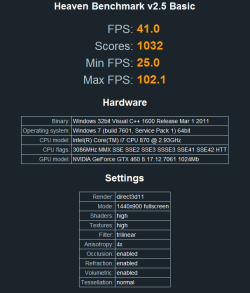
Ran Heaven benchmark. GPU OC'ed it was the same result.

GPU stock clock went up only 0.4 FPS....but there was no lag.
HDD minimum framerate would drop to 8 FPS on start up and sometimes on changing from test scene to test scene.
Now the lowest was 25 FPS and during the run it didn't drop below 38 FPS. No flickering or artifacts without the OC now.

With no OC the HDD was creating a lag. The SSD can keep up with the GPU which is a Nvidia 460 so that is excellent.

No GPU OC on Snips below.
 

Attachments

  • Heaven2.5.PNG
    Heaven2.5.PNG
    10.3 KB · Views: 0
  • Heaven 5-26-2011.PNG
    Heaven 5-26-2011.PNG
    13.5 KB · Views: 1

My Computer

Computer Manufacturer/Model Number
Hopalong/ Godzilla
OS
Windows7 Pro 64bit SP-1; Windows XP Pro 32bit
CPU
Intel Core i7-870 Lynnfield 2.93GHz LGA 1156 95W Quad-Core
Motherboard
ASUS P7P55D-E PRO
Memory
8GB@1400MHz Crucial Ballistix DDR3-1600 4x2GB
Graphics Card(s)
ASUS ENGTX460 DirectCU/2DI/1GD5 1GB 256-bit GDDR5
Sound Card
VIA Onboard
Monitor(s) Displays
Asus VS248H-P 24"; Samsung SyncMaster 941BW 19"ws
Screen Resolution
1920x1080; 1440x900
Hard Drives
Samsung 830 120GB SSD
Intel 320 120GB SSD
Western Digital Caviar Black WD7501AALS 750GB 7200 RPM SATA 3.0Gb/s
Western Digital Caviar Black WD6401AALS 640GB 7200 RPM SATA 3.0Gb/s
PSU
COOLER MASTER Silent Pro RS850-AMBAJ3-US 850W Modular
Case
COOLER MASTER HAF 932 RC-932-KKN5-GP Black
Cooling
Scythe "Mugen-2 Rev.B" (2 ScytheKaze-Jyuni PWM fans)
Keyboard
Logitech K-320
Mouse
Kensington
Antivirus
Avast Inernet Suite
Browser
IE 9 ; Chrome
Hi Mike, It looks like I came again too late to the party. Between the time difference here in Europe and all my appointments I have a hard time keeping up with you guys.

But it looks like you are having fun with your new toy. Aren't they great those SSDs.
 
Last edited:

My Computer

Computer Manufacturer/Model Number
HP, Dell, Gateway, Toshiba - 4 laptops and 2 desktops
OS
Vista, Windows7, Mint Mate, Zorin, Windows 8
CPU
from 1.6GHz Duo to i7
Monitor(s) Displays
2x HP w2207
Hard Drives
5x HDD, 7x SSD, 12x Externals
Keyboard
with trackball - no mices
Mouse
Trackball mice
Internet Speed
DSL 6000
WHS

That is okay. The time difference I understand.
A friend of mine is in the Phillipines. About 12 hours time difference.
I'm having coffee and breakfast or he is when we get to talk.

Thanks again everyone that assisted. :D
Mike
 

My Computer

Computer Manufacturer/Model Number
Hopalong/ Godzilla
OS
Windows7 Pro 64bit SP-1; Windows XP Pro 32bit
CPU
Intel Core i7-870 Lynnfield 2.93GHz LGA 1156 95W Quad-Core
Motherboard
ASUS P7P55D-E PRO
Memory
8GB@1400MHz Crucial Ballistix DDR3-1600 4x2GB
Graphics Card(s)
ASUS ENGTX460 DirectCU/2DI/1GD5 1GB 256-bit GDDR5
Sound Card
VIA Onboard
Monitor(s) Displays
Asus VS248H-P 24"; Samsung SyncMaster 941BW 19"ws
Screen Resolution
1920x1080; 1440x900
Hard Drives
Samsung 830 120GB SSD
Intel 320 120GB SSD
Western Digital Caviar Black WD7501AALS 750GB 7200 RPM SATA 3.0Gb/s
Western Digital Caviar Black WD6401AALS 640GB 7200 RPM SATA 3.0Gb/s
PSU
COOLER MASTER Silent Pro RS850-AMBAJ3-US 850W Modular
Case
COOLER MASTER HAF 932 RC-932-KKN5-GP Black
Cooling
Scythe "Mugen-2 Rev.B" (2 ScytheKaze-Jyuni PWM fans)
Keyboard
Logitech K-320
Mouse
Kensington
Antivirus
Avast Inernet Suite
Browser
IE 9 ; Chrome
WHS

That is okay. The time difference I understand.
A friend of mine is in the Phillipines. About 12 hours time difference.
I'm having coffee and breakfast or he is when we get to talk.

Thanks again everyone that assisted. :D
Mike

Good to see you got it sorted mate.


Believe me when I say, do not do very many wipes to it. ;)
 

My Computer

Computer Manufacturer/Model Number
* BFK Customs *
OS
W 7 64-bit Ultimate
CPU
Intel Q9550 Yorkfield
Motherboard
ASUS P5Q Pro
Memory
8GB Dominator 8500C5D
Graphics Card(s)
ATI : XFX 5870
Sound Card
Realtek HD Audio 7-1
Monitor(s) Displays
1x 47" LCD HDMI & 3x 26" LCD HDMI
Screen Resolution
1920x1080P & 1920x1200
Hard Drives
1x 80GB Intel X25-M G2 SSD : 1x 500GB & 1x 640GB WD Caviar Black(s)
PSU
Corsair 620HX
Case
Cooler Master RC-690
Cooling
Tuniq Tower 120, 2x 140mm and 3x 120mm case fans
Keyboard
Microsoft 500
Mouse
Razer Diamondback 3G
Internet Speed
14 Mb/s
Other Info
1x Koutech 3Gb/s SATA HDD Hot Swap Rack
BFK

Makes sense to me.
It is working fine as is so I will leave well enough alone.
I have a Repair/Recovery Disk-SP1 made so I can run recovery options from it instead of the 100MB partition.
So for now I'll just use it as is and do a clean install when the need arises in the future.

If I was having problems then I would go ahead with a wipe and clean install now.

Thanks
Mike
 

My Computer

Computer Manufacturer/Model Number
Hopalong/ Godzilla
OS
Windows7 Pro 64bit SP-1; Windows XP Pro 32bit
CPU
Intel Core i7-870 Lynnfield 2.93GHz LGA 1156 95W Quad-Core
Motherboard
ASUS P7P55D-E PRO
Memory
8GB@1400MHz Crucial Ballistix DDR3-1600 4x2GB
Graphics Card(s)
ASUS ENGTX460 DirectCU/2DI/1GD5 1GB 256-bit GDDR5
Sound Card
VIA Onboard
Monitor(s) Displays
Asus VS248H-P 24"; Samsung SyncMaster 941BW 19"ws
Screen Resolution
1920x1080; 1440x900
Hard Drives
Samsung 830 120GB SSD
Intel 320 120GB SSD
Western Digital Caviar Black WD7501AALS 750GB 7200 RPM SATA 3.0Gb/s
Western Digital Caviar Black WD6401AALS 640GB 7200 RPM SATA 3.0Gb/s
PSU
COOLER MASTER Silent Pro RS850-AMBAJ3-US 850W Modular
Case
COOLER MASTER HAF 932 RC-932-KKN5-GP Black
Cooling
Scythe "Mugen-2 Rev.B" (2 ScytheKaze-Jyuni PWM fans)
Keyboard
Logitech K-320
Mouse
Kensington
Antivirus
Avast Inernet Suite
Browser
IE 9 ; Chrome
Glad to see you are enjoying it. I DO love mine. After you get used to it. Install windows on your old drive and try it. If you are like me, you'll say "never again".


Once you start getting used to it, you kind of take for granted how much quicker a SSD really is.

Ive already decided I will never install Windows on a mechanical HD on my machine.


I tried this a while back.
And the HD just seemed so sluggish in everything.
And boot time just seemed so long.
Once at desktop, it was still working on loading things. I guess I got so used to when I see my desktop, Im good to go.

Its a huge difference once you get used them for sure.
 

My Computer

Computer Manufacturer/Model Number
Custom (Self Build)
OS
Windows 7 Home Premium 64bit
CPU
Intel Core i7 2700k
Motherboard
eVGA P67 SLI
Memory
8GB Mushkin Redline Ridgebacks @1866
Graphics Card(s)
EVGA GTX570 SC
Sound Card
XiFi Titanium HD
Monitor(s) Displays
LG W2453V
Screen Resolution
1920x1080
Hard Drives
Intel 320 80GB -- Intel X25-V 40GB --WD Black 1TB x2 -- WD Blue 640GB
PSU
Seasonic x750
Case
Corsair 600T SE White
Cooling
eVGA Superclocked CPU Cooler
Keyboard
Saitek Cyborg
Antivirus
Kaspersky
Browser
IE
Other Info
LG BD/DVD
Wishmaster, when I tried that I thought to myself, I used to use this and like it. I really can't believe that.
 

My Computers

System One System Two

  • Computer type
    PC/Desktop
    Computer Manufacturer/Model Number
    ALWAYS UNDER CONSTRUCTION
    OS
    Windows 11 Pro
    CPU
    Ryzen 9 5900X
    Motherboard
    Asus X570 Crosshair Viii Hero
    Memory
    32GB G Skill DDR4-3600
    Graphics Card(s)
    EVGA RTX 3080 FTW 3 Ultra
    Sound Card
    On Board/Sennheiser PC37X Headset
    Monitor(s) Displays
    3 X Asus 27"
    Screen Resolution
    2560x1440
    Hard Drives
    2 X 1 TB NVME drives
    PSU
    EVGA 850
    Case
    Phanteks Eclipse P400A
    Cooling
    EVGA 280 AIO
    Keyboard
    Logitech G510s/ Logitech G13
    Mouse
    Logitech G502
    Internet Speed
    24/1
    Antivirus
    ESET/MBAM Pro/SAS Pro
    Browser
    Chrome/ Firefox/ Edge
  • Computer type
    Laptop
    System Manufacturer/Model Number
    Dell 16 Plus
    OS
    Windows 11 Pro
    CPU
    Intel Ultra 9 288V
    Memory
    32 GB LPDDR5X 8533
    Monitor(s) Displays
    16" Mini-LED HDR600 Touch 90 Hz
    Screen Resolution
    2560X1600
    Hard Drives
    1 TB NVME
Winsat formal

WD Caviar Black 7200RPM.
> Disk Sequential 64.0 Read 95.63 MB/s 6.5
> Disk Random 16.0 Read 1.50 MB/s 4.0

Intel 320
> Disk Sequential 64.0 Read 252.44 MB/s 7.5
> Disk Random 16.0 Read 182.82 MB/s 7.6


What I highlighted in red was the real shocker to me. 1.5 to 182 is 1200x.

That is what affects loading Windows. Random Reads. Jumping everywhere on the disk to load the apps.
That doesn't make it 1200 times faster loading Windows but it is a major gain.

Also I noticed yesteday evening after SSD was running I had 9 IE9 tabs open.

I only have more than three open when I'm searching though the tutorials for specific info.
You open one with a link then another then another, I looked at the tabs and had nine open.
No lag.
Click open. Click open.

I realize keeping the cache clean and internet speed varies but I have always had some delay on a new tab opening with the HDD.
Beyond six tabs was sometimes REALLY slow.


My Computer

Computer Manufacturer/Model Number
Hopalong/ Godzilla
OS
Windows7 Pro 64bit SP-1; Windows XP Pro 32bit
CPU
Intel Core i7-870 Lynnfield 2.93GHz LGA 1156 95W Quad-Core
Motherboard
ASUS P7P55D-E PRO
Memory
8GB@1400MHz Crucial Ballistix DDR3-1600 4x2GB
Graphics Card(s)
ASUS ENGTX460 DirectCU/2DI/1GD5 1GB 256-bit GDDR5
Sound Card
VIA Onboard
Monitor(s) Displays
Asus VS248H-P 24"; Samsung SyncMaster 941BW 19"ws
Screen Resolution
1920x1080; 1440x900
Hard Drives
Samsung 830 120GB SSD
Intel 320 120GB SSD
Western Digital Caviar Black WD7501AALS 750GB 7200 RPM SATA 3.0Gb/s
Western Digital Caviar Black WD6401AALS 640GB 7200 RPM SATA 3.0Gb/s
PSU
COOLER MASTER Silent Pro RS850-AMBAJ3-US 850W Modular
Case
COOLER MASTER HAF 932 RC-932-KKN5-GP Black
Cooling
Scythe "Mugen-2 Rev.B" (2 ScytheKaze-Jyuni PWM fans)
Keyboard
Logitech K-320
Mouse
Kensington
Antivirus
Avast Inernet Suite
Browser
IE 9 ; Chrome
Sounds like you are happy with the purchase. I certainly was. I have 2 now and am fixing to buy another. Soon I'll put one in my new laptop. That is if I can find a laptop I like that I can affoard.
 

My Computers

System One System Two

  • Computer type
    PC/Desktop
    Computer Manufacturer/Model Number
    ALWAYS UNDER CONSTRUCTION
    OS
    Windows 11 Pro
    CPU
    Ryzen 9 5900X
    Motherboard
    Asus X570 Crosshair Viii Hero
    Memory
    32GB G Skill DDR4-3600
    Graphics Card(s)
    EVGA RTX 3080 FTW 3 Ultra
    Sound Card
    On Board/Sennheiser PC37X Headset
    Monitor(s) Displays
    3 X Asus 27"
    Screen Resolution
    2560x1440
    Hard Drives
    2 X 1 TB NVME drives
    PSU
    EVGA 850
    Case
    Phanteks Eclipse P400A
    Cooling
    EVGA 280 AIO
    Keyboard
    Logitech G510s/ Logitech G13
    Mouse
    Logitech G502
    Internet Speed
    24/1
    Antivirus
    ESET/MBAM Pro/SAS Pro
    Browser
    Chrome/ Firefox/ Edge
  • Computer type
    Laptop
    System Manufacturer/Model Number
    Dell 16 Plus
    OS
    Windows 11 Pro
    CPU
    Intel Ultra 9 288V
    Memory
    32 GB LPDDR5X 8533
    Monitor(s) Displays
    16" Mini-LED HDR600 Touch 90 Hz
    Screen Resolution
    2560X1600
    Hard Drives
    1 TB NVME
Sounds like you are happy with the purchase. I certainly was. I have 2 now and am fixing to buy another. Soon I'll put one in my new laptop. That is if I can find a laptop I like that I can affoard.
Switching to an SSD on a laptop is the easiest. Just 3 or 4 screws. I put a 60GB Vertex2 and a 80GB Intel on the laptops the wife uses (she has little data and most of it is on sticks). On my own Vaio that I use for teaching at the computer club I put a 90GB Vertex2.
 

My Computer

Computer Manufacturer/Model Number
HP, Dell, Gateway, Toshiba - 4 laptops and 2 desktops
OS
Vista, Windows7, Mint Mate, Zorin, Windows 8
CPU
from 1.6GHz Duo to i7
Monitor(s) Displays
2x HP w2207
Hard Drives
5x HDD, 7x SSD, 12x Externals
Keyboard
with trackball - no mices
Mouse
Trackball mice
Internet Speed
DSL 6000
Sounds like you are happy with the purchase. I certainly was. I have 2 now and am fixing to buy another. Soon I'll put one in my new laptop. That is if I can find a laptop I like that I can affoard.
Switching to an SSD on a laptop is the easiest. Just 3 or 4 screws. I put a 60GB Vertex2 and a 80GB Intel on the laptops the wife uses (she has little data and most of it is on sticks). On my own Vaio that I use for teaching at the computer club I put a 90GB Vertex2.

Thanks WHS, I need all the help I can get. Doing that is my exact intention.
 

My Computers

System One System Two

  • Computer type
    PC/Desktop
    Computer Manufacturer/Model Number
    ALWAYS UNDER CONSTRUCTION
    OS
    Windows 11 Pro
    CPU
    Ryzen 9 5900X
    Motherboard
    Asus X570 Crosshair Viii Hero
    Memory
    32GB G Skill DDR4-3600
    Graphics Card(s)
    EVGA RTX 3080 FTW 3 Ultra
    Sound Card
    On Board/Sennheiser PC37X Headset
    Monitor(s) Displays
    3 X Asus 27"
    Screen Resolution
    2560x1440
    Hard Drives
    2 X 1 TB NVME drives
    PSU
    EVGA 850
    Case
    Phanteks Eclipse P400A
    Cooling
    EVGA 280 AIO
    Keyboard
    Logitech G510s/ Logitech G13
    Mouse
    Logitech G502
    Internet Speed
    24/1
    Antivirus
    ESET/MBAM Pro/SAS Pro
    Browser
    Chrome/ Firefox/ Edge
  • Computer type
    Laptop
    System Manufacturer/Model Number
    Dell 16 Plus
    OS
    Windows 11 Pro
    CPU
    Intel Ultra 9 288V
    Memory
    32 GB LPDDR5X 8533
    Monitor(s) Displays
    16" Mini-LED HDR600 Touch 90 Hz
    Screen Resolution
    2560X1600
    Hard Drives
    1 TB NVME
Just keep us informed. It's a frequently discussed subject.
I had to go back and disable Superfetch again. I can't explain it, and I don't have any data to back me up, but things just feel more responsive and smoother with it disabled. With it enabled I'd notice a tick here and there that does not exist when Superfetch is disabled.
 

My Computer

OS
7 Ultimate x64
CPU
i5-2500k
Motherboard
Asus P8P67 Pro
Memory
8GB G.Skill Ripjaws X F3-12800CL7D-8GBXH 1866MHz 8-9-8-24
Graphics Card(s)
EVGA GTX 570 SC
Sound Card
X-Fi Titanium Fatality
Monitor(s) Displays
Samsung S27A550H 27" LED
Screen Resolution
1920x1080
Hard Drives
OCZ Vertex 3 120GB.
1TB Samsung F3.
2TB Samsung F4.
PSU
PC Power & Cooling Silencer 760
Case
Lian Li Lancool K62
Cooling
Thermalright Venomous X Black/Scythe S-Flex/Shin-Etsu X23
Keyboard
MS Natural Elite 4000 Ergonomic
Mouse
Logitech G500
Internet Speed
6MB/768
Other Info
Logitech Z-5500 505 watts.
D-Link DGL-4500.
Tripp-Lite Smart Pro 1500.
Just keep us informed. It's a frequently discussed subject.
I had to go back and disable Superfetch again. I can't explain it, and I don't have any data to back me up, but things just feel more responsive and smoother with it disabled. With it enabled I'd notice a tick here and there that does not exist when Superfetch is disabled.


That was similar to my experience.
 

My Computers

System One System Two

  • Computer type
    PC/Desktop
    Computer Manufacturer/Model Number
    ALWAYS UNDER CONSTRUCTION
    OS
    Windows 11 Pro
    CPU
    Ryzen 9 5900X
    Motherboard
    Asus X570 Crosshair Viii Hero
    Memory
    32GB G Skill DDR4-3600
    Graphics Card(s)
    EVGA RTX 3080 FTW 3 Ultra
    Sound Card
    On Board/Sennheiser PC37X Headset
    Monitor(s) Displays
    3 X Asus 27"
    Screen Resolution
    2560x1440
    Hard Drives
    2 X 1 TB NVME drives
    PSU
    EVGA 850
    Case
    Phanteks Eclipse P400A
    Cooling
    EVGA 280 AIO
    Keyboard
    Logitech G510s/ Logitech G13
    Mouse
    Logitech G502
    Internet Speed
    24/1
    Antivirus
    ESET/MBAM Pro/SAS Pro
    Browser
    Chrome/ Firefox/ Edge
  • Computer type
    Laptop
    System Manufacturer/Model Number
    Dell 16 Plus
    OS
    Windows 11 Pro
    CPU
    Intel Ultra 9 288V
    Memory
    32 GB LPDDR5X 8533
    Monitor(s) Displays
    16" Mini-LED HDR600 Touch 90 Hz
    Screen Resolution
    2560X1600
    Hard Drives
    1 TB NVME
Just keep us informed. It's a frequently discussed subject.
I had to go back and disable Superfetch again. I can't explain it, and I don't have any data to back me up, but things just feel more responsive and smoother with it disabled. With it enabled I'd notice a tick here and there that does not exist when Superfetch is disabled.
The usefulness of Superfetch will largely depend on the way you work. If you often go back to programs/processes/data that you had previously used, it will speed things up because it can fetch the reference from the RAM cache.

If, however, you never return to what was previously used and always call in new/different programs/data from the SSD, then the cached stuff will never be used and you pay the small Superfetch caching overhead for no gain.

Another parameter, of course, is the size of the RAM. With a small RAM (e.g. 2GB), there will not be enough space to cache a lot of history. But with 4GB and more, this should not be a problem.
 

My Computer

Computer Manufacturer/Model Number
HP, Dell, Gateway, Toshiba - 4 laptops and 2 desktops
OS
Vista, Windows7, Mint Mate, Zorin, Windows 8
CPU
from 1.6GHz Duo to i7
Monitor(s) Displays
2x HP w2207
Hard Drives
5x HDD, 7x SSD, 12x Externals
Keyboard
with trackball - no mices
Mouse
Trackball mice
Internet Speed
DSL 6000
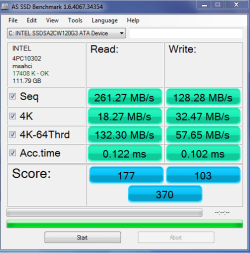
Good or bad here is my only benchmark.
 

Attachments

  • AS SSD Bench.PNG
    AS SSD Bench.PNG
    15.3 KB · Views: 0

My Computer

Computer Manufacturer/Model Number
Hopalong/ Godzilla
OS
Windows7 Pro 64bit SP-1; Windows XP Pro 32bit
CPU
Intel Core i7-870 Lynnfield 2.93GHz LGA 1156 95W Quad-Core
Motherboard
ASUS P7P55D-E PRO
Memory
8GB@1400MHz Crucial Ballistix DDR3-1600 4x2GB
Graphics Card(s)
ASUS ENGTX460 DirectCU/2DI/1GD5 1GB 256-bit GDDR5
Sound Card
VIA Onboard
Monitor(s) Displays
Asus VS248H-P 24"; Samsung SyncMaster 941BW 19"ws
Screen Resolution
1920x1080; 1440x900
Hard Drives
Samsung 830 120GB SSD
Intel 320 120GB SSD
Western Digital Caviar Black WD7501AALS 750GB 7200 RPM SATA 3.0Gb/s
Western Digital Caviar Black WD6401AALS 640GB 7200 RPM SATA 3.0Gb/s
PSU
COOLER MASTER Silent Pro RS850-AMBAJ3-US 850W Modular
Case
COOLER MASTER HAF 932 RC-932-KKN5-GP Black
Cooling
Scythe "Mugen-2 Rev.B" (2 ScytheKaze-Jyuni PWM fans)
Keyboard
Logitech K-320
Mouse
Kensington
Antivirus
Avast Inernet Suite
Browser
IE 9 ; Chrome
The access time looks excellent. The 4K read seems a bit low. I have only Atto data to compare. And that usually shows a bit differently.
 

My Computer

Computer Manufacturer/Model Number
HP, Dell, Gateway, Toshiba - 4 laptops and 2 desktops
OS
Vista, Windows7, Mint Mate, Zorin, Windows 8
CPU
from 1.6GHz Duo to i7
Monitor(s) Displays
2x HP w2207
Hard Drives
5x HDD, 7x SSD, 12x Externals
Keyboard
with trackball - no mices
Mouse
Trackball mice
Internet Speed
DSL 6000
Hmm, I would expect the 4K read to be around 20-21.


Then again, if you've been testing and benchmarking a lot (which I think we all do when we get a new SSD) it may be the cause.
Just run your Toolbox Optimizer, and let the drive be a day or 2 and it'll work itself back out.

To much benchmarking can hinder the performance temporarily. But nothing permanent or to be alarmed about.


Still, those look like good scores to me :)
 

My Computer

Computer Manufacturer/Model Number
Custom (Self Build)
OS
Windows 7 Home Premium 64bit
CPU
Intel Core i7 2700k
Motherboard
eVGA P67 SLI
Memory
8GB Mushkin Redline Ridgebacks @1866
Graphics Card(s)
EVGA GTX570 SC
Sound Card
XiFi Titanium HD
Monitor(s) Displays
LG W2453V
Screen Resolution
1920x1080
Hard Drives
Intel 320 80GB -- Intel X25-V 40GB --WD Black 1TB x2 -- WD Blue 640GB
PSU
Seasonic x750
Case
Corsair 600T SE White
Cooling
eVGA Superclocked CPU Cooler
Keyboard
Saitek Cyborg
Antivirus
Kaspersky
Browser
IE
Other Info
LG BD/DVD
Status
Not open for further replies.
Back
Top