Show us your SSD performance

Status
Not open for further replies.
HD tune and ATTO are free for the basic level program. It's basic but show some benchmarks.
 

My Computer

Computer Manufacturer/Model Number
Keeps changing - (Custom)
OS
Windows 7 Professional x64
CPU
Intel Core i7 860
Motherboard
Gigabyte GA-P55-UD4P
Memory
4GB DDR3 Mushkin 1600Mhz @ 7-8-7-20
Graphics Card(s)
MSI GTS250 1GB DDR3 Twin Frozr
Sound Card
Onboard realtek
Monitor(s) Displays
Samsung SyncMaster 24" P2450 + Samsung 20" 2033
Screen Resolution
1920 X 1080 and 1600 X 900 (#2 system 1440 X 900)
Hard Drives
Patriot Inferno 120GB SSD + 3 WD Blue 640GB drives
PSU
Corsair 750 HX Modular
Case
Lancool PC-K62
Cooling
Cooler Master TX3 CPU cooler and 4-140mm and 1-120mm case
Keyboard
Gigabyte USB keyboard
Mouse
Microsoft wireless laser mouse 5000
Internet Speed
7 Mb down 1.5 up
Other Info
System #2: AMD Phenom II X6 1055T (Freezer 7 Pro cooler) - Gigabyte 880GMA-UD2H - WD 500GB Black - 9500GT (1GB) 500W OCZ modular PSU - Antec 200 case. System #3 (LapTop) Core 2 Duo T6670 - 320GB 7200RPM HD - 4GB DDR3 RAM.
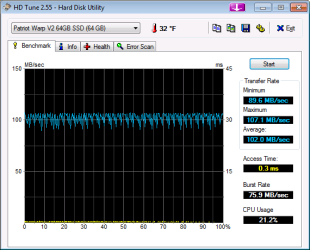
My Patriot 64 GB SSD benchmark

screenshot attached
 

Attachments

  • HDTune_Benchmark_Patriot_Warp_V2_64GB_SSD.png
    HDTune_Benchmark_Patriot_Warp_V2_64GB_SSD.png
    25 KB · Views: 554

My Computer

Computer Manufacturer/Model Number
Asus eee 1000HE
OS
win 7
CPU
Atom 1.6
Memory
2 gb
Hard Drives
Patriot Warp 64 gb SSD
I like the GSkill Falcon SSD myself. I'm still waiting to get them though. I'll be going RAID 0 with three of the 128GB SSD's.
 

My Computer

Computer type
PC/Desktop
Computer Manufacturer/Model Number
Home built
OS
Windows 7 Ult, Windows 8.1 Pro,
CPU
Q9650-4.275GHz, E8600 4.5GHz, E6750-3.8GHz
Motherboard
Evga 780i FTW
Memory
G.Skill PC2 9600 1200Mhz 5 5 5 15 2T
Graphics Card(s)
GTX480
Sound Card
Asus Xonar D2
Monitor(s) Displays
HannsG
Screen Resolution
1680X1050
Hard Drives
GSkill Phoenix Pro 120GB SSD
PSU
ThermalTake Toughpower 1000Watt modular
Case
ThermalTake XaserV
Cooling
Xigmatek S1283
Keyboard
Logitech G15
Mouse
Logitech G9
Internet Speed
T1
Well my single X-25M opens Photoshop CS3 in 1.5 seconds flat on a 2.6 gig Core 2 duo.

That's about all the "Benchmarking" that really matters :D
 

My Computer

Computer Manufacturer/Model Number
Scratch built
OS
Windows 7 x64 Ultimate
CPU
i7 960
Motherboard
Asus P6X58D
Memory
12 Gig Corsair Dominator
Graphics Card(s)
Nvidia 480
Sound Card
Maudio Delta 44 + breakout box
Monitor(s) Displays
Dell UltraSharp U2410 24in and Samsung 21 dual monitors
Screen Resolution
1920x1200 and 1280x1024
Hard Drives
Primary: Intel X-25M G2 160G SSD
Secondary: Segate baracuda 1.0 TB
HDs in AHCI mode.
PSU
Corasair TX850
Case
Cooler Master HAF
Cooling
Corsair H50
Keyboard
Logitech G15 + N52 game pad
Mouse
Logitech MX518
Internet Speed
15kbs down 4.5kbps up
Other Info
WEI 7.6
CPU & RAM 7.6
Graphics 7.9
Hard disk 7.7

Attachments

  • HDD.jpg
    HDD.jpg
    65 KB · Views: 313

My Computer

OS
Windows 7 Ultimate x64
CPU
Intel Core i7-2600
Memory
16Gb DDR3-1600
Graphics Card(s)
ATI Radeon 7950
Sound Card
Creative X-Fi Extreme Gamer
Monitor(s) Displays
(2) 22" LG WideScreens
Screen Resolution
1920 x 1080
Hard Drives
(1) Samsung 840 Pro 256GB
(1) WD RE4 1Tb SATA3 Drive
PSU
Antec TruPower 750W
Internet Speed
50Mbps
64GB G.Skill Falcon SSD
 

Attachments

  • HT-Tune-Pro-Benchmark.jpg
    HT-Tune-Pro-Benchmark.jpg
    81.9 KB · Views: 290

My Computer

OS
Windows 7
CPU
Intel Q9400
Motherboard
Ausus P5Q Pro
Memory
4GB DDR2 800Mhz
Graphics Card(s)
Basic 1 GB
Hard Drives
64 GB G.Skill Falcon SSD
SSD and Windows 7

I'm using the 80GB Intel X-25M as it received great reviews on tomshardware.com. Since I was planning on a Windows 7 install I waited for the drive. So I have changed 3 things. The move to the SSD, a new OS and I'm running the 64-bit version of OS. Was using 32-bit XP. I can tell you the disk writes are blazing, the reads are unbelievable. Its slowed down a bit with being part of a domain and running login scripts but the overall performance is a noticable difference. The E6500 is no slouch either. I can honestly say with this setup - This is what I think a personal computer should be. Multitasking including video or music with all of Aero effects turned up is pretty flawless. Some people have talked about removing the page file but from my research you could run into problems with older software so I let windows adjust. The one problem I did have was USB power settings getting plain stupid with my mouse. I change the advanced power settings and all is fine. If you are buying a drive just for an OS on the desktop or for a mobile platform you should consider a SSD. Its quieter, cooler, and faster.
 

My Computer

Computer Manufacturer/Model Number
Dell E6500 w/ LED
OS
Windows 7 RTM
CPU
Intel Core 2 Duo T9550 @ 2.66GHz
Motherboard
Dell 0PP476 PM45 Chipset
Memory
4GB DDR2 @ 400MHz
Graphics Card(s)
Nvidia Quadro NVS 160M
Monitor(s) Displays
Dual 19" Dell LCD
Hard Drives
80GB Intel X-25M SSD
I'm using the 80GB Intel X-25M as it received great reviews on tomshardware.com. Since I was planning on a Windows 7 install I waited for the drive. So I have changed 3 things. The move to the SSD, a new OS and I'm running the 64-bit version of OS. Was using 32-bit XP. I can tell you the disk writes are blazing, the reads are unbelievable. Its slowed down a bit with being part of a domain and running login scripts but the overall performance is a noticable difference. The E6500 is no slouch either. I can honestly say with this setup - This is what I think a personal computer should be. Multitasking including video or music with all of Aero effects turned up is pretty flawless. Some people have talked about removing the page file but from my research you could run into problems with older software so I let windows adjust. The one problem I did have was USB power settings getting plain stupid with my mouse. I change the advanced power settings and all is fine. If you are buying a drive just for an OS on the desktop or for a mobile platform you should consider a SSD. Its quieter, cooler, and faster.

I love my Intel X25-M. Win7 installed in no time, applications open instantly...No noise...Tiny drive in my massive tower... :)
 

My Computer

OS
Windows 7 Ultimate x64
CPU
Intel Core i7-2600
Memory
16Gb DDR3-1600
Graphics Card(s)
ATI Radeon 7950
Sound Card
Creative X-Fi Extreme Gamer
Monitor(s) Displays
(2) 22" LG WideScreens
Screen Resolution
1920 x 1080
Hard Drives
(1) Samsung 840 Pro 256GB
(1) WD RE4 1Tb SATA3 Drive
PSU
Antec TruPower 750W
Internet Speed
50Mbps
Keep these coming! It's very interesting to see the SSDs people have. The Intel and Falcon are looking pretty good. I think the Falcon has the same controller as my Torqx.

It IS funny to see one of these in a massive tower. I have mine in a full tower Lian Li case bolted right into the hard drive cage. You can barely see it unless you look hard. haha
 

My Computer

Computer Manufacturer/Model Number
Keeps changing - (Custom)
OS
Windows 7 Professional x64
CPU
Intel Core i7 860
Motherboard
Gigabyte GA-P55-UD4P
Memory
4GB DDR3 Mushkin 1600Mhz @ 7-8-7-20
Graphics Card(s)
MSI GTS250 1GB DDR3 Twin Frozr
Sound Card
Onboard realtek
Monitor(s) Displays
Samsung SyncMaster 24" P2450 + Samsung 20" 2033
Screen Resolution
1920 X 1080 and 1600 X 900 (#2 system 1440 X 900)
Hard Drives
Patriot Inferno 120GB SSD + 3 WD Blue 640GB drives
PSU
Corsair 750 HX Modular
Case
Lancool PC-K62
Cooling
Cooler Master TX3 CPU cooler and 4-140mm and 1-120mm case
Keyboard
Gigabyte USB keyboard
Mouse
Microsoft wireless laser mouse 5000
Internet Speed
7 Mb down 1.5 up
Other Info
System #2: AMD Phenom II X6 1055T (Freezer 7 Pro cooler) - Gigabyte 880GMA-UD2H - WD 500GB Black - 9500GT (1GB) 500W OCZ modular PSU - Antec 200 case. System #3 (LapTop) Core 2 Duo T6670 - 320GB 7200RPM HD - 4GB DDR3 RAM.
I'm using the 80GB Intel X-25M as it received great reviews on tomshardware.com. Since I was planning on a Windows 7 install I waited for the drive. So I have changed 3 things. The move to the SSD, a new OS and I'm running the 64-bit version of OS. Was using 32-bit XP. I can tell you the disk writes are blazing, the reads are unbelievable. Its slowed down a bit with being part of a domain and running login scripts but the overall performance is a noticable difference. The E6500 is no slouch either. I can honestly say with this setup - This is what I think a personal computer should be. Multitasking including video or music with all of Aero effects turned up is pretty flawless. Some people have talked about removing the page file but from my research you could run into problems with older software so I let windows adjust. The one problem I did have was USB power settings getting plain stupid with my mouse. I change the advanced power settings and all is fine. If you are buying a drive just for an OS on the desktop or for a mobile platform you should consider a SSD. Its quieter, cooler, and faster.

Snap - Just fitted my X-25M (2nd Generation) drive today and am using it as the Win 7 systems disk. Absolutely amazing performance :D

I have moved my page file to my 7200rpm WD hard drive and it seems to have improved my WEI Memory score hugely as well.

You can move the page file to a different disk, then switch Windows back to managing the page file automatically in its new location.
 

My Computer

OS
Windows 7 Home Premium x64
CPU
Pentium D 945
Motherboard
Dell DXP051
Memory
4GB 667MHz DDR2
Graphics Card(s)
NVidia 8800GT
Sound Card
Soundblaster Audigy 2 ZS
Monitor(s) Displays
1680 x 1050
Screen Resolution
1680 x 1050
Hard Drives
1 x Intel MX-25 G2 SSD, 1 x 7200RPM Western Digital
PSU
Stock Dell
Case
Stock Dell XPS400
Cooling
Stock Dell XPS400
Internet Speed
13.4Mbps Throughput / 15.3Mbps Synch
Snap - Just fitted my X-25M (2nd Generation) drive today and am using it as the Win 7 systems disk. Absolutely amazing performance :D

I have moved my page file to my 7200rpm WD hard drive and it seems to have improved my WEI Memory score hugely as well.

You can move the page file to a different disk, then switch Windows back to managing the page file automatically in its new location.

That's the best SSD. Post some benchmarks and post back again in 60 days. Lets see how it does.

I turned my page file off. I was warned against it by some and told by others it would be fine. It's been off for 30 days or so. Not one problem yet.
 

My Computer

Computer Manufacturer/Model Number
Keeps changing - (Custom)
OS
Windows 7 Professional x64
CPU
Intel Core i7 860
Motherboard
Gigabyte GA-P55-UD4P
Memory
4GB DDR3 Mushkin 1600Mhz @ 7-8-7-20
Graphics Card(s)
MSI GTS250 1GB DDR3 Twin Frozr
Sound Card
Onboard realtek
Monitor(s) Displays
Samsung SyncMaster 24" P2450 + Samsung 20" 2033
Screen Resolution
1920 X 1080 and 1600 X 900 (#2 system 1440 X 900)
Hard Drives
Patriot Inferno 120GB SSD + 3 WD Blue 640GB drives
PSU
Corsair 750 HX Modular
Case
Lancool PC-K62
Cooling
Cooler Master TX3 CPU cooler and 4-140mm and 1-120mm case
Keyboard
Gigabyte USB keyboard
Mouse
Microsoft wireless laser mouse 5000
Internet Speed
7 Mb down 1.5 up
Other Info
System #2: AMD Phenom II X6 1055T (Freezer 7 Pro cooler) - Gigabyte 880GMA-UD2H - WD 500GB Black - 9500GT (1GB) 500W OCZ modular PSU - Antec 200 case. System #3 (LapTop) Core 2 Duo T6670 - 320GB 7200RPM HD - 4GB DDR3 RAM.
That's the best SSD. Post some benchmarks and post back again in 60 days. Lets see how it does.

I turned my page file off. I was warned against it by some and told by others it would be fine. It's been off for 30 days or so. Not one problem yet.

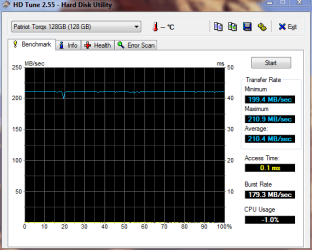
Here is the benchmark test:

View attachment 25492

I produced this under Vista - Win 7 should use the TRIM command to optimise the drive, so there should be no tail off in performance. We shall see!
 

My Computer

OS
Windows 7 Home Premium x64
CPU
Pentium D 945
Motherboard
Dell DXP051
Memory
4GB 667MHz DDR2
Graphics Card(s)
NVidia 8800GT
Sound Card
Soundblaster Audigy 2 ZS
Monitor(s) Displays
1680 x 1050
Screen Resolution
1680 x 1050
Hard Drives
1 x Intel MX-25 G2 SSD, 1 x 7200RPM Western Digital
PSU
Stock Dell
Case
Stock Dell XPS400
Cooling
Stock Dell XPS400
Internet Speed
13.4Mbps Throughput / 15.3Mbps Synch
Those are great numbers!

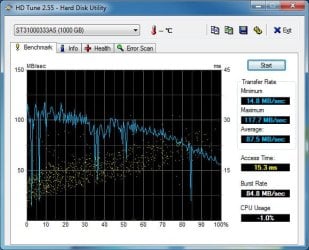
I wonder why my CPU usage is not registering. It should be right up with yours but it's -1. That cannot be right.
Pat1571.PNG
 

My Computer

Computer Manufacturer/Model Number
Keeps changing - (Custom)
OS
Windows 7 Professional x64
CPU
Intel Core i7 860
Motherboard
Gigabyte GA-P55-UD4P
Memory
4GB DDR3 Mushkin 1600Mhz @ 7-8-7-20
Graphics Card(s)
MSI GTS250 1GB DDR3 Twin Frozr
Sound Card
Onboard realtek
Monitor(s) Displays
Samsung SyncMaster 24" P2450 + Samsung 20" 2033
Screen Resolution
1920 X 1080 and 1600 X 900 (#2 system 1440 X 900)
Hard Drives
Patriot Inferno 120GB SSD + 3 WD Blue 640GB drives
PSU
Corsair 750 HX Modular
Case
Lancool PC-K62
Cooling
Cooler Master TX3 CPU cooler and 4-140mm and 1-120mm case
Keyboard
Gigabyte USB keyboard
Mouse
Microsoft wireless laser mouse 5000
Internet Speed
7 Mb down 1.5 up
Other Info
System #2: AMD Phenom II X6 1055T (Freezer 7 Pro cooler) - Gigabyte 880GMA-UD2H - WD 500GB Black - 9500GT (1GB) 500W OCZ modular PSU - Antec 200 case. System #3 (LapTop) Core 2 Duo T6670 - 320GB 7200RPM HD - 4GB DDR3 RAM.
I got an OCZ Vertex 30GB and I love it! That's much faster than any HDD, in writes and reads! And that's on SATA1.

I'm currently with FW 1.41 beta. I is stable in Windows but not when I try to start with the Windows 7 DVD. It has the garbage collection feature and TRIM support.

Anybody that thinks writes becomes slow when drive is filled can think differently now. With the new firmwares, no SSD will be slow when filled, because of garbage collection and TRIM (if you're on Windows 7, which will be very popular anyway :) )
 

My Computer

OS
Win7 64 bits FR
CPU
2500K @ 4.5 GHz
Motherboard
Asrock Z68 Gen3 Extreme3
Memory
4x4GB 1600MHz GSkill CL9.
Graphics Card(s)
HD6850 Powercolor stock
Sound Card
Integrated
Monitor(s) Displays
Samsung 2343 + Dell 20in 4/3
Screen Resolution
2048x1152, 1600x1200
Hard Drives
OCZ Vertex LE SSD, 50GB
OCZ Solid 3 120GB
OCZ Vertex 2 240GB
Western Digital Scorpio 320GB 5400 rpm
PSU
KingWin Lazer Platinum (90+) 550Watts
Case
HAF912
Cooling
CPU: OCZ Vendetta 2
Keyboard
MX5500 revolution bluetooth
Mouse
MX5500 revolution bluetooth
Internet Speed
Cable 7 Mbps
kensiko, glad to hear you are experiencing the SSD love!

When you get some free time, post some benchmarks. I would love to see how a Vertex does on the simple HDTune test.

I hope you enjoy your SSD!!
 

My Computer

Computer Manufacturer/Model Number
Keeps changing - (Custom)
OS
Windows 7 Professional x64
CPU
Intel Core i7 860
Motherboard
Gigabyte GA-P55-UD4P
Memory
4GB DDR3 Mushkin 1600Mhz @ 7-8-7-20
Graphics Card(s)
MSI GTS250 1GB DDR3 Twin Frozr
Sound Card
Onboard realtek
Monitor(s) Displays
Samsung SyncMaster 24" P2450 + Samsung 20" 2033
Screen Resolution
1920 X 1080 and 1600 X 900 (#2 system 1440 X 900)
Hard Drives
Patriot Inferno 120GB SSD + 3 WD Blue 640GB drives
PSU
Corsair 750 HX Modular
Case
Lancool PC-K62
Cooling
Cooler Master TX3 CPU cooler and 4-140mm and 1-120mm case
Keyboard
Gigabyte USB keyboard
Mouse
Microsoft wireless laser mouse 5000
Internet Speed
7 Mb down 1.5 up
Other Info
System #2: AMD Phenom II X6 1055T (Freezer 7 Pro cooler) - Gigabyte 880GMA-UD2H - WD 500GB Black - 9500GT (1GB) 500W OCZ modular PSU - Antec 200 case. System #3 (LapTop) Core 2 Duo T6670 - 320GB 7200RPM HD - 4GB DDR3 RAM.
kensiko, glad to hear you are experiencing the SSD love!

When you get some free time, post some benchmarks. I would love to see how a Vertex does on the simple HDTune test.

I hope you enjoy your SSD!!

I told you I'm on SATA1. Also, my partition is misaligned right now because of the problems I got with FW 1.41b.

But anyway, here is a screen:


My Computer

OS
Win7 64 bits FR
CPU
2500K @ 4.5 GHz
Motherboard
Asrock Z68 Gen3 Extreme3
Memory
4x4GB 1600MHz GSkill CL9.
Graphics Card(s)
HD6850 Powercolor stock
Sound Card
Integrated
Monitor(s) Displays
Samsung 2343 + Dell 20in 4/3
Screen Resolution
2048x1152, 1600x1200
Hard Drives
OCZ Vertex LE SSD, 50GB
OCZ Solid 3 120GB
OCZ Vertex 2 240GB
Western Digital Scorpio 320GB 5400 rpm
PSU
KingWin Lazer Platinum (90+) 550Watts
Case
HAF912
Cooling
CPU: OCZ Vendetta 2
Keyboard
MX5500 revolution bluetooth
Mouse
MX5500 revolution bluetooth
Internet Speed
Cable 7 Mbps
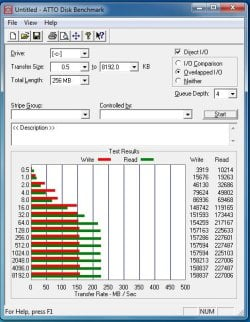
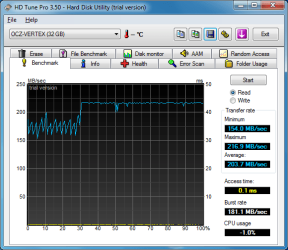
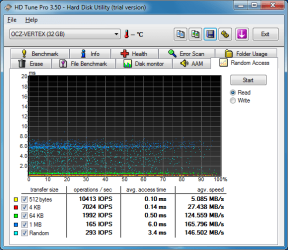
This is my new OCZ vertex 30GB "mac edition" w/ FW 1.3 (same as vertex, just different sticker). I have win-7 x64 installed on it. I did use diskpart and alligned it to 64 just incase 7 didnt want to do it. Have all the tweaks i can think of done to it. PF is on the raid-1 setup. Its attached to Sata-5 on my MB (IDE). Sata1 and 2 are Raid-1. In OTTO, looks like im saturating my onboard w/ just one of these?
Also, installed all my programs on it..Are these speeds OK?
 

Attachments

  • atto ssd.jpg
    atto ssd.jpg
    109.8 KB · Views: 79
  • HDTune_Benchmark_OCZ-VERTEX-ussj4brolli.png
    HDTune_Benchmark_OCZ-VERTEX-ussj4brolli.png
    61.8 KB · Views: 191
  • HDTune_Random_Access_OCZ-VERTEX-ussj4brolli.png
    HDTune_Random_Access_OCZ-VERTEX-ussj4brolli.png
    67.2 KB · Views: 94

My Computer

OS
Windows 7 PRO x64
CPU
Phenom II 1090T @ 4.00GHz
Motherboard
Crosshair IV Formula
Memory
8gb DDR3
Graphics Card(s)
1x ATI Diamond 5850
Monitor(s) Displays
50in HDTV (HDMI)
Screen Resolution
1080P
Hard Drives
2x 1TB barracuda
1x 1TB WD Black
1x 2TB WD
1x OCZ Vertex 2 40GB
PSU
1000w Xion
Case
Armor+ VH6000BWS
Cooling
W/C
Internet Speed
60Mbps down, 7 up
They look pretty good. I have never ran a "random access" test.

The bandwidth speeds look right. Do you like it compared to normal disks?
 

My Computer

Computer Manufacturer/Model Number
Keeps changing - (Custom)
OS
Windows 7 Professional x64
CPU
Intel Core i7 860
Motherboard
Gigabyte GA-P55-UD4P
Memory
4GB DDR3 Mushkin 1600Mhz @ 7-8-7-20
Graphics Card(s)
MSI GTS250 1GB DDR3 Twin Frozr
Sound Card
Onboard realtek
Monitor(s) Displays
Samsung SyncMaster 24" P2450 + Samsung 20" 2033
Screen Resolution
1920 X 1080 and 1600 X 900 (#2 system 1440 X 900)
Hard Drives
Patriot Inferno 120GB SSD + 3 WD Blue 640GB drives
PSU
Corsair 750 HX Modular
Case
Lancool PC-K62
Cooling
Cooler Master TX3 CPU cooler and 4-140mm and 1-120mm case
Keyboard
Gigabyte USB keyboard
Mouse
Microsoft wireless laser mouse 5000
Internet Speed
7 Mb down 1.5 up
Other Info
System #2: AMD Phenom II X6 1055T (Freezer 7 Pro cooler) - Gigabyte 880GMA-UD2H - WD 500GB Black - 9500GT (1GB) 500W OCZ modular PSU - Antec 200 case. System #3 (LapTop) Core 2 Duo T6670 - 320GB 7200RPM HD - 4GB DDR3 RAM.
Well I finally DLed HD tune and installed it. and here is my score for the X-25M.

The dips in performance are interesting. they seem to change somewhat each run. SOme part of the throughput is dependant on what windows decides it wants to do in the background as you are running the test :/

By comparison here is my seagate 1 TB baracuda as well...
 

Attachments

  • SSDBenchmark.jpg
    SSDBenchmark.jpg
    140.6 KB · Views: 105
  • SeagateBarracuda.jpg
    SeagateBarracuda.jpg
    166.7 KB · Views: 94

My Computer

Computer Manufacturer/Model Number
Scratch built
OS
Windows 7 x64 Ultimate
CPU
i7 960
Motherboard
Asus P6X58D
Memory
12 Gig Corsair Dominator
Graphics Card(s)
Nvidia 480
Sound Card
Maudio Delta 44 + breakout box
Monitor(s) Displays
Dell UltraSharp U2410 24in and Samsung 21 dual monitors
Screen Resolution
1920x1200 and 1280x1024
Hard Drives
Primary: Intel X-25M G2 160G SSD
Secondary: Segate baracuda 1.0 TB
HDs in AHCI mode.
PSU
Corasair TX850
Case
Cooler Master HAF
Cooling
Corsair H50
Keyboard
Logitech G15 + N52 game pad
Mouse
Logitech MX518
Internet Speed
15kbs down 4.5kbps up
Other Info
WEI 7.6
CPU & RAM 7.6
Graphics 7.9
Hard disk 7.7
Snap - Just fitted my X-25M (2nd Generation) drive today and am using it as the Win 7 systems disk. Absolutely amazing performance :D

I have moved my page file to my 7200rpm WD hard drive and it seems to have improved my WEI Memory score hugely as well.

I just ordered an X-25M (2nd gen) today. When it comes in, I plan to use it the exact same way you are..including moving that page file over to my WD Caviar Black.
 

My Computer

Computer Manufacturer/Model Number
Self-Built in July 2009
OS
Windows 7 Ultimate x64
CPU
Intel Q9550 2.83Ghz OC'd to 3.40Ghz
Motherboard
Gigabyte GA-EP45-UD3R rev. 1.1, F12 BIOS
Memory
8GB G.Skill PI DDR2-800, 4-4-4-12 timings
Graphics Card(s)
EVGA 1280MB Nvidia GeForce GTX570
Sound Card
Realtek ALC899A 8 channel onboard audio
Monitor(s) Displays
23" Acer x233H
Screen Resolution
1920x1080
Hard Drives
Intel X25-M 80GB Gen 2 SSD
Western Digital 1TB Caviar Black, 32MB cache. WD1001FALS
PSU
Corsair 620HX modular
Case
Antec P182
Cooling
stock
Keyboard
ABS M1 Mechanical
Mouse
Logitech G9 Laser Mouse
Internet Speed
15/2 cable modem
Other Info
Windows and Linux enthusiast. Logitech G35 Headset.
Status
Not open for further replies.
Back
Top