Show us your SSD performance

Status
Not open for further replies.
Had to back off my 10% OC to run this don't think that matters can anyone tell me if this is good?
My new Crucial Real SSD 64 gb Sata III
View attachment 91894
Thanks, Alan

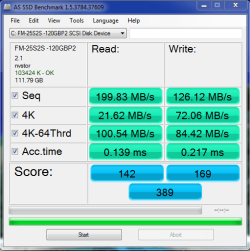
Looks good Alan. Here's my 128GB Crucial as a comparison (taken a couple of months ago)
 

Attachments

  • crucial_9_06_2010_1.PNG
    crucial_9_06_2010_1.PNG
    17.5 KB · Views: 4

My Computer

Computer Manufacturer/Model Number
tw33k
OS
Windows 7 Ultimate (x64) SP1
CPU
Intel 3770k 4.6GHz
Motherboard
ASUS Maximus V Formula
Memory
8GB (2x 4GB) Crucial Ballistix
Graphics Card(s)
Sapphire 7950 (1060/1600)
Sound Card
On Board Realtek HD Audio
Monitor(s) Displays
27" Acer B273HU (via HDMI)
Screen Resolution
2048 x 1152
Hard Drives
Crucial M4 128GB
2TB WD Black
1TB Samsung F3 SATA
1TB WD Elite External
2TB WD USB 3.0
PSU
Corsair AX750 Gold
Case
Corsair Obsidian 800DW
Cooling
Corsair H100 (2x AP-121/2x UK-3000 push/pull)
Keyboard
Microsoft Wireless 5000
Mouse
Microsoft Wireless 5000
Internet Speed
5mb/s
Other Info
Logitech z-2300 2.1 speakers
Lamptron FC-5 v2
tw33k, I noticed that this benchmark progrm always shows the 4K read slower than the 4K write. That is a little strange. Could that be a program error or is there some explanation.
 

My Computer

Computer Manufacturer/Model Number
HP, Dell, Gateway, Toshiba - 4 laptops and 2 desktops
OS
Vista, Windows7, Mint Mate, Zorin, Windows 8
CPU
from 1.6GHz Duo to i7
Monitor(s) Displays
2x HP w2207
Hard Drives
5x HDD, 7x SSD, 12x Externals
Keyboard
with trackball - no mices
Mouse
Trackball mice
Internet Speed
DSL 6000
Had to back off my 10% OC to run this don't think that matters can anyone tell me if this is good?
My new Crucial Real SSD 64 gb Sata III
View attachment 91894
Thanks, Alan

Overall those are very good scores, that SSD is very fast.

Do you have a 6Gb/s SATA controller?

If not you will be limited with the 3Gb/s controller.

You will be a little slower with the Nvidia controller, from what I've read about it.

You can compare to some other C300 64GB SSDs at this AS SSD Benchmark thread, just click on the Google Spreadsheet link under the spreadsheet to see it better.

The range for the C300 64GB is:
Min 270 with a Marvell 9128 controller and mv91xx storage driver. (same as yours)
Max 598 with a AMD SB850 controller and AMSATA storage driver.

With your C300 64GB and same controller, you got a far higher score than anyone on that list.

So, ya, it's really good.
 

My Computer

Computer type
PC/Desktop
Computer Manufacturer/Model Number
76~2.0
OS
Windows 7 Ult x64 - SP1/ Windows 8 Pro x64
CPU
Intel Core i5-3570K 4.6GHz
Motherboard
Gigabyte GA-Z77X UD3H, f18
Memory
8GB (2X4GB) DDR3 1600 Corsair Vengeance CL8 1.5v
Graphics Card(s)
Sapphire HD 7770 Vapor-X OC 1GB DDR5
Sound Card
Onboard VIA VT2021
Monitor(s) Displays
22" LCD Dell
Screen Resolution
1680x1050
Hard Drives
Samsung 840Pro 128GB SSD,
Seagate Barracuda 500GB SATA2 7200rpm 32MB cache, Seagate Barracuda 1TB SATA2 7200rpm 32MB cache,
PSU
Corsair HX650W
Case
Cooler Master Storm Scout
Cooling
Corsair H80 2x12cm Noctua NF P12 , 2x14cm case fans
Keyboard
Logitech Wave
Mouse
CM Sentinel
Internet Speed
Dismal
Antivirus
Avast
Browser
Opera Next
Other Info
Haswell laptop: HP Envy 17t-j, i7-4700MQ, GeForce 740M 2GB DDR3, 17.3" Full HD 1920x1080, 16GB RAM, Samsung 840 Pro 128GB, 1TB Hitachi 7200 HDD,
Desktop: eSATA ports,
External eSATA Seagate 500GB SATA2 7200rpm,
External WD USB 500GB
Dave76,

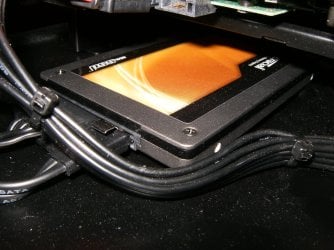
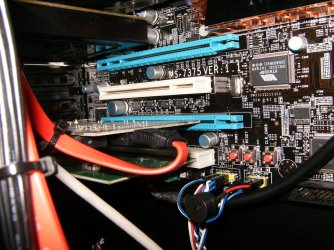
Yes I'm using the ASUS PCIe USB3/SATA6g adapter and running to the card with their supplied SATA III cable. The ASUS uses the Marvel controller. Man what a great add on for the $26.00 (card) and $144 (drive). Sure it's small capacity and yes those are still big bucks for a boot/app. drive but man the thing has upped my enjoyment factor by a health percentage. Can't wait for 128's and 256's to fall in price.

Cheers, Alan
HPIM0994.JPG

HPIM0976.JPG

HPIM0996.JPG
 

My Computer

Computer type
PC/Desktop
Computer Manufacturer/Model Number
A blend of brains, brawn and dumb luck.
OS
Windows 7 Ultimate 64
CPU
i7 3770k OC'd 4.6 @ 1.17v, also FX 8120 & i5 miniITX
Motherboard
MSI P67A-GD80 b3
Memory
32 gb G.Skill Sniper DDR3 10-12-12-31 @ 2133
Graphics Card(s)
XFX Radeon 7870 2GB DDR5
Sound Card
Sound Blaster Z Series Card
Monitor(s) Displays
(2) LG LED 23" 1920 x 1080 2ms Monitors via mini d-port
Screen Resolution
1680 X 1050 p
Hard Drives
Samsung 256 gb 830 SSD sata III
(1) 1 tb WD Black
(2) 1 tb Hitachi deskmates/sata II
(2) 1 tb WD green/sata II
(2) 3 tb Seagate Barracuda
(1) 120 gb OCZ Vertex SS
(1) Drobo 5N w/5 Seagate 3tb
PSU
EVGA modular 1000G2 80% gold rating & APC 1200 RS
Case
CoolerMaster Storm Styker
Cooling
7 case fans 140mm & 120mm, NZXT Kraken X60
Keyboard
(2) Logitech Illuminated Keyboards (1) usb (1) wireless
Mouse
Logitech G700 & T-BC21 - nano nx for the laptop
Internet Speed
Basic 120mbps down
Antivirus
Trend Micro Titanium Max Security & Malwarebytes Premium
Browser
Chrome and IE 10
Other Info
5 Noctua case fans + 3 Noctua in p/p on NZXT cooler
Integrated hot swap drive bays for 2.5" Drives
(2) Lite-on dvd/cd/Blu Ray optical 22X
Integrated fan controller and led on/off
HP Officejet Pro 8630 all-n-one
Hot-swappable 3.5" hard drive bay
Netgear Nighthawk router
Asus USB 3 & sata 6 PCIe card
Vantec IDE to sata adptr./Ultra sata adptr
Lenovo L420 i5 lappy with m sata
Drobo 5N advanced NAS
tw33k, I noticed that this benchmark progrm always shows the 4K read slower than the 4K write. That is a little strange. Could that be a program error or is there some explanation.

It's a good question and Ill look into it because, for me at least, it doesn't just happen with this software; same thing happens with CrystalDiskMark as well
 

My Computer

Computer Manufacturer/Model Number
tw33k
OS
Windows 7 Ultimate (x64) SP1
CPU
Intel 3770k 4.6GHz
Motherboard
ASUS Maximus V Formula
Memory
8GB (2x 4GB) Crucial Ballistix
Graphics Card(s)
Sapphire 7950 (1060/1600)
Sound Card
On Board Realtek HD Audio
Monitor(s) Displays
27" Acer B273HU (via HDMI)
Screen Resolution
2048 x 1152
Hard Drives
Crucial M4 128GB
2TB WD Black
1TB Samsung F3 SATA
1TB WD Elite External
2TB WD USB 3.0
PSU
Corsair AX750 Gold
Case
Corsair Obsidian 800DW
Cooling
Corsair H100 (2x AP-121/2x UK-3000 push/pull)
Keyboard
Microsoft Wireless 5000
Mouse
Microsoft Wireless 5000
Internet Speed
5mb/s
Other Info
Logitech z-2300 2.1 speakers
Lamptron FC-5 v2
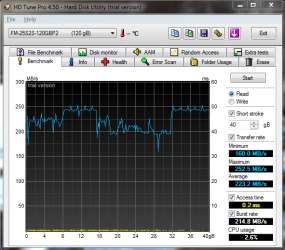
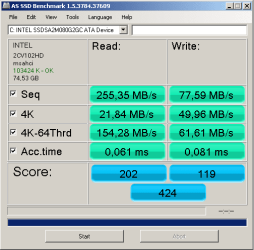
My GSkill Phoenix Pro 120GB SSD. :geek:

There are quite a few points to look at in this set of results that show how a drive will perform with Windows 7 as a boot drive. The important comparison here is between the Phoenix Pro 120GB drive and the Crucial RealSSD C300 128GB. Both drives are high on the list of consumers looking for a next generation SSD, but here we see that the Phoenix Pro has a significant real world performance advantage when compared to the 128GB C300.

Read more about the real world testing against the Crucial RealSSD C300 128GB in the link below.
http://www.tweaktown.com/reviews/34...gb_high_4k_iops_solid_state_drive/index9.html

Real world tests mean the ones that matter!
 

Attachments

  • AS SSD Benchmark.PNG
    AS SSD Benchmark.PNG
    80.3 KB · Views: 3
  • HDTUNE SCREEN SHOT.PNG
    HDTUNE SCREEN SHOT.PNG
    97.5 KB · Views: 7
Last edited:

My Computer

Computer type
PC/Desktop
Computer Manufacturer/Model Number
Home built
OS
Windows 7 Ult, Windows 8.1 Pro,
CPU
Q9650-4.275GHz, E8600 4.5GHz, E6750-3.8GHz
Motherboard
Evga 780i FTW
Memory
G.Skill PC2 9600 1200Mhz 5 5 5 15 2T
Graphics Card(s)
GTX480
Sound Card
Asus Xonar D2
Monitor(s) Displays
HannsG
Screen Resolution
1680X1050
Hard Drives
GSkill Phoenix Pro 120GB SSD
PSU
ThermalTake Toughpower 1000Watt modular
Case
ThermalTake XaserV
Cooling
Xigmatek S1283
Keyboard
Logitech G15
Mouse
Logitech G9
Internet Speed
T1

My Computer

Computer type
PC/Desktop
Computer Manufacturer/Model Number
76~2.0
OS
Windows 7 Ult x64 - SP1/ Windows 8 Pro x64
CPU
Intel Core i5-3570K 4.6GHz
Motherboard
Gigabyte GA-Z77X UD3H, f18
Memory
8GB (2X4GB) DDR3 1600 Corsair Vengeance CL8 1.5v
Graphics Card(s)
Sapphire HD 7770 Vapor-X OC 1GB DDR5
Sound Card
Onboard VIA VT2021
Monitor(s) Displays
22" LCD Dell
Screen Resolution
1680x1050
Hard Drives
Samsung 840Pro 128GB SSD,
Seagate Barracuda 500GB SATA2 7200rpm 32MB cache, Seagate Barracuda 1TB SATA2 7200rpm 32MB cache,
PSU
Corsair HX650W
Case
Cooler Master Storm Scout
Cooling
Corsair H80 2x12cm Noctua NF P12 , 2x14cm case fans
Keyboard
Logitech Wave
Mouse
CM Sentinel
Internet Speed
Dismal
Antivirus
Avast
Browser
Opera Next
Other Info
Haswell laptop: HP Envy 17t-j, i7-4700MQ, GeForce 740M 2GB DDR3, 17.3" Full HD 1920x1080, 16GB RAM, Samsung 840 Pro 128GB, 1TB Hitachi 7200 HDD,
Desktop: eSATA ports,
External eSATA Seagate 500GB SATA2 7200rpm,
External WD USB 500GB
My 30GB Vertex just died ... AGAIN!!
(been using as a secondary Drive for Documents, PF, Pictures etc. since last RMA)

Was browsing the forums, and BSOD ... then the drive totally disappeared :(

I got it to show briefly, but only in Diskpart (oddly) as a 17MB drive.

Then gone again. Now, the PC hangs at post if that drive is even connected.


Should have known, it showed up as corrupt just 2 days ago.

RMA time again I guess.
Im beginning to hate this drive and not sure I even want another one :mad:
 

My Computer

Computer Manufacturer/Model Number
Custom (Self Build)
OS
Windows 7 Home Premium 64bit
CPU
Intel Core i7 2700k
Motherboard
eVGA P67 SLI
Memory
8GB Mushkin Redline Ridgebacks @1866
Graphics Card(s)
EVGA GTX570 SC
Sound Card
XiFi Titanium HD
Monitor(s) Displays
LG W2453V
Screen Resolution
1920x1080
Hard Drives
Intel 320 80GB -- Intel X25-V 40GB --WD Black 1TB x2 -- WD Blue 640GB
PSU
Seasonic x750
Case
Corsair 600T SE White
Cooling
eVGA Superclocked CPU Cooler
Keyboard
Saitek Cyborg
Antivirus
Kaspersky
Browser
IE
Other Info
LG BD/DVD
My 30GB Vertex just died ... AGAIN!!
(been using as a secondary Drive for Documents, PF, Pictures etc. since last RMA)

Was browsing the forums, and BSOD ... then the drive totally disappeared :(

I got it to show briefly, but only in Diskpart (oddly) as a 17MB drive.

Then gone again. Now, the PC hangs at post if that drive is even connected.


Should have known, it showed up as corrupt just 2 days ago.

RMA time again I guess.
Im beginning to hate this drive and not sure I even want another one :mad:


That would be a PITA!
 

My Computer

Computer Manufacturer/Model Number
* BFK Customs *
OS
W 7 64-bit Ultimate
CPU
Intel Q9550 Yorkfield
Motherboard
ASUS P5Q Pro
Memory
8GB Dominator 8500C5D
Graphics Card(s)
ATI : XFX 5870
Sound Card
Realtek HD Audio 7-1
Monitor(s) Displays
1x 47" LCD HDMI & 3x 26" LCD HDMI
Screen Resolution
1920x1080P & 1920x1200
Hard Drives
1x 80GB Intel X25-M G2 SSD : 1x 500GB & 1x 640GB WD Caviar Black(s)
PSU
Corsair 620HX
Case
Cooler Master RC-690
Cooling
Tuniq Tower 120, 2x 140mm and 3x 120mm case fans
Keyboard
Microsoft 500
Mouse
Razer Diamondback 3G
Internet Speed
14 Mb/s
Other Info
1x Koutech 3Gb/s SATA HDD Hot Swap Rack
This is my Intel G2 80GB SSD

Don't know if it is good or bad? :)
 

Attachments

  • disk_bench.png
    disk_bench.png
    24.9 KB · Views: 5

My Computer

Computer Manufacturer/Model Number
Asus
OS
Windows 7 32bit
CPU
[email protected] - 4.4GHz
Motherboard
Asus P5Q
Memory
2GB DDRII 4-4-4-12 2T Mushkin
Graphics Card(s)
5850 HD MSI Ati Radeon
Sound Card
Onboard
Monitor(s) Displays
Nec 20WGX2 Pro
Screen Resolution
1680x1050
Hard Drives
Intel G2 80GB SSD +
Intel G2 40GB SSD
PSU
500W Enermax
Cooling
Noctua 8
Keyboard
Razer Tarantula
Mouse
Typhoon
Internet Speed
1-10Mbits
Definately good. AHCI, good alignment, fast threaded reads. Nothing wrong there! Hows it /feel/ :)
 

My Computer

Computer Manufacturer/Model Number
Scratch built
OS
Windows 7 x64 Ultimate
CPU
i7 960
Motherboard
Asus P6X58D
Memory
12 Gig Corsair Dominator
Graphics Card(s)
Nvidia 480
Sound Card
Maudio Delta 44 + breakout box
Monitor(s) Displays
Dell UltraSharp U2410 24in and Samsung 21 dual monitors
Screen Resolution
1920x1200 and 1280x1024
Hard Drives
Primary: Intel X-25M G2 160G SSD
Secondary: Segate baracuda 1.0 TB
HDs in AHCI mode.
PSU
Corasair TX850
Case
Cooler Master HAF
Cooling
Corsair H50
Keyboard
Logitech G15 + N52 game pad
Mouse
Logitech MX518
Internet Speed
15kbs down 4.5kbps up
Other Info
WEI 7.6
CPU & RAM 7.6
Graphics 7.9
Hard disk 7.7
Feels very lightweight ;) It opens everything in instant. I wonder if I could do Raid 0 with 40GB and 80GB Intel G2 SSD disks? Different size and different speed will be an issue?!
 

My Computer

Computer Manufacturer/Model Number
Asus
OS
Windows 7 32bit
CPU
[email protected] - 4.4GHz
Motherboard
Asus P5Q
Memory
2GB DDRII 4-4-4-12 2T Mushkin
Graphics Card(s)
5850 HD MSI Ati Radeon
Sound Card
Onboard
Monitor(s) Displays
Nec 20WGX2 Pro
Screen Resolution
1680x1050
Hard Drives
Intel G2 80GB SSD +
Intel G2 40GB SSD
PSU
500W Enermax
Cooling
Noctua 8
Keyboard
Razer Tarantula
Mouse
Typhoon
Internet Speed
1-10Mbits
Feels very lightweight ;) It opens everything in instant. I wonder if I could do Raid 0 with 40GB and 80GB Intel G2 SSD disks? Different size and different speed will be an issue?!
I personally would not Raid it. For the little gain you buy additional complexity.
 

My Computer

Computer Manufacturer/Model Number
HP, Dell, Gateway, Toshiba - 4 laptops and 2 desktops
OS
Vista, Windows7, Mint Mate, Zorin, Windows 8
CPU
from 1.6GHz Duo to i7
Monitor(s) Displays
2x HP w2207
Hard Drives
5x HDD, 7x SSD, 12x Externals
Keyboard
with trackball - no mices
Mouse
Trackball mice
Internet Speed
DSL 6000
Feels very lightweight ;) It opens everything in instant. I wonder if I could do Raid 0 with 40GB and 80GB Intel G2 SSD disks? Different size and different speed will be an issue?!



Hello Zenith2009, welcome to Seven Forums!

The drives have to be an exact match for a RAID array.
 

My Computer

Computer Manufacturer/Model Number
* BFK Customs *
OS
W 7 64-bit Ultimate
CPU
Intel Q9550 Yorkfield
Motherboard
ASUS P5Q Pro
Memory
8GB Dominator 8500C5D
Graphics Card(s)
ATI : XFX 5870
Sound Card
Realtek HD Audio 7-1
Monitor(s) Displays
1x 47" LCD HDMI & 3x 26" LCD HDMI
Screen Resolution
1920x1080P & 1920x1200
Hard Drives
1x 80GB Intel X25-M G2 SSD : 1x 500GB & 1x 640GB WD Caviar Black(s)
PSU
Corsair 620HX
Case
Cooler Master RC-690
Cooling
Tuniq Tower 120, 2x 140mm and 3x 120mm case fans
Keyboard
Microsoft 500
Mouse
Razer Diamondback 3G
Internet Speed
14 Mb/s
Other Info
1x Koutech 3Gb/s SATA HDD Hot Swap Rack
Thanx to all.
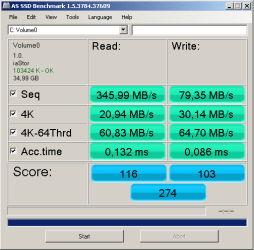
I have learned the hard way and this is the result:
 

Attachments

  • raid_bench.png
    raid_bench.png
    24 KB · Views: 2

My Computer

Computer Manufacturer/Model Number
Asus
OS
Windows 7 32bit
CPU
[email protected] - 4.4GHz
Motherboard
Asus P5Q
Memory
2GB DDRII 4-4-4-12 2T Mushkin
Graphics Card(s)
5850 HD MSI Ati Radeon
Sound Card
Onboard
Monitor(s) Displays
Nec 20WGX2 Pro
Screen Resolution
1680x1050
Hard Drives
Intel G2 80GB SSD +
Intel G2 40GB SSD
PSU
500W Enermax
Cooling
Noctua 8
Keyboard
Razer Tarantula
Mouse
Typhoon
Internet Speed
1-10Mbits
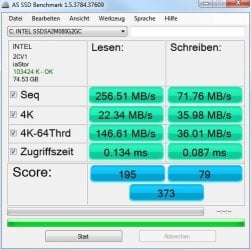
...AHCI, good alignment, fast threaded reads...
The AHCI part I figured out from Zenith2009's screenshot. Mine says iaStor in the same place, referring to the Intel Storage Driver. Is that OK?

As for the good alignment part, how is that determined? :)
 

Attachments

  • AS SSD 082410a.JPG
    AS SSD 082410a.JPG
    63.9 KB · Views: 1

My Computer

Computer Manufacturer/Model Number
Self
OS
Main - Windows 7 Pro SP1 64-Bit; 2nd - Windows Server 2008 R2
CPU
Main - Core i7 2600K; 2nd - Core i7 920
Motherboard
Main - Asus P8Z68-V Pro/Gen3; 2nd - Gigabyte GA-EX58-UDR3
Memory
Main - 16GB Corsair Vengeance; 2nd - 12GB Corsair Vengeance
Graphics Card(s)
Main - XFX Radeon 6870 1GB; 2nd - XFX Radeon 4870 1GB
Sound Card
Both: Onboard Realtek Azalia
Monitor(s) Displays
Main - Hann 25" + I-INC 25" + Acer 23"; 2nd - Upgrading Soon
Screen Resolution
Main - 1920x1080 (All Three Monitors); 2nd - Upgrading Soon
Hard Drives
Main - (1) Crucial M4 128GB (Boot)
Main - (1) Seagate 2TB 64MB Cache (Data)
Main - (1) Seagate 2TB 64MB Cache (Data Backup)
2nd - (1) Intel X25-M SSD 80GB (Boot)
2nd - (3) Seagate 1TB 32MB Cache (Data Backup)
2nd - (1) Seagate 320GB (Because)
PSU
Main - OCZ 600W Modular; 2nd - OCZ 600W
Case
Main - Thermaltake Element G; 2nd - NZXT something or other
Cooling
Main - Corsair H80; 2nd - Prolimatech Megahalems
Keyboard
Main - Razer Reclusa; 2nd - Old MS Keyboard
Mouse
Main - Logitech MX Revolution; 2nd - Old MS Mouse
Internet Speed
20Mbps Time-Warner Cable
As for the good alignment part, how is that determined?
If you made a new windows7 install, the installer takes care of it. If you e.g. restore an image, you have to do it yourself. E.G like this in cmd:

1 once the elevated cmd window is open type diskpart
2 list disk
3 select disk X with X being the number given for your ssd
4 clean - this destroys all partition/volume data on the disk.
5 create partition primary align 64
6 active
7 exit
 

My Computer

Computer Manufacturer/Model Number
HP, Dell, Gateway, Toshiba - 4 laptops and 2 desktops
OS
Vista, Windows7, Mint Mate, Zorin, Windows 8
CPU
from 1.6GHz Duo to i7
Monitor(s) Displays
2x HP w2207
Hard Drives
5x HDD, 7x SSD, 12x Externals
Keyboard
with trackball - no mices
Mouse
Trackball mice
Internet Speed
DSL 6000
As for the good alignment part, how is that determined?
If you made a new windows7 install, the installer takes care of it. If you e.g. restore an image, you have to do it yourself. E.G like this in cmd:

1 once the elevated cmd window is open type diskpart
2 list disk
3 select disk X with X being the number given for your ssd
4 clean - this destroys all partition/volume data on the disk.
5 create partition primary align 64
6 active
7 exit


Hello whs, wouldn't "clean all" be better as that over-writes all the data, isn't "clean" just like a regular format and we all know that a format does not actually remove old data?
 

My Computer

Computer Manufacturer/Model Number
* BFK Customs *
OS
W 7 64-bit Ultimate
CPU
Intel Q9550 Yorkfield
Motherboard
ASUS P5Q Pro
Memory
8GB Dominator 8500C5D
Graphics Card(s)
ATI : XFX 5870
Sound Card
Realtek HD Audio 7-1
Monitor(s) Displays
1x 47" LCD HDMI & 3x 26" LCD HDMI
Screen Resolution
1920x1080P & 1920x1200
Hard Drives
1x 80GB Intel X25-M G2 SSD : 1x 500GB & 1x 640GB WD Caviar Black(s)
PSU
Corsair 620HX
Case
Cooler Master RC-690
Cooling
Tuniq Tower 120, 2x 140mm and 3x 120mm case fans
Keyboard
Microsoft 500
Mouse
Razer Diamondback 3G
Internet Speed
14 Mb/s
Other Info
1x Koutech 3Gb/s SATA HDD Hot Swap Rack
As for the good alignment part, how is that determined?
If you made a new windows7 install, the installer takes care of it. If you e.g. restore an image, you have to do it yourself. E.G like this in cmd:

1 once the elevated cmd window is open type diskpart
2 list disk
3 select disk X with X being the number given for your ssd
4 clean - this destroys all partition/volume data on the disk.
5 create partition primary align 64
6 active
7 exit


Hello whs, wouldnI guess you got a point't "clean all" be better as that over-writes all the data, isn't "clean" just like a regular format and we all know that a format does not actually remove old data?
I guess you got a point. The only problem I have is that clean all zeros all the sectors. And that is not so swift if the SSD is brand new (because of Trim).
 

My Computer

Computer Manufacturer/Model Number
HP, Dell, Gateway, Toshiba - 4 laptops and 2 desktops
OS
Vista, Windows7, Mint Mate, Zorin, Windows 8
CPU
from 1.6GHz Duo to i7
Monitor(s) Displays
2x HP w2207
Hard Drives
5x HDD, 7x SSD, 12x Externals
Keyboard
with trackball - no mices
Mouse
Trackball mice
Internet Speed
DSL 6000
If you made a new windows7 install, the installer takes care of it. If you e.g. restore an image, you have to do it yourself. E.G like this in cmd:

1 once the elevated cmd window is open type diskpart
2 list disk
3 select disk X with X being the number given for your ssd
4 clean - this destroys all partition/volume data on the disk.
5 create partition primary align 64
6 active
7 exit


Hello whs, wouldnI guess you got a point't "clean all" be better as that over-writes all the data, isn't "clean" just like a regular format and we all know that a format does not actually remove old data?
I guess you got a point. The only problem I have is that clean all zeros all the sectors. And that is not so swift if the SSD is brand new (because of Trim).


I totally agree with you about a "new" SSD, but that's not what we're referring to here. ;)
 

My Computer

Computer Manufacturer/Model Number
* BFK Customs *
OS
W 7 64-bit Ultimate
CPU
Intel Q9550 Yorkfield
Motherboard
ASUS P5Q Pro
Memory
8GB Dominator 8500C5D
Graphics Card(s)
ATI : XFX 5870
Sound Card
Realtek HD Audio 7-1
Monitor(s) Displays
1x 47" LCD HDMI & 3x 26" LCD HDMI
Screen Resolution
1920x1080P & 1920x1200
Hard Drives
1x 80GB Intel X25-M G2 SSD : 1x 500GB & 1x 640GB WD Caviar Black(s)
PSU
Corsair 620HX
Case
Cooler Master RC-690
Cooling
Tuniq Tower 120, 2x 140mm and 3x 120mm case fans
Keyboard
Microsoft 500
Mouse
Razer Diamondback 3G
Internet Speed
14 Mb/s
Other Info
1x Koutech 3Gb/s SATA HDD Hot Swap Rack
Status
Not open for further replies.
Back
Top