Shrink Partition

dlgn

New member
Local time
5:02 PM
Messages
11
Hi, I am trying to shrink my system partition, and have disabled the paging file, system restore, kernel memory, and hibernation (following instructions from Working Around Windows Vista’s "Shrink Volume" Inadequacy Problems - How-To Geek). I have also run boot-time defragmentation. Nevertheless, I am not able to shrink the partition. I am running Ultimate 32-bit. Does anyone know of any possible diagnoses/solutions?


Thanks, dlgn
 

My Computer

Computer Manufacturer/Model Number
Toshiba Satellite L300D
OS
Windows 7 Ultimate 32-bit Service Pack 1 and Ubuntu Linux 10.10
CPU
AMD Athlon X2 64
Memory
2.00 GB, 1.75 Usable
Hard Drives
1 Internal, about 150 gb
Hi, I am trying to shrink my system partition, and have disabled the paging file, system restore, kernel memory, and hibernation (following instructions from Working Around Windows Vista’s "Shrink Volume" Inadequacy Problems - How-To Geek). I have also run boot-time defragmentation. Nevertheless, I am not able to shrink the partition. I am running Ultimate 32-bit. Does anyone know of any possible diagnoses/solutions?


Thanks, dlgn

To shrink the system partiton you need a third party app like Paragon disk suite (tial is free)


Ken J
 

My Computer

Computer Manufacturer/Model Number
HP Pavillion dv-7 1005 Tx
OS
Win 8 Release candidate 8400
CPU
[email protected]
Memory
4 gigs
Graphics Card(s)
Nvidia 9600M
Sound Card
HD built-in
Monitor(s) Displays
17" Wxga
Screen Resolution
1440x900
Cooling
none
Internet Speed
45Mb down 5Mb up
Other alternative well regarded 3rd party (free software) is:
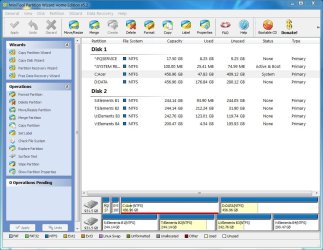
Partition Wizard
 

My Computer

Computer type
PC/Desktop
Computer Manufacturer/Model Number
Own build
OS
Windows 7x64 Home Premium SP1
CPU
Intel i7 2600k
Motherboard
ASUS P8Z68 Deluxe
Memory
G.Skill Ripjaws (DDR3-1600) 2x4GB
Graphics Card(s)
Nvidia GeForce GTS 450; Intel HD Graphics 3000(GT2+)
Monitor(s) Displays
Dell Ultrasharp IPS panel U2311H, Samsung SyncMaster P2350
Screen Resolution
1920x1080
Hard Drives
Samsung 850 Pro SSD 256GB, Samsung SSD 840 120GB, Seagates 1TB Barracuda ST31000528AS x2
PSU
Seasonic M12II 520W
Case
Lian Li Lancool PC-K60
Cooling
Case: 1x120mm, 3x140mm CPU: Hyper 212+
Keyboard
Logitech MK520 (wireless)
Mouse
Logitech MK520
Internet Speed
6-7 Mbps
Antivirus
Norton Security Premium, Malwarebytes on 2 (MSE on 3rd PC)
Browser
FireFox
Other Info
Audio: Logitech Z523 2.1
If Partition Wizard cannot shrink it enough, use Perfect Disk 10 trial version, rightclick partition choose System files to Offline defrag.
 
I shrank the partition using partition wizard, but now I can no longer boot (am posting using an old xp computer). When I run system repair, it says the disk is corrupt. Is this a common problem?
 

My Computer

Computer Manufacturer/Model Number
Toshiba Satellite L300D
OS
Windows 7 Ultimate 32-bit Service Pack 1 and Ubuntu Linux 10.10
CPU
AMD Athlon X2 64
Memory
2.00 GB, 1.75 Usable
Hard Drives
1 Internal, about 150 gb
Can you describe exactly what you did and give a "picture" of the disk management before and after shrank the partition. Presumably you just dragged the right partition marker to the left (Move/resize) leaving some unallocated space.
(1) How much room did you leave for the existing in excess of what it was using?
(2) For each partition you can boot up partition wizard to give the written "picture" of the disk. Also for each partition run "Check file system - (check only box initially).
 

My Computer

Computer type
PC/Desktop
Computer Manufacturer/Model Number
Own build
OS
Windows 7x64 Home Premium SP1
CPU
Intel i7 2600k
Motherboard
ASUS P8Z68 Deluxe
Memory
G.Skill Ripjaws (DDR3-1600) 2x4GB
Graphics Card(s)
Nvidia GeForce GTS 450; Intel HD Graphics 3000(GT2+)
Monitor(s) Displays
Dell Ultrasharp IPS panel U2311H, Samsung SyncMaster P2350
Screen Resolution
1920x1080
Hard Drives
Samsung 850 Pro SSD 256GB, Samsung SSD 840 120GB, Seagates 1TB Barracuda ST31000528AS x2
PSU
Seasonic M12II 520W
Case
Lian Li Lancool PC-K60
Cooling
Case: 1x120mm, 3x140mm CPU: Hyper 212+
Keyboard
Logitech MK520 (wireless)
Mouse
Logitech MK520
Internet Speed
6-7 Mbps
Antivirus
Norton Security Premium, Malwarebytes on 2 (MSE on 3rd PC)
Browser
FireFox
Other Info
Audio: Logitech Z523 2.1
I shrank it 2 gbs. Its total size was 141 gbs. It uses about 64. I re-grew it using the parition wizard boot disk to 141 again, but the problem remains.
 

My Computer

Computer Manufacturer/Model Number
Toshiba Satellite L300D
OS
Windows 7 Ultimate 32-bit Service Pack 1 and Ubuntu Linux 10.10
CPU
AMD Athlon X2 64
Memory
2.00 GB, 1.75 Usable
Hard Drives
1 Internal, about 150 gb
Can you do all the things I requested. You have to provide more information.
Also to confirm you shrank 1 141 GB partition to 139GB leaving 2 GB unallocated. The partition only uses ~64GB. And you shrank into the unused portion.
 

My Computer

Computer type
PC/Desktop
Computer Manufacturer/Model Number
Own build
OS
Windows 7x64 Home Premium SP1
CPU
Intel i7 2600k
Motherboard
ASUS P8Z68 Deluxe
Memory
G.Skill Ripjaws (DDR3-1600) 2x4GB
Graphics Card(s)
Nvidia GeForce GTS 450; Intel HD Graphics 3000(GT2+)
Monitor(s) Displays
Dell Ultrasharp IPS panel U2311H, Samsung SyncMaster P2350
Screen Resolution
1920x1080
Hard Drives
Samsung 850 Pro SSD 256GB, Samsung SSD 840 120GB, Seagates 1TB Barracuda ST31000528AS x2
PSU
Seasonic M12II 520W
Case
Lian Li Lancool PC-K60
Cooling
Case: 1x120mm, 3x140mm CPU: Hyper 212+
Keyboard
Logitech MK520 (wireless)
Mouse
Logitech MK520
Internet Speed
6-7 Mbps
Antivirus
Norton Security Premium, Malwarebytes on 2 (MSE on 3rd PC)
Browser
FireFox
Other Info
Audio: Logitech Z523 2.1
I don't know what you mean by booting a partition using the wizard. Partition wizard will not allow me to check the filesystems of any partitions. And yes, that is what happened.
 

My Computer

Computer Manufacturer/Model Number
Toshiba Satellite L300D
OS
Windows 7 Ultimate 32-bit Service Pack 1 and Ubuntu Linux 10.10
CPU
AMD Athlon X2 64
Memory
2.00 GB, 1.75 Usable
Hard Drives
1 Internal, about 150 gb
Maybe my wording was confusing.
1) Boot using Partition Wizard Boot disk
2) Describe your partition layout that it shows you.
3) For the disk in question select each partition in question
4) Over on the left you will see "Check file system" do it for each partition (don't select fix option).
Tell us what you see.
 

Attachments

  • PW16_12_10.JPG
    PW16_12_10.JPG
    116.9 KB · Views: 35

My Computer

Computer type
PC/Desktop
Computer Manufacturer/Model Number
Own build
OS
Windows 7x64 Home Premium SP1
CPU
Intel i7 2600k
Motherboard
ASUS P8Z68 Deluxe
Memory
G.Skill Ripjaws (DDR3-1600) 2x4GB
Graphics Card(s)
Nvidia GeForce GTS 450; Intel HD Graphics 3000(GT2+)
Monitor(s) Displays
Dell Ultrasharp IPS panel U2311H, Samsung SyncMaster P2350
Screen Resolution
1920x1080
Hard Drives
Samsung 850 Pro SSD 256GB, Samsung SSD 840 120GB, Seagates 1TB Barracuda ST31000528AS x2
PSU
Seasonic M12II 520W
Case
Lian Li Lancool PC-K60
Cooling
Case: 1x120mm, 3x140mm CPU: Hyper 212+
Keyboard
Logitech MK520 (wireless)
Mouse
Logitech MK520
Internet Speed
6-7 Mbps
Antivirus
Norton Security Premium, Malwarebytes on 2 (MSE on 3rd PC)
Browser
FireFox
Other Info
Audio: Logitech Z523 2.1
Partition layout:
Toshiba system volume, ntfs, 1.46 gb, primary
Windows 7, ntfs, 141.76 gb, 65.75 used, active, primary.
unformatted, 3 gb, 3 gb used, primary
unallocated, 2.83 gb.

Partition Wizard won't let me check the filesystem. It may think that the partitions have no drive letters, and I cannot change/give them any.
 

My Computer

Computer Manufacturer/Model Number
Toshiba Satellite L300D
OS
Windows 7 Ultimate 32-bit Service Pack 1 and Ubuntu Linux 10.10
CPU
AMD Athlon X2 64
Memory
2.00 GB, 1.75 Usable
Hard Drives
1 Internal, about 150 gb

My Computer

OS
Windows 7 Professional
CPU
Intel Core i7-2670QM
Memory
Samsung 8GB
Graphics Card(s)
NVIDIA GT 555M
Hard Drives
Intel 525 120GB | HGST Travelstar 1TB
Mouse
CM Storm Xornet | Microsoft Sculpt Comfort
Internet Speed
25 Mbps | 600 Kbps
Other Info
Centrino 6205 | Seagate Backup Plus 1TB
Partition layout:
Toshiba system volume, ntfs, 1.46 gb, primary
Windows 7, ntfs, 141.76 gb, 65.75 used, active, primary.
unformatted, 3 gb, 3 gb used, primary
unallocated, 2.83 gb.

Partition Wizard won't let me check the filesystem. It may think that the partitions have no drive letters, and I cannot change/give them any.

I don't know where the "unformatted" came from.
Windows 7... partition should have a letter (eg. C:)
Are you saying it won't let you assign it a letter???

What was the structure of your disk before and exactly what did you do.
 

My Computer

Computer type
PC/Desktop
Computer Manufacturer/Model Number
Own build
OS
Windows 7x64 Home Premium SP1
CPU
Intel i7 2600k
Motherboard
ASUS P8Z68 Deluxe
Memory
G.Skill Ripjaws (DDR3-1600) 2x4GB
Graphics Card(s)
Nvidia GeForce GTS 450; Intel HD Graphics 3000(GT2+)
Monitor(s) Displays
Dell Ultrasharp IPS panel U2311H, Samsung SyncMaster P2350
Screen Resolution
1920x1080
Hard Drives
Samsung 850 Pro SSD 256GB, Samsung SSD 840 120GB, Seagates 1TB Barracuda ST31000528AS x2
PSU
Seasonic M12II 520W
Case
Lian Li Lancool PC-K60
Cooling
Case: 1x120mm, 3x140mm CPU: Hyper 212+
Keyboard
Logitech MK520 (wireless)
Mouse
Logitech MK520
Internet Speed
6-7 Mbps
Antivirus
Norton Security Premium, Malwarebytes on 2 (MSE on 3rd PC)
Browser
FireFox
Other Info
Audio: Logitech Z523 2.1
The unformatted is a partition I planned to install Linux to. I erased it using Partition Wizard and then shrank my 7 partition by dragging the line on the right side to the left about 2 gb.
 

My Computer

Computer Manufacturer/Model Number
Toshiba Satellite L300D
OS
Windows 7 Ultimate 32-bit Service Pack 1 and Ubuntu Linux 10.10
CPU
AMD Athlon X2 64
Memory
2.00 GB, 1.75 Usable
Hard Drives
1 Internal, about 150 gb
When I try to boot windows, by the way, a blue screen appears saying at the bottom:
"Technical Information:
*** STOP 0x0000006B (OxC000012F, 0x00000003, 0x00000000, 0x00000000)"

Does anyone to what error that is?
 

My Computer

Computer Manufacturer/Model Number
Toshiba Satellite L300D
OS
Windows 7 Ultimate 32-bit Service Pack 1 and Ubuntu Linux 10.10
CPU
AMD Athlon X2 64
Memory
2.00 GB, 1.75 Usable
Hard Drives
1 Internal, about 150 gb
Boot the Win7 DVD Repair console or Repair CD to run Startup Repair up to 3 separate times with reboots to repair Win7 boot.
http://www.sevenforums.com/tutorials/681-startup-repair.html?ltr=S
http://www.sevenforums.com/tutorials/2083-system-repair-disc-create.html

You may need to mark Win7 Active to get it to repair as the current Toshiba System partition may be corrupted. Use Free Partition Wizard bootable CD or Diskpark from DVD Command Line: http://www.sevenforums.com/tutorials/71432-partition-mark-active.html

Then run Startup Repair again x3 to see if it will recover the System MBR into Win7 partition successfully.

There is also a wizard on PW CD to Rebuild MBR which sometimes works when other repairs won't.

If these fail, then you can copy out your files using the Install DVD or Repair CD: http://www.sevenforums.com/tutorials/93347-copy-paste-windows-recovery-console.html

Then clean reinstall using these tips to get a perfect install: http://www.sevenforums.com/installation-setup/125874-re-install-windows-7-a.html#post1086729
 
"I shrank the partition using partition wizard, but now I can no longer boot (am posting using an old xp computer). When I run system repair, it says the disk is corrupt. Is this a common problem?"
He already he tried system repair which would be the obvious next step after partition adjustment. The poster then stated he had disk corruption problems.

dlgn,
do you still have problems or did Startup repair run again fix them?
 

My Computer

Computer type
PC/Desktop
Computer Manufacturer/Model Number
Own build
OS
Windows 7x64 Home Premium SP1
CPU
Intel i7 2600k
Motherboard
ASUS P8Z68 Deluxe
Memory
G.Skill Ripjaws (DDR3-1600) 2x4GB
Graphics Card(s)
Nvidia GeForce GTS 450; Intel HD Graphics 3000(GT2+)
Monitor(s) Displays
Dell Ultrasharp IPS panel U2311H, Samsung SyncMaster P2350
Screen Resolution
1920x1080
Hard Drives
Samsung 850 Pro SSD 256GB, Samsung SSD 840 120GB, Seagates 1TB Barracuda ST31000528AS x2
PSU
Seasonic M12II 520W
Case
Lian Li Lancool PC-K60
Cooling
Case: 1x120mm, 3x140mm CPU: Hyper 212+
Keyboard
Logitech MK520 (wireless)
Mouse
Logitech MK520
Internet Speed
6-7 Mbps
Antivirus
Norton Security Premium, Malwarebytes on 2 (MSE on 3rd PC)
Browser
FireFox
Other Info
Audio: Logitech Z523 2.1
Unfortunately, startup repair did not fix the problem, nor did the partition wizard's mbr rebuilder. I also tried Microsoft's Solution, deleting the bootcat.cache file, but this didn't work either.
 
Last edited:

My Computer

Computer Manufacturer/Model Number
Toshiba Satellite L300D
OS
Windows 7 Ultimate 32-bit Service Pack 1 and Ubuntu Linux 10.10
CPU
AMD Athlon X2 64
Memory
2.00 GB, 1.75 Usable
Hard Drives
1 Internal, about 150 gb
I hope you made an image before doing any of this.

You may end up having to do a reimage or clean install.
But based on what you said earlier the Windows 7 partition didn't have a letter assigned. If not use Partition Wizard(PW):
(1) assign it a letter (C) and do a check file system & fix using the PW
(2) Apply these changes
If (1) & (2) work out
Now try the startup repair at least 3 separate times until it reports no errors and boot.
 

My Computer

Computer type
PC/Desktop
Computer Manufacturer/Model Number
Own build
OS
Windows 7x64 Home Premium SP1
CPU
Intel i7 2600k
Motherboard
ASUS P8Z68 Deluxe
Memory
G.Skill Ripjaws (DDR3-1600) 2x4GB
Graphics Card(s)
Nvidia GeForce GTS 450; Intel HD Graphics 3000(GT2+)
Monitor(s) Displays
Dell Ultrasharp IPS panel U2311H, Samsung SyncMaster P2350
Screen Resolution
1920x1080
Hard Drives
Samsung 850 Pro SSD 256GB, Samsung SSD 840 120GB, Seagates 1TB Barracuda ST31000528AS x2
PSU
Seasonic M12II 520W
Case
Lian Li Lancool PC-K60
Cooling
Case: 1x120mm, 3x140mm CPU: Hyper 212+
Keyboard
Logitech MK520 (wireless)
Mouse
Logitech MK520
Internet Speed
6-7 Mbps
Antivirus
Norton Security Premium, Malwarebytes on 2 (MSE on 3rd PC)
Browser
FireFox
Other Info
Audio: Logitech Z523 2.1
Is there any way to do a repair install without booting?
 

My Computer

Computer Manufacturer/Model Number
Toshiba Satellite L300D
OS
Windows 7 Ultimate 32-bit Service Pack 1 and Ubuntu Linux 10.10
CPU
AMD Athlon X2 64
Memory
2.00 GB, 1.75 Usable
Hard Drives
1 Internal, about 150 gb
Back
Top